Music getting duplicated or moved on its own.

azulblueaoi

New member
Local time
4:32 AM
Messages
6
Well what is happening is that I have a lot of my albums sorted out in separate folders in the Music folder, well either those songs in those albums get duplicated and are also out in the music folder rather than in there album folder... Or they get erased from the album folder and are moved to the Music folder. I had finally sorted everything nicely today and when I went to go put a new song in the music folder I noticed it happened again... Now I have to do everything all over again, but I am worried it will do the same thing. Is there some type of setting in my Windows Media Player that is doing this or is this a glitch?.. I am not sure what to do, I have never had this problem before. If anyone can help, it would be very appreciated :) Thanks.
 

My Computer My Computer

At a glance

Windows 7Intel Core 2 Duo T7400 (2 GHz, 4 MB Cache, 66...2GB
Computer Manufacturer/Model Number
Dell/Inspiron 9400
OS
Windows 7
CPU
Intel Core 2 Duo T7400 (2 GHz, 4 MB Cache, 667 MHz FSB)
Memory
2GB
Hard Drives
150 GB
I am suspecting this is the work of malware like a worm or trojan. Its duplicating your music files. I would first do a malware scan if I were you.
 

My Computer My Computer

At a glance

Windows 7 Ultimate 32 Bit, Windows Developer ...Intel Pentium Dual CPU E2180@2GHzNVIDIA GeForce 7200 GS
Computer Manufacturer/Model Number
Custom Built
OS
Windows 7 Ultimate 32 Bit, Windows Developer Preview, Linux Mint 9 Gnome 32 Bit
CPU
Intel Pentium Dual CPU E2180@2GHz
Motherboard
Elitegroup 671T-M3
Graphics Card(s)
NVIDIA GeForce 7200 GS
Monitor(s) Displays
AOC TFT1560 15" LCD Monitor
Screen Resolution
1024x768
Keyboard
Logitech USB Keyboard
Is there some type of setting in my Windows Media Player that is doing this or is this a glitch?

Of course there is ;)

Start WMP
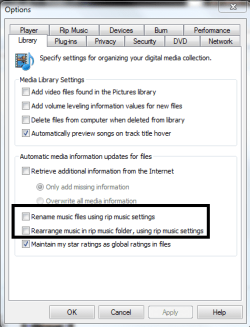
Go to Organize -> Options -> Library Tab

Uncheck the highlighted options:

WMPlibtab.PNG

Additionally, you can prevent WMP from changing your tags too by unchecking the option above the two highlighted options ;)
 

My Computer My Computer

At a glance

Windows 7 Home Premium x64Intel Core i5 2500K8GB DDR3nVidia GeForce GTX650 Ti BOOST
Computer type
Laptop
Computer Manufacturer/Model Number
Custom
OS
Windows 7 Home Premium x64
CPU
Intel Core i5 2500K
Motherboard
MSI MS-7750
Memory
8GB DDR3
Graphics Card(s)
nVidia GeForce GTX650 Ti BOOST
Sound Card
Realtek
Monitor(s) Displays
21' Philips
Screen Resolution
Full HD
Hard Drives
1TB
PSU
500W
So I did a scan on the computer and nothing came up, I have Shaw Secure(F-Secure) that is provided by my internet provider for free, it seems to work good, because it has saved me when I downloaded infected files by deleting them.

Now for settings in the WMP I don't have those two that Gornot said to have unchecked, so I am good. But I do have "Retrieve additional information from the internet" checked, would that have anything to do with the problem.

I have a feeling that it has something to do with the music folder, so what i did is made a separate folder in "My Documents" and moved all my music to that folder, I hope it fixes the problem.

Now there is also another thing that is bugging me, there is little lock signs on the folders of my albums, I have no idea how to get rid of them. I have never seen them before, and they seem to be empty when I go into them, but even after I put the music in there, they still show the little locks. I have a image showing what I am talking about.

21136557.jpg
 

My Computer My Computer

At a glance

Windows 7Intel Core 2 Duo T7400 (2 GHz, 4 MB Cache, 66...2GB
Computer Manufacturer/Model Number
Dell/Inspiron 9400
OS
Windows 7
CPU
Intel Core 2 Duo T7400 (2 GHz, 4 MB Cache, 667 MHz FSB)
Memory
2GB
Hard Drives
150 GB
Hi there
Sometimes the tagging info can get screwed up so perhaps the Album name is missing from some tracks or the track numbers have got "out of sequence".

I'd check using mp3tag program -- very good for fixing this type of stuff

Mp3tag - the universal Tag Editor (ID3v2, MP4, OGG, FLAC, ...)

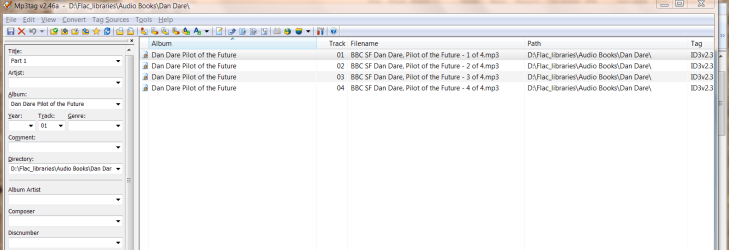
For example I downloaded an old BBC Audio production of Dan Dare - popular science fiction around 45 years old but still a great story today.

This was screwed up and missing the Album name so it was all out of sequence in my music library but easily fixed


Cheers
jimbo
 

Attachments

  • dandare.png
    dandare.png
    39.3 KB · Views: 7

My Computer My Computer

At a glance

Linux CENTOS 7 / various Windows OS'es and se...Intel i7 Intel i58GB, 16GBOn Motherboard
Computer type
PC/Desktop
Computer Manufacturer/Model Number
Custom built, several laptops HP/ASUS
OS
Linux CENTOS 7 / various Windows OS'es and servers
CPU
Intel i7 Intel i5
Memory
8GB, 16GB
Graphics Card(s)
On Motherboard
Sound Card
Realtek HD audio
Monitor(s) Displays
Apple Cinema display, Samsung LCD
Screen Resolution
1920 X 1080
Hard Drives
4 X 1TB SATA
Mouse
Toshiba wireless laser
Internet Speed
> 20MB up
I have been using Stamp ID3 Tag Editor for a while now, but I never use to happen to me before?

EDIT: Well So far making a new folder for my music in a different location on the computer worked and I figured out the whole locks on the folder... It has to do with the sharing options, I guess if you share your stuff over your network like I do, you have the option when you right click on a file and click "Share with" you can choose nobody, which puts those little locks on the folders or you can choose "read only" or "read/write". Though I would say if anyone else is wondering about that.
 
Last edited:

My Computer My Computer

At a glance

Windows 7Intel Core 2 Duo T7400 (2 GHz, 4 MB Cache, 66...2GB
Computer Manufacturer/Model Number
Dell/Inspiron 9400
OS
Windows 7
CPU
Intel Core 2 Duo T7400 (2 GHz, 4 MB Cache, 667 MHz FSB)
Memory
2GB
Hard Drives
150 GB
Yes, you are completely right about network sharing...
As far as downloading metadata from the internet option, that shouldn't have anything to do with actually moving and/or renaming files that are included in your libraries unless you have the two options I highlighted checked. So right now I can't think of anything that could reproduce your problem and test it...

Moving your music folder(s) was a good idea, and I would suggest that you reorganize your files once more than, instead of moving them back, copy them and see how it goes. Remember to clear your WMP library before doing this, otherwise the library would get corrupted and you would have to rebuild it again (there is a tutorial I wrote here on SF which explains how to do this), furthermore, if you added these music folders to WMP after moving them, expect duplicates to show if you decide to go ahead and copy some stuff back for the test.
 

My Computer My Computer

At a glance

Windows 7 Home Premium x64Intel Core i5 2500K8GB DDR3nVidia GeForce GTX650 Ti BOOST
Computer type
Laptop
Computer Manufacturer/Model Number
Custom
OS
Windows 7 Home Premium x64
CPU
Intel Core i5 2500K
Motherboard
MSI MS-7750
Memory
8GB DDR3
Graphics Card(s)
nVidia GeForce GTX650 Ti BOOST
Sound Card
Realtek
Monitor(s) Displays
21' Philips
Screen Resolution
Full HD
Hard Drives
1TB
PSU
500W
Back
Top