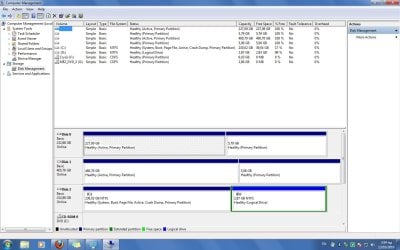
I can see my HDD but can't open it

Pigimon

New member
Local time
4:24 PM
Messages
8
Hi, i used to have ubuntu on my pc but as a gamer i allways use windows too,i have 2 maxtor 250gb and one 500gb WD which i want to use only for data,so first i installed ubuntu 10.04LTS on one maxtor i formated the WD as "FAT(Visible to windows)" - that's what ubuntu said.. and then i installed windows 7 to the other maxtor. when i logged in windows i couldn't see the drive in "Computer" folder but i can on device manager as well on disk management but can't open it either way please help me thank you!! :D
 

My Computer My Computer

At a glance

Windows 7 UltimateAMD Phenom IITranscend 2 GbGeForce 8600 GT 512 MB
OS
Windows 7 Ultimate
CPU
AMD Phenom II
Motherboard
Gigabyte 880 GM UD2H (sAM3, 880G, DDR3, VGA)
Memory
Transcend 2 Gb
Graphics Card(s)
GeForce 8600 GT 512 MB
Hard Drives
2xMaxtor 250Gb
1xWestern Digital 500Gb
PSU
Xigmatek Go Green PSU (500W)
Hi, i used to have ubuntu on my pc but as a gamer i allways use windows too,i have 2 maxtor 250gb and one 500gb WD which i want to use only for data,so first i installed ubuntu 10.04LTS on one maxtor i formated the WD as "FAT(Visible to windows)" - that's what ubuntu said.. and then i installed windows 7 to the other maxtor. when i logged in windows i couldn't see the drive in "Computer" folder but i can on device manager as well on disk management but can't open it either way please help me thank you!! :D

Is there data on the FAT volume? IS IT fat32, OR fat? Does it have a drive letter?
 

My Computer My Computer

At a glance

Win 8 Release candidate 8400[email protected]4 gigsNvidia 9600M
Computer Manufacturer/Model Number
HP Pavillion dv-7 1005 Tx
OS
Win 8 Release candidate 8400
CPU
[email protected]
Memory
4 gigs
Graphics Card(s)
Nvidia 9600M
Sound Card
HD built-in
Monitor(s) Displays
17" Wxga
Screen Resolution
1440x900
Cooling
none
Internet Speed
45Mb down 5Mb up
i have attached the print screen from my disk management! hmm no i think it hasn't a letter...
 

Attachments

  • Untitled.jpg
    Untitled.jpg
    128.8 KB · Views: 100

My Computer My Computer

At a glance

Windows 7 UltimateAMD Phenom IITranscend 2 GbGeForce 8600 GT 512 MB
OS
Windows 7 Ultimate
CPU
AMD Phenom II
Motherboard
Gigabyte 880 GM UD2H (sAM3, 880G, DDR3, VGA)
Memory
Transcend 2 Gb
Graphics Card(s)
GeForce 8600 GT 512 MB
Hard Drives
2xMaxtor 250Gb
1xWestern Digital 500Gb
PSU
Xigmatek Go Green PSU (500W)
oh! plus the disk has data in it... sorry i forgot
 

My Computer My Computer

At a glance

Windows 7 UltimateAMD Phenom IITranscend 2 GbGeForce 8600 GT 512 MB
OS
Windows 7 Ultimate
CPU
AMD Phenom II
Motherboard
Gigabyte 880 GM UD2H (sAM3, 880G, DDR3, VGA)
Memory
Transcend 2 Gb
Graphics Card(s)
GeForce 8600 GT 512 MB
Hard Drives
2xMaxtor 250Gb
1xWestern Digital 500Gb
PSU
Xigmatek Go Green PSU (500W)
Hopefully the experts here will get you all straightened out. But, if I may be so bold as to offer you some advice for next time:

1. Install Windows 7 on its drive first.
2. Then format your data drive, NTFS or FAT32. Ubuntu can handle both. I'd pick NTFS.
3. Then install Ubuntu on its own drive. Let Ubuntu format it.

When you're done, Windows and Ubuntu will both be able to see your data drive.
 

My Computer My Computer

At a glance

Windows 7 Enterprise x64 SP1, Ubuntu 11.04 x64Core2Quad Q6700 - 2.66 GHz8 Gig Mushkin DDR2 800 MHzEVGA NVIDIA 9800GT - 512MB DDR3
Computer Manufacturer/Model Number
Dell E520
OS
Windows 7 Enterprise x64 SP1, Ubuntu 11.04 x64
CPU
Core2Quad Q6700 - 2.66 GHz
Motherboard
Whatever the heck Dell put in there...
Memory
8 Gig Mushkin DDR2 800 MHz
Graphics Card(s)
EVGA NVIDIA 9800GT - 512MB DDR3
Monitor(s) Displays
2 x 19" ViewSonic LCD
Screen Resolution
2560x1024
Hard Drives
1 Intel X25-M 120G SSD, 1 300G VelociRaptor, 1 WD Caviar Black 1TB
PSU
PCPower & Cooling Silencer 500 Watt
Internet Speed
15/2 Roadrunner Cable
Other Info
NOD32 AV - Malwarebytes
yeah i know,i do it like this all the time but i bought Windows 7 after a month that i already used my pc with Ubuntu.. :s
 

My Computer My Computer

At a glance

Windows 7 UltimateAMD Phenom IITranscend 2 GbGeForce 8600 GT 512 MB
OS
Windows 7 Ultimate
CPU
AMD Phenom II
Motherboard
Gigabyte 880 GM UD2H (sAM3, 880G, DDR3, VGA)
Memory
Transcend 2 Gb
Graphics Card(s)
GeForce 8600 GT 512 MB
Hard Drives
2xMaxtor 250Gb
1xWestern Digital 500Gb
PSU
Xigmatek Go Green PSU (500W)
if you want to access the FAT partition in explorer, all that is required is for you to right click on the partition from disk management and select "change drive letter and paths" then assign a drive letter to it
 
yea i don't have that option... i only have convert to dynamic disc / offline / delete.... useless i think i don't have an option other than transfer to linux and then format it as ntfs, if you guys have any suggestions tho i'll try them all..
 

My Computer My Computer

At a glance

Windows 7 UltimateAMD Phenom IITranscend 2 GbGeForce 8600 GT 512 MB
OS
Windows 7 Ultimate
CPU
AMD Phenom II
Motherboard
Gigabyte 880 GM UD2H (sAM3, 880G, DDR3, VGA)
Memory
Transcend 2 Gb
Graphics Card(s)
GeForce 8600 GT 512 MB
Hard Drives
2xMaxtor 250Gb
1xWestern Digital 500Gb
PSU
Xigmatek Go Green PSU (500W)
Ubuntu actually works fine with NTFS partitions if they're present in the system when you install linux while connected to the internet.. otherwise you have to install ntfsprogs afterwards
 
yeah i know they work fine with ntfs i just dont want to make this huge transfer and stuff
its ok..
 

My Computer My Computer

At a glance

Windows 7 UltimateAMD Phenom IITranscend 2 GbGeForce 8600 GT 512 MB
OS
Windows 7 Ultimate
CPU
AMD Phenom II
Motherboard
Gigabyte 880 GM UD2H (sAM3, 880G, DDR3, VGA)
Memory
Transcend 2 Gb
Graphics Card(s)
GeForce 8600 GT 512 MB
Hard Drives
2xMaxtor 250Gb
1xWestern Digital 500Gb
PSU
Xigmatek Go Green PSU (500W)
Pigimon,

And if you run DiskPart via running cmd.exe elevated?

Can you then use the DiskPart Assign command?

Command Prompt - Elevated command prompt

Elevated command prompt = Run CMD.EXE as administrator
· WIN key
· Type CMD.EXE (do not hit Enter key)
· In the Programs list, Right-Click on CMD.EXE
· Click on Run as administrator
· YES button

OR for keyboard fans:
· WIN key
· Type CMD.EXE (do not hit Enter key)
· Press CTRL + SHIFT + ENTER key combo
· Press ALT + y in response to UAC (User Access Control) prompt asking to “allow program …”

Type following commands. Hit ENTER key after each command.
DISKPART starts the DiskPart program
LIST VOLUME shows drive letter assignment

Now use SELECT VOLUME to select the volume that needs a letter
ASSIGN LETTER=Q would assign the letter q to the selected volume
EXIT will exit diskpart
EXIT will exit the command shell
 

My Computer My Computer

At a glance

MS Windows 7 Ultimate SP1 64-bitAMD A10-4600M6.00 GB Dual-Channel DDR3 @ 798MHz (11-11-12-28)AMD Radeon HD 7660G
Computer Manufacturer/Model Number
Toshiba Satellite S875D-S7239 laptop
OS
MS Windows 7 Ultimate SP1 64-bit
CPU
AMD A10-4600M
Motherboard
AMD Pumori (Socket FT1)
Memory
6.00 GB Dual-Channel DDR3 @ 798MHz (11-11-12-28)
Graphics Card(s)
AMD Radeon HD 7660G
Sound Card
High Definition Audio Device
Monitor(s) Displays
Generic PnP Monitor (1600x900@60Hz)
Screen Resolution
1600x900@60Hz
Hard Drives
SSD 119GB Corsair CSSD-V128GB2 ATA Device
Keyboard
Standard PS/2 Keyboard
Mouse
HP Wireless Optical Mobile Mouse Model FHA-3410
Internet Speed
What the local pub, local coffee shop offers.
Other Info
Optical Drive:MATSHITA BD-CMB UJ160B ATA Device


Also have an Asus ha1002xp netbook with Win 7 Ultimate installed.
i haven't tested paragon, as for the DiskPart when i do LIST VOLUME i dont see anything but the NTFS and the DVD drives...i can only see my disk after list disk and i only see

Disk 0
Disk 1
Disk 2

so it needs a volume to be named..
 

My Computer My Computer

At a glance

Windows 7 UltimateAMD Phenom IITranscend 2 GbGeForce 8600 GT 512 MB
OS
Windows 7 Ultimate
CPU
AMD Phenom II
Motherboard
Gigabyte 880 GM UD2H (sAM3, 880G, DDR3, VGA)
Memory
Transcend 2 Gb
Graphics Card(s)
GeForce 8600 GT 512 MB
Hard Drives
2xMaxtor 250Gb
1xWestern Digital 500Gb
PSU
Xigmatek Go Green PSU (500W)
It's possible that windows isn't fully recognizing the partition table created by the ubuntu live installer. Your best bet if you still want to use linux from time is to move any files you want to keep to an NTFS partition, then reinstall linux, using gparted to create a msdos partition table for shared files and unallocated unpartitioned space on the HDD, then reinstall ubuntu and select the "use the largest contiguous free space" option
 
It's possible that windows isn't fully recognizing the partition table created by the ubuntu live installer. Your best bet if you still want to use linux from time is to move any files you want to keep to an NTFS partition, then reinstall linux, using gparted to create a msdos partition table for shared files and unallocated unpartitioned space on the HDD, then reinstall ubuntu and select the "use the largest contiguous free space" option

this is a sure way to work but it so damn weird! windows can't recognize a FAT32 ?
i installed trial paragon partition manager,i assigned a letter to the drive (disk management didn't see that tho..) i explored it too but overall nothing its just a FAT 32 sitting there with 200 GB of Data init...
 

My Computer My Computer

At a glance

Windows 7 UltimateAMD Phenom IITranscend 2 GbGeForce 8600 GT 512 MB
OS
Windows 7 Ultimate
CPU
AMD Phenom II
Motherboard
Gigabyte 880 GM UD2H (sAM3, 880G, DDR3, VGA)
Memory
Transcend 2 Gb
Graphics Card(s)
GeForce 8600 GT 512 MB
Hard Drives
2xMaxtor 250Gb
1xWestern Digital 500Gb
PSU
Xigmatek Go Green PSU (500W)
Chances are you're not going to be able to avoid making that huge file transfer.
It's probably not that windows can't recognize the FAT partition, but that it's programmed not to, because it wasn't created by windows or another program acceptable to Microsoft. Obviously windows can see the partition table exists, but is refusing to recognize the file system. And it's probably that way by design..
There is quite a bit of hostility between some open source developers and Microsoft, mainly because of the history Microsoft has of appropriating ideas that aren't already patented and putting a patent on them.. then suing people for copyright infringement for continuing to use their own source code. It also seems as if Windows only works with other operating systems to the minimal extent that it has to in order for Microsoft to keep its large enterprise customers who use linux and other OS platforms for their servers.
 
Pigimon,
Now I don't know where things have gone astray, but Windows does recognize Fat32. I have formatted and used Fat32 partitions and have read fat32 partitions formatted on other systems.

And no, there isn't some secret battle between MS and Open Source.
 

My Computer My Computer

At a glance

MS Windows 7 Ultimate SP1 64-bitAMD A10-4600M6.00 GB Dual-Channel DDR3 @ 798MHz (11-11-12-28)AMD Radeon HD 7660G
Computer Manufacturer/Model Number
Toshiba Satellite S875D-S7239 laptop
OS
MS Windows 7 Ultimate SP1 64-bit
CPU
AMD A10-4600M
Motherboard
AMD Pumori (Socket FT1)
Memory
6.00 GB Dual-Channel DDR3 @ 798MHz (11-11-12-28)
Graphics Card(s)
AMD Radeon HD 7660G
Sound Card
High Definition Audio Device
Monitor(s) Displays
Generic PnP Monitor (1600x900@60Hz)
Screen Resolution
1600x900@60Hz
Hard Drives
SSD 119GB Corsair CSSD-V128GB2 ATA Device
Keyboard
Standard PS/2 Keyboard
Mouse
HP Wireless Optical Mobile Mouse Model FHA-3410
Internet Speed
What the local pub, local coffee shop offers.
Other Info
Optical Drive:MATSHITA BD-CMB UJ160B ATA Device


Also have an Asus ha1002xp netbook with Win 7 Ultimate installed.
Back
Top