Can I reinstall this way?

gmreplay

New member
Local time
4:15 AM
Messages
34
I partitioned my drive prior to installing W7 so that my operating system would be on a different partition than my data. In retrospect, I made the operating system partition way too small, and I've had nothing but trouble with trying to keep the partition from filling up.

Would it be possible for to simply back up my data partition, wipe the drive and reinstall (again with two partitions) without everything screwing up? I don't want to go through all that work just to have all my games and programs tell me that they aren't properly installed since the original C partition is gone.
 

My Computer My Computer

OS
W7 Ultimate
If you're backing up the data on another hard drive, you can wipe out the entire drive and create 2 partitions for your data and OS.
 

My Computer My Computer

Computer Manufacturer/Model Number
Samsung NP530U4B-S02IN
OS
Windows® 8 Pro (64-bit)
CPU
Intel® Core™ i5 Processor 2467M (1.60GHz, 3MB L3 Cache)
Motherboard
Samsung Electronics
Memory
6GB DDR3 System Memory at 1,333MHz (on BD 4GB + 2GB x 1)
Graphics Card(s)
AMD Radeon™ HD7550M 1GB DDR3 (Ext. Graphic)
Sound Card
Realtek High Definition Audio
Monitor(s) Displays
35.56cm (14.0) SuperBright 300nit HD LED Display
Screen Resolution
1366x768
Hard Drives
1TB S-ATA II Hard Drive (5400RPM) with ExpressCache 16GB SSD
Internet Speed
sucks
Antivirus
Microsoft Security Essentials
Browser
Google Chrome (Sync enabled)
Right, I understand that, but I want to just basically copy off the data partition as is, and plop it back in place on top of the reinstalled W7. I'm asking if that will work without issue, or if it will screw up the installations of my programs.
 

My Computer My Computer

OS
W7 Ultimate
I partitioned my drive prior to installing W7 so that my operating system would be on a different partition than my data. In retrospect, I made the operating system partition way too small, and I've had nothing but trouble with trying to keep the partition from filling up.

Would it be possible for to simply back up my data partition, wipe the drive and reinstall (again with two partitions) without everything screwing up? I don't want to go through all that work just to have all my games and programs tell me that they aren't properly installed since the original C partition is gone.

Yes to your question. -- You could also backup your data, format your data partition and expand the partition your Win 7 is on and reinstall your data. Check this out.
http://www.sevenforums.com/tutorials/2670-partition-volume-extend.html
 

My Computer My Computer

Computer type
PC/Desktop
Computer Manufacturer/Model Number
Custom Build
OS
Windows 7 Home Premium 32-Bit - Build 7600 SP1
CPU
Intel Core i3-2120 3.30Ghz
Motherboard
Asus P8Z68-V LX Intel Z68 Socket H2 ATX
Memory
Kingston 4 GB DDR3 1333 mhz
Graphics Card(s)
AMD Radeon HD6670
Sound Card
Sound Blaster Audigy SE 24-Bit
Monitor(s) Displays
Asus VE228
Screen Resolution
1440 X 900
Hard Drives
OCZ Vertex 3 120 GB Sata 3 SSD ==
Kingston SH103/S3 120 G Hyper X 120 GB SSD ==
Western Digital 500 GB Caviar Green 7200 RPM ==
PSU
Corsair CX600M == 600 Watt
Case
NZXT Apollo - Silver with Clear Side Panel
Cooling
Three 120 mm Fans
Keyboard
Microsoft Natural 4000
Mouse
Microsoft Custom Optical 3000
Internet Speed
AT&T Fiber Optic Wireless Network
Antivirus
Microsoft Security Essentials
Browser
Chrome
Other Info
120 mm Blue LED Fan -- Three Blue LED Lazer Light Sticks
We have used free Partition Wizard to help with hundreds of complicated partitioning operations successfully, so it will work fine to shrink your data partition as needed and expand your Win7.

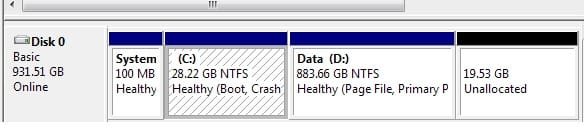
If you'll post back a screenshot of your full Disk Management drive map and listings we can give you the exact steps. Tell us what you want to do with each.
 
I partitioned my drive prior to installing W7 so that my operating system would be on a different partition than my data. In retrospect, I made the operating system partition way too small, and I've had nothing but trouble with trying to keep the partition from filling up.

Would it be possible for to simply back up my data partition, wipe the drive and reinstall (again with two partitions) without everything screwing up? I don't want to go through all that work just to have all my games and programs tell me that they aren't properly installed since the original C partition is gone.

Yes to your question. -- You could also backup your data, format your data partition and expand the partition your Win 7 is on and reinstall your data. Check this out.
http://www.sevenforums.com/tutorials/2670-partition-volume-extend.html

I didn't even think of that. Great idea! It's definitely the easiest and safest way to go about this, but I think I'm going to reinstall fresh just for sanitation's sake.


We have used free Partition Wizard to help with hundreds of complicated partitioning operations successfully, so it will work fine to shrink your data partition as needed and expand your Win7.

If you'll post back a screenshot of your full Disk Management drive map and listings we can give you the exact steps. Tell us what you want to do with each.

I've attached it. Most of all I just don't want to reinstall W7, drop the data partition back onto the disk and then be told that my shortcuts and program installs are no longer functional.
 

Attachments

  • diskmanagement.jpg
    diskmanagement.jpg
    13.5 KB · Views: 7

My Computer My Computer

OS
W7 Ultimate
You would have to reinstall your programs if you reinstall Win7.

It would be much easier to use free Partition Wizard bootable CD. Free Download Magic Partition Manager Software - Partition Wizard Online DoubleClick on downloaded ISO file to burn to CD.

Boot PW CD, select 1 for Screen Res, rightclick D>Resize, slide left grey border to the right by as much space as you want to extend C into. Click OK.

Next rightlick C>Resize, slide right grey border to the right to take up the space you made from D, OK. Apply all steps.

Done.
 
I'm doing it in the manner you suggested. Is there any way to simplify the reinstall process when I inevitably do reinstall Windows? I know my Steam games can be backed up and restored. It's a shame you can't just drop in a fresh copy of Windows without all of your programs breaking.
 

My Computer My Computer

OS
W7 Ultimate
A success! Bootup took a strangely long amount of time at the tail end of the Windows logo (perhaps a consequence of the fragmentation of the drive thanks to moving everything around), but other than that it worked a treat. Thanks!

Edit: Strangely, my Asus Xonar audio driver also appears to have been screwed up in some manner by this process. Huh.
 

My Computer My Computer

OS
W7 Ultimate
Run Auslogics Disk defragger on the drive.

PW checks file system during resizing but you can run it manually from there or Windows.

Update/Reinstall the sound driver. Never heard of driver being affected by resizing.
 
You would have to reinstall your programs if you reinstall Win7.

It would be much easier to use free Partition Wizard bootable CD. Free Download Magic Partition Manager Software - Partition Wizard Online DoubleClick on downloaded ISO file to burn to CD.

Boot PW CD, select 1 for Screen Res, rightclick D>Resize, slide left grey border to the right by as much space as you want to extend C into. Click OK.

Next rightlick C>Resize, slide right grey border to the right to take up the space you made from D, OK. Apply all steps.

Done.


You could post a link to this tutorial to make it easier for people and yourself; a picture is worth a thousand words. ;)

Partition Wizard : Use the Bootable CD
 

My Computer My Computer

Computer Manufacturer/Model Number
* BFK Customs *
OS
W 7 64-bit Ultimate
CPU
Intel Q9550 Yorkfield
Motherboard
ASUS P5Q Pro
Memory
8GB Dominator 8500C5D
Graphics Card(s)
ATI : XFX 5870
Sound Card
Realtek HD Audio 7-1
Monitor(s) Displays
1x 47" LCD HDMI & 3x 26" LCD HDMI
Screen Resolution
1920x1080P & 1920x1200
Hard Drives
1x 80GB Intel X25-M G2 SSD : 1x 500GB & 1x 640GB WD Caviar Black(s)
PSU
Corsair 620HX
Case
Cooler Master RC-690
Cooling
Tuniq Tower 120, 2x 140mm and 3x 120mm case fans
Keyboard
Microsoft 500
Mouse
Razer Diamondback 3G
Internet Speed
14 Mb/s
Other Info
1x Koutech 3Gb/s SATA HDD Hot Swap Rack
You could post a link to this tutorial to make it easier for people and yourself; a picture is worth a thousand words. ;)

Partition Wizard : Use the Bootable CD

Where in the tutorial does it show the steps to shrink one partition in order to make the adjacent one larger?

If I posted the tutorial in this case the OP would likely see nothing that pertains to him/her and not be helped as with writing out the steps which took me two minutes.

This has happened before which is why I didn't post it this time.
 
OK you got me there but there's plenty of examples how to use the Partition Wizard program including links to the download site all included in the tutorial.
 

My Computer My Computer

Computer Manufacturer/Model Number
* BFK Customs *
OS
W 7 64-bit Ultimate
CPU
Intel Q9550 Yorkfield
Motherboard
ASUS P5Q Pro
Memory
8GB Dominator 8500C5D
Graphics Card(s)
ATI : XFX 5870
Sound Card
Realtek HD Audio 7-1
Monitor(s) Displays
1x 47" LCD HDMI & 3x 26" LCD HDMI
Screen Resolution
1920x1080P & 1920x1200
Hard Drives
1x 80GB Intel X25-M G2 SSD : 1x 500GB & 1x 640GB WD Caviar Black(s)
PSU
Corsair 620HX
Case
Cooler Master RC-690
Cooling
Tuniq Tower 120, 2x 140mm and 3x 120mm case fans
Keyboard
Microsoft 500
Mouse
Razer Diamondback 3G
Internet Speed
14 Mb/s
Other Info
1x Koutech 3Gb/s SATA HDD Hot Swap Rack
Back
Top