IE8 dosen't save downloads

I would probably install Firefox and try downloading using that to see if you can download using anything.

If that works, then you could try uninstalling-reinstalling IE.

The problem with that is that we can't download. I even tried the Open instead of Save but that didn't work either.

**edit**
And I just checked and Internet Explorer 8 is not in the Uninstall Programs List. This is fu.
 

My Computer My Computer

At a glance

Windows 7 RC
OS
Windows 7 RC
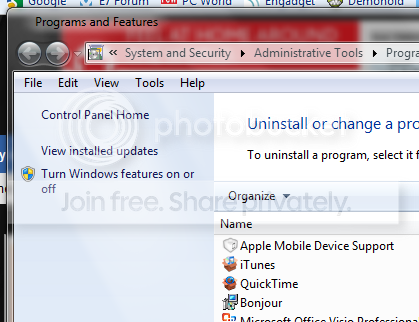
in programs and features you must go to 'turn windows fetaures on or off' (it's on the left) and IE is under there


*edit*
prog.png
 

My Computer My Computer

At a glance

Vista & Win 7AMD Turion 64X22GB
OS
Vista & Win 7
CPU
AMD Turion 64X2
Memory
2GB
Screen Resolution
1280x800
But will that move it back Internet 7?
 

My Computer My Computer

At a glance

Windows 7 RC
OS
Windows 7 RC
Go into Programs and Features and on the lefthand side there is the Turn Windows features on or off,untick the box for IE, Hope this helps.
To Late :)
 

My Computer My Computer

At a glance

Vista Ult64, Win7600Intel Core 2 Quad Q6600 @ 2400 MHz 64bit OS4096 MB DDR3-SDRAMATI Radeon HD 3870 Series x2 Crossfired
Computer Manufacturer/Model Number
Self Build 64bit
OS
Vista Ult64, Win7600
CPU
Intel Core 2 Quad Q6600 @ 2400 MHz 64bit OS
Motherboard
Asus P5E3 Deluxe WiFi @p 64 bit OS
Memory
4096 MB DDR3-SDRAM
Graphics Card(s)
ATI Radeon HD 3870 Series x2 Crossfired
Sound Card
Realtek on board
Monitor(s) Displays
Samsung SyncMaster - 23 inches
Screen Resolution
1680x1050 pixels at 60 Hz in True Colors
Hard Drives
Hitachi (250 GB)/Samsung 750 GB. /Barracuda 160 GB.
My Book 1 TB external..
PSU
Cooler Master 1000w
Case
Cooler Master Cosmos 1000.
Cooling
Fans and fresh air,
Keyboard
Wireless
Mouse
Wireless
Internet Speed
Never fast enough
Other Info
I use a Magnum.
But will that move it back Internet 7?

i don't think so, i think it just removes IE. im doing it right now. it's taken a while. i'll report back
 

My Computer My Computer

At a glance

Vista & Win 7AMD Turion 64X22GB
OS
Vista & Win 7
CPU
AMD Turion 64X2
Memory
2GB
Screen Resolution
1280x800
IE can be removed but not uninstalled if you follow me.
 

My Computer My Computer

At a glance

Windows 7 Professional 64-bitIntel E8400 3GHzKingston PC3-10700H 4GbXFX Radeon HD 5850 BlackEd.
Computer Manufacturer/Model Number
self built
OS
Windows 7 Professional 64-bit
CPU
Intel E8400 3GHz
Motherboard
Intel DX48BT2
Memory
Kingston PC3-10700H 4Gb
Graphics Card(s)
XFX Radeon HD 5850 BlackEd.
Sound Card
Asus Xonar DG
Monitor(s) Displays
2x Samsung SM-T220HD 22"
Screen Resolution
1680x1050 on two monitors
Hard Drives
OCZ Vertex 2 120gb 3.5" (OS)
Seagate Momentus XT 500gb
Samsung F3 1Tb (games)
2x Samsung F1 1Tb
PSU
Thermaltake ToughPower 850w
Case
Thermaltake Armor
Cooling
Scythe Mugen II
Keyboard
Microsoft Comfort Curve USB
Mouse
Razer Diamondback 3G
Internet Speed
8128/443
And I just tried to call Microsoft but they can't help me because there is no phone support for people using Windows 7 and the Internet Explorer 8 people only deal wiht XP and Vista. I love Micro$oft.
 

My Computer My Computer

At a glance

Windows 7 RC
OS
Windows 7 RC
windows finally 'removed' IE and finished 'installing' will report back with results once i reboot for the 7th time today (installing updates that i haven't done in a while b/c of my internet connection @ home)


*edit*
nope that didn't work
 

My Computer My Computer

At a glance

Vista & Win 7AMD Turion 64X22GB
OS
Vista & Win 7
CPU
AMD Turion 64X2
Memory
2GB
Screen Resolution
1280x800
Well I just removed mine and still no dice. I don't know where to go next on this.
 

My Computer My Computer

At a glance

Windows 7 RC
OS
Windows 7 RC
The problem with that is that we can't download. I even tried the Open instead of Save but that didn't work either.

**edit**
And I just checked and Internet Explorer 8 is not in the Uninstall Programs List. This is fu.

You could download using another computer.

At this point, as painful as it probably is, I'd try a clean install of the OS and see if that corrects it.
 

My Computer My Computer

At a glance

Windows 7 x64 / SameIntel Core 2 Duo T7250 / Intel Core i7 9304GB / 6GBNVIDIA GeForce 8400M GS / ASUS 1GB
Computer Manufacturer/Model Number
Dell Inspiron 1520 (Laptop)/ Home (Desktop)
OS
Windows 7 x64 / Same
CPU
Intel Core 2 Duo T7250 / Intel Core i7 930
Motherboard
Intel 945 / Asus P6X58D-E
Memory
4GB / 6GB
Graphics Card(s)
NVIDIA GeForce 8400M GS / ASUS 1GB
Sound Card
Whatever Dell gave me :-( / Onboard
Monitor(s) Displays
15.4" LCD / Crappy CRT
Hard Drives
Seagate 500GB SATA; 7200 RPM / Seagate 1TB SATA; 7200 RPM
PSU
N/A / OCZ Fatal1ty 550W Modular
Case
N/A / Antec 900
Cooling
Air
Mouse
Microsoft Presenter (Bluetooth)
*edit*
i just remembered that IE can be 'uninstalled' from win 7 rc, right? what if i just did that and then reinstalled it? could that work? has anyone ever done that?

This will just "turn the feature off" it will not "un-install" it. I don't know if this will help.
 

My Computer My Computer

At a glance

Windows 7 Professional x64Intel Core i7 8604GB DDR3 Mushkin 1600Mhz @ 7-8-7-20MSI GTS250 1GB DDR3 Twin Frozr
Computer Manufacturer/Model Number
Keeps changing - (Custom)
OS
Windows 7 Professional x64
CPU
Intel Core i7 860
Motherboard
Gigabyte GA-P55-UD4P
Memory
4GB DDR3 Mushkin 1600Mhz @ 7-8-7-20
Graphics Card(s)
MSI GTS250 1GB DDR3 Twin Frozr
Sound Card
Onboard realtek
Monitor(s) Displays
Samsung SyncMaster 24" P2450 + Samsung 20" 2033
Screen Resolution
1920 X 1080 and 1600 X 900 (#2 system 1440 X 900)
Hard Drives
Patriot Inferno 120GB SSD + 3 WD Blue 640GB drives
PSU
Corsair 750 HX Modular
Case
Lancool PC-K62
Cooling
Cooler Master TX3 CPU cooler and 4-140mm and 1-120mm case
Keyboard
Gigabyte USB keyboard
Mouse
Microsoft wireless laser mouse 5000
Internet Speed
7 Mb down 1.5 up
Other Info
System #2: AMD Phenom II X6 1055T (Freezer 7 Pro cooler) - Gigabyte 880GMA-UD2H - WD 500GB Black - 9500GT (1GB) 500W OCZ modular PSU - Antec 200 case. System #3 (LapTop) Core 2 Duo T6670 - 320GB 7200RPM HD - 4GB DDR3 RAM.
ya it just turned it off. it didn't help :(
 

My Computer My Computer

At a glance

Vista & Win 7AMD Turion 64X22GB
OS
Vista & Win 7
CPU
AMD Turion 64X2
Memory
2GB
Screen Resolution
1280x800
I had the same problem with my Firefox on the 7 7000 build (the beta) x86. IE and Chrome downloaded without issues, but Firefox's downloads finished and then the downloaded file dissapeared. Checking my monthly data traffic, the files actually did download, but after they'd finished, they simply disappeared on my Hard Drive.

I solved the problem by installing the RC 64bit.
 

My Computer My Computer

At a glance

Windows 7 Beta
OS
Windows 7 Beta
Hi greenlink23, Why dont you try Internet Download Manager to do your downloads for you, it is much quicker, and it is free to try for 30 days, when you use it I don't think you will ever use IE or FF again to do your downloading for you.

http://www.internetdownloadmanager.com/
 

My Computer My Computer

At a glance

Vista Ult64, Win7600Intel Core 2 Quad Q6600 @ 2400 MHz 64bit OS4096 MB DDR3-SDRAMATI Radeon HD 3870 Series x2 Crossfired
Computer Manufacturer/Model Number
Self Build 64bit
OS
Vista Ult64, Win7600
CPU
Intel Core 2 Quad Q6600 @ 2400 MHz 64bit OS
Motherboard
Asus P5E3 Deluxe WiFi @p 64 bit OS
Memory
4096 MB DDR3-SDRAM
Graphics Card(s)
ATI Radeon HD 3870 Series x2 Crossfired
Sound Card
Realtek on board
Monitor(s) Displays
Samsung SyncMaster - 23 inches
Screen Resolution
1680x1050 pixels at 60 Hz in True Colors
Hard Drives
Hitachi (250 GB)/Samsung 750 GB. /Barracuda 160 GB.
My Book 1 TB external..
PSU
Cooler Master 1000w
Case
Cooler Master Cosmos 1000.
Cooling
Fans and fresh air,
Keyboard
Wireless
Mouse
Wireless
Internet Speed
Never fast enough
Other Info
I use a Magnum.
Every now and then I've had files saved to the desktop not appear when saved, yet they've immediately showed if I've gone to the desktop and hit F5 to refresh.

The problem has usually gone away the next time the computer restarts, but it occasionally returns.

You might try saving to the desktop via "C:\Users\[username]\Desktop".

Otherwise I'd personally try a repair install, and if that fails, a fresh install.

I suppose you might try reinstalling any browser add-ons you have like Java, Flash, etc. too just in case. I've also had antivirus (ESET) occasionally stop downloads from finishing when they're at 99% -- I believe the server times out before the antivirus finishes its scan of the download.
 

My Computer My Computer

At a glance

Windows7
OS
Windows7
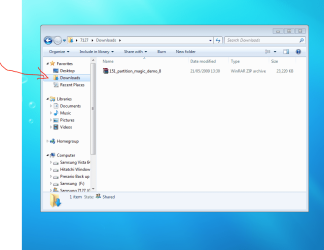
This is where downloaded files go to when you use IE,
I hope this helps.
Capturepp.PNG
 

My Computer My Computer

At a glance

Vista Ult64, Win7600Intel Core 2 Quad Q6600 @ 2400 MHz 64bit OS4096 MB DDR3-SDRAMATI Radeon HD 3870 Series x2 Crossfired
Computer Manufacturer/Model Number
Self Build 64bit
OS
Vista Ult64, Win7600
CPU
Intel Core 2 Quad Q6600 @ 2400 MHz 64bit OS
Motherboard
Asus P5E3 Deluxe WiFi @p 64 bit OS
Memory
4096 MB DDR3-SDRAM
Graphics Card(s)
ATI Radeon HD 3870 Series x2 Crossfired
Sound Card
Realtek on board
Monitor(s) Displays
Samsung SyncMaster - 23 inches
Screen Resolution
1680x1050 pixels at 60 Hz in True Colors
Hard Drives
Hitachi (250 GB)/Samsung 750 GB. /Barracuda 160 GB.
My Book 1 TB external..
PSU
Cooler Master 1000w
Case
Cooler Master Cosmos 1000.
Cooling
Fans and fresh air,
Keyboard
Wireless
Mouse
Wireless
Internet Speed
Never fast enough
Other Info
I use a Magnum.
Solved!- IE8 dosen't save downloads-Solved!

I had the same problem trying to save download/save census images from Ancestry.com. After some experimentation I realized it was a UAC-related problem. Then the light went on... I right clicked my IE8 icon an clicked "Open as Administrator" and shazzam! my downloads would now save. It not a defect, just a feature we don't fully understand or see properly documented.
 

My Computer My Computer

At a glance

Windows 7 RC
OS
Windows 7 RC
I had the same problem trying to save download/save census images from Ancestry.com. After some experimentation I realized it was a UAC-related problem. Then the light went on... I right clicked my IE8 icon an clicked "Open as Administrator" and shazzam! my downloads would now save. It not a defect, just a feature we don't fully understand or see properly documented.

Turning UAC off shouldn't solve the problem, IE runs under a "sandbox" separated from the OS and running it elevated disables this protection. If you do require disabling this protection then I would be very concerned :huh:
 
Hi greenlink23, Why dont you try Internet Download Manager to do your downloads for you, it is much quicker, and it is free to try for 30 days, when you use it I don't think you will ever use IE or FF again to do your downloading for you.

Internet Download Manager: the fastest download accelerator

thanks but i do use idm, it's just that it doesn't pickup every download and some sites don't allow the use of it.

and i specifically tell ie to download to my desktop, and hitting F5 doesn't help.

oh well i guess i'll repair windows
 

My Computer My Computer

At a glance

Vista & Win 7AMD Turion 64X22GB
OS
Vista & Win 7
CPU
AMD Turion 64X2
Memory
2GB
Screen Resolution
1280x800
IE8 dosen't save downloads - Remedy that shouldn't work

Dear Guru Friend,
I know my fix shouldn't work...BUT IT DID! I was able to save census images from Ancestry unto a flash drive, no problem- but couldn't save to Documents, Desktop, or anywhere else on my "C" drive. I turned off all security etc. Nothing worked. My reasoning was that Ancestry.com some form of browser helper object related to there image viewer which is probably ActiveX. All I know is that when I ran IE8 using right click-> "run as administrator", I was able to save. This has not been necessary to download or save from other sites so far, but this site must use a technology that Win 7 or IE8 flags.
 

My Computer My Computer

At a glance

Windows 7 RC
OS
Windows 7 RC
Back
Top