Can't Access file for deletion with Admin Privileges

glennc

New member
Power User
VIP
Local time
12:56 PM
Messages
1,024
Hello,
I am currently running W7 Ultimate 64 Bit with Norton 2011 and Comodo 5.????. I noticed I didn't have a site advisor on FF. So I installed McAfee. It seems to react after a file is downloaded and everything even Windows Gadgets are unsafe and must be blocked. I downloaded Norton Safe Web Lite to replace it. It downloaded in priviledged account (standard). It won't let me run or delete it saying I don't have permission or privilege to do so. If anyone has any ideas I'd appreciate it. Thanks in advance for any assistance.
glennc
 

My Computer My Computer

At a glance

Windows 7 UltimateAMD Phenom-II X4 9658192 MB DDR2-SDRAMATI Radeon HD 4200
Computer type
PC/Desktop
Computer Manufacturer/Model Number
Self-Built
OS
Windows 7 Ultimate
CPU
AMD Phenom-II X4 965
Motherboard
Gigabyte GA-MA785GM-US2H
Memory
8192 MB DDR2-SDRAM
Graphics Card(s)
ATI Radeon HD 4200
Sound Card
ATI Radeon HD 4200 High Definition Audo
Monitor(s) Displays
LG Electronics W1943
Screen Resolution
1360 X 768
Hard Drives
C: 500 GB Caviar Black SATA
E: 500 GB Caviar Black SATA
PSU
Ultra LSP 750
Case
Ultra XBlaster
Cooling
2 Fans, CPU Fan, PS Fan
Keyboard
Acer
Mouse
Logitech
Internet Speed
6 MB
Decide on which antivirus program you want to use... You look like you have 3 installed.. That is 2 too many ... I would also uninstall Norton Safe Web Lite... If you are still having problems uninstalling a file, boot into safe mode and delete the file...
 

My Computer My Computer

At a glance

64-bit Windows 8.1 ProCore(TM) i5 CPU 4330 Haswell @ 3.20GHz12.00 GBIntel(R) HD Graphics
Computer type
PC/Desktop
Computer Manufacturer/Model Number
LENOVO K450 @3.0GHZ
OS
64-bit Windows 8.1 Pro
CPU
Core(TM) i5 CPU 4330 Haswell @ 3.20GHz
Motherboard
LENOVO
Memory
12.00 GB
Graphics Card(s)
Intel(R) HD Graphics
Sound Card
Intel HD integtrated
Monitor(s) Displays
HP 25' ISP Monitor
Screen Resolution
1900/1020
Hard Drives
(1) ST1000DM003-1CH162 (2) Generic STORAGE DEVICE USB Device (3) Generic STORAGE DEVICE USB Device
Internet Speed
100mb down/10mb up
Hello Tews,
I failed to make myself clear, again, sorry. I am using Comodo Firewall without Antivirus, Norton 2011 and have been using only the McAfee Site Advisor. I want to get rid of the McAfee and replace it with Norton Safe Web Advisor. I downloaded the program as standard/Administrative Privilege account. I have it on my disk drive. It will not let me run the Norton Safe Web installer so it never installs and it also won't let me delete the program itself. I like a site advisor and thought the Norton with Norton 2011 would be a good combo. I will try the safe mode delete. Thanks for your time.
glennc
 

My Computer My Computer

At a glance

Windows 7 UltimateAMD Phenom-II X4 9658192 MB DDR2-SDRAMATI Radeon HD 4200
Computer type
PC/Desktop
Computer Manufacturer/Model Number
Self-Built
OS
Windows 7 Ultimate
CPU
AMD Phenom-II X4 965
Motherboard
Gigabyte GA-MA785GM-US2H
Memory
8192 MB DDR2-SDRAM
Graphics Card(s)
ATI Radeon HD 4200
Sound Card
ATI Radeon HD 4200 High Definition Audo
Monitor(s) Displays
LG Electronics W1943
Screen Resolution
1360 X 768
Hard Drives
C: 500 GB Caviar Black SATA
E: 500 GB Caviar Black SATA
PSU
Ultra LSP 750
Case
Ultra XBlaster
Cooling
2 Fans, CPU Fan, PS Fan
Keyboard
Acer
Mouse
Logitech
Internet Speed
6 MB
Delete the standalone version of Safe Web.

The Norton Internet Security 2011 beta includes critical features such as Norton Identity Safe which has a new look for 2011, and Norton Safe Web, a Web site rating service that annotates Google, Yahoo! and Bing.com search results with safety and ecommerce ratings. Delivering a safer online experience, the Norton Internet Security 2011 beta toolbar rolls all browser protection technologies into a single interface that not only indicates Safe Web ratings, it prevents users from visiting sites which contain malware, browser or media plug-in exploits, phishing attempts, or which have been determined heuristically unsafe
 

My Computer My Computer

At a glance

Windows 7 Ultimate 32bit SP1Intel(R) Core(TM)2 Quad CPU @ 2.40GHz, 2400 MHz4 GBATI Radeon HD 2600 Pro
Computer type
PC/Desktop
Computer Manufacturer/Model Number
Bruce ... somewhere in his 40's
OS
Windows 7 Ultimate 32bit SP1
CPU
Intel(R) Core(TM)2 Quad CPU @ 2.40GHz, 2400 MHz
Motherboard
INTEL/D975XBX2
Memory
4 GB
Graphics Card(s)
ATI Radeon HD 2600 Pro
Monitor(s) Displays
Samsung SyncMaster 914v
Screen Resolution
1280 x 1024
Hard Drives
2/500GB each ... ST3500630AS ATA Device.
One is not connected
PSU
Rocketfish 700 W
Case
G.Skill Gigabyte Chassis
Keyboard
Standard PS/2 Keyboard
Mouse
Microsoft PS/2 Mouse
Internet Speed
DSL
Antivirus
Avira Internet Security
Browser
IE 11
Other Info
ATI HDMI Audio
Howdy,
Tews, thanks and that delete in safe boot worked great. Did some scanning while in that mode.Thank you kind Sir!! Haven't run into that yet, now I know.

Hey Jaycee,
Managed to delete the standalone version of Norton Safe Web Lite with Tews' help.
Thanks for that quote. Will have to look into it as I haven't seen hide nor hair of Norton Toolbar as yet.
glennc
 

My Computer My Computer

At a glance

Windows 7 UltimateAMD Phenom-II X4 9658192 MB DDR2-SDRAMATI Radeon HD 4200
Computer type
PC/Desktop
Computer Manufacturer/Model Number
Self-Built
OS
Windows 7 Ultimate
CPU
AMD Phenom-II X4 965
Motherboard
Gigabyte GA-MA785GM-US2H
Memory
8192 MB DDR2-SDRAM
Graphics Card(s)
ATI Radeon HD 4200
Sound Card
ATI Radeon HD 4200 High Definition Audo
Monitor(s) Displays
LG Electronics W1943
Screen Resolution
1360 X 768
Hard Drives
C: 500 GB Caviar Black SATA
E: 500 GB Caviar Black SATA
PSU
Ultra LSP 750
Case
Ultra XBlaster
Cooling
2 Fans, CPU Fan, PS Fan
Keyboard
Acer
Mouse
Logitech
Internet Speed
6 MB
Glad that you have it all sorted! ;)
 

My Computer My Computer

At a glance

64-bit Windows 8.1 ProCore(TM) i5 CPU 4330 Haswell @ 3.20GHz12.00 GBIntel(R) HD Graphics
Computer type
PC/Desktop
Computer Manufacturer/Model Number
LENOVO K450 @3.0GHZ
OS
64-bit Windows 8.1 Pro
CPU
Core(TM) i5 CPU 4330 Haswell @ 3.20GHz
Motherboard
LENOVO
Memory
12.00 GB
Graphics Card(s)
Intel(R) HD Graphics
Sound Card
Intel HD integtrated
Monitor(s) Displays
HP 25' ISP Monitor
Screen Resolution
1900/1020
Hard Drives
(1) ST1000DM003-1CH162 (2) Generic STORAGE DEVICE USB Device (3) Generic STORAGE DEVICE USB Device
Internet Speed
100mb down/10mb up
Howdy Tews,
I have deleted it, thanks and also McAfee Site Advisor. Now I see no site advisement. Got to figure out how to get it started. No Norton Toolbar, no stars or green orbs on Google or Yahoo searches. Stumped.
glennc
 

My Computer My Computer

At a glance

Windows 7 UltimateAMD Phenom-II X4 9658192 MB DDR2-SDRAMATI Radeon HD 4200
Computer type
PC/Desktop
Computer Manufacturer/Model Number
Self-Built
OS
Windows 7 Ultimate
CPU
AMD Phenom-II X4 965
Motherboard
Gigabyte GA-MA785GM-US2H
Memory
8192 MB DDR2-SDRAM
Graphics Card(s)
ATI Radeon HD 4200
Sound Card
ATI Radeon HD 4200 High Definition Audo
Monitor(s) Displays
LG Electronics W1943
Screen Resolution
1360 X 768
Hard Drives
C: 500 GB Caviar Black SATA
E: 500 GB Caviar Black SATA
PSU
Ultra LSP 750
Case
Ultra XBlaster
Cooling
2 Fans, CPU Fan, PS Fan
Keyboard
Acer
Mouse
Logitech
Internet Speed
6 MB
glenn, Download HijackThis!
HijackThis - Trend Micro USA

Right click to run as Administrator, click do a system scan and save log

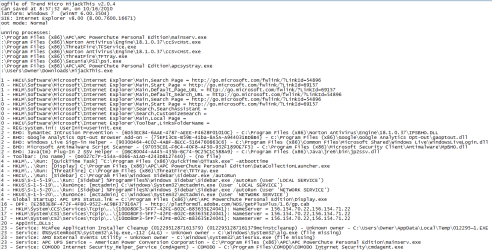
Copy and paste the HJT log back here ... we'll see if the toolbar is running :)
 

My Computer My Computer

At a glance

Windows 7 Ultimate 32bit SP1Intel(R) Core(TM)2 Quad CPU @ 2.40GHz, 2400 MHz4 GBATI Radeon HD 2600 Pro
Computer type
PC/Desktop
Computer Manufacturer/Model Number
Bruce ... somewhere in his 40's
OS
Windows 7 Ultimate 32bit SP1
CPU
Intel(R) Core(TM)2 Quad CPU @ 2.40GHz, 2400 MHz
Motherboard
INTEL/D975XBX2
Memory
4 GB
Graphics Card(s)
ATI Radeon HD 2600 Pro
Monitor(s) Displays
Samsung SyncMaster 914v
Screen Resolution
1280 x 1024
Hard Drives
2/500GB each ... ST3500630AS ATA Device.
One is not connected
PSU
Rocketfish 700 W
Case
G.Skill Gigabyte Chassis
Keyboard
Standard PS/2 Keyboard
Mouse
Microsoft PS/2 Mouse
Internet Speed
DSL
Antivirus
Avira Internet Security
Browser
IE 11
Other Info
ATI HDMI Audio
glenn, Download HijackThis!
HijackThis - Trend Micro USA

Right click to run as Administrator, click do a system scan and save log

Copy and paste the HJT log back here ... we'll see if the toolbar is running :)

Jaycee,
Again as a paranoid newcomer to this program, it doesn't divulge any info that could be used by unscrupulous people to create more problems, does it? Paranoia the ultimate form of self defense. :)
glennc
 

My Computer My Computer

At a glance

Windows 7 UltimateAMD Phenom-II X4 9658192 MB DDR2-SDRAMATI Radeon HD 4200
Computer type
PC/Desktop
Computer Manufacturer/Model Number
Self-Built
OS
Windows 7 Ultimate
CPU
AMD Phenom-II X4 965
Motherboard
Gigabyte GA-MA785GM-US2H
Memory
8192 MB DDR2-SDRAM
Graphics Card(s)
ATI Radeon HD 4200
Sound Card
ATI Radeon HD 4200 High Definition Audo
Monitor(s) Displays
LG Electronics W1943
Screen Resolution
1360 X 768
Hard Drives
C: 500 GB Caviar Black SATA
E: 500 GB Caviar Black SATA
PSU
Ultra LSP 750
Case
Ultra XBlaster
Cooling
2 Fans, CPU Fan, PS Fan
Keyboard
Acer
Mouse
Logitech
Internet Speed
6 MB
Delete the standalone version of Safe Web.

The Norton Internet Security 2011 beta includes critical features such as Norton Identity Safe which has a new look for 2011, and Norton Safe Web, a Web site rating service that annotates Google, Yahoo! and Bing.com search results with safety and ecommerce ratings. Delivering a safer online experience, the Norton Internet Security 2011 beta toolbar rolls all browser protection technologies into a single interface that not only indicates Safe Web ratings, it prevents users from visiting sites which contain malware, browser or media plug-in exploits, phishing attempts, or which have been determined heuristically unsafe

Hello Jaycee,
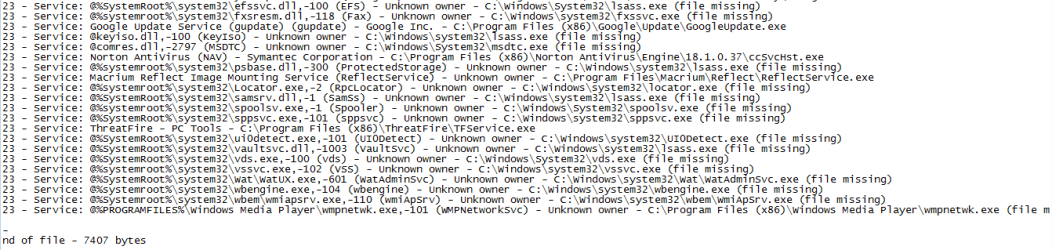
Hope this works right.

Capture.PNG

Capture1.PNG

Glad you understand that stuff. Thanks for your help Jaycee.
glennc
 

My Computer My Computer

At a glance

Windows 7 UltimateAMD Phenom-II X4 9658192 MB DDR2-SDRAMATI Radeon HD 4200
Computer type
PC/Desktop
Computer Manufacturer/Model Number
Self-Built
OS
Windows 7 Ultimate
CPU
AMD Phenom-II X4 965
Motherboard
Gigabyte GA-MA785GM-US2H
Memory
8192 MB DDR2-SDRAM
Graphics Card(s)
ATI Radeon HD 4200
Sound Card
ATI Radeon HD 4200 High Definition Audo
Monitor(s) Displays
LG Electronics W1943
Screen Resolution
1360 X 768
Hard Drives
C: 500 GB Caviar Black SATA
E: 500 GB Caviar Black SATA
PSU
Ultra LSP 750
Case
Ultra XBlaster
Cooling
2 Fans, CPU Fan, PS Fan
Keyboard
Acer
Mouse
Logitech
Internet Speed
6 MB
Wow - quite a few apps to secure your system!

Just in case, you may want to head over to AVTest.org

This is an independent testing site that publishes the latest AV testing results.

It's very revealing... quite surprising that a company like McAfee is not certified by them.

Take a look, and then perhaps you will have some more information for future decisions on AV software. It's been a big help to me and produced some significant performance increases on systems that I admin.

HTH, and Happy Computing!
 

My Computer My Computer

At a glance

Windows 7 Pro, Vista Business, Vista Ultimate...Core 2 Extreme
Computer Manufacturer/Model Number
Custom Creation
OS
Windows 7 Pro, Vista Business, Vista Ultimate, Windows XP
CPU
Core 2 Extreme
Wow - quite a few apps to secure your system!

Just in case, you may want to head over to AVTest.org

This is an independent testing site that publishes the latest AV testing results.

It's very revealing... quite surprising that a company like McAfee is not certified by them.

Take a look, and then perhaps you will have some more information for future decisions on AV software. It's been a big help to me and produced some significant performance increases on systems that I admin.

HTH, and Happy Computing!

Hello Pierre50,
I do have a lot of stuff I've found. I also change as the wind. Having Norton 2010 purchased on my XP, with two unintentionally bought extra licenses, I've recently been advised that Norton 2011 is incredibly good. So they let me do free upgrades.
Was running McAfee Suite, which was purchased, but was not IMO well rated.
So I ran it and MSE. Now with Norton 2011, I kept MSE to use as a standalone scanner. Now needing a firewall I had heard good stuff about Comodo and had used it extensively in the past (Pre -W7). Threatfire is supposed to run with your main security and would always react to changes and threats. Now Norton seems to be catching most issues before Threatfire so I may delete it in the near future. Secunia is IMO fantastic, except it sometimes misses stuff if you don't do a manual scan regularly. Also there are those darned issues that it cannot supply a recommendation for a patch or fix for like Adobe and Firefox. So on FF I added a bunch of more secure-ish extensions.
Thanks for the link, I will investigate and wait til Jaycee gets back to look over the log.
glennc
 

My Computer My Computer

At a glance

Windows 7 UltimateAMD Phenom-II X4 9658192 MB DDR2-SDRAMATI Radeon HD 4200
Computer type
PC/Desktop
Computer Manufacturer/Model Number
Self-Built
OS
Windows 7 Ultimate
CPU
AMD Phenom-II X4 965
Motherboard
Gigabyte GA-MA785GM-US2H
Memory
8192 MB DDR2-SDRAM
Graphics Card(s)
ATI Radeon HD 4200
Sound Card
ATI Radeon HD 4200 High Definition Audo
Monitor(s) Displays
LG Electronics W1943
Screen Resolution
1360 X 768
Hard Drives
C: 500 GB Caviar Black SATA
E: 500 GB Caviar Black SATA
PSU
Ultra LSP 750
Case
Ultra XBlaster
Cooling
2 Fans, CPU Fan, PS Fan
Keyboard
Acer
Mouse
Logitech
Internet Speed
6 MB
Go into Services, and set RpcLocator to 'manuel', if it isn't already set up that way.
 

My Computer My Computer

At a glance

Windows 7 Ultimate 32bit SP1Intel(R) Core(TM)2 Quad CPU @ 2.40GHz, 2400 MHz4 GBATI Radeon HD 2600 Pro
Computer type
PC/Desktop
Computer Manufacturer/Model Number
Bruce ... somewhere in his 40's
OS
Windows 7 Ultimate 32bit SP1
CPU
Intel(R) Core(TM)2 Quad CPU @ 2.40GHz, 2400 MHz
Motherboard
INTEL/D975XBX2
Memory
4 GB
Graphics Card(s)
ATI Radeon HD 2600 Pro
Monitor(s) Displays
Samsung SyncMaster 914v
Screen Resolution
1280 x 1024
Hard Drives
2/500GB each ... ST3500630AS ATA Device.
One is not connected
PSU
Rocketfish 700 W
Case
G.Skill Gigabyte Chassis
Keyboard
Standard PS/2 Keyboard
Mouse
Microsoft PS/2 Mouse
Internet Speed
DSL
Antivirus
Avira Internet Security
Browser
IE 11
Other Info
ATI HDMI Audio
Go into Services, and set RpcLocator to 'manuel', if it isn't already set up that way.

Hey Hey Jaycee,
Will do. I called Norton and they weren't much help. I downloaded it (Norton Safe Web) in IE8 and it downloaded and let me run it. Now it is up and running on FF and IE8. Did you see anything ominous in the code?? What will your instructions do if you could explain slowly. Thanks!!
glennc
 

My Computer My Computer

At a glance

Windows 7 UltimateAMD Phenom-II X4 9658192 MB DDR2-SDRAMATI Radeon HD 4200
Computer type
PC/Desktop
Computer Manufacturer/Model Number
Self-Built
OS
Windows 7 Ultimate
CPU
AMD Phenom-II X4 965
Motherboard
Gigabyte GA-MA785GM-US2H
Memory
8192 MB DDR2-SDRAM
Graphics Card(s)
ATI Radeon HD 4200
Sound Card
ATI Radeon HD 4200 High Definition Audo
Monitor(s) Displays
LG Electronics W1943
Screen Resolution
1360 X 768
Hard Drives
C: 500 GB Caviar Black SATA
E: 500 GB Caviar Black SATA
PSU
Ultra LSP 750
Case
Ultra XBlaster
Cooling
2 Fans, CPU Fan, PS Fan
Keyboard
Acer
Mouse
Logitech
Internet Speed
6 MB
In your HJT log, I see that McAfee was running, but did you uninstall after posting the log?

I also see Norton/Symantec, Comodo Security and now you say you have Microsoft Security Essentials
OMG.gif

I feel you are defeating yourself and what you want to do with this much 'extra' baggage.


This has nothing to do with all your security programs, I just noticed that it was running in the background, so I wanted to know if you set it to Automatic.
According to MS, this is how RCPLocator should be set as default:
Use the Services tool in Control Panel to set the startup type of the RPC Service to Automatic, and, optionally, set the startup type of the RPC Locator to Manual, which are the default settings for these services. NOTE: You should not change the RPC Locator startup type to Disabled if you are using distributed computing (DCE)-aware programs. If you are unsure about the appropriate settings for this service relative to your environment, check with your network administrator
 

My Computer My Computer

At a glance

Windows 7 Ultimate 32bit SP1Intel(R) Core(TM)2 Quad CPU @ 2.40GHz, 2400 MHz4 GBATI Radeon HD 2600 Pro
Computer type
PC/Desktop
Computer Manufacturer/Model Number
Bruce ... somewhere in his 40's
OS
Windows 7 Ultimate 32bit SP1
CPU
Intel(R) Core(TM)2 Quad CPU @ 2.40GHz, 2400 MHz
Motherboard
INTEL/D975XBX2
Memory
4 GB
Graphics Card(s)
ATI Radeon HD 2600 Pro
Monitor(s) Displays
Samsung SyncMaster 914v
Screen Resolution
1280 x 1024
Hard Drives
2/500GB each ... ST3500630AS ATA Device.
One is not connected
PSU
Rocketfish 700 W
Case
G.Skill Gigabyte Chassis
Keyboard
Standard PS/2 Keyboard
Mouse
Microsoft PS/2 Mouse
Internet Speed
DSL
Antivirus
Avira Internet Security
Browser
IE 11
Other Info
ATI HDMI Audio
In your HJT log, I see that McAfee was running, but did you uninstall after posting the log?

I also see Norton/Symantec, Comodo Security and now you say you have Microsoft Security Essentials
OMG.gif

I feel you are defeating yourself and what you want to do with this much 'extra' baggage.


This has nothing to do with all your security programs, I just noticed that it was running in the background, so I wanted to know if you set it to Automatic.
According to MS, this is how RCPLocator should be set as default:
Use the Services tool in Control Panel to set the startup type of the RPC Service to Automatic, and, optionally, set the startup type of the RPC Locator to Manual, which are the default settings for these services. NOTE: You should not change the RPC Locator startup type to Disabled if you are using distributed computing (DCE)-aware programs. If you are unsure about the appropriate settings for this service relative to your environment, check with your network administrator

Hello Jaycee,
Yes I was running McAfee site advisor until I got the Norton running. Running Norton AV 2011, Newest Commodo Free firewall, MSE is supposed to be not active, it shows the red icon with the X. I am using it to do a weekly standalone scan as a backup for the Norton. So how much will I save by dumping MSE running it like I am. I didn't think it was running a service other than maybe an updater. Threatfire is designed to run in addition to regular protection, but I may dump it as Comodo is doing a lot of catching stuff. Just as a guess, percentage wise, how much do you believe I am degrading my performance? I know that you know this kind of stuff and appreciated your knowledgeable information.
Oh that quote on RPC might have well been in Summarian, for what I could understand, sorry for my ignorance. I couldn't locate RPC Locator in System. So I'll need help in tracking it down, and what does it do in English?
Just to show how over the top I am, I have SuperAntispyware on a bootable disk which updates itself and scans, while keeping Malware Antimalyare on board but not running. I've got to be honest, one of the reasons is that I don't understand enough to know how to set up Comodo to the optimum protection settings so I use redundancy. A bit pathetic. Never had these problems in CPM. :)
Really do appreciate you time, assistance and helpful attitude, pal.
glennc
 

My Computer My Computer

At a glance

Windows 7 UltimateAMD Phenom-II X4 9658192 MB DDR2-SDRAMATI Radeon HD 4200
Computer type
PC/Desktop
Computer Manufacturer/Model Number
Self-Built
OS
Windows 7 Ultimate
CPU
AMD Phenom-II X4 965
Motherboard
Gigabyte GA-MA785GM-US2H
Memory
8192 MB DDR2-SDRAM
Graphics Card(s)
ATI Radeon HD 4200
Sound Card
ATI Radeon HD 4200 High Definition Audo
Monitor(s) Displays
LG Electronics W1943
Screen Resolution
1360 X 768
Hard Drives
C: 500 GB Caviar Black SATA
E: 500 GB Caviar Black SATA
PSU
Ultra LSP 750
Case
Ultra XBlaster
Cooling
2 Fans, CPU Fan, PS Fan
Keyboard
Acer
Mouse
Logitech
Internet Speed
6 MB
Threatfire is designed to run in addition to regular protection, but I may dump it as Comodo is doing a lot of catching stuff.
What's Comodo catching? Are you downloading (c)rap or visiting sites you shouldn't be? :confused:

Glenn, you have too many security programs that are 'resource hogs' ... they are most likely picking up each other's virrus/spyware definitions and confusing the daylights out of you!

It's too hard to help you when you un-install one program, install another, and then ask for help as to why things aren't going as you expect. :(

Please regard all the posts that we've supplied to help you. We can't help you if you don't help yourself ;)
 

My Computer My Computer

At a glance

Windows 7 Ultimate 32bit SP1Intel(R) Core(TM)2 Quad CPU @ 2.40GHz, 2400 MHz4 GBATI Radeon HD 2600 Pro
Computer type
PC/Desktop
Computer Manufacturer/Model Number
Bruce ... somewhere in his 40's
OS
Windows 7 Ultimate 32bit SP1
CPU
Intel(R) Core(TM)2 Quad CPU @ 2.40GHz, 2400 MHz
Motherboard
INTEL/D975XBX2
Memory
4 GB
Graphics Card(s)
ATI Radeon HD 2600 Pro
Monitor(s) Displays
Samsung SyncMaster 914v
Screen Resolution
1280 x 1024
Hard Drives
2/500GB each ... ST3500630AS ATA Device.
One is not connected
PSU
Rocketfish 700 W
Case
G.Skill Gigabyte Chassis
Keyboard
Standard PS/2 Keyboard
Mouse
Microsoft PS/2 Mouse
Internet Speed
DSL
Antivirus
Avira Internet Security
Browser
IE 11
Other Info
ATI HDMI Audio
Threatfire is designed to run in addition to regular protection, but I may dump it as Comodo is doing a lot of catching stuff.
What's Comodo catching? Are you downloading (c)rap or visiting sites you shouldn't be? :confused:

Glenn, you have too many security programs that are 'resource hogs' ... they are most likely picking up each other's virrus/spyware definitions and confusing the daylights out of you!

It's too hard to help you when you un-install one program, install another, and then ask for help as to why things aren't going as you expect. :(

Please regard all the posts that we've supplied to help you. We can't help you if you don't help yourself ;)

That is a fair and true assessment. So I am currently going to keep stuff as it is!
Comodo is just a firewall. I don't know how to set it up properly so I accept a lot of default max or near max settings. I'll leave Threatfire installed. No in reference to sites that Norton Site Advisor considers bad. No visits to sites that Comodo or Norton mark as malicious. Norton stopped me from visiting a site suggested by another member to get the newest Minefield as it didn't have enough ratings and was out only one day. I did disregard it, that time.
As to viruses I never get any or malware that is more than low level cookies.
Right now Threatfire is using approx 1.5K
Secunia 9K
msseces.exe 7K
Comodo 4K
Norton 8K
MsMpEng.exe 65.5k

Are those above memory usages considered excessive? I really don't know. I looked up MsMpEng.exe and it is supposed to go with Windows Defender and will stop if it WD isn't running. I turned it off quite a while ago and checked just now to see that it is off. MalwareBytes and SuperAntispyware take no space as they aren't running any processes. I'd think that MsMpEng.exe was a major concern. My physical memory shows approx 50% usage with those and FF and TBird running. No real attempts were made to optimize Windows 7 performance.
Do I have a lot to gain by dumping msseces.exe and Threatfire? You seem to imply that I don't need a firewall is I read into it correctly, maybe not.
I will attempt to follow your complete instructions to the letter and change nothing until it is cleared with you, if that will help. Right now, I'd like to know why MsMpEng.exe is running and if I can remove it. Awaiting your kind assistance with a new diligent attitude.
glennc
 

My Computer My Computer

At a glance

Windows 7 UltimateAMD Phenom-II X4 9658192 MB DDR2-SDRAMATI Radeon HD 4200
Computer type
PC/Desktop
Computer Manufacturer/Model Number
Self-Built
OS
Windows 7 Ultimate
CPU
AMD Phenom-II X4 965
Motherboard
Gigabyte GA-MA785GM-US2H
Memory
8192 MB DDR2-SDRAM
Graphics Card(s)
ATI Radeon HD 4200
Sound Card
ATI Radeon HD 4200 High Definition Audo
Monitor(s) Displays
LG Electronics W1943
Screen Resolution
1360 X 768
Hard Drives
C: 500 GB Caviar Black SATA
E: 500 GB Caviar Black SATA
PSU
Ultra LSP 750
Case
Ultra XBlaster
Cooling
2 Fans, CPU Fan, PS Fan
Keyboard
Acer
Mouse
Logitech
Internet Speed
6 MB
Norton comes with it's own firewall, I'm surprised you get it and Comodo both to work :shock:

Secunia is a 'personal software inspector', this program check for out of date programs that you migh have on your machine. It is not an anti-virus or anti-spyware program.

Windows Defender is included with Microsoft Security Essentials.

Threatfire is fine to keep.
 

My Computer My Computer

At a glance

Windows 7 Ultimate 32bit SP1Intel(R) Core(TM)2 Quad CPU @ 2.40GHz, 2400 MHz4 GBATI Radeon HD 2600 Pro
Computer type
PC/Desktop
Computer Manufacturer/Model Number
Bruce ... somewhere in his 40's
OS
Windows 7 Ultimate 32bit SP1
CPU
Intel(R) Core(TM)2 Quad CPU @ 2.40GHz, 2400 MHz
Motherboard
INTEL/D975XBX2
Memory
4 GB
Graphics Card(s)
ATI Radeon HD 2600 Pro
Monitor(s) Displays
Samsung SyncMaster 914v
Screen Resolution
1280 x 1024
Hard Drives
2/500GB each ... ST3500630AS ATA Device.
One is not connected
PSU
Rocketfish 700 W
Case
G.Skill Gigabyte Chassis
Keyboard
Standard PS/2 Keyboard
Mouse
Microsoft PS/2 Mouse
Internet Speed
DSL
Antivirus
Avira Internet Security
Browser
IE 11
Other Info
ATI HDMI Audio
Norton comes with it's own firewall, I'm surprised you get it and Comodo both to work :shock:

Secunia is a 'personal software inspector', this program check for out of date programs that you migh have on your machine. It is not an anti-virus or anti-spyware program.

Windows Defender is included with Microsoft Security Essentials.

Threatfire is fine to keep.

Hello Jaycee,
The Norton I have is the AV only not the Norton Internet Security. MSE is not protecting, it may be running services but it doesn't do anything. Use it as a standalone scanner because of the rep the forums member have given it. I like a trustworthy backup for a weekly scan to double check Norton.
I have the Windows Defender turned off and I've read that this should stop the 65K MsMpEng.exe process. That seems a big chunk.
Do those numbers indicate that I am restricting my computer's performance to a great degree? I don't have the experience or knowledge to tell. My computer runs a lot faster with several apps and a scan running, than my old XP did just running one program.
I can only find an RPC Endpoint manager that indicates it is Started and Automatic. Is this the RPC Service you mentioned previously.
Thanks for any assistance.
glennc
 

My Computer My Computer

At a glance

Windows 7 UltimateAMD Phenom-II X4 9658192 MB DDR2-SDRAMATI Radeon HD 4200
Computer type
PC/Desktop
Computer Manufacturer/Model Number
Self-Built
OS
Windows 7 Ultimate
CPU
AMD Phenom-II X4 965
Motherboard
Gigabyte GA-MA785GM-US2H
Memory
8192 MB DDR2-SDRAM
Graphics Card(s)
ATI Radeon HD 4200
Sound Card
ATI Radeon HD 4200 High Definition Audo
Monitor(s) Displays
LG Electronics W1943
Screen Resolution
1360 X 768
Hard Drives
C: 500 GB Caviar Black SATA
E: 500 GB Caviar Black SATA
PSU
Ultra LSP 750
Case
Ultra XBlaster
Cooling
2 Fans, CPU Fan, PS Fan
Keyboard
Acer
Mouse
Logitech
Internet Speed
6 MB
Back
Top