
Weird signal from my WiFi router...

OldDogEyes

New member
Member
Local time
12:13 PM
Messages
35
Howdy,

I'm definitely a neophyte when it comes to understanding the technical aspects of WiFi... Only recently did I start looking at how my WiFi router (Netgear WGR-614v8) is performing compared to others in the area.

I have a WiFi analyzer program on my HTC Evo mobile and the signal that my router is emitting looks different than any other WiFi router that I've ever seen before.

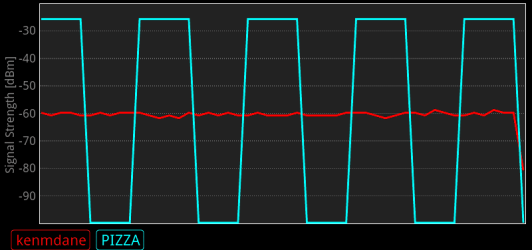
In the attached picture my router is in blue and my neighbor's is in red.

See how mine seems to be on and then off and the back on again?

Does anyone know if that is normal and why my router has a vastly different signal structure than the other one?

Thanks in advance for your feedback.

Doug
 

Attachments
  • comparr.png
    comparr.png
    9.4 KB · Views: 8

My Computer My Computer

At a glance

Win 7 Home Premium 64-bitAMD Phenom 9550 Quad 2.20 ghz8gbNVIDIA GeForce 9300 GE
Computer Manufacturer/Model Number
Desktop - HP m9517c
OS
Win 7 Home Premium 64-bit
CPU
AMD Phenom 9550 Quad 2.20 ghz
Motherboard
stock
Memory
8gb
Graphics Card(s)
NVIDIA GeForce 9300 GE
Monitor(s) Displays
HP w2558hc (25.5")
Hard Drives
1 TB - ST310003-33AS SCSI
Internet Speed
16 mpbs - Comcast
Other Info
Browser: Firefox 3.6.7 as of this writing
that appears to be a square wave, not a signal that's turning on and off. I don't know what app you're using, so I have no clue why your display is what it is.
 

My Computer My Computer

At a glance

Black Label 7 x64AMD Phenom II X6 1055t8GB Corsair XMS3Radeon HD 6790
Computer Manufacturer/Model Number
Colonel Travis 5000
OS
Black Label 7 x64
CPU
AMD Phenom II X6 1055t
Motherboard
GA-890FXA-UD5
Memory
8GB Corsair XMS3
Graphics Card(s)
Radeon HD 6790
Sound Card
X-FI Titanium Fatal1ty Pro
Monitor(s) Displays
Acer AJ15
Screen Resolution
1600x900
Hard Drives
OCZ Agility 3 SSD 120GB |
Corsair Force GT SSD 120 GB |
Barracuda 7200 SATA 300GB |
WD Caviar Green SATA 500GB
PSU
OCZ ModXStream 700W
Cooling
50 billion case fans
Internet Speed
35Mbps/35Mbps
Howdy,

I'm definitely a neophyte when it comes to understanding the technical aspects of WiFi... Only recently did I start looking at how my WiFi router (Netgear WGR-614v8) is performing compared to others in the area.

I have a WiFi analyzer program on my HTC Evo mobile and the signal that my router is emitting looks different than any other WiFi router that I've ever seen before.

In the attached picture my router is in blue and my neighbor's is in red.

See how mine seems to be on and then off and the back on again?

Does anyone know if that is normal and why my router has a vastly different signal structure than the other one?

Thanks in advance for your feedback.

Doug

My network activity does the same thing. I always thought this was the case:

The net pings your machine on a regular basis, just to make sure it's got a good link to you. You would see the same activity if you were on CAT5. It's hard to tell from your pic what kind of timeframe we're looking at, but it' looks like normal activity to me.

Just my two cents,
G
 

My Computer My Computer

At a glance

Microsoft Windows 10 Home Build 15036Intel(R) Core(TM) i7-860 @ 2.80GHz4.00 GBNVIDIA GeForce GTX 750
Computer type
PC/Desktop
Computer Manufacturer/Model Number
iBuyPower NZXT
OS
Microsoft Windows 10 Home Build 15036
CPU
Intel(R) Core(TM) i7-860 @ 2.80GHz
Motherboard
Gigabyte Technology Co., Ltd. P55-UD3L
Memory
4.00 GB
Graphics Card(s)
NVIDIA GeForce GTX 750
Sound Card
(1) Line 6 UX2 (2) Realtek High Definition Audio
Monitor(s) Displays
23" acer
Screen Resolution
1920 x 1080 x 32 bits (4294967296 colors) @ 60 Hz
Hard Drives
(1) WDC WD5000AAKS-00D2B0 ATA Device (2) Seagate FreeAgent Go 250G USB Device
Cooling
Corsair H75 liquid cooler (Very easy to install, actually)
Internet Speed
60M cable modem-->Linksys E1200-->1Gbps net card
Browser
Chrome
Other Info
This is probably the longest I've ever had a Windows machine run without having to restore it to scratch. I'm used to restoring to "factory" about every 2 yrs. I've run with Win7 since new in 2009 and only recently (Nov, '14) restored to clean up the machine from all my 'xperimenting. LOL!! I may never need another machine.

Upgraded to 10 when it was still free, then installed 2017 update.
My network activity does the same thing. I always thought this was the case:

The net pings your machine on a regular basis, just to make sure it's got a good link to you. You would see the same activity if you were on CAT5. It's hard to tell from your pic what kind of timeframe we're looking at, but it' looks like normal activity to me.

The time frame is less than a minute - no more than twenty or thirty seconds.

I guess what's important is that this isn't indicating a problem. To me WiFi is kind of like a Microwave Oven... I don't really need to know how it works to use it or benefit from it.

Thanks to both of you who replied!
 

My Computer My Computer

At a glance

Win 7 Home Premium 64-bitAMD Phenom 9550 Quad 2.20 ghz8gbNVIDIA GeForce 9300 GE
Computer Manufacturer/Model Number
Desktop - HP m9517c
OS
Win 7 Home Premium 64-bit
CPU
AMD Phenom 9550 Quad 2.20 ghz
Motherboard
stock
Memory
8gb
Graphics Card(s)
NVIDIA GeForce 9300 GE
Monitor(s) Displays
HP w2558hc (25.5")
Hard Drives
1 TB - ST310003-33AS SCSI
Internet Speed
16 mpbs - Comcast
Other Info
Browser: Firefox 3.6.7 as of this writing
Back
Top