DeFraggler vs Win7 defrag?

Well, one last off-topic question. One of the Mydefrag scripts placed my reserved MFT space at the front of the drive. I'm assuming it's fine to leave it there?
 

My Computer My Computer

At a glance

Windows 7 Home Premium 64 bit4GB DDR3
OS
Windows 7 Home Premium 64 bit
Memory
4GB DDR3
"The MFT is an integral part of NTFS (NT File System). The MFT houses data relating to every file on the hard drive and, if the file is small enough, may even house the file itself. Information stored in the MFT includes security information defining which users can access the file and how and the file’s name. If the file is small enough, the data contained in the file is saved in the MFT, but in most cases the MFT will use pointers to direct the system to the location of the file on the hard drive. The MFT resides near the front of the hard drive and a backup is automatically maintained in the middle of the hard drive."

That MFT placement should be just fine.

~Maxx~
.

da59fa57.png
 

My Computer My Computer

At a glance

Windows 7 x64 Home PremiumIntel Core i7 930 @ 2.8 Ghz Socket 1366 LGA8 GB 1366 Mhz DDR3 (PC3-10700) RAMATI Radeon 5770 1 GB DDR5 RAM
Computer Manufacturer/Model Number
HP HPE 270f
OS
Windows 7 x64 Home Premium
CPU
Intel Core i7 930 @ 2.8 Ghz Socket 1366 LGA
Motherboard
Pegatron Truckee v1.04E41
Memory
8 GB 1366 Mhz DDR3 (PC3-10700) RAM
Graphics Card(s)
ATI Radeon 5770 1 GB DDR5 RAM
Sound Card
Realtech High Definition
Monitor(s) Displays
32" Sony Bravia
Screen Resolution
1366 X 768
Hard Drives
Intel 25nm 120 GB Series 320 SSD HD Tune- 265 MBps Read/ 130 MBps Write

LaCie 1TB + 1TB RAID 0 eSATA Drive HD Tune- 160 MBps Read/ 90 MBps Write
Keyboard
Logitech Illuminated
Mouse
Logitech MX Revolution
Internet Speed
36.4 Mbps Maximum on a 37 Mbps Motorola SB501 Modem
"The MFT is an integral part of NTFS (NT File System). The MFT houses data relating to every file on the hard drive and, if the file is small enough, may even house the file itself. Information stored in the MFT includes security information defining which users can access the file and how and the file’s name. If the file is small enough, the data contained in the file is saved in the MFT, but in most cases the MFT will use pointers to direct the system to the location of the file on the hard drive. The MFT resides near the front of the hard drive and a backup is automatically maintained in the middle of the hard drive."

That MFT placement should be just fine.

~Maxx~
.
da59fa57.png

Great. Thanks.
 

My Computer My Computer

At a glance

Windows 7 Home Premium 64 bit4GB DDR3
OS
Windows 7 Home Premium 64 bit
Memory
4GB DDR3
I then used MyDefrag. I ran one of their scripts to "sort by size". It increased my used HD space from about 26GB to 50.3GB.

I have tried many different varieties of HDD Optimization software that claimed they would move files on the disk, but My Defrag is the only program that ever actually moved so many files that it caused the Volume Shadow Copy Service to react like this to prove that it was working.

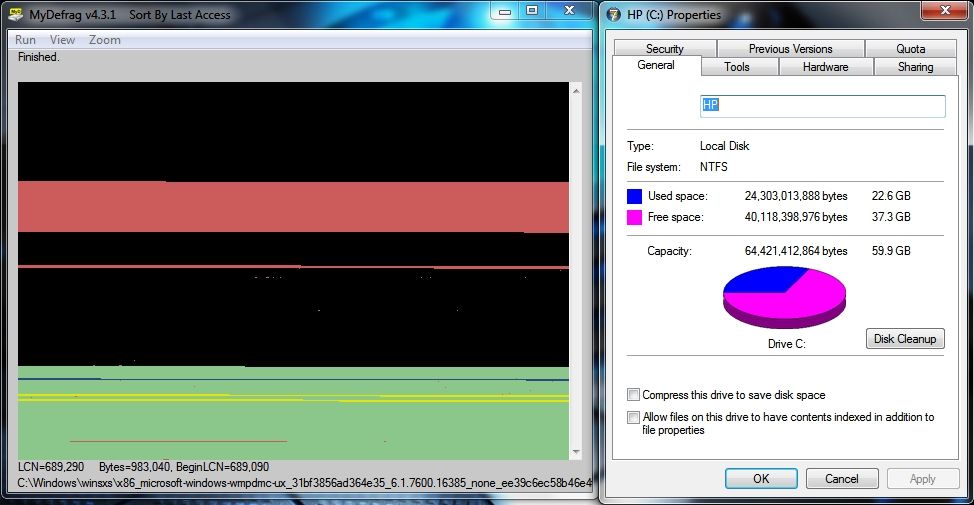
MyD is certainly not for everyone, but as I said it increased the speed with which programs open on my Win 7 x64 computer by about 42% after using the 'sort by last access' script and was the one and only 'disk optimization' program to ever make such a dramatic and noticeable difference in performance.

EDIT- I decided that after almost 4 months and a number of software program upgrades and changes that my Win 7 computer was due for another running of the MyD 'sort by last access' script which took 14 minutes and 45 seconds and did not create any additional shadow copy information on the Windows 7 partition which holds 22.6 GB due to the VSS limitations which I have set...

470a9eff.jpg


~Maxx~

ca8135dc.png
 

My Computer My Computer

At a glance

Windows 7 x64 Home PremiumIntel Core i7 930 @ 2.8 Ghz Socket 1366 LGA8 GB 1366 Mhz DDR3 (PC3-10700) RAMATI Radeon 5770 1 GB DDR5 RAM
Computer Manufacturer/Model Number
HP HPE 270f
OS
Windows 7 x64 Home Premium
CPU
Intel Core i7 930 @ 2.8 Ghz Socket 1366 LGA
Motherboard
Pegatron Truckee v1.04E41
Memory
8 GB 1366 Mhz DDR3 (PC3-10700) RAM
Graphics Card(s)
ATI Radeon 5770 1 GB DDR5 RAM
Sound Card
Realtech High Definition
Monitor(s) Displays
32" Sony Bravia
Screen Resolution
1366 X 768
Hard Drives
Intel 25nm 120 GB Series 320 SSD HD Tune- 265 MBps Read/ 130 MBps Write

LaCie 1TB + 1TB RAID 0 eSATA Drive HD Tune- 160 MBps Read/ 90 MBps Write
Keyboard
Logitech Illuminated
Mouse
Logitech MX Revolution
Internet Speed
36.4 Mbps Maximum on a 37 Mbps Motorola SB501 Modem
Back
Top