Solved Unidentified Network; No Network Access; Limited Access

Tired

New member
Local time
3:42 AM
Messages
13
I have a Dell Inspiron 1750 with Windows Home Premium x64. This problem began occurring on Thursday after my brother put his hard drive from his laptop which runs Vista, into my laptop. I figured it was a stupid idea, but he stayed home and I went to school that day. (His CMOS battery needs to be replaced)

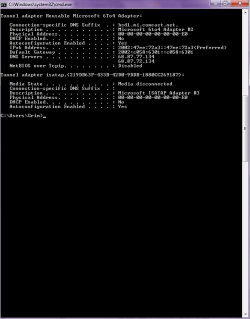
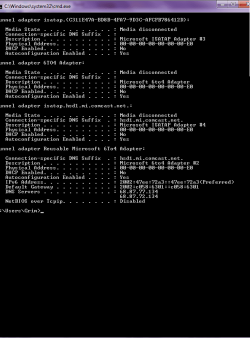
So whenever I try to connect wirelessly to my home network, my laptop considers it a public network and I have limited connectivity, which is pretty much no connectivity. Although when I connect the ethernet cord directly to my laptop, everything works fine. Not sure if that helped so let me know if you all need anything else. Here is my ipconfig/all, which is quite long.

Just so you know, I've already tried adding things to the {GUID} codes or whatever.

Any help is appreciated.
 

Attachments
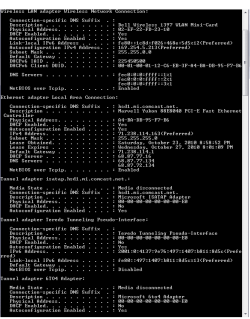
  • ipconfig.png
    ipconfig.png
    14.4 KB · Views: 183
  • ipconfig2.png
    ipconfig2.png
    12 KB · Views: 72

My Computer My Computer

Computer Manufacturer/Model Number
Dell Inc/ Inspiron 1750
OS
Windows 7 Home Premium x64

My Computer My Computer

Computer Manufacturer/Model Number
Samsung NP550P5C-S02IN
OS
Windows 7 Ultimate - 64-bit | Windows 8 Pro - 64-bit
CPU
Intel® Core™ i7 Processor 3,610QM (2.30Hz, 6MB L3 Cach
Memory
8 GB
Graphics Card(s)
NVIDIA® GeForce® GT 650M 2GB Graphics, Optimus™ techno
Sound Card
SoundAlive™ JBL 3 Speakers (With sub-Woofer)
Monitor(s) Displays
39.62cm (15.6) SuperBright 300nit HD+ LED Display
Screen Resolution
1,600 x 900, Anti-Reflective
Hard Drives
1TB S-ATA II Hard Drive (5,400RPM)
Sorry, Cap'n. Nothing there worked. Thanks for the suggestion though. Actually tried those already.
 

My Computer My Computer

Computer Manufacturer/Model Number
Dell Inc/ Inspiron 1750
OS
Windows 7 Home Premium x64
I have a Dell Inspiron 1750 with Windows Home Premium x64. This problem began occurring on Thursday after my brother put his hard drive from his laptop which runs Vista, into my laptop. I figured it was a stupid idea, but he stayed home and I went to school that day. (His CMOS battery needs to be replaced)

So whenever I try to connect wirelessly to my home network, my laptop considers it a public network and I have limited connectivity, which is pretty much no connectivity. Although when I connect the ethernet cord directly to my laptop, everything works fine. Not sure if that helped so let me know if you all need anything else. Here is my ipconfig/all, which is quite long.

Just so you know, I've already tried adding things to the {GUID} codes or whatever.

Any help is appreciated.

The problem here is that your wireless connection isn't getting a default gateway from the router. Have you tried resetting the router yet? If not you should do so.

After that go into the Network and sharing center, go upper left to "manage wireless connections" delate the old wireless credential and create a new one for this connection.

Try running this batch file which will reset winsock, reset the TCP/IP stack and release renew your IP.

Download Renew IP + Reset Winsock Batch File

After that try connecting with the wireless connection and post the ipconfig /all here again.
 
Last edited:

My Computer My Computer

Computer type
PC/Desktop
Computer Manufacturer/Model Number
Home built
OS
Windows 7 Ult, Windows 8.1 Pro,
CPU
Q9650-4.275GHz, E8600 4.5GHz, E6750-3.8GHz
Motherboard
Evga 780i FTW
Memory
G.Skill PC2 9600 1200Mhz 5 5 5 15 2T
Graphics Card(s)
GTX480
Sound Card
Asus Xonar D2
Monitor(s) Displays
HannsG
Screen Resolution
1680X1050
Hard Drives
GSkill Phoenix Pro 120GB SSD
PSU
ThermalTake Toughpower 1000Watt modular
Case
ThermalTake XaserV
Cooling
Xigmatek S1283
Keyboard
Logitech G15
Mouse
Logitech G9
Internet Speed
T1
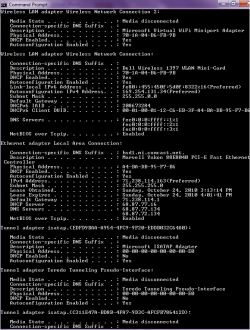
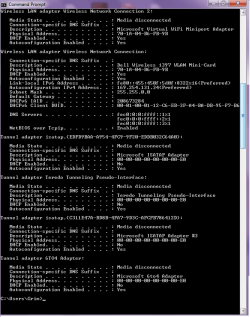
Alright, I reset the router before, no dice. During the whole reset batch TCIP thing or whatever, had a few errors. Such as, not being able to renew/release my ip without having connection to Local Area Connection 2, and such. But since I temporarily lost connection to the Ethernet connection, I'm guessing progress was either made or lost. Regardless, here's the ipconfig/all after all of that. Tell me if it looks exactly the same.
 

Attachments

  • ipconfig3.png
    ipconfig3.png
    21.1 KB · Views: 46
  • ipconfig4.png
    ipconfig4.png
    13.7 KB · Views: 16

My Computer My Computer

Computer Manufacturer/Model Number
Dell Inc/ Inspiron 1750
OS
Windows 7 Home Premium x64
Edit:
I already tried resetting the router and such. I opened the program as Administrator and it reset the TKIP and whatnot. Here's the ipconfig/all after that.
 

Attachments

  • ipconfig5.png
    ipconfig5.png
    18.7 KB · Views: 25
  • ipconfig6.png
    ipconfig6.png
    13 KB · Views: 7

My Computer My Computer

Computer Manufacturer/Model Number
Dell Inc/ Inspiron 1750
OS
Windows 7 Home Premium x64
Edit:


I already tried resetting the router and such. I opened the program as Administrator and it reset the TKIP and whatnot. Here's the ipconfig/all after that.


That batch file isn't for resetting TKIP which is a security encryption standard for wireless connections.

The batch file resets winsock,resets the TCP/IP stack and releases and renews your IP.
You should try using WPA2 security and AES encryption rather than using TKIP and WEP.

As it stands you still aren't getting anything from the router for the wireless connection. But, I can see that your wired connection is working and probably is plugged in.

If you are trying to do this with the eithernet cable plugged in you need to unplug it. Windows 7 will choose the wired connection over the wireless when the eithernet cable is plugged in.

One other thing, do you have iTunes or Adobe photo suite installed on this machine?
 

My Computer My Computer

Computer type
PC/Desktop
Computer Manufacturer/Model Number
Home built
OS
Windows 7 Ult, Windows 8.1 Pro,
CPU
Q9650-4.275GHz, E8600 4.5GHz, E6750-3.8GHz
Motherboard
Evga 780i FTW
Memory
G.Skill PC2 9600 1200Mhz 5 5 5 15 2T
Graphics Card(s)
GTX480
Sound Card
Asus Xonar D2
Monitor(s) Displays
HannsG
Screen Resolution
1680X1050
Hard Drives
GSkill Phoenix Pro 120GB SSD
PSU
ThermalTake Toughpower 1000Watt modular
Case
ThermalTake XaserV
Cooling
Xigmatek S1283
Keyboard
Logitech G15
Mouse
Logitech G9
Internet Speed
T1
I only have Adobe Reader 9. No Photo Suite or iTunes. Also, I'm not sure how to correctly change my connection to anything other than WEP. It seems like the router has made up its mind to stay WEP.

For some reason, my IP won't reset if all my networks aren't working or something. "No operation can be performed on Local Area Connection while it has its media disconnected.". I'll give you the new ipconfig/all after I reset.
 

My Computer My Computer

Computer Manufacturer/Model Number
Dell Inc/ Inspiron 1750
OS
Windows 7 Home Premium x64
Try deleting the wireless connection credentials...
Editing the credentials sometimes isn't enough.

zzz2496

Edit: I see that your network adapter is bridging you, it's not doing NAT per-say... Until you change it to do NAT, I don't think you'd be able to do anything...
 

My Computer My Computer

Computer Manufacturer/Model Number
Self Built
OS
Windows7 Ultimate 64bit
CPU
Intel Core 2 Quad Q6600
Motherboard
Abit IN9-32X-MMAX
Memory
DDR2 Adata 4GB
Graphics Card(s)
Nvidia GeForce GTX 285 1024 and Nvidia GeForce 8800GT 512
Sound Card
Asus Xonar HDAV 1.3
Monitor(s) Displays
Dell 2407WFP and BenQ 2400v and Philips 150v3
Screen Resolution
3840x1200 and 1024x768
Hard Drives
2 WDC 1TB
1 WDC 1.5TB
1 WDC 640GB
1 WDC 320GB
1 Seagate 200GB
PSU
Corsair TX 850W
Case
Cooler Master HAF932
Cooling
Arctic Cooling Freezer Extreme and plenty of fans...
Keyboard
MicrosoftNaturalKeyboard 4000/Apple Alu keyboard/Dinovo mini
Mouse
Logitech G5/MarbleMouseTrackball/PerformanceMX/SpacePilotPRO
Internet Speed
1.5Mbps down/384Kbps up
Other Info
APC SURT 1000XL
Logitech Z-560
Wiimote
Mikrotik Router
Linksys (now Cisco) SD2008 8 port Gigabit switch
Linksys WRT54G (acting as AP)
Apple wireless Aluminium keyboard
Apple Magic Mouse
Xbox360 wired controller
Not sure what you're talking about,zzz2496. Here's the ipconfig/all after running that program again. I reset my release/renew'd my ip with the Ethernet connection, then ran the program with the bugged wireless connection.
 

Attachments

  • ipconfig7.png
    ipconfig7.png
    21.7 KB · Views: 49

My Computer My Computer

Computer Manufacturer/Model Number
Dell Inc/ Inspiron 1750
OS
Windows 7 Home Premium x64
Ok good, I see you unplugged the eithernet cable.

There isn't a thing coming from your router, so either the driver is hosed or the routers wireless isn't working. Suggest you reset the router again and uninstall and reinstall your WLAN driver.

Be sure and go into the routers settings and make sure that wireless is turned on, also make sure that the wireless switch on the laptop is turned on also. Don't forget to delate the old wireless credential from "manage wireless connections" in the Network and Sharing Center.

If the router only has WEP then set up your new connection manually and designate the type of security and encryption when you do that. Please post another ipconfig /all after that.
 

My Computer My Computer

Computer type
PC/Desktop
Computer Manufacturer/Model Number
Home built
OS
Windows 7 Ult, Windows 8.1 Pro,
CPU
Q9650-4.275GHz, E8600 4.5GHz, E6750-3.8GHz
Motherboard
Evga 780i FTW
Memory
G.Skill PC2 9600 1200Mhz 5 5 5 15 2T
Graphics Card(s)
GTX480
Sound Card
Asus Xonar D2
Monitor(s) Displays
HannsG
Screen Resolution
1680X1050
Hard Drives
GSkill Phoenix Pro 120GB SSD
PSU
ThermalTake Toughpower 1000Watt modular
Case
ThermalTake XaserV
Cooling
Xigmatek S1283
Keyboard
Logitech G15
Mouse
Logitech G9
Internet Speed
T1
@Tired

Here's what I understand about your situation:

Looking at screenshots (see it for your self), your ethernet got 71.x.y.z IP address. This IP address is a public IP, it's what distinguishes your computer uniquely on the world wide web. This IP comes from your ISP, usually they only assign 1 IP per customer, which is one of your computers. Now, this is the practice of several ISPs (I don't know if yours is doing this or not), they might lock an IP address to a certain NIC (be it an ethernet controller or a Wifi interface). Now, how come your computer got an IP directly from your ISP? I assume that your modem/router (I suspect you got it from your ISP) is "bridging" you directly to the ISP's network (read my guides about firewall to understand what NAT/firewall is). In bridge mode, your computer is [as if] connected directly to your ISP, which then making it ask IP address directly from your ISPs DHCP server. In this mode, there can be only ONE computer active at all time because ISP limitation.

To solve this, I suppose you can log in to your router and change it's configuration, so that it will "masquerade" you from the ISP's net and activating a local DHCP server, enabling you to share the internet connection with [close to] zero configuration.

zzz2496
 

My Computer My Computer

Computer Manufacturer/Model Number
Self Built
OS
Windows7 Ultimate 64bit
CPU
Intel Core 2 Quad Q6600
Motherboard
Abit IN9-32X-MMAX
Memory
DDR2 Adata 4GB
Graphics Card(s)
Nvidia GeForce GTX 285 1024 and Nvidia GeForce 8800GT 512
Sound Card
Asus Xonar HDAV 1.3
Monitor(s) Displays
Dell 2407WFP and BenQ 2400v and Philips 150v3
Screen Resolution
3840x1200 and 1024x768
Hard Drives
2 WDC 1TB
1 WDC 1.5TB
1 WDC 640GB
1 WDC 320GB
1 Seagate 200GB
PSU
Corsair TX 850W
Case
Cooler Master HAF932
Cooling
Arctic Cooling Freezer Extreme and plenty of fans...
Keyboard
MicrosoftNaturalKeyboard 4000/Apple Alu keyboard/Dinovo mini
Mouse
Logitech G5/MarbleMouseTrackball/PerformanceMX/SpacePilotPRO
Internet Speed
1.5Mbps down/384Kbps up
Other Info
APC SURT 1000XL
Logitech Z-560
Wiimote
Mikrotik Router
Linksys (now Cisco) SD2008 8 port Gigabit switch
Linksys WRT54G (acting as AP)
Apple wireless Aluminium keyboard
Apple Magic Mouse
Xbox360 wired controller
Those IP's made no sense to me either zzzz LOL. It's like the router isn't even there which I why I keep telling the OP to reset the router "if there is one".
 

My Computer My Computer

Computer type
PC/Desktop
Computer Manufacturer/Model Number
Home built
OS
Windows 7 Ult, Windows 8.1 Pro,
CPU
Q9650-4.275GHz, E8600 4.5GHz, E6750-3.8GHz
Motherboard
Evga 780i FTW
Memory
G.Skill PC2 9600 1200Mhz 5 5 5 15 2T
Graphics Card(s)
GTX480
Sound Card
Asus Xonar D2
Monitor(s) Displays
HannsG
Screen Resolution
1680X1050
Hard Drives
GSkill Phoenix Pro 120GB SSD
PSU
ThermalTake Toughpower 1000Watt modular
Case
ThermalTake XaserV
Cooling
Xigmatek S1283
Keyboard
Logitech G15
Mouse
Logitech G9
Internet Speed
T1
Those IP's made no sense to me either zzzz LOL. It's like the router isn't even there which I why I keep telling the OP to reset the router "if there is one".
I suspect Tired is using a "modem" instead of a "router"...

zzz2496
 

My Computer My Computer

Computer Manufacturer/Model Number
Self Built
OS
Windows7 Ultimate 64bit
CPU
Intel Core 2 Quad Q6600
Motherboard
Abit IN9-32X-MMAX
Memory
DDR2 Adata 4GB
Graphics Card(s)
Nvidia GeForce GTX 285 1024 and Nvidia GeForce 8800GT 512
Sound Card
Asus Xonar HDAV 1.3
Monitor(s) Displays
Dell 2407WFP and BenQ 2400v and Philips 150v3
Screen Resolution
3840x1200 and 1024x768
Hard Drives
2 WDC 1TB
1 WDC 1.5TB
1 WDC 640GB
1 WDC 320GB
1 Seagate 200GB
PSU
Corsair TX 850W
Case
Cooler Master HAF932
Cooling
Arctic Cooling Freezer Extreme and plenty of fans...
Keyboard
MicrosoftNaturalKeyboard 4000/Apple Alu keyboard/Dinovo mini
Mouse
Logitech G5/MarbleMouseTrackball/PerformanceMX/SpacePilotPRO
Internet Speed
1.5Mbps down/384Kbps up
Other Info
APC SURT 1000XL
Logitech Z-560
Wiimote
Mikrotik Router
Linksys (now Cisco) SD2008 8 port Gigabit switch
Linksys WRT54G (acting as AP)
Apple wireless Aluminium keyboard
Apple Magic Mouse
Xbox360 wired controller
Those IP's made no sense to me either zzzz LOL. It's like the router isn't even there which I why I keep telling the OP to reset the router "if there is one".
I suspect Tired is using a "modem" instead of a "router"...

zzz2496

If only I could actually see these so called routers I'm sure it would be good for a laugh. I think maybe a call to the ISP would do more good in these cases. :confused:
 

My Computer My Computer

Computer type
PC/Desktop
Computer Manufacturer/Model Number
Home built
OS
Windows 7 Ult, Windows 8.1 Pro,
CPU
Q9650-4.275GHz, E8600 4.5GHz, E6750-3.8GHz
Motherboard
Evga 780i FTW
Memory
G.Skill PC2 9600 1200Mhz 5 5 5 15 2T
Graphics Card(s)
GTX480
Sound Card
Asus Xonar D2
Monitor(s) Displays
HannsG
Screen Resolution
1680X1050
Hard Drives
GSkill Phoenix Pro 120GB SSD
PSU
ThermalTake Toughpower 1000Watt modular
Case
ThermalTake XaserV
Cooling
Xigmatek S1283
Keyboard
Logitech G15
Mouse
Logitech G9
Internet Speed
T1
I'm completely confused now. Moreso than I was before. How exactly am I supposed to configure my router settings and such? I have both a modem and a router. The modem isn't wireless, thus it's unaffected by this issue. The wireless router, however, was not bought from my ISP. It's just a regular NETGEAR router. As for manually setting up a connection, would I first have to put in the WEP code in order to change it to something else?

Still have no idea what you're talking about, zzz2496.
 

My Computer My Computer

Computer Manufacturer/Model Number
Dell Inc/ Inspiron 1750
OS
Windows 7 Home Premium x64
Can you tell me the make/model of your router? Can you take a picture of "what ethernet cable goes where" (or tell me what ethernet cable goes where)?

zzz2496
 

My Computer My Computer

Computer Manufacturer/Model Number
Self Built
OS
Windows7 Ultimate 64bit
CPU
Intel Core 2 Quad Q6600
Motherboard
Abit IN9-32X-MMAX
Memory
DDR2 Adata 4GB
Graphics Card(s)
Nvidia GeForce GTX 285 1024 and Nvidia GeForce 8800GT 512
Sound Card
Asus Xonar HDAV 1.3
Monitor(s) Displays
Dell 2407WFP and BenQ 2400v and Philips 150v3
Screen Resolution
3840x1200 and 1024x768
Hard Drives
2 WDC 1TB
1 WDC 1.5TB
1 WDC 640GB
1 WDC 320GB
1 Seagate 200GB
PSU
Corsair TX 850W
Case
Cooler Master HAF932
Cooling
Arctic Cooling Freezer Extreme and plenty of fans...
Keyboard
MicrosoftNaturalKeyboard 4000/Apple Alu keyboard/Dinovo mini
Mouse
Logitech G5/MarbleMouseTrackball/PerformanceMX/SpacePilotPRO
Internet Speed
1.5Mbps down/384Kbps up
Other Info
APC SURT 1000XL
Logitech Z-560
Wiimote
Mikrotik Router
Linksys (now Cisco) SD2008 8 port Gigabit switch
Linksys WRT54G (acting as AP)
Apple wireless Aluminium keyboard
Apple Magic Mouse
Xbox360 wired controller
Netgear Wireless-N Router WNR 2000 v1.

The Ethernet Cable is basic. There's a yellow area around where you're supposed to be the Ethernet Cable from the router to the modem. Other than that, there are 4 other cable jacks(or something) where I guess you can put multiple Ethernet Cables from the router to your PC.
 

My Computer My Computer

Computer Manufacturer/Model Number
Dell Inc/ Inspiron 1750
OS
Windows 7 Home Premium x64
You do plug the cable from modem to this yellow port, right?

zzz2496
 

My Computer My Computer

Computer Manufacturer/Model Number
Self Built
OS
Windows7 Ultimate 64bit
CPU
Intel Core 2 Quad Q6600
Motherboard
Abit IN9-32X-MMAX
Memory
DDR2 Adata 4GB
Graphics Card(s)
Nvidia GeForce GTX 285 1024 and Nvidia GeForce 8800GT 512
Sound Card
Asus Xonar HDAV 1.3
Monitor(s) Displays
Dell 2407WFP and BenQ 2400v and Philips 150v3
Screen Resolution
3840x1200 and 1024x768
Hard Drives
2 WDC 1TB
1 WDC 1.5TB
1 WDC 640GB
1 WDC 320GB
1 Seagate 200GB
PSU
Corsair TX 850W
Case
Cooler Master HAF932
Cooling
Arctic Cooling Freezer Extreme and plenty of fans...
Keyboard
MicrosoftNaturalKeyboard 4000/Apple Alu keyboard/Dinovo mini
Mouse
Logitech G5/MarbleMouseTrackball/PerformanceMX/SpacePilotPRO
Internet Speed
1.5Mbps down/384Kbps up
Other Info
APC SURT 1000XL
Logitech Z-560
Wiimote
Mikrotik Router
Linksys (now Cisco) SD2008 8 port Gigabit switch
Linksys WRT54G (acting as AP)
Apple wireless Aluminium keyboard
Apple Magic Mouse
Xbox360 wired controller
Yes.
 

My Computer My Computer

Computer Manufacturer/Model Number
Dell Inc/ Inspiron 1750
OS
Windows 7 Home Premium x64
Back
Top