Weird display problem

drazenn

New member
Power User
Local time
6:28 PM
Messages
177
Location
zagreb,croatia
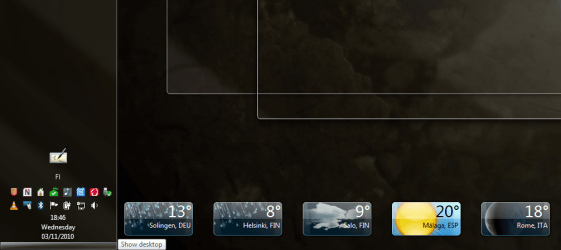
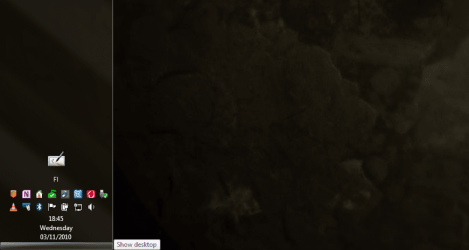
Since few days ago I have a weird display problem,it is like my PC is playing now you see me/now you don't with me.
When I log on after start,everything is ok,I can see all my gadgets on a desktop,but for example when I open Firefox(or any other program),and press show Show Desktop button,there is no gadgets on a screen.I press it again-gadgets are here,and then if I press Show Desktop again-there are not gadgets on the screen,and if I would do it for a day,it is the same result every time-once gadgets are here,and another time are not.
 

My Computer My Computer

At a glance

Windows 7 Ultimate x64[email protected] (non overclocked)8gb DDR3Asus 6850
Computer type
PC/Desktop
Computer Manufacturer/Model Number
intel x58 selfmade
OS
Windows 7 Ultimate x64
CPU
[email protected] (non overclocked)
Motherboard
x58
Memory
8gb DDR3
Graphics Card(s)
Asus 6850
Monitor(s) Displays
lg 22"
Hard Drives
1TB
PSU
Corsair 650w
Case
Gigabyte
Cooling
Scytech
Keyboard
noname
Mouse
Logitech wireless xy
Internet Speed
70GB
Antivirus
Windows Defender
Browser
Chrome (default)

My Computer My Computer

At a glance

Windows 10, Home Clean InstallIntel Core2 processsor Q8200(2.33Ghz 1333FSB)...6 gbATI Radeon 256MB HD3650
Computer type
PC/Desktop
Computer Manufacturer/Model Number
Dell XPS 420
OS
Windows 10, Home Clean Install
CPU
Intel Core2 processsor Q8200(2.33Ghz 1333FSB) Quad Core Tech
Motherboard
Dell
Memory
6 gb
Graphics Card(s)
ATI Radeon 256MB HD3650
Sound Card
Intergrated 7.1 Channel Audio
Monitor(s) Displays
Dell SP2009W 20"
Hard Drives
640 GB Serial ATA Hard drive
Cooling
Fan
Keyboard
Dell USB Keyboard
Mouse
Dell Premium Optical USB
Internet Speed
DSL 2.85
Since few days ago I have a weird display problem,it is like my PC is playing now you see me/now you don't with me.
When I log on after start,everything is ok,I can see all my gadgets on a desktop,but for example when I open Firefox(or any other program),and press show Show Desktop button,there is no gadgets on a screen.I press it again-gadgets are here,and then if I press Show Desktop again-there are not gadgets on the screen,and if I would do it for a day,it is the same result every time-once gadgets are here,and another time are not.

Hello Drazenn,

This is normal for "Show Desktop".

When you click on the "Show Desktop" button on the taskbar, it clears everything from the desktop to show only the desktop and the files, folders, or shortcuts that you have on the desktop. Nothing else.

You may be thinking of Aero Peek where you just hover the mouse pointer over the "Show Desktop" button on the taskbar instead. Doing this will only make all open windows transparent without affecting gadgets.

Hope this helps,
Shawn
 

My Computer My Computer

At a glance

64-bit Windows 11 Pro for WorkstationsIntel i7-8700K OC'd to 5 GHz64 GB (4x16GB) G.SKILL TridentZ RGB DDR4 3600...ASUS ROG-STRIX-GTX1080TI-O11G-GAMING
Computer type
PC/Desktop
Computer Manufacturer/Model Number
Self built custom
OS
64-bit Windows 11 Pro for Workstations
CPU
Intel i7-8700K OC'd to 5 GHz
Motherboard
ASUS ROG Maximus XI Formula Z390
Memory
64 GB (4x16GB) G.SKILL TridentZ RGB DDR4 3600 MHz
Graphics Card(s)
ASUS ROG-STRIX-GTX1080TI-O11G-GAMING
Sound Card
Integrated
Monitor(s) Displays
2 x Samsung Odyssey G7 27"
Screen Resolution
2560x1440
Hard Drives
1TB Samsung 990 PRO M.2,
4TB Samsung 990 PRO PRO M.2,
TerraMaster F8 SSD Plus NAS
PSU
Seasonic Prime Titanium 850W
Case
Thermaltake Core P3
Cooling
Corsair Hydro H115i
Keyboard
Logitech wireless K800
Mouse
Logitech MX Master 4
Internet Speed
2 Gb/s Download and 100 Mb/s Upload
Antivirus
Malwarebyte Anti-Malware Premium
Browser
Google Chrome
Other Info
Logitech Z625 speaker system,
Logitech BRIO 4K Pro webcam,
HP Color LaserJet Pro MFP M477fdn,
APC SMART-UPS RT 1000 XL - SURT1000XLI,
Galaxy S23 Plus phone
Hmm on my machine, the gadgets always show with aero peek OR by pressing the show desktop, they are always there, never dissapear.

Though I do not have FF installed to see if that affects it.
 

My Computer My Computer

At a glance

Windows 7 x64 Ultimatei7 96012 Gig Corsair DominatorNvidia 480
Computer Manufacturer/Model Number
Scratch built
OS
Windows 7 x64 Ultimate
CPU
i7 960
Motherboard
Asus P6X58D
Memory
12 Gig Corsair Dominator
Graphics Card(s)
Nvidia 480
Sound Card
Maudio Delta 44 + breakout box
Monitor(s) Displays
Dell UltraSharp U2410 24in and Samsung 21 dual monitors
Screen Resolution
1920x1200 and 1280x1024
Hard Drives
Primary: Intel X-25M G2 160G SSD
Secondary: Segate baracuda 1.0 TB
HDs in AHCI mode.
PSU
Corasair TX850
Case
Cooler Master HAF
Cooling
Corsair H50
Keyboard
Logitech G15 + N52 game pad
Mouse
Logitech MX518
Internet Speed
15kbs down 4.5kbps up
Other Info
WEI 7.6
CPU & RAM 7.6
Graphics 7.9
Hard disk 7.7
We may not be talking about the same thing, Shawn. When I use the show desktop, I see the Gadgets. When I hoover, I also see gadgets
 

My Computer My Computer

At a glance

Windows 10, Home Clean InstallIntel Core2 processsor Q8200(2.33Ghz 1333FSB)...6 gbATI Radeon 256MB HD3650
Computer type
PC/Desktop
Computer Manufacturer/Model Number
Dell XPS 420
OS
Windows 10, Home Clean Install
CPU
Intel Core2 processsor Q8200(2.33Ghz 1333FSB) Quad Core Tech
Motherboard
Dell
Memory
6 gb
Graphics Card(s)
ATI Radeon 256MB HD3650
Sound Card
Intergrated 7.1 Channel Audio
Monitor(s) Displays
Dell SP2009W 20"
Hard Drives
640 GB Serial ATA Hard drive
Cooling
Fan
Keyboard
Dell USB Keyboard
Mouse
Dell Premium Optical USB
Internet Speed
DSL 2.85
IMO Brink is right. As far as I can remember, this is the way Seven has always worked. Aero Peek shows the desktop with gadgets, Show Desktop hides the gadgets.

Kari

EDIT: this of course applies only to those gadgets using sidebar.exe process. Behaviour of other gadgets can vary.
 

My Computer My Computer

At a glance

Windows 10 Pro x64 EN-GB1.6 GHz Intel Core i7-720QM Processor6 GBATI Mobility Radeon HD 5850 Graphics
Computer type
Laptop
Computer Manufacturer/Model Number
HP ENVY 17-1150eg
OS
Windows 10 Pro x64 EN-GB
CPU
1.6 GHz Intel Core i7-720QM Processor
Memory
6 GB
Graphics Card(s)
ATI Mobility Radeon HD 5850 Graphics
Sound Card
Beats sound system with integrated subwoofer
Monitor(s) Displays
17" laptop display, 22" LED and 32" Full HD TV through HDMI
Screen Resolution
1600*900 (1), 1920*1080 (2&3)
Hard Drives
Internal: 2 x 500 GB SATA Hard Disk Drive 7200 rpm
External: 2TB for backups, 3TB USB3 network drive for media
Cooling
As Envy runs a bit warm, I have it on a Cooler Master pad
Keyboard
Logitech diNovo Media Desktop Laser (bluetooth)
Mouse
Logitech Performance Mouse MX
Internet Speed
50/10 Mbps VDSL
Antivirus
Windows Defender 4.3.9431.0
Browser
Maxthon 3.5.2., IE11
Hey Kari, good to see you
I think that there is some sort of misunderstanding somewhere. I have just tried on my computer and it shows gadgets both ways.
 

My Computer My Computer

At a glance

Windows 10, Home Clean InstallIntel Core2 processsor Q8200(2.33Ghz 1333FSB)...6 gbATI Radeon 256MB HD3650
Computer type
PC/Desktop
Computer Manufacturer/Model Number
Dell XPS 420
OS
Windows 10, Home Clean Install
CPU
Intel Core2 processsor Q8200(2.33Ghz 1333FSB) Quad Core Tech
Motherboard
Dell
Memory
6 gb
Graphics Card(s)
ATI Radeon 256MB HD3650
Sound Card
Intergrated 7.1 Channel Audio
Monitor(s) Displays
Dell SP2009W 20"
Hard Drives
640 GB Serial ATA Hard drive
Cooling
Fan
Keyboard
Dell USB Keyboard
Mouse
Dell Premium Optical USB
Internet Speed
DSL 2.85
When I hoover gadgets disappear with windows. Click on it gadget stays open windows disappear.
My gadgets aren't the Windows 7 downloaded ones though.

Never tried it before clicking.
 

My Computer My Computer

At a glance

Windows7 Pro 64bit SP-1; Windows XP Pro 32bitIntel Core i7-870 Lynnfield 2.93GHz LGA 1156 ...8GB@1400MHz Crucial Ballistix DDR3-1600 4x2GBASUS ENGTX460 DirectCU/2DI/1GD5 1GB 256-bit G...
Computer Manufacturer/Model Number
Hopalong/ Godzilla
OS
Windows7 Pro 64bit SP-1; Windows XP Pro 32bit
CPU
Intel Core i7-870 Lynnfield 2.93GHz LGA 1156 95W Quad-Core
Motherboard
ASUS P7P55D-E PRO
Memory
8GB@1400MHz Crucial Ballistix DDR3-1600 4x2GB
Graphics Card(s)
ASUS ENGTX460 DirectCU/2DI/1GD5 1GB 256-bit GDDR5
Sound Card
VIA Onboard
Monitor(s) Displays
Asus VS248H-P 24"; Samsung SyncMaster 941BW 19"ws
Screen Resolution
1920x1080; 1440x900
Hard Drives
Samsung 830 120GB SSD
Intel 320 120GB SSD
Western Digital Caviar Black WD7501AALS 750GB 7200 RPM SATA 3.0Gb/s
Western Digital Caviar Black WD6401AALS 640GB 7200 RPM SATA 3.0Gb/s
PSU
COOLER MASTER Silent Pro RS850-AMBAJ3-US 850W Modular
Case
COOLER MASTER HAF 932 RC-932-KKN5-GP Black
Cooling
Scythe "Mugen-2 Rev.B" (2 ScytheKaze-Jyuni PWM fans)
Keyboard
Logitech K-320
Mouse
Kensington
Antivirus
Avast Inernet Suite
Browser
IE 9 ; Chrome
I can ATM only test it with this laptop of mine, and both virtual Sevens I have installed here, one in VPC and other in VirtualBox. All three showning the gadgets when hovering the mouse over Show Desktop-button i.e. using Aero Peek, all three hiding gadgets when clicking Show Desktop.

EDIT: the above mentioned is not completely true, answered too hastily. VPC-7 does not let me use Aero, it shows the gadgets when pressing Show Desktop. The other virtual 7 in my laptop is not VirtualBox, it's VMWare, and it behaves like my laptop: Show Desktop hides the gadgets, Aero Peek shows them.
 
Last edited:

My Computer My Computer

At a glance

Windows 10 Pro x64 EN-GB1.6 GHz Intel Core i7-720QM Processor6 GBATI Mobility Radeon HD 5850 Graphics
Computer type
Laptop
Computer Manufacturer/Model Number
HP ENVY 17-1150eg
OS
Windows 10 Pro x64 EN-GB
CPU
1.6 GHz Intel Core i7-720QM Processor
Memory
6 GB
Graphics Card(s)
ATI Mobility Radeon HD 5850 Graphics
Sound Card
Beats sound system with integrated subwoofer
Monitor(s) Displays
17" laptop display, 22" LED and 32" Full HD TV through HDMI
Screen Resolution
1600*900 (1), 1920*1080 (2&3)
Hard Drives
Internal: 2 x 500 GB SATA Hard Disk Drive 7200 rpm
External: 2TB for backups, 3TB USB3 network drive for media
Cooling
As Envy runs a bit warm, I have it on a Cooler Master pad
Keyboard
Logitech diNovo Media Desktop Laser (bluetooth)
Mouse
Logitech Performance Mouse MX
Internet Speed
50/10 Mbps VDSL
Antivirus
Windows Defender 4.3.9431.0
Browser
Maxthon 3.5.2., IE11
When you click on the "Show Desktop" button on the taskbar, it clears everything from the desktop to show only the desktop and the files, folders, or shortcuts that you have on the desktop. Nothing else.

You may be thinking of Aero Peek where you just hover the mouse pointer over the "Show Desktop" button on the taskbar instead. Doing this will only make all open windows transparent without affecting gadgets.

No,no,no..you haven't understood me because of my weak English.
What I meant to say is when I press "Show Desktop",not just to hover over it.
I know it should clear everything,and it does it,but it's weird it clears gadgets too.

I know what aero peek is,and when I just hover over "Show Desktop",I can still see gadgets,but problem is when I press it.

So,let's say I open Mozilla Thunderbird,and if I need to access SMS gadget so I press "Show Desktop" so I can access it,right?It used to work like that before,but not any more.
Basically"Show Desktop" minimize every open window,but what it does not usually do is not clearing gadgets.If I click on minimize on explorer window,it does not affects gadgets then.

I've just tried to press"Show Desktop" without even opening any window before that,and what it does is once it hides gadgets,and unhides when pressed again.

I hoped maybe someone had this problem before.
 

My Computer My Computer

At a glance

Windows 7 Ultimate x64[email protected] (non overclocked)8gb DDR3Asus 6850
Computer type
PC/Desktop
Computer Manufacturer/Model Number
intel x58 selfmade
OS
Windows 7 Ultimate x64
CPU
[email protected] (non overclocked)
Motherboard
x58
Memory
8gb DDR3
Graphics Card(s)
Asus 6850
Monitor(s) Displays
lg 22"
Hard Drives
1TB
PSU
Corsair 650w
Case
Gigabyte
Cooling
Scytech
Keyboard
noname
Mouse
Logitech wireless xy
Internet Speed
70GB
Antivirus
Windows Defender
Browser
Chrome (default)
When you click on the "Show Desktop" button on the taskbar, it clears everything from the desktop to show only the desktop and the files, folders, or shortcuts that you have on the desktop. Nothing else.

You may be thinking of Aero Peek where you just hover the mouse pointer over the "Show Desktop" button on the taskbar instead. Doing this will only make all open windows transparent without affecting gadgets.

No,no,no..you haven't understood me because of my weak English.
What I meant to say is when I press "Show Desktop",not just to hover over it.
I know it should clear everything,and it does it,but it's weird it clears gadgets too.

I know what aero peek is,and when I just hover over "Show Desktop",I can still see gadgets,but problem is when I press it.

So,let's say I open Mozilla Thunderbird,and if I need to access SMS gadget so I press "Show Desktop" so I can access it,right?It used to work like that before,but not any more.
Basically"Show Desktop" minimize every open window,but what it does not usually do is not clearing gadgets.If I click on minimize on explorer window,it does not affects gadgets then.

I've just tried to press"Show Desktop" without even opening any window before that,and what it does is once it hides gadgets,and unhides when pressed again.

I hoped maybe someone had this problem before.

I understood you Drazenn. Press and Click on the "Show Desktop" button is the same thing. Not sure what changed this, but it will clear/minimize opened windows and gadgets both now.

I'm thinging either a Windows Update or the SP1 RC may be responsible for gadgets also clearing now when "Show Desktop" is clicked on.
 

My Computer My Computer

At a glance

64-bit Windows 11 Pro for WorkstationsIntel i7-8700K OC'd to 5 GHz64 GB (4x16GB) G.SKILL TridentZ RGB DDR4 3600...ASUS ROG-STRIX-GTX1080TI-O11G-GAMING
Computer type
PC/Desktop
Computer Manufacturer/Model Number
Self built custom
OS
64-bit Windows 11 Pro for Workstations
CPU
Intel i7-8700K OC'd to 5 GHz
Motherboard
ASUS ROG Maximus XI Formula Z390
Memory
64 GB (4x16GB) G.SKILL TridentZ RGB DDR4 3600 MHz
Graphics Card(s)
ASUS ROG-STRIX-GTX1080TI-O11G-GAMING
Sound Card
Integrated
Monitor(s) Displays
2 x Samsung Odyssey G7 27"
Screen Resolution
2560x1440
Hard Drives
1TB Samsung 990 PRO M.2,
4TB Samsung 990 PRO PRO M.2,
TerraMaster F8 SSD Plus NAS
PSU
Seasonic Prime Titanium 850W
Case
Thermaltake Core P3
Cooling
Corsair Hydro H115i
Keyboard
Logitech wireless K800
Mouse
Logitech MX Master 4
Internet Speed
2 Gb/s Download and 100 Mb/s Upload
Antivirus
Malwarebyte Anti-Malware Premium
Browser
Google Chrome
Other Info
Logitech Z625 speaker system,
Logitech BRIO 4K Pro webcam,
HP Color LaserJet Pro MFP M477fdn,
APC SMART-UPS RT 1000 XL - SURT1000XLI,
Galaxy S23 Plus phone
Weird!

I wanted to test this feature as it is on an "Out of the box"-Windows 7. Downloaded 7 Enterprise Trial, installed it on VMware. Put Aero on (after installation it was Basic theme without Aero).

Now, this fresh copy of 7 acts differently than the older virtual 7 on VMware, or 7 on my laptop.

Here:

1. My laptop
- Hovering mouse over Show Desktop-button shows the desktop including gadgets and placeholders for open windows

Aero3.png

- Clicking show Desktop hides everything, including gadgets

Aero4.png

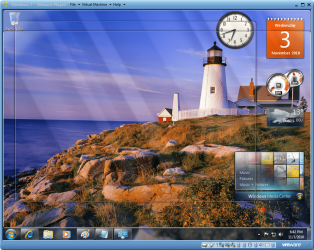
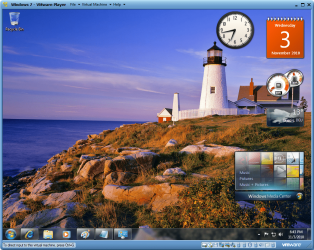
2. "Out of the box" Seven (virtually in VMware)
- Hovering mouse over Show Desktop-button shows gadgets and placeholders

Aero1.PNG

- Clicking the Show Desktop-button hides everything else but, funny enough, shows the gadgets

Aero2.PNG

Two different reactions, same OS and settings. Interesting and weird.

Kari
 
Last edited:

My Computer My Computer

At a glance

Windows 10 Pro x64 EN-GB1.6 GHz Intel Core i7-720QM Processor6 GBATI Mobility Radeon HD 5850 Graphics
Computer type
Laptop
Computer Manufacturer/Model Number
HP ENVY 17-1150eg
OS
Windows 10 Pro x64 EN-GB
CPU
1.6 GHz Intel Core i7-720QM Processor
Memory
6 GB
Graphics Card(s)
ATI Mobility Radeon HD 5850 Graphics
Sound Card
Beats sound system with integrated subwoofer
Monitor(s) Displays
17" laptop display, 22" LED and 32" Full HD TV through HDMI
Screen Resolution
1600*900 (1), 1920*1080 (2&3)
Hard Drives
Internal: 2 x 500 GB SATA Hard Disk Drive 7200 rpm
External: 2TB for backups, 3TB USB3 network drive for media
Cooling
As Envy runs a bit warm, I have it on a Cooler Master pad
Keyboard
Logitech diNovo Media Desktop Laser (bluetooth)
Mouse
Logitech Performance Mouse MX
Internet Speed
50/10 Mbps VDSL
Antivirus
Windows Defender 4.3.9431.0
Browser
Maxthon 3.5.2., IE11
Aaaahhh,found a solution,accidentally.
I have uninstalled internet explorer 9 beta,and then,my gadgets started to act as normal(not dissapearing on clicking "show desktop").
So,I tried installed IE 9 beta again,and problem is again here.
So,if anybody else has the same problem(I mean,if gadgets dissappearing after clicking "Show Desktop"),try uninstalling IE9 beta,if it is not your main browser already.
Weird connection,but it is here
 

My Computer My Computer

At a glance

Windows 7 Ultimate x64[email protected] (non overclocked)8gb DDR3Asus 6850
Computer type
PC/Desktop
Computer Manufacturer/Model Number
intel x58 selfmade
OS
Windows 7 Ultimate x64
CPU
[email protected] (non overclocked)
Motherboard
x58
Memory
8gb DDR3
Graphics Card(s)
Asus 6850
Monitor(s) Displays
lg 22"
Hard Drives
1TB
PSU
Corsair 650w
Case
Gigabyte
Cooling
Scytech
Keyboard
noname
Mouse
Logitech wireless xy
Internet Speed
70GB
Antivirus
Windows Defender
Browser
Chrome (default)
Back
Top