Solved System Information Shows I Have 2Gb Ram, When I have 6GB

dannyboy2005

New member
Member
VIP
Local time
12:01 AM
Messages
177
I have 6GB of Ram, But my System Information is telling me i have only 2GB? Dose this mean its only using 2GB/ 6Gb, or i need to activate another 4GB?

Thanks
 

My Computer My Computer

At a glance

Windows 7 Pro X64Intel i7, 930 2.8Ghz - O/c to 4Ghz @ 1.29v3x2GB = 6GB Mushkin Redline 998805Nvidia Geforce 8800GTX
Computer Manufacturer/Model Number
Home Grown
OS
Windows 7 Pro X64
CPU
Intel i7, 930 2.8Ghz - O/c to 4Ghz @ 1.29v
Motherboard
ASUS Rampage II Gene
Memory
3x2GB = 6GB Mushkin Redline 998805
Graphics Card(s)
Nvidia Geforce 8800GTX
Sound Card
Audigy Soundblaster 24 Bit Extreme
Monitor(s) Displays
Samsung SyncMaster 913N
Screen Resolution
1280 x 1024
Hard Drives
1x Western Digital 500GB, 16MB Crèche, 7,200RPM
1x Western Digital 150GB, 2MB Crèche, 7,200RPM
1x Seagate 250GB, 16MB Crèche, 7,200RPM
PSU
Thermaltake 850W PSU
Case
A butchered case with holes cut out for extra cooling lol
Cooling
CPU = Corsair H50 with 2x 120mm Noctua NF-S12B fans on rad
Keyboard
QWERTY
Mouse
Micky
Internet Speed
Not fast enough
When you boot up, how much memory shows in the bios?
 

My Computer My Computer

At a glance

Systems 1 and 2: Windows 7 Enterprise x64, Wi...System 1: i7 [email protected], System 2: AMD FX-41...System 1: 8GB System 2: 8GBSystem 1: ATI FirePro V4800 System 2: Radeon ...
Computer Manufacturer/Model Number
Dell and Custom
OS
Systems 1 and 2: Windows 7 Enterprise x64, Win 8 Developer
CPU
System 1: i7 [email protected], System 2: AMD FX-4100 Zambezi 3.6G
Motherboard
System 1:Dell 06NWYK System 2: ASUS M5A97 AM3+
Memory
System 1: 8GB System 2: 8GB
Graphics Card(s)
System 1: ATI FirePro V4800 System 2: Radeon HD 6850
Sound Card
System 1: onboard System 2: onboard
Monitor(s) Displays
System1: Viewsonic HDMI 24"
Screen Resolution
System 1: 1920x1080 System 2: 1920x1080
Hard Drives
System 1: Mirrored .5B drives System 2: Seagate Barracuda ST1000DM003 1TB 7200 RPM 64MB Cache SATA 6.0Gb/s
Case
System 1: Dell System 2: Cooler Master
Internet Speed
10 MBPS
As Lemur posted check what is showing in Bios on restart if Resource Monitor shows the same as you already posted.

Click Start Orb type in Resource monitor. Open it and click the Memory tab.

Will show memory at the bottom. Post a Snip if you have questions or aren't sure of something.
I'll find a link while you check out Resource Manager.

UNPLUG PC FIRST!
If Bios doesn't show them try reseating the Ram in the slots.
All three. There is a definite snap and the latch catches on its own on an ASUS motherboard. You hear no snap or the latch doesn't close on its own the ram isn't seated yet.
Experience taught me that. One wouldn't seat. I swapped slots and the sticks snapped right in.


Lemur

We did it again.
 

My Computer My Computer

At a glance

Windows7 Pro 64bit SP-1; Windows XP Pro 32bitIntel Core i7-870 Lynnfield 2.93GHz LGA 1156 ...8GB@1400MHz Crucial Ballistix DDR3-1600 4x2GBASUS ENGTX460 DirectCU/2DI/1GD5 1GB 256-bit G...
Computer Manufacturer/Model Number
Hopalong/ Godzilla
OS
Windows7 Pro 64bit SP-1; Windows XP Pro 32bit
CPU
Intel Core i7-870 Lynnfield 2.93GHz LGA 1156 95W Quad-Core
Motherboard
ASUS P7P55D-E PRO
Memory
8GB@1400MHz Crucial Ballistix DDR3-1600 4x2GB
Graphics Card(s)
ASUS ENGTX460 DirectCU/2DI/1GD5 1GB 256-bit GDDR5
Sound Card
VIA Onboard
Monitor(s) Displays
Asus VS248H-P 24"; Samsung SyncMaster 941BW 19"ws
Screen Resolution
1920x1080; 1440x900
Hard Drives
Samsung 830 120GB SSD
Intel 320 120GB SSD
Western Digital Caviar Black WD7501AALS 750GB 7200 RPM SATA 3.0Gb/s
Western Digital Caviar Black WD6401AALS 640GB 7200 RPM SATA 3.0Gb/s
PSU
COOLER MASTER Silent Pro RS850-AMBAJ3-US 850W Modular
Case
COOLER MASTER HAF 932 RC-932-KKN5-GP Black
Cooling
Scythe "Mugen-2 Rev.B" (2 ScytheKaze-Jyuni PWM fans)
Keyboard
Logitech K-320
Mouse
Kensington
Antivirus
Avast Inernet Suite
Browser
IE 9 ; Chrome
As Lemur posted check what is showing in Bios on restart if Resource Monitor shows the same as you already posted.

Click Start Orb type in Resource monitor. Open it and click the Memory tab.

Will show memory at the bottom. Post a Snip if you have questions or aren't sure of something.
I'll find a link while you check out Resource Manager.


Lemur

We did it again.
Ah, it shows it has 2048MB installed, though 6 months ago, before I reformatted, I know it defiantly showed 6GB in system information. I remembered i scored a very high score in WEI too.

Thank you.

When you boot up, how much memory shows in the bios?
Bios and Boot Up screen doesn't show any thing related to Memory.

Thanks
 

My Computer My Computer

At a glance

Windows 7 Pro X64Intel i7, 930 2.8Ghz - O/c to 4Ghz @ 1.29v3x2GB = 6GB Mushkin Redline 998805Nvidia Geforce 8800GTX
Computer Manufacturer/Model Number
Home Grown
OS
Windows 7 Pro X64
CPU
Intel i7, 930 2.8Ghz - O/c to 4Ghz @ 1.29v
Motherboard
ASUS Rampage II Gene
Memory
3x2GB = 6GB Mushkin Redline 998805
Graphics Card(s)
Nvidia Geforce 8800GTX
Sound Card
Audigy Soundblaster 24 Bit Extreme
Monitor(s) Displays
Samsung SyncMaster 913N
Screen Resolution
1280 x 1024
Hard Drives
1x Western Digital 500GB, 16MB Crèche, 7,200RPM
1x Western Digital 150GB, 2MB Crèche, 7,200RPM
1x Seagate 250GB, 16MB Crèche, 7,200RPM
PSU
Thermaltake 850W PSU
Case
A butchered case with holes cut out for extra cooling lol
Cooling
CPU = Corsair H50 with 2x 120mm Noctua NF-S12B fans on rad
Keyboard
QWERTY
Mouse
Micky
Internet Speed
Not fast enough
Hopealong, What is the likeness of the ram or the ram slots being faulty? It is very good quality ram, and motherboard. I bought them all new and about 8 months old. Plenty of cooling in there too.

Thanks
 

My Computer My Computer

At a glance

Windows 7 Pro X64Intel i7, 930 2.8Ghz - O/c to 4Ghz @ 1.29v3x2GB = 6GB Mushkin Redline 998805Nvidia Geforce 8800GTX
Computer Manufacturer/Model Number
Home Grown
OS
Windows 7 Pro X64
CPU
Intel i7, 930 2.8Ghz - O/c to 4Ghz @ 1.29v
Motherboard
ASUS Rampage II Gene
Memory
3x2GB = 6GB Mushkin Redline 998805
Graphics Card(s)
Nvidia Geforce 8800GTX
Sound Card
Audigy Soundblaster 24 Bit Extreme
Monitor(s) Displays
Samsung SyncMaster 913N
Screen Resolution
1280 x 1024
Hard Drives
1x Western Digital 500GB, 16MB Crèche, 7,200RPM
1x Western Digital 150GB, 2MB Crèche, 7,200RPM
1x Seagate 250GB, 16MB Crèche, 7,200RPM
PSU
Thermaltake 850W PSU
Case
A butchered case with holes cut out for extra cooling lol
Cooling
CPU = Corsair H50 with 2x 120mm Noctua NF-S12B fans on rad
Keyboard
QWERTY
Mouse
Micky
Internet Speed
Not fast enough
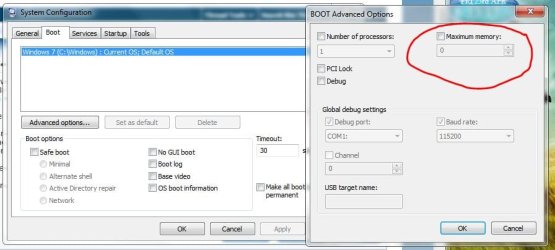
If you have Run on the start menu, clik it and type msconfig in the box, clik ok. In the System configuration window that comes up, choose the boot tab at the top, clik the advanced button in the mid portion of the window. set the number of cores to max and the memory to the max onboard. After a reboot, check the box that pops up 'Do not show this blahblahblah' and Ok. You should see all of your ram in specs now.

msconfigshot.jpg
 

My Computer My Computer

At a glance

Win7 Home Premium x64 W10Pro&HomeA12 9720p 4+8 TurionII M5206GB 8GBR7
Computer type
Laptop
Computer Manufacturer/Model Number
HP 17-ak0xx, dv7 3173nr
OS
Win7 Home Premium x64 W10Pro&Home
CPU
A12 9720p 4+8 TurionII M520
Motherboard
HP 3839
Memory
6GB 8GB
Graphics Card(s)
R7
Monitor(s) Displays
24" sa550
Screen Resolution
1600x900 1920x1080
Mouse
Logitechx2
Internet Speed
120Mb/s down 12up
It does you will need to get your manual or download from ASUS.

It will show you how to get to the memory.

Go to the below link. Try the auto detect or curtains on right side.
It will then ask for OS then find your manual.

ASUSTeK Computer Inc.-Support-

See if the Ram is shown in bios and let us know. If only showing 2Gig one stick then follow my post for reseating. Then recheck.

Mike
 

My Computer My Computer

At a glance

Windows7 Pro 64bit SP-1; Windows XP Pro 32bitIntel Core i7-870 Lynnfield 2.93GHz LGA 1156 ...8GB@1400MHz Crucial Ballistix DDR3-1600 4x2GBASUS ENGTX460 DirectCU/2DI/1GD5 1GB 256-bit G...
Computer Manufacturer/Model Number
Hopalong/ Godzilla
OS
Windows7 Pro 64bit SP-1; Windows XP Pro 32bit
CPU
Intel Core i7-870 Lynnfield 2.93GHz LGA 1156 95W Quad-Core
Motherboard
ASUS P7P55D-E PRO
Memory
8GB@1400MHz Crucial Ballistix DDR3-1600 4x2GB
Graphics Card(s)
ASUS ENGTX460 DirectCU/2DI/1GD5 1GB 256-bit GDDR5
Sound Card
VIA Onboard
Monitor(s) Displays
Asus VS248H-P 24"; Samsung SyncMaster 941BW 19"ws
Screen Resolution
1920x1080; 1440x900
Hard Drives
Samsung 830 120GB SSD
Intel 320 120GB SSD
Western Digital Caviar Black WD7501AALS 750GB 7200 RPM SATA 3.0Gb/s
Western Digital Caviar Black WD6401AALS 640GB 7200 RPM SATA 3.0Gb/s
PSU
COOLER MASTER Silent Pro RS850-AMBAJ3-US 850W Modular
Case
COOLER MASTER HAF 932 RC-932-KKN5-GP Black
Cooling
Scythe "Mugen-2 Rev.B" (2 ScytheKaze-Jyuni PWM fans)
Keyboard
Logitech K-320
Mouse
Kensington
Antivirus
Avast Inernet Suite
Browser
IE 9 ; Chrome
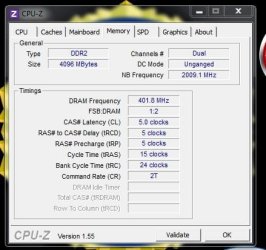
You can run CPU-Z to see if your MB is seeing all the 6GB
 

Attachments

My Computer My Computer

At a glance

Win7 Enterprise, Win7 x86 (Ult 7600), Win7 x6...AMD fx8350 4ghz, AMD-32 2400mhz, AMD-64 3200m...2gb, 4gb on the Ult 7600, 4gb on Technet RTM,...Draw my own Graphics, several nVidia cards
Computer type
PC/Desktop
Computer Manufacturer/Model Number
Built them myself, Science Experiments !
OS
Win7 Enterprise, Win7 x86 (Ult 7600), Win7 x64 Ult 7600, TechNet RTM on AMD x64 (2.8Ghz)
CPU
AMD fx8350 4ghz, AMD-32 2400mhz, AMD-64 3200mhz, AMDx64 2.8G
Motherboard
SIS 755, ECS-K8M890M-M (Ult 7600), GigaByte & others
Memory
2gb, 4gb on the Ult 7600, 4gb on Technet RTM, 32gb on FX8350
Graphics Card(s)
Draw my own Graphics, several nVidia cards
Sound Card
on motherboard
Monitor(s) Displays
19" flat scr, 28" I-Inc widescr,22" Emprex Widescr, 23" Acer
Screen Resolution
1280 x 1024, 1440 x 900, 1920 x 1080
Hard Drives
6 pata Ide HD's & 2 Sata HD's
added 80gb external on Ult 7600 computer,
numerous extra 1tb, 2TB, 3Tb SATA HD's
A collection of ext HD Docks w/ HDs
PSU
430w, 550w, 600w, 700, 800, etc
Case
All Generic Full Towers
Cooling
Open Air & a few fans, some w/ colored LEDs
Keyboard
Compaq & Dell recycled from GoodWill
Mouse
Made in China Optical Wired Mouse
Internet Speed
Fast Cable InterNet
Antivirus
AVG Free on 24 different Desktops, NO Problems!
Browser
IE 8 is preferred, but use FireFox sometimes
Other Info
Linksys Routers, switches, & Hubs
Too Many USB Flash Drives to count, Biggest is 64GB !
Eight computers in my home network.
Sixteen computers at my business network.
Linked via TeamViewer !
Lots of old used spare computer parts everywhere!
Do not set the cores to max. Leave at the default.
 

My Computer My Computer

At a glance

Windows7 Pro 64bit SP-1; Windows XP Pro 32bitIntel Core i7-870 Lynnfield 2.93GHz LGA 1156 ...8GB@1400MHz Crucial Ballistix DDR3-1600 4x2GBASUS ENGTX460 DirectCU/2DI/1GD5 1GB 256-bit G...
Computer Manufacturer/Model Number
Hopalong/ Godzilla
OS
Windows7 Pro 64bit SP-1; Windows XP Pro 32bit
CPU
Intel Core i7-870 Lynnfield 2.93GHz LGA 1156 95W Quad-Core
Motherboard
ASUS P7P55D-E PRO
Memory
8GB@1400MHz Crucial Ballistix DDR3-1600 4x2GB
Graphics Card(s)
ASUS ENGTX460 DirectCU/2DI/1GD5 1GB 256-bit GDDR5
Sound Card
VIA Onboard
Monitor(s) Displays
Asus VS248H-P 24"; Samsung SyncMaster 941BW 19"ws
Screen Resolution
1920x1080; 1440x900
Hard Drives
Samsung 830 120GB SSD
Intel 320 120GB SSD
Western Digital Caviar Black WD7501AALS 750GB 7200 RPM SATA 3.0Gb/s
Western Digital Caviar Black WD6401AALS 640GB 7200 RPM SATA 3.0Gb/s
PSU
COOLER MASTER Silent Pro RS850-AMBAJ3-US 850W Modular
Case
COOLER MASTER HAF 932 RC-932-KKN5-GP Black
Cooling
Scythe "Mugen-2 Rev.B" (2 ScytheKaze-Jyuni PWM fans)
Keyboard
Logitech K-320
Mouse
Kensington
Antivirus
Avast Inernet Suite
Browser
IE 9 ; Chrome
You can run CPU-Z to see if your MB is seeing all the 6GB

Good thinking Doctor.

It shows under the memory tab in CPUz 6144MB, which is 6GB. So i know there all working. Its just the question, why isn't it showing the other 4GB in windows?
 

My Computer My Computer

At a glance

Windows 7 Pro X64Intel i7, 930 2.8Ghz - O/c to 4Ghz @ 1.29v3x2GB = 6GB Mushkin Redline 998805Nvidia Geforce 8800GTX
Computer Manufacturer/Model Number
Home Grown
OS
Windows 7 Pro X64
CPU
Intel i7, 930 2.8Ghz - O/c to 4Ghz @ 1.29v
Motherboard
ASUS Rampage II Gene
Memory
3x2GB = 6GB Mushkin Redline 998805
Graphics Card(s)
Nvidia Geforce 8800GTX
Sound Card
Audigy Soundblaster 24 Bit Extreme
Monitor(s) Displays
Samsung SyncMaster 913N
Screen Resolution
1280 x 1024
Hard Drives
1x Western Digital 500GB, 16MB Crèche, 7,200RPM
1x Western Digital 150GB, 2MB Crèche, 7,200RPM
1x Seagate 250GB, 16MB Crèche, 7,200RPM
PSU
Thermaltake 850W PSU
Case
A butchered case with holes cut out for extra cooling lol
Cooling
CPU = Corsair H50 with 2x 120mm Noctua NF-S12B fans on rad
Keyboard
QWERTY
Mouse
Micky
Internet Speed
Not fast enough
If you have Run on the start menu, clik it and type msconfig in the box, clik ok. In the System configuration window that comes up, choose the boot tab at the top, clik the advanced button in the mid portion of the window. set the number of cores to max and the memory to the max onboard. After a reboot, check the box that pops up 'Do not show this blahblahblah' and Ok. You should see all of your ram in specs now.

msconfigshot.jpg

I did this, and nothing happened.
 

My Computer My Computer

At a glance

Windows 7 Pro X64Intel i7, 930 2.8Ghz - O/c to 4Ghz @ 1.29v3x2GB = 6GB Mushkin Redline 998805Nvidia Geforce 8800GTX
Computer Manufacturer/Model Number
Home Grown
OS
Windows 7 Pro X64
CPU
Intel i7, 930 2.8Ghz - O/c to 4Ghz @ 1.29v
Motherboard
ASUS Rampage II Gene
Memory
3x2GB = 6GB Mushkin Redline 998805
Graphics Card(s)
Nvidia Geforce 8800GTX
Sound Card
Audigy Soundblaster 24 Bit Extreme
Monitor(s) Displays
Samsung SyncMaster 913N
Screen Resolution
1280 x 1024
Hard Drives
1x Western Digital 500GB, 16MB Crèche, 7,200RPM
1x Western Digital 150GB, 2MB Crèche, 7,200RPM
1x Seagate 250GB, 16MB Crèche, 7,200RPM
PSU
Thermaltake 850W PSU
Case
A butchered case with holes cut out for extra cooling lol
Cooling
CPU = Corsair H50 with 2x 120mm Noctua NF-S12B fans on rad
Keyboard
QWERTY
Mouse
Micky
Internet Speed
Not fast enough
If you have Run on the start menu, clik it and type msconfig in the box, clik ok. In the System configuration window that comes up, choose the boot tab at the top, clik the advanced button in the mid portion of the window. set the number of cores to max and the memory to the max onboard. After a reboot, check the box that pops up 'Do not show this blahblahblah' and Ok. You should see all of your ram in specs now...

You should uncheck those options....Those are only for disabling hardware for testing and debugging.
 

My Computer My Computer

At a glance

Windows 10 Pro (x64)Intel Core i7-3930K (3.2GHz - 4.5GHz)4x Samsung 4GB PC3-12800 DDR3 (16GB 1600MHz)Nvidia Geforce GTX 690
Computer type
PC/Desktop
Computer Manufacturer/Model Number
Alienware Aurora ALX R4
OS
Windows 10 Pro (x64)
CPU
Intel Core i7-3930K (3.2GHz - 4.5GHz)
Motherboard
Alienware Aurora-R4 x79
Memory
4x Samsung 4GB PC3-12800 DDR3 (16GB 1600MHz)
Graphics Card(s)
Nvidia Geforce GTX 690
Sound Card
SteelSeries Siberia Elite
Monitor(s) Displays
Dell UltraSharp U3011
Screen Resolution
2560x1600
Hard Drives
Samsung 850 Pro 256 GB, Seagate 1TB Desktop Hybrid HDD, 2x Western Digital 4TB Green HDD
PSU
875W Some Dell PSU <.<
Case
Alienware Aurora ALX
Cooling
Custom Liquid Cooling (EK CPU & GPU blocks) dual EK 480RAD
Keyboard
Logitech G710+ Mechanical
Mouse
Logitech G700s
Internet Speed
Verizon Fios (50 mbps average)
Other Info
Server: Intel NUC D54250WYK: i5-4250U, 16GB, 256 GB mSATA, Windows Server 2012 R2
That was why I posted not to do it also.

Let me see if I can find something in the tutorials on Windows showing wrong amount of RAM.
 

My Computer My Computer

At a glance

Windows7 Pro 64bit SP-1; Windows XP Pro 32bitIntel Core i7-870 Lynnfield 2.93GHz LGA 1156 ...8GB@1400MHz Crucial Ballistix DDR3-1600 4x2GBASUS ENGTX460 DirectCU/2DI/1GD5 1GB 256-bit G...
Computer Manufacturer/Model Number
Hopalong/ Godzilla
OS
Windows7 Pro 64bit SP-1; Windows XP Pro 32bit
CPU
Intel Core i7-870 Lynnfield 2.93GHz LGA 1156 95W Quad-Core
Motherboard
ASUS P7P55D-E PRO
Memory
8GB@1400MHz Crucial Ballistix DDR3-1600 4x2GB
Graphics Card(s)
ASUS ENGTX460 DirectCU/2DI/1GD5 1GB 256-bit GDDR5
Sound Card
VIA Onboard
Monitor(s) Displays
Asus VS248H-P 24"; Samsung SyncMaster 941BW 19"ws
Screen Resolution
1920x1080; 1440x900
Hard Drives
Samsung 830 120GB SSD
Intel 320 120GB SSD
Western Digital Caviar Black WD7501AALS 750GB 7200 RPM SATA 3.0Gb/s
Western Digital Caviar Black WD6401AALS 640GB 7200 RPM SATA 3.0Gb/s
PSU
COOLER MASTER Silent Pro RS850-AMBAJ3-US 850W Modular
Case
COOLER MASTER HAF 932 RC-932-KKN5-GP Black
Cooling
Scythe "Mugen-2 Rev.B" (2 ScytheKaze-Jyuni PWM fans)
Keyboard
Logitech K-320
Mouse
Kensington
Antivirus
Avast Inernet Suite
Browser
IE 9 ; Chrome
If you have Run on the start menu, clik it and type msconfig in the box, clik ok. In the System configuration window that comes up, choose the boot tab at the top, clik the advanced button in the mid portion of the window. set the number of cores to max and the memory to the max onboard. After a reboot, check the box that pops up 'Do not show this blahblahblah' and Ok. You should see all of your ram in specs now...

You should uncheck those options....Those are only for disabling hardware for testing and debugging.


I agree with logicearth.


This is how we showed everybody in the past.
 

Attachments

  • Maximum_memory.JPG
    Maximum_memory.JPG
    51.3 KB · Views: 75

My Computer My Computer

At a glance

Win7 Enterprise, Win7 x86 (Ult 7600), Win7 x6...AMD fx8350 4ghz, AMD-32 2400mhz, AMD-64 3200m...2gb, 4gb on the Ult 7600, 4gb on Technet RTM,...Draw my own Graphics, several nVidia cards
Computer type
PC/Desktop
Computer Manufacturer/Model Number
Built them myself, Science Experiments !
OS
Win7 Enterprise, Win7 x86 (Ult 7600), Win7 x64 Ult 7600, TechNet RTM on AMD x64 (2.8Ghz)
CPU
AMD fx8350 4ghz, AMD-32 2400mhz, AMD-64 3200mhz, AMDx64 2.8G
Motherboard
SIS 755, ECS-K8M890M-M (Ult 7600), GigaByte & others
Memory
2gb, 4gb on the Ult 7600, 4gb on Technet RTM, 32gb on FX8350
Graphics Card(s)
Draw my own Graphics, several nVidia cards
Sound Card
on motherboard
Monitor(s) Displays
19" flat scr, 28" I-Inc widescr,22" Emprex Widescr, 23" Acer
Screen Resolution
1280 x 1024, 1440 x 900, 1920 x 1080
Hard Drives
6 pata Ide HD's & 2 Sata HD's
added 80gb external on Ult 7600 computer,
numerous extra 1tb, 2TB, 3Tb SATA HD's
A collection of ext HD Docks w/ HDs
PSU
430w, 550w, 600w, 700, 800, etc
Case
All Generic Full Towers
Cooling
Open Air & a few fans, some w/ colored LEDs
Keyboard
Compaq & Dell recycled from GoodWill
Mouse
Made in China Optical Wired Mouse
Internet Speed
Fast Cable InterNet
Antivirus
AVG Free on 24 different Desktops, NO Problems!
Browser
IE 8 is preferred, but use FireFox sometimes
Other Info
Linksys Routers, switches, & Hubs
Too Many USB Flash Drives to count, Biggest is 64GB !
Eight computers in my home network.
Sixteen computers at my business network.
Linked via TeamViewer !
Lots of old used spare computer parts everywhere!
Found nothing in the tutorials.

I'm not sure why Windows isn't showing it.

By any chance have you run the WEI on your PC yet?

Control panel> Performance Information and tools

Click the run WEI if you haven't.

If you have run it before on the right side of page toward bottom click rerun assessment.
That might get Windows to recognize the RAM properly again.
Worth a shot.

Mike
 

My Computer My Computer

At a glance

Windows7 Pro 64bit SP-1; Windows XP Pro 32bitIntel Core i7-870 Lynnfield 2.93GHz LGA 1156 ...8GB@1400MHz Crucial Ballistix DDR3-1600 4x2GBASUS ENGTX460 DirectCU/2DI/1GD5 1GB 256-bit G...
Computer Manufacturer/Model Number
Hopalong/ Godzilla
OS
Windows7 Pro 64bit SP-1; Windows XP Pro 32bit
CPU
Intel Core i7-870 Lynnfield 2.93GHz LGA 1156 95W Quad-Core
Motherboard
ASUS P7P55D-E PRO
Memory
8GB@1400MHz Crucial Ballistix DDR3-1600 4x2GB
Graphics Card(s)
ASUS ENGTX460 DirectCU/2DI/1GD5 1GB 256-bit GDDR5
Sound Card
VIA Onboard
Monitor(s) Displays
Asus VS248H-P 24"; Samsung SyncMaster 941BW 19"ws
Screen Resolution
1920x1080; 1440x900
Hard Drives
Samsung 830 120GB SSD
Intel 320 120GB SSD
Western Digital Caviar Black WD7501AALS 750GB 7200 RPM SATA 3.0Gb/s
Western Digital Caviar Black WD6401AALS 640GB 7200 RPM SATA 3.0Gb/s
PSU
COOLER MASTER Silent Pro RS850-AMBAJ3-US 850W Modular
Case
COOLER MASTER HAF 932 RC-932-KKN5-GP Black
Cooling
Scythe "Mugen-2 Rev.B" (2 ScytheKaze-Jyuni PWM fans)
Keyboard
Logitech K-320
Mouse
Kensington
Antivirus
Avast Inernet Suite
Browser
IE 9 ; Chrome
If you have Run on the start menu, clik it and type msconfig in the box, clik ok. In the System configuration window that comes up, choose the boot tab at the top, clik the advanced button in the mid portion of the window. set the number of cores to max and the memory to the max onboard. After a reboot, check the box that pops up 'Do not show this blahblahblah' and Ok. You should see all of your ram in specs now...
Yes, it originally was unchecked, i checked the box and tried it then unchecked the box and tried it

You should uncheck those options....Those are only for disabling hardware for testing and debugging.
As above, as default, they were unchecked.

If you have Run on the start menu, clik it and type msconfig in the box, clik ok. In the System configuration window that comes up, choose the boot tab at the top, clik the advanced button in the mid portion of the window. set the number of cores to max and the memory to the max onboard. After a reboot, check the box that pops up 'Do not show this blahblahblah' and Ok. You should see all of your ram in specs now...

You should uncheck those options....Those are only for disabling hardware for testing and debugging.


I agree with logicearth.


This is how we showed everybody in the past.
As i've mentioned above.

Found nothing in the tutorials.

I'm not sure why Windows isn't showing it.

By any chance have you run the WEI on your PC yet?
Yes, i have ran the WEI. I scored 5.1 :S, because of low ram. I used to score around the 9 mark iirc.

I'll have a google search why ram isn't showing in window's 7.

Thanks
 

My Computer My Computer

At a glance

Windows 7 Pro X64Intel i7, 930 2.8Ghz - O/c to 4Ghz @ 1.29v3x2GB = 6GB Mushkin Redline 998805Nvidia Geforce 8800GTX
Computer Manufacturer/Model Number
Home Grown
OS
Windows 7 Pro X64
CPU
Intel i7, 930 2.8Ghz - O/c to 4Ghz @ 1.29v
Motherboard
ASUS Rampage II Gene
Memory
3x2GB = 6GB Mushkin Redline 998805
Graphics Card(s)
Nvidia Geforce 8800GTX
Sound Card
Audigy Soundblaster 24 Bit Extreme
Monitor(s) Displays
Samsung SyncMaster 913N
Screen Resolution
1280 x 1024
Hard Drives
1x Western Digital 500GB, 16MB Crèche, 7,200RPM
1x Western Digital 150GB, 2MB Crèche, 7,200RPM
1x Seagate 250GB, 16MB Crèche, 7,200RPM
PSU
Thermaltake 850W PSU
Case
A butchered case with holes cut out for extra cooling lol
Cooling
CPU = Corsair H50 with 2x 120mm Noctua NF-S12B fans on rad
Keyboard
QWERTY
Mouse
Micky
Internet Speed
Not fast enough
Have you looked in your BIOS for re-mapping options? Also, a WEI of 9 is impossible! The max is 7.9
 

My Computer My Computer

At a glance

Windows 7 Ultimate (x64) SP1Intel 3770k 4.6GHz8GB (2x 4GB) Crucial BallistixSapphire 7950 (1060/1600)
Computer Manufacturer/Model Number
tw33k
OS
Windows 7 Ultimate (x64) SP1
CPU
Intel 3770k 4.6GHz
Motherboard
ASUS Maximus V Formula
Memory
8GB (2x 4GB) Crucial Ballistix
Graphics Card(s)
Sapphire 7950 (1060/1600)
Sound Card
On Board Realtek HD Audio
Monitor(s) Displays
27" Acer B273HU (via HDMI)
Screen Resolution
2048 x 1152
Hard Drives
Crucial M4 128GB
2TB WD Black
1TB Samsung F3 SATA
1TB WD Elite External
2TB WD USB 3.0
PSU
Corsair AX750 Gold
Case
Corsair Obsidian 800DW
Cooling
Corsair H100 (2x AP-121/2x UK-3000 push/pull)
Keyboard
Microsoft Wireless 5000
Mouse
Microsoft Wireless 5000
Internet Speed
5mb/s
Other Info
Logitech z-2300 2.1 speakers
Lamptron FC-5 v2
I had this same problem when building my pc. (see my specs). I tried replacing my motherboard then replacing the memory for different brand. After setting the correct memory setting for the new memory brand; I had 6 gigs showing. I would try new memory and set the correct setting in bios.
 

My Computer My Computer

At a glance

Windows 7 x64Intel Core i7 930OCZ 6GBkit OCZ3G1600LV6GK 8-8-8-24-2T 1.65V(2) HIS ATI Radeon HD 5770 CROSSFIRE (H577QT1GD)
Computer Manufacturer/Model Number
Built by Mark
OS
Windows 7 x64
CPU
Intel Core i7 930
Motherboard
Gigabyte GA-X58A-UD3R Bios F5
Memory
OCZ 6GBkit OCZ3G1600LV6GK 8-8-8-24-2T 1.65V
Graphics Card(s)
(2) HIS ATI Radeon HD 5770 CROSSFIRE (H577QT1GD)
Sound Card
On board Realtek HD
Monitor(s) Displays
Samsung SyncMaster 2343 22" Wide Screen
Screen Resolution
2048x1152
Hard Drives
Two Western Digital 320 Gig Blue series WDC WD3200AAKS-00L9A0
PSU
Corsiar 750 watts TX750W
Case
Antec NINE Hundred Two (air filters & adjustable fan speed)
Cooling
Cooler Master Hyper 212 Plus CPU cooler
Keyboard
Logitech
Mouse
Logitech MX310
Internet Speed
20 meg down/ 5 meg up
Other Info
Hewlett Packard Deskjet 932C printer
Epson 4990 Photo scanner
Have you looked in your BIOS for re-mapping options? Also, a WEI of 9 is impossible! The max is 7.9
Oh really? Sorry.. I must had got carried away lol.

I had this same problem when building my pc. (see my specs). I tried replacing my motherboard then replacing the memory for different brand. After setting the correct memory setting for the new memory brand; I had 6 gigs showing. I would try new memory and set the correct setting in bios.
I am not buying new memory. There is nothing wrong with it if CPUz says i have 6GB installed. Its obviously a software (MSW7) fault. The memory alone was around $80 each stick of 2GB iirc.

Thanks
 

My Computer My Computer

At a glance

Windows 7 Pro X64Intel i7, 930 2.8Ghz - O/c to 4Ghz @ 1.29v3x2GB = 6GB Mushkin Redline 998805Nvidia Geforce 8800GTX
Computer Manufacturer/Model Number
Home Grown
OS
Windows 7 Pro X64
CPU
Intel i7, 930 2.8Ghz - O/c to 4Ghz @ 1.29v
Motherboard
ASUS Rampage II Gene
Memory
3x2GB = 6GB Mushkin Redline 998805
Graphics Card(s)
Nvidia Geforce 8800GTX
Sound Card
Audigy Soundblaster 24 Bit Extreme
Monitor(s) Displays
Samsung SyncMaster 913N
Screen Resolution
1280 x 1024
Hard Drives
1x Western Digital 500GB, 16MB Crèche, 7,200RPM
1x Western Digital 150GB, 2MB Crèche, 7,200RPM
1x Seagate 250GB, 16MB Crèche, 7,200RPM
PSU
Thermaltake 850W PSU
Case
A butchered case with holes cut out for extra cooling lol
Cooling
CPU = Corsair H50 with 2x 120mm Noctua NF-S12B fans on rad
Keyboard
QWERTY
Mouse
Micky
Internet Speed
Not fast enough
Boot into your Bios.

Choose DEFAULT SETTINGS
Save and EXit.
 

My Computer My Computer

At a glance

MS Windows 7 Ultimate SP1 64-bitAMD A10-4600M6.00 GB Dual-Channel DDR3 @ 798MHz (11-11-12-28)AMD Radeon HD 7660G
Computer Manufacturer/Model Number
Toshiba Satellite S875D-S7239 laptop
OS
MS Windows 7 Ultimate SP1 64-bit
CPU
AMD A10-4600M
Motherboard
AMD Pumori (Socket FT1)
Memory
6.00 GB Dual-Channel DDR3 @ 798MHz (11-11-12-28)
Graphics Card(s)
AMD Radeon HD 7660G
Sound Card
High Definition Audio Device
Monitor(s) Displays
Generic PnP Monitor (1600x900@60Hz)
Screen Resolution
1600x900@60Hz
Hard Drives
SSD 119GB Corsair CSSD-V128GB2 ATA Device
Keyboard
Standard PS/2 Keyboard
Mouse
HP Wireless Optical Mobile Mouse Model FHA-3410
Internet Speed
What the local pub, local coffee shop offers.
Other Info
Optical Drive:MATSHITA BD-CMB UJ160B ATA Device


Also have an Asus ha1002xp netbook with Win 7 Ultimate installed.
Back
Top