Solved No internet access- 'ipconfig /all' included

aetye

New member
Local time
12:49 AM
Messages
6
Hello,

I have a new-to-me HP laptop with Windows 7 Home Premium 64-bit. I saw in some other posts that the ipconfig /all information would be helpful so I've included it.

Any help would be much appreciated!
Thank you,
Annie
 

Attachments

My Computer My Computer

At a glance

Windows 7 Home Premium 64-bit
OS
Windows 7 Home Premium 64-bit

My Computer My Computer

At a glance

Systems 1 and 2: Windows 7 Enterprise x64, Wi...System 1: i7 [email protected], System 2: AMD FX-41...System 1: 8GB System 2: 8GBSystem 1: ATI FirePro V4800 System 2: Radeon ...
Computer Manufacturer/Model Number
Dell and Custom
OS
Systems 1 and 2: Windows 7 Enterprise x64, Win 8 Developer
CPU
System 1: i7 [email protected], System 2: AMD FX-4100 Zambezi 3.6G
Motherboard
System 1:Dell 06NWYK System 2: ASUS M5A97 AM3+
Memory
System 1: 8GB System 2: 8GB
Graphics Card(s)
System 1: ATI FirePro V4800 System 2: Radeon HD 6850
Sound Card
System 1: onboard System 2: onboard
Monitor(s) Displays
System1: Viewsonic HDMI 24"
Screen Resolution
System 1: 1920x1080 System 2: 1920x1080
Hard Drives
System 1: Mirrored .5B drives System 2: Seagate Barracuda ST1000DM003 1TB 7200 RPM 64MB Cache SATA 6.0Gb/s
Case
System 1: Dell System 2: Cooler Master
Internet Speed
10 MBPS
Hello,

I have a new-to-me HP laptop with Windows 7 Home Premium 64-bit. I saw in some other posts that the ipconfig /all information would be helpful so I've included it.

Any help would be much appreciated!
Thank you,
Annie

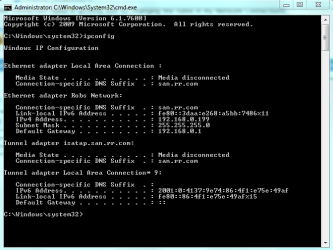
Are you having problems going online with this machine? If so can you please post a "screen shot" example below, of your ipconfig /all rather than the txt. file.

I believe that you have too many 6 to 4 tunnel adaptors there which will cause problems with your connection.

It's usually easy to fix by going into device manager then choose "view" then "show hidden devices" then delate all the extra 6to4 tunnel adaptors then reboot the machine. After that you need to find a better network driver which is what causes this problem to occur.
 

Attachments

  • ipconfig both connections.PNG
    ipconfig both connections.PNG
    15.9 KB · Views: 148

My Computer My Computer

At a glance

Windows 7 Ult, Windows 8.1 Pro,Q9650-4.275GHz, E8600 4.5GHz, E6750-3.8GHzG.Skill PC2 9600 1200Mhz 5 5 5 15 2TGTX480
Computer type
PC/Desktop
Computer Manufacturer/Model Number
Home built
OS
Windows 7 Ult, Windows 8.1 Pro,
CPU
Q9650-4.275GHz, E8600 4.5GHz, E6750-3.8GHz
Motherboard
Evga 780i FTW
Memory
G.Skill PC2 9600 1200Mhz 5 5 5 15 2T
Graphics Card(s)
GTX480
Sound Card
Asus Xonar D2
Monitor(s) Displays
HannsG
Screen Resolution
1680X1050
Hard Drives
GSkill Phoenix Pro 120GB SSD
PSU
ThermalTake Toughpower 1000Watt modular
Case
ThermalTake XaserV
Cooling
Xigmatek S1283
Keyboard
Logitech G15
Mouse
Logitech G9
Internet Speed
T1
Thanks Lemur, I tried to ping 72.246.230.103 but no luck- it said destination net unreachable.

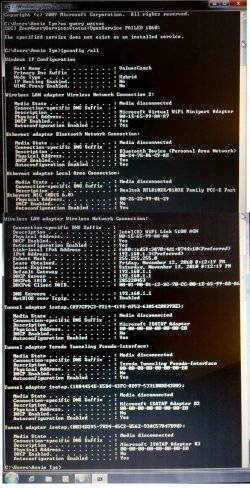
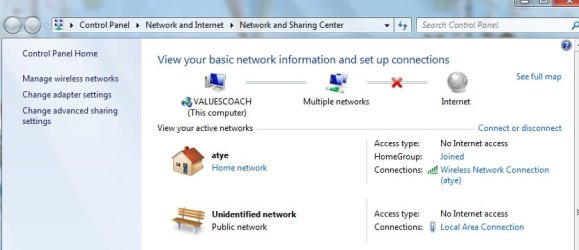
chev65, please see screen shot. I can't get online with the laptop in question, I saved the text file to my flash drive and used another computer to post it. I also included a screen shot of the network connection cartoon, in case that's helpful.

Thanks! One note, my computer knowledge is pretty minimal so I might have to ask some stupid questions to follow your directions.

Annie
 

Attachments

  • Windows7_HPlaptop.jpg
    Windows7_HPlaptop.jpg
    157.8 KB · Views: 99
  • NetConnection.jpg
    NetConnection.jpg
    35.1 KB · Views: 34

My Computer My Computer

At a glance

Windows 7 Home Premium 64-bit
OS
Windows 7 Home Premium 64-bit

My Computer My Computer

At a glance

Windows 7 Ultimate x64AMD Sempron Dual Core3GBNVIDIA GeForce 6150SE nForce 430
Computer Manufacturer/Model Number
Compaq Desktop
OS
Windows 7 Ultimate x64
CPU
AMD Sempron Dual Core
Memory
3GB
Graphics Card(s)
NVIDIA GeForce 6150SE nForce 430
Screen Resolution
1024x768
Hard Drives
150GB Sata
Thanks Lemur, I tried to ping 72.246.230.103 but no luck- it said destination net unreachable.

chev65, please see screen shot. I can't get online with the laptop in question, I saved the text file to my flash drive and used another computer to post it. I also included a screen shot of the network connection cartoon, in case that's helpful.

Thanks! One note, my computer knowledge is pretty minimal so I might have to ask some stupid questions to follow your directions.

Annie


Yes it looks like you have the extra tunnel adaptor problem, perform the following procedure below "in bold" then reboot. You can probably get rid of the extra "public" connection by simply disabling your bluetooth device.

Go into your device manager "control panel large icons device manager" then choose "view" upper right then select "show hidden devices" after that go down to network adaptors, then delate all the extra 6to4 tunnel adaptors you see there, don't worrie windows will make a new one for you, then reboot the machine.

After that you need to find a better network driver which is what causes this problem to occur.
 

My Computer My Computer

At a glance

Windows 7 Ult, Windows 8.1 Pro,Q9650-4.275GHz, E8600 4.5GHz, E6750-3.8GHzG.Skill PC2 9600 1200Mhz 5 5 5 15 2TGTX480
Computer type
PC/Desktop
Computer Manufacturer/Model Number
Home built
OS
Windows 7 Ult, Windows 8.1 Pro,
CPU
Q9650-4.275GHz, E8600 4.5GHz, E6750-3.8GHz
Motherboard
Evga 780i FTW
Memory
G.Skill PC2 9600 1200Mhz 5 5 5 15 2T
Graphics Card(s)
GTX480
Sound Card
Asus Xonar D2
Monitor(s) Displays
HannsG
Screen Resolution
1680X1050
Hard Drives
GSkill Phoenix Pro 120GB SSD
PSU
ThermalTake Toughpower 1000Watt modular
Case
ThermalTake XaserV
Cooling
Xigmatek S1283
Keyboard
Logitech G15
Mouse
Logitech G9
Internet Speed
T1
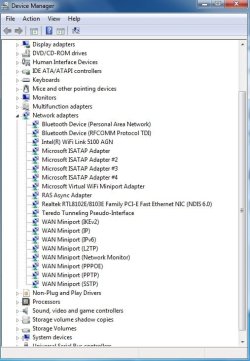
Which of these should I remove?

Then do I just download a new network driver? Are there any that you'd recommend?
 

Attachments

  • NetAdapters.jpg
    NetAdapters.jpg
    56.1 KB · Views: 131

My Computer My Computer

At a glance

Windows 7 Home Premium 64-bit
OS
Windows 7 Home Premium 64-bit
Delate the ones that say Microsoft ISATAP adaptor # 2,3 and 4 and also the one without any number. After that reboot and install the new driver, you may need to uninstall the old driver from Device Manager first.

Looking at your scroll length which isn't extended it's hard to tell how many there are, there are four showing but it looks like there could be many more which usually indicates a driver that isn't quite compatible with Windows 7.

As for the driver, which ever one is the most recent should be ok.
 

My Computer My Computer

At a glance

Windows 7 Ult, Windows 8.1 Pro,Q9650-4.275GHz, E8600 4.5GHz, E6750-3.8GHzG.Skill PC2 9600 1200Mhz 5 5 5 15 2TGTX480
Computer type
PC/Desktop
Computer Manufacturer/Model Number
Home built
OS
Windows 7 Ult, Windows 8.1 Pro,
CPU
Q9650-4.275GHz, E8600 4.5GHz, E6750-3.8GHz
Motherboard
Evga 780i FTW
Memory
G.Skill PC2 9600 1200Mhz 5 5 5 15 2T
Graphics Card(s)
GTX480
Sound Card
Asus Xonar D2
Monitor(s) Displays
HannsG
Screen Resolution
1680X1050
Hard Drives
GSkill Phoenix Pro 120GB SSD
PSU
ThermalTake Toughpower 1000Watt modular
Case
ThermalTake XaserV
Cooling
Xigmatek S1283
Keyboard
Logitech G15
Mouse
Logitech G9
Internet Speed
T1
Yay! Thank you, you are brilliant!!

Annie :)
 

My Computer My Computer

At a glance

Windows 7 Home Premium 64-bit
OS
Windows 7 Home Premium 64-bit

My Computer My Computer

At a glance

Windows 7 Ult, Windows 8.1 Pro,Q9650-4.275GHz, E8600 4.5GHz, E6750-3.8GHzG.Skill PC2 9600 1200Mhz 5 5 5 15 2TGTX480
Computer type
PC/Desktop
Computer Manufacturer/Model Number
Home built
OS
Windows 7 Ult, Windows 8.1 Pro,
CPU
Q9650-4.275GHz, E8600 4.5GHz, E6750-3.8GHz
Motherboard
Evga 780i FTW
Memory
G.Skill PC2 9600 1200Mhz 5 5 5 15 2T
Graphics Card(s)
GTX480
Sound Card
Asus Xonar D2
Monitor(s) Displays
HannsG
Screen Resolution
1680X1050
Hard Drives
GSkill Phoenix Pro 120GB SSD
PSU
ThermalTake Toughpower 1000Watt modular
Case
ThermalTake XaserV
Cooling
Xigmatek S1283
Keyboard
Logitech G15
Mouse
Logitech G9
Internet Speed
T1
Yes, I am online now! I disabled the four ISATAP adapters (and three more appeared in the list after reboot) and the bluetooth devices (two of them). Now I am looking into the network driver upgrade but truthfully I'm not sure what I'm doing, there's a long list of things under the tab "Non-plug and play drivers", is this right? None of them say Network driver.

I really appreciate your help- I was ready to buy a new wireless router!
 

My Computer My Computer

At a glance

Windows 7 Home Premium 64-bit
OS
Windows 7 Home Premium 64-bit
Yes, I am online now! I disabled the four ISATAP adapters (and three more appeared in the list after reboot) and the bluetooth devices (two of them). Now I am looking into the network driver upgrade but truthfully I'm not sure what I'm doing, there's a long list of things under the tab "Non-plug and play drivers", is this right? None of them say Network driver.

I really appreciate your help- I was ready to buy a new wireless router!

Ok so getting rid of the extra ISATAP or bluetooth adaptors got you online "very good"!

The problem is that it may or may not happen again someday if you keep using the same driver for your Intel wifi adaptor 5100, thats the one that may need to be updated.

Although it is possible that the extra network created from the bluetooth adaptors was causing the problem. Either way the problem is solved so I'll mark as solved.

If you can find a more recent driver for the Intel wifi adaptor 5100 then use that but if not then not to worrie because having the extra "Unidentified" network can also cause problems. I'm just not sure which one was the culprit.
 

My Computer My Computer

At a glance

Windows 7 Ult, Windows 8.1 Pro,Q9650-4.275GHz, E8600 4.5GHz, E6750-3.8GHzG.Skill PC2 9600 1200Mhz 5 5 5 15 2TGTX480
Computer type
PC/Desktop
Computer Manufacturer/Model Number
Home built
OS
Windows 7 Ult, Windows 8.1 Pro,
CPU
Q9650-4.275GHz, E8600 4.5GHz, E6750-3.8GHz
Motherboard
Evga 780i FTW
Memory
G.Skill PC2 9600 1200Mhz 5 5 5 15 2T
Graphics Card(s)
GTX480
Sound Card
Asus Xonar D2
Monitor(s) Displays
HannsG
Screen Resolution
1680X1050
Hard Drives
GSkill Phoenix Pro 120GB SSD
PSU
ThermalTake Toughpower 1000Watt modular
Case
ThermalTake XaserV
Cooling
Xigmatek S1283
Keyboard
Logitech G15
Mouse
Logitech G9
Internet Speed
T1
I used the Intel Driver Update Utility to update:

Product Detected Intel® WiFi Link 5100 Current Driver Installed 13.1.1.1 Newer Driver Available: 13.3.0.24
What do you think?
 

My Computer My Computer

At a glance

Windows 7 Home Premium 64-bit
OS
Windows 7 Home Premium 64-bit
I used the Intel Driver Update Utility to update:

Product Detected Intel® WiFi Link 5100 Current Driver Installed 13.1.1.1 Newer Driver Available: 13.3.0.24
What do you think?

I'd go with the more recent driver because it's less likely to cause problems. The extra adaptors might have been the cause but it's wise to make sure this doesn't happen again by installing the more recent driver. :)
 

My Computer My Computer

At a glance

Windows 7 Ult, Windows 8.1 Pro,Q9650-4.275GHz, E8600 4.5GHz, E6750-3.8GHzG.Skill PC2 9600 1200Mhz 5 5 5 15 2TGTX480
Computer type
PC/Desktop
Computer Manufacturer/Model Number
Home built
OS
Windows 7 Ult, Windows 8.1 Pro,
CPU
Q9650-4.275GHz, E8600 4.5GHz, E6750-3.8GHz
Motherboard
Evga 780i FTW
Memory
G.Skill PC2 9600 1200Mhz 5 5 5 15 2T
Graphics Card(s)
GTX480
Sound Card
Asus Xonar D2
Monitor(s) Displays
HannsG
Screen Resolution
1680X1050
Hard Drives
GSkill Phoenix Pro 120GB SSD
PSU
ThermalTake Toughpower 1000Watt modular
Case
ThermalTake XaserV
Cooling
Xigmatek S1283
Keyboard
Logitech G15
Mouse
Logitech G9
Internet Speed
T1
Back
Top