IPCONFIG giving 192.168.0.1 Modem wants 192.168.1.1 Help.

bowlesj3

New member
Local time
4:06 PM
Messages
21
Hi, I think this history might be helpful to solving this.

Maybe 2 or 3 years ago I bought at D-Link ADSL2+ Modem model DSL-520B.
At the same time I bought a D-Link Wireless N300 Rounter (however I use Ethernet cables to connect)
I have two desktops running off of it as well as a laptop (all using cables).
So I got it set up.
I even used OBS studio to create an mp4 video of all the things I had to do thinking this would help speed this up in the future. So for sure I was getting into the modem using 192.168.1.1
So I started having issues with loosing internet connection.
I finally switched the Ethernet cable between the router and the modem.
That seemed to fixed it.
However it started to happen again so I decided to go out and buy the exact same modem again.
However before I installed the new modem I discovered that just by unplugging and re-plugging the cable it once again fixed it.
So the new modem has been sitting in the box all sealed up for a few months now.
My internet start to act up again and I started unplugging and re-plugging the cable in every time and that seemed to work.
But now it seems to be getting worse (loosing connection more frequently and when I am trying to trade the stock market so not good) so I decided to try the new modem.
So I got the video I created, watched it and entered 192.168.1.1 as I had done before.
I get a time out now.
So I go to google and youtube and eventually learn to enter IPCONFIG to get my router's private IP address.
That address is 192.168.0.1 and I was reading that it needs to be 192.168.1.1 in order for me to get at the new modem.
So currently (as of now) the old modem seems to be working (watching youtube videos no problem).
But I need it to be more reliable and I want to try the new modem.
I am a bit nervous about this since I read that the router assigned the same IP address to the three computers. If this is true why would it all of a sudden change the assignment from 192.168.1.1 to 192.168.0.1? I have not touched the router since I bought it other than unplugging the power maybe three times.

Any thoughts?

I guess I should go to the router manual but I am betting it won't say that sometimes it changes the IP it assigns.

Thanks,
John
 

My Computer My Computer

At a glance

Windows 7 Professional 64 bitIntel(R) Core(TM) I5-4430 [email protected]8 Gig (may increase)
Computer type
PC/Desktop
Computer Manufacturer/Model Number
LG
OS
Windows 7 Professional 64 bit
CPU
Intel(R) Core(TM) I5-4430 [email protected]
Memory
8 Gig (may increase)
Hard Drives
solid state drive and a regular drive
Antivirus
Avast
Browser
Chrome
Its confusing adsl2+ is realy old tech and a 1 port router is anciant You simple answer to all your problems is to get a 4 port router they are as cheap as chips. Then its dead simple just plug your pcs in and go. what you have is a router with ip 192.168.1.1 and the second router on 192.168.0.1 which is a different subnet so it cant see the other range.


The key is which one is issuing DHCP ips and thats the problem how is the second router connected to the wan/internet port or a lan port
 

My Computer My Computer

At a glance

win 8 32 bit
Computer type
PC/Desktop
OS
win 8 32 bit
Hi Samuria, I think there is a miss communication. There is only one router and two modems.

Also the " D-Link Wireless N300 Router" actually is a 4 Ethernet port router. It was there when I installed the 1st D-Link modem (bought the router and modem the same day maybe 2 years ago). And as you say when I first installed the combo it was "as dead simple as just plug your pcs in and go". This is why I don't understand why I can't just swap in the exact same model of replacement modem I bought and repeat what I did the first time and away I go. I was really surprised to have this problem. At first I was worried the new modem might not be working so I swapped the old modem back in and tried it and I get the same issue. That told me the new modem is probably working and the issue is something else. At least the old modem is set up and working again for now (allowing me to post here).

Regarding connections if I remember correctly literally nothing has changed other than reinstalling Windows-7 on the machine I use most.
 

My Computer My Computer

At a glance

Windows 7 Professional 64 bitIntel(R) Core(TM) I5-4430 [email protected]8 Gig (may increase)
Computer type
PC/Desktop
Computer Manufacturer/Model Number
LG
OS
Windows 7 Professional 64 bit
CPU
Intel(R) Core(TM) I5-4430 [email protected]
Memory
8 Gig (may increase)
Hard Drives
solid state drive and a regular drive
Antivirus
Avast
Browser
Chrome
First and foremost, you want to make sure the DSL modem is in bridging mode otherwise you'll get a double NAT situation. Read here on how to do that: D-Link Technical Support

But, before you do that you need to reset the modem and the router. Then plug the modem into your PC and configure bridge mode from that PC. Once you have configured bridging mode in the modem, you can now connect the router to the modem.
 

My Computer My Computer

At a glance

Windows 7 Ultimate x64
Computer type
PC/Desktop
OS
Windows 7 Ultimate x64
Thanks guy and special thanks for this sentence "F22 Simpilot"
"Once you have configured bridging mode in the modem, you can now connect the router to the modem."

That was the real problem. I should not have been trying to configure the modem running through the router. I guess I never thought of that when I created the video for myself :-) I also have an MS-Access reminder database I wrote like 25 years ago (I am 65 and have been programming since age 26). This time I created a reminder I have the video available but I included preparatory notes to not make this mistake again. So many things to remember :-)
I want to google with "what is a double NAT situation"
It said.
Double NAT is when you connect your router behind another router creating two different private networks. ... Double NAT does not prevent your devices access to the internet but may cause problems with playing online games, opening a specific service port, connecting to a VPN tunnel, or visiting secure sites with SSL.
I am not sure if the above has ever happened to me. Okay so my video shows I had "Encapsulation Mode" set to LLC/SNAP-Bridging. This made me think I should go ahead with my video instructions since my service provider said I need to choose "PPP over Ethernet (PPPoE)" and if I chose Bridge mode on that screen with the instructions you suggested I would not be doing what the service provider said since it was a form with an option box (only one of many options available). But I am still not sure if I have to worry about this double NAt situation. So I went back to the "WAN Setup - Summary" page. It says "NAT: enabled". Does this mean I have a double NAT situation?
 

My Computer My Computer

At a glance

Windows 7 Professional 64 bitIntel(R) Core(TM) I5-4430 [email protected]8 Gig (may increase)
Computer type
PC/Desktop
Computer Manufacturer/Model Number
LG
OS
Windows 7 Professional 64 bit
CPU
Intel(R) Core(TM) I5-4430 [email protected]
Memory
8 Gig (may increase)
Hard Drives
solid state drive and a regular drive
Antivirus
Avast
Browser
Chrome
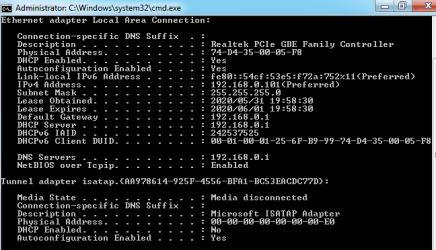
To find out if you have a double NAT type the following in CMD:
Code:
ipconfig /all
Post your results here. I believe if the first two IP addresses are local IPs, then you have a double NAT. That Google search is not really what can all happen. If you have a double NAT, you may not have Internet access at all. Or at least sporadic Internet.

This is for a different router, but may help you as well. SwissCobalt's Blog: How to bridge DSL-520B with WRT-54GC
 

My Computer My Computer

At a glance

Windows 7 Ultimate x64
Computer type
PC/Desktop
OS
Windows 7 Ultimate x64
Thanks for the info F22 Simpilot, I will read that page later when I have a good nights sleep.

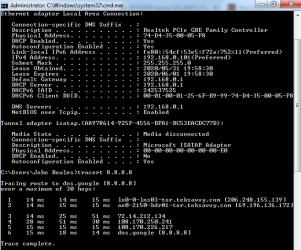
I ran the IPCONFIG and attached the image.

Yesterday after finally getting the new modem to work stand alone I then set it up through the router with the other 3 computers (forgot I have an old XP machine connected which I use for a weekly backup). So the new modem was working great with full download speed. I turned the modem and computer off over night. Next morning it would not work. So I change it to stand alone. It worked once then stopped working. I swapped the old one in. Same thing. I decided to swap the new one back in and call my ISP (Teksavvy). After 2.5 hours on the phone we finally got it working (right now it is working great with high speed). Part way through we discovered I had set both the router and modem up with my credentials (it is still set up this way). She talked to the senior technical person. She came back and said I could set it up 2 ways. I was so tired I could not absorb it. I think basically it all boiled down to I could have my credentials in either the modem or the router but maybe it is not best to have my credentials in both. I am leaning toward having them in the modem because I can see the lights much more clearly. She also said they have done extensive studies and she said it is best to leave both the modem and router on all the time (just turn the computer off). She said if making changes to the modem or router setup I should also reboot the PC so that it picks up the IP addresses properly.
 

Attachments

  • Double_NAT_Test.png
    Double_NAT_Test.png
    9.9 KB · Views: 9

My Computer My Computer

At a glance

Windows 7 Professional 64 bitIntel(R) Core(TM) I5-4430 [email protected]8 Gig (may increase)
Computer type
PC/Desktop
Computer Manufacturer/Model Number
LG
OS
Windows 7 Professional 64 bit
CPU
Intel(R) Core(TM) I5-4430 [email protected]
Memory
8 Gig (may increase)
Hard Drives
solid state drive and a regular drive
Antivirus
Avast
Browser
Chrome
Read post #7.
 

My Computer My Computer

At a glance

Windows 7 Ultimate x64
Computer type
PC/Desktop
OS
Windows 7 Ultimate x64
Just ran the trace and attached it.
 

Attachments

  • Double_NAT_Test.png
    Double_NAT_Test.png
    14.8 KB · Views: 9

My Computer My Computer

At a glance

Windows 7 Professional 64 bitIntel(R) Core(TM) I5-4430 [email protected]8 Gig (may increase)
Computer type
PC/Desktop
Computer Manufacturer/Model Number
LG
OS
Windows 7 Professional 64 bit
CPU
Intel(R) Core(TM) I5-4430 [email protected]
Memory
8 Gig (may increase)
Hard Drives
solid state drive and a regular drive
Antivirus
Avast
Browser
Chrome
So I guess this means I am currently running double NAT. Have I got that correct?

I do remember she said I could reset the router to factory reset and run it as a dumb router and also have it set up for wifi as well as using the 4 Ethernet ports. I will read that page more carefully tomorrow when I am more alert.
 

My Computer My Computer

At a glance

Windows 7 Professional 64 bitIntel(R) Core(TM) I5-4430 [email protected]8 Gig (may increase)
Computer type
PC/Desktop
Computer Manufacturer/Model Number
LG
OS
Windows 7 Professional 64 bit
CPU
Intel(R) Core(TM) I5-4430 [email protected]
Memory
8 Gig (may increase)
Hard Drives
solid state drive and a regular drive
Antivirus
Avast
Browser
Chrome
4 port adsl2 is the real answer as it's so simple and people are giving them away as no one wants them and your wasting so much time and it's so simple with the proper router
 

My Computer My Computer

At a glance

win 8 32 bit
Computer type
PC/Desktop
OS
win 8 32 bit
4 port adsl2 is the real answer as it's so simple and people are giving them away as no one wants them and your wasting so much time and it's so simple with the proper router

One might say (or would be wise to say) "we always waste time when we are learning new things". We always learn new things because we can not possibly know everything that exists in the universe. This pandemic is a perfect example of that. We typically learn in a just in time manor. So here is my just in time learning sequence drilling down step by step to this situation.

I started out learning programming before internet and before PCs. Eventually PCs existed. Eventually internet existed. Eventually routers existed. Eventually combined router/modem boxes existed. All new things to learn. I first started out with separate router and modem boxes. Next I graduated to combined router/network boxes with 4 ports and wifi. I used those with Bell Canada service. When I switched to TekSavvy their delivery of these router/modem boxes was too slow for me so I decided to buy them at Canada computers at lower price. So before these D-link boxes I had just that (a combined router/modem box with 4 ports and the router part has wifi as did the prior Bell Canada provided box).

Sadly they do not last that long and I had to replace the Canada Computers combined router/modem box. I was surprised to here this from the technician at Canada Computers. He said "they (meaning the industry) are moving away from these combined router/modem boxes and Canada computer no longer carries them". To me this did not make much sense but I liked the store and their prices and decided to buy the D-Link.

So I did the standard take it home and follow the instructions carefully thing. No big deal. But there was a pot hole here and I hit it without even realizing it until just this morning actually (just in time learning). It was the fact that the router also had two text boxes for entering the ISP credentials. I made an incorrect assumption that I had to fill in these two text boxes. I need to go back to the router instructions later today to see if it said "optional" here. I suspect maybe it did. Mistakes are tools of learning we all have the right to make so I don't sweat it. I feel sorry for those who don't realize this. They hide their mistakes thinking that other's don't realize this.

So I woke up this morning with recharged batteries providing the energy needed for an idea for a mental learning note to leave for myself. I will write it down here in an organized fashion and may copy it to my reminder database just in case I get older and forget...lol.

Subject:
Understand the difference between (setting and providing) the two set of internet related credentials (each set of credentials meaning ID and Password). See the notes for the answer.

#1 - ISP Credentials:
........Setting: they are set at the ISP computer.
........Providing: they are provided by the modem.

#2 - Wireless WIFI Credentials:
.........Setting: they are set at the router which has the antennas.
.........Providing: they are provided by one or more laptop computers.

This seems obvious to me now. But I forget for a short moment that we can not possibly know everything there is to know in the universe and we typically learn just in time. But there remains a question. Why does the wireless router which does not have a built in modem have a place to enter the ISP credentials?
 
Last edited:

My Computer My Computer

At a glance

Windows 7 Professional 64 bitIntel(R) Core(TM) I5-4430 [email protected]8 Gig (may increase)
Computer type
PC/Desktop
Computer Manufacturer/Model Number
LG
OS
Windows 7 Professional 64 bit
CPU
Intel(R) Core(TM) I5-4430 [email protected]
Memory
8 Gig (may increase)
Hard Drives
solid state drive and a regular drive
Antivirus
Avast
Browser
Chrome
In your tracert I don't see your local adapters for some reason. That would let me know if there was a double NAT. I would make sure you read everything in that article in post #7 and that other article in post #6 to make sure bridging mode is on. That is vital when you use a modem and a router.
 

My Computer My Computer

At a glance

Windows 7 Ultimate x64
Computer type
PC/Desktop
OS
Windows 7 Ultimate x64
In your tracert I don't see your local adapters for some reason. That would let me know if there was a double NAT. I would make sure you read everything in that article in post #7 and that other article in post #6 to make sure bridging mode is on. That is vital when you use a modem and a router.

Thanks F22 Simpilot, you have been very helpful. I have scheduled to do the reading you suggest and make adjustments on Saturday for sure. For now the new modem is working well with the old setup so using work time to do the reading is not good use of my time. Everything is new (modem, ac adapter, phone wire, modem-to-router-wire). Maybe that is the difference. But I definitely want it set up properly.
 

My Computer My Computer

At a glance

Windows 7 Professional 64 bitIntel(R) Core(TM) I5-4430 [email protected]8 Gig (may increase)
Computer type
PC/Desktop
Computer Manufacturer/Model Number
LG
OS
Windows 7 Professional 64 bit
CPU
Intel(R) Core(TM) I5-4430 [email protected]
Memory
8 Gig (may increase)
Hard Drives
solid state drive and a regular drive
Antivirus
Avast
Browser
Chrome
In your tracert I don't see your local adapters for some reason. That would let me know if there was a double NAT. I would make sure you read everything in that article in post #7 and that other article in post #6 to make sure bridging mode is on. That is vital when you use a modem and a router.

Hi F22 Simpilot, I read both articles. I checked both items in the post #7 article. They both suggest I did not have a double NAT. My modem is a simple modem (single Ethernet port). I changed the modem setup to bridge as per both other pages you sent me (the modem instructions and the post #6 page). It is working now as well. The router is set to connection type PPPoE so I am taking a guess that this is why switching the modem from PPPoE to bridge works.

The modem internet light would (with the prior setup) often run solid red but still work. The ISP people had trouble believing this but it is obvious there is something they do not know. I could not clear up their confusion :-) Both the modem and the router have had my correct ISP credentials entered for at least 2 years.

What I find interesting now is the modem internet light flashes now and is mostly not lit. With the prior setup it was always either solid red or solid green. I just checked the router instructions and its 2nd light is Internet. Thus router internet light is solid on. I am assuming the router internet light has taken over . Maybe this is why the other modem (PPPoE rather than bridge) setup still worked with a red light (layman thoughts).

The one thing I did not bother doing from post #6 was resetting the router and reentering all the stuff. The modem automatically reset when I changed from PPPoE to bridge and saved it. I rebooted the computer (something I learned from the ISP support person). My understanding is thus PC reboot is requied because the router might change the private IP addresses it assigns.

I still don't really understand why both the router and the modem need to have the ISP credentials. I am tempted to remove the ISP credentials from the router as an experiment. If I had nothing more important to do I might try that. Maybe someone or Google can clarify this question.

My tests. I ran both "FAST.com" and "speedtest.net" with good results. I ran pingplotter with good results. All web pages I regularly use come up fast. My broker software runs. Its all good :-)

I will update my notes to myself. Maybe some day I will get a single box again. My ISP has them. I guess I should price this single box against the router+modem cost.

A late discovery. The modem internet light stays consistently dark now when all web pages are closed. It seems to only light when internet data is transferring. The router internet light is flashing a bit but is mostly on even when there is no internet traffic.
 
Last edited:

My Computer My Computer

At a glance

Windows 7 Professional 64 bitIntel(R) Core(TM) I5-4430 [email protected]8 Gig (may increase)
Computer type
PC/Desktop
Computer Manufacturer/Model Number
LG
OS
Windows 7 Professional 64 bit
CPU
Intel(R) Core(TM) I5-4430 [email protected]
Memory
8 Gig (may increase)
Hard Drives
solid state drive and a regular drive
Antivirus
Avast
Browser
Chrome
I think since you have the modem in bridging mode you may have to have your DSL credentials in the router since now the modem is like pass through.
 

My Computer My Computer

At a glance

Windows 7 Ultimate x64
Computer type
PC/Desktop
OS
Windows 7 Ultimate x64
I think since you have the modem in bridging mode you may have to have your DSL credentials in the router since now the modem is like pass through.

Interesting. The exact opposite of what I was thinking. It makes sense however. I will just leave well enough alone. :-)

I expect things will run smoothly for a long time now. I am keeping the old modem as a backup.

Thanks again for your help.
 

My Computer My Computer

At a glance

Windows 7 Professional 64 bitIntel(R) Core(TM) I5-4430 [email protected]8 Gig (may increase)
Computer type
PC/Desktop
Computer Manufacturer/Model Number
LG
OS
Windows 7 Professional 64 bit
CPU
Intel(R) Core(TM) I5-4430 [email protected]
Memory
8 Gig (may increase)
Hard Drives
solid state drive and a regular drive
Antivirus
Avast
Browser
Chrome
Back
Top