Solved Windows not reading Chinese characters properly

darknightz0117

New member
Member
VIP
Local time
2:34 PM
Messages
179
Hello all,

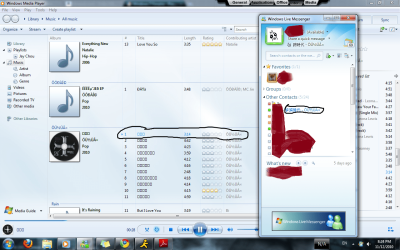
This is a really strange problem. Both my laptop and my desktop can't seem to read Chinese characters properly. The languages are installed; I can type in Chinese just fine, but if I go to a folder that contains music files in Chinese or I open up Windows Media Player, the characters are all boxes. Just plain old boxes. Yet, if I choose to play one of these songs, the correct title will show up in my Windows Live Messenger status. I'm not sure why Windows Live Messenger can read it properly, but not Windows 7 itself.

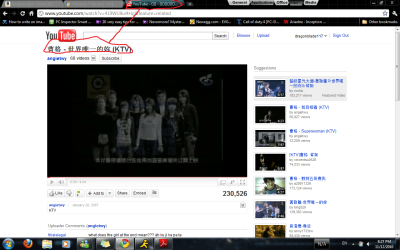
Even if I go on google chrome and go on youtube, the youtube page itself will display the characters properly, but the google chrome tab label will be boxes. The screenshot should clarify.

If anyone has any idea, I would really appreciate it. One thing that I have noticed is that if I connect my Sony mp3 player, suddenly all the characters will show up perfectly, so I really don't understand why this is. Please advise.

Thank you all in advance =D
 

Attachments
  • MSN and Media Player.png
    MSN and Media Player.png
    196.5 KB · Views: 1,343
  • Chrome.png
    Chrome.png
    113.9 KB · Views: 696

My Computer My Computer

At a glance

Windows 7AMD Phenom II X4 5552x2GB OCZ Platinum Edition DDR3 PC3-10666Sapphire Radeon 6870
OS
Windows 7
CPU
AMD Phenom II X4 555
Motherboard
Biostar TA785G3
Memory
2x2GB OCZ Platinum Edition DDR3 PC3-10666
Graphics Card(s)
Sapphire Radeon 6870
Hard Drives
Generic SSD (64GB)
Samsung F3 (1TB)
Seagate (1TB)
Case
Antec 300
Try this:

Start> Type Fonts in search box and press enter> When fonts folder opens, click on Font Settings on left navigation pane> Untick Hide fonts based on language settings> Ok your way out.

If no fix, right click on the Ming Liu fonts in the fonts folder, and select Show. Restart to see changes.

A Guy
 

My Computer My Computer

At a glance

Windows 10 Home x64INTEL Core i5-750 Quad-Core 3.37GHzHyperX Fury Black Series 8GB (2 x 4GB) 1866MhzEVGA GeForce GTX 750 Superclocked 1GB 128-Bit...
Computer type
PC/Desktop
OS
Windows 10 Home x64
CPU
INTEL Core i5-750 Quad-Core 3.37GHz
Motherboard
ASUS P7P55D
Memory
HyperX Fury Black Series 8GB (2 x 4GB) 1866Mhz
Graphics Card(s)
EVGA GeForce GTX 750 Superclocked 1GB 128-Bit GDDR5
Monitor(s) Displays
LG 32MA68HY 32" IPS
Screen Resolution
1920 x 1080
Hard Drives
Samsung 840 Evo 120GB, SEAGATE 500GB Barracuda® 7200.12, SATA 3 Gb/s, 7200 RPM, 16MB cache
PSU
ANTEC TruePower New TP-550, 80 PLUS, 550W
Case
ANTEC Three Hundred Illusion
Cooling
COOLER MASTER Hyper 212 Plus, 4 x 120mm 1 x 140mm Noctua's
Internet Speed
85 + Mbps
Antivirus
Avast
Browser
Vivaldi
Hmm under Regional / language settings (not the keyboard tab) there is something called system wide language or something similar (I'm on my phone typing this, not sure of the exact name). Try clicking that, changing it to Chinese and restarting. This fixed a problem I had a while ago where Chinese characters in some programs would show up as random symbols.

Good luck!
 

My Computer My Computer

At a glance

Windows 7 Professional 64 bit
OS
Windows 7 Professional 64 bit
Try this:

Start> Type Fonts in search box and press enter> When fonts folder opens, click on Font Settings on left navigation pane> Untick Hide fonts based on language settings> Ok your way out.

If no fix, right click on the Ming Liu fonts in the fonts folder, and select Show. Restart to see changes.

A Guy

holy crap! i just did this fix (unchecking the "Hide fonts" setting, and now it's okay! Thanks a lot!!
 

My Computer My Computer

At a glance

Windows 7AMD Phenom II X4 5552x2GB OCZ Platinum Edition DDR3 PC3-10666Sapphire Radeon 6870
OS
Windows 7
CPU
AMD Phenom II X4 555
Motherboard
Biostar TA785G3
Memory
2x2GB OCZ Platinum Edition DDR3 PC3-10666
Graphics Card(s)
Sapphire Radeon 6870
Hard Drives
Generic SSD (64GB)
Samsung F3 (1TB)
Seagate (1TB)
Case
Antec 300

My Computer My Computer

At a glance

Windows 10 Home x64INTEL Core i5-750 Quad-Core 3.37GHzHyperX Fury Black Series 8GB (2 x 4GB) 1866MhzEVGA GeForce GTX 750 Superclocked 1GB 128-Bit...
Computer type
PC/Desktop
OS
Windows 10 Home x64
CPU
INTEL Core i5-750 Quad-Core 3.37GHz
Motherboard
ASUS P7P55D
Memory
HyperX Fury Black Series 8GB (2 x 4GB) 1866Mhz
Graphics Card(s)
EVGA GeForce GTX 750 Superclocked 1GB 128-Bit GDDR5
Monitor(s) Displays
LG 32MA68HY 32" IPS
Screen Resolution
1920 x 1080
Hard Drives
Samsung 840 Evo 120GB, SEAGATE 500GB Barracuda® 7200.12, SATA 3 Gb/s, 7200 RPM, 16MB cache
PSU
ANTEC TruePower New TP-550, 80 PLUS, 550W
Case
ANTEC Three Hundred Illusion
Cooling
COOLER MASTER Hyper 212 Plus, 4 x 120mm 1 x 140mm Noctua's
Internet Speed
85 + Mbps
Antivirus
Avast
Browser
Vivaldi
holy crap! i just did this fix (unchecking the "Hide fonts" setting, and now it's okay! Thanks a lot!!

You are very welcome :)

A Guy

Okay never mind lol. Now, the characters reverted back to boxes. The characters seem to be temperamental. They change whenever they want, and there doesn't seem to be any way to control it. I've installed all the updates and everything. I'm not quite sure what else to do o.O
 

My Computer My Computer

At a glance

Windows 7AMD Phenom II X4 5552x2GB OCZ Platinum Edition DDR3 PC3-10666Sapphire Radeon 6870
OS
Windows 7
CPU
AMD Phenom II X4 555
Motherboard
Biostar TA785G3
Memory
2x2GB OCZ Platinum Edition DDR3 PC3-10666
Graphics Card(s)
Sapphire Radeon 6870
Hard Drives
Generic SSD (64GB)
Samsung F3 (1TB)
Seagate (1TB)
Case
Antec 300
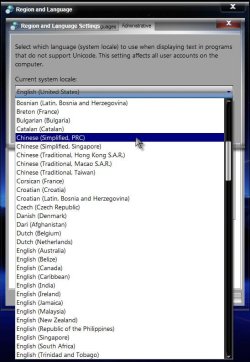
No taking it back! Lol, sorry...ok, try this:

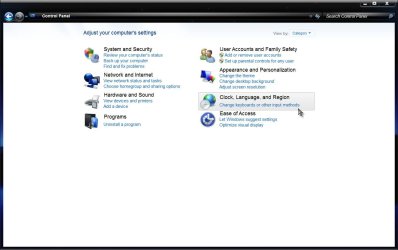
Start> Control panel> Click on Clock, Language, and Region

1.jpg

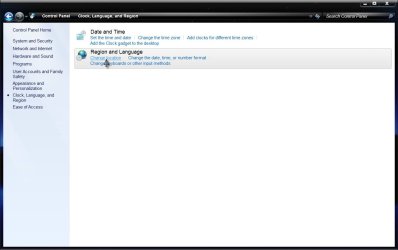
Under Region and Language click on Change Location

2.jpg

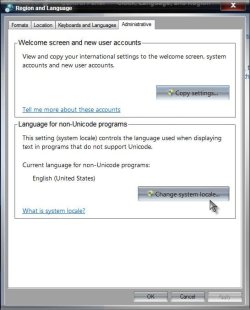
On the Administrative tab, choose Change System Locale

3.jpg

Choose Chinese (Simplified, PRC)

5.jpg

OK and Apply your way out.

Now repeat the steps and change it back to English (United States)

Assuming that is what it was when you started.

See if that helps. A Guy
 

My Computer My Computer

At a glance

Windows 10 Home x64INTEL Core i5-750 Quad-Core 3.37GHzHyperX Fury Black Series 8GB (2 x 4GB) 1866MhzEVGA GeForce GTX 750 Superclocked 1GB 128-Bit...
Computer type
PC/Desktop
OS
Windows 10 Home x64
CPU
INTEL Core i5-750 Quad-Core 3.37GHz
Motherboard
ASUS P7P55D
Memory
HyperX Fury Black Series 8GB (2 x 4GB) 1866Mhz
Graphics Card(s)
EVGA GeForce GTX 750 Superclocked 1GB 128-Bit GDDR5
Monitor(s) Displays
LG 32MA68HY 32" IPS
Screen Resolution
1920 x 1080
Hard Drives
Samsung 840 Evo 120GB, SEAGATE 500GB Barracuda® 7200.12, SATA 3 Gb/s, 7200 RPM, 16MB cache
PSU
ANTEC TruePower New TP-550, 80 PLUS, 550W
Case
ANTEC Three Hundred Illusion
Cooling
COOLER MASTER Hyper 212 Plus, 4 x 120mm 1 x 140mm Noctua's
Internet Speed
85 + Mbps
Antivirus
Avast
Browser
Vivaldi
  • Like
Reactions: ryo
No taking it back! Lol, sorry...ok, try this:

Start> Control panel> Click on Clock, Language, and Region

View attachment 114219

Under Region and Language click on Change Location

View attachment 114220

On the Administrative tab, choose Change System Locale

View attachment 114221

Choose Chinese (Simplified, PRC)

View attachment 114222

OK and Apply your way out.

Now repeat the steps and change it back to English (United States)

Assuming that is what it was when you started.

See if that helps. A Guy

Yeah I've seen that fix too. It works, but that causes a problem in my other program, Rainmeter. Rainmeter has a function that displays the weather for the cities I choose. When I changed the system locale, the degrees Celsius sign turns into a random symbol. I just wish that things would stay stable lol. Just this morning, the Chinese characters were perfectly viewable. Now, they're boxes again.
 

My Computer My Computer

At a glance

Windows 7AMD Phenom II X4 5552x2GB OCZ Platinum Edition DDR3 PC3-10666Sapphire Radeon 6870
OS
Windows 7
CPU
AMD Phenom II X4 555
Motherboard
Biostar TA785G3
Memory
2x2GB OCZ Platinum Edition DDR3 PC3-10666
Graphics Card(s)
Sapphire Radeon 6870
Hard Drives
Generic SSD (64GB)
Samsung F3 (1TB)
Seagate (1TB)
Case
Antec 300
Back
Top