How to find a file with the exact name?

gilmoses

New member
Local time
12:24 PM
Messages
23
Hi,
Seen this question posted several times, but no good answer yet.

I'm trying to locate a file on my disk named "gm". Is that seemingly simple task possible on Windows 7? When I search for 'name:gm' or 'name:"gm"' I get hundreds of files, all of them contain 'gm' in their name and to find my file I need to go over the list one by one.

Please help!!
Thanks,
Gil.
 

My Computer My Computer

At a glance

Windows 7 Professional 64 bit
OS
Windows 7 Professional 64 bit
Hi,
Seen this question posted several times, but no good answer yet.

I'm trying to locate a file on my disk named "gm". Is that seemingly simple task possible on Windows 7? When I search for 'name:gm' or 'name:"gm"' I get hundreds of files, all of them contain 'gm' in their name and to find my file I need to go over the list one by one.

Please help!!
Thanks,
Gil.

Have you tried using filename:"gm.*"?

I ran a quick test on my system, and searched my pictures library using filename:"obelix", and got the following results:

_asterix_obelix_idefix_1_.jpg
Obelix.jpg

When I changed the search to filename:"obelix.*", thenI only got "Obelix.jpg"

The key therefore is to enclude the filename you are searching for in quotes, and include a period and star wildcard at the end of the filename.
 

My Computer My Computer

At a glance

Windows 7 Professional 32-bit SP1AMD A4/A63.00GB EDOVMware SVGA 3D
Computer type
PC/Desktop
Computer Manufacturer/Model Number
Virtual Machine
OS
Windows 7 Professional 32-bit SP1
CPU
AMD A4/A6
Motherboard
Intel Corporation 440BX Desktop Reference Platform
Memory
3.00GB EDO
Graphics Card(s)
VMware SVGA 3D
Sound Card
High Definition Audio Device
Monitor(s) Displays
Generic Non-PnP Monitor on VMware SVGA 3D
Screen Resolution
1440x900
Hard Drives
1 x 60GB VMware Virtual SATA Hard Drive ATA Device
Antivirus
Kaspersky Total Security
Re: How to find a file with the exact name

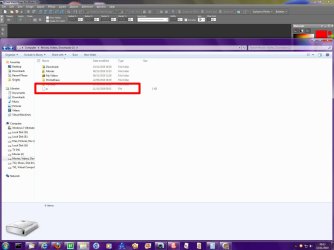
No go. Try this: create a file named "a" on your disk (no extension), then try to locate it...

Gil.
 

My Computer My Computer

At a glance

Windows 7 Professional 64 bit
OS
Windows 7 Professional 64 bit
No go. Try this: create a file named "a" on your disk (no extension), then try to locate it...

Gil.

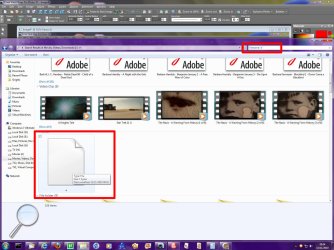
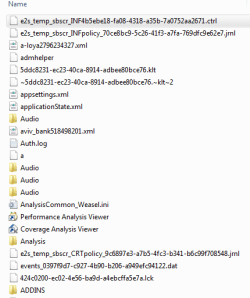
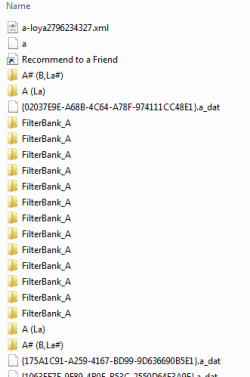
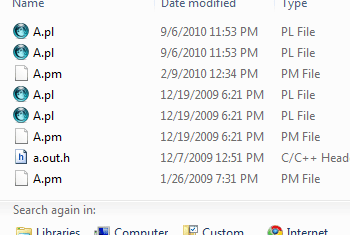
Works like a charm for me:
Image1.jpg Image2.jpg

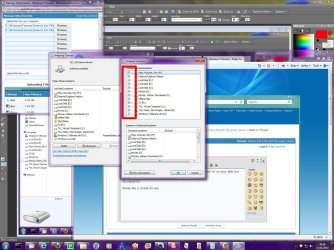
Is it possible that the drive/s you are searching are not in your index?:
Image3.jpg

Try the following:
  1. Click the Start Orb :orb:
  2. Type "index" without quotes
  3. Click "Indexing Options"
  4. Click "Modify"
  5. Are all you drives checked for indexing?
Are you or have you recently run utilities such as registry cleaners and/or system optimizers other than disk defrag programs? Registry Cleaners have a tendency to make more problems than they solve. "RegVac" has been known to interfere with the Windows Search Index...
 

My Computer My Computer

At a glance

Windows 7 Professional 32-bit SP1AMD A4/A63.00GB EDOVMware SVGA 3D
Computer type
PC/Desktop
Computer Manufacturer/Model Number
Virtual Machine
OS
Windows 7 Professional 32-bit SP1
CPU
AMD A4/A6
Motherboard
Intel Corporation 440BX Desktop Reference Platform
Memory
3.00GB EDO
Graphics Card(s)
VMware SVGA 3D
Sound Card
High Definition Audio Device
Monitor(s) Displays
Generic Non-PnP Monitor on VMware SVGA 3D
Screen Resolution
1440x900
Hard Drives
1 x 60GB VMware Virtual SATA Hard Drive ATA Device
Antivirus
Kaspersky Total Security

My Computer My Computer

At a glance

windows 7 professional & ultimate 64bit laptops2.27 boost to 2.53 & 2.53 boost to 2.804GBIntel® Graphics Media Accelerator HD
Computer Manufacturer/Model Number
Gateway/NV7923u & NV79C52u Laptops
OS
windows 7 professional & ultimate 64bit laptops
CPU
2.27 boost to 2.53 & 2.53 boost to 2.80
Motherboard
Mobile Intel® HM55 Express Chipset ???
Memory
4GB
Graphics Card(s)
Intel® Graphics Media Accelerator HD
Sound Card
realtek High-definition audio support
Monitor(s) Displays
17.3 " HD 1600 x 900
Hard Drives
hatachi Travelstar 5400 500GB & west digital 500GB
Internet Speed
35MB fios

My Computer My Computer

At a glance

Windows 7 x86/x64, Server 2008r2, Web Server ...i7 v2 3930K Steping stone 2G.SKILL Ripjaws Z Series 32GBAMD HD 5770
Computer Manufacturer/Model Number
SMN-Productions
OS
Windows 7 x86/x64, Server 2008r2, Web Server 2008
CPU
i7 v2 3930K Steping stone 2
Motherboard
ASUS Rampage IV Extreme
Memory
G.SKILL Ripjaws Z Series 32GB
Graphics Card(s)
AMD HD 5770
Monitor(s) Displays
Acer 21" and Samsung 20"
Hard Drives
Patriot Pyro 80GB
PSU
1000 Watt
Case
HAF-X
Cooling
4 Fans
Keyboard
Black Widow Ultimate
Dzomlija,
I can see that your search found 180+ files of a certain type, then 9 of another.
You got lucky.. for me (and for the general case) there are 400+ files...

Thanks to the others for the links, I'll check them out.

Gil.
 

My Computer My Computer

At a glance

Windows 7 Professional 64 bit
OS
Windows 7 Professional 64 bit
When you search for "name:GM" Windows is not searching for a file called "GM", it is searching for all files with the letters GM in the name. To prevent this, use "filename:GM", instead.
 
Last edited:

My Computer My Computer

At a glance

Windows 7 Pro/32 Academic. Build 7600Intel 2.3 Duo core4 GB DDRNvidia GeForce 9500 GT
Computer Manufacturer/Model Number
Custom Build
OS
Windows 7 Pro/32 Academic. Build 7600
CPU
Intel 2.3 Duo core
Motherboard
EliteGroup G31T-M
Memory
4 GB DDR
Graphics Card(s)
Nvidia GeForce 9500 GT
Sound Card
Built in
Monitor(s) Displays
Viewsonic 15" 4:3
Screen Resolution
1280 x 1024
Hard Drives
WD Caviar Black 750 GB
WD 250 GB External
PSU
Antec 450w
Keyboard
Standard windows
Mouse
Logitech USB
Internet Speed
Bellsouth DSL 6.0
mborner,
'filename' does not work. try this: create a file named "a" on your disk (no extension), then try to create a search query that displays all the files that are named 'a' and THESE FILES ONLY, NOTHING MORE.
None of the suggestions above (excluding external apps) succeeded in displaying ONLY the filename requested.

If this is a Windows 7 deficiency I'll be happy to report it if I knew where :)

Thanks,
Gil.
 

My Computer My Computer

At a glance

Windows 7 Professional 64 bit
OS
Windows 7 Professional 64 bit
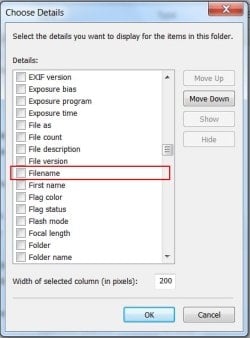
I can assure you, "filename" is a legitemate seach query.

filename.jpg

I apologize if I'm just not understanding your search problem, I'm trying. In your example above, why would anybody have several files on their PC with the exact same name? I'm just not following. First, If I create a file named "A" on my disk and then query "filename:a", I get the file instantly in my results window. If I create 100 files named "A" in 100 different folders on my disk and query "filename:a" I will get the top 100 results for the file located in 100 different folders.
You'll get other files with the letter "a" in the name but the exact file you are searching for will always be the first one on the list. For example, if I searched my entire drive for "filename:a" I may get 6,000 results, but the file, "a", that I'm looking for will be the first item of those 6,000 results. It always works this way. Again, I have to ask, why would you have several hundred files named "GM" on your disk? If you only have 1 file named "GM" and you search for "filename:GM" and you get 25,000 results but the file you are looking for is the very first file, what is the issue? You found your file, who cares about the rest of the results.
 

My Computer My Computer

At a glance

Windows 7 Pro/32 Academic. Build 7600Intel 2.3 Duo core4 GB DDRNvidia GeForce 9500 GT
Computer Manufacturer/Model Number
Custom Build
OS
Windows 7 Pro/32 Academic. Build 7600
CPU
Intel 2.3 Duo core
Motherboard
EliteGroup G31T-M
Memory
4 GB DDR
Graphics Card(s)
Nvidia GeForce 9500 GT
Sound Card
Built in
Monitor(s) Displays
Viewsonic 15" 4:3
Screen Resolution
1280 x 1024
Hard Drives
WD Caviar Black 750 GB
WD 250 GB External
PSU
Antec 450w
Keyboard
Standard windows
Mouse
Logitech USB
Internet Speed
Bellsouth DSL 6.0
'filename' is indeed legitimate, no argument here. I meant to say that it didn't work in trying to reduce the search results.
And, it's not that I have hundreds of 'GM' files or 'a' files, I simply generalized the problem I was having.

Now, using filename:a I get the following:


Where is the file.png

Using filename:"a" (added quotes) I get:


Where is the file 2.png

Better, however I got lucky this time and my file is second. But who guarantees I'll get lucky next time?
And why can't Windows simply display only the files I'm looking for?

Thanks,
Gil.
 

My Computer My Computer

At a glance

Windows 7 Professional 64 bit
OS
Windows 7 Professional 64 bit
First, an important thing to remember is that when searching from Start menu's search box, it searches only the indexed locations. To search whole computer, also non-indexed locations, use search box in Computer's Explorer-window.


Then the search principles.
  • filename:gm
    • finds files where gm is filename or a part of it
    • gm_1.jpg, test_gm.txt, gm.doc, myGMfile.pdf etc.
  • filename:gm AND type:image
    • finds all image files where gm is filename or a part of it
    • gm_1.jpg, test_gm.png, gm.gif, myGMfile.bmp etc.
  • filename:gm.*
    • finds files with exact filename gm, with any extension
    • gm.doc, GM.png etc.
  • filename:gm*.*
    • finds files where the name starts with gm, followed by none or any number of characters, with any extension
    • gm_testfile.pdf, gm1.doc, gmreallylongfilename.txt, gm.jpg etc.
  • filename:gm????.*
    • finds files with a 6 character name beginning with gm, any extension
    • gmtest.txt, gmimag.jpg etc.
  • filename:gm*.doc
    • finds files where the name starts with gm, followed by none or any number of characters, with extension .doc
    • gmtest.doc, gmfollowedbyalotofcharacters1.doc etc.
So, an asterisk (*) replaces any number of characters, a question mark (?) one character. When using search parameters AND, OR & NOT, these must always be written in caps, otherwise searchs thinks they are just words to search.

Hope this helps.

Kari
 

My Computer My Computer

At a glance

Windows 10 Pro x64 EN-GB1.6 GHz Intel Core i7-720QM Processor6 GBATI Mobility Radeon HD 5850 Graphics
Computer type
Laptop
Computer Manufacturer/Model Number
HP ENVY 17-1150eg
OS
Windows 10 Pro x64 EN-GB
CPU
1.6 GHz Intel Core i7-720QM Processor
Memory
6 GB
Graphics Card(s)
ATI Mobility Radeon HD 5850 Graphics
Sound Card
Beats sound system with integrated subwoofer
Monitor(s) Displays
17" laptop display, 22" LED and 32" Full HD TV through HDMI
Screen Resolution
1600*900 (1), 1920*1080 (2&3)
Hard Drives
Internal: 2 x 500 GB SATA Hard Disk Drive 7200 rpm
External: 2TB for backups, 3TB USB3 network drive for media
Cooling
As Envy runs a bit warm, I have it on a Cooler Master pad
Keyboard
Logitech diNovo Media Desktop Laser (bluetooth)
Mouse
Logitech Performance Mouse MX
Internet Speed
50/10 Mbps VDSL
Antivirus
Windows Defender 4.3.9431.0
Browser
Maxthon 3.5.2., IE11
Hi Kari, but how do you find a file without an extension, say, 'a'?
Here's what I get when I use 'filename:a.*' :

Where is the file 3.png

As you can see, my 'a' file was not found!

Gil.
 

My Computer My Computer

At a glance

Windows 7 Professional 64 bit
OS
Windows 7 Professional 64 bit
That's difficult. I would like to think I'm quite experienced Windows Search user, but I really have not a clue how to pinpoint a search to find a certain file if that file has no extension. Made some tests just now, was unable to find a way.

The only way I can think of is to search filename:a, which of course is not good because it shows all the files where letter a appears in filename.

A good example why it's important to use extensions?

Kari
 

My Computer My Computer

At a glance

Windows 10 Pro x64 EN-GB1.6 GHz Intel Core i7-720QM Processor6 GBATI Mobility Radeon HD 5850 Graphics
Computer type
Laptop
Computer Manufacturer/Model Number
HP ENVY 17-1150eg
OS
Windows 10 Pro x64 EN-GB
CPU
1.6 GHz Intel Core i7-720QM Processor
Memory
6 GB
Graphics Card(s)
ATI Mobility Radeon HD 5850 Graphics
Sound Card
Beats sound system with integrated subwoofer
Monitor(s) Displays
17" laptop display, 22" LED and 32" Full HD TV through HDMI
Screen Resolution
1600*900 (1), 1920*1080 (2&3)
Hard Drives
Internal: 2 x 500 GB SATA Hard Disk Drive 7200 rpm
External: 2TB for backups, 3TB USB3 network drive for media
Cooling
As Envy runs a bit warm, I have it on a Cooler Master pad
Keyboard
Logitech diNovo Media Desktop Laser (bluetooth)
Mouse
Logitech Performance Mouse MX
Internet Speed
50/10 Mbps VDSL
Antivirus
Windows Defender 4.3.9431.0
Browser
Maxthon 3.5.2., IE11
It looks to me just like a simple deficiency in Windows 7 implementation... :)
No Microsoft moderator here to defend Win 7?

Gil.
 

My Computer My Computer

At a glance

Windows 7 Professional 64 bit
OS
Windows 7 Professional 64 bit
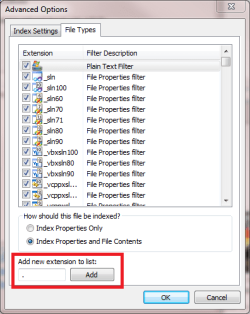
This might work, I know for sure when my laptop has finished re-indexing:

- Open Control Panel > Indexing options
- Click Advanced
- Choose File Types tab
- Ad an empty extension by typing a dot to Add a new extension to list, click Add
- Click OK, click Close

Indexing.png

Kari
 

My Computer My Computer

At a glance

Windows 10 Pro x64 EN-GB1.6 GHz Intel Core i7-720QM Processor6 GBATI Mobility Radeon HD 5850 Graphics
Computer type
Laptop
Computer Manufacturer/Model Number
HP ENVY 17-1150eg
OS
Windows 10 Pro x64 EN-GB
CPU
1.6 GHz Intel Core i7-720QM Processor
Memory
6 GB
Graphics Card(s)
ATI Mobility Radeon HD 5850 Graphics
Sound Card
Beats sound system with integrated subwoofer
Monitor(s) Displays
17" laptop display, 22" LED and 32" Full HD TV through HDMI
Screen Resolution
1600*900 (1), 1920*1080 (2&3)
Hard Drives
Internal: 2 x 500 GB SATA Hard Disk Drive 7200 rpm
External: 2TB for backups, 3TB USB3 network drive for media
Cooling
As Envy runs a bit warm, I have it on a Cooler Master pad
Keyboard
Logitech diNovo Media Desktop Laser (bluetooth)
Mouse
Logitech Performance Mouse MX
Internet Speed
50/10 Mbps VDSL
Antivirus
Windows Defender 4.3.9431.0
Browser
Maxthon 3.5.2., IE11
I'm feeling a bit thick this evening but I have never created a file without an extension. Can someone explain how to achieve this and more importantly why should anyone want to create a file with no extension?
 

My Computer My Computer

At a glance

Microsoft Windows 7 Home Premium 64-bit 7601 ...Intel(R) Core(TM) i7-3770 CPU @ 3.40GHz8.00 GBIntel(R) HD Graphics 4000
Computer type
PC/Desktop
OS
Microsoft Windows 7 Home Premium 64-bit 7601 Multiprocessor Free Service Pack 1
CPU
Intel(R) Core(TM) i7-3770 CPU @ 3.40GHz
Motherboard
ASUSTeK COMPUTER INC. P8H77-M
Memory
8.00 GB
Graphics Card(s)
Intel(R) HD Graphics 4000
Sound Card
On Board
Monitor(s) Displays
Dell 24"
Screen Resolution
1920 x 1080
Hard Drives
(1) INTEL SSDSC2CT180A3 ATA Device (2) ST500DM002-1BD142 ATA Device (3) WDC WD3200AAKS-75L9A0 ATA Device (4) Generic- Compact Flash USB Device (5) Generic- MS/MS-Pro USB Device (6) Generic- SD/MMC USB Device (7) Generic- SM/xD-Picture USB
PSU
500w Corsair
Case
Cooler Master
Cooling
3 Fans
Keyboard
Logitech MK300
Mouse
Logitech WOM
Internet Speed
75Mb
Antivirus
Norton 360
Browser
Firefox, Opera, IE
I'm feeling a bit thick this evening but I have never created a file without an extension. Can someone explain how to achieve this and more importantly why should anyone want to create a file with no extension?
Exactly. As I said earlier:
A good example why it's important to use extensions?
 

My Computer My Computer

At a glance

Windows 10 Pro x64 EN-GB1.6 GHz Intel Core i7-720QM Processor6 GBATI Mobility Radeon HD 5850 Graphics
Computer type
Laptop
Computer Manufacturer/Model Number
HP ENVY 17-1150eg
OS
Windows 10 Pro x64 EN-GB
CPU
1.6 GHz Intel Core i7-720QM Processor
Memory
6 GB
Graphics Card(s)
ATI Mobility Radeon HD 5850 Graphics
Sound Card
Beats sound system with integrated subwoofer
Monitor(s) Displays
17" laptop display, 22" LED and 32" Full HD TV through HDMI
Screen Resolution
1600*900 (1), 1920*1080 (2&3)
Hard Drives
Internal: 2 x 500 GB SATA Hard Disk Drive 7200 rpm
External: 2TB for backups, 3TB USB3 network drive for media
Cooling
As Envy runs a bit warm, I have it on a Cooler Master pad
Keyboard
Logitech diNovo Media Desktop Laser (bluetooth)
Mouse
Logitech Performance Mouse MX
Internet Speed
50/10 Mbps VDSL
Antivirus
Windows Defender 4.3.9431.0
Browser
Maxthon 3.5.2., IE11
Thank Kari but I would just like to know how its done, just curious really!
 

My Computer My Computer

At a glance

Microsoft Windows 7 Home Premium 64-bit 7601 ...Intel(R) Core(TM) i7-3770 CPU @ 3.40GHz8.00 GBIntel(R) HD Graphics 4000
Computer type
PC/Desktop
OS
Microsoft Windows 7 Home Premium 64-bit 7601 Multiprocessor Free Service Pack 1
CPU
Intel(R) Core(TM) i7-3770 CPU @ 3.40GHz
Motherboard
ASUSTeK COMPUTER INC. P8H77-M
Memory
8.00 GB
Graphics Card(s)
Intel(R) HD Graphics 4000
Sound Card
On Board
Monitor(s) Displays
Dell 24"
Screen Resolution
1920 x 1080
Hard Drives
(1) INTEL SSDSC2CT180A3 ATA Device (2) ST500DM002-1BD142 ATA Device (3) WDC WD3200AAKS-75L9A0 ATA Device (4) Generic- Compact Flash USB Device (5) Generic- MS/MS-Pro USB Device (6) Generic- SD/MMC USB Device (7) Generic- SM/xD-Picture USB
PSU
500w Corsair
Case
Cooler Master
Cooling
3 Fans
Keyboard
Logitech MK300
Mouse
Logitech WOM
Internet Speed
75Mb
Antivirus
Norton 360
Browser
Firefox, Opera, IE
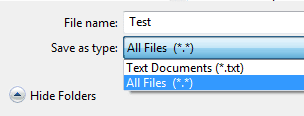
For instance in Notepad:
- File > Save As
- Type the name you want to without extension or with an extension of your choice
- Choose Save as type: All files (*.*)
- Click Save

This example would save the file with the name Test, with no extension:

Save_no_extension.png

This would save the the file with the name Test, with extension .zzz:

Save_my_extension.PNG

Kari
 

My Computer My Computer

At a glance

Windows 10 Pro x64 EN-GB1.6 GHz Intel Core i7-720QM Processor6 GBATI Mobility Radeon HD 5850 Graphics
Computer type
Laptop
Computer Manufacturer/Model Number
HP ENVY 17-1150eg
OS
Windows 10 Pro x64 EN-GB
CPU
1.6 GHz Intel Core i7-720QM Processor
Memory
6 GB
Graphics Card(s)
ATI Mobility Radeon HD 5850 Graphics
Sound Card
Beats sound system with integrated subwoofer
Monitor(s) Displays
17" laptop display, 22" LED and 32" Full HD TV through HDMI
Screen Resolution
1600*900 (1), 1920*1080 (2&3)
Hard Drives
Internal: 2 x 500 GB SATA Hard Disk Drive 7200 rpm
External: 2TB for backups, 3TB USB3 network drive for media
Cooling
As Envy runs a bit warm, I have it on a Cooler Master pad
Keyboard
Logitech diNovo Media Desktop Laser (bluetooth)
Mouse
Logitech Performance Mouse MX
Internet Speed
50/10 Mbps VDSL
Antivirus
Windows Defender 4.3.9431.0
Browser
Maxthon 3.5.2., IE11
Back
Top