Windows 7 SSD Install -- "Backup Media"

TheHighRoad

New member
Local time
6:12 PM
Messages
14
Hello!

I purchased a Mushkin Callisto Deluxe 60GB SSD yesterday (still in shipping transit) and have a Western Digital Black 500GB hard drive with Windows 7 Professional 32-bit installed on it.

I am going to want to do a clean install of my Windows 7 onto my new SSD. I would just like to have a clear plan of action as to how to get windows installed without it complaining and having to spend hours trying to figure out what went wrong.

First of all I bought the Digital River Student Windows 7 upgrade promo during which time I upgraded from my Windows XP, and I ordered the Windows 7 backup media (product X15-60650-01). Is this disc bootable? Will it be able to install directly to my SSD with the aid of the "upgrade media clean install" work-around.

For reference, the exact disk (albeit the 64-bit version) is scanned by DocBrown here: http://www.sevenforums.com/general-discussion/122640-ebay-purchase.html#post1057169

Do I first reformat the Western Digital Black HDD and then install Windows onto my SSD or do I install to the SSD (only drive plugged into SATA) and reformat the HDD after plugging it in while Windows is running off of the SSD?

I also have the HDD running on IDE mode something I never intended on doing, does anyone have the knowledge of when and how to change it over to SATA AHCI; as it needs to be reformatted anway?

Thanks!!!
TheHighRoad
 

My Computer My Computer

At a glance

W 7 Professional x64
Computer type
PC/Desktop
OS
W 7 Professional x64
Hello!

I purchased a Mushkin Callisto Deluxe 60GB SSD yesterday (still in shipping transit) and have a Western Digital Black 500GB hard drive with Windows 7 Professional 32-bit installed on it.

I am going to want to do a clean install of my Windows 7 onto my new SSD. I would just like to have a clear plan of action as to how to get windows installed without it complaining and having to spend hours trying to figure out what went wrong.

First of all I bought the Digital River Student Windows 7 upgrade promo during which time I upgraded from my Windows XP, and I ordered the Windows 7 backup media (product X15-60650-01). Is this disc bootable? Will it be able to install directly to my SSD with the aid of the "upgrade media clean install" work-around.

For reference, the exact disk (albeit the 64-bit version) is scanned by DocBrown here: http://www.sevenforums.com/general-discussion/122640-ebay-purchase.html#post1057169

Do I first reformat the Western Digital Black HDD and then install Windows onto my SSD or do I install to the SSD (only drive plugged into SATA) and reformat the HDD after plugging it in while Windows is running off of the SSD?

I also have the HDD running on IDE mode something I never intended on doing, does anyone have the knowledge of when and how to change it over to SATA AHCI; as it needs to be reformatted anway?

Thanks!!!
TheHighRoad

I'm not too certain of whether or not the DVD will be bootable, but I do think that it may be. If so, you can use the "Clean Install From Upgrade Media" media workaround to install directly to the SSD. The install process will take care of the partioning and formatting of the target drive for you.

Just be sure to change the SATA setting in your system BIOS from IDE to AHCI first...
 

My Computer My Computer

At a glance

Windows 7 Professional 32-bit SP1AMD A4/A63.00GB EDOVMware SVGA 3D
Computer type
PC/Desktop
Computer Manufacturer/Model Number
Virtual Machine
OS
Windows 7 Professional 32-bit SP1
CPU
AMD A4/A6
Motherboard
Intel Corporation 440BX Desktop Reference Platform
Memory
3.00GB EDO
Graphics Card(s)
VMware SVGA 3D
Sound Card
High Definition Audio Device
Monitor(s) Displays
Generic Non-PnP Monitor on VMware SVGA 3D
Screen Resolution
1440x900
Hard Drives
1 x 60GB VMware Virtual SATA Hard Drive ATA Device
Antivirus
Kaspersky Total Security
Hello TheHighRoad, welcome to Seven Forums!


Sounds like you have a good plan; it is suggested to enable AHCI before you start the install to the SSD though if you need to get back to the old install after you have reconnected it you will have to change back to IDE mode for it to boot, you can change back and forth between the two if needed.


Have a look at this tutorial at the link below for an out-line on the "Clean all" command (secure erase) an excellent method or over-writing old data on a HDD, just be sure to move the data you want to keep before you start. Running it this way, it will not allow the new Windows to be over-written when run from there.

Disk - Clean and Clean All with Diskpart Command
 

My Computer My Computer

At a glance

W 7 64-bit UltimateIntel Q9550 Yorkfield8GB Dominator 8500C5DATI : XFX 5870
Computer Manufacturer/Model Number
* BFK Customs *
OS
W 7 64-bit Ultimate
CPU
Intel Q9550 Yorkfield
Motherboard
ASUS P5Q Pro
Memory
8GB Dominator 8500C5D
Graphics Card(s)
ATI : XFX 5870
Sound Card
Realtek HD Audio 7-1
Monitor(s) Displays
1x 47" LCD HDMI & 3x 26" LCD HDMI
Screen Resolution
1920x1080P & 1920x1200
Hard Drives
1x 80GB Intel X25-M G2 SSD : 1x 500GB & 1x 640GB WD Caviar Black(s)
PSU
Corsair 620HX
Case
Cooler Master RC-690
Cooling
Tuniq Tower 120, 2x 140mm and 3x 120mm case fans
Keyboard
Microsoft 500
Mouse
Razer Diamondback 3G
Internet Speed
14 Mb/s
Other Info
1x Koutech 3Gb/s SATA HDD Hot Swap Rack
Thanks for the replies.

If I were to install the OS right on to my SSD, it would be in AHCI mode with the 500GB HDD disconnected. But since the format of the drive is in IDE (boot tables, right?), will it even be possible to reformat it so that I can set it up in AHCI and use it for storage?

Also is there a way to test if the backup DVD is bootable without having it start overwriting my harddrive? I cannot explore the disc in windows explorer.
 

My Computer My Computer

At a glance

W 7 Professional x64
Computer type
PC/Desktop
OS
W 7 Professional x64
Hello again.


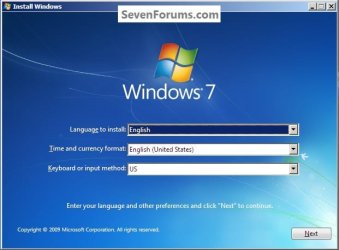
You can boot the DVD and if you get to this screen you'll know it's bootable; then you can remove the DVD and restart the PC without concern of the install starting.

Also have a look at Step One in this tutorial for an alternative method to boot to diskpart to do a wipe that won't matter which mode the PC is in.

SSD / HDD : Optimize for Windows Reinstallation

click to enlarge
Select2.jpg
 
Last edited:

My Computer My Computer

At a glance

W 7 64-bit UltimateIntel Q9550 Yorkfield8GB Dominator 8500C5DATI : XFX 5870
Computer Manufacturer/Model Number
* BFK Customs *
OS
W 7 64-bit Ultimate
CPU
Intel Q9550 Yorkfield
Motherboard
ASUS P5Q Pro
Memory
8GB Dominator 8500C5D
Graphics Card(s)
ATI : XFX 5870
Sound Card
Realtek HD Audio 7-1
Monitor(s) Displays
1x 47" LCD HDMI & 3x 26" LCD HDMI
Screen Resolution
1920x1080P & 1920x1200
Hard Drives
1x 80GB Intel X25-M G2 SSD : 1x 500GB & 1x 640GB WD Caviar Black(s)
PSU
Corsair 620HX
Case
Cooler Master RC-690
Cooling
Tuniq Tower 120, 2x 140mm and 3x 120mm case fans
Keyboard
Microsoft 500
Mouse
Razer Diamondback 3G
Internet Speed
14 Mb/s
Other Info
1x Koutech 3Gb/s SATA HDD Hot Swap Rack
Thanks for your help Bare Foot Kid, I appreciate it.
 

My Computer My Computer

At a glance

W 7 Professional x64
Computer type
PC/Desktop
OS
W 7 Professional x64

My Computer My Computer

At a glance

W 7 64-bit UltimateIntel Q9550 Yorkfield8GB Dominator 8500C5DATI : XFX 5870
Computer Manufacturer/Model Number
* BFK Customs *
OS
W 7 64-bit Ultimate
CPU
Intel Q9550 Yorkfield
Motherboard
ASUS P5Q Pro
Memory
8GB Dominator 8500C5D
Graphics Card(s)
ATI : XFX 5870
Sound Card
Realtek HD Audio 7-1
Monitor(s) Displays
1x 47" LCD HDMI & 3x 26" LCD HDMI
Screen Resolution
1920x1080P & 1920x1200
Hard Drives
1x 80GB Intel X25-M G2 SSD : 1x 500GB & 1x 640GB WD Caviar Black(s)
PSU
Corsair 620HX
Case
Cooler Master RC-690
Cooling
Tuniq Tower 120, 2x 140mm and 3x 120mm case fans
Keyboard
Microsoft 500
Mouse
Razer Diamondback 3G
Internet Speed
14 Mb/s
Other Info
1x Koutech 3Gb/s SATA HDD Hot Swap Rack
"Just be sure to change the SATA setting in your system BIOS from IDE to AHCI first..."

I did not do this when I put Windows on my SSD drive. Did I mess up? I did activate the C drive (SSD) and made the D drive (HHD) inactive.
 

My Computer My Computer

At a glance

Windows 7 Home PremiumAMD Phenom II 955 Black Edition Quad CoreCorsair XMS3 8GBATI Eyefinity HD 5770 5 mini display ports
Computer type
PC/Desktop
Computer Manufacturer/Model Number
Custom Build
OS
Windows 7 Home Premium
CPU
AMD Phenom II 955 Black Edition Quad Core
Motherboard
MSI 870-G45
Memory
Corsair XMS3 8GB
Graphics Card(s)
ATI Eyefinity HD 5770 5 mini display ports
Sound Card
Realtek High Definition 6.1
Monitor(s) Displays
2 DELL E207WFP 21.5" - 1 Acer 21.5"
Screen Resolution
2 Dells 1680x1050 - Acer 1920x1080
Hard Drives
Intel 40GB SSD
WD 500GB internal
WD 500Gb external
PSU
Cooler Master 500w
Case
Cooler Master 430 Black Elite
Keyboard
HP
Mouse
MIBRU
Internet Speed
10 mbs
Antivirus
Trend Micro
Browser
Chrome
"Just be sure to change the SATA setting in your system BIOS from IDE to AHCI first..."

I did not do this when I put Windows on my SSD drive. Did I mess up? I did activate the C drive (SSD) and made the D drive (HHD) inactive.

No, but if Windows was installed onto your SSD (or any other hard disk for that matter) with the bios settings on IDE compatibility, and you then set the bios to AHCI, then Windows will have a hissy-fit and will likely need to be re-installed.

This is why I said to first change your BIOS to AHCI mode before installing Windows.
 

My Computer My Computer

At a glance

Windows 7 Professional 32-bit SP1AMD A4/A63.00GB EDOVMware SVGA 3D
Computer type
PC/Desktop
Computer Manufacturer/Model Number
Virtual Machine
OS
Windows 7 Professional 32-bit SP1
CPU
AMD A4/A6
Motherboard
Intel Corporation 440BX Desktop Reference Platform
Memory
3.00GB EDO
Graphics Card(s)
VMware SVGA 3D
Sound Card
High Definition Audio Device
Monitor(s) Displays
Generic Non-PnP Monitor on VMware SVGA 3D
Screen Resolution
1440x900
Hard Drives
1 x 60GB VMware Virtual SATA Hard Drive ATA Device
Antivirus
Kaspersky Total Security
Thanks a lot! Is there a difference or advantage in having the bios set to AHCI instead of IDT?
 

My Computer My Computer

At a glance

Windows 7 Home PremiumAMD Phenom II 955 Black Edition Quad CoreCorsair XMS3 8GBATI Eyefinity HD 5770 5 mini display ports
Computer type
PC/Desktop
Computer Manufacturer/Model Number
Custom Build
OS
Windows 7 Home Premium
CPU
AMD Phenom II 955 Black Edition Quad Core
Motherboard
MSI 870-G45
Memory
Corsair XMS3 8GB
Graphics Card(s)
ATI Eyefinity HD 5770 5 mini display ports
Sound Card
Realtek High Definition 6.1
Monitor(s) Displays
2 DELL E207WFP 21.5" - 1 Acer 21.5"
Screen Resolution
2 Dells 1680x1050 - Acer 1920x1080
Hard Drives
Intel 40GB SSD
WD 500GB internal
WD 500Gb external
PSU
Cooler Master 500w
Case
Cooler Master 430 Black Elite
Keyboard
HP
Mouse
MIBRU
Internet Speed
10 mbs
Antivirus
Trend Micro
Browser
Chrome
AHCI is apparently important for function and performance with SSDs, IDE is antiquated and probably shouldn't be used ever any more. The most important thing with SSDs I've read is to turn off defragmentation and use the TRIM command tool.

As a final note:

The Digital River DVD for Windows 7 is bootable, and the screen that Bare Foot Kid posted HERE appears.
 

My Computer My Computer

At a glance

W 7 Professional x64
Computer type
PC/Desktop
OS
W 7 Professional x64
Thanks a lot! Is there a difference or advantage in having the bios set to AHCI instead of IDT?

You might want to look at this Wikipedia article: Advanced Host Controller Interface.


Me, I leave my sata drives on IDE mode, because if I have them set to AHCI, then for some obscure reason, they show up on the "Safe To Remove Hardware" icon in the system try, as though they where removable drives. Which technically they are, because SATA exists to allow to hot-plugging of hard drives. And with 10 hard disks installed, the "Safely Remove Hardware" menu can become a little cluttered, so by leaving my hard disks on IDE mode, I can at least clean-up said list.
 

My Computer My Computer

At a glance

Windows 7 Professional 32-bit SP1AMD A4/A63.00GB EDOVMware SVGA 3D
Computer type
PC/Desktop
Computer Manufacturer/Model Number
Virtual Machine
OS
Windows 7 Professional 32-bit SP1
CPU
AMD A4/A6
Motherboard
Intel Corporation 440BX Desktop Reference Platform
Memory
3.00GB EDO
Graphics Card(s)
VMware SVGA 3D
Sound Card
High Definition Audio Device
Monitor(s) Displays
Generic Non-PnP Monitor on VMware SVGA 3D
Screen Resolution
1440x900
Hard Drives
1 x 60GB VMware Virtual SATA Hard Drive ATA Device
Antivirus
Kaspersky Total Security
Thanks a lot, I really appreciate it.
 

My Computer My Computer

At a glance

Windows 7 Home PremiumAMD Phenom II 955 Black Edition Quad CoreCorsair XMS3 8GBATI Eyefinity HD 5770 5 mini display ports
Computer type
PC/Desktop
Computer Manufacturer/Model Number
Custom Build
OS
Windows 7 Home Premium
CPU
AMD Phenom II 955 Black Edition Quad Core
Motherboard
MSI 870-G45
Memory
Corsair XMS3 8GB
Graphics Card(s)
ATI Eyefinity HD 5770 5 mini display ports
Sound Card
Realtek High Definition 6.1
Monitor(s) Displays
2 DELL E207WFP 21.5" - 1 Acer 21.5"
Screen Resolution
2 Dells 1680x1050 - Acer 1920x1080
Hard Drives
Intel 40GB SSD
WD 500GB internal
WD 500Gb external
PSU
Cooler Master 500w
Case
Cooler Master 430 Black Elite
Keyboard
HP
Mouse
MIBRU
Internet Speed
10 mbs
Antivirus
Trend Micro
Browser
Chrome
"Just be sure to change the SATA setting in your system BIOS from IDE to AHCI first..."

I did not do this when I put Windows on my SSD drive. Did I mess up? I did activate the C drive (SSD) and made the D drive (HHD) inactive.

Hello Casey.

Have a look at this tutorial at the link below.

AHCI : Enable in Windows 7 / Vista

AHCI is apparently important for function and performance with SSDs, IDE is antiquated and probably shouldn't be used ever any more. The most important thing with SSDs I've read is to turn off defragmentation and use the TRIM command tool.

As a final note:

The Digital River DVD for Windows 7 is bootable, and the screen that Bare Foot Kid posted HERE appears.

Good to see that, you're just about ready eh.

The TRIM function is enabled by default in Windows 7 for SSDs that comply with the standard.

Did you notice I replaced the link in post #5 with the correct one, sorry 'bout that?
 

My Computer My Computer

At a glance

W 7 64-bit UltimateIntel Q9550 Yorkfield8GB Dominator 8500C5DATI : XFX 5870
Computer Manufacturer/Model Number
* BFK Customs *
OS
W 7 64-bit Ultimate
CPU
Intel Q9550 Yorkfield
Motherboard
ASUS P5Q Pro
Memory
8GB Dominator 8500C5D
Graphics Card(s)
ATI : XFX 5870
Sound Card
Realtek HD Audio 7-1
Monitor(s) Displays
1x 47" LCD HDMI & 3x 26" LCD HDMI
Screen Resolution
1920x1080P & 1920x1200
Hard Drives
1x 80GB Intel X25-M G2 SSD : 1x 500GB & 1x 640GB WD Caviar Black(s)
PSU
Corsair 620HX
Case
Cooler Master RC-690
Cooling
Tuniq Tower 120, 2x 140mm and 3x 120mm case fans
Keyboard
Microsoft 500
Mouse
Razer Diamondback 3G
Internet Speed
14 Mb/s
Other Info
1x Koutech 3Gb/s SATA HDD Hot Swap Rack
The Digital River install media is a standard retail Win7 installer.

They are all alike - only the Product key determines the version and whether it's retail or factory OEM.
 
"Just be sure to change the SATA setting in your system BIOS from IDE to AHCI first..."

I did not do this when I put Windows on my SSD drive. Did I mess up? I did activate the C drive (SSD) and made the D drive (HHD) inactive.

Hello Casey.

Have a look at this tutorial at the link below.

AHCI : Enable in Windows 7 / Vista

AHCI is apparently important for function and performance with SSDs, IDE is antiquated and probably shouldn't be used ever any more. The most important thing with SSDs I've read is to turn off defragmentation and use the TRIM command tool.

As a final note:

The Digital River DVD for Windows 7 is bootable, and the screen that Bare Foot Kid posted HERE appears.

Good to see that, you're just about ready eh.

The TRIM function is enabled by default in Windows 7 for SSDs that comply with the standard.

Did you notice I replaced the link in post #5 with the correct one, sorry 'bout that?

Whew! I think I am ready...so I can change from IDE to AHCI without having to erase the OS from the SSD drive and starting all over...this stuff boggles my mind sometimes lol. The TRIM thing has thrown me for a loop. What is TRIM? What differance will I notice having AHCI instead of IDE? Just curious.

Casey

ps. + rep to you Ted!
 
Last edited:

My Computer My Computer

At a glance

Windows 7 Home PremiumAMD Phenom II 955 Black Edition Quad CoreCorsair XMS3 8GBATI Eyefinity HD 5770 5 mini display ports
Computer type
PC/Desktop
Computer Manufacturer/Model Number
Custom Build
OS
Windows 7 Home Premium
CPU
AMD Phenom II 955 Black Edition Quad Core
Motherboard
MSI 870-G45
Memory
Corsair XMS3 8GB
Graphics Card(s)
ATI Eyefinity HD 5770 5 mini display ports
Sound Card
Realtek High Definition 6.1
Monitor(s) Displays
2 DELL E207WFP 21.5" - 1 Acer 21.5"
Screen Resolution
2 Dells 1680x1050 - Acer 1920x1080
Hard Drives
Intel 40GB SSD
WD 500GB internal
WD 500Gb external
PSU
Cooler Master 500w
Case
Cooler Master 430 Black Elite
Keyboard
HP
Mouse
MIBRU
Internet Speed
10 mbs
Antivirus
Trend Micro
Browser
Chrome
Hello again,

Things have gone well, and I now have everything running smoothly. But there's still a question I have.

1) I'm having a hard time understanding what's going on with the simple volumes, and primary partitions. The primary partition is my SSD, it contains Windows 7. My question revolves around the WD HDD simple volumes. After reformatting the hard drive completely (I just used disk management this time), it showed up as something like 466GB primary partition and 13.6GB unallocated. I moved the page file to the 466GB primary partition. Curious with the unallocated part, I chose to Expand the 466GB partition, some stupid error came up, and changed it to a simple volume. I then also changed the unallocated part to a simple volume. For some reason as well, the page file made its own little volume. Anyways, how is my set up going to effect me, and is there a better way to format it for better performance?

Thanks!
 
Last edited:

My Computer My Computer

At a glance

W 7 Professional x64
Computer type
PC/Desktop
OS
W 7 Professional x64
You won't really be wanting a dynamic disk - complicates backup and restore process.

Change it back to basic disk if you have an app. that can do it.

No free ones currently available for that.

The earlier version Partition Wizard 4.2 could do it - if you can find that - you are in business.
 

My Computers My Computers

  • At a glance

    7 X64i5 84002x8gb 3200mhz
    Computer type
    PC/Desktop
    OS
    7 X64
    CPU
    i5 8400
    Motherboard
    gigabyte b365m ds3h
    Memory
    2x8gb 3200mhz
    Hard Drives
    various
    PSU
    pure power 11 400w cm
    Case
    Coolermaster
    Cooling
    cryorig m9i
  • At a glance

    7x64g54008gb ddr4 2400
    Computer type
    PC/Desktop
    OS
    7x64
    CPU
    g5400
    Motherboard
    ga b365m ds3h
    Memory
    8gb ddr4 2400
    PSU
    xfx pro 450w
Hello,

I did manage to locate Partition Wizard 4.2.2 and attempted to convert my dynamic disk to a basic partition. Here is what I get:

"...MiniTool Partition Wizard cannot convert any dynamic volume type except the simple or mirrored volume."

Yet, I am certain my drive is a simple volume as you can see on my screenshot. Any ideas?
 

My Computer My Computer

At a glance

W 7 Professional x64
Computer type
PC/Desktop
OS
W 7 Professional x64
Back
Top