New Microsoft Security Essentials 1.0 and 2.0 Releases

Petey7:
Sometimes, when I re-boot the system MSE icon stays red until I open it.
Is a re-install in order?
Is version 2.0 available for download now?
A re-install might be necessary, but lets try something else first. Restart your computer and don't sign in until no hard drive activity is present. Does they icon stay red or come up as red at all? Also, is superfetch turned off?
 

My Computer My Computer

At a glance

Windows 7 Professional SP1 64-bitIntel Core i5-2450M @2.5 GHz6 GB DDR3 1333MHzIntel HD 3000
Computer type
Laptop
Computer Manufacturer/Model Number
Toshiba P775-S7100
OS
Windows 7 Professional SP1 64-bit
CPU
Intel Core i5-2450M @2.5 GHz
Memory
6 GB DDR3 1333MHz
Graphics Card(s)
Intel HD 3000
Monitor(s) Displays
Built-in 17.3" LED; 22" Insignia NS-L22Q-10A
Screen Resolution
1600x900; 1360x768
Hard Drives
750 GB Hitachi
1TB Seagate FreeAgent External
Internet Speed
Verizon DSL Speed(Down/Up): 3360 Kbps / 800 Kbps
Antivirus
MSE and MBAM Pro
Browser
IE10

My Computer My Computer

At a glance

Win 7 Pro 64-bitIntel i5 2.4 Ghz8GB DDR3Intel HD 3000
Computer type
Laptop
Computer Manufacturer/Model Number
Sony Vaio VPCEB47GM Laptop
OS
Win 7 Pro 64-bit
CPU
Intel i5 2.4 Ghz
Memory
8GB DDR3
Graphics Card(s)
Intel HD 3000
Sound Card
IDT High Definition
Monitor(s) Displays
15.6 WGXA Anti-Glare LED
Screen Resolution
1280x800
Hard Drives
640Gb 7200rpm
Antivirus
MSE
Browser
Opera (primary) with IE9 backup
Petey7:

I am such an idiot- doh...
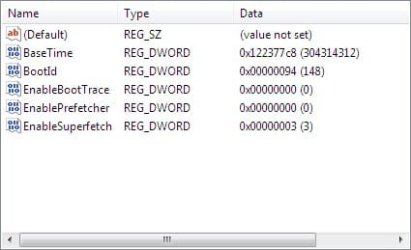
I had Superfetch enabled in the registry but not the Service! Sheee!
I have it setup for both Boot and Applications.
Boottrace and Prefetch are disabled.
---

I have re-booted twice now and MSE system tray icon comes up green- it has been intermittent, however.

Right-click MSE option still does not show up in context menu.

Really appreciate the help here,

PS I love Yoda's speech reversal! - "A coherent statement, learn to make, you must." :)
 

Attachments

  • superfetch screenshot.jpg
    superfetch screenshot.jpg
    15.5 KB · Views: 2

My Computer My Computer

At a glance

Windows 7 Home Premium x64AMD Phenom II X6 1600T16GB PC3-10700 (1342MHz)ATI Radeon 5770 HD (x2) CrossFire
Computer Manufacturer/Model Number
OEM - Me
OS
Windows 7 Home Premium x64
CPU
AMD Phenom II X6 1600T
Motherboard
GigaByte GZ-990FXA-UD3
Memory
16GB PC3-10700 (1342MHz)
Graphics Card(s)
ATI Radeon 5770 HD (x2) CrossFire
Sound Card
On-board RealTek chipset
Monitor(s) Displays
3x Hanns-G 1920x1080 Monitors
Screen Resolution
3x Hanns-G 1920x1080 Monitors
Hard Drives
Intel 25-V SSD 40GB: 218 MB/s AT: 0.1ms
Intel X-25M SSD 80GB: 230MB/s AT: 0.1ms
Seagate 750GB: 133 MB/s AT: 13ms (perpendicular storage)
Buffalo HD-PCTU3 1TB External drive
PSU
OCZ Stealth X Stream 750W
Case
Cheap (unknown)
Cooling
Stock
Keyboard
HP USB
Mouse
LogiTech USB
Internet Speed
1.5 Mbps - Slow - At the tail-end of a rural network
Other Info
Printer: Epson Stylus C-84
Scanner: HP 3500C Flatbed
DVD-RW: Plextor
DVD-ROM: Unknown
WEI: 7.4
marsmimar:
I DL'd the file from MS.

Thanks for the link!

Haven't installed it yet; am waiting to see what Petey7 has to say.
 

My Computer My Computer

At a glance

Windows 7 Home Premium x64AMD Phenom II X6 1600T16GB PC3-10700 (1342MHz)ATI Radeon 5770 HD (x2) CrossFire
Computer Manufacturer/Model Number
OEM - Me
OS
Windows 7 Home Premium x64
CPU
AMD Phenom II X6 1600T
Motherboard
GigaByte GZ-990FXA-UD3
Memory
16GB PC3-10700 (1342MHz)
Graphics Card(s)
ATI Radeon 5770 HD (x2) CrossFire
Sound Card
On-board RealTek chipset
Monitor(s) Displays
3x Hanns-G 1920x1080 Monitors
Screen Resolution
3x Hanns-G 1920x1080 Monitors
Hard Drives
Intel 25-V SSD 40GB: 218 MB/s AT: 0.1ms
Intel X-25M SSD 80GB: 230MB/s AT: 0.1ms
Seagate 750GB: 133 MB/s AT: 13ms (perpendicular storage)
Buffalo HD-PCTU3 1TB External drive
PSU
OCZ Stealth X Stream 750W
Case
Cheap (unknown)
Cooling
Stock
Keyboard
HP USB
Mouse
LogiTech USB
Internet Speed
1.5 Mbps - Slow - At the tail-end of a rural network
Other Info
Printer: Epson Stylus C-84
Scanner: HP 3500C Flatbed
DVD-RW: Plextor
DVD-ROM: Unknown
WEI: 7.4
OK- I installed v2.0 of MSE and now it shows up in the context menu.

Thanks for all the help!

I'd still like to know why the question about Superfetch?

TIA
 

My Computer My Computer

At a glance

Windows 7 Home Premium x64AMD Phenom II X6 1600T16GB PC3-10700 (1342MHz)ATI Radeon 5770 HD (x2) CrossFire
Computer Manufacturer/Model Number
OEM - Me
OS
Windows 7 Home Premium x64
CPU
AMD Phenom II X6 1600T
Motherboard
GigaByte GZ-990FXA-UD3
Memory
16GB PC3-10700 (1342MHz)
Graphics Card(s)
ATI Radeon 5770 HD (x2) CrossFire
Sound Card
On-board RealTek chipset
Monitor(s) Displays
3x Hanns-G 1920x1080 Monitors
Screen Resolution
3x Hanns-G 1920x1080 Monitors
Hard Drives
Intel 25-V SSD 40GB: 218 MB/s AT: 0.1ms
Intel X-25M SSD 80GB: 230MB/s AT: 0.1ms
Seagate 750GB: 133 MB/s AT: 13ms (perpendicular storage)
Buffalo HD-PCTU3 1TB External drive
PSU
OCZ Stealth X Stream 750W
Case
Cheap (unknown)
Cooling
Stock
Keyboard
HP USB
Mouse
LogiTech USB
Internet Speed
1.5 Mbps - Slow - At the tail-end of a rural network
Other Info
Printer: Epson Stylus C-84
Scanner: HP 3500C Flatbed
DVD-RW: Plextor
DVD-ROM: Unknown
WEI: 7.4
Sorry for the delayed response. I've been busy with other things. I asked because superfetch, prefectch and other services should NOT be switched to disabled as some guides recommend. Superfetch will record that you run MSE when you start the computer and make sure all related services are running either as soon as you log in or shortly after. If superfetch is turned off, you will often have to start MSE's real time potection manually.

If you don't want certain services running automatically, switch them to manual. The only three I disable are Remote Registry for security reasons (hackers could use it to make unwanted changes to your registry without your knowledges), and the two homegroup services since I do not use home group and they run at start-up even when set to manual.
 

My Computer My Computer

At a glance

Windows 7 Professional SP1 64-bitIntel Core i5-2450M @2.5 GHz6 GB DDR3 1333MHzIntel HD 3000
Computer type
Laptop
Computer Manufacturer/Model Number
Toshiba P775-S7100
OS
Windows 7 Professional SP1 64-bit
CPU
Intel Core i5-2450M @2.5 GHz
Memory
6 GB DDR3 1333MHz
Graphics Card(s)
Intel HD 3000
Monitor(s) Displays
Built-in 17.3" LED; 22" Insignia NS-L22Q-10A
Screen Resolution
1600x900; 1360x768
Hard Drives
750 GB Hitachi
1TB Seagate FreeAgent External
Internet Speed
Verizon DSL Speed(Down/Up): 3360 Kbps / 800 Kbps
Antivirus
MSE and MBAM Pro
Browser
IE10
Petey7:

You seem to be correct about SuperFetch- since I enabled it MSE's icon goes green on its own.

The reason I disabled Prefetch (and BootTrace) is because of what I've have read regarding SSD's.
That is, that Prefetch performs a lot of writes to the disk and is unnecessary due to the speed of the SSD.
BootTrace? I don't know what that does or if it's needed for anything other than debugging?

Thanks for taking the time to answer these questions,
 

My Computer My Computer

At a glance

Windows 7 Home Premium x64AMD Phenom II X6 1600T16GB PC3-10700 (1342MHz)ATI Radeon 5770 HD (x2) CrossFire
Computer Manufacturer/Model Number
OEM - Me
OS
Windows 7 Home Premium x64
CPU
AMD Phenom II X6 1600T
Motherboard
GigaByte GZ-990FXA-UD3
Memory
16GB PC3-10700 (1342MHz)
Graphics Card(s)
ATI Radeon 5770 HD (x2) CrossFire
Sound Card
On-board RealTek chipset
Monitor(s) Displays
3x Hanns-G 1920x1080 Monitors
Screen Resolution
3x Hanns-G 1920x1080 Monitors
Hard Drives
Intel 25-V SSD 40GB: 218 MB/s AT: 0.1ms
Intel X-25M SSD 80GB: 230MB/s AT: 0.1ms
Seagate 750GB: 133 MB/s AT: 13ms (perpendicular storage)
Buffalo HD-PCTU3 1TB External drive
PSU
OCZ Stealth X Stream 750W
Case
Cheap (unknown)
Cooling
Stock
Keyboard
HP USB
Mouse
LogiTech USB
Internet Speed
1.5 Mbps - Slow - At the tail-end of a rural network
Other Info
Printer: Epson Stylus C-84
Scanner: HP 3500C Flatbed
DVD-RW: Plextor
DVD-ROM: Unknown
WEI: 7.4
Im running "Security Essentials Version: 2.0.522.0":D
 

My Computer My Computer

At a glance

7 Ultimate x64 RTM 7600.16385AMD Phenom 9550 @ 2.20ghz4x2GB DDR2 Patriot Viper 800mhzGeForce 9400 GT 512MB
Computer Manufacturer/Model Number
HP a6720f
OS
7 Ultimate x64 RTM 7600.16385
CPU
AMD Phenom 9550 @ 2.20ghz
Motherboard
Asus M2N78-LA
Memory
4x2GB DDR2 Patriot Viper 800mhz
Graphics Card(s)
GeForce 9400 GT 512MB
Sound Card
Onboard Realtek Hi-Definition ALC 888S chipset
Monitor(s) Displays
Samsung P2370HD 23" 1080P HDTV
Screen Resolution
1920x1080
Hard Drives
Western Digital 640GB; Samsung 1 TB; WD 500GB; Seagate Portable 250gb;
Keyboard
Logitech LX310 Wireless Internet Keyboard
Mouse
Logitech LX310 Wireless Laser Mouse
Internet Speed
7Mbps/384Kbps
As from today, my versions are:

Security Essentials Version: 2.0.522.0
Antimalware Client Version: 3.0.8007.0
Engine Version: 1.1.6402.0
Network Inspection System Engine Version: 2.0.5850.0

(plus the definitions for Antivirus, Antispyware and Network Inspection System, which changes almost daily)

Are these versions matching this update?
 

My Computer My Computer

At a glance

Windows 7 Ultimate x64 SP1 | OSX Lion 10.7 x64Intel Core i5 7504x Corsair Value DDR-3 1333MHz 2GbSapphire HD4850 512Mb HDMI+DVI+VGA
OS
Windows 7 Ultimate x64 SP1 | OSX Lion 10.7 x64
CPU
Intel Core i5 750
Motherboard
Asus P7P55D LE
Memory
4x Corsair Value DDR-3 1333MHz 2Gb
Graphics Card(s)
Sapphire HD4850 512Mb HDMI+DVI+VGA
Sound Card
Sound Blaster Audigy 2 ZS Platinum
Monitor(s) Displays
Samsung Syncmaster 245BW
Screen Resolution
1920x1200
Hard Drives
Samsung Spinpoint 160Gb
Seagate Barracuda 200Gb
PSU
Seventeam 650W ATX 2.3
Case
Coolermaster Centurion 532
Cooling
Stock cooling system
Keyboard
Logitech G15 Gaming Keyboard
Mouse
Razer Deathadder
Internet Speed
10Mbit Down / 1Mbit Up ADSL2+M
Other Info
Apple AirPort Extreme 802.11n (single band)
1Tb External USB HDD (AEBS volume)
Linksys WAG120N ADSL2+ Modem/Router
As from today, my versions are:

Security Essentials Version: 2.0.522.0
Antimalware Client Version: 3.0.8007.0
Engine Version: 1.1.6402.0
Network Inspection System Engine Version: 2.0.5850.0

(plus the definitions for Antivirus, Antispyware and Network Inspection System, which changes almost daily)

Are these versions matching this update?

You appear to have the latest version. You can compare it to what I have:

View attachment 115225
 
Last edited:

My Computer My Computer

At a glance

Win 7 Pro 64-bitIntel i5 2.4 Ghz8GB DDR3Intel HD 3000
Computer type
Laptop
Computer Manufacturer/Model Number
Sony Vaio VPCEB47GM Laptop
OS
Win 7 Pro 64-bit
CPU
Intel i5 2.4 Ghz
Memory
8GB DDR3
Graphics Card(s)
Intel HD 3000
Sound Card
IDT High Definition
Monitor(s) Displays
15.6 WGXA Anti-Glare LED
Screen Resolution
1280x800
Hard Drives
640Gb 7200rpm
Antivirus
MSE
Browser
Opera (primary) with IE9 backup
Kaspersky Internet Security has protection against online threats (like phishing, spam control etc) but Kaspersky Antivirus has none. I wonder If the same situation stands for MSE, too.
If a person has a basic idea of good computing habits, they wouldn't need any of those extras. MSE handles your malware scanning, and the built-in firewall, combined with a router handle your access protection. Malwarebytes is a good manual scanner, if you feel you need something more. Would you really consider paying for anti-phishing software? Why not just read an e-mail more thorough?
 

My Computer My Computer

At a glance

Windows 7 Ultimate x64 SP1Intel Core i7-260012 GB Patriot Extreme DDR3-1333Nvidia GTX 470
OS
Windows 7 Ultimate x64 SP1
CPU
Intel Core i7-2600
Motherboard
Gigabyte GA-P67A-UD3P-B3
Memory
12 GB Patriot Extreme DDR3-1333
Graphics Card(s)
Nvidia GTX 470
Monitor(s) Displays
Dell UltraSharp 2209WA
Hard Drives
OCZ Agility3 240 GB, WD5001AALS, WD7501AALS
PSU
OCZ ModStream 700W
Case
CoolerMaster HAF 912 Advanced
Cooling
CoolerMaster Hyper 212 Plus
Kaspersky Internet Security has protection against online threats (like phishing, spam control etc) but Kaspersky Antivirus has none. I wonder If the same situation stands for MSE, too.
...Would you really consider paying for anti-phishing software...

All major browsers have anti-phishing built in anyways. And they get the list directly from the web, no downloading updates. I also use OpenDSN which has its own anti-phishing system.
 

My Computer My Computer

At a glance

Windows 10 Pro (x64)Intel Core i7-3930K (3.2GHz - 4.5GHz)4x Samsung 4GB PC3-12800 DDR3 (16GB 1600MHz)Nvidia Geforce GTX 690
Computer type
PC/Desktop
Computer Manufacturer/Model Number
Alienware Aurora ALX R4
OS
Windows 10 Pro (x64)
CPU
Intel Core i7-3930K (3.2GHz - 4.5GHz)
Motherboard
Alienware Aurora-R4 x79
Memory
4x Samsung 4GB PC3-12800 DDR3 (16GB 1600MHz)
Graphics Card(s)
Nvidia Geforce GTX 690
Sound Card
SteelSeries Siberia Elite
Monitor(s) Displays
Dell UltraSharp U3011
Screen Resolution
2560x1600
Hard Drives
Samsung 850 Pro 256 GB, Seagate 1TB Desktop Hybrid HDD, 2x Western Digital 4TB Green HDD
PSU
875W Some Dell PSU <.<
Case
Alienware Aurora ALX
Cooling
Custom Liquid Cooling (EK CPU & GPU blocks) dual EK 480RAD
Keyboard
Logitech G710+ Mechanical
Mouse
Logitech G700s
Internet Speed
Verizon Fios (50 mbps average)
Other Info
Server: Intel NUC D54250WYK: i5-4250U, 16GB, 256 GB mSATA, Windows Server 2012 R2
Back
Top