Windows 7 Ultimate x64 ram 4GB 2GB only usable

abdoalrahman

New member
Local time
5:07 AM
Messages
14
Hello
I am having a big problem with Windows 7 Ultimate x64

It uses only 2 GB of 4GB

These advantages of my computer

intle core i7 2.9 cach 8MB
ram 4 GB DDR 3 pass 1366
motherboard intel DH55TC
ati 5750HD 1 GB DDR5
HDD 500 GB

I tried several solutions to this problem did not show me any result, including

Run
msconfig
boot
advanced
max memory

This is another way Jrepetta did not change anything
memory ramp
Did not show any results because I did not find her in boot


Information
He says he use it in hardwere reserved
But I did not understand what is intended
 

My Computer My Computer

At a glance

Windows 7 Ultimate x64
OS
Windows 7 Ultimate x64
Do you have two memory modules at 2 Gigs each? If so, try moving them around in the Dimm slots separately to make sure one module isn't bad, or one of the Dimm slots needs to be blown out with some compressed air. It could also just be a bad seat, so wiggle them a bit to see if that helps. You can even clean up the gold plated portion with a pencil eraser [old trick]. If none of that works, you may want to run MemTest86 to diagnose them.

Where are you seeing that only 2 Gigs is being used? Your system information?
 

My Computer My Computer

At a glance

Windows 7 Ultimate SP1 x64 RTMAMD Athlon 64x2 3800+ Dual CoreOCZ Platinum Dual Channel 4x1GBPNY NVIDIA GeForce 9800 GT 1024MB DDR3 256 Bit
Computer Manufacturer/Model Number
NVIDIA
OS
Windows 7 Ultimate SP1 x64 RTM
CPU
AMD Athlon 64x2 3800+ Dual Core
Motherboard
NVIDIA GeForce 6100-M9
Memory
OCZ Platinum Dual Channel 4x1GB
Graphics Card(s)
PNY NVIDIA GeForce 9800 GT 1024MB DDR3 256 Bit
Sound Card
Creative Sound Blaster Audigy 24Bit
Monitor(s) Displays
Compaq 7500
Screen Resolution
1024x768
Hard Drives
C: 250GB Seagate Barracuda 7200.12 SATA-300
D: 500GB Seagate Barracuda 7200.12 SATA-300
PSU
OCZ 650Watt Dual 12-Volt Rails
Case
Thermaltake
Cooling
Fans, fans, and more fans
Keyboard
Logitech
Mouse
Logitech PS2
Internet Speed
300MBps
Other Info
LG CD-RW [IDE]
Pioneer DVD-RW [SATA-II]
Do you have two memory modules at 2 Gigs each? If so, try moving them around in the Dimm slots separately to make sure one module isn't bad, or one of the Dimm slots needs to be blown out with some compressed air. It could also just be a bad seat, so wiggle them a bit to see if that helps. You can even clean up the gold plated portion with a pencil eraser [old trick]. If none of that works, you may want to run MemTest86 to diagnose them.

Where are you seeing that only 2 Gigs is being used? Your system information?
i have 2 memory
i will try this way now
 

My Computer My Computer

At a glance

Windows 7 Ultimate x64
OS
Windows 7 Ultimate x64
iam finish try this way
but did not change anything
ram is work
i think this proplem in windows
 

My Computer My Computer

At a glance

Windows 7 Ultimate x64
OS
Windows 7 Ultimate x64
Did you installed the RAM sticks in different DIMM slots, and not right next to each other?
Basicly 1 apart?
 

My Computer My Computer

At a glance

Windows 8.1 Pro x64Intel Core i5-4570 CPU @ 3.20GHz8GB DDR3-1596 - Dual ChannelNVIDIA GeForce GTX 750 Ti SC
Computer type
PC/Desktop
Computer Manufacturer/Model Number
Custom
OS
Windows 8.1 Pro x64
CPU
Intel Core i5-4570 CPU @ 3.20GHz
Motherboard
Gigabyte Z87-D3HP-CF
Memory
8GB DDR3-1596 - Dual Channel
Graphics Card(s)
NVIDIA GeForce GTX 750 Ti SC
Sound Card
Onboard
Monitor(s) Displays
Samsung
Screen Resolution
1920x1080
Hard Drives
SSD - 120GB
Second - 1TB
Antivirus
MSE
Browser
Chrome
Did you installed the RAM sticks in different DIMM slots, and not right next to each other?
Basicly 1 apart?

i did not understand you

but iam instald ram in slots 0 and 1 its a black slots
 

My Computer My Computer

At a glance

Windows 7 Ultimate x64
OS
Windows 7 Ultimate x64
Would you have a picture by any chance?

I mean most of the time you need to have the RAM installed on the DIMM slots not right next to each other, but 1 DIMM slot away.

So for example if you have 4 DIMM slots, then you install 2 RAM sticks in the DIMM slots 1 & 3.

You see what i mean now?
 

My Computer My Computer

At a glance

Windows 8.1 Pro x64Intel Core i5-4570 CPU @ 3.20GHz8GB DDR3-1596 - Dual ChannelNVIDIA GeForce GTX 750 Ti SC
Computer type
PC/Desktop
Computer Manufacturer/Model Number
Custom
OS
Windows 8.1 Pro x64
CPU
Intel Core i5-4570 CPU @ 3.20GHz
Motherboard
Gigabyte Z87-D3HP-CF
Memory
8GB DDR3-1596 - Dual Channel
Graphics Card(s)
NVIDIA GeForce GTX 750 Ti SC
Sound Card
Onboard
Monitor(s) Displays
Samsung
Screen Resolution
1920x1080
Hard Drives
SSD - 120GB
Second - 1TB
Antivirus
MSE
Browser
Chrome

My Computer My Computer

At a glance

Windows 7 Pro x64 SP1Intel Core I716 GigsNVIDIA GeForce GTX 670M
Computer type
Laptop
Computer Manufacturer/Model Number
Toshiba Laptop Qosimo X870
OS
Windows 7 Pro x64 SP1
CPU
Intel Core I7
Motherboard
Toshiba Qosmio
Memory
16 Gigs
Graphics Card(s)
NVIDIA GeForce GTX 670M
Monitor(s) Displays
17.7" laptop
Screen Resolution
1600 x 900
Hard Drives
256 Gig SanDisk SSD for C
256 Gig Intel SSD for D
Internet Speed
50/25 FIOS
Antivirus
Vipre (all you can eat for 10 machines)
Browser
IE and FF
Other Info
I have dos 6.22, wfwg 3.11, win98, 2000 and xp VHD's available for testing. MS's Virtual PC works great.
Thanks rich,

I was hoping I was able to explain it well enough.
 

My Computer My Computer

At a glance

Windows 8.1 Pro x64Intel Core i5-4570 CPU @ 3.20GHz8GB DDR3-1596 - Dual ChannelNVIDIA GeForce GTX 750 Ti SC
Computer type
PC/Desktop
Computer Manufacturer/Model Number
Custom
OS
Windows 8.1 Pro x64
CPU
Intel Core i5-4570 CPU @ 3.20GHz
Motherboard
Gigabyte Z87-D3HP-CF
Memory
8GB DDR3-1596 - Dual Channel
Graphics Card(s)
NVIDIA GeForce GTX 750 Ti SC
Sound Card
Onboard
Monitor(s) Displays
Samsung
Screen Resolution
1920x1080
Hard Drives
SSD - 120GB
Second - 1TB
Antivirus
MSE
Browser
Chrome
I would take a look at the picture of your memory stick locations requirements at
Intel® Desktop Board DH55TC — Product guides for DH55TC

It shows the slots for 4 sticks. I believe each of your 2 gig sticks should be in the 0

you can take a look at the .pdf file showing the memory at page 37 of the doc.
http://downloadmirror.intel.com/18505/eng/DH55TC_ProductGuide01_English.pdf

honorgamer put you in the ballpark on this.

Rich

sir
i instaled ram in a slot 0
but Still problem
 

My Computer My Computer

At a glance

Windows 7 Ultimate x64
OS
Windows 7 Ultimate x64
How many RAM sticks are you using?
 

My Computer My Computer

At a glance

Windows 8.1 Pro x64Intel Core i5-4570 CPU @ 3.20GHz8GB DDR3-1596 - Dual ChannelNVIDIA GeForce GTX 750 Ti SC
Computer type
PC/Desktop
Computer Manufacturer/Model Number
Custom
OS
Windows 8.1 Pro x64
CPU
Intel Core i5-4570 CPU @ 3.20GHz
Motherboard
Gigabyte Z87-D3HP-CF
Memory
8GB DDR3-1596 - Dual Channel
Graphics Card(s)
NVIDIA GeForce GTX 750 Ti SC
Sound Card
Onboard
Monitor(s) Displays
Samsung
Screen Resolution
1920x1080
Hard Drives
SSD - 120GB
Second - 1TB
Antivirus
MSE
Browser
Chrome
Alright your motherboard as 4 DIMM(Dual Inline Memory Module). Those are were your RAM sticks are inserted into. Since you have 4 DIMM slots, they are normally called 1,2,3,4. Insert your RAM Stick #1 into DIMM slot #1. Insert your RAM stick #2 into DIMM slot #3.

Do you see what I mean?
 

My Computer My Computer

At a glance

Windows 8.1 Pro x64Intel Core i5-4570 CPU @ 3.20GHz8GB DDR3-1596 - Dual ChannelNVIDIA GeForce GTX 750 Ti SC
Computer type
PC/Desktop
Computer Manufacturer/Model Number
Custom
OS
Windows 8.1 Pro x64
CPU
Intel Core i5-4570 CPU @ 3.20GHz
Motherboard
Gigabyte Z87-D3HP-CF
Memory
8GB DDR3-1596 - Dual Channel
Graphics Card(s)
NVIDIA GeForce GTX 750 Ti SC
Sound Card
Onboard
Monitor(s) Displays
Samsung
Screen Resolution
1920x1080
Hard Drives
SSD - 120GB
Second - 1TB
Antivirus
MSE
Browser
Chrome
Keeping the memory modules in every other Dimm slot is just for dual channel to work [on most rigs]. It will still use all 4 Gigs, so that's not a possibility as to why it's only showing 2 Gigs. You either have a bad module, or one of them isn't seating properly in the Dimm. I'm almost certain it has nothing to do with Windows.

Did you run the MemTest86? I would make sure you pass the memory test before proceeding any further.
 

My Computer My Computer

At a glance

Windows 7 Ultimate SP1 x64 RTMAMD Athlon 64x2 3800+ Dual CoreOCZ Platinum Dual Channel 4x1GBPNY NVIDIA GeForce 9800 GT 1024MB DDR3 256 Bit
Computer Manufacturer/Model Number
NVIDIA
OS
Windows 7 Ultimate SP1 x64 RTM
CPU
AMD Athlon 64x2 3800+ Dual Core
Motherboard
NVIDIA GeForce 6100-M9
Memory
OCZ Platinum Dual Channel 4x1GB
Graphics Card(s)
PNY NVIDIA GeForce 9800 GT 1024MB DDR3 256 Bit
Sound Card
Creative Sound Blaster Audigy 24Bit
Monitor(s) Displays
Compaq 7500
Screen Resolution
1024x768
Hard Drives
C: 250GB Seagate Barracuda 7200.12 SATA-300
D: 500GB Seagate Barracuda 7200.12 SATA-300
PSU
OCZ 650Watt Dual 12-Volt Rails
Case
Thermaltake
Cooling
Fans, fans, and more fans
Keyboard
Logitech
Mouse
Logitech PS2
Internet Speed
300MBps
Other Info
LG CD-RW [IDE]
Pioneer DVD-RW [SATA-II]
Alright your motherboard as 4 DIMM(Dual Inline Memory Module). Those are were your RAM sticks are inserted into. Since you have 4 DIMM slots, they are normally called 1,2,3,4. Insert your RAM Stick #1 into DIMM slot #1. Insert your RAM stick #2 into DIMM slot #3.

Do you see what I mean?
That's only for the dual channel modules to work properly. You will still see all 4 Gigs no matter what configuration you have them in. ;)
 

My Computer My Computer

At a glance

Windows 7 Ultimate SP1 x64 RTMAMD Athlon 64x2 3800+ Dual CoreOCZ Platinum Dual Channel 4x1GBPNY NVIDIA GeForce 9800 GT 1024MB DDR3 256 Bit
Computer Manufacturer/Model Number
NVIDIA
OS
Windows 7 Ultimate SP1 x64 RTM
CPU
AMD Athlon 64x2 3800+ Dual Core
Motherboard
NVIDIA GeForce 6100-M9
Memory
OCZ Platinum Dual Channel 4x1GB
Graphics Card(s)
PNY NVIDIA GeForce 9800 GT 1024MB DDR3 256 Bit
Sound Card
Creative Sound Blaster Audigy 24Bit
Monitor(s) Displays
Compaq 7500
Screen Resolution
1024x768
Hard Drives
C: 250GB Seagate Barracuda 7200.12 SATA-300
D: 500GB Seagate Barracuda 7200.12 SATA-300
PSU
OCZ 650Watt Dual 12-Volt Rails
Case
Thermaltake
Cooling
Fans, fans, and more fans
Keyboard
Logitech
Mouse
Logitech PS2
Internet Speed
300MBps
Other Info
LG CD-RW [IDE]
Pioneer DVD-RW [SATA-II]
Alright your motherboard as 4 DIMM(Dual Inline Memory Module). Those are were your RAM sticks are inserted into. Since you have 4 DIMM slots, they are normally called 1,2,3,4. Insert your RAM Stick #1 into DIMM slot #1. Insert your RAM stick #2 into DIMM slot #3.

Do you see what I mean?

yes
i do it
but wtill proplem
 

My Computer My Computer

At a glance

Windows 7 Ultimate x64
OS
Windows 7 Ultimate x64
Alright your motherboard as 4 DIMM(Dual Inline Memory Module). Those are were your RAM sticks are inserted into. Since you have 4 DIMM slots, they are normally called 1,2,3,4. Insert your RAM Stick #1 into DIMM slot #1. Insert your RAM stick #2 into DIMM slot #3.

Do you see what I mean?
That's only for the dual channel modules to work properly. You will still see all 4 Gigs no matter what configuration you have them in. ;)

Oh yeah, I completely forgot. XD. Other than that. I would assume that it would be a bad module.
 

My Computer My Computer

At a glance

Windows 8.1 Pro x64Intel Core i5-4570 CPU @ 3.20GHz8GB DDR3-1596 - Dual ChannelNVIDIA GeForce GTX 750 Ti SC
Computer type
PC/Desktop
Computer Manufacturer/Model Number
Custom
OS
Windows 8.1 Pro x64
CPU
Intel Core i5-4570 CPU @ 3.20GHz
Motherboard
Gigabyte Z87-D3HP-CF
Memory
8GB DDR3-1596 - Dual Channel
Graphics Card(s)
NVIDIA GeForce GTX 750 Ti SC
Sound Card
Onboard
Monitor(s) Displays
Samsung
Screen Resolution
1920x1080
Hard Drives
SSD - 120GB
Second - 1TB
Antivirus
MSE
Browser
Chrome
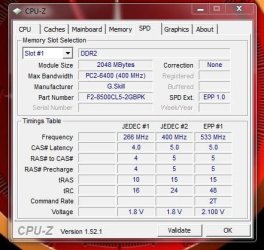
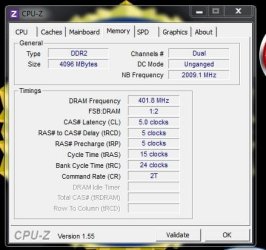
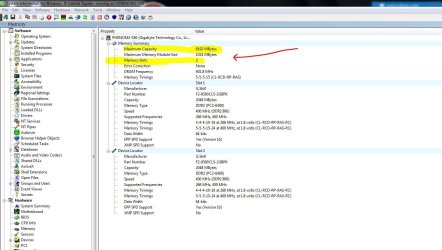
Does 4gb show up in the Bios setup?

How about in CPU-Z ?

How about in SIW ?

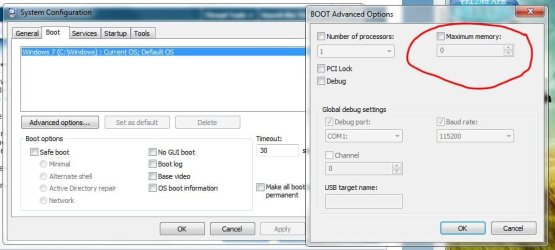
Is Max Memory set to zero (0) ?
 

Attachments

  • Cpu_Z_Memory.JPG
    Cpu_Z_Memory.JPG
    44.7 KB · Views: 17
  • Cpu_Z_Memory_01.JPG
    Cpu_Z_Memory_01.JPG
    36.8 KB · Views: 14
  • SIW_Max_Memory_on_MB.JPG
    SIW_Max_Memory_on_MB.JPG
    117.4 KB · Views: 80
  • Maximum_memory.JPG
    Maximum_memory.JPG
    51.3 KB · Views: 61

My Computer My Computer

At a glance

Win7 Enterprise, Win7 x86 (Ult 7600), Win7 x6...AMD fx8350 4ghz, AMD-32 2400mhz, AMD-64 3200m...2gb, 4gb on the Ult 7600, 4gb on Technet RTM,...Draw my own Graphics, several nVidia cards
Computer type
PC/Desktop
Computer Manufacturer/Model Number
Built them myself, Science Experiments !
OS
Win7 Enterprise, Win7 x86 (Ult 7600), Win7 x64 Ult 7600, TechNet RTM on AMD x64 (2.8Ghz)
CPU
AMD fx8350 4ghz, AMD-32 2400mhz, AMD-64 3200mhz, AMDx64 2.8G
Motherboard
SIS 755, ECS-K8M890M-M (Ult 7600), GigaByte & others
Memory
2gb, 4gb on the Ult 7600, 4gb on Technet RTM, 32gb on FX8350
Graphics Card(s)
Draw my own Graphics, several nVidia cards
Sound Card
on motherboard
Monitor(s) Displays
19" flat scr, 28" I-Inc widescr,22" Emprex Widescr, 23" Acer
Screen Resolution
1280 x 1024, 1440 x 900, 1920 x 1080
Hard Drives
6 pata Ide HD's & 2 Sata HD's
added 80gb external on Ult 7600 computer,
numerous extra 1tb, 2TB, 3Tb SATA HD's
A collection of ext HD Docks w/ HDs
PSU
430w, 550w, 600w, 700, 800, etc
Case
All Generic Full Towers
Cooling
Open Air & a few fans, some w/ colored LEDs
Keyboard
Compaq & Dell recycled from GoodWill
Mouse
Made in China Optical Wired Mouse
Internet Speed
Fast Cable InterNet
Antivirus
AVG Free on 24 different Desktops, NO Problems!
Browser
IE 8 is preferred, but use FireFox sometimes
Other Info
Linksys Routers, switches, & Hubs
Too Many USB Flash Drives to count, Biggest is 64GB !
Eight computers in my home network.
Sixteen computers at my business network.
Linked via TeamViewer !
Lots of old used spare computer parts everywhere!
Hey Doc, the DRAM timings are a little high on that rig. Have you tried to see if it's stable with a 1T Command Rate?
 

My Computer My Computer

At a glance

Windows 7 Ultimate SP1 x64 RTMAMD Athlon 64x2 3800+ Dual CoreOCZ Platinum Dual Channel 4x1GBPNY NVIDIA GeForce 9800 GT 1024MB DDR3 256 Bit
Computer Manufacturer/Model Number
NVIDIA
OS
Windows 7 Ultimate SP1 x64 RTM
CPU
AMD Athlon 64x2 3800+ Dual Core
Motherboard
NVIDIA GeForce 6100-M9
Memory
OCZ Platinum Dual Channel 4x1GB
Graphics Card(s)
PNY NVIDIA GeForce 9800 GT 1024MB DDR3 256 Bit
Sound Card
Creative Sound Blaster Audigy 24Bit
Monitor(s) Displays
Compaq 7500
Screen Resolution
1024x768
Hard Drives
C: 250GB Seagate Barracuda 7200.12 SATA-300
D: 500GB Seagate Barracuda 7200.12 SATA-300
PSU
OCZ 650Watt Dual 12-Volt Rails
Case
Thermaltake
Cooling
Fans, fans, and more fans
Keyboard
Logitech
Mouse
Logitech PS2
Internet Speed
300MBps
Other Info
LG CD-RW [IDE]
Pioneer DVD-RW [SATA-II]
Keeping the memory modules in every other Dimm slot is just for dual channel to work [on most rigs]. It will still use all 4 Gigs, so that's not a possibility as to why it's only showing 2 Gigs. You either have a bad module, or one of them isn't seating properly in the Dimm. I'm almost certain it has nothing to do with Windows.

Did you run the MemTest86? I would make sure you pass the memory test before proceeding any further.

MemTest86
he sid that
no errors found
 

My Computer My Computer

At a glance

Windows 7 Ultimate x64
OS
Windows 7 Ultimate x64
Back
Top