Outlook 2010 email addresses to choose from??

Northwest29

New member
Greetings all,

I'm a real newbie to this forum, so if I have posted this in the incorrect location just let me know. Thanks -

When I create a new email and begin to type in a name, for example J, a window/drop-down appears and shows me 3 names that begin with the letter "J" and the next name shown begins with the letter "L". Since I actually have 26 names that begin with "J" why can't I scroll down the list and pick the one I want?

If I double click on the "To" it will bring up my address book and then I can type "J" and it will show me all the "J"s that I can choose from. However, that is obviously another step to go through that wastes time. Is there an option I need to check to allow the first window/drop down to show me more options, or another solution?

Thanks in advance for any information you can provide to solve this problem for me.

Ron
 

My Computer

OS
Win 7 Home Premium 32
Hi Ron, maybe I'm missing something, but the more letters you type, the narrower the field becomes.

So for example, if I start off with "L" all the names with L will pop-up, as I type the second letter, LI, all the names with LI will stay and everything else drops off and so on. That's the way the "auto" feature is designed to work.

The other way you could do it is just type the entire name in the To box and hit Check Names and the box that opens will have a list of all the people with that name, then you just choose the one you want.

Hope this helps.
 

My Computer

Computer type
PC/Desktop
Computer Manufacturer/Model Number
Custom built by me.
OS
Windows 10 Pro
CPU
Intel Core i7-4770K (3.5Ghz)
Motherboard
Gigabyte G1 Sniper 5 (F10 Bios)
Memory
32 gig Corsair Dominator Platinum (4x8Gig)
Graphics Card(s)
Sapphire Tri-X R9 Fury
Sound Card
Soundblaster ZXR
Monitor(s) Displays
NEC PA242W 24" LCD Monitor
Screen Resolution
1920 x 1200
Hard Drives
Primary - Samsung 850 Pro (512gig), Samsung 840 Pro (256gig), 2TB WD Caviar Black.
PSU
EVGA Supernova 1000 G2
Case
Cooler Master HAF X
Cooling
Corsair H100i with Corsair Air Series SP120 Quiet Fans
Keyboard
Logitech Wireless Wave
Mouse
Logitech Performance MX
Internet Speed
High Speed Cable
Antivirus
Norton Security
Browser
IE11
Other Info
Memory Timings - 1866MHz @ 9-9-9-27-1T @ 1.5 volts
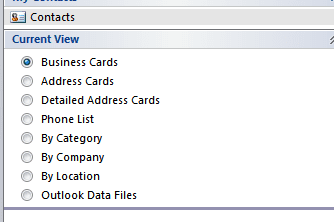
I have my Outlook contacts set up as Business Cards...
Captureoutl1.PNG
Then I dbl click his/her card and hit e-mail....see snip
Captureoutlook.PNG

I only do this when I am in Outlook...otherwise I use either Hotmail, gmail or whatever else I am using.
 

My Computer

Computer Manufacturer/Model Number
HP M9077c
OS
Windows 7 Home Premium 64bit
CPU
Intel(R)Core(TM)2 quad [email protected] 2.39GHz
Motherboard
ASUSeK
Memory
6GB DDR2 6400
Graphics Card(s)
GeForce 8500/512MB
Sound Card
Realtek High Def Audio
Monitor(s) Displays
HP w2408 LCD 24" widescreen
Screen Resolution
1920x1200
Cooling
6 pack of Bud
Keyboard
MS wireless Inteli
Mouse
MS wireless Inteli
Hi Ron, maybe I'm missing something, but the more letters you type, the narrower the field becomes.

So for example, if I start off with "L" all the names with L will pop-up, as I type the second letter, LI, all the names with LI will stay and everything else drops off and so on. That's the way the "auto" feature is designed to work.

The other way you could do it is just type the entire name in the To box and hit Check Names and the box that opens will have a list of all the people with that name, then you just choose the one you want.

Hope this helps.


Thanks for the feedback. Let me give you a bit more detail.

I would agree with you that with each letter I type the 'choices' avaliable list should get narrowed down quickly. And that was my expectation, but that is not what happens.

When I first type J the drop down shows me,

"Jack ....", and "Jmmcc .....", and "Jim A.....", and "Jack E.....", and "Lynn ....." and no others (there are 20 names that start with "J". If I then type the second letter "E" (I'm looking for "Jean .....") the drop down shows me "Jack ...." and NO others.

I'm using the '....' to keep the peoples email addresses concealed.

Again, if I click on "To" the pop up window works as you noted and I would expect it to work.

Ron
 

My Computer

OS
Win 7 Home Premium 32
How do you have your contacts list set up, first names first, or last names first? You could try checking that. I have mine set up to use first names first.

Go to Outlook....

Go to File

Choose Options

Choose Contacts

Look under the Names and filings heading and set your preference.

Click new mail and see if your issue is resolved?

Let us know.
 

My Computer

Computer type
PC/Desktop
Computer Manufacturer/Model Number
Custom built by me.
OS
Windows 10 Pro
CPU
Intel Core i7-4770K (3.5Ghz)
Motherboard
Gigabyte G1 Sniper 5 (F10 Bios)
Memory
32 gig Corsair Dominator Platinum (4x8Gig)
Graphics Card(s)
Sapphire Tri-X R9 Fury
Sound Card
Soundblaster ZXR
Monitor(s) Displays
NEC PA242W 24" LCD Monitor
Screen Resolution
1920 x 1200
Hard Drives
Primary - Samsung 850 Pro (512gig), Samsung 840 Pro (256gig), 2TB WD Caviar Black.
PSU
EVGA Supernova 1000 G2
Case
Cooler Master HAF X
Cooling
Corsair H100i with Corsair Air Series SP120 Quiet Fans
Keyboard
Logitech Wireless Wave
Mouse
Logitech Performance MX
Internet Speed
High Speed Cable
Antivirus
Norton Security
Browser
IE11
Other Info
Memory Timings - 1866MHz @ 9-9-9-27-1T @ 1.5 volts
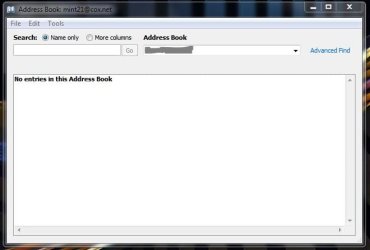
Ok, when you click on your address book, in the address drop down menu, click the various options to to insure all your contacts are listed. Some drop down options filter names. You want the book that has all of them.

Address Book.JPG
 

My Computer

Computer type
PC/Desktop
Computer Manufacturer/Model Number
Custom built by me.
OS
Windows 10 Pro
CPU
Intel Core i7-4770K (3.5Ghz)
Motherboard
Gigabyte G1 Sniper 5 (F10 Bios)
Memory
32 gig Corsair Dominator Platinum (4x8Gig)
Graphics Card(s)
Sapphire Tri-X R9 Fury
Sound Card
Soundblaster ZXR
Monitor(s) Displays
NEC PA242W 24" LCD Monitor
Screen Resolution
1920 x 1200
Hard Drives
Primary - Samsung 850 Pro (512gig), Samsung 840 Pro (256gig), 2TB WD Caviar Black.
PSU
EVGA Supernova 1000 G2
Case
Cooler Master HAF X
Cooling
Corsair H100i with Corsair Air Series SP120 Quiet Fans
Keyboard
Logitech Wireless Wave
Mouse
Logitech Performance MX
Internet Speed
High Speed Cable
Antivirus
Norton Security
Browser
IE11
Other Info
Memory Timings - 1866MHz @ 9-9-9-27-1T @ 1.5 volts
Yes, here's the first part shown after selecting Address Book (see attached PDF)

OK, so it looks like its displaying all the names. At this point in time i'm afraid I have no other ideas. I'll ask some of the other Guru's.

Not sure about the solution offered by WindowStar. He'll have to explain that one. Sorry
 

My Computer

Computer type
PC/Desktop
Computer Manufacturer/Model Number
Custom built by me.
OS
Windows 10 Pro
CPU
Intel Core i7-4770K (3.5Ghz)
Motherboard
Gigabyte G1 Sniper 5 (F10 Bios)
Memory
32 gig Corsair Dominator Platinum (4x8Gig)
Graphics Card(s)
Sapphire Tri-X R9 Fury
Sound Card
Soundblaster ZXR
Monitor(s) Displays
NEC PA242W 24" LCD Monitor
Screen Resolution
1920 x 1200
Hard Drives
Primary - Samsung 850 Pro (512gig), Samsung 840 Pro (256gig), 2TB WD Caviar Black.
PSU
EVGA Supernova 1000 G2
Case
Cooler Master HAF X
Cooling
Corsair H100i with Corsair Air Series SP120 Quiet Fans
Keyboard
Logitech Wireless Wave
Mouse
Logitech Performance MX
Internet Speed
High Speed Cable
Antivirus
Norton Security
Browser
IE11
Other Info
Memory Timings - 1866MHz @ 9-9-9-27-1T @ 1.5 volts
As you describe the situation in your first post, it is just like Outlook should work. Address book and autofill are two different things.

When typing an email address in to the To (or CC or BCC) field, Outlook does not compare what you type to your address book. The autofill will compare it to addresses you have previously typed in to this field. When typing J, if you have since last installation only sent emails to three recipients starting with J, only these three are shown.

The function is similar to that of address bar in browser: starting to type for instance letters micro in to the address field of your browser does not show a list of all bookmarks you have starting with micro, instead it shows a list of websites starting with micro you have visited since last time clearing the history.

Kari

EDIT: Noticed something else in your first post: Do not double click To to open address book. It's a single click button.
 
Last edited:

My Computer

Computer type
Laptop
Computer Manufacturer/Model Number
HP ENVY 17-1150eg
OS
Windows 10 Pro x64 EN-GB
CPU
1.6 GHz Intel Core i7-720QM Processor
Memory
6 GB
Graphics Card(s)
ATI Mobility Radeon HD 5850 Graphics
Sound Card
Beats sound system with integrated subwoofer
Monitor(s) Displays
17" laptop display, 22" LED and 32" Full HD TV through HDMI
Screen Resolution
1600*900 (1), 1920*1080 (2&3)
Hard Drives
Internal: 2 x 500 GB SATA Hard Disk Drive 7200 rpm
External: 2TB for backups, 3TB USB3 network drive for media
Cooling
As Envy runs a bit warm, I have it on a Cooler Master pad
Keyboard
Logitech diNovo Media Desktop Laser (bluetooth)
Mouse
Logitech Performance Mouse MX
Internet Speed
50/10 Mbps VDSL
Antivirus
Windows Defender 4.3.9431.0
Browser
Maxthon 3.5.2., IE11
As you describe the situation in your first post, it is just like Outlook should work. Address book and auto fill are two different things.

When typing an email address in to the To (or CC or BCC) field, Outlook does not compare what you type to your address book. The auto fill will compare it to addresses you have previously typed in to this field. When typing J, if you have since last installation only sent emails to three recipients starting with J, only these three are shown.

The function is similar to that of address bar in browser: starting to type for instance letters micro in to the address field of your browser does not show a list of all bookmarks you have starting with micro, instead it shows a list of websites starting with micro you have visited since last time clearing the history.

Kari

EDIT: Noticed something else in your first post: Do not double click To to open address book. It's a single click button.

+1 Kari, I should have noted that (above). I did post a utility that helps with the Auto Fill, maybe that will help to remove the names the OP does not want or correct errors.
 

My Computer

Computer type
PC/Desktop
Computer Manufacturer/Model Number
Dell OP7010
OS
Windows 7 Enterprise (x64); Windows Server 2008 R2 (x64)
Memory
16GB
Monitor(s) Displays
4 Dell 24" LCD
Screen Resolution
1280x1024
Keyboard
Dell
Mouse
Dell Optical
Internet Speed
40meg
Yes, here's the first part shown after selecting Address Book (see attached PDF)

OK, so it looks like its displaying all the names. At this point in time i'm afraid I have no other ideas. I'll ask some of the other Guru's.

Not sure about the solution offered by WindowStar. He'll have to explain that one. Sorry


Thanks! Very much appreciated. It would seem to me if the "To" window will access the names as expected the file would be okay. Could it still be corrupted as suggested??

Recall: this is on Windows 7 and it is Outlook 2010.

All help greatly appreciated.

Ron
 

My Computer

OS
Win 7 Home Premium 32
Recall: this is on Windows 7 and it is Outlook 2010.

The instructions I posted is actually from Office 2010 and Windows 7 Ultimate 64-bit.

Bottom line.... there are no conflicts between Windows 7 and Office 2010.

I'm afraid I have no further advice other than looking at the suggestion WindowStar posted, or reinstalling Office.

Sorry.
 

My Computer

Computer type
PC/Desktop
Computer Manufacturer/Model Number
Custom built by me.
OS
Windows 10 Pro
CPU
Intel Core i7-4770K (3.5Ghz)
Motherboard
Gigabyte G1 Sniper 5 (F10 Bios)
Memory
32 gig Corsair Dominator Platinum (4x8Gig)
Graphics Card(s)
Sapphire Tri-X R9 Fury
Sound Card
Soundblaster ZXR
Monitor(s) Displays
NEC PA242W 24" LCD Monitor
Screen Resolution
1920 x 1200
Hard Drives
Primary - Samsung 850 Pro (512gig), Samsung 840 Pro (256gig), 2TB WD Caviar Black.
PSU
EVGA Supernova 1000 G2
Case
Cooler Master HAF X
Cooling
Corsair H100i with Corsair Air Series SP120 Quiet Fans
Keyboard
Logitech Wireless Wave
Mouse
Logitech Performance MX
Internet Speed
High Speed Cable
Antivirus
Norton Security
Browser
IE11
Other Info
Memory Timings - 1866MHz @ 9-9-9-27-1T @ 1.5 volts
Kari is correct, this is the autofill, not your complete address book. It is the same in my Outlook 2007.

The utility posted will help correct the "problem" :)
 

My Computer

Computer Manufacturer/Model Number
Pugh Technologies
OS
W7 Professional x64
CPU
AMD Athlon II X3 445 Rana 3.10 GHz
Motherboard
MSI 870A-G54
Memory
PNY XLR DDR3 1600 4x2GB
Graphics Card(s)
NVIDIA GeForce GTS 450 (fermi) 1GB GDDR5
Sound Card
Realtek ALC892 onboard
Monitor(s) Displays
ASUS VE205t, Viewsonic VX2035WM
Screen Resolution
1600x900, 1600x1050
Hard Drives
977GB Hitachi Hitachi HDS721010CLA332
244GB Western Digital WDC WD2500AAJS-65B4A0
488GB Western Digital WDC WD5000AAJS-00A8B0
488GB Western Digital WDC WD5000AAKS-00UU3A0
PSU
Antec EarthWatts EA650 650W
Case
ThermalTake Armor A90 Mid Tower
Cooling
3x 120mm in, 1x 120mm & 200mm out, self built hydro-cooler
Keyboard
Logitec 55
Mouse
Razer Deathadder
Internet Speed
20 Mbps D/L, 9 Mbps U/L
Kari is 100% correct. Outlook is only looking at name you have entered in the "To:" box.
 

My Computer

Computer Manufacturer/Model Number
Home built
OS
Windows 7 Ultimate 32 bit
CPU
Intel(R) Pentium(R) 4 CPU 3.00GHz
Motherboard
ASUS P4P800-VM Motherboard Chipset: Intel 865G + ICH5
Memory
2.50 GB RAM
Graphics Card(s)
NVIDIA GeForce 7600 GS
Sound Card
SoundMax Integrated Digital Audio (Chip)
Monitor(s) Displays
ViewSonic VX 1962 wm
Screen Resolution
1680 X 1050
Hard Drives
Seagate Barracuda 7200.10 80 GB
ST380215A ATA Device 18.6 GB
Western Digital "My Book" external hard drive 750 GB
Cooling
Fan based
Keyboard
Microsoft Comfort Curve Keyboard 2000 v10 USB
Mouse
Logitec optic USB
Internet Speed
3.01 Mb/s download 0.64 Mb/s upload
Kari is 100% correct. Outlook is only looking at name you have entered in the "To:" box.

I think his problem is that it's not 100% working like it should.....

Hi Ron, maybe I'm missing something, but the more letters you type, the narrower the field becomes.

So for example, if I start off with "L" all the names with L will pop-up, as I type the second letter, LI, all the names with LI will stay and everything else drops off and so on. That's the way the "auto" feature is designed to work.

The other way you could do it is just type the entire name in the To box and hit Check Names and the box that opens will have a list of all the people with that name, then you just choose the one you want.

Hope this helps.


Thanks for the feedback. Let me give you a bit more detail.

I would agree with you that with each letter I type the 'choices' avaliable list should get narrowed down quickly. And that was my expectation, but that is not what happens.

When I first type J the drop down shows me,

"Jack ....", and "Jmmcc .....", and "Jim A.....", and "Jack E.....", and "Lynn ....." and no others (there are 20 names that start with "J". If I then type the second letter "E" (I'm looking for "Jean .....") the drop down shows me "Jack ...." and NO others.

I'm using the '....' to keep the peoples email addresses concealed.

Again, if I click on "To" the pop up window works as you noted and I would expect it to work.

Ron
 

My Computer

Computer type
PC/Desktop
Computer Manufacturer/Model Number
Custom built by me.
OS
Windows 10 Pro
CPU
Intel Core i7-4770K (3.5Ghz)
Motherboard
Gigabyte G1 Sniper 5 (F10 Bios)
Memory
32 gig Corsair Dominator Platinum (4x8Gig)
Graphics Card(s)
Sapphire Tri-X R9 Fury
Sound Card
Soundblaster ZXR
Monitor(s) Displays
NEC PA242W 24" LCD Monitor
Screen Resolution
1920 x 1200
Hard Drives
Primary - Samsung 850 Pro (512gig), Samsung 840 Pro (256gig), 2TB WD Caviar Black.
PSU
EVGA Supernova 1000 G2
Case
Cooler Master HAF X
Cooling
Corsair H100i with Corsair Air Series SP120 Quiet Fans
Keyboard
Logitech Wireless Wave
Mouse
Logitech Performance MX
Internet Speed
High Speed Cable
Antivirus
Norton Security
Browser
IE11
Other Info
Memory Timings - 1866MHz @ 9-9-9-27-1T @ 1.5 volts
As you describe the situation in your first post, it is just like Outlook should work. Address book and auto fill are two different things.

When typing an email address in to the To (or CC or BCC) field, Outlook does not compare what you type to your address book. The auto fill will compare it to addresses you have previously typed in to this field. When typing J, if you have since last installation only sent emails to three recipients starting with J, only these three are shown.

The function is similar to that of address bar in browser: starting to type for instance letters micro in to the address field of your browser does not show a list of all bookmarks you have starting with micro, instead it shows a list of websites starting with micro you have visited since last time clearing the history.


EDIT: Noticed something else in your first post: Do not double click To to open address book. It's a single click butto
Kari

n.

+1 Kari, I should have noted that (above). I did post a utility that helps with the Auto Fill, maybe that will help to remove the names the OP does not want or correct errors.

Thanks for all the information. Perhaps something is corrupted. The name that does NOT come up in the auto fill window is a name that I send email to roughly 4 or 5 times a week. So, I would expect to see it there. I'll do somemore looking around and see if I can provide you with additonal clues. Can I delete the contrent of autofill and start over? May be that would help???

Thanks again!
 

My Computer

OS
Win 7 Home Premium 32
As you describe the situation in your first post, it is just like Outlook should work. Address book and auto fill are two different things.

When typing an email address in to the To (or CC or BCC) field, Outlook does not compare what you type to your address book. The auto fill will compare it to addresses you have previously typed in to this field. When typing J, if you have since last installation only sent emails to three recipients starting with J, only these three are shown.

The function is similar to that of address bar in browser: starting to type for instance letters micro in to the address field of your browser does not show a list of all bookmarks you have starting with micro, instead it shows a list of websites starting with micro you have visited since last time clearing the history.


EDIT: Noticed something else in your first post: Do not double click To to open address book. It's a single click butto
Kari

n.

+1 Kari, I should have noted that (above). I did post a utility that helps with the Auto Fill, maybe that will help to remove the names the OP does not want or correct errors.

Thanks for all the information. Perhaps something is corrupted. The name that does NOT come up in the auto fill window is a name that I send email to roughly 4 or 5 times a week. So, I would expect to see it there. I'll do somemore looking around and see if I can provide you with additonal clues. Can I delete the contrent of autofill and start over? May be that would help???

Thanks again!

Why don't you just delete that person and then re-enter it as a new contact.
Hopefully that will eliminate the corruption.
 

My Computer

Computer Manufacturer/Model Number
HP M9077c
OS
Windows 7 Home Premium 64bit
CPU
Intel(R)Core(TM)2 quad [email protected] 2.39GHz
Motherboard
ASUSeK
Memory
6GB DDR2 6400
Graphics Card(s)
GeForce 8500/512MB
Sound Card
Realtek High Def Audio
Monitor(s) Displays
HP w2408 LCD 24" widescreen
Screen Resolution
1920x1200
Cooling
6 pack of Bud
Keyboard
MS wireless Inteli
Mouse
MS wireless Inteli
As you describe the situation in your first post, it is just like Outlook should work. Address book and auto fill are two different things.

When typing an email address in to the To (or CC or BCC) field, Outlook does not compare what you type to your address book. The auto fill will compare it to addresses you have previously typed in to this field. When typing J, if you have since last installation only sent emails to three recipients starting with J, only these three are shown.

The function is similar to that of address bar in browser: starting to type for instance letters micro in to the address field of your browser does not show a list of all bookmarks you have starting with micro, instead it shows a list of websites starting with micro you have visited since last time clearing the history.


EDIT: Noticed something else in your first post: Do not double click To to open address book. It's a single click butto
Kari

n.

+1 Kari, I should have noted that (above). I did post a utility that helps with the Auto Fill, maybe that will help to remove the names the OP does not want or correct errors.

Thanks for all the information. Perhaps something is corrupted. The name that does NOT come up in the auto fill window is a name that I send email to roughly 4 or 5 times a week. So, I would expect to see it there. I'll do somemore looking around and see if I can provide you with additonal clues. Can I delete the contrent of autofill and start over? May be that would help???

Thanks again!

Have you tried the utility I provided?? I have had great luck with it. Delete the names and then add them back. Sould fix it. -WS
 

My Computer

Computer type
PC/Desktop
Computer Manufacturer/Model Number
Dell OP7010
OS
Windows 7 Enterprise (x64); Windows Server 2008 R2 (x64)
Memory
16GB
Monitor(s) Displays
4 Dell 24" LCD
Screen Resolution
1280x1024
Keyboard
Dell
Mouse
Dell Optical
Internet Speed
40meg
Back
Top