
Internet acces through ethernet but not wireless

ImJustMatter

New member
Local time
5:25 PM
Messages
24
<<THE SOLUTION>>

Microsoft couldn't get me the latest drivers for my wireless network card so even if the drivers turned up as up to date in device manager that wasn't the case. That resulted in no wpa support so when I removed the security or connected via ethernet it worked. If you have this problem test to turn of the security of your network for a while and try to connect.

Why it made it hard for me to download the latest drivers from the manufutcers website which I should have done before reinstalling the OS and so was that I couldn't find the name of the manufucturer. That I solved with some help by in Device manager right click on the 802.11n Wireless LAN Card >> click properties >> details tab >> in the scrollbar choose manufucturer.

<</SOLUTION>>

I have tried everything. Just everything. What am I doing wrong!?

Yesterday I got a laptop from a friend that isn't that handy with computers. The first thing i did was to buy a windows 7 ultimate 32bit copy for her, formated and replaced her vista. Its a pretty old laptop (Zepto A15 with 2gb memory, 2 gHz intel pentium) so I expected some problem. Among others to find right drivers for the Nvidia 9600M GT card. But now im completly stuck.

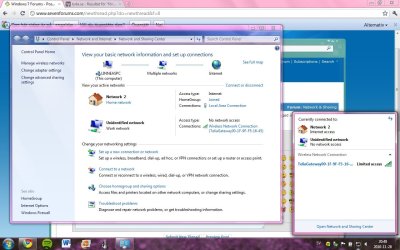
The attached picture explains my problem pretty well. This i have already tried:

1. Reinstalled the network devices (both ethernet and wireless). This is pretty strange I think though. The etheret device is named Realtek RTL8168C(P)/8111C(P) Family PCI-E Gigabit Ethernet NIC (NDIS 6.20) and the wireless 802.11n Wireless LAN Card. I can't find the real name of the wireless card. Any suggestions? Or is it the same as the ethernet (realtek)?

2. Turned off router, reseted router, changed the security key, deleted the wireless connection and some other basic stuff like restarted the computer.

3. Tested the wireless card through a ubuntu live cd to make sure it isn't the hardware that fails.

I hope someone is willing to help, solve or just discuss this problem. Its really driving me crazy!

Oh, I attach the information from ipconfig /all if the someone wants the information there. Unfortunalety i don't have the skills the make any use of it. Something i noticed though is that there is no numbers after "Default Gateway": Could that be the problem?
 

Attachments
  • Untitled.jpg
    Untitled.jpg
    120.4 KB · Views: 57
  • ipconfig.txt
    ipconfig.txt
    8.6 KB · Views: 20
Last edited:

My Computer My Computer

Computer Manufacturer/Model Number
Zepto Nox A15LL
OS
Windows 7 Ultimate 32bit
CPU
2,00 gigahertz Intel Pentium Dual
Motherboard
Zepto Zepto AURA_V0.27-EC0.23
Memory
2gb
Graphics Card(s)
Nvidia 9600M GT
Sound Card
High Definition Audio Device

My Computer My Computer

Computer Manufacturer/Model Number
Alienware AREA-51 M17x
OS
windows 7 ultimate 64bit
CPU
Intel Core2 Extreme x9000 2.8GHZ
Motherboard
Asus P965 Intel chipset
Memory
4Gig
Graphics Card(s)
2 NVidia GeForce 8800M GTX (SLi)
Sound Card
onboard
Monitor(s) Displays
17in. built-in, 47in JVC LCD
Screen Resolution
1080p
Hard Drives
2 250Gig Hitachi (RAID 0) @ 7200RPM
Case
17in. laptop
Mouse
touchpad, Logitech Anywhere Mouse cordless laser
Internet Speed
cable
you may have two options. if you have the intel chip, you can find it here: http://downloadcenter.intel.com/Sea...ductProduct=Intel®+Wireless+WiFi+Link+4965AGN

according to this review: Review Zepto Mythos A15 Notebook - Notebookcheck.net Reviews zepto also makes their own wireless adapter, so you can try installing the vista driver. try it by standard method, and if it doesnt work, try it in compatibility mode.

Thanks for the quick reply!

Unfortunately installing the intel driver didn't work. (Downloaded win 7 drivers, installed and restarted = same result as before)

Didn't really understand what you meant with your second link. But it make sense they make their own adapters. Can't find the drivers to the Zepto adapter - suggestions?
 

My Computer My Computer

Computer Manufacturer/Model Number
Zepto Nox A15LL
OS
Windows 7 Ultimate 32bit
CPU
2,00 gigahertz Intel Pentium Dual
Motherboard
Zepto Zepto AURA_V0.27-EC0.23
Memory
2gb
Graphics Card(s)
Nvidia 9600M GT
Sound Card
High Definition Audio Device
i think you may have to contact zepto. i couldnt find any link for drivers on their website, but i see that model comes with win7 basic, so they must have a driver.

was there any sort of factory restore DVD? the windows vista driver may work.
 

My Computer My Computer

Computer Manufacturer/Model Number
Alienware AREA-51 M17x
OS
windows 7 ultimate 64bit
CPU
Intel Core2 Extreme x9000 2.8GHZ
Motherboard
Asus P965 Intel chipset
Memory
4Gig
Graphics Card(s)
2 NVidia GeForce 8800M GTX (SLi)
Sound Card
onboard
Monitor(s) Displays
17in. built-in, 47in JVC LCD
Screen Resolution
1080p
Hard Drives
2 250Gig Hitachi (RAID 0) @ 7200RPM
Case
17in. laptop
Mouse
touchpad, Logitech Anywhere Mouse cordless laser
Internet Speed
cable
Did some random research myself in device manager (properties >> details tab >> manufactures) and actually finally found out that it is Ralink´s wireless card in the laptop. Found some drivers at download.com but still the same problem, at radarsync.com they got version 3 00 020 and i got 3 00 040 right now so i don't bother try that one or what do you think?

I also tried uninstalling the network card and restarted, but no luck...

I read some about ip-numbers and well, ip-numbers starting with 169 wasn't that good obviously... Now I at least have something more to search for...
 

My Computer My Computer

Computer Manufacturer/Model Number
Zepto Nox A15LL
OS
Windows 7 Ultimate 32bit
CPU
2,00 gigahertz Intel Pentium Dual
Motherboard
Zepto Zepto AURA_V0.27-EC0.23
Memory
2gb
Graphics Card(s)
Nvidia 9600M GT
Sound Card
High Definition Audio Device
i'm not sure what type of connection you are using. you may need to input specific settings. you can try this: How to Reset a PC IP Address | eHow.com

if that doesnt work, post more info about your connection type.
 

My Computer My Computer

Computer Manufacturer/Model Number
Alienware AREA-51 M17x
OS
windows 7 ultimate 64bit
CPU
Intel Core2 Extreme x9000 2.8GHZ
Motherboard
Asus P965 Intel chipset
Memory
4Gig
Graphics Card(s)
2 NVidia GeForce 8800M GTX (SLi)
Sound Card
onboard
Monitor(s) Displays
17in. built-in, 47in JVC LCD
Screen Resolution
1080p
Hard Drives
2 250Gig Hitachi (RAID 0) @ 7200RPM
Case
17in. laptop
Mouse
touchpad, Logitech Anywhere Mouse cordless laser
Internet Speed
cable
i'm not sure what type of connection you are using. you may need to input specific settings. you can try this: How to Reset a PC IP Address | eHow.com

if that doesnt work, post more info about your connection type.

Acutully i already tried that, but i didn't notice this error messege when ipconfig /release:

"No operation can be performed on Local Area Connection while it has its media disconnected."

what do you think?

thanks for your replies anyway!
 

My Computer My Computer

Computer Manufacturer/Model Number
Zepto Nox A15LL
OS
Windows 7 Ultimate 32bit
CPU
2,00 gigahertz Intel Pentium Dual
Motherboard
Zepto Zepto AURA_V0.27-EC0.23
Memory
2gb
Graphics Card(s)
Nvidia 9600M GT
Sound Card
High Definition Audio Device
what antivirus are you running ?
 

My Computer My Computer

Computer Manufacturer/Model Number
built my own
OS
win7 ultimate / virtual box
CPU
Intel Core i7 3770K,1155, Ivy Bridge
Motherboard
MSI Z77A-G43
Memory
GSkill Ripjaws Z Series 1600 CL 9.0 16GB
Graphics Card(s)
KFA2 GeForce GTX 670 EX OC 2048MB GDDR5 PCI-E gfx card
Sound Card
onboard Nvidia HDMI audio
Monitor(s) Displays
ASUS VK222H 22" widescreen LCD monitor
Screen Resolution
1680x1050
Hard Drives
Kingston 128gb SSD
OCZ Vertex 90gb SSD
500GB WDCaviar 16mb 5000KS
320GB WDCaviar 16mb 3200AAKS sata 2
1TB Samsung 16mb HD103SJ sata 2
PSU
Corsair HX 750W ATX2.2 Modular
Cooling
Antec 25 Kuhler H2O 620
Keyboard
logitech
Mouse
logitech MX518
Internet Speed
7mb adsl
what antivirus are you running ?

norton internet security, will test exit it now and test safe mode again...

Do you think that could be it?

EDIT: Can't ping router in safe mode nor with norton closed. Other suggestions?

My connection is that i am directly connected to a gateway btw. I can get the wireless network to work in an ubuntu live cd but not in an installed copy of windows 7! its really strange according to me...
 

My Computer My Computer

Computer Manufacturer/Model Number
Zepto Nox A15LL
OS
Windows 7 Ultimate 32bit
CPU
2,00 gigahertz Intel Pentium Dual
Motherboard
Zepto Zepto AURA_V0.27-EC0.23
Memory
2gb
Graphics Card(s)
Nvidia 9600M GT
Sound Card
High Definition Audio Device
you might try using the same settings from your wired LAN card. also i found this from another forum: control panel
network connections
wireless network/local area connection
(mine was in wireles network, but if you are not wireless, do the same thing in local area connection)
Properties
under General tab look under the "this connection uses the following items"
Click on Internet Protocol (TCP/IP)
Click Properties
Click "obtain an IP adress automatically"
also make sure the "obtain a DNS automatically" is checked


but like i stated previously, i dont know what type of connection you use. some connections require a static iIP address, in which case the above wont work.
 

My Computer My Computer

Computer Manufacturer/Model Number
Alienware AREA-51 M17x
OS
windows 7 ultimate 64bit
CPU
Intel Core2 Extreme x9000 2.8GHZ
Motherboard
Asus P965 Intel chipset
Memory
4Gig
Graphics Card(s)
2 NVidia GeForce 8800M GTX (SLi)
Sound Card
onboard
Monitor(s) Displays
17in. built-in, 47in JVC LCD
Screen Resolution
1080p
Hard Drives
2 250Gig Hitachi (RAID 0) @ 7200RPM
Case
17in. laptop
Mouse
touchpad, Logitech Anywhere Mouse cordless laser
Internet Speed
cable
and does the computer have a hotkey or key combination to enable/disable wireless? every time i reformat my laptop, wireless is disabled by default. you may want to check that first.
 

My Computer My Computer

Computer Manufacturer/Model Number
Alienware AREA-51 M17x
OS
windows 7 ultimate 64bit
CPU
Intel Core2 Extreme x9000 2.8GHZ
Motherboard
Asus P965 Intel chipset
Memory
4Gig
Graphics Card(s)
2 NVidia GeForce 8800M GTX (SLi)
Sound Card
onboard
Monitor(s) Displays
17in. built-in, 47in JVC LCD
Screen Resolution
1080p
Hard Drives
2 250Gig Hitachi (RAID 0) @ 7200RPM
Case
17in. laptop
Mouse
touchpad, Logitech Anywhere Mouse cordless laser
Internet Speed
cable
They is set to obtain ip automatically. I tried change to static but with the same result... Im really tired of this shit now, that yellow triangle is freaking me out!

I talked with the the one who owes the laptop now and she told me that internet had been bad before when it was vista on it too. Do you think that it could be the same problem?
 

My Computer My Computer

Computer Manufacturer/Model Number
Zepto Nox A15LL
OS
Windows 7 Ultimate 32bit
CPU
2,00 gigahertz Intel Pentium Dual
Motherboard
Zepto Zepto AURA_V0.27-EC0.23
Memory
2gb
Graphics Card(s)
Nvidia 9600M GT
Sound Card
High Definition Audio Device
its possible its the same problem left over from vista. what is the error message associated with the yellow triangle in device manager?
 

My Computer My Computer

Computer Manufacturer/Model Number
Alienware AREA-51 M17x
OS
windows 7 ultimate 64bit
CPU
Intel Core2 Extreme x9000 2.8GHZ
Motherboard
Asus P965 Intel chipset
Memory
4Gig
Graphics Card(s)
2 NVidia GeForce 8800M GTX (SLi)
Sound Card
onboard
Monitor(s) Displays
17in. built-in, 47in JVC LCD
Screen Resolution
1080p
Hard Drives
2 250Gig Hitachi (RAID 0) @ 7200RPM
Case
17in. laptop
Mouse
touchpad, Logitech Anywhere Mouse cordless laser
Internet Speed
cable
and does the computer have a hotkey or key combination to enable/disable wireless? every time i reformat my laptop, wireless is disabled by default. you may want to check that first.

Actually it hasn't. The strange thing is that it can find the network and connect to it but it always shown up as unidentified and with limited acces.

really persuade your help!
 

My Computer My Computer

Computer Manufacturer/Model Number
Zepto Nox A15LL
OS
Windows 7 Ultimate 32bit
CPU
2,00 gigahertz Intel Pentium Dual
Motherboard
Zepto Zepto AURA_V0.27-EC0.23
Memory
2gb
Graphics Card(s)
Nvidia 9600M GT
Sound Card
High Definition Audio Device
its possible its the same problem left over from vista. what is the error message associated with the yellow triangle in device manager?

Actually the triangel i was thinink about was the one that appears in the taskbar. Over the network icon when you got limited access. In device manager however there is a "unknown device" with a yellow triangel also. The error of that one is that it can't get any drivers. I don't know which device it is but its hardware ids are AcpiHidMapper. It hasn't anything to do with my network, or has it?
 

My Computer My Computer

Computer Manufacturer/Model Number
Zepto Nox A15LL
OS
Windows 7 Ultimate 32bit
CPU
2,00 gigahertz Intel Pentium Dual
Motherboard
Zepto Zepto AURA_V0.27-EC0.23
Memory
2gb
Graphics Card(s)
Nvidia 9600M GT
Sound Card
High Definition Audio Device
what antivirus are you running ?

norton internet security, will test exit it now and test safe mode again...

Do you think that could be it?

EDIT: Can't ping router in safe mode nor with norton closed. Other suggestions?

My connection is that i am directly connected to a gateway btw. I can get the wireless network to work in an ubuntu live cd but not in an installed copy of windows 7! its really strange according to me...

Norton does install network drivers and I have fixed some machines by uninstalling Norton so I reckon it's worth a try just to eliminate it as the cause :geek:
 

My Computer My Computer

Computer Manufacturer/Model Number
built my own
OS
win7 ultimate / virtual box
CPU
Intel Core i7 3770K,1155, Ivy Bridge
Motherboard
MSI Z77A-G43
Memory
GSkill Ripjaws Z Series 1600 CL 9.0 16GB
Graphics Card(s)
KFA2 GeForce GTX 670 EX OC 2048MB GDDR5 PCI-E gfx card
Sound Card
onboard Nvidia HDMI audio
Monitor(s) Displays
ASUS VK222H 22" widescreen LCD monitor
Screen Resolution
1680x1050
Hard Drives
Kingston 128gb SSD
OCZ Vertex 90gb SSD
500GB WDCaviar 16mb 5000KS
320GB WDCaviar 16mb 3200AAKS sata 2
1TB Samsung 16mb HD103SJ sata 2
PSU
Corsair HX 750W ATX2.2 Modular
Cooling
Antec 25 Kuhler H2O 620
Keyboard
logitech
Mouse
logitech MX518
Internet Speed
7mb adsl
Oh. If it is norton that had made this problem i swear i never gonna look at norton agian! Will test it as soon as i get home, is it enough uninstalling or do also have to delete any drivers or similiar?

EDIT: Uninstalling norton unfortunately didn't change anything...
 
Last edited:

My Computer My Computer

Computer Manufacturer/Model Number
Zepto Nox A15LL
OS
Windows 7 Ultimate 32bit
CPU
2,00 gigahertz Intel Pentium Dual
Motherboard
Zepto Zepto AURA_V0.27-EC0.23
Memory
2gb
Graphics Card(s)
Nvidia 9600M GT
Sound Card
High Definition Audio Device
Just in case the OP doesn't realize this, the wireless connection will not work as long as the eithernet cable is plugged into the machine, or you can disable the wired connection. That is why it's showing two networks.

Windows will choose the wired connection over the wireless when both are enabled. So to test the wireless you will definately need to unplug or disable the eithernet connection first.

If you want more help please post a screen shot of your ipconfig /all with only the wireless connection enabled. :)
 

My Computer My Computer

Computer type
PC/Desktop
Computer Manufacturer/Model Number
Home built
OS
Windows 7 Ult, Windows 8.1 Pro,
CPU
Q9650-4.275GHz, E8600 4.5GHz, E6750-3.8GHz
Motherboard
Evga 780i FTW
Memory
G.Skill PC2 9600 1200Mhz 5 5 5 15 2T
Graphics Card(s)
GTX480
Sound Card
Asus Xonar D2
Monitor(s) Displays
HannsG
Screen Resolution
1680X1050
Hard Drives
GSkill Phoenix Pro 120GB SSD
PSU
ThermalTake Toughpower 1000Watt modular
Case
ThermalTake XaserV
Cooling
Xigmatek S1283
Keyboard
Logitech G15
Mouse
Logitech G9
Internet Speed
T1
Actually the reason I was posting that screenshot and ipconfig was to show that the ethernet connection worked. But now I see that it maybe was unnecessary. The problem is that i also get limited acces and unidentified network when I unplugging the ethernet cable. Thanks anyway

Here is the ipconfig /all when using DHCP:

Windows IP Configuration

Host Name . . . . . . . . . . . . : LinneasPC
Primary Dns Suffix . . . . . . . :
Node Type . . . . . . . . . . . . : Hybrid
IP Routing Enabled. . . . . . . . : No
WINS Proxy Enabled. . . . . . . . : No
DNS Suffix Search List. . . . . . : lan

Wireless LAN adapter Wireless Network Connection:

Connection-specific DNS Suffix . :
Description . . . . . . . . . . . : 802.11n Wireless LAN Card
Physical Address. . . . . . . . . : 00-22-43-15-51-20
DHCP Enabled. . . . . . . . . . . : Yes
Autoconfiguration Enabled . . . . : Yes
Link-local IPv6 Address . . . . . : fe80::3472:f57:3849:b1ac%30(P
Autoconfiguration IPv4 Address. . : 169.254.177.172(Preferred)
Subnet Mask . . . . . . . . . . . : 255.255.0.0
Default Gateway . . . . . . . . . :
DHCPv6 IAID . . . . . . . . . . . : 587211331
DHCPv6 Client DUID. . . . . . . . : 00-01-00-01-14-82-B5-D9-00-09

DNS Servers . . . . . . . . . . . : fec0:0:0:ffff::1%1
fec0:0:0:ffff::2%1
fec0:0:0:ffff::3%1
NetBIOS over Tcpip. . . . . . . . : Enabled

My networks adapters is listed like this in the device manager:

1. 802.11n Wireless LAN Card
2. Realtek RTL8168C(P)/8111C(P) Family PCI-E Gigabit Ethernet NIC (NDIS 6.20)

It seems to me that the first one is missing some driver but when i try to update it through th device manager it says that the drivers is up to date. Maybe it is no windows 7 drivers for that card?
 

My Computer My Computer

Computer Manufacturer/Model Number
Zepto Nox A15LL
OS
Windows 7 Ultimate 32bit
CPU
2,00 gigahertz Intel Pentium Dual
Motherboard
Zepto Zepto AURA_V0.27-EC0.23
Memory
2gb
Graphics Card(s)
Nvidia 9600M GT
Sound Card
High Definition Audio Device
change your wireless security on the wifi... most new OSs don't support old router encryption... If you can connect to the wireless without security key in place, it's the router (you will need to flash firmware)... If you can't... then it's your OS/driver.
 

My Computer My Computer

OS
7 Pro
Back
Top