How can I control volume by decibels bandwidth

Ravanx

Banned
Local time
3:10 AM
Messages
117
How can I control volume by db level?

It's especially annoying to have to keep adjusting the volume level to suit the various different sound levels that different websites use.

Is there a way to adjust and set a bandwidth for the volume, according to the projected decibels levels, so that sounds below the bandwidth will be made louder while sounds above the bandwidth will be made softer?
 

My Computer My Computer

At a glance

Windows 7 Pro
OS
Windows 7 Pro
You would have to have a compressor/limiter to do what you want. I don't know of anything that would work in conjuction with the PC sound card to do that.
 

My Computer My Computer

At a glance

Windows 10 64 bitIntel i7 6700K16GB Corsair DominatorIntel CPU Graphics
Computer type
PC/Desktop
Computer Manufacturer/Model Number
My Own Build
OS
Windows 10 64 bit
CPU
Intel i7 6700K
Motherboard
ASUS ROG Maximus VIII Hero
Memory
16GB Corsair Dominator
Graphics Card(s)
Intel CPU Graphics
Sound Card
RealTek
Monitor(s) Displays
27" Dell S2719dgf
Screen Resolution
2560X1440
Hard Drives
1 TB Samsung 850 EVO SSD for Win 10 Pro
500GB Samsung 850 EVO SSD for Win 10 Insider
2 TB drive for backup
PSU
EVGA Supernova 750G2
Case
BeQuiet Silent Base 600
Cooling
Deepcool Captain 120EX
Keyboard
Microsoft Wireless 2000
Mouse
Microsoft wireless
Internet Speed
100 MB/sec (Cable)
Antivirus
Microsoft Defender and Malwarebytes
Browser
Edge/Firefox
Other Info
Cakewalk (Sonar) by BandLab and Studio One 4.1 Pro recording studio software. MOTU 896Mk3 Hybrid recording interface, Frontier Tranzport wireless control unit, Behringer X-Touch Control Surface.
Five USB connected optical drives for CD Audio production using Nero BurningROM
You would have to have a compressor/limiter to do what you want. I don't know of anything that would work in conjuction with the PC sound card to do that.
Actually I was asking whether there is a program that does that. Not a physical piece of hardware. I seriously doubt any hardware or any complicated software is needed to achieve this.

Afterall, Windows 7's Volume Mixer Control is already able to detect the db levels.

All that is needed is a program that adjusts the volume level based on that information.
 

My Computer My Computer

At a glance

Windows 7 Pro
OS
Windows 7 Pro
I was referring to a software package to do that, not an external device. I have those in my Sonar recording studio program but they are "VST" applications, not standalone.

If you can find a standalone software application you can do what you want. Otherwise you can do what everyone else does, change the volume level on their speakers or on the PC or put up with the different volume levels.
 

My Computer My Computer

At a glance

Windows 10 64 bitIntel i7 6700K16GB Corsair DominatorIntel CPU Graphics
Computer type
PC/Desktop
Computer Manufacturer/Model Number
My Own Build
OS
Windows 10 64 bit
CPU
Intel i7 6700K
Motherboard
ASUS ROG Maximus VIII Hero
Memory
16GB Corsair Dominator
Graphics Card(s)
Intel CPU Graphics
Sound Card
RealTek
Monitor(s) Displays
27" Dell S2719dgf
Screen Resolution
2560X1440
Hard Drives
1 TB Samsung 850 EVO SSD for Win 10 Pro
500GB Samsung 850 EVO SSD for Win 10 Insider
2 TB drive for backup
PSU
EVGA Supernova 750G2
Case
BeQuiet Silent Base 600
Cooling
Deepcool Captain 120EX
Keyboard
Microsoft Wireless 2000
Mouse
Microsoft wireless
Internet Speed
100 MB/sec (Cable)
Antivirus
Microsoft Defender and Malwarebytes
Browser
Edge/Firefox
Other Info
Cakewalk (Sonar) by BandLab and Studio One 4.1 Pro recording studio software. MOTU 896Mk3 Hybrid recording interface, Frontier Tranzport wireless control unit, Behringer X-Touch Control Surface.
Five USB connected optical drives for CD Audio production using Nero BurningROM
Depending on yuour onboard sound, you may have something available.

It's called Loudness Equalization. (basically a compressor/limiter)
Unfortunately, there are no adjustments for it, just a default setting.

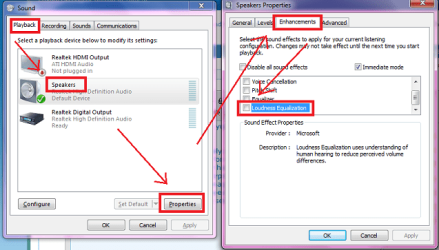
SpeakersProp.jpg

Speakers/Properties/Enhancements... scroll down to Loudness Equalization

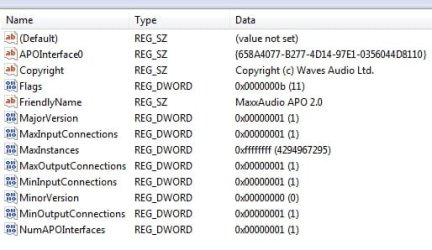
It's software, not hardware. From poking around in the registry it's looks like this is built into Win7's audio subsystem and has hooks made available to developers, your soundcared drivers may or may not have incorporated this.

Ap
 

My Computer My Computer

At a glance

Windows 7 Home PremiumIntel Core 2 Duo @ 3.00gHz4 GBATI Radeon HD 2600 XT
Computer Manufacturer/Model Number
Assembled in my workshop
OS
Windows 7 Home Premium
CPU
Intel Core 2 Duo @ 3.00gHz
Motherboard
Gigabyte GA-P35-S3G
Memory
4 GB
Graphics Card(s)
ATI Radeon HD 2600 XT
Sound Card
RME 24/96 Card, Realtek Internal Audio PreSonus FireStudio
Monitor(s) Displays
Acer 1917 (x2)
Screen Resolution
1280 x 1024 on both monitors
Hard Drives
Three 250GB Seagate SATA Barracuda 7200rpm
PSU
Rosewill 500-watt
Case
Rosewill mid-tower
Cooling
Noctua NH-U9B (CPU), PwrSupply fan + single large case Fan
Keyboard
Macally w/2/USB ports.
Mouse
Trackman Wheel
Other Info
Event 20/20 bas studio monitors, Yamaha sub.
Rackmount Korg/Roland/Yamaha synthesizers,
Cubase MIDI/audio recording. Sony Soundforge audio/mastering software. CD Architect Mastering. RME & Presonus audio interfaces.
Depending on yuour onboard sound, you may have something available.

It's called Loudness Equalization. (basically a compressor/limiter)
Unfortunately, there are no adjustments for it, just a default setting.

View attachment 118621

Speakers/Properties/Enhancements... scroll down to Loudness Equalization

It's software, not hardware. From poking around in the registry it's looks like this is built into Win7's audio subsystem and has hooks made available to developers, your soundcared drivers may or may not have incorporated this.

Ap
Ah I found it. But how does it work? If I minimised the volume for system sounds, woould the equalizing bring it back up?
 

My Computer My Computer

At a glance

Windows 7 Pro
OS
Windows 7 Pro
Depending on yuour onboard sound, you may have something available.

It's called Loudness Equalization. (basically a compressor/limiter)
Unfortunately, there are no adjustments for it, just a default setting.
Most machines have onboard RealTeks I think. At first it seemed they don't have this feature, but I found it after a little poking around elsewhere. At the Start menu:
-> type speaker (but don't press enter)
-> select Manage audio devices (for me it was the 5th result which appeared after typing "speaker"
-> select the Playback tab (should be the default one already open)
-> click to select the specific speaker hardware you want -> then click Properties.

At the new popup select the Enhancements tab, then in the middle section below you should see the Loudness Equalization option among the others.

win7_sound_eq.png
 

My Computer My Computer

At a glance

Win7 Pro x64Koa i5-2550K8 GBSapphire ATI 6870 1GB GDDR5
Computer Manufacturer/Model Number
Self-built rig
OS
Win7 Pro x64
CPU
Koa i5-2550K
Memory
8 GB
Graphics Card(s)
Sapphire ATI 6870 1GB GDDR5
Sound Card
RealTek HD Audio / ATI HDMI Audio
Monitor(s) Displays
Samsung HDTV Monitor T23A350
Screen Resolution
1920 x 1080
Hard Drives
- SSD (C:)
- HDD (D:)
- BD-ROM (E:)
Keyboard
Logitech G110
Internet Speed
Unifi home (5mbps)
Depending on yuour onboard sound, you may have something available.

It's called Loudness Equalization. (basically a compressor/limiter)
Unfortunately, there are no adjustments for it, just a default setting.

View attachment 118621

Speakers/Properties/Enhancements... scroll down to Loudness Equalization

It's software, not hardware. From poking around in the registry it's looks like this is built into Win7's audio subsystem and has hooks made available to developers, your soundcared drivers may or may not have incorporated this.

Ap
Ah I found it. But how does it work? If I minimised the volume for system sounds, woould the equalizing bring it back up?

I would think so but I never use system sounds so not sure about that. The Windows mixer will have a separate volume control for system sounds. Select the MS speaker icon in the task bar, then select mixer.

Most running applications that have audio, including Windows system sounds will have a volume slider, you should be able to balance sounds using the mixer. Perhaps you don't even need loudness equalization.

Ap
 

My Computer My Computer

At a glance

Windows 7 Home PremiumIntel Core 2 Duo @ 3.00gHz4 GBATI Radeon HD 2600 XT
Computer Manufacturer/Model Number
Assembled in my workshop
OS
Windows 7 Home Premium
CPU
Intel Core 2 Duo @ 3.00gHz
Motherboard
Gigabyte GA-P35-S3G
Memory
4 GB
Graphics Card(s)
ATI Radeon HD 2600 XT
Sound Card
RME 24/96 Card, Realtek Internal Audio PreSonus FireStudio
Monitor(s) Displays
Acer 1917 (x2)
Screen Resolution
1280 x 1024 on both monitors
Hard Drives
Three 250GB Seagate SATA Barracuda 7200rpm
PSU
Rosewill 500-watt
Case
Rosewill mid-tower
Cooling
Noctua NH-U9B (CPU), PwrSupply fan + single large case Fan
Keyboard
Macally w/2/USB ports.
Mouse
Trackman Wheel
Other Info
Event 20/20 bas studio monitors, Yamaha sub.
Rackmount Korg/Roland/Yamaha synthesizers,
Cubase MIDI/audio recording. Sony Soundforge audio/mastering software. CD Architect Mastering. RME & Presonus audio interfaces.
I doubt that the "loudness" option will do enough to equalize the volume levels between sites or games that you want. On old stereo systems that had a loudness control it did very little in controlling actual sound level between various devices in the system.
 

My Computer My Computer

At a glance

Windows 10 64 bitIntel i7 6700K16GB Corsair DominatorIntel CPU Graphics
Computer type
PC/Desktop
Computer Manufacturer/Model Number
My Own Build
OS
Windows 10 64 bit
CPU
Intel i7 6700K
Motherboard
ASUS ROG Maximus VIII Hero
Memory
16GB Corsair Dominator
Graphics Card(s)
Intel CPU Graphics
Sound Card
RealTek
Monitor(s) Displays
27" Dell S2719dgf
Screen Resolution
2560X1440
Hard Drives
1 TB Samsung 850 EVO SSD for Win 10 Pro
500GB Samsung 850 EVO SSD for Win 10 Insider
2 TB drive for backup
PSU
EVGA Supernova 750G2
Case
BeQuiet Silent Base 600
Cooling
Deepcool Captain 120EX
Keyboard
Microsoft Wireless 2000
Mouse
Microsoft wireless
Internet Speed
100 MB/sec (Cable)
Antivirus
Microsoft Defender and Malwarebytes
Browser
Edge/Firefox
Other Info
Cakewalk (Sonar) by BandLab and Studio One 4.1 Pro recording studio software. MOTU 896Mk3 Hybrid recording interface, Frontier Tranzport wireless control unit, Behringer X-Touch Control Surface.
Five USB connected optical drives for CD Audio production using Nero BurningROM
I doubt that the "loudness" option will do enough to equalize the volume levels between sites or games that you want. On old stereo systems that had a loudness control it did very little in controlling actual sound level between various devices in the system.


The Loudness Equalization that Microsoft added (based on Waves MaxxAudio) is actually a working compressor/limiter. It squashes high output and amplifies low input.

It senses input level and acts according to preset parameters. The downside being... at this point it's not user configurable.

Audio.jpg

I should add, it's up to the audio driver programmers whether or not this option is added to the available enhancements. Of the enhancement tab selections, most are from Realtek however, Headphone Virtualization and Loudness Equalization are by MS.

Ap
 
Last edited:

My Computer My Computer

At a glance

Windows 7 Home PremiumIntel Core 2 Duo @ 3.00gHz4 GBATI Radeon HD 2600 XT
Computer Manufacturer/Model Number
Assembled in my workshop
OS
Windows 7 Home Premium
CPU
Intel Core 2 Duo @ 3.00gHz
Motherboard
Gigabyte GA-P35-S3G
Memory
4 GB
Graphics Card(s)
ATI Radeon HD 2600 XT
Sound Card
RME 24/96 Card, Realtek Internal Audio PreSonus FireStudio
Monitor(s) Displays
Acer 1917 (x2)
Screen Resolution
1280 x 1024 on both monitors
Hard Drives
Three 250GB Seagate SATA Barracuda 7200rpm
PSU
Rosewill 500-watt
Case
Rosewill mid-tower
Cooling
Noctua NH-U9B (CPU), PwrSupply fan + single large case Fan
Keyboard
Macally w/2/USB ports.
Mouse
Trackman Wheel
Other Info
Event 20/20 bas studio monitors, Yamaha sub.
Rackmount Korg/Roland/Yamaha synthesizers,
Cubase MIDI/audio recording. Sony Soundforge audio/mastering software. CD Architect Mastering. RME & Presonus audio interfaces.
Back
Top