windows 7 system reserved partition not created?

carrot muncher

New member
Local time
12:06 AM
Messages
16
Hi Guys,

Reinstalling Windows 7 on a Dell laptop, I had three partitions, system reserved, OS and the recovery partition.
So deleted the OS and system reserved partition, I want to keep the recovery partition for now, and I thought the now two unallocated partitions would become one, but they never did.
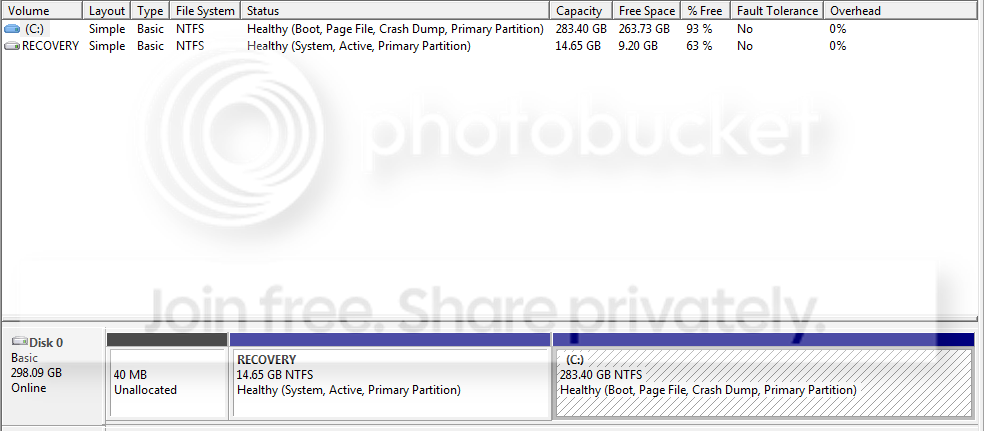
So I installed Windows and now I have no system reserved partition, instead I have a 40mb unallocated partition.
Something went wrong somewhere?
 

My Computer My Computer

OS
Windows 7 HP 64 bit
The installer didn't issue the 100mb SysReserved partition because you already had pre-partitioned with a Recovery Partition. You should have used Custom>Drive Options to create New partition in the space you deleted from the first two partitions, then format it before install. I'm not sure where the 40mb came from but it is negligible.

If you post back a screenshot of your full Disk Mgmt drive map, using Snipping Tool in Start Menu, we can look it over and see that it is all correct now. The only thing you lose from not having the 100mb boot partition is having the Repair Console on your F8 Advanced Boot Tools menu - but you already have it on your DVD.
 
Last edited:
So what I should have done is, delete both the OS and system reserved partition, then from the unallocated space, create a 100mb partition and format it, then install?
Except what happened was, I had deleted both the OS and system reserved partition which is what the 40mb is from, and I didn't end up with one single unallocated partition/space, I tried to make the larger partition that had prevously had the OS on bigger and use up the 40mb unallocated space, but that didn't want to work, so I had to install the OS on the larger partition leaving the 40mb one doing nothing.

So below is what I have now, I have acronis disk director that I was going to use to add the 40mb back to the OS partition.

If I press f8 now, it starts brings up the recovery partition, which I guess is the original dell OS which you can restore from, would having the 100mb system reserved partition add the abilitly to go into the recovery console without a disc?

If I have to reinstall again to get it right, I will, or else it will bug me no end. :rolleyes:


DiskManagementscreenshot.png
 

My Computer My Computer

OS
Windows 7 HP 64 bit

My Computer My Computer

Computer Manufacturer/Model Number
Too many to describe...
OS
Windows 7 x64 pro/ Windows 7 x86 Pro/ XP SP3 x86
Your Recovery is marked System Active which means it contains the critical boot files. This is likely required to boot it should you need to run Recovery - which is the only way it will run now that you've installed Win7 and it's lost its link to Vista.

I would not mess with trying to create a SysReserved partition since your boot files need to remain on the Recovery partition as long as you keep it. In similar cases where System Active has been moved to Win7 partition or its System Reserved boot partition, Recovery would not run even when marked Active again.

What you deleted is a factory OEM partition typically seen on a factory configuration such as yours. There was no System Reserved partition. You could not add that space to Win7 partition because Recovery is in the way. It can be done using free Partition Wizard bootable CD but I would not move the Recovery Partition now unless you decide to delete it.

If you made your Recovery Disks when you had Vista or have any Vista retail installer, you can consider wiping the HD since you've deleted your Factory OEM utilities partition anyway. http://www.sevenforums.com/tutorials/91339-ssd-hdd-optimize-windows-reinstallation.html

Then you'll have a clean slate so that the installer creates 100mb System Reserved partition when you use Custom>Drive options to partition and format the wiped HD. http://www.sevenforums.com/tutorials/1649-clean-install-windows-7-a.html
 
Where have you gotten vista from. :rolleyes:;)


They definitely was a 40 mb partition marked system reserved along side the OS and the recovery partition, which is why I deleted it, and that must have been to do with Windows 7 install?


Yer using the dell backup and restore manager, I did create some discs, system image and a 'Windows 7 ENG Business' which is a Windows 7 Pro disc with some dell drivers on, I've just installed that in a virtual machine and although I only used it for about 5 minutes, apart from the dell logo in system properties it looks like a clean oem Windows 7 disc.


Having the two dell system backup discs, I guess I can reinstall from them if I ever needed, would just need to install dells backup and restore manager?


TBH, think what I will do is just wipe the entire drive and reinstall again, I'm pretty certain I'll have zero need for the dell recovery partition, reason I done a reinstall is to have a 64 bit OS and have a clean OS, the amount of junk pre installed is a joke.
 

My Computer My Computer

OS
Windows 7 HP 64 bit
Hello carrot muncher, welcome to Seven Forums!


It you do a wipe / clean install, I would give consideration to creating the SysResv partition at 200MB instead of the default 100MB, some are having issues with the default being too small; have a look at the info/snip at Step Two #4 in the tutorial Greg posted above for an example.

SSD / HDD : Optimize for Windows Reinstallation
 

My Computer My Computer

Computer Manufacturer/Model Number
* BFK Customs *
OS
W 7 64-bit Ultimate
CPU
Intel Q9550 Yorkfield
Motherboard
ASUS P5Q Pro
Memory
8GB Dominator 8500C5D
Graphics Card(s)
ATI : XFX 5870
Sound Card
Realtek HD Audio 7-1
Monitor(s) Displays
1x 47" LCD HDMI & 3x 26" LCD HDMI
Screen Resolution
1920x1080P & 1920x1200
Hard Drives
1x 80GB Intel X25-M G2 SSD : 1x 500GB & 1x 640GB WD Caviar Black(s)
PSU
Corsair 620HX
Case
Cooler Master RC-690
Cooling
Tuniq Tower 120, 2x 140mm and 3x 120mm case fans
Keyboard
Microsoft 500
Mouse
Razer Diamondback 3G
Internet Speed
14 Mb/s
Other Info
1x Koutech 3Gb/s SATA HDD Hot Swap Rack
Thanks bare foot kid,

Yer I have 64 bit HP disc, that I copied to the hdd, deleted the ei.cfg, used the command prompt and 'oscdimg.exe -bC:\expandedSetup\boot\etfsboot.com -u2 -h -m -lWIN_EN_DVD C:\expandedSetup\ C:\Win7.iso' to create an iso, then used microsofts usb tool.


So just so I'm 100% on what I'm doing.
1, boot from the memory stick and press shift+f10 when the select language comes up.
2, 'diskpart', 'list disk', 'select disk #', 'clean all'
3, 'create partition primary size=200', format fs=ntfs label="System Reserved", 'active'
4, exit diskpart/command window.
5, go to custom (advanced) and select the unallocated space and click next to continue installation.

Sounds right from what I have read?
 

My Computer My Computer

OS
Windows 7 HP 64 bit
Hello again.


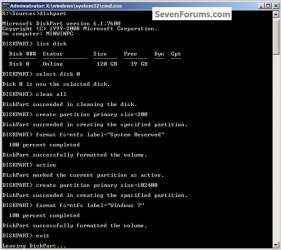
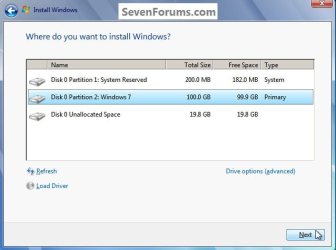
First create the SysResv partition and mark that active, then create a second partition of 100GB to install Windows 7 to selecting that "Windows 7" partition when you get to the "Where do you want to install Windows" dialog box during the install process.

SSD / HDD : Optimize for Windows Reinstallation


Have a look at this first snip for the complete create process, Step Two #3 in the tutorial; and the second for "the where" for the install.

Do not use the installer to format anything, just click to select the Windows 7 partition and click next.
click to enlarge
SysResv.jpg
Where.jpg
 
Last edited:

My Computer My Computer

Computer Manufacturer/Model Number
* BFK Customs *
OS
W 7 64-bit Ultimate
CPU
Intel Q9550 Yorkfield
Motherboard
ASUS P5Q Pro
Memory
8GB Dominator 8500C5D
Graphics Card(s)
ATI : XFX 5870
Sound Card
Realtek HD Audio 7-1
Monitor(s) Displays
1x 47" LCD HDMI & 3x 26" LCD HDMI
Screen Resolution
1920x1080P & 1920x1200
Hard Drives
1x 80GB Intel X25-M G2 SSD : 1x 500GB & 1x 640GB WD Caviar Black(s)
PSU
Corsair 620HX
Case
Cooler Master RC-690
Cooling
Tuniq Tower 120, 2x 140mm and 3x 120mm case fans
Keyboard
Microsoft 500
Mouse
Razer Diamondback 3G
Internet Speed
14 Mb/s
Other Info
1x Koutech 3Gb/s SATA HDD Hot Swap Rack
Is the 100GB partition needed, or is that just a suggestion for the OS partition size?
 

My Computer My Computer

OS
Windows 7 HP 64 bit
Is the 100GB partition needed, or is that just a suggestion for the OS partition size?


This way you can use this tutorial after the install finishes to create another partition for data storage out of the left-over unallocated space, away from the OS partition, that way if ever you have to reinstall the OS you will have data saved to a separate partition.

How to Create a New Partition or Volume in Windows 7
 

My Computer My Computer

Computer Manufacturer/Model Number
* BFK Customs *
OS
W 7 64-bit Ultimate
CPU
Intel Q9550 Yorkfield
Motherboard
ASUS P5Q Pro
Memory
8GB Dominator 8500C5D
Graphics Card(s)
ATI : XFX 5870
Sound Card
Realtek HD Audio 7-1
Monitor(s) Displays
1x 47" LCD HDMI & 3x 26" LCD HDMI
Screen Resolution
1920x1080P & 1920x1200
Hard Drives
1x 80GB Intel X25-M G2 SSD : 1x 500GB & 1x 640GB WD Caviar Black(s)
PSU
Corsair 620HX
Case
Cooler Master RC-690
Cooling
Tuniq Tower 120, 2x 140mm and 3x 120mm case fans
Keyboard
Microsoft 500
Mouse
Razer Diamondback 3G
Internet Speed
14 Mb/s
Other Info
1x Koutech 3Gb/s SATA HDD Hot Swap Rack
Thanks lads, very helpful indeed.

I've never had more than one partition, I backup often so always have a copy of everything I want to keep, and I know to a point what and what not to do.
However thinking about, this laptop is going to be a christmas present, with a new user, and having music/vids etc on a different partition is a good idea, for when the inevitable happens, 'oh the os is screwed' yer well done...

So I was thinking of moving, the desktop/downloads/my docs/my music/my pic and my videos folder.
That would probably be all I need to move do you think?
 

My Computer My Computer

OS
Windows 7 HP 64 bit

My Computer My Computer

Computer Manufacturer/Model Number
* BFK Customs *
OS
W 7 64-bit Ultimate
CPU
Intel Q9550 Yorkfield
Motherboard
ASUS P5Q Pro
Memory
8GB Dominator 8500C5D
Graphics Card(s)
ATI : XFX 5870
Sound Card
Realtek HD Audio 7-1
Monitor(s) Displays
1x 47" LCD HDMI & 3x 26" LCD HDMI
Screen Resolution
1920x1080P & 1920x1200
Hard Drives
1x 80GB Intel X25-M G2 SSD : 1x 500GB & 1x 640GB WD Caviar Black(s)
PSU
Corsair 620HX
Case
Cooler Master RC-690
Cooling
Tuniq Tower 120, 2x 140mm and 3x 120mm case fans
Keyboard
Microsoft 500
Mouse
Razer Diamondback 3G
Internet Speed
14 Mb/s
Other Info
1x Koutech 3Gb/s SATA HDD Hot Swap Rack
You're welcome! ;)
 

My Computer My Computer

Computer Manufacturer/Model Number
* BFK Customs *
OS
W 7 64-bit Ultimate
CPU
Intel Q9550 Yorkfield
Motherboard
ASUS P5Q Pro
Memory
8GB Dominator 8500C5D
Graphics Card(s)
ATI : XFX 5870
Sound Card
Realtek HD Audio 7-1
Monitor(s) Displays
1x 47" LCD HDMI & 3x 26" LCD HDMI
Screen Resolution
1920x1080P & 1920x1200
Hard Drives
1x 80GB Intel X25-M G2 SSD : 1x 500GB & 1x 640GB WD Caviar Black(s)
PSU
Corsair 620HX
Case
Cooler Master RC-690
Cooling
Tuniq Tower 120, 2x 140mm and 3x 120mm case fans
Keyboard
Microsoft 500
Mouse
Razer Diamondback 3G
Internet Speed
14 Mb/s
Other Info
1x Koutech 3Gb/s SATA HDD Hot Swap Rack
Back
Top