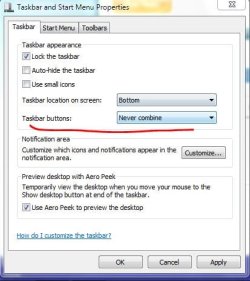
How can I make the taskbar not group similar programs?

tucansam

New member
Local time
3:17 AM
Messages
10
I've already disabled grouping for the taskbar. My problem is I multitask a lot, and usually have the taskbar completely full of open programs. I work based on the order in which I opened the programs, ie, newer-opened items at the bottom of the taskbar (I run my taskbar on the right side of the desktop).

Right now Win7 is grouping items based on similarity, ie, all notepad icons next to each other, file explorer windows all next to each other, etc. The problem is, I want my icons to stay on the taskbar in the order I opened them, like I had under WinXP.

Any ideas?
 

My Computer My Computer

At a glance

win7
OS
win7
Last edited by a moderator:

My Computer My Computer

At a glance

Windows 7 Ultimate x86DualCore AMD Athlon 64 X2, 2600 MHz 5200+Samsung 2GB DDR2Onboard NVIDIA GeForce 6150SE nForce 430
Computer Manufacturer/Model Number
HP m8000n
OS
Windows 7 Ultimate x86
CPU
DualCore AMD Athlon 64 X2, 2600 MHz 5200+
Motherboard
Asus M2N68-LA (Narra)
Memory
Samsung 2GB DDR2
Graphics Card(s)
Onboard NVIDIA GeForce 6150SE nForce 430
Sound Card
Onboard nVIDIA nForce 6100-430 (MCP61P)
Monitor(s) Displays
Westinghouse 19" LED
Screen Resolution
1280x1024
Hard Drives
SATA II Seagate Barracuda 500GB
USB II WD Elements 500GB
USB II WD My Book 1TB
USB II WD My Book 2TB
PSU
Stock (HP)
Case
Stock (HP)
Cooling
Stock
Keyboard
Logitech Classic KB 200
Mouse
Standard HP opticle USB mouse
Last edited by a moderator:

My Computer My Computer

At a glance

Win7U 64 RTMQ95508GB GskillASUS|EAH4850/HTDI/1GD3/A
OS
Win7U 64 RTM
CPU
Q9550
Motherboard
GA-EP45-UD3R
Memory
8GB Gskill
Graphics Card(s)
ASUS|EAH4850/HTDI/1GD3/A
Sound Card
xfi Plat
Monitor(s) Displays
Dell 2405fpw
Screen Resolution
1920x1200
Hard Drives
Seagate & WD sata Drives
PSU
Antec
Case
Antec
Keyboard
MS Natural Ergonomic 4000
Mouse
Logitech MX610 USB Cordless
Unfortunately, DG, that won't solve the issue the OP is having. I'm unaware of how to do this natively in Win 7 but I have seen 3rd party solutions. I'll have to check on that, though.

The issue isn't the grouping but the order in which they're grouped. When "Never Combine" is selected, new windows still congregate with their like windows; just not "combined."

Additionally, attempting to reorder them results in the "like" windows moving together as one.

Ah, I found the 3rd party solution I mentioned earlier: TaskBar Tweaker. I have used this in the past and it worked well. Sorry, but I can't remember why I quit using it. :o I never had an issue with it, though.
 

My Computer My Computer

At a glance

Windows 7 Ultimate x64 SP1Core2 Duo4 GBGM965 on-board
Computer Manufacturer/Model Number
Toshiba L355D
OS
Windows 7 Ultimate x64 SP1
CPU
Core2 Duo
Motherboard
Intel
Memory
4 GB
Graphics Card(s)
GM965 on-board
Sound Card
RealTek on-board
Monitor(s) Displays
19"+17"(laptop)
Screen Resolution
1440x900 (x 2)
Hard Drives
500GB Ext. 200GB Internal
PSU
N/A
Case
N/A
Cooling
N/A
Taskbar Tweaker worked. Thanks!
 

My Computer My Computer

At a glance

win7
OS
win7
Taskbar Tweaker worked. Thanks!
You're quite welcome, tucansam! :)

I found it to be useful especially in the manner of using the taskbar to which you have become accustomed. I've gotten used to the Win 7 default options which is the only reason, as I recall now, that I quit using it. Glad I could help.
 

My Computer My Computer

At a glance

Windows 7 Ultimate x64 SP1Core2 Duo4 GBGM965 on-board
Computer Manufacturer/Model Number
Toshiba L355D
OS
Windows 7 Ultimate x64 SP1
CPU
Core2 Duo
Motherboard
Intel
Memory
4 GB
Graphics Card(s)
GM965 on-board
Sound Card
RealTek on-board
Monitor(s) Displays
19"+17"(laptop)
Screen Resolution
1440x900 (x 2)
Hard Drives
500GB Ext. 200GB Internal
PSU
N/A
Case
N/A
Cooling
N/A
Back
Top