Delete XP partition and add the space to 7

wakawakamush

New member
Local time
5:03 AM
Messages
11
Location
Holland
Hi,

First i had a dual boot of Windows XP and Linux Ubuntu 10.04 on my pc. Then i wanted to try out Windows 7. So i formatted the Ubuntu partition and installed 7.
Now i want to delete my old XP partition and use the full size of my drive for Windows 7. I think the XP partition still contains the important boot files.

I was planning to use my Ubuntu live cd to do the partition stuff, but i can't find it when i need it. (Why does that always happen?)

How do i move the bootloader and stuff to my 7 partition, the delete the Windows XP partition and add the size of that partition to the Windows 7 one without (preferably) using a live cd?

Thanks,
Wakawakamush
 

My Computer My Computer

At a glance

Win7 Ultimate 32bitAMD Athlon 64 X2 44002,5 GBnvidia 8500GT
Computer Manufacturer/Model Number
-
OS
Win7 Ultimate 32bit
CPU
AMD Athlon 64 X2 4400
Motherboard
Can't find it, need to get some software to look it up :D
Memory
2,5 GB
Graphics Card(s)
nvidia 8500GT

My Computer My Computer

At a glance

Vista, Windows7, Mint Mate, Zorin, Windows 8from 1.6GHz Duo to i7
Computer Manufacturer/Model Number
HP, Dell, Gateway, Toshiba - 4 laptops and 2 desktops
OS
Vista, Windows7, Mint Mate, Zorin, Windows 8
CPU
from 1.6GHz Duo to i7
Monitor(s) Displays
2x HP w2207
Hard Drives
5x HDD, 7x SSD, 12x Externals
Keyboard
with trackball - no mices
Mouse
Trackball mice
Internet Speed
DSL 6000
Can i boot that program from a usb drive? I don't have a cd burner. My live cd was a live usb
 

My Computer My Computer

At a glance

Win7 Ultimate 32bitAMD Athlon 64 X2 44002,5 GBnvidia 8500GT
Computer Manufacturer/Model Number
-
OS
Win7 Ultimate 32bit
CPU
AMD Athlon 64 X2 4400
Motherboard
Can't find it, need to get some software to look it up :D
Memory
2,5 GB
Graphics Card(s)
nvidia 8500GT
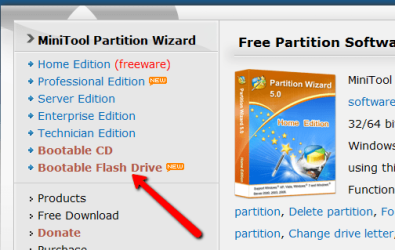
Yes, you can burn it to a CD or a USB stick - see on the left side of the webpage for Partition Wizard.
 

Attachments

  • 2010-12-10_1458.png
    2010-12-10_1458.png
    22.5 KB · Views: 2

My Computer My Computer

At a glance

Vista, Windows7, Mint Mate, Zorin, Windows 8from 1.6GHz Duo to i7
Computer Manufacturer/Model Number
HP, Dell, Gateway, Toshiba - 4 laptops and 2 desktops
OS
Vista, Windows7, Mint Mate, Zorin, Windows 8
CPU
from 1.6GHz Duo to i7
Monitor(s) Displays
2x HP w2207
Hard Drives
5x HDD, 7x SSD, 12x Externals
Keyboard
with trackball - no mices
Mouse
Trackball mice
Internet Speed
DSL 6000
Great! I will test it soon!
 

My Computer My Computer

At a glance

Win7 Ultimate 32bitAMD Athlon 64 X2 44002,5 GBnvidia 8500GT
Computer Manufacturer/Model Number
-
OS
Win7 Ultimate 32bit
CPU
AMD Athlon 64 X2 4400
Motherboard
Can't find it, need to get some software to look it up :D
Memory
2,5 GB
Graphics Card(s)
nvidia 8500GT
I downloaded program from that site you gave me to make the bootable usb, but i can't find the option to make my usb bootable. The only thing with bootable cd, when i click that it takes me to their website with a howto for their bootable cd.

Did i install the wrong app?
 

My Computer My Computer

At a glance

Win7 Ultimate 32bitAMD Athlon 64 X2 44002,5 GBnvidia 8500GT
Computer Manufacturer/Model Number
-
OS
Win7 Ultimate 32bit
CPU
AMD Athlon 64 X2 4400
Motherboard
Can't find it, need to get some software to look it up :D
Memory
2,5 GB
Graphics Card(s)
nvidia 8500GT
You have to change your BIOS boot sequence to boot from the USB. When you switch the system on, look on the splash scree which key you have to tap - e.g. on a HP, it is ESC, but other makes use different function keys. Once in the BIOS boot sequence screen, move the USB to the top - with the up/down keys.
 

My Computer My Computer

At a glance

Vista, Windows7, Mint Mate, Zorin, Windows 8from 1.6GHz Duo to i7
Computer Manufacturer/Model Number
HP, Dell, Gateway, Toshiba - 4 laptops and 2 desktops
OS
Vista, Windows7, Mint Mate, Zorin, Windows 8
CPU
from 1.6GHz Duo to i7
Monitor(s) Displays
2x HP w2207
Hard Drives
5x HDD, 7x SSD, 12x Externals
Keyboard
with trackball - no mices
Mouse
Trackball mice
Internet Speed
DSL 6000
i booted from 800 bootable usb drives, i meant that i couldn't find the option to install the partitioning software on my usb stick.
 

My Computer My Computer

At a glance

Win7 Ultimate 32bitAMD Athlon 64 X2 44002,5 GBnvidia 8500GT
Computer Manufacturer/Model Number
-
OS
Win7 Ultimate 32bit
CPU
AMD Athlon 64 X2 4400
Motherboard
Can't find it, need to get some software to look it up :D
Memory
2,5 GB
Graphics Card(s)
nvidia 8500GT
1. Delete the XP partition using the bootable CD of this program: BEST FREE Partition Manager Software for Windows supports all 32-bit & 64 bit Windows No-server OS.

2. Mark your Win7 partition "Active" using the same program.

3. Use this tutorial for creating the MBR on the Win7 partition:
http://www.sevenforums.com/tutorials/20864-mbr-restore-windows-7-master-boot-record.html
I just came through this exact same project last weekend. I had decided that after a full year of "trying out" Win7 (on a separate partition, retaining the WinXP partition all during this time) I would eliminate the WinXP partition and go just win Win7. Note that throughout the year, all System Image backups copied both the Win7 partition as well as the WinXP partition, because the boot manager (BCD, or EasyBCD in my case) files were really on the WinXP partition... so System Image felt it part of the critical environment to image.

Well, when I deleted the WinXP partition I could not boot directly to the Win7 partition. To be honest, I didn't remember to use Partition Wizard to make the Win7 partition "active".

But then I couldn't even FORMAT and re-install Win7 on the very Win7 partition, because as it turns out there was no place on that drive to create the 100MB "system reserved" partition used by Win7 (if you're not in a dual-boot situation, adding a Win7 to an existing WinXP boot environment). When adding to WinXP, the WinXP partition is where those boot files apparently go. When installing Win7 "standalone/new", there needs to be room on that drive for the 100MB "reserved" partition.

So I ended up having to delete all partitions on that drive where I'd intended to re-install Win7 (now that I'd already lost my original installed copy because of my failed attempts described above, having already started FORMAT). I had backups of the other partitions so this was not a problem.

Now that the complete drive was available, the Win7 install did exactly what it wanted to... namely allocate the 100MB "system reserved" partition, followed by the rest of the drive for the Win7 "C" partition.

When everything in my new Win7 install was complete, I then used Partition Wizard to resize "C" down to what I wanted it to be, and allocated additional logical partitions in the rest of the drive... as I used to be, and as I wanted.

So, perhaps using Partition Wizard to just change my existing Win7 partition to "active" might have worked, but I'm not convinced. There needs to be a place to put the BCD files, and I believe they're in the 100MB "system reserved" area if you don't have a dual-boot environment with WinXP and an existing set of boot manager files on your WinXP partition.

Anyway, I'm now back in business... but it took available space on the drive to allocate that 100MB "system reserved" partition before Win7's install would get started.
 

My Computer My Computer

At a glance

Windows 7 Pro x64 (1), Win7 Pro X64 (2)i5-3350p 3.1Ghz/6MB-cache (1); E8400 3.0Ghz/6...8GB PC3-12800 DDR3 (1); 4GB PC3-10600 DDR3 (2)ATI HD7750 (1), (see TV cards); ATI R7 250 (2)
Computer type
PC/Desktop
Computer Manufacturer/Model Number
Home-built, two systems (1) and (2)
OS
Windows 7 Pro x64 (1), Win7 Pro X64 (2)
CPU
i5-3350p 3.1Ghz/6MB-cache (1); E8400 3.0Ghz/6MB-cache (2)
Motherboard
ASUS P8Z77-V Pro (1); ASUS P5Q3 (2)
Memory
8GB PC3-12800 DDR3 (1); 4GB PC3-10600 DDR3 (2)
Graphics Card(s)
ATI HD7750 (1), (see TV cards); ATI R7 250 (2)
Sound Card
Realtek ALC892 HD Audio (1); Realtek ALC1200 HD Audio (2)
Monitor(s) Displays
Eizo HD2441W LCD, Eizo S2433W (1); Eizo 24" S2433W (2)
Screen Resolution
1920x1200, 1920x1200 (1); 1920x1200 (2)
Hard Drives
(1) 1TB SATA-II (7200RPM), 2x2TB SATA-III (7200RPM), 250GB SATA-III (10000RPM) for OS; 2x2TB external USB 3.0

(2) 320GB SATA-II (7200RPM), 750GB SATA-II (7200RPM), 150GB SATA-II (10000RPM) for OS; 2TB external USB 3.0
PSU
Nesteq ECS-6001 600W (1); Nesteq ECS-5001 500W (2)
Case
Acousti-Case 360 (1) and (2)
Cooling
Noctua NH-U12P SE2 for CPU, 2x120mm case fans (1) and (2)
Keyboard
IBM PS/2 (1) and (2)
Mouse
Logitech MX Revolution wireless (1); Microsoft wired (2)
Internet Speed
100mbps down / 10mbps up
Antivirus
Microsoft Security Essentials; Malwarebyte Anti-Malware Pro
Browser
Firefox
Other Info
Ceton InfiniTV 4-tuner cablecard-enabled TV card as well as Hauppauge HVR-2250 OTA/ATSC 2-tuner TV card in (1), running under Win7 WMC
Anyway, I'm now back in business... but it took available space on the drive to allocate that 100MB "system reserved" partition before Windows 7's install would get started.

Yeah, but 100MB is peanuts.
 

My Computer My Computer

At a glance

Vista, Windows7, Mint Mate, Zorin, Windows 8from 1.6GHz Duo to i7
Computer Manufacturer/Model Number
HP, Dell, Gateway, Toshiba - 4 laptops and 2 desktops
OS
Vista, Windows7, Mint Mate, Zorin, Windows 8
CPU
from 1.6GHz Duo to i7
Monitor(s) Displays
2x HP w2207
Hard Drives
5x HDD, 7x SSD, 12x Externals
Keyboard
with trackball - no mices
Mouse
Trackball mice
Internet Speed
DSL 6000
I think you have to purchase PW 5.2 Pro version to get the Bootable Media Builder which writes to flash stick. At least I cannot find it anywhere in the home version or the trial unregistered Pro download.

The Win7 Repair CD is also a small download which works best writing to USB flash stick with Win2Flash, so maybe you can try that method with PW CD ISO download: YouTube - How to install Windows 7 from USB (WinToFlash)

In addition to the steps given to delete XP, mark Win7 partition Active, you can also rightclick on Win7 partition to Resize, drag the border over the deleted XP Unallocated space. Works well.

If you need further help, please post back a screenshot of your full Disk mgmt drive map and listing, using Snipping Tool in Start menu, and we can give you the exact steps as we have hundreds of others here.
 
I'm downloading 'n installing the professional demo now.
 

My Computer My Computer

At a glance

Win7 Ultimate 32bitAMD Athlon 64 X2 44002,5 GBnvidia 8500GT
Computer Manufacturer/Model Number
-
OS
Win7 Ultimate 32bit
CPU
AMD Athlon 64 X2 4400
Motherboard
Can't find it, need to get some software to look it up :D
Memory
2,5 GB
Graphics Card(s)
nvidia 8500GT
I can't find the bootable media builder in the pro version too. I'm gonna make a new live usb.
 

My Computer My Computer

At a glance

Win7 Ultimate 32bitAMD Athlon 64 X2 44002,5 GBnvidia 8500GT
Computer Manufacturer/Model Number
-
OS
Win7 Ultimate 32bit
CPU
AMD Athlon 64 X2 4400
Motherboard
Can't find it, need to get some software to look it up :D
Memory
2,5 GB
Graphics Card(s)
nvidia 8500GT
Anyway, I'm now back in business... but it took available space on the drive to allocate that 100MB "system reserved" partition before Windows 7's install would get started.
Yeah, but 100MB is peanuts.
I understand. In fact, it really only takes about 28MB to house the boot-related files.

My point was not that it took "an extra 100MB" of disk. My point was that it had to allocate this special partition (which must be a "primary" type of partition) for the boot files, in the absence of the other existing C partition where the former WinXP lived.

And in my case, because all of that second drive where Win7 was to go had already been fully allocated to partitions, there was no way for the Win7 installer to do what it needed to do insofar as creating the required 100MB "primary" partition.

It was only by literally cleaning the drive of all existing partitions, making it completely "unallocated", could Win7's installer do what it wanted to do which was to create the two needed partitions (system for boot plus new "C" for Win7) out of the "unallocated" space.

That was my point... that I couldn't fabricate the space needed, for the partition types required, because of my previous partitioning of that drive... while retaining any of the previous partitions. I literally had to start over on that drive, from empty... and then rebuild the additional partitions after the Win7 install completed.
 

My Computer My Computer

At a glance

Windows 7 Pro x64 (1), Win7 Pro X64 (2)i5-3350p 3.1Ghz/6MB-cache (1); E8400 3.0Ghz/6...8GB PC3-12800 DDR3 (1); 4GB PC3-10600 DDR3 (2)ATI HD7750 (1), (see TV cards); ATI R7 250 (2)
Computer type
PC/Desktop
Computer Manufacturer/Model Number
Home-built, two systems (1) and (2)
OS
Windows 7 Pro x64 (1), Win7 Pro X64 (2)
CPU
i5-3350p 3.1Ghz/6MB-cache (1); E8400 3.0Ghz/6MB-cache (2)
Motherboard
ASUS P8Z77-V Pro (1); ASUS P5Q3 (2)
Memory
8GB PC3-12800 DDR3 (1); 4GB PC3-10600 DDR3 (2)
Graphics Card(s)
ATI HD7750 (1), (see TV cards); ATI R7 250 (2)
Sound Card
Realtek ALC892 HD Audio (1); Realtek ALC1200 HD Audio (2)
Monitor(s) Displays
Eizo HD2441W LCD, Eizo S2433W (1); Eizo 24" S2433W (2)
Screen Resolution
1920x1200, 1920x1200 (1); 1920x1200 (2)
Hard Drives
(1) 1TB SATA-II (7200RPM), 2x2TB SATA-III (7200RPM), 250GB SATA-III (10000RPM) for OS; 2x2TB external USB 3.0

(2) 320GB SATA-II (7200RPM), 750GB SATA-II (7200RPM), 150GB SATA-II (10000RPM) for OS; 2TB external USB 3.0
PSU
Nesteq ECS-6001 600W (1); Nesteq ECS-5001 500W (2)
Case
Acousti-Case 360 (1) and (2)
Cooling
Noctua NH-U12P SE2 for CPU, 2x120mm case fans (1) and (2)
Keyboard
IBM PS/2 (1) and (2)
Mouse
Logitech MX Revolution wireless (1); Microsoft wired (2)
Internet Speed
100mbps down / 10mbps up
Antivirus
Microsoft Security Essentials; Malwarebyte Anti-Malware Pro
Browser
Firefox
Other Info
Ceton InfiniTV 4-tuner cablecard-enabled TV card as well as Hauppauge HVR-2250 OTA/ATSC 2-tuner TV card in (1), running under Win7 WMC
Back
Top