Windows 7 fails to boot after 5/26/09 test updates

mgebhart

New member
Local time
9:35 AM
Messages
7
Hi,

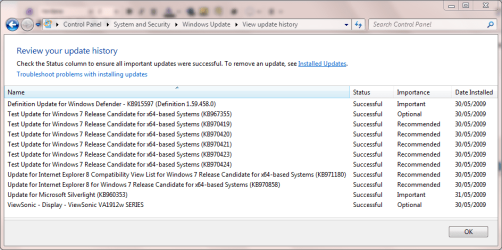
I installed the Win 7 RC on my system a few days ago and ran into problems after installing the following three updates:

KB970421
KB970423
KB970424

I have done a clean install a couple of times and each time after these three updates are installed when the system reboots it goes into the Startup Repair wizard and detects the problem as:

"missing or corrupt ndis.sys"

I have tried doing a system restore to a point prior to these updates being installed but I still see the same error. If I disable automatic updates and don't install these 3 updates the system is stable.

Has anyone else run into problems with these updates?

Thanks,
Mark
 

My Computer My Computer

At a glance

Win 7
OS
Win 7
Hi mgebhart, welcome to the forums.

Have you tried booting in safe mode? If you can get in on safe mode then you might want to try the following.

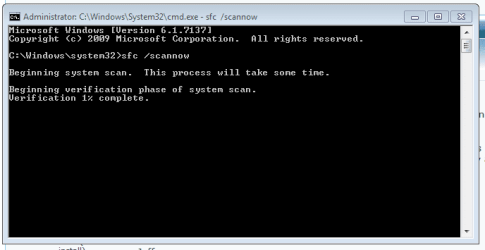
In the start menu search bar type CMD, right-click CMD when it appears & select 'Run as administrator'. Once open, type sfc /scannow which will scan your system file integrity & should restore any corrupt files.

Hope this helps :)

Added pic:
Capture.PNG


Jeff
 

My Computer My Computer

At a glance

Windows 7 Ultimate x64AMD Sempron Dual Core3GBNVIDIA GeForce 6150SE nForce 430
Computer Manufacturer/Model Number
Compaq Desktop
OS
Windows 7 Ultimate x64
CPU
AMD Sempron Dual Core
Memory
3GB
Graphics Card(s)
NVIDIA GeForce 6150SE nForce 430
Screen Resolution
1024x768
Hard Drives
150GB Sata
Jeff,

Thanks for the reply. I can't get into safe mode. When I select boot into safe mode the Startup Repair wizard runs and I see the same error.

I am not too concerned about repairing this installation since it was a clean install and I can wipe it and start over. However, this is the 2nd time that these particular updates have caused this same issue so I am afraid that when I reinstall if I enable automatic updates the same thing will happen again.

Thanks,
Mark
 

My Computer My Computer

At a glance

Win 7
OS
Win 7
You're welcome Mark,

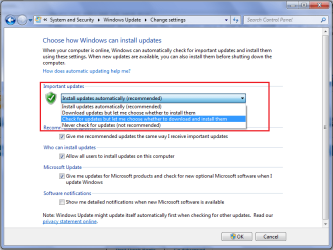
You can just disable automatic updates after you install, then change the settings to the ones below.
Untitled.png

This will notify you of updates and you can choose whether or not to install them. Also, when you have the list of available updates on screen you can right-click each 1 and Hide them so they don't show up again.

Hope this help :)


Jeff
 

My Computer My Computer

At a glance

Windows 7 Ultimate x64AMD Sempron Dual Core3GBNVIDIA GeForce 6150SE nForce 430
Computer Manufacturer/Model Number
Compaq Desktop
OS
Windows 7 Ultimate x64
CPU
AMD Sempron Dual Core
Memory
3GB
Graphics Card(s)
NVIDIA GeForce 6150SE nForce 430
Screen Resolution
1024x768
Hard Drives
150GB Sata
Thanks Jeff, I'll give this a try and see how things go.

Mark
 

My Computer My Computer

At a glance

Win 7
OS
Win 7
When you access the boot screen, choose Safe Mode with Command Prompt and you'l be able to run sfc there.
 

My Computer My Computer

At a glance

Windows 7 Pro & Vista Home PremiumAthlon 64 3800+ (Orleans) 2.40GHz2GB DDR2 RAM DIMMNVIDIA GeForce 8500 GT 512 MB memory HDMI out
Computer Manufacturer/Model Number
Cheap $399.00 E-Machine
OS
Windows 7 Pro & Vista Home Premium
CPU
Athlon 64 3800+ (Orleans) 2.40GHz
Motherboard
Winfast
Memory
2GB DDR2 RAM DIMM
Graphics Card(s)
NVIDIA GeForce 8500 GT 512 MB memory HDMI out
Sound Card
creative X-Fi Exteme 7..1 channel
Monitor(s) Displays
Acer V223W 22" widescreen DVI
Screen Resolution
1680x1050
Hard Drives
WDC WD5 500GB
WDC WD25 250GB
PSU
OCZ 550 watt
Case
Gateway
Cooling
2 fans
Keyboard
Dell
Mouse
Sony Vaio
Internet Speed
18MB/s down - .72MB /s up
When you access the boot screen, choose Safe Mode with Command Prompt and you'l be able to run sfc there.

The problem is, he CAN'T get into safe mode....:sarc:
 

My Computer My Computer

At a glance

Windows 8 x64Intel Core i7 3630QMSamsung 8 GB DDR3 800 MhzATI Radeon HD Graphics 7670M + Intel HD Graph...
Computer type
Laptop
Computer Manufacturer/Model Number
Samsung
OS
Windows 8 x64
CPU
Intel Core i7 3630QM
Motherboard
Intel HM76
Memory
Samsung 8 GB DDR3 800 Mhz
Graphics Card(s)
ATI Radeon HD Graphics 7670M + Intel HD Graphics 4000
Screen Resolution
1366x768
Hard Drives
SAMSUNG Spinpoint M8 1TB
Internet Speed
4 Mb/sDownload Speed, 2 Mb/s Upload Speed
Antivirus
avast!
Thanks for the reply. I can't get into safe mode. When I select boot into safe mode the Startup Repair wizard runs and I see the same error.

This is a kind of contradictory statement.
 

My Computer My Computer

At a glance

Windows 7 Pro & Vista Home PremiumAthlon 64 3800+ (Orleans) 2.40GHz2GB DDR2 RAM DIMMNVIDIA GeForce 8500 GT 512 MB memory HDMI out
Computer Manufacturer/Model Number
Cheap $399.00 E-Machine
OS
Windows 7 Pro & Vista Home Premium
CPU
Athlon 64 3800+ (Orleans) 2.40GHz
Motherboard
Winfast
Memory
2GB DDR2 RAM DIMM
Graphics Card(s)
NVIDIA GeForce 8500 GT 512 MB memory HDMI out
Sound Card
creative X-Fi Exteme 7..1 channel
Monitor(s) Displays
Acer V223W 22" widescreen DVI
Screen Resolution
1680x1050
Hard Drives
WDC WD5 500GB
WDC WD25 250GB
PSU
OCZ 550 watt
Case
Gateway
Cooling
2 fans
Keyboard
Dell
Mouse
Sony Vaio
Internet Speed
18MB/s down - .72MB /s up
It's because of the boot issue that Safe Mode is acting like the 'Repair Install' option, the best option for him, as he's only got a clean install anyway, is another clean install.
 

My Computer My Computer

At a glance

Windows 7 Ultimate x64AMD Sempron Dual Core3GBNVIDIA GeForce 6150SE nForce 430
Computer Manufacturer/Model Number
Compaq Desktop
OS
Windows 7 Ultimate x64
CPU
AMD Sempron Dual Core
Memory
3GB
Graphics Card(s)
NVIDIA GeForce 6150SE nForce 430
Screen Resolution
1024x768
Hard Drives
150GB Sata
I haven't had a chance to try "Safe Mode with Command Prompt" yet but when I do either "Safe Mode" or the normal boot sequence the Microsoft logo flashes briefly then disappears and the Startup Repair Wizard then runs.

I'll try "Safe Mode with Command Prompt" to see if I get the same result before I do another clean install.

Thanks,
Mark
 

My Computer My Computer

At a glance

Win 7
OS
Win 7
You're on the right track with selecting one of the Advanced Boot Options, however the option you require is not Safe Mode but Last Known Good Configuration (advanced). This option has got me out of deep holes on many occasions over on Vista, even when normal Safe Mode fails.

Incidentally, I have had no problems with these updates either on 32-bit or 64-bit.
Capture.PNG
 

My Computer My Computer

At a glance

Windows 8.1 Pro RTM x64Intel Core-i5-3570K 4-core @ 3.4GHz (Ivy Brid...4 x 4GB DDR3-1600 Corsair Vengeance CMZ8GX3M2...MSI GeForce GTX770 Gaming OC 2GB
Computer type
PC/Desktop
Computer Manufacturer/Model Number
Dwarf Dwf/11/2012 r09/2013
OS
Windows 8.1 Pro RTM x64
CPU
Intel Core-i5-3570K 4-core @ 3.4GHz (Ivy Bridge) (OC 4.4GHz)
Motherboard
ASRock Z77 Extreme4-M
Memory
4 x 4GB DDR3-1600 Corsair Vengeance CMZ8GX3M2A1600C9B (16GB)
Graphics Card(s)
MSI GeForce GTX770 Gaming OC 2GB
Sound Card
Realtek High Definition on board solution (ALC 898)
Monitor(s) Displays
ViewSonic VA1912w Widescreen (VGA)
Screen Resolution
1440x900
Hard Drives
OCZ Agility 3 SSD 120GB SATA III x2 (RAID 0)
Samsung HD501LJ 500GB SATA II x2
Hitachi HDS721010CLA332 1TB SATA II
Iomega 1.5TB Ext USB 2.0
WD 2.0TB Ext USB 3.0
PSU
XFX Pro Series 850W Semi-Modular
Case
Gigabyte IF233
Cooling
1 x 120mm Front Inlet 1 x 120mm Rear Exhaust
Keyboard
Microsoft Comfort Curve Keyboard 3000 (USB)
Mouse
Microsoft Comfort Mouse 3000 for Business (USB)
Internet Speed
NetGear DG834Gv3 ADSL Modem/Router (Ethernet) ~4.0 Mb/s (O2)
Antivirus
Avast! 8.0.1497
Browser
IE 11
Other Info
Optical Drive: HL-DT-ST BD-RE BH10LS30 SATA Bluray
Lexmark S305 Printer/Scanner/Copier (USB)
WEI Score: 8.1/8.1/8.5/8.5/8.25
Asus Eee PC 1011PX Netbook (Windows 7 x86 Starter)
+1 Drawf,

Can't believe i didn't think of it. It's saved my a$$ a few times :p
 

My Computer My Computer

At a glance

Windows 7 Ultimate x64AMD Sempron Dual Core3GBNVIDIA GeForce 6150SE nForce 430
Computer Manufacturer/Model Number
Compaq Desktop
OS
Windows 7 Ultimate x64
CPU
AMD Sempron Dual Core
Memory
3GB
Graphics Card(s)
NVIDIA GeForce 6150SE nForce 430
Screen Resolution
1024x768
Hard Drives
150GB Sata
Yeah, I tried Last Known Good Configuration but got the same results (going directly to the Startup Repair Wizard).

Thanks for the suggestion,
Mark
 

My Computer My Computer

At a glance

Win 7
OS
Win 7

My Computer My Computer

At a glance

Windows 7 Ultimate x64AMD Sempron Dual Core3GBNVIDIA GeForce 6150SE nForce 430
Computer Manufacturer/Model Number
Compaq Desktop
OS
Windows 7 Ultimate x64
CPU
AMD Sempron Dual Core
Memory
3GB
Graphics Card(s)
NVIDIA GeForce 6150SE nForce 430
Screen Resolution
1024x768
Hard Drives
150GB Sata
Hello Mark,

So I assume the safe Mode with command Prompt didn't work either.
 

My Computer My Computer

At a glance

Windows 7 Pro & Vista Home PremiumAthlon 64 3800+ (Orleans) 2.40GHz2GB DDR2 RAM DIMMNVIDIA GeForce 8500 GT 512 MB memory HDMI out
Computer Manufacturer/Model Number
Cheap $399.00 E-Machine
OS
Windows 7 Pro & Vista Home Premium
CPU
Athlon 64 3800+ (Orleans) 2.40GHz
Motherboard
Winfast
Memory
2GB DDR2 RAM DIMM
Graphics Card(s)
NVIDIA GeForce 8500 GT 512 MB memory HDMI out
Sound Card
creative X-Fi Exteme 7..1 channel
Monitor(s) Displays
Acer V223W 22" widescreen DVI
Screen Resolution
1680x1050
Hard Drives
WDC WD5 500GB
WDC WD25 250GB
PSU
OCZ 550 watt
Case
Gateway
Cooling
2 fans
Keyboard
Dell
Mouse
Sony Vaio
Internet Speed
18MB/s down - .72MB /s up
Seems like a problem with your windows 7 dvd mate.
 

My Computer My Computer

At a glance

Windows® 8 Pro (64-bit)Intel® Core™ i5 Processor 2467M (1.60GHz, 3MB...6GB DDR3 System Memory at 1,333MHz (on BD 4GB...AMD Radeon™ HD7550M 1GB DDR3 (Ext. Graphic)
Computer Manufacturer/Model Number
Samsung NP530U4B-S02IN
OS
Windows® 8 Pro (64-bit)
CPU
Intel® Core™ i5 Processor 2467M (1.60GHz, 3MB L3 Cache)
Motherboard
Samsung Electronics
Memory
6GB DDR3 System Memory at 1,333MHz (on BD 4GB + 2GB x 1)
Graphics Card(s)
AMD Radeon™ HD7550M 1GB DDR3 (Ext. Graphic)
Sound Card
Realtek High Definition Audio
Monitor(s) Displays
35.56cm (14.0) SuperBright 300nit HD LED Display
Screen Resolution
1366x768
Hard Drives
1TB S-ATA II Hard Drive (5400RPM) with ExpressCache 16GB SSD
Internet Speed
sucks
Antivirus
Microsoft Security Essentials
Browser
Google Chrome (Sync enabled)
Seems like a problem with your windows 7 dvd mate.

I can't see it being the DVD as he's installed the OS, it's just since the test updates that it's "cr@pped" out.
 

My Computer My Computer

At a glance

Windows 7 Ultimate x64AMD Sempron Dual Core3GBNVIDIA GeForce 6150SE nForce 430
Computer Manufacturer/Model Number
Compaq Desktop
OS
Windows 7 Ultimate x64
CPU
AMD Sempron Dual Core
Memory
3GB
Graphics Card(s)
NVIDIA GeForce 6150SE nForce 430
Screen Resolution
1024x768
Hard Drives
150GB Sata
So I assume the safe Mode with command Prompt didn't work either.
I am away from my machine for the next few hours, when I get back to it I'll try Safe Mode with Command Prompt and a Repair Install and let you know what happens.
 

My Computer My Computer

At a glance

Win 7
OS
Win 7
So I tried to launch "Safe Mode with Command Prompt" but saw the same error (Startup Repair Manager Runs)

I also tried to do "Last Known Good Configuration" and got the same error.

Since I can't get into Windows I couldn't figure out how to do a repair install.

I will probably just do a clean install now since I am not trying to save any data I just wanted to report this issue in case others had trouble with these updates.
 

My Computer My Computer

At a glance

Win 7
OS
Win 7
Back
Top