Virtual Hard Drive VHD File - Create and Start with at Boot

How to Create a Windows 7 VHD at Boot to Start with from Boot


   Information
This will show you how to create a Windows 7 VHD file at boot on an existing installed OS's (ex: Vista or Windows 7) C: hard disk or partition to be able to natively boot from the Windows 7 VHD at startup in the Windows Boot Manager.

   Note
This tutorial uses an example that will create a C:\(file name).vhd file on the C: drive/partition at boot that is used to natively boot from at startup.

You will be able to create the VHD file on any partition or drive letter that you like though.

   Warning
All Vista, Windows 7, and Windows 8 (except Windows 8 RT) editions support booting from a VHD.

You must have either Windows 7 Ultimate, Windows 7 Enterprise, Windows 8 Pro, or Windows 8 Enterprise installed on the VHD to be able to boot from the VHD natively.


EXAMPLE: Windows Boot Manager
NOTE: You will be able to either select your currently installed OS (ex: Vista) or the VHD file (ex: Windows 7) in the Windows Boot Manager to start your computer with.
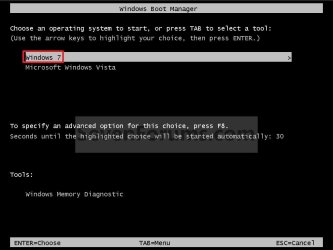
Boot_Manager.jpg
EXAMPLE: VHD file in your Current OS (ex: Vista)
NOTE: This is where the VHD file will be stored at on your currently installed OS (ex: Vista) to be used to boot from.
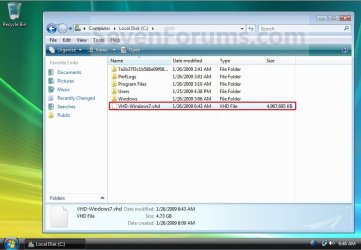
Example.jpg


OPTION ONE

To Create and Add the VHD to Boot From


1. Boot from your retail copy Windows 7 Ultimate or Enterprise installation DVD/USB, and do step 2 or 3 below for what you would like to do.
NOTE: To have Windows 8 on VHD, see instead: How to Create a Windows 8 VHD at Boot to Dual Boot with Windows 7 or Vista

2. When you are at the start of the Windows 7 installation screen, press the Shift+F10 keys, and go to step 4 below. (See screenshot below)
Setup.jpg
3. Boot into the command prompt from the Startup Recovery Options screen, and go to step 4 below. (See screenshot below)
NOTE: You will use OPTION TWO at that link.
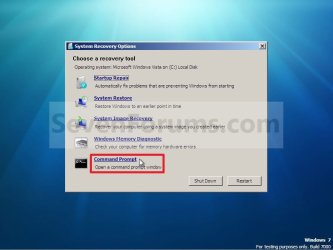
Step1.jpg
4. In the command prompt, type diskpart and press Enter. (See screenshot below)
Step2.jpg
5. In the elevated command prompt, type list volume and press Enter. Make note of the drive letter for the volume that you want to create the VHD file on. (See screenshot below)
NOTE: This will allow you to see what the drive letters are for each volume. They are not always the same at boot as they are in Windows.
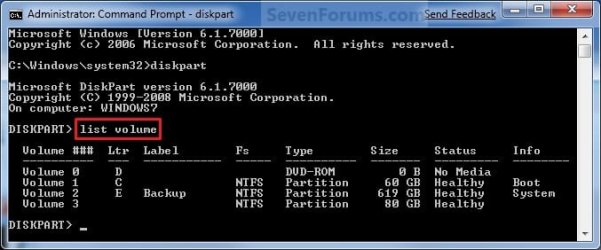
list-disk.jpg
6. Do either step 7 or 8 below for what type of VHD file you would like to create.

7. To Create a Fixed VHD File
NOTE: A fixed VHD file will allocate the entire maximum size (ex: 40GB) that you set below for the VHD file size.
A) In the command prompt, type the command below and press Enter.
NOTE: Substitute the C drive letter in the command below for what volume (step 5) you would like to create the VHD on.

Code:
[B]create vdisk file=[COLOR=red]C[/COLOR]:\[COLOR=red]VHD-Windows7[/COLOR].vhd maximum=[COLOR=red]40960[/COLOR][/B]

NOTE: You can substitute the VHD-Windows7 name with any name you would like for the VHD file instead. You can also substitute the maximum size of 40960 MB for the VHD to the maximum size you want instead in MB (1GB = 1024MB).
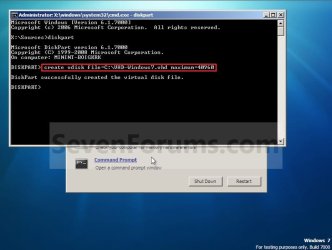
Step3.jpg
B) Go to step 9.
8. To Create an Expandable VHD File
NOTE: An expandable VHD file will only be as large as the amount of data that is saved in the VHD file, but still can get as large as the maximium size (ex: 40GB) that you set below. For example, using this option, the VHD file showed only 7GB instead of the full 40GB. Even though the VHD file is expandable, you may need to install Windows Virtual PC to have a program associated with VHD files to actual see only the smaller size instead of the larger size for the VHD file.
A) In the command prompt, type the command below and press Enter.
NOTE: Substitute the C drive letter in the command below for what volume (step 5) you would like to create the VHD on.
Code:
[B]create vdisk file=[COLOR=red]C[/COLOR]:\[COLOR=red]VHD-Windows7[/COLOR].vhd maximum=[COLOR=red]40960[/COLOR][/B] [B]type=expandable[/B]

NOTE: You can substitute the VHD-Windows7 name with any name you would like for the VHD file instead. You can also substitute the maximum size of 40960 MB for the VHD to the maximum size you want instead in MB (1GB = 1024MB).
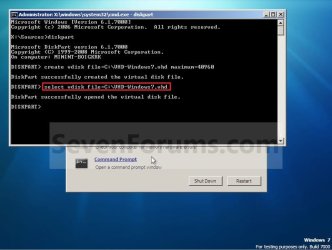
9. In the command prompt, type the command below and press Enter. (See screenshot below)
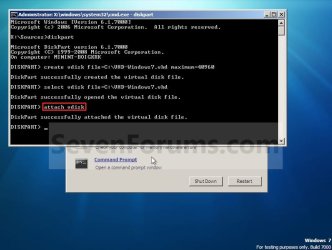
NOTE: If you subsituted the VHD-Windows7 name in step 7 or 8, then you will need to use it here as well. Substitute the C drive letter in the command below for what volume (step 5) you would like to create the VHD on.

Code:
[B]select vdisk file=[COLOR=red]C[/COLOR]:\[COLOR=red]VHD-Windows7[/COLOR].vhd[/B]
Step4.jpg
10. In the command prompt, type attach vdisk and press Enter. (See screenshot below)
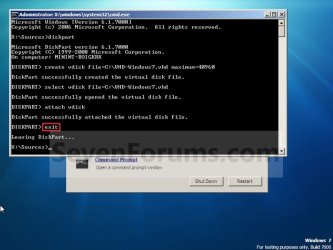
Step5.jpg
11. In the command prompt, type exit and press Enter. (See screenshot below)
Step6.jpg
12. Close the command prompt window. (See screenshot above)
A) If you used step 2 above, then click on Next, and go to step 13 below.

B) If you used step 3 above, then continue on to step 14 below.
13. Close the System Recovery Options window. (See screenshot below)
WARNING: You must close it only. Do not click on the Shut Down or Restart button.
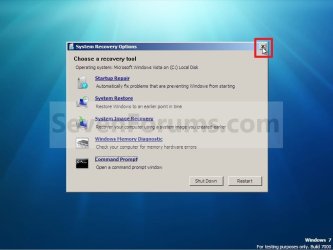
Step7.jpg
14. Click on the Install now button. (See screenshot below)
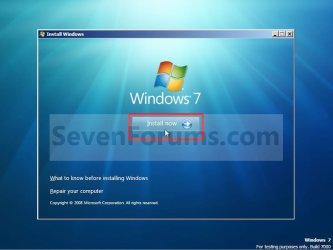
Step8.jpg
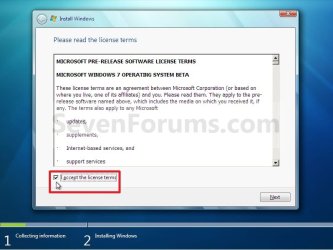
15. Check the I accept the license terms box and click on Next. (See screenshot below)
Step9.jpg
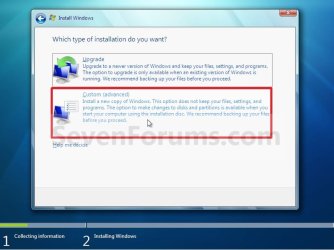
16. Click on the Custom (advanced) option. (See screenshot below)
Step10.jpg
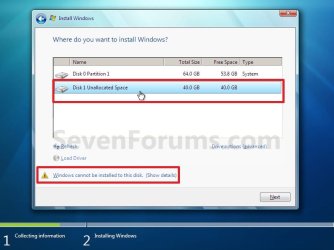
17. Select the available option with the unallocated space that is the same maximum VHD size (ex: 40GB = 40960MB) that you specified in step 7 or 8 above, and click on the Next button. (See screenshot below)
NOTE: If you see the Windows cannot be installed to this disk warning, then you can ignore it. Windows 7 will still install on the VHD file.
Step11.jpg
18. Finish doing a clean install of Windows 7.
NOTE: You will pick up at step 10 at that link to finish installing Windows 7 on the VHD file.

19. When you restart or start the computer, you will now have Windows 7 to select from at boot to start natively from the VHD file. (See the first example at top of the tutorial.)


OPTION TWO

To Delete the VHD and Remove from Boot List


1. To Remove OS VHD from Windows Boot Manager List
A) Delete the listed OS VHD from the Windows Boot Manager in msconfig.
2. To Delete the VHD File
A) In Windows Explorer, navigate to the VHD file that you have created in step 7 or 8 of OPTION ONE above (ex: C:\VHD-Windows7.vhd), right click on the VHD file and click on Delete.

B) Click on Yes to approve deletion.
That's it,
Shawn


Last edited:
Re: VHD-File Type=Fixed vs. Type=Expandable

I created the file using "repair / command prompt / diskpart" during win7-installation with maximum=100000 type=expandable as file parameters. Then I quit repair and installed Win7 x86 RC on that file.

Under Win7 that file seems to be FIXED (thats my problem): The Drive D: with Vista and that file on it is very low on free disk space when Win7 is running, and the vhd-file shows 100 Gig in size.
When I start Diskpart from inside Win7 it reports the file type as FIXED

When take a look from inside of Vista, the behaviour is EXPANDABLE just showing me the used space (about 20 Gig now)

Installing virtual pc beta on Win7 did not change anything how the expandable vhd file is handled: Still as fixed when Win7 is running

But there is a difference after installation of Virtual PC:

When I boot from Win7 installation media, switch to a repair command prompt and start diskpart, it was (correctly) displayed as type EXPANDABLE before I installed Virtual PC
After installation the same procedure of checking the VHD with Win7 on it now displays the type of the file as UNKNOWN

Strange, isn't it?

Oblomow
 

My Computer

Computer Manufacturer/Model Number
ASUSTEK COMPUTER INC
OS
Win7 x64 SP1, Virtual Hackintosh
CPU
Intel(R) i7-2600K
Motherboard
ASUS P8Z68V PRO
Memory
16 GB
Graphics Card(s)
Gigabyte GeForce GTX 560 Ti
Monitor(s) Displays
Syncmaster 225 BW & Asus MW 2225
Screen Resolution
2x1680x1050
Hard Drives
Many
PSU
660 Watt 230Volt 80Plus Gold
Case
Corsair Obsidian
Cooling
6 Fans if I count well
Keyboard
Logitech not supported in Vista
Mouse
Logitech G7
Internet Speed
15000/1000 DSL practically just 90% of that value
Strange indeed. I'll play with some more later tonight to see if I get reproduce what you are seeing, and hopefully have some answers for you.
 

My Computer

Computer type
PC/Desktop
Computer Manufacturer/Model Number
Self built custom
OS
64-bit Windows 11 Pro for Workstations
CPU
Intel i7-8700K OC'd to 5 GHz
Motherboard
ASUS ROG Maximus XI Formula Z390
Memory
64 GB (4x16GB) G.SKILL TridentZ RGB DDR4 3600 MHz
Graphics Card(s)
ASUS ROG-STRIX-GTX1080TI-O11G-GAMING
Sound Card
Integrated
Monitor(s) Displays
2 x Samsung Odyssey G7 27"
Screen Resolution
2560x1440
Hard Drives
1TB Samsung 990 PRO M.2,
4TB Samsung 990 PRO PRO M.2,
TerraMaster F8 SSD Plus NAS
PSU
Seasonic Prime Titanium 850W
Case
Thermaltake Core P3
Cooling
Corsair Hydro H115i
Keyboard
Logitech wireless K800
Mouse
Logitech MX Master 4
Internet Speed
2 Gb/s Download and 100 Mb/s Upload
Antivirus
Malwarebyte Anti-Malware Premium
Browser
Google Chrome
Other Info
Logitech Z625 speaker system,
Logitech BRIO 4K Pro webcam,
HP Color LaserJet Pro MFP M477fdn,
APC SMART-UPS RT 1000 XL - SURT1000XLI,
Galaxy S23 Plus phone
Oblomow,

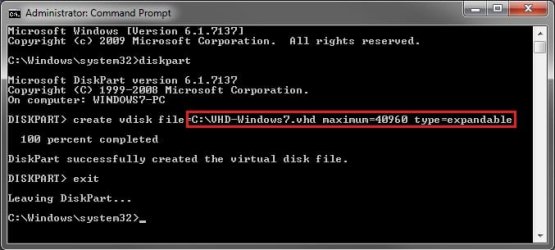
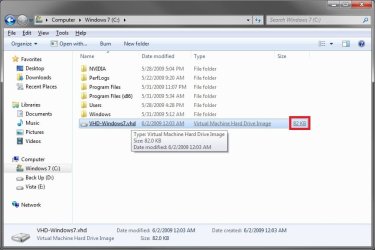
Ok, I had a play with it. When I create a 40 GB expandable VHD file from within a elevated command prompt in Windows 7 or from boot as described in the tutorial, this is what I always see. The VHD file shows the expand size for me.

Elevated_Command_Prompt.jpg

VHD_File.jpg

As a test, you might see if creating the VHD file first from within Windows 7, then picking back up with steps 1 to 4 then step 7 in the tutorial may work for you.
 

My Computer

Computer type
PC/Desktop
Computer Manufacturer/Model Number
Self built custom
OS
64-bit Windows 11 Pro for Workstations
CPU
Intel i7-8700K OC'd to 5 GHz
Motherboard
ASUS ROG Maximus XI Formula Z390
Memory
64 GB (4x16GB) G.SKILL TridentZ RGB DDR4 3600 MHz
Graphics Card(s)
ASUS ROG-STRIX-GTX1080TI-O11G-GAMING
Sound Card
Integrated
Monitor(s) Displays
2 x Samsung Odyssey G7 27"
Screen Resolution
2560x1440
Hard Drives
1TB Samsung 990 PRO M.2,
4TB Samsung 990 PRO PRO M.2,
TerraMaster F8 SSD Plus NAS
PSU
Seasonic Prime Titanium 850W
Case
Thermaltake Core P3
Cooling
Corsair Hydro H115i
Keyboard
Logitech wireless K800
Mouse
Logitech MX Master 4
Internet Speed
2 Gb/s Download and 100 Mb/s Upload
Antivirus
Malwarebyte Anti-Malware Premium
Browser
Google Chrome
Other Info
Logitech Z625 speaker system,
Logitech BRIO 4K Pro webcam,
HP Color LaserJet Pro MFP M477fdn,
APC SMART-UPS RT 1000 XL - SURT1000XLI,
Galaxy S23 Plus phone
How to mount a VHD-File in Vista

Hi, Brink, Thanks for your reply.
It seems to be a difference, how a VHD-file looks in diskpart, when the OS (Win7) is loaded from that file. Possible it is a kind of locking, the virtual drive is under control of the OS and should show the maximum size as disk size.

Did you know a tool to mount that vhd-file with Win7 installed as normal disk drive from inside of Win7 SP2?
Since there are different types of VHD so I do not want to shrink that file (before I have madee a backup) using VHDresize or VMWare Converter

Is it possible to move the whole installation from outside the installation in the vhd to a normal disk partition?

Let me make an remark: WIn7 installation is fast, but the installation of all those Thinkpad drivers, utilities and Office including Spell Checker language packs and Service Packs for Langugage Packs and Spelling Packs and multiple Runs of WIndows Update is very time consuming!

Cheers, Oblomow58
 

My Computer

Computer Manufacturer/Model Number
ASUSTEK COMPUTER INC
OS
Win7 x64 SP1, Virtual Hackintosh
CPU
Intel(R) i7-2600K
Motherboard
ASUS P8Z68V PRO
Memory
16 GB
Graphics Card(s)
Gigabyte GeForce GTX 560 Ti
Monitor(s) Displays
Syncmaster 225 BW & Asus MW 2225
Screen Resolution
2x1680x1050
Hard Drives
Many
PSU
660 Watt 230Volt 80Plus Gold
Case
Corsair Obsidian
Cooling
6 Fans if I count well
Keyboard
Logitech not supported in Vista
Mouse
Logitech G7
Internet Speed
15000/1000 DSL practically just 90% of that value
Sorry, but I do not know of anything that would allow a OS in a VHD to be transfered from the VHD to a normal partition or drive. :(
 

My Computer

Computer type
PC/Desktop
Computer Manufacturer/Model Number
Self built custom
OS
64-bit Windows 11 Pro for Workstations
CPU
Intel i7-8700K OC'd to 5 GHz
Motherboard
ASUS ROG Maximus XI Formula Z390
Memory
64 GB (4x16GB) G.SKILL TridentZ RGB DDR4 3600 MHz
Graphics Card(s)
ASUS ROG-STRIX-GTX1080TI-O11G-GAMING
Sound Card
Integrated
Monitor(s) Displays
2 x Samsung Odyssey G7 27"
Screen Resolution
2560x1440
Hard Drives
1TB Samsung 990 PRO M.2,
4TB Samsung 990 PRO PRO M.2,
TerraMaster F8 SSD Plus NAS
PSU
Seasonic Prime Titanium 850W
Case
Thermaltake Core P3
Cooling
Corsair Hydro H115i
Keyboard
Logitech wireless K800
Mouse
Logitech MX Master 4
Internet Speed
2 Gb/s Download and 100 Mb/s Upload
Antivirus
Malwarebyte Anti-Malware Premium
Browser
Google Chrome
Other Info
Logitech Z625 speaker system,
Logitech BRIO 4K Pro webcam,
HP Color LaserJet Pro MFP M477fdn,
APC SMART-UPS RT 1000 XL - SURT1000XLI,
Galaxy S23 Plus phone
I do not know of anything that would allow a OS in a VHD to be transfered from the VHD to a normal partition or drive.
I don't know if this helps. But you can make an image backup with Windows 7 tools. The backup files are VHD files. Perhaps you can restore from this backup files to a separate partition ?

But notice: Windows 7 installed in a VHD file doesn't have a boot manager IN the VHD file.
 

My Computer

OS
Windows XP and 7
Right..I installed Windows 7 into a VHD and it boots to it fine. What I would like to know is if I can move the VHD file to an external USB drive and boot to it. The idea is that if my internal drive goes out I could still boot to the VHD. Now I know there isnt a bootmgr in the VHD so how can I set one up on say a USB Flash drive and point it to the VHD on a partition on my external USB drive?

I already have the partition setup on the external drive as a 20GB partition and have copied the VHD file to it..I would just like to know how to get it to boot to it. Thanks in advance..

:geek:
 
Last edited:

My Computer

OS
Windows 7
Wivelden,

Sorry, but Windows 7 cannot be installed or booted from an removable drive. It can only be done from an internal drive. :(
 

My Computer

Computer type
PC/Desktop
Computer Manufacturer/Model Number
Self built custom
OS
64-bit Windows 11 Pro for Workstations
CPU
Intel i7-8700K OC'd to 5 GHz
Motherboard
ASUS ROG Maximus XI Formula Z390
Memory
64 GB (4x16GB) G.SKILL TridentZ RGB DDR4 3600 MHz
Graphics Card(s)
ASUS ROG-STRIX-GTX1080TI-O11G-GAMING
Sound Card
Integrated
Monitor(s) Displays
2 x Samsung Odyssey G7 27"
Screen Resolution
2560x1440
Hard Drives
1TB Samsung 990 PRO M.2,
4TB Samsung 990 PRO PRO M.2,
TerraMaster F8 SSD Plus NAS
PSU
Seasonic Prime Titanium 850W
Case
Thermaltake Core P3
Cooling
Corsair Hydro H115i
Keyboard
Logitech wireless K800
Mouse
Logitech MX Master 4
Internet Speed
2 Gb/s Download and 100 Mb/s Upload
Antivirus
Malwarebyte Anti-Malware Premium
Browser
Google Chrome
Other Info
Logitech Z625 speaker system,
Logitech BRIO 4K Pro webcam,
HP Color LaserJet Pro MFP M477fdn,
APC SMART-UPS RT 1000 XL - SURT1000XLI,
Galaxy S23 Plus phone
Hi guys, I new here.

Good direct tutorial. This was my first way to install Win7 on VHD... I think this is the prefered way.

when creating the disks, the drive which is housing the VHD, Cannot contain "File Compression" probably because a vhd is also compressed files already...

Also im not sure, but, i dont beleive it works Creating VHD's onto Dynamic Paritions either. "IE: import foriegn disk" being the reason.

PS: Creating disk for use for win 7 "25GIG" should be your minimum - win7 uncompresses to ove 10gig. Also Create Dynamic disk, when possible as when creating fixed disk pre allocating disk space & Formatting takes a Period of Time! microsoft have not fixed this problem yet!

LEROY
 

My Computer

Computer Manufacturer/Model Number
MySelF -
OS
Windows 7 64-bit 7600 OEM
CPU
AMD Phenom Quad CORE 2.5 ghz
Motherboard
Gigabyte GA-MA78GM-S2H AMD 780G Micro-ATX (Socket AM2) PCI-E
Memory
OCZ Vista Series 8GB (2x4GB) DDR2 PC2-6400C5 Dual Channel
Graphics Card(s)
RADION 3200 HDMI & DVI
Sound Card
EMU 1812 - Optical ADAT
Monitor(s) Displays
42LG LCD & 2 19inch ELO TOUCH SCREENS
Screen Resolution
1360x768
Hard Drives
2 1TB samsung 39mbCACHE - SATA
1 500GB Western Digital - SATA
PSU
500W
Case
silverstone -
Cooling
Standard CPU FAN <<<<< ALWAYS BEST >>>>> Coolermaster
Keyboard
Microsoft Wireless optical
Mouse
Microsoft Wireless optical
Internet Speed
2mbits
Other Info
Will be Getting the Tesla Card from NVIDIA SOON <<<<< tesla supercomputer >>> nvidia CODA, PS: Motherboard Has Got Hardware assisted virtualization... If Your motherboard does not have it, It may JUST need the correct BIOS UPGRADE, CHECK BIOS DATES BEFORE FINALIZING A BUY, EVEN LOOKIN BIOS IF POSSIBLE as its not stated on the spec sheets, THAT WILL HAVE TO CHANGE as many mother board DO have hardw
Right..I installed Windows 7 into a VHD and it boots to it fine. What I would like to know is if I can move the VHD file to an external USB drive and boot to it. The idea is that if my internal drive goes out I could still boot to the VHD. Now I know there isnt a bootmgr in the VHD so how can I set one up on say a USB Flash drive and point it to the VHD on a partition on my external USB drive?

I already have the partition setup on the external drive as a 20GB partition and have copied the VHD file to it..I would just like to know how to get it to boot to it. Thanks in advance..

:geek:

There IS a way, With the Windows PE 3.0 for windows 7 automated installation kit. to Run a PE Environment from a USB KEY, by editing the BCD configuration data. Technically the same could be done from a .Wim / VHD but the computer loading the KEy would have to have the equivelent RAM to host the whole os in ram... unless the bcd data on the host machine pointed to the usb key as a menu item, but if the key was not inserted then that os would not load..... ITS PoSSiBLE, i will check it out!
 

My Computer

Computer Manufacturer/Model Number
MySelF -
OS
Windows 7 64-bit 7600 OEM
CPU
AMD Phenom Quad CORE 2.5 ghz
Motherboard
Gigabyte GA-MA78GM-S2H AMD 780G Micro-ATX (Socket AM2) PCI-E
Memory
OCZ Vista Series 8GB (2x4GB) DDR2 PC2-6400C5 Dual Channel
Graphics Card(s)
RADION 3200 HDMI & DVI
Sound Card
EMU 1812 - Optical ADAT
Monitor(s) Displays
42LG LCD & 2 19inch ELO TOUCH SCREENS
Screen Resolution
1360x768
Hard Drives
2 1TB samsung 39mbCACHE - SATA
1 500GB Western Digital - SATA
PSU
500W
Case
silverstone -
Cooling
Standard CPU FAN <<<<< ALWAYS BEST >>>>> Coolermaster
Keyboard
Microsoft Wireless optical
Mouse
Microsoft Wireless optical
Internet Speed
2mbits
Other Info
Will be Getting the Tesla Card from NVIDIA SOON <<<<< tesla supercomputer >>> nvidia CODA, PS: Motherboard Has Got Hardware assisted virtualization... If Your motherboard does not have it, It may JUST need the correct BIOS UPGRADE, CHECK BIOS DATES BEFORE FINALIZING A BUY, EVEN LOOKIN BIOS IF POSSIBLE as its not stated on the spec sheets, THAT WILL HAVE TO CHANGE as many mother board DO have hardw
How to Uninstall ??

Hi,

How can I delete the installed Win7 from my system? I cannot upgrade it to the latest released version :cry:. It says "vhd installation cannot be upgraded".
Also, how to restore vista boot manager to its original state after deleting Win7 from my dual boot system?

I followed this guide and got Win7 working.

Regards
Mukul
 

My Computer

Computer Manufacturer/Model Number
Sony VAIO VGN-CS14G
OS
Vista Home Premium 32-bit/ Win7 RC/ Debian Lenny
CPU
Core 2 Duo 2.2GHz
Memory
2GB
Hard Drives
250GB SATA
Internet Speed
192Kbps/ 2Mbps
Delete the vhd, and then type msconfig into the start menu search bar and hit enter. On the boot tab select the entry for the vhd and delete that also.
 

My Computer

Computer Manufacturer/Model Number
Dell XPS420
OS
Vista Ult 64 bit Seven Ult RTM x64
CPU
Intel Core2 Quad Q6600 2.40 gigahertz
Memory
Crucial Ballistix 4x2GB PC2 6400
Graphics Card(s)
NVIDIA GeForce 8600 GTS 256 MB
Sound Card
Creative SB X-Fi audio
Monitor(s) Displays
HP w2207 + HPvs15
Screen Resolution
1680x1050 + 1024x768
Hard Drives
2-WD5000AAKS-500 GB
WD5000AAV-500 GB external
Keyboard
Microsoft Comfort Curve
Mouse
MX Revolution
Other Info
Wacom Intuos 2 Graphics Tablet
Experience Index=5.5
Hi,

How can I delete the installed Win7 from my system? I cannot upgrade it to the latest released version :cry:. It says "vhd installation cannot be upgraded".
Also, how to restore vista boot manager to its original state after deleting Win7 from my dual boot system?

I followed this guide and got Win7 working.

Regards
Mukul

To delete the vhd Use Admistrator CMD PROMPT:
BCDEDIT /DELETE {GUID}

The guid must be the guid that referes to the vhd installation.
This will delete the entry in the bcd edit file.
This will enable you to delete the old VHD File.

Now that your Boot Partition HAS BEEN UPRGADED. You should still be able to boot the previous windows vista... BUT IF WANT THE OLDER BOOTLOADER.....
then you would have to use the original startup vista installation disk. when booted into the setup, you would have to delete the system partition where the Win7 Bootloader IS..IN THE DISK MANAGEMENT PART OF THE SETUP.
Then X off the corner of the screen Bringing you back tho the INSTALL NOW SCREEN.
GOTO REPAIR MY COMPUTER.....
Here the repair will efectively put the bootloader BACK into the Original Vista Partition....Restart It should be working....

IF THIS DOES NOT WORK.. You will have to do an Upgrade install on the old vista installation, fixing the problem after the bootloader partition from the windows 7 has been deleted.

If this Fails: Quickly do a default install of the win7, get back the bootloader.... Instal WIndows AIK... Capture the VISTA INSTALLATION TO EXTERNAL HARD DRIVE... Format hardrive and Install basic vista, and apply old image.

LOL.

Hopefully that should give you some direction...
I have had many a simular situation.....
 

My Computer

Computer Manufacturer/Model Number
MySelF -
OS
Windows 7 64-bit 7600 OEM
CPU
AMD Phenom Quad CORE 2.5 ghz
Motherboard
Gigabyte GA-MA78GM-S2H AMD 780G Micro-ATX (Socket AM2) PCI-E
Memory
OCZ Vista Series 8GB (2x4GB) DDR2 PC2-6400C5 Dual Channel
Graphics Card(s)
RADION 3200 HDMI & DVI
Sound Card
EMU 1812 - Optical ADAT
Monitor(s) Displays
42LG LCD & 2 19inch ELO TOUCH SCREENS
Screen Resolution
1360x768
Hard Drives
2 1TB samsung 39mbCACHE - SATA
1 500GB Western Digital - SATA
PSU
500W
Case
silverstone -
Cooling
Standard CPU FAN <<<<< ALWAYS BEST >>>>> Coolermaster
Keyboard
Microsoft Wireless optical
Mouse
Microsoft Wireless optical
Internet Speed
2mbits
Other Info
Will be Getting the Tesla Card from NVIDIA SOON <<<<< tesla supercomputer >>> nvidia CODA, PS: Motherboard Has Got Hardware assisted virtualization... If Your motherboard does not have it, It may JUST need the correct BIOS UPGRADE, CHECK BIOS DATES BEFORE FINALIZING A BUY, EVEN LOOKIN BIOS IF POSSIBLE as its not stated on the spec sheets, THAT WILL HAVE TO CHANGE as many mother board DO have hardw
or even just delete the vhd, Create a new one with ImageX /apply install.wim [image] SAMENAME.VHD.
to set up a sysprep new install of win7 and replace with old VHD...
Because THe New Functionalty of the win7 Bootloader should be KEPT.
AS A VERY USEFULL TOOL even if you dont upgrade, you can still attatch VHDS..... You can always Make a WindowsPE environment for any BCDWORK. or VHD / IMAGE WORK... IE: HyperV / Win2k8 , as a guy who loves reinstalling and multi boot stuff... Best boot loader yet...
Still comming to grips with all the different type of CONFIGS(loads which are not public yet) there are loads of guide on the common stuff....
But MY QUESTION IS, HOW DO I INSTALL THE MAC OS< ONTO MY PC NOT VMWARE... HOW WOULD I CONFIGURE THE BOOTLOADER... & FOR DUAL BOOT LINUX.....
 

My Computer

Computer Manufacturer/Model Number
MySelF -
OS
Windows 7 64-bit 7600 OEM
CPU
AMD Phenom Quad CORE 2.5 ghz
Motherboard
Gigabyte GA-MA78GM-S2H AMD 780G Micro-ATX (Socket AM2) PCI-E
Memory
OCZ Vista Series 8GB (2x4GB) DDR2 PC2-6400C5 Dual Channel
Graphics Card(s)
RADION 3200 HDMI & DVI
Sound Card
EMU 1812 - Optical ADAT
Monitor(s) Displays
42LG LCD & 2 19inch ELO TOUCH SCREENS
Screen Resolution
1360x768
Hard Drives
2 1TB samsung 39mbCACHE - SATA
1 500GB Western Digital - SATA
PSU
500W
Case
silverstone -
Cooling
Standard CPU FAN <<<<< ALWAYS BEST >>>>> Coolermaster
Keyboard
Microsoft Wireless optical
Mouse
Microsoft Wireless optical
Internet Speed
2mbits
Other Info
Will be Getting the Tesla Card from NVIDIA SOON <<<<< tesla supercomputer >>> nvidia CODA, PS: Motherboard Has Got Hardware assisted virtualization... If Your motherboard does not have it, It may JUST need the correct BIOS UPGRADE, CHECK BIOS DATES BEFORE FINALIZING A BUY, EVEN LOOKIN BIOS IF POSSIBLE as its not stated on the spec sheets, THAT WILL HAVE TO CHANGE as many mother board DO have hardw
There IS a way, With the Windows PE 3.0 for windows 7 automated installation kit. to Run a PE Environment from a USB KEY, by editing the BCD configuration data. Technically the same could be done from a .Wim / VHD but the computer loading the KEy would have to have the equivelent RAM to host the whole os in ram... unless the bcd data on the host machine pointed to the usb key as a menu item, but if the key was not inserted then that os would not load..... ITS PoSSiBLE, i will check it out!


YEP YOU CAN : BUT YOU NEED A 25GIG KEY CORSAIR, THE KEY needs be formatted ntfs.
you also need to use the admin command prompt:

Goto the boot folder on the win7 disk: Use the command BOOTSECT NT60 [usbDrive]:
This will make it bootable. "Giving the USB A GUID"
When the installtion of windows, or PE env, or Windows install disk, IT WILL NOW BOOT FROM USB AS HDD
 
Last edited:

My Computer

Computer Manufacturer/Model Number
MySelF -
OS
Windows 7 64-bit 7600 OEM
CPU
AMD Phenom Quad CORE 2.5 ghz
Motherboard
Gigabyte GA-MA78GM-S2H AMD 780G Micro-ATX (Socket AM2) PCI-E
Memory
OCZ Vista Series 8GB (2x4GB) DDR2 PC2-6400C5 Dual Channel
Graphics Card(s)
RADION 3200 HDMI & DVI
Sound Card
EMU 1812 - Optical ADAT
Monitor(s) Displays
42LG LCD & 2 19inch ELO TOUCH SCREENS
Screen Resolution
1360x768
Hard Drives
2 1TB samsung 39mbCACHE - SATA
1 500GB Western Digital - SATA
PSU
500W
Case
silverstone -
Cooling
Standard CPU FAN <<<<< ALWAYS BEST >>>>> Coolermaster
Keyboard
Microsoft Wireless optical
Mouse
Microsoft Wireless optical
Internet Speed
2mbits
Other Info
Will be Getting the Tesla Card from NVIDIA SOON <<<<< tesla supercomputer >>> nvidia CODA, PS: Motherboard Has Got Hardware assisted virtualization... If Your motherboard does not have it, It may JUST need the correct BIOS UPGRADE, CHECK BIOS DATES BEFORE FINALIZING A BUY, EVEN LOOKIN BIOS IF POSSIBLE as its not stated on the spec sheets, THAT WILL HAVE TO CHANGE as many mother board DO have hardw
But MY QUESTION IS, HOW DO I INSTALL THE MAC OS< ONTO MY PC NOT VMWARE... HOW WOULD I CONFIGURE THE BOOTLOADER... & FOR DUAL BOOT LINUX.....
i did it the old boot.ini way (there are numerous tutorials on how to do it in vista...)
the same tutorial applies in 7 too..
 

My Computer

Computer Manufacturer/Model Number
Tx2500z Tablet Pc/Homemade Server
OS
Windows 7 Ult x64(x2), HomePrem x32(x4), Server 08 (+VM), 08 R2 (VM) , SuSe 11.2 (VM), XP 32 (VM)
CPU
Turion X2 ultra (oh well came with laptop)/P4 @3.2 (yes P4)
Motherboard
IDK HP Motherboard / Intel DG965SS
Memory
OCZ Dual Channel 4GB kit/ 1gb Dual Channel
Graphics Card(s)
HD 3200 graphics /GMA x3100 (yay for intergrated!!)
Sound Card
Realtek HD Audio(mic working, well sort of)/Siig IC-70012
Monitor(s) Displays
built-in Hp 12" laptop screen/ Acer 19"
Screen Resolution
1280x800 /1440x900
Cooling
All Air Cooled
Mouse
Logi MX Rev. /MS Wheel Optical 1.1A /Logitech Optical Mouse
Internet Speed
College baby but its still routed through vpn to 1536k...
Other Info
love my wacom pen and pressure sensitivity...
wished it worked in 7, SUSE for that matter though
I will look up this way and check back...
 

My Computer

Computer Manufacturer/Model Number
MySelF -
OS
Windows 7 64-bit 7600 OEM
CPU
AMD Phenom Quad CORE 2.5 ghz
Motherboard
Gigabyte GA-MA78GM-S2H AMD 780G Micro-ATX (Socket AM2) PCI-E
Memory
OCZ Vista Series 8GB (2x4GB) DDR2 PC2-6400C5 Dual Channel
Graphics Card(s)
RADION 3200 HDMI & DVI
Sound Card
EMU 1812 - Optical ADAT
Monitor(s) Displays
42LG LCD & 2 19inch ELO TOUCH SCREENS
Screen Resolution
1360x768
Hard Drives
2 1TB samsung 39mbCACHE - SATA
1 500GB Western Digital - SATA
PSU
500W
Case
silverstone -
Cooling
Standard CPU FAN <<<<< ALWAYS BEST >>>>> Coolermaster
Keyboard
Microsoft Wireless optical
Mouse
Microsoft Wireless optical
Internet Speed
2mbits
Other Info
Will be Getting the Tesla Card from NVIDIA SOON <<<<< tesla supercomputer >>> nvidia CODA, PS: Motherboard Has Got Hardware assisted virtualization... If Your motherboard does not have it, It may JUST need the correct BIOS UPGRADE, CHECK BIOS DATES BEFORE FINALIZING A BUY, EVEN LOOKIN BIOS IF POSSIBLE as its not stated on the spec sheets, THAT WILL HAVE TO CHANGE as many mother board DO have hardw
Wivelden,

Sorry, but Windows 7 cannot be installed or booted from an removable drive. It can only be done from an internal drive. :(


OK HERE IT GOES . LOLOLOOLOLOLOLOL VERY HAPPY

Firstly,
SET UP THE USB KEY/HDD DEVICE With The Windows PE 3.0 (Win7)
Then Either Boot up into the PE Environment Or Windows 7 Environment
Open evelated as Adminstrator CMD PROMPT

Here i setup my variables ---- I keep all little scripts in text files as REUSABLE CODE ----

set drive=I: /// enter drive where vhd is stored
set VHD=\Win7_RC1x64.vhd /// enter vhd file name
set description="VHD BOOT"

bcdedit /store i:\boot\bcd /enum
bcdedit /store i:\boot\bcd /copy {default} /d %description%
Bcdedit /store i:\boot\BCD /set <GUID> device = vhd=[%drive%]%VHD%
Bcdedit /store i:\boot\BCD /set <GUID> osdevice = vhd=[%drive%]%VHD%
Bcdedit /store i:\boot\BCD /set <GUID> detecthal yes

syntax used:

BCDEDIT /STORE <DRIVE><PATH OF STORE> /Other normal bcdedit cmds

With this you can have a dual boot USB device If you just want the VHD BOOT then just delete the entry.

bcdedit /store i:\boot\bcd /delete {GUID} <<< old PE:

and delete the relevent <old PE stuff>

REMEMBER TO KEEP \BOOT <<<<< This is where the BCD files are <<<

>>>> Thanks for the journey <<<
I had been wondering how to do this then after some carefull thought...
IF you can boot PE / Windows Install IT MUST BE POSSIBLE! Only constraint is the size of the key must be able to HOUSE the VHD...

Im not sure if microsoft want you to boot off a usb key... But If its possible YOU CAN....

PS: Ive watched all of microsofts videos too. They say that it cant be done!!!!!! <Reverse psycology> LOL.... they dont want you to do it....

Really this wuld only boot your own pc. as the vhd will be driver specific, Unless you was using a SYSPREPED VHD.... which once booted will work anywhere, lol. In its syspreped state the vhd file is only avge 8gig, but fully installed it will expand to 25 gig.... So Size constraints exist for usb key devices... but as for usb harddrives YES... No problems... then you could have multiple installs / vhds....

QUESTION : CAN Linux be installed to a vhd ? <<< Can it be syspreped <<<< can a linux live disk be copied to vhd ? <<<<
I Know that you can definatly tripple boot from the usb hdd / key >>> TODAY ive amazed myself>>>>>
 
Last edited by a moderator:

My Computer

Computer Manufacturer/Model Number
MySelF -
OS
Windows 7 64-bit 7600 OEM
CPU
AMD Phenom Quad CORE 2.5 ghz
Motherboard
Gigabyte GA-MA78GM-S2H AMD 780G Micro-ATX (Socket AM2) PCI-E
Memory
OCZ Vista Series 8GB (2x4GB) DDR2 PC2-6400C5 Dual Channel
Graphics Card(s)
RADION 3200 HDMI & DVI
Sound Card
EMU 1812 - Optical ADAT
Monitor(s) Displays
42LG LCD & 2 19inch ELO TOUCH SCREENS
Screen Resolution
1360x768
Hard Drives
2 1TB samsung 39mbCACHE - SATA
1 500GB Western Digital - SATA
PSU
500W
Case
silverstone -
Cooling
Standard CPU FAN <<<<< ALWAYS BEST >>>>> Coolermaster
Keyboard
Microsoft Wireless optical
Mouse
Microsoft Wireless optical
Internet Speed
2mbits
Other Info
Will be Getting the Tesla Card from NVIDIA SOON <<<<< tesla supercomputer >>> nvidia CODA, PS: Motherboard Has Got Hardware assisted virtualization... If Your motherboard does not have it, It may JUST need the correct BIOS UPGRADE, CHECK BIOS DATES BEFORE FINALIZING A BUY, EVEN LOOKIN BIOS IF POSSIBLE as its not stated on the spec sheets, THAT WILL HAVE TO CHANGE as many mother board DO have hardw
Windows XP?

Will this process work if the original operating system before creating the VHD is windows xp?

another Windows 7 tester
 

My Computer

OS
Windows XP, Vista, Damn Small Linux, PendriveLinux
Back
Top