
Virtual Hard Drive VHD File - Create and Start with at Boot

How to Create a Windows 7 VHD at Boot to Start with from Boot


   Information
This will show you how to create a Windows 7 VHD file at boot on an existing installed OS's (ex: Vista or Windows 7) C: hard disk or partition to be able to natively boot from the Windows 7 VHD at startup in the Windows Boot Manager.

   Note
This tutorial uses an example that will create a C:\(file name).vhd file on the C: drive/partition at boot that is used to natively boot from at startup.

You will be able to create the VHD file on any partition or drive letter that you like though.

   Warning
All Vista, Windows 7, and Windows 8 (except Windows 8 RT) editions support booting from a VHD.

You must have either Windows 7 Ultimate, Windows 7 Enterprise, Windows 8 Pro, or Windows 8 Enterprise installed on the VHD to be able to boot from the VHD natively.


EXAMPLE: Windows Boot Manager
NOTE: You will be able to either select your currently installed OS (ex: Vista) or the VHD file (ex: Windows 7) in the Windows Boot Manager to start your computer with.
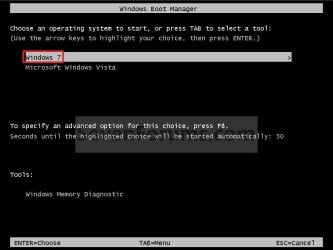
Boot_Manager.jpg
EXAMPLE: VHD file in your Current OS (ex: Vista)
NOTE: This is where the VHD file will be stored at on your currently installed OS (ex: Vista) to be used to boot from.
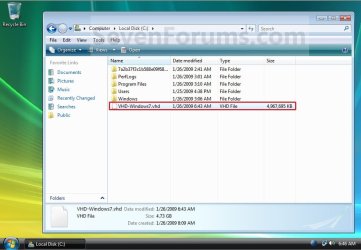
Example.jpg


OPTION ONE

To Create and Add the VHD to Boot From


1. Boot from your retail copy Windows 7 Ultimate or Enterprise installation DVD/USB, and do step 2 or 3 below for what you would like to do.
NOTE: To have Windows 8 on VHD, see instead: How to Create a Windows 8 VHD at Boot to Dual Boot with Windows 7 or Vista

2. When you are at the start of the Windows 7 installation screen, press the Shift+F10 keys, and go to step 4 below. (See screenshot below)
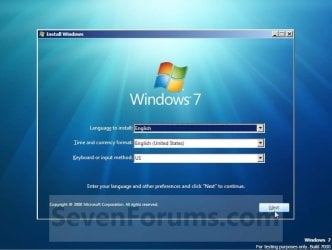
Setup.jpg
3. Boot into the command prompt from the Startup Recovery Options screen, and go to step 4 below. (See screenshot below)
NOTE: You will use OPTION TWO at that link.
Step1.jpg
4. In the command prompt, type diskpart and press Enter. (See screenshot below)
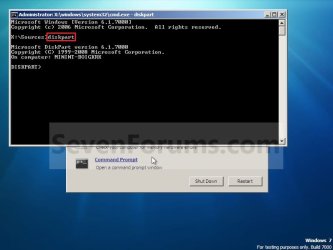
Step2.jpg
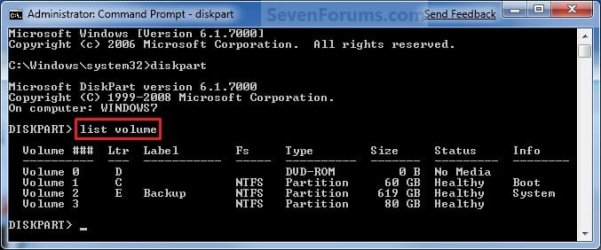
5. In the elevated command prompt, type list volume and press Enter. Make note of the drive letter for the volume that you want to create the VHD file on. (See screenshot below)
NOTE: This will allow you to see what the drive letters are for each volume. They are not always the same at boot as they are in Windows.
list-disk.jpg
6. Do either step 7 or 8 below for what type of VHD file you would like to create.

7. To Create a Fixed VHD File
NOTE: A fixed VHD file will allocate the entire maximum size (ex: 40GB) that you set below for the VHD file size.
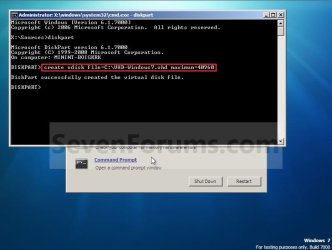
A) In the command prompt, type the command below and press Enter.
NOTE: Substitute the C drive letter in the command below for what volume (step 5) you would like to create the VHD on.

Code:
[B]create vdisk file=[COLOR=red]C[/COLOR]:\[COLOR=red]VHD-Windows7[/COLOR].vhd maximum=[COLOR=red]40960[/COLOR][/B]

NOTE: You can substitute the VHD-Windows7 name with any name you would like for the VHD file instead. You can also substitute the maximum size of 40960 MB for the VHD to the maximum size you want instead in MB (1GB = 1024MB).
Step3.jpg
B) Go to step 9.
8. To Create an Expandable VHD File
NOTE: An expandable VHD file will only be as large as the amount of data that is saved in the VHD file, but still can get as large as the maximium size (ex: 40GB) that you set below. For example, using this option, the VHD file showed only 7GB instead of the full 40GB. Even though the VHD file is expandable, you may need to install Windows Virtual PC to have a program associated with VHD files to actual see only the smaller size instead of the larger size for the VHD file.
A) In the command prompt, type the command below and press Enter.
NOTE: Substitute the C drive letter in the command below for what volume (step 5) you would like to create the VHD on.
Code:
[B]create vdisk file=[COLOR=red]C[/COLOR]:\[COLOR=red]VHD-Windows7[/COLOR].vhd maximum=[COLOR=red]40960[/COLOR][/B] [B]type=expandable[/B]

NOTE: You can substitute the VHD-Windows7 name with any name you would like for the VHD file instead. You can also substitute the maximum size of 40960 MB for the VHD to the maximum size you want instead in MB (1GB = 1024MB).
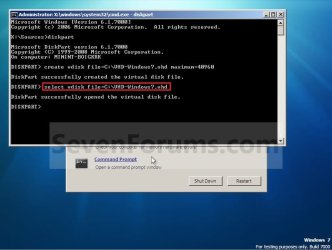
9. In the command prompt, type the command below and press Enter. (See screenshot below)
NOTE: If you subsituted the VHD-Windows7 name in step 7 or 8, then you will need to use it here as well. Substitute the C drive letter in the command below for what volume (step 5) you would like to create the VHD on.

Code:
[B]select vdisk file=[COLOR=red]C[/COLOR]:\[COLOR=red]VHD-Windows7[/COLOR].vhd[/B]
Step4.jpg
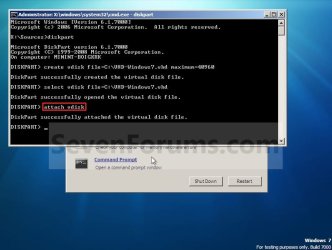
10. In the command prompt, type attach vdisk and press Enter. (See screenshot below)
Step5.jpg
11. In the command prompt, type exit and press Enter. (See screenshot below)
Step6.jpg
12. Close the command prompt window. (See screenshot above)
A) If you used step 2 above, then click on Next, and go to step 13 below.

B) If you used step 3 above, then continue on to step 14 below.
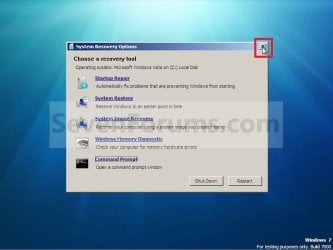
13. Close the System Recovery Options window. (See screenshot below)
WARNING: You must close it only. Do not click on the Shut Down or Restart button.
Step7.jpg
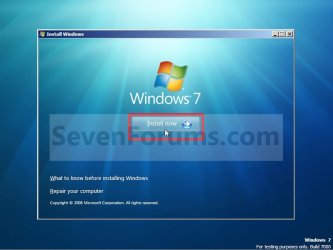
14. Click on the Install now button. (See screenshot below)
Step8.jpg
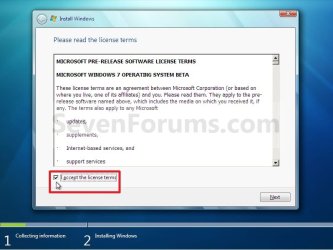
15. Check the I accept the license terms box and click on Next. (See screenshot below)
Step9.jpg
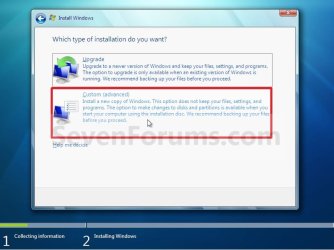
16. Click on the Custom (advanced) option. (See screenshot below)
Step10.jpg
17. Select the available option with the unallocated space that is the same maximum VHD size (ex: 40GB = 40960MB) that you specified in step 7 or 8 above, and click on the Next button. (See screenshot below)
NOTE: If you see the Windows cannot be installed to this disk warning, then you can ignore it. Windows 7 will still install on the VHD file.
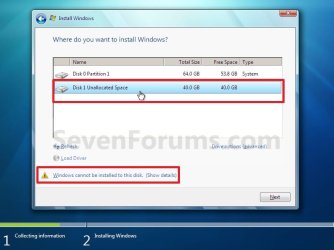
Step11.jpg
18. Finish doing a clean install of Windows 7.
NOTE: You will pick up at step 10 at that link to finish installing Windows 7 on the VHD file.

19. When you restart or start the computer, you will now have Windows 7 to select from at boot to start natively from the VHD file. (See the first example at top of the tutorial.)


OPTION TWO

To Delete the VHD and Remove from Boot List


1. To Remove OS VHD from Windows Boot Manager List
A) Delete the listed OS VHD from the Windows Boot Manager in msconfig.
2. To Delete the VHD File
A) In Windows Explorer, navigate to the VHD file that you have created in step 7 or 8 of OPTION ONE above (ex: C:\VHD-Windows7.vhd), right click on the VHD file and click on Delete.

B) Click on Yes to approve deletion.
That's it,
Shawn


Last edited:
OK, I understand that. Thank you very much.
Nice place you have here :)
Hello Pitajax, and welcome to Seven Forums.

As Spacesurfer posted, you can place the VHD at any location. You will just need to modify the commands in the steps for that location instead. :)
 

My Computer My Computer

At a glance

Windows 7
OS
Windows 7
You're welcome Pitajax. :)
 

My Computer My Computer

At a glance

64-bit Windows 11 Pro for WorkstationsIntel i7-8700K OC'd to 5 GHz64 GB (4x16GB) G.SKILL TridentZ RGB DDR4 3600...ASUS ROG-STRIX-GTX1080TI-O11G-GAMING
Computer type
PC/Desktop
Computer Manufacturer/Model Number
Self built custom
OS
64-bit Windows 11 Pro for Workstations
CPU
Intel i7-8700K OC'd to 5 GHz
Motherboard
ASUS ROG Maximus XI Formula Z390
Memory
64 GB (4x16GB) G.SKILL TridentZ RGB DDR4 3600 MHz
Graphics Card(s)
ASUS ROG-STRIX-GTX1080TI-O11G-GAMING
Sound Card
Integrated
Monitor(s) Displays
2 x Samsung Odyssey G7 27"
Screen Resolution
2560x1440
Hard Drives
1TB Samsung 990 PRO M.2,
4TB Samsung 990 PRO PRO M.2,
TerraMaster F8 SSD Plus NAS
PSU
Seasonic Prime Titanium 850W
Case
Thermaltake Core P3
Cooling
Corsair Hydro H115i
Keyboard
Logitech wireless K800
Mouse
Logitech MX Master 4
Internet Speed
2 Gb/s Download and 100 Mb/s Upload
Antivirus
Malwarebyte Anti-Malware Premium
Browser
Google Chrome
Other Info
Logitech Z625 speaker system,
Logitech BRIO 4K Pro webcam,
HP Color LaserJet Pro MFP M477fdn,
APC SMART-UPS RT 1000 XL - SURT1000XLI,
Galaxy S23 Plus phone
Some info regarding booting Windows XP from VHD.

It seems that it should be possible as XP does have the VHD drivers. When you install XP in a virtual pc and attach a second VHD drive, you can see device manager loading the drivers for virtual drives. Hence, my theory is that it should be possible to boot XP from VHD.

Based on this premise, I have tried the following ideas (and if someone wants to further test different scenarios, that would be helpful):

1) Install XP on Virtual PC VHD
2) Add VHD boot entry to menu

bcdedit /set {ntldr} device vhd=[drive]\file.vhd
bcdedit /set {ntldr} osdevice vhd=[drive]\file.vhd
bcdedit /set {ntldr} detecthal on

3) Try to boot XP and get an error stating NTLDR not found

Based on above, it seems the VHD does load but it can't find ntldr within the partition.

So, I tried the following. Instead of loading XP using ntldr, I tried loading it via bootmgr by doing the following:

1) Export bcd store from a bootable source. Import that in XP loaded in Virtual PC.
2) Copy bootmgr, bcdedit, and bootsect.exe to XP in virtual pc.
3) Change bootsec from nt52 to nt60 using the command bootsect /nt60 /f
4) Copy bootmgr to c:\
5) Add entries to boot XP
6) Restart to make sure XP boots using bootmgr instead of ntldr. It does and I have succeeded up to here.
7) In main physical OS, add entry to boot to this VHD that load XP using bootmgr instead of ntldr.

This failed for me. Instead of loading XP, I got Windows 7 recovery... and vaguely remember some error about partition not being right.

So the plan is to format the partition with Windows 7, then install XP on that and retry.

So, here's the steps if anyone wants to try.

1) Create a virtual pc vhd. Load Windows 7 iso and format the partition with windows 7. Abort win 7 install. (Or use command prompt and diskpart to format and exit).
2) Load Windows XP iso and install windows xp.
3) change boot loader to bootmgr as outlined above.
4) add boot entries to menu
5) load xp.
 

My Computer My Computer

At a glance

Windows Vista and Windows 7 BetaIntel Pentium 3 Centrino1.5 GBATI Radeon Mobility 7500
Computer Manufacturer/Model Number
IBM T42
OS
Windows Vista and Windows 7 Beta
CPU
Intel Pentium 3 Centrino
Memory
1.5 GB
Graphics Card(s)
ATI Radeon Mobility 7500
save a couple steps

I found that during install you can press Shift+F10 it will pop up a command prompt. So you can essentially skip the whole navigate to recover stuff and just pop into cmd and do diskpart, from diskpar screen.

I tested out a Win7 to Win7 dual-boot it is installing as i type this. I have used this to play solitar, majohng, or minesweeper while it is installing/upgrading with no issues (i even managed to get IE to work while upgrading but the upgrade took 3+ hours)

good luck.

Lucas
 

My Computer My Computer

At a glance

win 7 rc
OS
win 7 rc
Hello Lucas, and welcome to Seven Forums.

Thank you. It has been added. :)

Shawn
 
Last edited:

My Computer My Computer

At a glance

64-bit Windows 11 Pro for WorkstationsIntel i7-8700K OC'd to 5 GHz64 GB (4x16GB) G.SKILL TridentZ RGB DDR4 3600...ASUS ROG-STRIX-GTX1080TI-O11G-GAMING
Computer type
PC/Desktop
Computer Manufacturer/Model Number
Self built custom
OS
64-bit Windows 11 Pro for Workstations
CPU
Intel i7-8700K OC'd to 5 GHz
Motherboard
ASUS ROG Maximus XI Formula Z390
Memory
64 GB (4x16GB) G.SKILL TridentZ RGB DDR4 3600 MHz
Graphics Card(s)
ASUS ROG-STRIX-GTX1080TI-O11G-GAMING
Sound Card
Integrated
Monitor(s) Displays
2 x Samsung Odyssey G7 27"
Screen Resolution
2560x1440
Hard Drives
1TB Samsung 990 PRO M.2,
4TB Samsung 990 PRO PRO M.2,
TerraMaster F8 SSD Plus NAS
PSU
Seasonic Prime Titanium 850W
Case
Thermaltake Core P3
Cooling
Corsair Hydro H115i
Keyboard
Logitech wireless K800
Mouse
Logitech MX Master 4
Internet Speed
2 Gb/s Download and 100 Mb/s Upload
Antivirus
Malwarebyte Anti-Malware Premium
Browser
Google Chrome
Other Info
Logitech Z625 speaker system,
Logitech BRIO 4K Pro webcam,
HP Color LaserJet Pro MFP M477fdn,
APC SMART-UPS RT 1000 XL - SURT1000XLI,
Galaxy S23 Plus phone
Id like to format my primary hd and back up my new vhd to my NAS drive, then put it back when im all done.
I know I can copy it back, but how to I attach it to the boot menu? so it can be booted after I reformat my primary drive or if I were to upgrade to a new larger drive.
You need to install the boot manager. Because you do not have any operating system on your clean hard disk you can not use "system repair".

So: Install a "dummy" operating system:
Format your hard disk with NTFS
Boot from Windows 7 DVD and install Windows 7 to VHD file. See here.


After this you have on your hard disk:
  • The VHD file
  • Boot manager as file "bootmgr"
  • Boot settings in folder c:\boot\bcd
  • A file "pagefile.sys"
Boot this "dummy" installation.

You now should see two hard disks:
  • C: = dummy VHD file
  • D: = real hard disk
Copy your backup of your VHD file from NAS drive to D:
Then use "bcdedit" to add boot menu entry of your (backup) VHD file. See here.

Boot to your (backup) VHD.
If it works all fine then you can delete boot menu entry of your "dummy" installation via "bcdedit" and also delete dummy VHD file.
 

My Computer My Computer

At a glance

Windows XP and 7
OS
Windows XP and 7

My Computer My Computer

At a glance

Vista/7
OS
Vista/7

My Computer My Computer

At a glance

64-bit Windows 11 Pro for WorkstationsIntel i7-8700K OC'd to 5 GHz64 GB (4x16GB) G.SKILL TridentZ RGB DDR4 3600...ASUS ROG-STRIX-GTX1080TI-O11G-GAMING
Computer type
PC/Desktop
Computer Manufacturer/Model Number
Self built custom
OS
64-bit Windows 11 Pro for Workstations
CPU
Intel i7-8700K OC'd to 5 GHz
Motherboard
ASUS ROG Maximus XI Formula Z390
Memory
64 GB (4x16GB) G.SKILL TridentZ RGB DDR4 3600 MHz
Graphics Card(s)
ASUS ROG-STRIX-GTX1080TI-O11G-GAMING
Sound Card
Integrated
Monitor(s) Displays
2 x Samsung Odyssey G7 27"
Screen Resolution
2560x1440
Hard Drives
1TB Samsung 990 PRO M.2,
4TB Samsung 990 PRO PRO M.2,
TerraMaster F8 SSD Plus NAS
PSU
Seasonic Prime Titanium 850W
Case
Thermaltake Core P3
Cooling
Corsair Hydro H115i
Keyboard
Logitech wireless K800
Mouse
Logitech MX Master 4
Internet Speed
2 Gb/s Download and 100 Mb/s Upload
Antivirus
Malwarebyte Anti-Malware Premium
Browser
Google Chrome
Other Info
Logitech Z625 speaker system,
Logitech BRIO 4K Pro webcam,
HP Color LaserJet Pro MFP M477fdn,
APC SMART-UPS RT 1000 XL - SURT1000XLI,
Galaxy S23 Plus phone
Type of the VHD-File: Fixed vs. Expandable

It is an excellent documentation offered here in that forum, and I successful installed Win7 x86 RC on my Thinkpad z61p using a USB-Stick as a installation media and a VHD as installation target.

But on question / problem came up, the size of that VHD-File for a full Win7-installation and Office etc.

Diskpart offeres two types of VHD-Files, FIXED (Default) and EXPANDABLE.

DISKPART
CREATE VDISK FILE=C:\VHD\<filename>.vhd MAXIMUM=25000 TYPE=EXPANDABLE

In FIXED mode (as I understand) the max value will be allocation right now, the size will be 25Gig. In EXPANDABLE mode the size will be that amount of data, which is used by the installation, not more and the size at all can grow up to 25 GB (same behaviour as with Virtual PC or VMWare Workstation).

So I selected a MAXIUM of 100 GB thinking the effective size will be just around 15-20 Gig. But as I looked into the explorer, the file is 100 GB in size and the underlying Vista installation has a lack of free disk space now.

I cannot see any difference in the allocated size of my VHD, but I have created it with the TYPE=EXPANDABLE option and diskpart reports the Type as expandable - But the size is fixed to the maximum.

Does anyone here has similar experiences?
Is there a method to shrink the VHD?
What about a comparison in using a VHD vs. shrinking Vista and using a own partition for Win7?
What about Hypernation in a VHD?

Lots of questions

Greetings from Switzerland and Thanks in Advance

Oblomow
 

My Computer My Computer

At a glance

Win7 x64 SP1, Virtual HackintoshIntel(R) i7-2600K16 GBGigabyte GeForce GTX 560 Ti
Computer Manufacturer/Model Number
ASUSTEK COMPUTER INC
OS
Win7 x64 SP1, Virtual Hackintosh
CPU
Intel(R) i7-2600K
Motherboard
ASUS P8Z68V PRO
Memory
16 GB
Graphics Card(s)
Gigabyte GeForce GTX 560 Ti
Monitor(s) Displays
Syncmaster 225 BW & Asus MW 2225
Screen Resolution
2x1680x1050
Hard Drives
Many
PSU
660 Watt 230Volt 80Plus Gold
Case
Corsair Obsidian
Cooling
6 Fans if I count well
Keyboard
Logitech not supported in Vista
Mouse
Logitech G7
Internet Speed
15000/1000 DSL practically just 90% of that value
Hello Oblomow,

Sorry for the late reply, but it took a bit to play with this to see what options may be available for you.

I have added a option to create either a fixed or expandable VHD file option to help give more options.

When using the type=expandable command, the VHD file will be exandable, but it will require installing Windows Virtual PC to actually see the VHD file as the smaller expandable size instead of the full fixed size. It seems that without that program installed to have associated with VHD files types, Windows 7 will still only show the maximum size instead whether it is fixed or expandable.

I find that it's usually best to backup anything on the VHD that you did not want to lose, then delete it and create a new VHD file the size that you wanted instead of trying to shrink an existing one.

Hope this helps,
Shawn
 

My Computer My Computer

At a glance

64-bit Windows 11 Pro for WorkstationsIntel i7-8700K OC'd to 5 GHz64 GB (4x16GB) G.SKILL TridentZ RGB DDR4 3600...ASUS ROG-STRIX-GTX1080TI-O11G-GAMING
Computer type
PC/Desktop
Computer Manufacturer/Model Number
Self built custom
OS
64-bit Windows 11 Pro for Workstations
CPU
Intel i7-8700K OC'd to 5 GHz
Motherboard
ASUS ROG Maximus XI Formula Z390
Memory
64 GB (4x16GB) G.SKILL TridentZ RGB DDR4 3600 MHz
Graphics Card(s)
ASUS ROG-STRIX-GTX1080TI-O11G-GAMING
Sound Card
Integrated
Monitor(s) Displays
2 x Samsung Odyssey G7 27"
Screen Resolution
2560x1440
Hard Drives
1TB Samsung 990 PRO M.2,
4TB Samsung 990 PRO PRO M.2,
TerraMaster F8 SSD Plus NAS
PSU
Seasonic Prime Titanium 850W
Case
Thermaltake Core P3
Cooling
Corsair Hydro H115i
Keyboard
Logitech wireless K800
Mouse
Logitech MX Master 4
Internet Speed
2 Gb/s Download and 100 Mb/s Upload
Antivirus
Malwarebyte Anti-Malware Premium
Browser
Google Chrome
Other Info
Logitech Z625 speaker system,
Logitech BRIO 4K Pro webcam,
HP Color LaserJet Pro MFP M477fdn,
APC SMART-UPS RT 1000 XL - SURT1000XLI,
Galaxy S23 Plus phone
VHD-File Type=Fixed vs. Type=Expandable

Hi, All

I created a VHD-File to install Win7 as described above:

Create vdisk file=c:\windows7.vhd maximum=100000 type=expandable

I thought that diskpart will create a file with a maximum size of 100GB but the file size should grow after installing the OS and other useful SW.
Actually I have installed about 15GB of stuff, so the size shown in Vista / Win 7 should be reported as that size.
But Win7 reports the file is about 100GB in size and a lack of free disk space in the underlying Vista installation.
I looked in Win7 diskpart and it reported the VHD-file as expanable. But the real behaviour is like fixed (the maximum space is allocated at the time of creation, no growth).

Has anyone out here made similar experiences, the behaviour differes from my expectations made based von Virtual PC and VMwares VHDs.
Is there a possibillity to shrink the file into realistic dimensions?
What about Hypernation when using a VHD - Is it possible and does it make sense?

Thanks in Advance and Greetings from Switzerland

Oblomow58
 

My Computer My Computer

At a glance

Win7 x64 SP1, Virtual HackintoshIntel(R) i7-2600K16 GBGigabyte GeForce GTX 560 Ti
Computer Manufacturer/Model Number
ASUSTEK COMPUTER INC
OS
Win7 x64 SP1, Virtual Hackintosh
CPU
Intel(R) i7-2600K
Motherboard
ASUS P8Z68V PRO
Memory
16 GB
Graphics Card(s)
Gigabyte GeForce GTX 560 Ti
Monitor(s) Displays
Syncmaster 225 BW & Asus MW 2225
Screen Resolution
2x1680x1050
Hard Drives
Many
PSU
660 Watt 230Volt 80Plus Gold
Case
Corsair Obsidian
Cooling
6 Fans if I count well
Keyboard
Logitech not supported in Vista
Mouse
Logitech G7
Internet Speed
15000/1000 DSL practically just 90% of that value
From post above. ;)


When using the type=expandable command, the VHD file will be exandable, but it will require installing Windows Virtual PC to actually see the VHD file as the smaller expandable size instead of the full fixed size. It seems that without that program installed to have associated with VHD files types, Windows 7 will still only show the maximum size instead whether it is fixed or expandable.
 

My Computer My Computer

At a glance

64-bit Windows 11 Pro for WorkstationsIntel i7-8700K OC'd to 5 GHz64 GB (4x16GB) G.SKILL TridentZ RGB DDR4 3600...ASUS ROG-STRIX-GTX1080TI-O11G-GAMING
Computer type
PC/Desktop
Computer Manufacturer/Model Number
Self built custom
OS
64-bit Windows 11 Pro for Workstations
CPU
Intel i7-8700K OC'd to 5 GHz
Motherboard
ASUS ROG Maximus XI Formula Z390
Memory
64 GB (4x16GB) G.SKILL TridentZ RGB DDR4 3600 MHz
Graphics Card(s)
ASUS ROG-STRIX-GTX1080TI-O11G-GAMING
Sound Card
Integrated
Monitor(s) Displays
2 x Samsung Odyssey G7 27"
Screen Resolution
2560x1440
Hard Drives
1TB Samsung 990 PRO M.2,
4TB Samsung 990 PRO PRO M.2,
TerraMaster F8 SSD Plus NAS
PSU
Seasonic Prime Titanium 850W
Case
Thermaltake Core P3
Cooling
Corsair Hydro H115i
Keyboard
Logitech wireless K800
Mouse
Logitech MX Master 4
Internet Speed
2 Gb/s Download and 100 Mb/s Upload
Antivirus
Malwarebyte Anti-Malware Premium
Browser
Google Chrome
Other Info
Logitech Z625 speaker system,
Logitech BRIO 4K Pro webcam,
HP Color LaserJet Pro MFP M477fdn,
APC SMART-UPS RT 1000 XL - SURT1000XLI,
Galaxy S23 Plus phone
Does anyone here has similar experiences?
It depends on where you are looking for the size. If you have booted the VHD file, then it shows 100 Gb - when you look at the drive or at the VHD file. If you have booted an other operating system – for example you real Vista – then the VHD file shows the real occupied disk space; e.g. 15 Gb.
Is there a method to shrink the VHD?
I only knew one program that can do this: "VhdResizer". It's freeware, but you must register to download it. With "VhdResizer" you can resize a VHD file or change from fixed to expandable vice versa.
I find that it's usually best to backup anything on the VHD that you did not want to lose, then delete it and create a new VHD file the size that you wanted instead of trying to shrink an existing one.
Just this is what "VhdResizer" do: Creates a new VHD file and copies all content.
 

My Computer My Computer

At a glance

Windows XP and 7
OS
Windows XP and 7
From underlying Vista point of view it's expandable!

Thanks for your fast repies,

You are right: When booting Win7 RC from the 100GB expandable VHD it reports the boot partition 100GB with 12GB used. This results in a warning (low free disk space on the Vista Boot drive where the VHD-file resides. The size of the VHD on the Vista drive is reported as 100GB).

But when looking the same thing from inside of Vista the VHD is just some 13GB and not the 100GB as reported.

So I got exactly what I wan't and it is not necessary to be in sorrow on the low disk space problem.

Oblomow58
 

My Computer My Computer

At a glance

Win7 x64 SP1, Virtual HackintoshIntel(R) i7-2600K16 GBGigabyte GeForce GTX 560 Ti
Computer Manufacturer/Model Number
ASUSTEK COMPUTER INC
OS
Win7 x64 SP1, Virtual Hackintosh
CPU
Intel(R) i7-2600K
Motherboard
ASUS P8Z68V PRO
Memory
16 GB
Graphics Card(s)
Gigabyte GeForce GTX 560 Ti
Monitor(s) Displays
Syncmaster 225 BW & Asus MW 2225
Screen Resolution
2x1680x1050
Hard Drives
Many
PSU
660 Watt 230Volt 80Plus Gold
Case
Corsair Obsidian
Cooling
6 Fans if I count well
Keyboard
Logitech not supported in Vista
Mouse
Logitech G7
Internet Speed
15000/1000 DSL practically just 90% of that value
performance?

Hey guys,

Is there any difference in performance If I install Win7 in this way? Will it give the same performance as the actual installation will do? Any short comings of running OS in this way?

Actually I was about to do dual-boot with Vista but Then I hit this thread and I feel if there's no change in performance then I'll go for it as every 2 weeks w get a new Win7 build :D

Regards
Mukul
 

My Computer My Computer

At a glance

Vista Home Premium 32-bit/ Win7 RC/ Debian LennyCore 2 Duo 2.2GHz2GB
Computer Manufacturer/Model Number
Sony VAIO VGN-CS14G
OS
Vista Home Premium 32-bit/ Win7 RC/ Debian Lenny
CPU
Core 2 Duo 2.2GHz
Memory
2GB
Hard Drives
250GB SATA
Internet Speed
192Kbps/ 2Mbps
Hello Mukul,

Using a expandable VHD file could cause it to run a bit slower than using a fixed VHD file, but I have seen no difference between a fixed VHD file and a normal partition or drive though.
 

My Computer My Computer

At a glance

64-bit Windows 11 Pro for WorkstationsIntel i7-8700K OC'd to 5 GHz64 GB (4x16GB) G.SKILL TridentZ RGB DDR4 3600...ASUS ROG-STRIX-GTX1080TI-O11G-GAMING
Computer type
PC/Desktop
Computer Manufacturer/Model Number
Self built custom
OS
64-bit Windows 11 Pro for Workstations
CPU
Intel i7-8700K OC'd to 5 GHz
Motherboard
ASUS ROG Maximus XI Formula Z390
Memory
64 GB (4x16GB) G.SKILL TridentZ RGB DDR4 3600 MHz
Graphics Card(s)
ASUS ROG-STRIX-GTX1080TI-O11G-GAMING
Sound Card
Integrated
Monitor(s) Displays
2 x Samsung Odyssey G7 27"
Screen Resolution
2560x1440
Hard Drives
1TB Samsung 990 PRO M.2,
4TB Samsung 990 PRO PRO M.2,
TerraMaster F8 SSD Plus NAS
PSU
Seasonic Prime Titanium 850W
Case
Thermaltake Core P3
Cooling
Corsair Hydro H115i
Keyboard
Logitech wireless K800
Mouse
Logitech MX Master 4
Internet Speed
2 Gb/s Download and 100 Mb/s Upload
Antivirus
Malwarebyte Anti-Malware Premium
Browser
Google Chrome
Other Info
Logitech Z625 speaker system,
Logitech BRIO 4K Pro webcam,
HP Color LaserJet Pro MFP M477fdn,
APC SMART-UPS RT 1000 XL - SURT1000XLI,
Galaxy S23 Plus phone
Registering VHD Files with Virtual PC Beta

In the meantime I have installed Virtual PC Beta and Virtual XP and tried to register VHD-Files with
%windir%\system32\vpc.exe
or
%windir%\system32\VPCWizard.exe
or
%windir%\system32\VPCSettings.exe

It does not make any difference, explorer shows the MAXIMUM (100GB) value of the EXPANDABLE VHD-File (20GB actually used) and warns me that the underlying Vista Partition is critical in low free disk space.

How did you register VHD-Files to displayed correctly?

Best Regards, Oblomow
 

My Computer My Computer

At a glance

Win7 x64 SP1, Virtual HackintoshIntel(R) i7-2600K16 GBGigabyte GeForce GTX 560 Ti
Computer Manufacturer/Model Number
ASUSTEK COMPUTER INC
OS
Win7 x64 SP1, Virtual Hackintosh
CPU
Intel(R) i7-2600K
Motherboard
ASUS P8Z68V PRO
Memory
16 GB
Graphics Card(s)
Gigabyte GeForce GTX 560 Ti
Monitor(s) Displays
Syncmaster 225 BW & Asus MW 2225
Screen Resolution
2x1680x1050
Hard Drives
Many
PSU
660 Watt 230Volt 80Plus Gold
Case
Corsair Obsidian
Cooling
6 Fans if I count well
Keyboard
Logitech not supported in Vista
Mouse
Logitech G7
Internet Speed
15000/1000 DSL practically just 90% of that value
Oblomow,

Just having Windows Virtual PC installed allowed them to display as the expandable size in Windows 7 Windows Explorer instead of the full maximum size for me.

Did you create the VHD at boot using the expandable option?
 

My Computer My Computer

At a glance

64-bit Windows 11 Pro for WorkstationsIntel i7-8700K OC'd to 5 GHz64 GB (4x16GB) G.SKILL TridentZ RGB DDR4 3600...ASUS ROG-STRIX-GTX1080TI-O11G-GAMING
Computer type
PC/Desktop
Computer Manufacturer/Model Number
Self built custom
OS
64-bit Windows 11 Pro for Workstations
CPU
Intel i7-8700K OC'd to 5 GHz
Motherboard
ASUS ROG Maximus XI Formula Z390
Memory
64 GB (4x16GB) G.SKILL TridentZ RGB DDR4 3600 MHz
Graphics Card(s)
ASUS ROG-STRIX-GTX1080TI-O11G-GAMING
Sound Card
Integrated
Monitor(s) Displays
2 x Samsung Odyssey G7 27"
Screen Resolution
2560x1440
Hard Drives
1TB Samsung 990 PRO M.2,
4TB Samsung 990 PRO PRO M.2,
TerraMaster F8 SSD Plus NAS
PSU
Seasonic Prime Titanium 850W
Case
Thermaltake Core P3
Cooling
Corsair Hydro H115i
Keyboard
Logitech wireless K800
Mouse
Logitech MX Master 4
Internet Speed
2 Gb/s Download and 100 Mb/s Upload
Antivirus
Malwarebyte Anti-Malware Premium
Browser
Google Chrome
Other Info
Logitech Z625 speaker system,
Logitech BRIO 4K Pro webcam,
HP Color LaserJet Pro MFP M477fdn,
APC SMART-UPS RT 1000 XL - SURT1000XLI,
Galaxy S23 Plus phone
Re: Expandable VHD

Yes I did. It works very well, I write this from inside Win7 installed on the expandable VHD.
Installing Virtual PC Beta and Virtual XP did not change anything on the display of the underlying Vista Partition (just 7% free disk space).

There is no default application for VHD files defined after Virtual PC's installation.
I tried to define (alternatively)
vpc.exe
VPCSettings.exe
VPCWizard.exe
as default application for vhd-file types but this did not change anything on the display of the Vista Partition (nearly full) and the Win7.vhd (Expandable but shown at the Maximum).

I open the disk management msc several times and refreshed to view of the disks.

Do you have any other idea?

Thanks in Advance

Oblomow58
 

My Computer My Computer

At a glance

Win7 x64 SP1, Virtual HackintoshIntel(R) i7-2600K16 GBGigabyte GeForce GTX 560 Ti
Computer Manufacturer/Model Number
ASUSTEK COMPUTER INC
OS
Win7 x64 SP1, Virtual Hackintosh
CPU
Intel(R) i7-2600K
Motherboard
ASUS P8Z68V PRO
Memory
16 GB
Graphics Card(s)
Gigabyte GeForce GTX 560 Ti
Monitor(s) Displays
Syncmaster 225 BW & Asus MW 2225
Screen Resolution
2x1680x1050
Hard Drives
Many
PSU
660 Watt 230Volt 80Plus Gold
Case
Corsair Obsidian
Cooling
6 Fans if I count well
Keyboard
Logitech not supported in Vista
Mouse
Logitech G7
Internet Speed
15000/1000 DSL practically just 90% of that value
I'm not sure why it's not showing only the expandable size for you instead of the maximum size even though it is set as expandable. You might see if creating a new VHD from scratch as a test to see if it remains the same way for you.
 

My Computer My Computer

At a glance

64-bit Windows 11 Pro for WorkstationsIntel i7-8700K OC'd to 5 GHz64 GB (4x16GB) G.SKILL TridentZ RGB DDR4 3600...ASUS ROG-STRIX-GTX1080TI-O11G-GAMING
Computer type
PC/Desktop
Computer Manufacturer/Model Number
Self built custom
OS
64-bit Windows 11 Pro for Workstations
CPU
Intel i7-8700K OC'd to 5 GHz
Motherboard
ASUS ROG Maximus XI Formula Z390
Memory
64 GB (4x16GB) G.SKILL TridentZ RGB DDR4 3600 MHz
Graphics Card(s)
ASUS ROG-STRIX-GTX1080TI-O11G-GAMING
Sound Card
Integrated
Monitor(s) Displays
2 x Samsung Odyssey G7 27"
Screen Resolution
2560x1440
Hard Drives
1TB Samsung 990 PRO M.2,
4TB Samsung 990 PRO PRO M.2,
TerraMaster F8 SSD Plus NAS
PSU
Seasonic Prime Titanium 850W
Case
Thermaltake Core P3
Cooling
Corsair Hydro H115i
Keyboard
Logitech wireless K800
Mouse
Logitech MX Master 4
Internet Speed
2 Gb/s Download and 100 Mb/s Upload
Antivirus
Malwarebyte Anti-Malware Premium
Browser
Google Chrome
Other Info
Logitech Z625 speaker system,
Logitech BRIO 4K Pro webcam,
HP Color LaserJet Pro MFP M477fdn,
APC SMART-UPS RT 1000 XL - SURT1000XLI,
Galaxy S23 Plus phone
Back
Top