
Windows 7 Home Premium x64 w/ New SSD

nyyankeefan95

New member
Local time
11:48 AM
Messages
54
Location
Long Island, NY
Hey, I just purchase what seems to be one of the best SSD's in the world, the "OCZ Vertex 2 120GB (SSD)". The speeds are:
Read: 285MB/s
Write: 275MB/s

I am going to put this drive in a laptop with Windows 7 Home Premium x64, but I want to configure it to be absolutely stable, yet amazing performance wise. What should I do?
 

My Computer My Computer

At a glance

Windows 7 Home Premium x64Intel Core 2 Duo T6400 (2.0GHz)4GB DDR2Intel Graphics Media Accelerator 4500MHD w/ 1GB
Computer Manufacturer/Model Number
HP Pavilion dv6-1030us
OS
Windows 7 Home Premium x64
CPU
Intel Core 2 Duo T6400 (2.0GHz)
Memory
4GB DDR2
Graphics Card(s)
Intel Graphics Media Accelerator 4500MHD w/ 1GB
Sound Card
IDT High Definition CODEC w/ Bose Companion 3 Speaker System
Monitor(s) Displays
Generic PnP Monitor (1366 x 768)
Hard Drives
OCZ Vertex 2 2.5" 120GB SATA II (SSD)
Read: 285MB/s
Write: 275MB/s
Some information about SSD alignment: http://www.sevenforums.com/tutorials/113967-ssd-alignment.html

Some tips for getting a purrfect install based on hundreds done here:

The installer is mostly driver-complete, with newer arriving quickly via optional Windows Updates. Any drivers then missing in Device Manager can be found on the Support Downloads webpage for your model computer or device. http://www.sevenforums.com/tutorials/1649-clean-install-windows-7-a.html

Install updates and then programs slowly over time to gauge performance after each. Don't let any programs write themselves into msconfig>Startup as they become freeloaders on your RAM/CPU and can spy on you. I only allow AV and gadgets. http://www.sevenforums.com/tutorials/1401-startup-programs-change.html

Use a lightweight free AV like MS Security Essentials which works perfectly with Windows 7 Firewall. http://www.microsoft.com/security_essentials/

When it is finished, clean and order the HD perfectly using state-of-the-art free CCleaner monthly.
CCleaner - Free software downloads and software reviews - CNET Download.com

Then save a Win7 Backup image externally so you never have to reinstall again, just reimage the HD or replacement using DVD or Repair CD. http://www.sevenforums.com/tutorials/663-backup-complete-computer-create-image-backup.html
 
Last edited:
Based on advice from experts, defragging a SSD is a waste of time and shortens it lifespan.

Rich
 

My Computer My Computer

At a glance

Windows 7 Pro x64 SP1Intel Core I716 GigsNVIDIA GeForce GTX 670M
Computer type
Laptop
Computer Manufacturer/Model Number
Toshiba Laptop Qosimo X870
OS
Windows 7 Pro x64 SP1
CPU
Intel Core I7
Motherboard
Toshiba Qosmio
Memory
16 Gigs
Graphics Card(s)
NVIDIA GeForce GTX 670M
Monitor(s) Displays
17.7" laptop
Screen Resolution
1600 x 900
Hard Drives
256 Gig SanDisk SSD for C
256 Gig Intel SSD for D
Internet Speed
50/25 FIOS
Antivirus
Vipre (all you can eat for 10 machines)
Browser
IE and FF
Other Info
I have dos 6.22, wfwg 3.11, win98, 2000 and xp VHD's available for testing. MS's Virtual PC works great.
Great! Quick question only when I have all the drivers installed but no programs or file on the drie should u make an image of the system because I will always add more files so the image will not be up to date.
 

My Computer My Computer

At a glance

Windows 7 Home Premium x64Intel Core 2 Duo T6400 (2.0GHz)4GB DDR2Intel Graphics Media Accelerator 4500MHD w/ 1GB
Computer Manufacturer/Model Number
HP Pavilion dv6-1030us
OS
Windows 7 Home Premium x64
CPU
Intel Core 2 Duo T6400 (2.0GHz)
Memory
4GB DDR2
Graphics Card(s)
Intel Graphics Media Accelerator 4500MHD w/ 1GB
Sound Card
IDT High Definition CODEC w/ Bose Companion 3 Speaker System
Monitor(s) Displays
Generic PnP Monitor (1366 x 768)
Hard Drives
OCZ Vertex 2 2.5" 120GB SATA II (SSD)
Read: 285MB/s
Write: 275MB/s
Based on advice from experts, defragging a SSD is a waste of time and shortens it lifespan.

Rich

Yeah I heard about that. Is it true because an SSD does not have any Disks to defrag.
 

My Computer My Computer

At a glance

Windows 7 Home Premium x64Intel Core 2 Duo T6400 (2.0GHz)4GB DDR2Intel Graphics Media Accelerator 4500MHD w/ 1GB
Computer Manufacturer/Model Number
HP Pavilion dv6-1030us
OS
Windows 7 Home Premium x64
CPU
Intel Core 2 Duo T6400 (2.0GHz)
Memory
4GB DDR2
Graphics Card(s)
Intel Graphics Media Accelerator 4500MHD w/ 1GB
Sound Card
IDT High Definition CODEC w/ Bose Companion 3 Speaker System
Monitor(s) Displays
Generic PnP Monitor (1366 x 768)
Hard Drives
OCZ Vertex 2 2.5" 120GB SATA II (SSD)
Read: 285MB/s
Write: 275MB/s
If you want good protection, make an image to an external drive as often as possible: http://www.sevenforums.com/tutorials/128494-imaging-strategies.html

And if you want to save a few GBs on the drive, delete the hiberfile (if you do not use hibernation). The command is powercfg -h off

And yes, never defrag an SSD since access time (0.1ms for the Vertex) to any place on the SSD is the same, that is counterproductive - and wears the gear.

Else, Greg has given you all the tips. Question though: How do you plan to get Win7 onto the SSD?
 

My Computer My Computer

At a glance

Vista, Windows7, Mint Mate, Zorin, Windows 8from 1.6GHz Duo to i7
Computer Manufacturer/Model Number
HP, Dell, Gateway, Toshiba - 4 laptops and 2 desktops
OS
Vista, Windows7, Mint Mate, Zorin, Windows 8
CPU
from 1.6GHz Duo to i7
Monitor(s) Displays
2x HP w2207
Hard Drives
5x HDD, 7x SSD, 12x Externals
Keyboard
with trackball - no mices
Mouse
Trackball mice
Internet Speed
DSL 6000
I have a windows 7 upgrade disk that I bought from staples I was planning on booting to that and go through the setup.
 

My Computer My Computer

At a glance

Windows 7 Home Premium x64Intel Core 2 Duo T6400 (2.0GHz)4GB DDR2Intel Graphics Media Accelerator 4500MHD w/ 1GB
Computer Manufacturer/Model Number
HP Pavilion dv6-1030us
OS
Windows 7 Home Premium x64
CPU
Intel Core 2 Duo T6400 (2.0GHz)
Memory
4GB DDR2
Graphics Card(s)
Intel Graphics Media Accelerator 4500MHD w/ 1GB
Sound Card
IDT High Definition CODEC w/ Bose Companion 3 Speaker System
Monitor(s) Displays
Generic PnP Monitor (1366 x 768)
Hard Drives
OCZ Vertex 2 2.5" 120GB SATA II (SSD)
Read: 285MB/s
Write: 275MB/s
When you boot the Upgrade version DVD, it scans the drive to detect any OS which will then allow use of Upgrade version Product key upfront.

If you install Upgrade version to a new or wiped HD, it requires one of the workarounds given here: http://www.sevenforums.com/tutorials/31402-clean-install-upgrade-windows-7-version.html unless you are installi

Registry change is easiest - set a Restore Point first. Then activate at Computer>Properties activation link.

If Win7 came preinstalled on your HP then you probably won't need to do the workaround. It should take the Product Key from COA sticker upfront and allow activation at link after install.
 
Last edited:
I have a windows 7 upgrade disk that I bought from staples I was planning on booting to that and go through the setup.
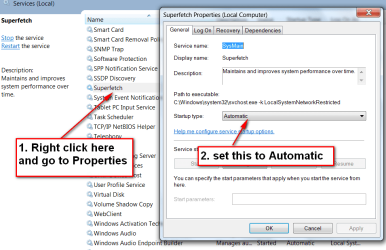
That will work. Sometimes, with a preinstalled Win7, one has to go via an image. And that is a bit more complicated. With the Win7 installation disk, it will make all the important settings (e.g. alignment, defrag disable) automatically. Just check Superfetch. That should be set to "automatic". Some people like it disabled, but that is counterproductive in my book.
 

My Computer My Computer

At a glance

Vista, Windows7, Mint Mate, Zorin, Windows 8from 1.6GHz Duo to i7
Computer Manufacturer/Model Number
HP, Dell, Gateway, Toshiba - 4 laptops and 2 desktops
OS
Vista, Windows7, Mint Mate, Zorin, Windows 8
CPU
from 1.6GHz Duo to i7
Monitor(s) Displays
2x HP w2207
Hard Drives
5x HDD, 7x SSD, 12x Externals
Keyboard
with trackball - no mices
Mouse
Trackball mice
Internet Speed
DSL 6000
I have a windows 7 upgrade disk that I bought from staples I was planning on booting to that and go through the setup.
That will work. Sometimes, with a preinstalled Win7, one has to go via an image. And that is a bit more complicated. With the Win7 installation disk, it will make all the important settings (e.g. alignment, defrag disable) automatically. Just check Superfetch. That should be set to "automatic". Some people like it disabled, but that is counterproductive in my book.

Sorry but what is super fetch.
 

My Computer My Computer

At a glance

Windows 7 Home Premium x64Intel Core 2 Duo T6400 (2.0GHz)4GB DDR2Intel Graphics Media Accelerator 4500MHD w/ 1GB
Computer Manufacturer/Model Number
HP Pavilion dv6-1030us
OS
Windows 7 Home Premium x64
CPU
Intel Core 2 Duo T6400 (2.0GHz)
Memory
4GB DDR2
Graphics Card(s)
Intel Graphics Media Accelerator 4500MHD w/ 1GB
Sound Card
IDT High Definition CODEC w/ Bose Companion 3 Speaker System
Monitor(s) Displays
Generic PnP Monitor (1366 x 768)
Hard Drives
OCZ Vertex 2 2.5" 120GB SATA II (SSD)
Read: 285MB/s
Write: 275MB/s
Superfetch is the function that caches programs and data in RAM. So when you acces it the next time, it gets it directly from RAM rather than from the disk - and RAM is still 100 times faster than even a SSD. Thus you get an additional performance boost.

You find it in Services. For the setting see the picture.
 

Attachments

  • 2010-12-18_124002.png
    2010-12-18_124002.png
    40.7 KB · Views: 22

My Computer My Computer

At a glance

Vista, Windows7, Mint Mate, Zorin, Windows 8from 1.6GHz Duo to i7
Computer Manufacturer/Model Number
HP, Dell, Gateway, Toshiba - 4 laptops and 2 desktops
OS
Vista, Windows7, Mint Mate, Zorin, Windows 8
CPU
from 1.6GHz Duo to i7
Monitor(s) Displays
2x HP w2207
Hard Drives
5x HDD, 7x SSD, 12x Externals
Keyboard
with trackball - no mices
Mouse
Trackball mice
Internet Speed
DSL 6000
Ok am will a clean install of an upgrade disk work
 

My Computer My Computer

At a glance

Windows 7 Home Premium x64Intel Core 2 Duo T6400 (2.0GHz)4GB DDR2Intel Graphics Media Accelerator 4500MHD w/ 1GB
Computer Manufacturer/Model Number
HP Pavilion dv6-1030us
OS
Windows 7 Home Premium x64
CPU
Intel Core 2 Duo T6400 (2.0GHz)
Memory
4GB DDR2
Graphics Card(s)
Intel Graphics Media Accelerator 4500MHD w/ 1GB
Sound Card
IDT High Definition CODEC w/ Bose Companion 3 Speaker System
Monitor(s) Displays
Generic PnP Monitor (1366 x 768)
Hard Drives
OCZ Vertex 2 2.5" 120GB SATA II (SSD)
Read: 285MB/s
Write: 275MB/s
Did your HP come with Win7 pre-installed?

You can use either 32 or 64 bit Win7 with each license. Do you have both disks?

You could also try cloning or imaging you old HD to the SSD to see if performance is good. If your old HD is WD or Seagate, you can use Acronis excellent free apps found on the Support Downloads webpage for your model HD. Or use Win7 backup imaging, free Macrium Reflect or Paragon 10. Wolfgang likely has more on this since he is an SSD expert.
 
Last edited:
No vista.
 

My Computer My Computer

At a glance

Windows 7 Home Premium x64Intel Core 2 Duo T6400 (2.0GHz)4GB DDR2Intel Graphics Media Accelerator 4500MHD w/ 1GB
Computer Manufacturer/Model Number
HP Pavilion dv6-1030us
OS
Windows 7 Home Premium x64
CPU
Intel Core 2 Duo T6400 (2.0GHz)
Memory
4GB DDR2
Graphics Card(s)
Intel Graphics Media Accelerator 4500MHD w/ 1GB
Sound Card
IDT High Definition CODEC w/ Bose Companion 3 Speaker System
Monitor(s) Displays
Generic PnP Monitor (1366 x 768)
Hard Drives
OCZ Vertex 2 2.5" 120GB SATA II (SSD)
Read: 285MB/s
Write: 275MB/s
Wolfgang likely has more on this since he is an SSD expert.
Greg, you are too kind. Talk of some "expert". I learned this stuff the hard way. And now I am on my 4th SSD. I wonder what new surprises that will have in store.

But I will be glad to assist in any way I can.
 

My Computer My Computer

At a glance

Vista, Windows7, Mint Mate, Zorin, Windows 8from 1.6GHz Duo to i7
Computer Manufacturer/Model Number
HP, Dell, Gateway, Toshiba - 4 laptops and 2 desktops
OS
Vista, Windows7, Mint Mate, Zorin, Windows 8
CPU
from 1.6GHz Duo to i7
Monitor(s) Displays
2x HP w2207
Hard Drives
5x HDD, 7x SSD, 12x Externals
Keyboard
with trackball - no mices
Mouse
Trackball mice
Internet Speed
DSL 6000
Thanks. Is the SSD that I bought pretty good?
 

My Computer My Computer

At a glance

Windows 7 Home Premium x64Intel Core 2 Duo T6400 (2.0GHz)4GB DDR2Intel Graphics Media Accelerator 4500MHD w/ 1GB
Computer Manufacturer/Model Number
HP Pavilion dv6-1030us
OS
Windows 7 Home Premium x64
CPU
Intel Core 2 Duo T6400 (2.0GHz)
Memory
4GB DDR2
Graphics Card(s)
Intel Graphics Media Accelerator 4500MHD w/ 1GB
Sound Card
IDT High Definition CODEC w/ Bose Companion 3 Speaker System
Monitor(s) Displays
Generic PnP Monitor (1366 x 768)
Hard Drives
OCZ Vertex 2 2.5" 120GB SATA II (SSD)
Read: 285MB/s
Write: 275MB/s
Thanks. Is the SSD that I bought pretty good?
It is the best in my book. I own two myself. And OCZ has excellent service. Only the Crucial C300 can touch it.

The OCZ forum is very informative. But don't necessarily go by their recommendations as far as tweaking is concerned. They are real SSD freaks that like to squeeze the last 0.1% out of their devices. But for the uninitiated, one can easily make a mistake. Keep it plain and simple.
 

My Computer My Computer

At a glance

Vista, Windows7, Mint Mate, Zorin, Windows 8from 1.6GHz Duo to i7
Computer Manufacturer/Model Number
HP, Dell, Gateway, Toshiba - 4 laptops and 2 desktops
OS
Vista, Windows7, Mint Mate, Zorin, Windows 8
CPU
from 1.6GHz Duo to i7
Monitor(s) Displays
2x HP w2207
Hard Drives
5x HDD, 7x SSD, 12x Externals
Keyboard
with trackball - no mices
Mouse
Trackball mice
Internet Speed
DSL 6000
Really! Some of the reviews say...Died in 3 weeks, ka put after a clean install of windows!

How long have you had yours and I heard that in the bios you turn on something called aSCI or something like that?
 

My Computer My Computer

At a glance

Windows 7 Home Premium x64Intel Core 2 Duo T6400 (2.0GHz)4GB DDR2Intel Graphics Media Accelerator 4500MHD w/ 1GB
Computer Manufacturer/Model Number
HP Pavilion dv6-1030us
OS
Windows 7 Home Premium x64
CPU
Intel Core 2 Duo T6400 (2.0GHz)
Memory
4GB DDR2
Graphics Card(s)
Intel Graphics Media Accelerator 4500MHD w/ 1GB
Sound Card
IDT High Definition CODEC w/ Bose Companion 3 Speaker System
Monitor(s) Displays
Generic PnP Monitor (1366 x 768)
Hard Drives
OCZ Vertex 2 2.5" 120GB SATA II (SSD)
Read: 285MB/s
Write: 275MB/s
My first one is 2 years old. The second one is brand new and not yet even installed - I am waiting for the laptop where it will go in. And don't go by reviews - any mechanical device can fail. Read the trouble some people have with their Mercedes.
Yes, set the BIOS to AHCI, but you have to do that BEFORE you install Win7.
 

My Computer My Computer

At a glance

Vista, Windows7, Mint Mate, Zorin, Windows 8from 1.6GHz Duo to i7
Computer Manufacturer/Model Number
HP, Dell, Gateway, Toshiba - 4 laptops and 2 desktops
OS
Vista, Windows7, Mint Mate, Zorin, Windows 8
CPU
from 1.6GHz Duo to i7
Monitor(s) Displays
2x HP w2207
Hard Drives
5x HDD, 7x SSD, 12x Externals
Keyboard
with trackball - no mices
Mouse
Trackball mice
Internet Speed
DSL 6000
Ok can any bios do this?
 

My Computer My Computer

At a glance

Windows 7 Home Premium x64Intel Core 2 Duo T6400 (2.0GHz)4GB DDR2Intel Graphics Media Accelerator 4500MHD w/ 1GB
Computer Manufacturer/Model Number
HP Pavilion dv6-1030us
OS
Windows 7 Home Premium x64
CPU
Intel Core 2 Duo T6400 (2.0GHz)
Memory
4GB DDR2
Graphics Card(s)
Intel Graphics Media Accelerator 4500MHD w/ 1GB
Sound Card
IDT High Definition CODEC w/ Bose Companion 3 Speaker System
Monitor(s) Displays
Generic PnP Monitor (1366 x 768)
Hard Drives
OCZ Vertex 2 2.5" 120GB SATA II (SSD)
Read: 285MB/s
Write: 275MB/s
Back
Top