Solved RAM Troubles

Teekz

New member
Power User
Local time
4:43 AM
Messages
142
Location
Doncaster, UK.
I have here an Acer Aspire T180-UB7Z, and it has a stick of RAM that isn't listed on the RAM manufacturer's website as being compatible with the motherboard. I don't know if this is because they haven't tested this particular stick with this motherboard, or if it is incompatible.

Basically, no memory tests (Memtest86, Memtest86+, Windows Memory Diagnostic) report any errors or problems, but I suspect this ram may be the cause of many random errors, and BSODs etc.

Having the ram installed makes the system run a lot better, so I really don't want to remove it unless absolutely necessary.

Any advice as to what steps I need to take next? I only have this machine for another 12 hours or so, and pretty much need a solution by then, such as whether the ram is the culprit of these errors, and if the ram needs to be removed.

Thanks a lot, in advance.
Tom. :)
 

My Computer My Computer

OS
Windows 7 Ultimate (x64) Service Pack 1
CPU
AMD Athlon 64 X2 Dual Core Processor 5600+ 2.80 GHz
Motherboard
GIGABYTE GA-M720-US3
Memory
4GB, Dual Channel, DDR2
Graphics Card(s)
NVIDIA GeForce 8600 GT
Sound Card
Creative SB X-Fi
Monitor(s) Displays
Dual Screen - Dell SE198WFP (19"), & GRUNDIG GU37BLKSE (37")
Screen Resolution
1440x900, 1600x1200
Hard Drives
Hitachi HDS722020ALA330 (2TB Internal), WD 15EADS (1.5TB External)
Keyboard
Microsoft Wireless Laser Keyboard 7000
Mouse
Microsoft Wireless Laser Mouse 7000
My Computer My Computer

Computer type
PC/Desktop
Computer Manufacturer/Model Number
Dell XPS 420
OS
Windows 10, Home Clean Install
CPU
Intel Core2 processsor Q8200(2.33Ghz 1333FSB) Quad Core Tech
Motherboard
Dell
Memory
6 gb
Graphics Card(s)
ATI Radeon 256MB HD3650
Sound Card
Intergrated 7.1 Channel Audio
Monitor(s) Displays
Dell SP2009W 20"
Hard Drives
640 GB Serial ATA Hard drive
Cooling
Fan
Keyboard
Dell USB Keyboard
Mouse
Dell Premium Optical USB
Internet Speed
DSL 2.85
Did you add an additional stick to the one that came with the system? Is it the same as the other?
Mis-matched memory can cause trouble.

Ken
 

My Computer My Computer

Computer Manufacturer/Model Number
Dell Optiplex 980
OS
Win7 x64 Ultimate SP1
CPU
Intel i7-2600
Memory
8 Gig
Graphics Card(s)
Geforce gt 520
Monitor(s) Displays
LG & Acer
Screen Resolution
1920x1080
Internet Speed
Fios 45/35
Other Info
Windows Home Server
Did you add an additional stick to the one that came with the system? Is it the same as the other?
Mis-matched memory can cause trouble.
Ken

The system is running in single-channel mode, so I imagine it won't make a difference.

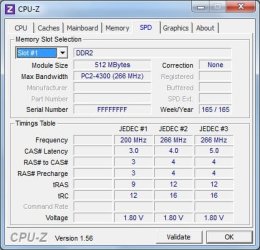
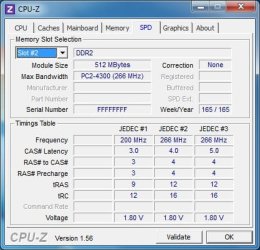
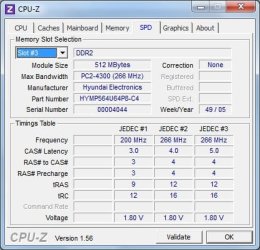
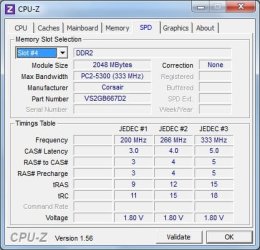
In the system, there are 3 sticks of 512mb, and the 2gb stick which was added most recently (this is the one I believe to be causing the problems.

If you act quickly I will try to examine the bsod report and see if it can be from memory.

I did this and attached the results, but the few BSODs that have occurred have all been different stop errors, and an automatic cleaning software deleted most of the error reports about an hour ago, I believe. There is only one minidump in the Windows\Minidump folder.
 

Attachments

My Computer My Computer

OS
Windows 7 Ultimate (x64) Service Pack 1
CPU
AMD Athlon 64 X2 Dual Core Processor 5600+ 2.80 GHz
Motherboard
GIGABYTE GA-M720-US3
Memory
4GB, Dual Channel, DDR2
Graphics Card(s)
NVIDIA GeForce 8600 GT
Sound Card
Creative SB X-Fi
Monitor(s) Displays
Dual Screen - Dell SE198WFP (19"), & GRUNDIG GU37BLKSE (37")
Screen Resolution
1440x900, 1600x1200
Hard Drives
Hitachi HDS722020ALA330 (2TB Internal), WD 15EADS (1.5TB External)
Keyboard
Microsoft Wireless Laser Keyboard 7000
Mouse
Microsoft Wireless Laser Mouse 7000
This is what I know. One report is rarely definitive, but this shows memory.
When there are many reports in a short period of time, it is usually hardware. In this situation memory is considered hardware.

Did you run the memory test for 8 passes?
 

My Computer My Computer

Computer type
PC/Desktop
Computer Manufacturer/Model Number
Dell XPS 420
OS
Windows 10, Home Clean Install
CPU
Intel Core2 processsor Q8200(2.33Ghz 1333FSB) Quad Core Tech
Motherboard
Dell
Memory
6 gb
Graphics Card(s)
ATI Radeon 256MB HD3650
Sound Card
Intergrated 7.1 Channel Audio
Monitor(s) Displays
Dell SP2009W 20"
Hard Drives
640 GB Serial ATA Hard drive
Cooling
Fan
Keyboard
Dell USB Keyboard
Mouse
Dell Premium Optical USB
Internet Speed
DSL 2.85
In the system, there are 3 sticks of 512mb, and the 2gb stick which was added most recently (this is the one I believe to be causing the problems.

Did you check your motherboard's manual on the proper configuration of this RAM setup? Most motherboards have a certain configuration they like the RAM run in when using different densities (2gig stick + 3 512 sticks).

And it really isn't a good idea to mix RAM like this, and it will cause problems.
 

My Computer My Computer

Computer type
PC/Desktop
Computer Manufacturer/Model Number
Custom built by me.
OS
Windows 10 Pro
CPU
Intel Core i7-4770K (3.5Ghz)
Motherboard
Gigabyte G1 Sniper 5 (F10 Bios)
Memory
32 gig Corsair Dominator Platinum (4x8Gig)
Graphics Card(s)
Sapphire Tri-X R9 Fury
Sound Card
Soundblaster ZXR
Monitor(s) Displays
NEC PA242W 24" LCD Monitor
Screen Resolution
1920 x 1200
Hard Drives
Primary - Samsung 850 Pro (512gig), Samsung 840 Pro (256gig), 2TB WD Caviar Black.
PSU
EVGA Supernova 1000 G2
Case
Cooler Master HAF X
Cooling
Corsair H100i with Corsair Air Series SP120 Quiet Fans
Keyboard
Logitech Wireless Wave
Mouse
Logitech Performance MX
Internet Speed
High Speed Cable
Antivirus
Norton Security
Browser
IE11
Other Info
Memory Timings - 1866MHz @ 9-9-9-27-1T @ 1.5 volts
Did you run the memory test for 8 passes?

Not at once, but I've definitely run a lot more than 8 passes, using various different tests.

Did you check your motherboard's manual on the proper configuration of this RAM setup? Most motherboards have a certain configuration they like the RAM run in when using different densities (2gig stick + 3 512 sticks).

I don't have a manual for the motherboard, but I'm looking for one online as we speak. I think I found one here (Foxconn Support - Download), but it won't let me download it. The icon that appears just says loading, and doesn't change.

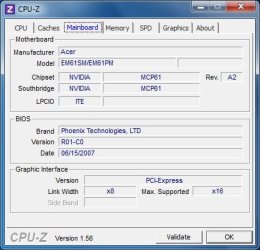
I've attached a screenshot of CPU-Z on the mainboard tab, if that helps.
 

Attachments

  • mainboard.jpg
    mainboard.jpg
    27.3 KB · Views: 0

My Computer My Computer

OS
Windows 7 Ultimate (x64) Service Pack 1
CPU
AMD Athlon 64 X2 Dual Core Processor 5600+ 2.80 GHz
Motherboard
GIGABYTE GA-M720-US3
Memory
4GB, Dual Channel, DDR2
Graphics Card(s)
NVIDIA GeForce 8600 GT
Sound Card
Creative SB X-Fi
Monitor(s) Displays
Dual Screen - Dell SE198WFP (19"), & GRUNDIG GU37BLKSE (37")
Screen Resolution
1440x900, 1600x1200
Hard Drives
Hitachi HDS722020ALA330 (2TB Internal), WD 15EADS (1.5TB External)
Keyboard
Microsoft Wireless Laser Keyboard 7000
Mouse
Microsoft Wireless Laser Mouse 7000
Everything point to ram problem
 

My Computer My Computer

Computer type
PC/Desktop
Computer Manufacturer/Model Number
Dell XPS 420
OS
Windows 10, Home Clean Install
CPU
Intel Core2 processsor Q8200(2.33Ghz 1333FSB) Quad Core Tech
Motherboard
Dell
Memory
6 gb
Graphics Card(s)
ATI Radeon 256MB HD3650
Sound Card
Intergrated 7.1 Channel Audio
Monitor(s) Displays
Dell SP2009W 20"
Hard Drives
640 GB Serial ATA Hard drive
Cooling
Fan
Keyboard
Dell USB Keyboard
Mouse
Dell Premium Optical USB
Internet Speed
DSL 2.85
I changed browser, and managed to download the manual. Am I looking for anything specific?

Everything point to ram problem

That's bad news. The system obviously runs better with it in (apart from the errors :P). Is there any action that can be taken to make it work as it should, or is it doomed to be removed?
 

My Computer My Computer

OS
Windows 7 Ultimate (x64) Service Pack 1
CPU
AMD Athlon 64 X2 Dual Core Processor 5600+ 2.80 GHz
Motherboard
GIGABYTE GA-M720-US3
Memory
4GB, Dual Channel, DDR2
Graphics Card(s)
NVIDIA GeForce 8600 GT
Sound Card
Creative SB X-Fi
Monitor(s) Displays
Dual Screen - Dell SE198WFP (19"), & GRUNDIG GU37BLKSE (37")
Screen Resolution
1440x900, 1600x1200
Hard Drives
Hitachi HDS722020ALA330 (2TB Internal), WD 15EADS (1.5TB External)
Keyboard
Microsoft Wireless Laser Keyboard 7000
Mouse
Microsoft Wireless Laser Mouse 7000

My Computer My Computer

Computer type
PC/Desktop
Computer Manufacturer/Model Number
Dell XPS 420
OS
Windows 10, Home Clean Install
CPU
Intel Core2 processsor Q8200(2.33Ghz 1333FSB) Quad Core Tech
Motherboard
Dell
Memory
6 gb
Graphics Card(s)
ATI Radeon 256MB HD3650
Sound Card
Intergrated 7.1 Channel Audio
Monitor(s) Displays
Dell SP2009W 20"
Hard Drives
640 GB Serial ATA Hard drive
Cooling
Fan
Keyboard
Dell USB Keyboard
Mouse
Dell Premium Optical USB
Internet Speed
DSL 2.85
So there is nothing that can be done to make the RAM work without error? BIOS settings, Windows settings, nothing? :(
 

My Computer My Computer

OS
Windows 7 Ultimate (x64) Service Pack 1
CPU
AMD Athlon 64 X2 Dual Core Processor 5600+ 2.80 GHz
Motherboard
GIGABYTE GA-M720-US3
Memory
4GB, Dual Channel, DDR2
Graphics Card(s)
NVIDIA GeForce 8600 GT
Sound Card
Creative SB X-Fi
Monitor(s) Displays
Dual Screen - Dell SE198WFP (19"), & GRUNDIG GU37BLKSE (37")
Screen Resolution
1440x900, 1600x1200
Hard Drives
Hitachi HDS722020ALA330 (2TB Internal), WD 15EADS (1.5TB External)
Keyboard
Microsoft Wireless Laser Keyboard 7000
Mouse
Microsoft Wireless Laser Mouse 7000
My only answer is there is nothing that I know that can be done.
It is very well known not to mix and match ram
 

My Computer My Computer

Computer type
PC/Desktop
Computer Manufacturer/Model Number
Dell XPS 420
OS
Windows 10, Home Clean Install
CPU
Intel Core2 processsor Q8200(2.33Ghz 1333FSB) Quad Core Tech
Motherboard
Dell
Memory
6 gb
Graphics Card(s)
ATI Radeon 256MB HD3650
Sound Card
Intergrated 7.1 Channel Audio
Monitor(s) Displays
Dell SP2009W 20"
Hard Drives
640 GB Serial ATA Hard drive
Cooling
Fan
Keyboard
Dell USB Keyboard
Mouse
Dell Premium Optical USB
Internet Speed
DSL 2.85
As has been stated, that's a bad combination you have there. I know it looks nice, but it's mixed and causing problems. With RAM being so cheap get a matched pair and lose the troubles :)

Peace :cool:
 

My Computer My Computer

Computer type
PC/Desktop
Computer Manufacturer/Model Number
Custom built by me.
OS
Windows 10 Pro
CPU
Intel Core i7-4770K (3.5Ghz)
Motherboard
Gigabyte G1 Sniper 5 (F10 Bios)
Memory
32 gig Corsair Dominator Platinum (4x8Gig)
Graphics Card(s)
Sapphire Tri-X R9 Fury
Sound Card
Soundblaster ZXR
Monitor(s) Displays
NEC PA242W 24" LCD Monitor
Screen Resolution
1920 x 1200
Hard Drives
Primary - Samsung 850 Pro (512gig), Samsung 840 Pro (256gig), 2TB WD Caviar Black.
PSU
EVGA Supernova 1000 G2
Case
Cooler Master HAF X
Cooling
Corsair H100i with Corsair Air Series SP120 Quiet Fans
Keyboard
Logitech Wireless Wave
Mouse
Logitech Performance MX
Internet Speed
High Speed Cable
Antivirus
Norton Security
Browser
IE11
Other Info
Memory Timings - 1866MHz @ 9-9-9-27-1T @ 1.5 volts
Since this isn't my machine, I didn't buy or install this RAM. I'll let the owner know the error of their ways. :P

So, in terms of removing RAM sticks, could someone determine which sticks need to be removed in order to achieve the maximum amount of functioning RAM left in the machine? The obvious answer would be to remove the 2gb stick, leaving 1.5gb, but is there not some combination where the 2gb stick can stay, and be functional? Perhaps remove the odd 512 stick? (two of the three 512 sticks are a pair, which came with the machine).

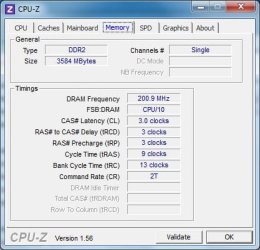
I've attached some screenshots from CPU-Z, if that helps.
 

Attachments

  • Slot 1.jpg
    Slot 1.jpg
    33.9 KB · Views: 1
  • Slot 2.jpg
    Slot 2.jpg
    34.3 KB · Views: 1
  • Slot 3.jpg
    Slot 3.jpg
    35.3 KB · Views: 1
  • Slot 4.jpg
    Slot 4.jpg
    34 KB · Views: 1
  • Memory.jpg
    Memory.jpg
    28.5 KB · Views: 0

My Computer My Computer

OS
Windows 7 Ultimate (x64) Service Pack 1
CPU
AMD Athlon 64 X2 Dual Core Processor 5600+ 2.80 GHz
Motherboard
GIGABYTE GA-M720-US3
Memory
4GB, Dual Channel, DDR2
Graphics Card(s)
NVIDIA GeForce 8600 GT
Sound Card
Creative SB X-Fi
Monitor(s) Displays
Dual Screen - Dell SE198WFP (19"), & GRUNDIG GU37BLKSE (37")
Screen Resolution
1440x900, 1600x1200
Hard Drives
Hitachi HDS722020ALA330 (2TB Internal), WD 15EADS (1.5TB External)
Keyboard
Microsoft Wireless Laser Keyboard 7000
Mouse
Microsoft Wireless Laser Mouse 7000
Remove the 2GB stick, run the system long enough to determine if your issues have stopped (I suspect so), leave the 2 GB stick out if so. RAM is indeed cheap, so buying matched RAM as per system compatibility is cheaper than taking your girlfriend to the movies :geek:. Here is a 'configurator' that will help you find compatible RAM:

Welcome to Corsair :: Memory Configurator

Buying compatible RAM also ensures the best, trouble free performance. The Acer system you mention will support up to 4 GB. However, only 64 bit will use all 4 GB. 32 bit will use about 3.25 GB.

James
 

My Computer My Computer

OS
Win7U 64 RTM
CPU
Q9550
Motherboard
GA-EP45-UD3R
Memory
8GB Gskill
Graphics Card(s)
ASUS|EAH4850/HTDI/1GD3/A
Sound Card
xfi Plat
Monitor(s) Displays
Dell 2405fpw
Screen Resolution
1920x1200
Hard Drives
Seagate & WD sata Drives
PSU
Antec
Case
Antec
Keyboard
MS Natural Ergonomic 4000
Mouse
Logitech MX610 USB Cordless
Your problem has been well pointed out but if you'll look at screenshot 3 and 4 you'll see the problem. Besides the size they are different speeds, sometimes you can get away with doing this but the faster ram will default to the lower speed.
In your case this is not working out for you.
Fabe
 

My Computer My Computer

Computer Manufacturer/Model Number
Self Built
OS
Windows 7 ultimate 64 bit / XP Home sp3
CPU
intel Core 2 Duo E8400 3.0ghz
Motherboard
Asus P5ND bios 1401
Memory
8 gigs 1066 OCZ Fata1ty
Graphics Card(s)
EVGA GTX 580 Call of Duty Black Ops Edition
Sound Card
Creative Soundblaster Audigy 2zs
Monitor(s) Displays
Asus 24in LCD's 2MS X2
Screen Resolution
1920x1080p @60Hz
Hard Drives
WD Caviar 500 Black/ WD Caviar 200 Blue
PSU
OCZ 700W GameXtreme
Case
NZXT Apollo
Cooling
Corsair H50 CPU/120mm x3 /60mm x2 /Corsair Dominator Ram
Keyboard
Logitech Bluetooth Wireless MX5000
Mouse
Logitech Bluetooth Wireless MX1000
Internet Speed
Download 19.83 Upload 0.97
Other Info
Logitech Z2300 Speakers/ Bose Noise Cancelling Headphones/Avermedia PCI-e Hybrid TV Bravo/Epson NX415 all in one/ 4 Port Powered USB Hub/ LG 10x Bluray Burner /TSST Corp DVDRW External
Fair enough. Thank you all for the assistance, sincerely. This is a great forum, with a very helpful and friendly community. :)
 

My Computer My Computer

OS
Windows 7 Ultimate (x64) Service Pack 1
CPU
AMD Athlon 64 X2 Dual Core Processor 5600+ 2.80 GHz
Motherboard
GIGABYTE GA-M720-US3
Memory
4GB, Dual Channel, DDR2
Graphics Card(s)
NVIDIA GeForce 8600 GT
Sound Card
Creative SB X-Fi
Monitor(s) Displays
Dual Screen - Dell SE198WFP (19"), & GRUNDIG GU37BLKSE (37")
Screen Resolution
1440x900, 1600x1200
Hard Drives
Hitachi HDS722020ALA330 (2TB Internal), WD 15EADS (1.5TB External)
Keyboard
Microsoft Wireless Laser Keyboard 7000
Mouse
Microsoft Wireless Laser Mouse 7000
Besides the size they are different speeds, sometimes you can get away with doing this but the faster ram will default to the lower speed.

Fabe hit the nail on the head. The 2gig stick makes no sense in this instance.
 

My Computer My Computer

Computer type
PC/Desktop
Computer Manufacturer/Model Number
Custom built by me.
OS
Windows 10 Pro
CPU
Intel Core i7-4770K (3.5Ghz)
Motherboard
Gigabyte G1 Sniper 5 (F10 Bios)
Memory
32 gig Corsair Dominator Platinum (4x8Gig)
Graphics Card(s)
Sapphire Tri-X R9 Fury
Sound Card
Soundblaster ZXR
Monitor(s) Displays
NEC PA242W 24" LCD Monitor
Screen Resolution
1920 x 1200
Hard Drives
Primary - Samsung 850 Pro (512gig), Samsung 840 Pro (256gig), 2TB WD Caviar Black.
PSU
EVGA Supernova 1000 G2
Case
Cooler Master HAF X
Cooling
Corsair H100i with Corsair Air Series SP120 Quiet Fans
Keyboard
Logitech Wireless Wave
Mouse
Logitech Performance MX
Internet Speed
High Speed Cable
Antivirus
Norton Security
Browser
IE11
Other Info
Memory Timings - 1866MHz @ 9-9-9-27-1T @ 1.5 volts
This might sound like a silly question, but why does it matter if the RAM is running slower than it should? Surely that would be a good thing, since it isn't working as hard, and putting too much pressure on performing?

Sorry, I'm just trying to learn. :P
 

My Computer My Computer

OS
Windows 7 Ultimate (x64) Service Pack 1
CPU
AMD Athlon 64 X2 Dual Core Processor 5600+ 2.80 GHz
Motherboard
GIGABYTE GA-M720-US3
Memory
4GB, Dual Channel, DDR2
Graphics Card(s)
NVIDIA GeForce 8600 GT
Sound Card
Creative SB X-Fi
Monitor(s) Displays
Dual Screen - Dell SE198WFP (19"), & GRUNDIG GU37BLKSE (37")
Screen Resolution
1440x900, 1600x1200
Hard Drives
Hitachi HDS722020ALA330 (2TB Internal), WD 15EADS (1.5TB External)
Keyboard
Microsoft Wireless Laser Keyboard 7000
Mouse
Microsoft Wireless Laser Mouse 7000
Well, you're right.... but then it's a waste of RAM, and issue could arise like the ones you're experiencing. That's the quick answer.

The long one can get complicated as it has to do with the way the motherboard deals with mismatched densities as well, which can impact performance of the other modules. That's why it's always better to match sets.
 

My Computer My Computer

Computer type
PC/Desktop
Computer Manufacturer/Model Number
Custom built by me.
OS
Windows 10 Pro
CPU
Intel Core i7-4770K (3.5Ghz)
Motherboard
Gigabyte G1 Sniper 5 (F10 Bios)
Memory
32 gig Corsair Dominator Platinum (4x8Gig)
Graphics Card(s)
Sapphire Tri-X R9 Fury
Sound Card
Soundblaster ZXR
Monitor(s) Displays
NEC PA242W 24" LCD Monitor
Screen Resolution
1920 x 1200
Hard Drives
Primary - Samsung 850 Pro (512gig), Samsung 840 Pro (256gig), 2TB WD Caviar Black.
PSU
EVGA Supernova 1000 G2
Case
Cooler Master HAF X
Cooling
Corsair H100i with Corsair Air Series SP120 Quiet Fans
Keyboard
Logitech Wireless Wave
Mouse
Logitech Performance MX
Internet Speed
High Speed Cable
Antivirus
Norton Security
Browser
IE11
Other Info
Memory Timings - 1866MHz @ 9-9-9-27-1T @ 1.5 volts
Back
Top