IP address conflicts

allend66

Brit on the lam...
Guru
Local time
11:49 PM
Messages
385
Location
The Mighty Maspujols, Spain
Hi, didn't know whether or not to post this in the network category, but here goes...

In a nutshell - sometimes 2 machines want to have the same IP address (192.168.1.36)

My setup is: Win7 HP x64 (main rig, wired + wifi) going to a 4 port wifi router that also connects a WinXP Pro x86 (now dedicated torrenter & jukebox, wired only), and an Xbox360 (wired only).

The router's address (default gateway) is 192.168.1.1. It assigns (or Win7 assigns) IP address to my main rig, ethernet (192.168.1.33) and wifi (192.168.1.34)

Then the WinXP box will want to assign itself 192.168.1.36, the same address as the Xbox. With all machines' settings at "automatic", I find it strange and frustrating that from a pool of 255 numbers to choose from I get a conflict. (Note: this is a combined wireless/4-port router, before I had a monoport modem (192.168.1.1) and a 4 port wifi router (192.168.2.1), but no problems, IP addresses started at 192.168.2.2 upto 192.168.2.6) Question 1 - Why do addresses start at 192.168.1.33, not at 192.168.1.2?

Now, I've already gone into the Xbox settings and instead of "automatic", I've selected "custom" and I've even input the same numbers (IP address, default gateway, DNS servers, submask) as the auto but it doesn't connect to Xbox Live!. Ok - I reset it to auto - fine.

Question 2 - I assume I can demand the WinXP to always use, for example, 192.168.1.99, leaving 192.168.1.36 for the Xbox? HOW? The problem only seems to happen if I turn something on after the others are booted and stable, typically both PCs are running, I boot the Xbox for a bit of gameage, the Xbox will rob the WinXP address and then I get the yellow exclamation triangle in the WinXP tray telling of a conflict of IP addresses.

Thank you for patience and help!
D
 

My Computer

Computer Manufacturer/Model Number
Toshiba Satellite L500
OS
Windows 7 Home Premium x64 OEM --> RTM clean install
CPU
Intel T4400
Motherboard
? - laptop inbuilt ?
Memory
4Gb
Graphics Card(s)
? - Mobile Intel(R) 4 Series Express Chipset Family ?
Sound Card
Realtek
Monitor(s) Displays
? + extended to a 42" LG55PC plasma tele!
Screen Resolution
1366 * 768
Hard Drives
320Gb 5500rpm
PSU
?
Case
?
Cooling
?
Internet Speed
3Meg, when it works.
Other Info
A LOWLY LAPTOP!
The router assigns IP addresses using DHCP. It sounds like your computer has been configured to use a static IP address that is inside the DHCP range of the router. If you ever set a static IP address on a computer you have to make sure that it's not in the block of IP addresses that the router will assign.

1) Have you configured your computer(s) to use static IP addresses? If so, why?
2) What is the make/model of your router?
 

My Computer

Computer Manufacturer/Model Number
Dell XPS 15 L502x
OS
Windows 7 Ultimate x64 SP1
CPU
Core i7-2670QM
Memory
8GB DDR3 PC3-10600
Graphics Card(s)
Intel HD Graphics 3000 + GeForce GT 540M
Screen Resolution
1920x1080
Hard Drives
1TB 5400RPM Seagate
Thanks for the reply kegobeer. I'm at work at the moment, so will postback info in 3 or 4 hours' time.

D
 

My Computer

Computer Manufacturer/Model Number
Toshiba Satellite L500
OS
Windows 7 Home Premium x64 OEM --> RTM clean install
CPU
Intel T4400
Motherboard
? - laptop inbuilt ?
Memory
4Gb
Graphics Card(s)
? - Mobile Intel(R) 4 Series Express Chipset Family ?
Sound Card
Realtek
Monitor(s) Displays
? + extended to a 42" LG55PC plasma tele!
Screen Resolution
1366 * 768
Hard Drives
320Gb 5500rpm
PSU
?
Case
?
Cooling
?
Internet Speed
3Meg, when it works.
Other Info
A LOWLY LAPTOP!
The router assigns IP addresses using DHCP. It sounds like your computer has been configured to use a static IP address that is inside the DHCP range of the router. If you ever set a static IP address on a computer you have to make sure that it's not in the block of IP addresses that the router will assign.

1) Have you configured your computer(s) to use static IP addresses? If so, why?
2) What is the make/model of your router?

OK, so I'm lost with DHCP - no idea what it is, or how it works.

1. I'm assuming by static you mean fixed, in which case I can tell you from ethernet properties --> Internet Protocol (TCP/IP) --> properties "Obtain IP address automatically" this was always checked (same with obtain DNS servers automatically). I have now unchecked these and put my required 192.168.1.99, with the same subnet mask 255.255.255.0 and my DNS servers 84.#.#.#). I have just set this to static to see if there are any conflicts...

2. Router is a ZyXEL P-660HW-D1. It was a free replacement from my ISP when my monoport modem died recently.

Thanks,
 

My Computer

Computer Manufacturer/Model Number
Toshiba Satellite L500
OS
Windows 7 Home Premium x64 OEM --> RTM clean install
CPU
Intel T4400
Motherboard
? - laptop inbuilt ?
Memory
4Gb
Graphics Card(s)
? - Mobile Intel(R) 4 Series Express Chipset Family ?
Sound Card
Realtek
Monitor(s) Displays
? + extended to a 42" LG55PC plasma tele!
Screen Resolution
1366 * 768
Hard Drives
320Gb 5500rpm
PSU
?
Case
?
Cooling
?
Internet Speed
3Meg, when it works.
Other Info
A LOWLY LAPTOP!
Go to your router's setting and make sure the DHCP server is enabled. One of your machines has a static ip address assigned. You can change this by going to START , CONTROL PANEL , NETWORK AND INTERNET, SHARING CENTER , CHANGE ADAPTER SETTINGS, RIGHT CLICK ON LAN OR WIRED CONNECTION, CLICK PRORTIES, CLICK INTERNET PROTOCOL VERSION 4, CLICK PROPORTIES, CLICK OBTAIN IP ADDRESS AUTOMATICLY AND DO THE SAME THING FOR THE DNS SERVER OPTION. (this may be different on the windows xp machine.)
 

My Computer

Computer Manufacturer/Model Number
HP
OS
Windows 7 profesional
Memory
4 Gigs
Monitor(s) Displays
Built in display
Hard Drives
1 280 gig
Case
N/A
Keyboard
Built in
Mouse
Built in
Internet Speed
100 mbps
@jhansen965 - yes, I've (temporarily?) put one machine as static IP because it would always fight for control over address 192.168.1.36.

Is static IP such a bad thing?? DHCP is enabled, though I don't know what it does.
 

My Computer

Computer Manufacturer/Model Number
Toshiba Satellite L500
OS
Windows 7 Home Premium x64 OEM --> RTM clean install
CPU
Intel T4400
Motherboard
? - laptop inbuilt ?
Memory
4Gb
Graphics Card(s)
? - Mobile Intel(R) 4 Series Express Chipset Family ?
Sound Card
Realtek
Monitor(s) Displays
? + extended to a 42" LG55PC plasma tele!
Screen Resolution
1366 * 768
Hard Drives
320Gb 5500rpm
PSU
?
Case
?
Cooling
?
Internet Speed
3Meg, when it works.
Other Info
A LOWLY LAPTOP!
@jhansen965 - yes, I've (temporarily?) put one machine as static IP because it would always fight for control over address 192.168.1.36.

Is static IP such a bad thing?? DHCP is enabled, though I don't know what it does.

DHCP: Dynamic Host Configuration Protocol - Wikipedia, the free encyclopedia

The router assigns IP addresses to any computer/device that connects to it.

Nothing is wrong with setting a static IP address. You just can't set a static IP address that is in the middle of the IP addresses your router "owns" and will assign to any computer that connects to it.

Download the manual for your router and read it. It will explain how to check DHCP. Set all of your computers to DHCP. Read this: How to enable DHCP in Windows 7? | Windows 7 Themes
 

My Computer

Computer Manufacturer/Model Number
Dell XPS 15 L502x
OS
Windows 7 Ultimate x64 SP1
CPU
Core i7-2670QM
Memory
8GB DDR3 PC3-10600
Graphics Card(s)
Intel HD Graphics 3000 + GeForce GT 540M
Screen Resolution
1920x1080
Hard Drives
1TB 5400RPM Seagate

My Computer

Computer Manufacturer/Model Number
Toshiba Satellite L500
OS
Windows 7 Home Premium x64 OEM --> RTM clean install
CPU
Intel T4400
Motherboard
? - laptop inbuilt ?
Memory
4Gb
Graphics Card(s)
? - Mobile Intel(R) 4 Series Express Chipset Family ?
Sound Card
Realtek
Monitor(s) Displays
? + extended to a 42" LG55PC plasma tele!
Screen Resolution
1366 * 768
Hard Drives
320Gb 5500rpm
PSU
?
Case
?
Cooling
?
Internet Speed
3Meg, when it works.
Other Info
A LOWLY LAPTOP!
Hi, didn't know whether or not to post this in the network category, but here goes...

In a nutshell - sometimes 2 machines want to have the same IP address (192.168.1.36)

My setup is: Win7 HP x64 (main rig, wired + wifi) going to a 4 port wifi router that also connects a WinXP Pro x86 (now dedicated torrenter & jukebox, wired only), and an Xbox360 (wired only).

The router's address (default gateway) is 192.168.1.1. It assigns (or Win7 assigns) IP address to my main rig, ethernet (192.168.1.33) and wifi (192.168.1.34)

Then the WinXP box will want to assign itself 192.168.1.36, the same address as the Xbox. With all machines' settings at "automatic", I find it strange and frustrating that from a pool of 255 numbers to choose from I get a conflict. (Note: this is a combined wireless/4-port router, before I had a monoport modem (192.168.1.1) and a 4 port wifi router (192.168.2.1), but no problems, IP addresses started at 192.168.2.2 upto 192.168.2.6) Question 1 - Why do addresses start at 192.168.1.33, not at 192.168.1.2?

Now, I've already gone into the Xbox settings and instead of "automatic", I've selected "custom" and I've even input the same numbers (IP address, default gateway, DNS servers, submask) as the auto but it doesn't connect to Xbox Live!. Ok - I reset it to auto - fine.

Question 2 - I assume I can demand the WinXP to always use, for example, 192.168.1.99, leaving 192.168.1.36 for the Xbox? HOW? The problem only seems to happen if I turn something on after the others are booted and stable, typically both PCs are running, I boot the Xbox for a bit of gameage, the Xbox will rob the WinXP address and then I get the yellow exclamation triangle in the WinXP tray telling of a conflict of IP addresses.

Thank you for patience and help!
D

Lots of confusing statements in your first paragraph which I highlighted in bold.

You say that you have Win7 machine going to your router?

This is a very confusing statement as the correct set up should be modem>router>Win7 machine and other machines or switch not the other way around. You can't have the Win7 machine before the modem or router.

You don't need to use static IP's for this set up. It will work fine using DHCP provided that everything is connected in the correct order.
 

My Computer

Computer type
PC/Desktop
Computer Manufacturer/Model Number
Home built
OS
Windows 7 Ult, Windows 8.1 Pro,
CPU
Q9650-4.275GHz, E8600 4.5GHz, E6750-3.8GHz
Motherboard
Evga 780i FTW
Memory
G.Skill PC2 9600 1200Mhz 5 5 5 15 2T
Graphics Card(s)
GTX480
Sound Card
Asus Xonar D2
Monitor(s) Displays
HannsG
Screen Resolution
1680X1050
Hard Drives
GSkill Phoenix Pro 120GB SSD
PSU
ThermalTake Toughpower 1000Watt modular
Case
ThermalTake XaserV
Cooling
Xigmatek S1283
Keyboard
Logitech G15
Mouse
Logitech G9
Internet Speed
T1
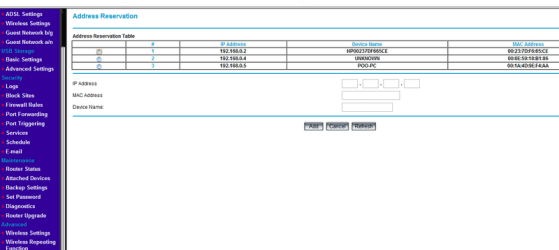
Alternatively you could assign the IP address in the router settings via the MAC address of each device, this way you would be guaranteed that each device would obtain an IP address that you decide before hand.
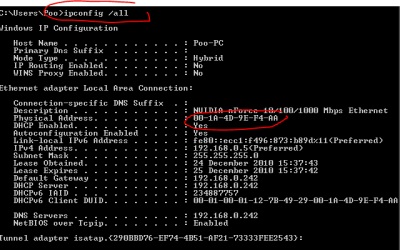
To find out the MAC address of your PC's open cmd and type ipconfig /all (see pic)
To find out the MAC address of your Xbox goto the advanced settings or look on the back of the unit (there should be a sticker) (see pic)
Once you have these just logo onto your router and under the LAN TCP/IP Setup you should be able to reserve the addresses you want. (see pic)

Your router settings will differ from mine but the concept is the same on most routers ;)

360_mac.jpg
 

Attachments

  • mac address.PNG
    mac address.PNG
    23.3 KB · Views: 27
  • tcpip setup.PNG
    tcpip setup.PNG
    94.3 KB · Views: 30
  • address reservation.PNG
    address reservation.PNG
    74.3 KB · Views: 25

My Computer

Computer type
PC/Desktop
Computer Manufacturer/Model Number
Self Built
OS
Windows 7 Ultimate 64bit
CPU
AMD Phenom Quad core 9950 black edition
Motherboard
Gigabyte
Memory
16Gb
Graphics Card(s)
2x XFX Radeon 5850
Sound Card
PCI Express X-Fi Titanium / Logitech G35
Monitor(s) Displays
2x HP 2410i
Screen Resolution
1920x1080
Hard Drives
2x 500Gb Seagate
1x 300Gb Seagate
1x 1Tb Seagate
2x 1Tb Hitatchi
PSU
Jean Tech Storm 700W
Case
Cooler Master COSMOS S
Cooling
Akasa Evo Blue Pro
Keyboard
Logitech G15
Mouse
Mad Catz M.M.O. 7
Internet Speed
12mb
Solved: IP address conflicts

Thanks a bunch, all!

Now that I've set the aggressive XP as static (.99) and the others as dynamic, it's been ok, so not wanting to mess it up when it's fine, I'll leave it as it is.

Oddly, I downloaded the user manual for my ZyXEL and none of the pictures in it resemble what I have in the web configurator. The menus are wrong too. I assumed it was a firmware update, tried to update and the router wouldn't accept the .bin file, so no joy in that regard, but as I say - everything seems to be working fine so consider this solved.

Thanks all
D
 

My Computer

Computer Manufacturer/Model Number
Toshiba Satellite L500
OS
Windows 7 Home Premium x64 OEM --> RTM clean install
CPU
Intel T4400
Motherboard
? - laptop inbuilt ?
Memory
4Gb
Graphics Card(s)
? - Mobile Intel(R) 4 Series Express Chipset Family ?
Sound Card
Realtek
Monitor(s) Displays
? + extended to a 42" LG55PC plasma tele!
Screen Resolution
1366 * 768
Hard Drives
320Gb 5500rpm
PSU
?
Case
?
Cooling
?
Internet Speed
3Meg, when it works.
Other Info
A LOWLY LAPTOP!
Back
Top