Hard Drive - why is 2 TB only 1.8 TB ??

What can be confusing.

Once you know decimal/binary difference for storage device labelling you just accept that's the way it is.

The confusion is more annoying when a technical reference is made to a device capacity.
eg. My BIOS can treat USB devices as "floppies" if less than 2GB and "HDD" if greater than 2GB.
Is it GB binary/technical notation or GB decimal/marketing notation?

The "Ripp off" complaint isn't an issue. Technical consistency can be annoying.
 

My Computer My Computer

At a glance

Windows 7x64 Home Premium SP1Intel i7 2600kG.Skill Ripjaws (DDR3-1600) 2x4GBNvidia GeForce GTS 450; Intel HD Graphics 300...
Computer type
PC/Desktop
Computer Manufacturer/Model Number
Own build
OS
Windows 7x64 Home Premium SP1
CPU
Intel i7 2600k
Motherboard
ASUS P8Z68 Deluxe
Memory
G.Skill Ripjaws (DDR3-1600) 2x4GB
Graphics Card(s)
Nvidia GeForce GTS 450; Intel HD Graphics 3000(GT2+)
Monitor(s) Displays
Dell Ultrasharp IPS panel U2311H, Samsung SyncMaster P2350
Screen Resolution
1920x1080
Hard Drives
Samsung 850 Pro SSD 256GB, Samsung SSD 840 120GB, Seagates 1TB Barracuda ST31000528AS x2
PSU
Seasonic M12II 520W
Case
Lian Li Lancool PC-K60
Cooling
Case: 1x120mm, 3x140mm CPU: Hyper 212+
Keyboard
Logitech MK520 (wireless)
Mouse
Logitech MK520
Internet Speed
6-7 Mbps
Antivirus
Norton Security Premium, Malwarebytes on 2 (MSE on 3rd PC)
Browser
FireFox
Other Info
Audio: Logitech Z523 2.1
Some of the discrepancy I believe has to do with with NTFS and how it locates or places files within a sector. Techies could either confirm or rebut this:D

Also, hard drives come with some amount of built in "firmware" that uses a certain amount of the drive reducing the amount of space available to the user.

In addition drives that come from the manufacturer may have a a factory installed "Recovery" feature which allows the user to reinstall the system at any time just at it came from the manufacturer. This is especially true on Netbooks and the like which do not come with a built in CD/DVD drive.

Then sometimes there are programs that come pre-installed from the manufacturer that use hard drive space but whose files are hidden and locked.

I know that hard drive and defragmenting technology have advanced significantly from when I worked for hard drive manufacturers years ago, but it used to be a rule of thumb that one should not use more than 60% - 70% of the available hard drive space that was available on the hard drive at the time that the computer or hard drive was purchased. The reason for this is because it used to be that if your hard drive was too full i.e. over say 65% of original user available capacity that defragging the hard drive would slow down exponentially as your usage of the available hard drive space exceeded 65% or thereabouts.

I would think that that may have changed but I still go by this rule of thumb. Actually I don't like to use more than than 50% of original available hard drive space. Hard drives are plenty cheap today so I like to leave lots of room on my hard drives just out of habit:D:D

Finally the way that hard drives used to handle read write routines affected the speed of writing and reading a drive depending on how much of the hard drive was being used. Since hard drives use mechanical parts as opposed to SSD drives the farther that the read write heads have to travel on the drive and the more that they have to travel due to excessive fragmenting the slower your read and write speeds would be on the hard drive.
 

My Computer My Computer

At a glance

Windows 7 Home Premium 64bitAthlon XII4GBATI Radeon 4200
Computer Manufacturer/Model Number
Dell 570MT
OS
Windows 7 Home Premium 64bit
CPU
Athlon XII
Motherboard
?
Memory
4GB
Graphics Card(s)
ATI Radeon 4200
Sound Card
?
Monitor(s) Displays
Asus and Dell
Hard Drives
Unknown
PSU
unknown
Case
unknown
Cooling
unknown
It is unbelievable how much discussion there can be about a simple mathematical conversion from decimal to binary. But it is interesting to see which theories are being forwarded - all wrong of course - LOL.

Reminds me the guy who came first time to Germany, rented a car at the airport and was wondering why he was going so slowly at 100 on the Autobahn. He did not realize that he was going 100kmh and not 100mph.
 

My Computer My Computer

At a glance

Vista, Windows7, Mint Mate, Zorin, Windows 8from 1.6GHz Duo to i7
Computer Manufacturer/Model Number
HP, Dell, Gateway, Toshiba - 4 laptops and 2 desktops
OS
Vista, Windows7, Mint Mate, Zorin, Windows 8
CPU
from 1.6GHz Duo to i7
Monitor(s) Displays
2x HP w2207
Hard Drives
5x HDD, 7x SSD, 12x Externals
Keyboard
with trackball - no mices
Mouse
Trackball mice
Internet Speed
DSL 6000
It is unbelievable how much discussion there can be about a simple mathematical conversion from decimal to binary. But it is interesting to see which theories are being forwarded - all wrong of course - LOL.

Reminds me the guy who came first time to Germany, rented a car at the airport and was wondering why he was going so slowly at 100 on the Autobahn. He did not realize that he was going 100kmh and not 100mph.

I definitely know that my entire theory was correct years ago with regard to the read/write heads movement, file placement on the hard drive and fragmented files and that parts of my theory if not all if are true today, straight up for a fact:D

If you would care to dispute my points one by one be my guess and lets have it.:)
 

My Computer My Computer

At a glance

Windows 7 Home Premium 64bitAthlon XII4GBATI Radeon 4200
Computer Manufacturer/Model Number
Dell 570MT
OS
Windows 7 Home Premium 64bit
CPU
Athlon XII
Motherboard
?
Memory
4GB
Graphics Card(s)
ATI Radeon 4200
Sound Card
?
Monitor(s) Displays
Asus and Dell
Hard Drives
Unknown
PSU
unknown
Case
unknown
Cooling
unknown
It is unbelievable how much discussion there can be about a simple mathematical conversion from decimal to binary. But it is interesting to see which theories are being forwarded - all wrong of course - LOL.

Reminds me the guy who came first time to Germany, rented a car at the airport and was wondering why he was going so slowly at 100 on the Autobahn. He did not realize that he was going 100kmh and not 100mph.

I definitely know that my entire theory was correct years ago with regard to the read/write heads movement, file placement on the hard drive and fragmented files and that parts of my theory if not all if are true today, straight up for a fact:D

If you would care to dispute my points one by one be my guess and lets have it.:)
That drive was completely empty.
 

My Computer My Computer

At a glance

Vista, Windows7, Mint Mate, Zorin, Windows 8from 1.6GHz Duo to i7
Computer Manufacturer/Model Number
HP, Dell, Gateway, Toshiba - 4 laptops and 2 desktops
OS
Vista, Windows7, Mint Mate, Zorin, Windows 8
CPU
from 1.6GHz Duo to i7
Monitor(s) Displays
2x HP w2207
Hard Drives
5x HDD, 7x SSD, 12x Externals
Keyboard
with trackball - no mices
Mouse
Trackball mice
Internet Speed
DSL 6000
It is unbelievable how much discussion there can be about a simple mathematical conversion from decimal to binary. But it is interesting to see which theories are being forwarded - all wrong of course - LOL.

Reminds me the guy who came first time to Germany, rented a car at the airport and was wondering why he was going so slowly at 100 on the Autobahn. He did not realize that he was going 100kmh and not 100mph.

I definitely know that my entire theory was correct years ago with regard to the read/write heads movement, file placement on the hard drive and fragmented files and that parts of my theory if not all if are true today, straight up for a fact:D

If you would care to dispute my points one by one be my guess and lets have it.:)
That drive was completely empty.

It is never completely empty even after formatting.

There should be a some firmware or software on a protected section of the drive that you can not see. That stuff is placed there by the hard drive manufacturer to do what it does to make the drive work. This is besides a protected section of the drive that is used to store the factory system recovery software and settings that may be placed there by the hard drive manufacturer. Even without the latter you will always have the former even if you can't see it. If it wasn't there your hard drive could not work.:(
 

My Computer My Computer

At a glance

Windows 7 Home Premium 64bitAthlon XII4GBATI Radeon 4200
Computer Manufacturer/Model Number
Dell 570MT
OS
Windows 7 Home Premium 64bit
CPU
Athlon XII
Motherboard
?
Memory
4GB
Graphics Card(s)
ATI Radeon 4200
Sound Card
?
Monitor(s) Displays
Asus and Dell
Hard Drives
Unknown
PSU
unknown
Case
unknown
Cooling
unknown
There should be a some firmware or software on a protected section of the drive that you can not see
20 Gigabytes worth?
 

My Computer My Computer

At a glance

Vista, Windows7, Mint Mate, Zorin, Windows 8from 1.6GHz Duo to i7
Computer Manufacturer/Model Number
HP, Dell, Gateway, Toshiba - 4 laptops and 2 desktops
OS
Vista, Windows7, Mint Mate, Zorin, Windows 8
CPU
from 1.6GHz Duo to i7
Monitor(s) Displays
2x HP w2207
Hard Drives
5x HDD, 7x SSD, 12x Externals
Keyboard
with trackball - no mices
Mouse
Trackball mice
Internet Speed
DSL 6000
There should be a some firmware or software on a protected section of the drive that you can not see
20 Gigabytes worth?

If you have a hard drive that is a a couple of yottabytes you might 20 Gigabytes worth:)
 

My Computer My Computer

At a glance

Windows 7 Home Premium 64bitAthlon XII4GBATI Radeon 4200
Computer Manufacturer/Model Number
Dell 570MT
OS
Windows 7 Home Premium 64bit
CPU
Athlon XII
Motherboard
?
Memory
4GB
Graphics Card(s)
ATI Radeon 4200
Sound Card
?
Monitor(s) Displays
Asus and Dell
Hard Drives
Unknown
PSU
unknown
Case
unknown
Cooling
unknown
You need a calculator. Whenever I wanted to install a 50 Gb partition, I did the following math.

50 x 24 = 1200

50,000 + 1200 = 51,200

To create a 50 Gb partition, I used 51,208 to format.
No not 50,000, but 51200 or 51208.

The magic number being 24.

Drives sizes are so large these days that, I don't miss anything.
There's more than enough space for data, movies or music.
If not, I'll just buy another drive.

Like it was said earlier, if you think about it too long, you'll go mad.
It is what it is.

why don't you just do 50x1024? this way it is just 1 step.

Also, back in my Amiga days, the the formatted capacity of a drive on the Amiga gave more space than an MS-Dos formatted drive.
Floppies were 1.44MB on PC and 1.78MB on the Amiga (720K and 880K for DD disks)
 

My Computer My Computer

At a glance

Windows 7 Ultimate 64bitIntel i7 3770K16GB DDR3 1333 Corsair XMS3XFX HD6950 2GB EyeFinity
Computer Manufacturer/Model Number
HAL-9000
OS
Windows 7 Ultimate 64bit
CPU
Intel i7 3770K
Motherboard
Asus Sabertooth Z77
Memory
16GB DDR3 1333 Corsair XMS3
Graphics Card(s)
XFX HD6950 2GB EyeFinity
Sound Card
Logitech G35 & Sennheiser PC135 & VIA HD
Monitor(s) Displays
23" HP 2310e, 23" Samsung B2230, 21.5" Viewsonic
Screen Resolution
5760x1080
Hard Drives
16TB of Storage
128GB & 256GB Crucial M4 SSD's, 2X 1TB WD Black, 3x 2TB WD, 3x 2TB Samsung F4, 1.5TB Seagate, WD 500GB,
PSU
Antec True Power New 650watt
Case
Cooler Master HAF-932
Cooling
Corsair H60 Hydro Cooler, 3x 230mm Fans, 2x120mm Fan
Keyboard
Logitech G15 and G13
Mouse
Logitech G700 Gaming Mouse
Internet Speed
50/10 Mbit
Other Info
Speakers : Alesis M1 Active Mk2 Studio Monitors , APC RS 1200 UPS, HP 4500DN Color Laser, HP P1006 mono Laser, Kodak 8500 Dye-Sub, Epson 1280 inkjet, Epson Worforce 610 MFC

My Computer My Computer

At a glance

Vista, Windows7, Mint Mate, Zorin, Windows 8from 1.6GHz Duo to i7
Computer Manufacturer/Model Number
HP, Dell, Gateway, Toshiba - 4 laptops and 2 desktops
OS
Vista, Windows7, Mint Mate, Zorin, Windows 8
CPU
from 1.6GHz Duo to i7
Monitor(s) Displays
2x HP w2207
Hard Drives
5x HDD, 7x SSD, 12x Externals
Keyboard
with trackball - no mices
Mouse
Trackball mice
Internet Speed
DSL 6000

My Computer My Computer

At a glance

Windows 7 Home Premium 64bitAthlon XII4GBATI Radeon 4200
Computer Manufacturer/Model Number
Dell 570MT
OS
Windows 7 Home Premium 64bit
CPU
Athlon XII
Motherboard
?
Memory
4GB
Graphics Card(s)
ATI Radeon 4200
Sound Card
?
Monitor(s) Displays
Asus and Dell
Hard Drives
Unknown
PSU
unknown
Case
unknown
Cooling
unknown
Sorry, Buddahfan, with all due respect, 99.9999 percent of the discrepancy one sees from buying a 2 TB drive and only realizing 1.8 TB is from the mathematical conversion, as has been mentioned here at least ... what ... 20 times ...

I believe you're thinking of sector use and actual storage capacity based on individual file sizes. That will not change the reported size of the HD.
 

My Computer My Computer

At a glance

Windows 7 Ultimate x64 SP1Core2 Duo4 GBGM965 on-board
Computer Manufacturer/Model Number
Toshiba L355D
OS
Windows 7 Ultimate x64 SP1
CPU
Core2 Duo
Motherboard
Intel
Memory
4 GB
Graphics Card(s)
GM965 on-board
Sound Card
RealTek on-board
Monitor(s) Displays
19"+17"(laptop)
Screen Resolution
1440x900 (x 2)
Hard Drives
500GB Ext. 200GB Internal
PSU
N/A
Case
N/A
Cooling
N/A
..the discrepancy one sees from buying a 2 TB drive and only realizing 1.8 TB is from the mathematical conversion, as has been mentioned here at least ... what ... 20 times ...

Or 15 in new money :D
 

My Computer My Computer

At a glance

Windows 7 Home Premium x64 OEM --> RTM clean ...Intel T44004Gb? - Mobile Intel(R) 4 Series Express Chipset ...
Computer Manufacturer/Model Number
Toshiba Satellite L500
OS
Windows 7 Home Premium x64 OEM --> RTM clean install
CPU
Intel T4400
Motherboard
? - laptop inbuilt ?
Memory
4Gb
Graphics Card(s)
? - Mobile Intel(R) 4 Series Express Chipset Family ?
Sound Card
Realtek
Monitor(s) Displays
? + extended to a 42" LG55PC plasma tele!
Screen Resolution
1366 * 768
Hard Drives
320Gb 5500rpm
PSU
?
Case
?
Cooling
?
Internet Speed
3Meg, when it works.
Other Info
A LOWLY LAPTOP!
Also, hard drives come with some amount of built in "firmware" that uses a certain amount of the drive reducing the amount of space available to the user.
Well, it's not worth several GB for sure.
It's true that there is a reserved space on disks (to store SMART data for example, or to hold spare sectors for re-allocations), but it doesn't influence the actual disk size by the big difference you mean.

I think that the producers are right to say a disk with 1,000,000,000,000 bytes is a 1TB disk.
At least, the kilo, mega, giga, tera prefixes are used to refer to 10^x bytes (for the sake of ease, probably, rather than to try fooling the acquirers).

If you want to know the exact size of the disk, you better rely on gibibytes instead of gigabytes. I more or less use the method explained by p5bdkw to decide partition sizes myself.
 

My Computer My Computer

At a glance

Windows 10 1703intel Core i7 92012GB DDR3 Corsair XMS3Sapphire AMD R9 270X
Computer type
PC/Desktop
Computer Manufacturer/Model Number
I've made it myself :)
OS
Windows 10 1703
CPU
intel Core i7 920
Motherboard
ASUS P6T
Memory
12GB DDR3 Corsair XMS3
Graphics Card(s)
Sapphire AMD R9 270X
Sound Card
onboard
Monitor(s) Displays
My living room TV
Screen Resolution
Too high for that card
Hard Drives
If they're that hard, why do they break so often?
PSU
LC Power GP3 650W
Case
CoolerMaster Centurion
Cooling
Still lots of fans :(
Keyboard
Logitech K400r
Mouse
Mice are overrated
Internet Speed
I'd rather use travelling pigeons

Attachments

  • brys_2010.12.24_11h41m16s_006.png
    brys_2010.12.24_11h41m16s_006.png
    37.4 KB · Views: 30
  • brys_2010.12.24_11h40m35s_005.png
    brys_2010.12.24_11h40m35s_005.png
    13.4 KB · Views: 13
  • brys_2010.12.24_11h42m26s_007.png
    brys_2010.12.24_11h42m26s_007.png
    30.1 KB · Views: 38

My Computer My Computer

At a glance

Operating System : Windows 7 Home Premium Edi...Processor : Intel Core 2 Quad Q8300 @ 2500 MHzPhysical Memory :8GB Corsair4x 2GB 800MHz C5 ...Video Card : XFX 6700 AMD
Computer Manufacturer/Model Number
packard bell IXTREME M5722
OS
Operating System : Windows 7 Home Premium Edition 6.01.7600 SP1 (x64)
CPU
Processor : Intel Core 2 Quad Q8300 @ 2500 MHz
Motherboard
Mainboard : Packard Bell (Acer EG43M )
Memory
Physical Memory :8GB Corsair4x 2GB 800MHz C5 DDR2
Graphics Card(s)
Video Card : XFX 6700 AMD
Monitor(s) Displays
Maestro 234DL - BenQ V2220 - BenQ VW2420H
Screen Resolution
Current Display :1920x1080p pixels at 60 Hz in HD LED
Hard Drives
Hard Disks : WDC (1000 GB)
Drive C: (Hard Disk) : 428 GB available on 491 GB
Drive D: (Hard Disk) : 426 GB available on 492 GB
SAMSUNG spinpoint HD103SJ 1000.2 GB
(X 2) KINGSTON SSD NOW V 30GB
PSU
XFX ProSeries 550W PSU
Case
PACKARD BELL IXTREME
Cooling
System Blower Current: 150mA Air Flow16CFM ;Akasa 90mm rear
Keyboard
Gigabyte Aivia K8100
Mouse
TRUST-Wireless Laser Mouse - Carbon edition MI-7770C
Internet Speed
TP-LINK > TL-WN951N / AV500 Gigabit Powerline Adapters
Browser
chrome dev
Other Info
EXTRA COOLING>(FAN CONTROLLER) PC Bay Cooler 3 x 40mm fans; Akasa AK-HD-BL Blue hard drive cooler 2 x 40 mm fan 4500 rpm 29.7 dBA
Bios> American Megatrends Inc.
Version : P01-A1
Date : 08/31/2009
Sorry, Buddahfan, with all due respect, 99.9999 percent of the discrepancy one sees from buying a 2 TB drive and only realizing 1.8 TB is from the mathematical conversion, as has been mentioned here at least ... what ... 20 times ...

I believe you're thinking of sector use and actual storage capacity based on individual file sizes. That will not change the reported size of the HD.
I think he got the idea - he just does not want to admit it. But in the meantime, we had some fun. :)
 

My Computer My Computer

At a glance

Vista, Windows7, Mint Mate, Zorin, Windows 8from 1.6GHz Duo to i7
Computer Manufacturer/Model Number
HP, Dell, Gateway, Toshiba - 4 laptops and 2 desktops
OS
Vista, Windows7, Mint Mate, Zorin, Windows 8
CPU
from 1.6GHz Duo to i7
Monitor(s) Displays
2x HP w2207
Hard Drives
5x HDD, 7x SSD, 12x Externals
Keyboard
with trackball - no mices
Mouse
Trackball mice
Internet Speed
DSL 6000
Sorry, Buddahfan, with all due respect, 99.9999 percent of the discrepancy one sees from buying a 2 TB drive and only realizing 1.8 TB is from the mathematical conversion, as has been mentioned here at least ... what ... 20 times ...

I believe you're thinking of sector use and actual storage capacity based on individual file sizes. That will not change the reported size of the HD.
I think he got the idea - he just does not want to admit it. But in the meantime, we had some fun. :)

It does seem that it is some mathematical wizardry that is causing this difference:D

I just loaded "MiniTool Partition Wizard Home Edition" which I use to create and re-size partitions on my computers.

I have two hard drives, internal and external, on all of my computers.

I checked one of the computers which has a 500GB and a 1TB external, drive on it. The HDs are from different manufacturers.

For the 500GB hard drive MTPW is showing 465.8 GB
For the 1TB hard drive MTPW is showing 931.5 GB

So both drives are showing exactly 93.15% of the 500GB and 1TB.:D

So what is the mathematical wizardry that gets us to the 93.15% number
.

Here is the answer.
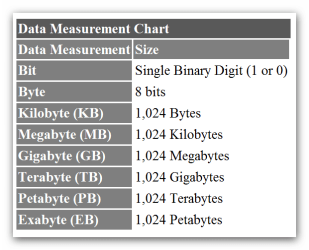
This question comes up fairly frequently, and it doesn't have anything to do with the operating system. The problem is this: In Windows Explorer and other software applications, terms like megabyte and gigabyte refer to powers of 2, while in the hardware industry they tend to refer to powers of 10. One kilobyte in software is 2 to the 10th power, or 1,024 bytes. In hardware it's 10 to the 3rd power, or 1,000 bytes. The discrepancy mounts as sizes go up, as the table shows.
Take away 6.87 percent of your drive's stated capacity of 20GB and you get 18.6GB. If you could purchase a 1-terabyte drive, its actual capacity would be short by nearly a tenth of the capacity it would have had if measured in binary terabytes
Drive Capacity Discrepancy

1000/1024 = .97656.

.97656 to the 3rd power = 93.13%

Bingo - Resolved:D

Threads like this are why I love computer forums. Even an old goat like me can learn something new:D:D
 

My Computer My Computer

At a glance

Windows 7 Home Premium 64bitAthlon XII4GBATI Radeon 4200
Computer Manufacturer/Model Number
Dell 570MT
OS
Windows 7 Home Premium 64bit
CPU
Athlon XII
Motherboard
?
Memory
4GB
Graphics Card(s)
ATI Radeon 4200
Sound Card
?
Monitor(s) Displays
Asus and Dell
Hard Drives
Unknown
PSU
unknown
Case
unknown
Cooling
unknown
The mathmatical part is a given, but one does have to wonder why drive manufacturer's continue to rate capacities as x1000 when the majority of use will be for OS's that use x1024 (which is the actual usable capacity). It strikes me that 'integrity in marketing' would dictate listing the 'user usable capacity' on the box.

Is there some valid reasoning behind this?

James
 

My Computer My Computer

At a glance

Win7U 64 RTMQ95508GB GskillASUS|EAH4850/HTDI/1GD3/A
OS
Win7U 64 RTM
CPU
Q9550
Motherboard
GA-EP45-UD3R
Memory
8GB Gskill
Graphics Card(s)
ASUS|EAH4850/HTDI/1GD3/A
Sound Card
xfi Plat
Monitor(s) Displays
Dell 2405fpw
Screen Resolution
1920x1200
Hard Drives
Seagate & WD sata Drives
PSU
Antec
Case
Antec
Keyboard
MS Natural Ergonomic 4000
Mouse
Logitech MX610 USB Cordless
It strikes me that 'integrity in marketing' would dictate listing the 'user usable capacity' on the box.

Is there some valid reasoning behind this?

James

The reasoning is utterly valid.

"Integrity in marketing"

A non sequitur if ever I heard one and surely you jest.

Marketing 101 states that if 4 is good, then 5 is better.

If a 100 Watt stereo system is good, then surely a 200 Watt stereo system is better. Witness any audio retailer advertisement.

It follows that if 1000 is good, then 1024 is better, if .9313 is good, then 1.000 is better, and if 465 GB is good, then 500 GB is better.

Ad vomitum.

The measuring method is used because it is thought to be effective---a certain unknown percentage of rubes would shy away from a drive advertised at 465 GB and buy the adjacent drive measured at 500 GB, even though they have the same usable capacity.

The measuring method will be abandoned when it is thought not to be effective or when it is outlawed. Neither are on the horizon.

Can you imagine WD adopting the measuring method that yields 465 GB while Seagate continues to use the method that yields 500 GB? It won't happen as long as WD believes the rube census is greater than zero.
 

My Computer My Computer

At a glance

Windows 7 Home Premium SP1, 64-bitIntel Skylake i5-6600K, not overclocked8 GB HyperX DDR4-2666 (2 x 4 GB)none; graphics are integrated on CPU
Computer type
PC/Desktop
Computer Manufacturer/Model Number
Ignatz Special; 4 speed manual gearbox; factory air conditioning; one of one
OS
Windows 7 Home Premium SP1, 64-bit
CPU
Intel Skylake i5-6600K, not overclocked
Motherboard
AsRock Z170M Extreme 4, micro ATX
Memory
8 GB HyperX DDR4-2666 (2 x 4 GB)
Graphics Card(s)
none; graphics are integrated on CPU
Sound Card
onboard: Realtek ALC1150; external: USB Behringer UF0-202
Monitor(s) Displays
Dell S2340M 23 inch IPS
Screen Resolution
1600 x 900
Hard Drives
System: Crucial MX100 series SSD, 128 GB;
Data: Samsung Spinpoint 103SJ, 1 TB;
Backup: WD Caviar Green WD30EZRX-00D8PB0, 3 TB
PSU
Rosewill SilentNight 500 watt fanless, semi-modular
Case
Antec Solo II
Cooling
Noctua NH-U12S; Noctua F12 intake, Noctua S12A exhaust
Keyboard
Microsoft 200 6JH-00001 USB
Mouse
Dell or Microsoft optical wired; USB
Antivirus
Microsoft Security Essentials and Malwarebytes Premium
Browser
Pale Moon
Other Info
All fans PWM; speeds at idle: CPU circa 500 rpm; intake circa 600 rpm; exhaust circa 600 rpm; CPU temps 27 idle and 47 C load in a warm room (27 C/81 F) when running Intel Extreme Tuning Utility stress test.
The mathmatical part is a given, but one does have to wonder why drive manufacturer's continue to rate capacities as x1000 when the majority of use will be for OS's that use x1024 (which is the actual usable capacity). It strikes me that 'integrity in marketing' would dictate listing the 'user usable capacity' on the box.

Is there some valid reasoning behind this?

James

Actually a 1 TB drive is only 1000/1024 to the fourth power so the available space in binary is only .9095TB.

So why does software show the available space as 931.5GB which is 1000/1024 to the 3rd power?

My guess is because it is easier to understand in GB which comes out to 931.35GB on a 1TB drive rather than showing drive size as .9095TB.

In addition to the non mathematically inclined .9095TB does not seem very large:):)

Hard Drive manufacturers use the SI Prefixes or the International System of Units

The International System of Units (SI) specifies a set of unit prefixes known as SI prefixes or metric prefixes. An SI prefix is a name that precedes a basic unit of measure to indicate a decadic multiple or fraction of the unit. Each prefix has a unique symbol that is prepended to the unit symbol. The SI prefixes are standardized by the International Bureau of Weights and Measures (IBWM)in resolutions dating from 1960 to 1991.[1] Their usage is not limited to SI units and many of these date back to the introduction of the metric system in the 1790s.
SI prefixes are used to reduce the number of zeros shown in numerical quantities before or after a decimal point. For example, an electrical current of 0.000000001ampere, or one-billionth (short scale) of an ampere, is written by using the SI-prefix nano as 1nanoampere or 1nA.
It could be a marketing thing.

The SI prefix is also correct in terms of metric prefixes which is easier for people to understand.

How Large is a Megabyte or a Gigabyte?

Disk Drive manufacturers have always used the more proper (you could even say correct or true) definitions of Mega and Giga in reference to the byte-capacity of their drives. Along with virtually all technical organizations in the world (including the Standards Board of the IEEE), they use the
offsite.gif
International System of Units ([FONT=Verdana, Arial, Helvetica, sans-serif]SI
) which defines a Megabyte as exactly 1 x 10[FONT=Verdana, Arial, Helvetica, sans-serif]^[/FONT]6 bytes (1,000,000 bytes) and a Gigabyte as exactly 1 x 10[FONT=Verdana, Arial, Helvetica, sans-serif]^[/FONT]9 bytes (1,000,000,000 bytes). Of course, this doesn't mean that a sales blurb will give the exact capacity of an HDD (it may only be rounded up or down to the nearest one or two digits); usually the drive case will have a label giving the correct size in 512-byte sectors.[/FONT]

In contrast to the world of disk drives, Memory chip manufacturers had a basic problem with the SI prefixes, since electronic computer Memory has always been based on the Binary system! When computer Memory was rather small, engineers and technicians began to refer to a Kilobyte of Memory as the nearest value to 1 Kilo (or 1000) for a power of two. The differences were fairly easy to compute back then: A Kilobyte of Memory was not 1000 bytes, but rather 1024 bytes, since 2[FONT=Verdana, Arial, Helvetica, sans-serif]^10 is 1024. This became a bit more complicated when Memory sizes reached a "Megabyte" of 2[FONT=Verdana, Arial, Helvetica, sans-serif]^[/FONT]20 which is not 1,000,000 bytes, but rather 1,048,576 (1024 x 1024) bytes. Now there are hundreds of "Megabytes" of memory being used in home computers and even "Gigabytes" in large servers[/FONT]! These Binary "Gigabytes" of Memory are equivalent to 2[FONT=Verdana, Arial, Helvetica, sans-serif]^30 (or 1024 x 1024 x 1024 bytes) which gives us: 1,073,741,824 bytes.

The prefixes used on this page follow [FONT=Verdana, Arial, Helvetica, sans-serif]SI[/FONT] system usage; or will state specifically that they refer to the “Binary” (power of two) format. In time, people should eventually start to use the new terms MiB and GiB to represent Binary-Megabytes and Binary-Gigabytes (see the essay
offsite.gif
Prefixes for Binary Multiples” ).
[/FONT]
When I open Windows Task Manager it shows the amount physical memory as 3,838MB

1000/1024 to the second power (because it is shown in MB) times 4 =3,815MB

Difference of 23MB due to rounding:)
 

My Computer My Computer

At a glance

Windows 7 Home Premium 64bitAthlon XII4GBATI Radeon 4200
Computer Manufacturer/Model Number
Dell 570MT
OS
Windows 7 Home Premium 64bit
CPU
Athlon XII
Motherboard
?
Memory
4GB
Graphics Card(s)
ATI Radeon 4200
Sound Card
?
Monitor(s) Displays
Asus and Dell
Hard Drives
Unknown
PSU
unknown
Case
unknown
Cooling
unknown
Back
Top