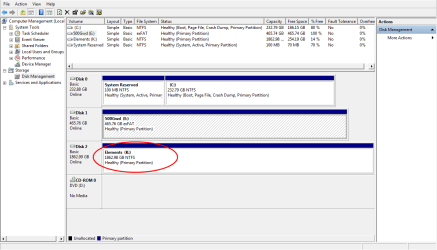
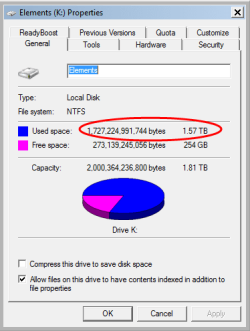
hello,
I have been using my WD 2tb for over 4 years now as second drive, 2 days ago due to a usb port of my laptop being little loose, when I move my laptop a little, I noticed the usb cable disconnected/connected from my external usb hard drive, ( heard ding/dang as the result of something connected/disconnected) after that the Drive did not show in my computer, looked at Disk management tool it shows, it needs to be initialized and the disk is unallocated.
I am running Win 7 ultimate, 32 bit on Toshiba M300, having intel core duo cpu p8600 2.4GHz, 2 GB ram
and WD 2tb Drive is as my second drive, ( P/N: WDBU6Y0020BBK-05)
here is pics from Disk management tool when I check the disk:
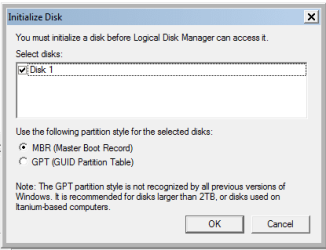
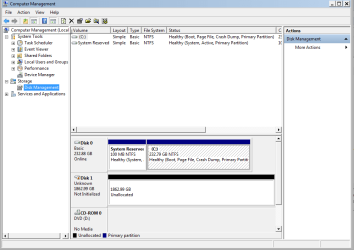
since the beginning of using this hard dive, I have not reformat it, and it is formatted as 32 bit, as much as I remember ,it has only one partition.
it is being used as storage of my files, different kind of files, MS doc, excel, pp, pdf, family pictures, videos, backups, and more., unfortunately I do not have any backup of them, it is all my life in it, I did have a plan to move most important files into anther external 500 GB empty hd I have, but I just keep delaying it, stupid of me.
I believe that 1.2 to 1.4 tb is been used.
before doing anything I kept reading forums, and see what other people did with the same problem,
I have not initialize nor repartition the drive, I have used some software to see if I can repair the damaged partition, but I have not written anything on the drive yet.
these are the software I have tried:
Free edition of MiniTool Partition Wizard-pw11-, testDisk, EaseUs Data Recovery Wizard, AOMEI Partition Assistant,GetDataback simple.
all of them taking so much time for search the drive, that is little odd about time consuming, when it shows how much sectors have searched out of the total number sectors (about 3,906,963,456 sectors), a little of calculation, it shows that it takes more than one year to finish the searching, so after running them for hours, or over night and seeing the process not reaching 1%, I canceled the action.
couple of hours ago I installed GetDataback simple and let it run,
immediately shows error, this is the first picture of it.
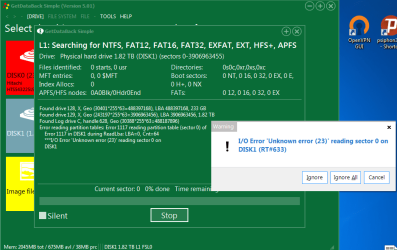
I click ignore for couple errors but errors kept coming, then I clicked ignore all,
some of the errors show on the screen as you see there are lots of errors with the given LBA address.
this picture of it one hour and 30 min later,

so now desperate to see what else I can do, it seems that boot sectors and/or other sectors are damaged.
I know the partition recovery or file/folder recover could take hours, that is completely fine with couple of days, but what is time frame that I should expect for 2tb drive?
couple of days , months or years, it is little odd to me that it takes more than a year to go through all sectors of drive, that is why I canceled searching.
appreciate any help to get my data back,
I have been using my WD 2tb for over 4 years now as second drive, 2 days ago due to a usb port of my laptop being little loose, when I move my laptop a little, I noticed the usb cable disconnected/connected from my external usb hard drive, ( heard ding/dang as the result of something connected/disconnected) after that the Drive did not show in my computer, looked at Disk management tool it shows, it needs to be initialized and the disk is unallocated.
I am running Win 7 ultimate, 32 bit on Toshiba M300, having intel core duo cpu p8600 2.4GHz, 2 GB ram
and WD 2tb Drive is as my second drive, ( P/N: WDBU6Y0020BBK-05)
here is pics from Disk management tool when I check the disk:
since the beginning of using this hard dive, I have not reformat it, and it is formatted as 32 bit, as much as I remember ,it has only one partition.
it is being used as storage of my files, different kind of files, MS doc, excel, pp, pdf, family pictures, videos, backups, and more., unfortunately I do not have any backup of them, it is all my life in it, I did have a plan to move most important files into anther external 500 GB empty hd I have, but I just keep delaying it, stupid of me.
I believe that 1.2 to 1.4 tb is been used.
before doing anything I kept reading forums, and see what other people did with the same problem,
I have not initialize nor repartition the drive, I have used some software to see if I can repair the damaged partition, but I have not written anything on the drive yet.
these are the software I have tried:
Free edition of MiniTool Partition Wizard-pw11-, testDisk, EaseUs Data Recovery Wizard, AOMEI Partition Assistant,GetDataback simple.
all of them taking so much time for search the drive, that is little odd about time consuming, when it shows how much sectors have searched out of the total number sectors (about 3,906,963,456 sectors), a little of calculation, it shows that it takes more than one year to finish the searching, so after running them for hours, or over night and seeing the process not reaching 1%, I canceled the action.
couple of hours ago I installed GetDataback simple and let it run,
immediately shows error, this is the first picture of it.
I click ignore for couple errors but errors kept coming, then I clicked ignore all,
some of the errors show on the screen as you see there are lots of errors with the given LBA address.
this picture of it one hour and 30 min later,
so now desperate to see what else I can do, it seems that boot sectors and/or other sectors are damaged.
I know the partition recovery or file/folder recover could take hours, that is completely fine with couple of days, but what is time frame that I should expect for 2tb drive?
couple of days , months or years, it is little odd to me that it takes more than a year to go through all sectors of drive, that is why I canceled searching.
appreciate any help to get my data back,
My Computer
- Computer type
- Laptop
- Computer Manufacturer/Model Number
- Toshiba Satellite M300
- OS
- windows 7 Ultimate 32 bit
- CPU
- duo cpu p8600 2.4GHz
- Memory
- 2GB
- Hard Drives
- Hitachi HTS543225L9SA00 ATA 250 GB as Main C drive
WD Elements, 2TB, P/N: WDBU6Y0020BBK-05
- Internet Speed
- 4mbs
- Antivirus
- webroot secure anywhere ver 9
- Browser
- Firefox ver. 55.0b3 32 bit