I keep being told I need 'permission'! Help!

marco772

New member
Member
Local time
9:02 PM
Messages
41
Hi,

I have a worrying development and I have no idea how to get things back to how they were.
I keep getting pop up boxes saying that I don;t have permissions and I'm not the administrator.

Just now, I sent a gmail and tried to attach a photo which I'd saved to the desktop and it wouldn't let me, saying;

"You don;t currently have permission to access this folder. Click continue"

and then;

"You have been denied permission to access this folder"

Now several icons on my desktop have padlocks on them, as in the attached photo.

I'm not terribly au fait with all this, so can anyone advise me?

Thanks

Mark
 

Attachments

  • Capture.JPG
    Capture.JPG
    24.8 KB · Views: 547

My Computer My Computer

OS
Windows 7 Ultimate
Memory
4 GB Corsair
Graphics Card(s)
NVIDIA GT9800
Last edited by a moderator:

My Computer My Computer

Computer Manufacturer/Model Number
HCL
OS
Winbdows 7 ultimate x64 | Ubuntu 12.04 x64 LTS
CPU
Core 2 Duo e7400 @ 2.90GHz
Motherboard
Gigabyte G31M-ES2L
Memory
3GB DDR2
Graphics Card(s)
Asus Nvidia GTX 560Ti 1GB
Sound Card
On-board
Monitor(s) Displays
HCL eZeeBee 18.5" LCD
Screen Resolution
1366x768 @ 60Hz
Hard Drives
Western Digital 320GB
PSU
Corsair CX500 V2 500W
Cooling
Stock
Keyboard
Stock
Mouse
Stock
Internet Speed
15-25kBps D/L | 10kBps U/L | Hey Don't laugh
Hi,

I have a worrying development and I have no idea how to get things back to how they were.
I keep getting pop up boxes saying that I don;t have permissions and I'm not the administrator.

Just now, I sent a gmail and tried to attach a photo which I'd saved to the desktop and it wouldn't let me, saying;

"You don;t currently have permission to access this folder. Click continue"

and then;

"You have been denied permission to access this folder"

Now several icons on my desktop have padlocks on them, as in the attached photo.

I'm not terribly au fait with all this, so can anyone advise me?

Thanks

Mark

Have you made ANY alterations to permissions on your system? Was this an upgrade, a clean install, or a PC purchased with 7 already installed? Did the problem just start all of a sudden? Have you used System Restore to go back to before it started?
 

My Computer My Computer

Computer Manufacturer/Model Number
Custom
OS
Windows 7 Ultimate RTM (Technet)
CPU
3.00 gigahertz Intel Core2 Duo E8400
Motherboard
ASUSTeK Computer INC. P5K/EPU Rev 1.xx
Memory
4GB
Graphics Card(s)
ATI Radeon X1950 Pro
Sound Card
Built in HD Audio
Monitor(s) Displays
22" Gateway LCD
Screen Resolution
1920 x 1200
Hard Drives
ST3160023A [Hard drive] (160.04 GB) -- drive 0, rev 8.01, ST3500630AS [Hard drive] (500.11 GB) -- drive 2, rev 3.AAK
ST3500630AS [Hard drive] (500.11 GB) -- drive 1, rev 3.AAK
Keyboard
Logitech G11
Mouse
Microsoft Wireless Laser Mouse 5000
Internet Speed
13.44 Mbps
That sounds suspiciously like a malware infection. May not be but it would be best to register at one of the good malware sites like WhatTheTech or GeeksToGo (or many others) and have them take a look. If not malware come back if the other suggestions already here made don't help.
 

My Computer My Computer

Computer type
PC/Desktop
Computer Manufacturer/Model Number
Lenovo IdeaCenter 450
OS
Windows 10 Pro X64
CPU
Intel Quad Core i7-4770 @ 3.4Ghz
Memory
16.0GB PC3-12800 DDR3 SDRAM 1600 MHz
Graphics Card(s)
Intel Integrated HD Graphics
Sound Card
Realtek HD Audio
Monitor(s) Displays
HP 22" LCD
Screen Resolution
1680 x 1050
Hard Drives
250GB Samsung EVO SATA-3 SSD
2TB Seagate ST2000DM001 SATA-2
1.5TB Seagate ST3150041AS SATA
Keyboard
Dell USB
Mouse
Lenovo USB
Internet Speed
Cable via Road Runner 3MB Upload, 30MB Download
Antivirus
Windows Defender, MBAM Pro, MBAE
Browser
Seamonkey
Other Info
UEFI/GPT
PLDS DVD-RW DH16AERSH
Hi, Well, I ran Malwarebytes and it came up clean.
To answer Macgyvr, yes, it just began all of a sudden. I did something last night, following a bit of Googling and the padlocks have now gone.
I have included the advice I took in the attachment on Wordpad.
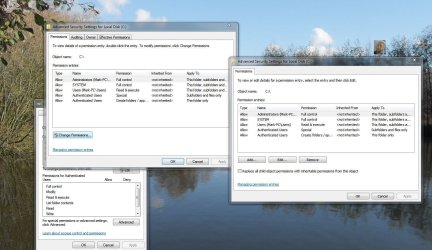
I'm a little concerned as to whether I am now less secure than before after seeing the response (also in the attachment)?

I don't really understand all this 'administrator' 'permissions'. I'm would have thought, as the PC was set up for my sole use that I AM the admin and should be able to do as I please, surely?

It all SEEMS okay now, but I have included a screenshot of my security settings, just in case I've done wrong!

Thanks for the advice!

Mark
 

Attachments

  • padlock.txt
    padlock.txt
    1.7 KB · Views: 25
  • Capture2.JPG
    Capture2.JPG
    157.4 KB · Views: 39

My Computer My Computer

OS
Windows 7 Ultimate
Memory
4 GB Corsair
Graphics Card(s)
NVIDIA GT9800
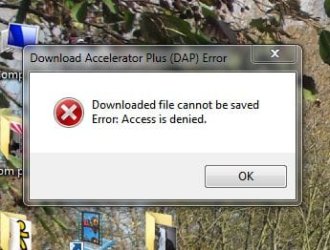
Ah, a new problem has now presented itself. My Download Accelerator - which worked fine before - now won't download to the desktop (my preference). It goes through all the motions and then, just before completion the message shown in the attachment pops up. Most vexing!

Mark
 

Attachments

  • Capture3.JPG
    Capture3.JPG
    27.6 KB · Views: 2

My Computer My Computer

OS
Windows 7 Ultimate
Memory
4 GB Corsair
Graphics Card(s)
NVIDIA GT9800
Use System Restore to go back to a point before all this started and before you tried to "fix" it. FYI, do not use download accelerators, either. They are useless.
 

My Computer My Computer

Computer Manufacturer/Model Number
Custom
OS
Windows 7 Ultimate RTM (Technet)
CPU
3.00 gigahertz Intel Core2 Duo E8400
Motherboard
ASUSTeK Computer INC. P5K/EPU Rev 1.xx
Memory
4GB
Graphics Card(s)
ATI Radeon X1950 Pro
Sound Card
Built in HD Audio
Monitor(s) Displays
22" Gateway LCD
Screen Resolution
1920 x 1200
Hard Drives
ST3160023A [Hard drive] (160.04 GB) -- drive 0, rev 8.01, ST3500630AS [Hard drive] (500.11 GB) -- drive 2, rev 3.AAK
ST3500630AS [Hard drive] (500.11 GB) -- drive 1, rev 3.AAK
Keyboard
Logitech G11
Mouse
Microsoft Wireless Laser Mouse 5000
Internet Speed
13.44 Mbps
Ah, a new problem has now presented itself. My Download Accelerator - which worked fine before - now won't download to the desktop (my preference). It goes through all the motions and then, just before completion the message shown in the attachment pops up. Most vexing!

Mark

hey marc, did you join a domain recently?
 

My Computer My Computer

OS
Windows 7 pro 64 bit
CPU
Intel Core i7-870 Lynnfield 2.93GHz
Motherboard
MSI P55-GD80 LGA 1156
Memory
Gskill 8 gig, 4x2gig
Graphics Card(s)
ASUS EAH5850
Sound Card
built in HD
Monitor(s) Displays
HP 23 inch
Hard Drives
1tbHDD,500HDD,500HDD,30SSD no RAID...
Case
Cooler master HAF 932
Cooling
4 case fans, v6 cpu cooler
Keyboard
Logitech G110
Mouse
Razer Death Adder
Internet Speed
never fast enough
Ah, a new problem has now presented itself. My Download Accelerator - which worked fine before - now won't download to the desktop (my preference). It goes through all the motions and then, just before completion the message shown in the attachment pops up. Most vexing!

Mark

hey marc, did you join a domain recently?

I noticed this too; Authenticated Users are in the list of groups that have permissions to your system. Authenticated Users are typically only used in Domain Environments.
 

My Computer My Computer

Computer type
PC/Desktop
Computer Manufacturer/Model Number
Dell OP7010
OS
Windows 7 Enterprise (x64); Windows Server 2008 R2 (x64)
Memory
16GB
Monitor(s) Displays
4 Dell 24" LCD
Screen Resolution
1280x1024
Keyboard
Dell
Mouse
Dell Optical
Internet Speed
40meg
Ah, a new problem has now presented itself. My Download Accelerator - which worked fine before - now won't download to the desktop (my preference). It goes through all the motions and then, just before completion the message shown in the attachment pops up. Most vexing!

Mark

hey marc, did you join a domain recently?

I noticed this too; Authenticated Users are in the list of groups that have permissions to your system. Authenticated Users are typically only used in Domain Environments.

yes when i set up peoples computers at work, after i join them to my domain, they will get messages with about everything they open asking for administrator cridentials, i get around this by adding a physical user account with the same login name as the network username, to the computer with administrator rights. and that solves the problem, they dont get the message anymore.
 

My Computer My Computer

OS
Windows 7 pro 64 bit
CPU
Intel Core i7-870 Lynnfield 2.93GHz
Motherboard
MSI P55-GD80 LGA 1156
Memory
Gskill 8 gig, 4x2gig
Graphics Card(s)
ASUS EAH5850
Sound Card
built in HD
Monitor(s) Displays
HP 23 inch
Hard Drives
1tbHDD,500HDD,500HDD,30SSD no RAID...
Case
Cooler master HAF 932
Cooling
4 case fans, v6 cpu cooler
Keyboard
Logitech G110
Mouse
Razer Death Adder
Internet Speed
never fast enough
Hello again,

Well, as I'm not exactly sure what a domain is or how I would go about joining one, I will assume that I haven't! :)
The reason I need the download accelerator is because my connection often cuts out and I have to start over, the DA allows the download to resume upon reconnection. It wasn't to increase the speed and it was fine before...

The only bit I understand above is the System Restore, so I might wind it back 3-4 days and try that I think...

Thanks again!

Mark
 

My Computer My Computer

OS
Windows 7 Ultimate
Memory
4 GB Corsair
Graphics Card(s)
NVIDIA GT9800
@marco772

If you have not joined a domain then domain policies will not be applied. I think that is what bmcdevitt and I were concerned about. Domain Policies can/will override local computer settings.

I guess my next suggestion would be to use a restore point to roll back your computer to a time before you were having this issue. -WS
 

My Computer My Computer

Computer type
PC/Desktop
Computer Manufacturer/Model Number
Dell OP7010
OS
Windows 7 Enterprise (x64); Windows Server 2008 R2 (x64)
Memory
16GB
Monitor(s) Displays
4 Dell 24" LCD
Screen Resolution
1280x1024
Keyboard
Dell
Mouse
Dell Optical
Internet Speed
40meg
Hi, thanks for all the help, I rolled it back three days using System Restore and now it all seems fine (fingers crossed).
No idea what could have upset it like that. And double-surprised that System Restore actually worked for once too!

Thanks again,

Mark
 

My Computer My Computer

OS
Windows 7 Ultimate
Memory
4 GB Corsair
Graphics Card(s)
NVIDIA GT9800
Hi, thanks for all the help, I rolled it back three days using System Restore and now it all seems fine (fingers crossed).
No idea what could have upset it like that. And double-surprised that System Restore actually worked for once too!

Thanks again,

Mark

Fantastic!
 

My Computer My Computer

Computer type
PC/Desktop
Computer Manufacturer/Model Number
Dell OP7010
OS
Windows 7 Enterprise (x64); Windows Server 2008 R2 (x64)
Memory
16GB
Monitor(s) Displays
4 Dell 24" LCD
Screen Resolution
1280x1024
Keyboard
Dell
Mouse
Dell Optical
Internet Speed
40meg
Back
Top