windows live mail 2011 with Windows Live Messenger 2009

gbp007

New member
Member
Local time
3:37 AM
Messages
37
Location
Florida
I have windows live mail 2010 and wanted to upgrade to windows live mail 2011 but i dont want to have to install windows live messenger 2011 and would like to keep windows live messenger 2009..

Is there a way i can have windows live mail 2011 along with windows live messenger 2009 (14.0.8117) ?
 

My Computer My Computer

At a glance

Windows 7 Ultimate
OS
Windows 7 Ultimate
Last edited:

My Computer My Computer

At a glance

64-bit Windows 11 Pro for WorkstationsIntel i7-8700K OC'd to 5 GHz64 GB (4x16GB) G.SKILL TridentZ RGB DDR4 3600...ASUS ROG-STRIX-GTX1080TI-O11G-GAMING
Computer type
PC/Desktop
Computer Manufacturer/Model Number
Self built custom
OS
64-bit Windows 11 Pro for Workstations
CPU
Intel i7-8700K OC'd to 5 GHz
Motherboard
ASUS ROG Maximus XI Formula Z390
Memory
64 GB (4x16GB) G.SKILL TridentZ RGB DDR4 3600 MHz
Graphics Card(s)
ASUS ROG-STRIX-GTX1080TI-O11G-GAMING
Sound Card
Integrated
Monitor(s) Displays
2 x Samsung Odyssey G7 27"
Screen Resolution
2560x1440
Hard Drives
1TB Samsung 990 PRO M.2,
4TB Samsung 990 PRO PRO M.2,
TerraMaster F8 SSD Plus NAS
PSU
Seasonic Prime Titanium 850W
Case
Thermaltake Core P3
Cooling
Corsair Hydro H115i
Keyboard
Logitech wireless K800
Mouse
Logitech MX Master 4
Internet Speed
2 Gb/s Download and 100 Mb/s Upload
Antivirus
Malwarebyte Anti-Malware Premium
Browser
Google Chrome
Other Info
Logitech Z625 speaker system,
Logitech BRIO 4K Pro webcam,
HP Color LaserJet Pro MFP M477fdn,
APC SMART-UPS RT 1000 XL - SURT1000XLI,
Galaxy S23 Plus phone
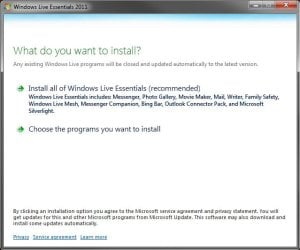
While installing Windows Live Essentials 2011, you can choose to only install Windows Live Mail 2011 but you don't have to install Windows Live Messenger 2011.
 

My Computer My Computer

At a glance

Windows 7 Ultimate x64
OS
Windows 7 Ultimate x64
Hello GBP,

Was there something wrong with Windows Live Messenger 2011 that we could help with so you wouldn't have to worry about using an older version of it?

Here's the most common complaint and solution for it.
http://www.sevenforums.com/tutorials/116432-windows-live-messenger-change-full-compact-view.html
I dont like it because there are to many features from the old version missing and its bloated, no handwriting feature, nickname status has been made more incovenient..Horrible update this is and definitely dont want it in my computer..

There is no way to just install windows live mail 2011 without having to install windows live messenger 2011..essentials 2011 forces you to install wlm 2011 also,this is not very nice from microsoft..
 

My Computer My Computer

At a glance

Windows 7 Ultimate
OS
Windows 7 Ultimate
When you start to install Windows Live Essentials 2011, select (dot) the Choose the programs you want to install option. From here, you will be able to select only the one that you want installed. :)

wlsetup-web.jpg
 

My Computer My Computer

At a glance

64-bit Windows 11 Pro for WorkstationsIntel i7-8700K OC'd to 5 GHz64 GB (4x16GB) G.SKILL TridentZ RGB DDR4 3600...ASUS ROG-STRIX-GTX1080TI-O11G-GAMING
Computer type
PC/Desktop
Computer Manufacturer/Model Number
Self built custom
OS
64-bit Windows 11 Pro for Workstations
CPU
Intel i7-8700K OC'd to 5 GHz
Motherboard
ASUS ROG Maximus XI Formula Z390
Memory
64 GB (4x16GB) G.SKILL TridentZ RGB DDR4 3600 MHz
Graphics Card(s)
ASUS ROG-STRIX-GTX1080TI-O11G-GAMING
Sound Card
Integrated
Monitor(s) Displays
2 x Samsung Odyssey G7 27"
Screen Resolution
2560x1440
Hard Drives
1TB Samsung 990 PRO M.2,
4TB Samsung 990 PRO PRO M.2,
TerraMaster F8 SSD Plus NAS
PSU
Seasonic Prime Titanium 850W
Case
Thermaltake Core P3
Cooling
Corsair Hydro H115i
Keyboard
Logitech wireless K800
Mouse
Logitech MX Master 4
Internet Speed
2 Gb/s Download and 100 Mb/s Upload
Antivirus
Malwarebyte Anti-Malware Premium
Browser
Google Chrome
Other Info
Logitech Z625 speaker system,
Logitech BRIO 4K Pro webcam,
HP Color LaserJet Pro MFP M477fdn,
APC SMART-UPS RT 1000 XL - SURT1000XLI,
Galaxy S23 Plus phone
When you start to install Windows Live Essentials 2011, select (dot) the Choose the programs you want to install option. From here, you will be able to select only the one that you want installed. :)

View attachment 109586
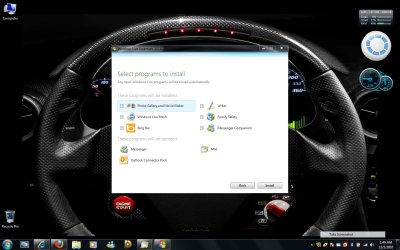
Im doing that and when i choose programs to installs it still forces you to download windows live messenger no matter what..There are no options to uncheck where it says the programs that will be installed for windows live messenger or windows live mail..On the bottom it says these programs will be updated.There is no way to do it, it wont let you..

By the way i already have windows live messenger 2009 (14.0.8117) and windows live messenger 2009 installed..I dont want it to force me to update to windows live messenger 2011, all i want is to update to windows live mail 2011..Is there another workaround ?
 

Attachments

  • 11-01-2010_01-49-12.jpg
    11-01-2010_01-49-12.jpg
    121.4 KB · Views: 87

My Computer My Computer

At a glance

Windows 7 Ultimate
OS
Windows 7 Ultimate
Microsoft no nonger calls Essentials 2011 "beta" but from all the problems people have been reporting with it (especially Mail), I suspect it still is. Maybe that's why they named it "2011". Perhaps you should uninstall 2011 completely (including Mail) and go back to 2009. Note that the web version installers allow you to download just the programs you want within the package but it looks like you can't selectively upgrade some programs but not others:

Windows Live Essentials 2009
- For XP SP2, Vista, Windows 7, Windows Server 2008
Full Version Installer English Language version
http://g.live.com/1rewlive3/en/wlsetup-all.exe
Web Version Installer – English Language Version
http://g.live.com/1rewlive3/en/wlsetup-web.exe
 
Windows Live Essentials 2011
- For Vista SP2 with Platform Update for Vista, Windows 7, and Windows
Server 2008 SP2 with Platform Update Windows Server 2008 R2)
Full Version Installer English Language version
http://g.live.com/1rewlive4-all/en/wlsetup-all.exe
Web Version Installer – English Language Version
http://g.live.com/1rewlive4-web/en/wlsetup-web.exe


My Computer My Computer

At a glance

Windows 8 Pro w/MC 32-bitIntel Atom 1.86 GHz2 GBIntel GMA 500
Computer type
PC/Desktop
Computer Manufacturer/Model Number
OQO 2+
OS
Windows 8 Pro w/MC 32-bit
CPU
Intel Atom 1.86 GHz
Motherboard
OQO 2+
Memory
2 GB
Graphics Card(s)
Intel GMA 500
Sound Card
IDT
Monitor(s) Displays
LCD
Screen Resolution
800 x 480 (portable) 1280 x 1024 (docked)
Hard Drives
64 GB SSD
PSU
9 Ah Battery (portable) or OQO Brick (docked)
Case
Shirt Pocket Sized
Cooling
Tiny Fan
Keyboard
Slide out (portable) DiNovo Edge (docked)
Mouse
Eraser head (portable) Logitech Bluetooth (docked)
Internet Speed
WWAN or 802.11G (portable) T1 (docked)
Browser
IE 10
Other Info
DVD-RW OQO Docking Station
When you start to install Windows Live Essentials 2011, select (dot) the Choose the programs you want to install option. From here, you will be able to select only the one that you want installed. :)

View attachment 109586
Im doing that and when i choose programs to installs it still forces you to download windows live messenger no matter what..There are no options to uncheck where it says the programs that will be installed for windows live messenger or windows live mail..On the bottom it says these programs will be updated.There is no way to do it, it wont let you..

By the way i already have windows live messenger 2009 (14.0.8117) and windows live messenger 2009 installed..I dont want it to force me to update to windows live messenger 2011, all i want is to update to windows live mail 2011..Is there another workaround ?

Ah, I see now.

You will need to uninstall Windows Live Messenger 2009 first, then install Windows Live Essentials 2011 so that it will not automatically update the old version of Windows Live Messenger 2009.

Afterwards, you can use the standalone installed that Ron posted above to reinstall Windows Live Messenger 2009.
 

My Computer My Computer

At a glance

64-bit Windows 11 Pro for WorkstationsIntel i7-8700K OC'd to 5 GHz64 GB (4x16GB) G.SKILL TridentZ RGB DDR4 3600...ASUS ROG-STRIX-GTX1080TI-O11G-GAMING
Computer type
PC/Desktop
Computer Manufacturer/Model Number
Self built custom
OS
64-bit Windows 11 Pro for Workstations
CPU
Intel i7-8700K OC'd to 5 GHz
Motherboard
ASUS ROG Maximus XI Formula Z390
Memory
64 GB (4x16GB) G.SKILL TridentZ RGB DDR4 3600 MHz
Graphics Card(s)
ASUS ROG-STRIX-GTX1080TI-O11G-GAMING
Sound Card
Integrated
Monitor(s) Displays
2 x Samsung Odyssey G7 27"
Screen Resolution
2560x1440
Hard Drives
1TB Samsung 990 PRO M.2,
4TB Samsung 990 PRO PRO M.2,
TerraMaster F8 SSD Plus NAS
PSU
Seasonic Prime Titanium 850W
Case
Thermaltake Core P3
Cooling
Corsair Hydro H115i
Keyboard
Logitech wireless K800
Mouse
Logitech MX Master 4
Internet Speed
2 Gb/s Download and 100 Mb/s Upload
Antivirus
Malwarebyte Anti-Malware Premium
Browser
Google Chrome
Other Info
Logitech Z625 speaker system,
Logitech BRIO 4K Pro webcam,
HP Color LaserJet Pro MFP M477fdn,
APC SMART-UPS RT 1000 XL - SURT1000XLI,
Galaxy S23 Plus phone
When you start to install Windows Live Essentials 2011, select (dot) the Choose the programs you want to install option. From here, you will be able to select only the one that you want installed. :)

View attachment 109586
Im doing that and when i choose programs to installs it still forces you to download windows live messenger no matter what..There are no options to uncheck where it says the programs that will be installed for windows live messenger or windows live mail..On the bottom it says these programs will be updated.There is no way to do it, it wont let you..

By the way i already have windows live messenger 2009 (14.0.8117) and windows live messenger 2009 installed..I dont want it to force me to update to windows live messenger 2011, all i want is to update to windows live mail 2011..Is there another workaround ?

Ah, I see now.

You will need to uninstall Windows Live Messenger 2009 first, then install Windows Live Essentials 2011 so that it will not automatically update the old version of Windows Live Messenger 2009.

Afterwards, you can use the standalone installed that Ron posted above to reinstall Windows Live Messenger 2009.
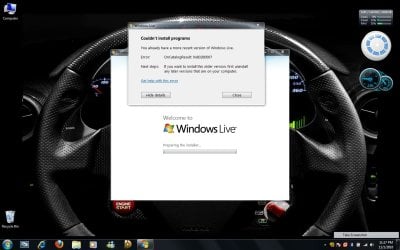
I went and uninstalled windows live messenger first, then i installed windows live mail 2011 from essentials 2011 and then i went to reinstall windows live messenger from essentials 2009 and it gave me the error that i couldnt install the program because i already have a recent version of windows live :( I posted a thumbnail pic of the error below.
 

Attachments

  • 11-01-2010_23-17-28.jpg
    11-01-2010_23-17-28.jpg
    112.3 KB · Views: 135

My Computer My Computer

At a glance

Windows 7 Ultimate
OS
Windows 7 Ultimate
Hmm, looks like a catch 22. :(
 

My Computer My Computer

At a glance

64-bit Windows 11 Pro for WorkstationsIntel i7-8700K OC'd to 5 GHz64 GB (4x16GB) G.SKILL TridentZ RGB DDR4 3600...ASUS ROG-STRIX-GTX1080TI-O11G-GAMING
Computer type
PC/Desktop
Computer Manufacturer/Model Number
Self built custom
OS
64-bit Windows 11 Pro for Workstations
CPU
Intel i7-8700K OC'd to 5 GHz
Motherboard
ASUS ROG Maximus XI Formula Z390
Memory
64 GB (4x16GB) G.SKILL TridentZ RGB DDR4 3600 MHz
Graphics Card(s)
ASUS ROG-STRIX-GTX1080TI-O11G-GAMING
Sound Card
Integrated
Monitor(s) Displays
2 x Samsung Odyssey G7 27"
Screen Resolution
2560x1440
Hard Drives
1TB Samsung 990 PRO M.2,
4TB Samsung 990 PRO PRO M.2,
TerraMaster F8 SSD Plus NAS
PSU
Seasonic Prime Titanium 850W
Case
Thermaltake Core P3
Cooling
Corsair Hydro H115i
Keyboard
Logitech wireless K800
Mouse
Logitech MX Master 4
Internet Speed
2 Gb/s Download and 100 Mb/s Upload
Antivirus
Malwarebyte Anti-Malware Premium
Browser
Google Chrome
Other Info
Logitech Z625 speaker system,
Logitech BRIO 4K Pro webcam,
HP Color LaserJet Pro MFP M477fdn,
APC SMART-UPS RT 1000 XL - SURT1000XLI,
Galaxy S23 Plus phone
I also have tried for long to keep MSN 2009 while upgrading to Mail 2011 but it is impossible.

I really hate Microsoft. Really. Other than Windows 7 everything else they do is awful. And they are always using horrible strategies to cheat or force the users to do what they want and fill you with huge bloatware and their own rules.

MSN 2011 is absolutely HORRIBLE and you may find hundreds of blogs and posts and reviews saying the same. Many Facebook groups complaining too.

So I would keep both MSN & Mail 2009 but Mail 2009 doesnt work well anymore either.

How can it be possible that they are denying us the possibility to decide what version we want to use? They are forcing us to use the social networks and pushing us to reveal personal information without us even knowing.

This is terrible, really. After Windows 7 I thought Microsoft had learnt the lesson, but no, it's back to the old policy of being hated by everyone.

By now I am keeping MSN 2009 and simply have uninstalled Mail. I am using Opera for Mail only.
 

My Computer My Computer

At a glance

Win7 Ultimate x64Intel Dual Core T4200 2.0 Ghz4 GB RAMIntel GMA 4500
Computer Manufacturer/Model Number
Samsung R519 Laptop
OS
Win7 Ultimate x64
CPU
Intel Dual Core T4200 2.0 Ghz
Memory
4 GB RAM
Graphics Card(s)
Intel GMA 4500
Screen Resolution
1366 x 768
Hard Drives
250 GB
Internet Speed
ADSL 20 MB
...I also have tried for long to keep MSN 2009 while upgrading to Mail 2011 but it is impossible....
Not sure what you mean by "MSN". I'm still using WLE2009; the latest version is here:
Web Version Installer – English Language Version
http://g.live.com/1rewlive3/en/wlsetup-web.exe

It's not only possible to keep it but it is relatively easy...just hide the WLE2011 update(s) in Windows Update. But it is difficult/impossible to mix and match components from the 2011 suite with the 2009 suite. And those of us who are using 2009/2010 will probably switch to 2011 sometime next year.
 

My Computer My Computer

At a glance

Windows 8 Pro w/MC 32-bitIntel Atom 1.86 GHz2 GBIntel GMA 500
Computer type
PC/Desktop
Computer Manufacturer/Model Number
OQO 2+
OS
Windows 8 Pro w/MC 32-bit
CPU
Intel Atom 1.86 GHz
Motherboard
OQO 2+
Memory
2 GB
Graphics Card(s)
Intel GMA 500
Sound Card
IDT
Monitor(s) Displays
LCD
Screen Resolution
800 x 480 (portable) 1280 x 1024 (docked)
Hard Drives
64 GB SSD
PSU
9 Ah Battery (portable) or OQO Brick (docked)
Case
Shirt Pocket Sized
Cooling
Tiny Fan
Keyboard
Slide out (portable) DiNovo Edge (docked)
Mouse
Eraser head (portable) Logitech Bluetooth (docked)
Internet Speed
WWAN or 802.11G (portable) T1 (docked)
Browser
IE 10
Other Info
DVD-RW OQO Docking Station
...I also have tried for long to keep MSN 2009 while upgrading to Mail 2011 but it is impossible....
Not sure what you mean by "MSN". I'm still using WLE2009; the latest version is here:
Web Version Installer – English Language Version
http://g.live.com/1rewlive3/en/wlsetup-web.exe

It's not only possible to keep it but it is relatively easy...just hide the WLE2011 update(s) in Windows Update. But it is difficult/impossible to mix and match components from the 2011 suite with the 2009 suite. And those of us who are using 2009/2010 will probably switch to 2011 sometime next year.

MSN is the old and still popular name for Windows Live Messenger. Most people say just "the MSN".

No it doesn't work like that. My Windows Updates are totally disabled (service disabled) and still combing MSN 2009 with WLMail 2011 is impossible.
 

My Computer My Computer

At a glance

Win7 Ultimate x64Intel Dual Core T4200 2.0 Ghz4 GB RAMIntel GMA 4500
Computer Manufacturer/Model Number
Samsung R519 Laptop
OS
Win7 Ultimate x64
CPU
Intel Dual Core T4200 2.0 Ghz
Memory
4 GB RAM
Graphics Card(s)
Intel GMA 4500
Screen Resolution
1366 x 768
Hard Drives
250 GB
Internet Speed
ADSL 20 MB
...still combing MSN 2009 with WLMail 2011 is impossible.
Correct. That's what I said. But you can easily stay with the 2009 suite as a whole. Just don't update to 2011. Or uninstall the 2011 suite and use the above link to install the pre-2011 version.
 

My Computer My Computer

At a glance

Windows 8 Pro w/MC 32-bitIntel Atom 1.86 GHz2 GBIntel GMA 500
Computer type
PC/Desktop
Computer Manufacturer/Model Number
OQO 2+
OS
Windows 8 Pro w/MC 32-bit
CPU
Intel Atom 1.86 GHz
Motherboard
OQO 2+
Memory
2 GB
Graphics Card(s)
Intel GMA 500
Sound Card
IDT
Monitor(s) Displays
LCD
Screen Resolution
800 x 480 (portable) 1280 x 1024 (docked)
Hard Drives
64 GB SSD
PSU
9 Ah Battery (portable) or OQO Brick (docked)
Case
Shirt Pocket Sized
Cooling
Tiny Fan
Keyboard
Slide out (portable) DiNovo Edge (docked)
Mouse
Eraser head (portable) Logitech Bluetooth (docked)
Internet Speed
WWAN or 802.11G (portable) T1 (docked)
Browser
IE 10
Other Info
DVD-RW OQO Docking Station
I have the same problem...i have to say messenger 2011 is really fail, at least this moment. i like mail 2011, why can't use mail 2011 and messenger 2009 at the same time. it's plain robbery!
 

My Computer My Computer

At a glance

windows 7 ulimate 32bit
OS
windows 7 ulimate 32bit
I have the same problem...i have to say messenger 2011 is really fail, at least this moment. i like mail 2011, why can't use mail 2011 and messenger 2009 at the same time. it's plain robbery!

One more absurd thing. I tried to fix this by searching and dowloading the 2009 and 2011 standalone offline installers for WL Essentials. They are arou nd 130 MB big that you download as one single file.

So, theoretically, you should be able to install them without connecting to the internet, so they would be fast to install and so on.

Absurd enough they take the same awful long time to install. Just for the MSN takes ages. And, of course, you still can't install MSN 2009 and Mail 2011.

I gave up. I am on MSN 2009 and using Opera Mail.
 

My Computer My Computer

At a glance

Win7 Ultimate x64Intel Dual Core T4200 2.0 Ghz4 GB RAMIntel GMA 4500
Computer Manufacturer/Model Number
Samsung R519 Laptop
OS
Win7 Ultimate x64
CPU
Intel Dual Core T4200 2.0 Ghz
Memory
4 GB RAM
Graphics Card(s)
Intel GMA 4500
Screen Resolution
1366 x 768
Hard Drives
250 GB
Internet Speed
ADSL 20 MB
I found something which almost worked but didnt..By going to the cache folder i was able to find just the live messenger 2009 installer.So i went and installed windows live mail 2011 and then install the 2009 messenger from the cache folder and i was able to have windows live messenger 2009 along with windows live mail 2011..The only thing is when i try to login to windows live messenger 2009, it wont login, none of my account will login..Sneaky microsoft they are!

here is the link in case anybody wants to try it so, you know what i mean - Retrieve Windows Live Messenger 2009 Standalone Individual Setup Installer (MSI) from Web Download » My Digital Life
 

My Computer My Computer

At a glance

Windows 7 Ultimate
OS
Windows 7 Ultimate
I found something which almost worked but didnt..By going to the cache folder i was able to find just the live messenger 2009 installer.So i went and installed windows live mail 2011 and then install the 2009 messenger from the cache folder and i was able to have windows live messenger 2009 along with windows live mail 2011..The only thing is when i try to login to windows live messenger 2009, it wont login, none of my account will login..Sneaky microsoft they are!

here is the link in case anybody wants to try it so, you know what i mean - Retrieve Windows Live Messenger 2009 Standalone Individual Setup Installer (MSI) from Web Download » My Digital Life

Thanks for this. By now I give up and stay with Opera Mail, but maybe one day I try it.
 

My Computer My Computer

At a glance

Win7 Ultimate x64Intel Dual Core T4200 2.0 Ghz4 GB RAMIntel GMA 4500
Computer Manufacturer/Model Number
Samsung R519 Laptop
OS
Win7 Ultimate x64
CPU
Intel Dual Core T4200 2.0 Ghz
Memory
4 GB RAM
Graphics Card(s)
Intel GMA 4500
Screen Resolution
1366 x 768
Hard Drives
250 GB
Internet Speed
ADSL 20 MB

My Computer My Computer

At a glance

W7 64 BitAMD Phenom x4 4000Mhz8 GB DDR-2PNY-NVIDIA GeForce GTX 460 1GB GDDR5 PCI-e
Computer Manufacturer/Model Number
My own Custom Build: Asus, Corsair, Transcend, AMD, PNY, Ultra
OS
W7 64 Bit
CPU
AMD Phenom x4 4000Mhz
Memory
8 GB DDR-2
Graphics Card(s)
PNY-NVIDIA GeForce GTX 460 1GB GDDR5 PCI-e
Monitor(s) Displays
Dual: Flatron L1942T
Hard Drives
C: Drive (Agility 2 Solid State Drive 60 GB)
D: Drive (HDD Internal Western Digital 640 GB)
PSU
650 Watt
Cooling
Corsair Hydro H6 Liquid Cooler
Internet Speed
25 mbps down - 3 mbps up

My Computer My Computer

At a glance

Windows 8 Pro w/MC 32-bitIntel Atom 1.86 GHz2 GBIntel GMA 500
Computer type
PC/Desktop
Computer Manufacturer/Model Number
OQO 2+
OS
Windows 8 Pro w/MC 32-bit
CPU
Intel Atom 1.86 GHz
Motherboard
OQO 2+
Memory
2 GB
Graphics Card(s)
Intel GMA 500
Sound Card
IDT
Monitor(s) Displays
LCD
Screen Resolution
800 x 480 (portable) 1280 x 1024 (docked)
Hard Drives
64 GB SSD
PSU
9 Ah Battery (portable) or OQO Brick (docked)
Case
Shirt Pocket Sized
Cooling
Tiny Fan
Keyboard
Slide out (portable) DiNovo Edge (docked)
Mouse
Eraser head (portable) Logitech Bluetooth (docked)
Internet Speed
WWAN or 802.11G (portable) T1 (docked)
Browser
IE 10
Other Info
DVD-RW OQO Docking Station
Back
Top