Achilles heel of ALL WINDOWS (inc W7)

jimbo45

New member
Guru
Gold Member
VIP
Local time
10:01 AM
Messages
5,941
Location
Hafnarfjörður IS
Hi all
Whilst I find W7 the best Microsoft desktop OS so far (although W2K3 server and Windows 2000 both were pretty good) the whole issue of Networking still seems to be highly hit and miss.

I've been using a Linux server way back for "Donkeys years" and have NEVER had any major problem to get networking and file shares to work FIRST TIME, EVERY TIME.

You just define the shares in SAMBA, password protect them if you want and it's up and running.

Trying to get a Network with W7 and XP machines just seems to be a nightmare -- sometimes the machines see each other, sometimes they don't and it's totally random. Password protecting shares also seems to be a very "hit and miss" affair and often whilst you get unable to access \\xpmachine\sharedirectory messages you can still connect directly via "Connect network drive" if you know the share name (which you don't always in a large network and the Browse facility doesn't work either.)

The idea now in W7 of "Homegroups" just makes a bad idea even worse -- as for starters you can only have W7 machines in the mix.

PLEASE MICROSOFT RE-WRITE the whole networking cludge -- I've been using computers for a LONG time and still have problems from time to time getting everything to share correctly.

Cheers
jimbo
 

My Computer My Computer

At a glance

Linux CENTOS 7 / various Windows OS'es and se...Intel i7 Intel i58GB, 16GBOn Motherboard
Computer type
PC/Desktop
Computer Manufacturer/Model Number
Custom built, several laptops HP/ASUS
OS
Linux CENTOS 7 / various Windows OS'es and servers
CPU
Intel i7 Intel i5
Memory
8GB, 16GB
Graphics Card(s)
On Motherboard
Sound Card
Realtek HD audio
Monitor(s) Displays
Apple Cinema display, Samsung LCD
Screen Resolution
1920 X 1080
Hard Drives
4 X 1TB SATA
Mouse
Toshiba wireless laser
Internet Speed
> 20MB up
Agreed. Would love to see the core re-written, but I don't imagine the NT4 kernal would be much fun to code.

Although the new 'homegroup' over IPV6 was dreadfully easy to set up, once you're in, you're in. Right-click a file and add it to the library and it's there. Much the same way SAMBA works, really. ;)
 

My Computer My Computer

At a glance

Windows 7 Home Premium x64Intel QX9650 Extreme 4.0 GHz8GB (4x2) Corsair Dominator DDR32x Radeon R390X [8GB]
Computer type
PC/Desktop
Computer Manufacturer/Model Number
Custom Build/Mod
OS
Windows 7 Home Premium x64
CPU
Intel QX9650 Extreme 4.0 GHz
Motherboard
ASUS Rampage Extreme Rev2
Memory
8GB (4x2) Corsair Dominator DDR3
Graphics Card(s)
2x Radeon R390X [8GB]
Sound Card
SupremeFX X-Fi
Monitor(s) Displays
Dell 2408WFP 26" Panel
Screen Resolution
1920x1200
Hard Drives
4x WD 2TB (8TB+ Total)
2x Crucial SSD 128GB (RAID-0)
1x LG Blu-ray read/write
1x Phillips LightScribe DVD read/write
PSU
Corsair HX1000
Case
CoolerMaster - Cosmos S
Cooling
Custom Liquid - 320mm rad w/ 3x 80mm fans, CPU/NB/SB Blocks
Keyboard
Logitech Illuminater Pro
Mouse
Logitech
Internet Speed
Fractional T1 - 125Mbps
Antivirus
ESET Security Suite / Microsoft Security Essentials
Browser
Cyberfox Intel x64
Other Info
OC'd to 5.0GHz @ 44c under full load
Hi there
Homegroup is no good for XP computers (or even VISTA) ones on the network. W7 only.

Perhaps someone should write "SAMBA FOR WINDOWS" :D

Cheers
jimbo
 

My Computer My Computer

At a glance

Linux CENTOS 7 / various Windows OS'es and se...Intel i7 Intel i58GB, 16GBOn Motherboard
Computer type
PC/Desktop
Computer Manufacturer/Model Number
Custom built, several laptops HP/ASUS
OS
Linux CENTOS 7 / various Windows OS'es and servers
CPU
Intel i7 Intel i5
Memory
8GB, 16GB
Graphics Card(s)
On Motherboard
Sound Card
Realtek HD audio
Monitor(s) Displays
Apple Cinema display, Samsung LCD
Screen Resolution
1920 X 1080
Hard Drives
4 X 1TB SATA
Mouse
Toshiba wireless laser
Internet Speed
> 20MB up

My Computer My Computer

At a glance

Windows 7 Ultimate 32bit SP1Intel(R) Core(TM)2 Quad CPU @ 2.40GHz, 2400 MHz4 GBATI Radeon HD 2600 Pro
Computer type
PC/Desktop
Computer Manufacturer/Model Number
Bruce ... somewhere in his 40's
OS
Windows 7 Ultimate 32bit SP1
CPU
Intel(R) Core(TM)2 Quad CPU @ 2.40GHz, 2400 MHz
Motherboard
INTEL/D975XBX2
Memory
4 GB
Graphics Card(s)
ATI Radeon HD 2600 Pro
Monitor(s) Displays
Samsung SyncMaster 914v
Screen Resolution
1280 x 1024
Hard Drives
2/500GB each ... ST3500630AS ATA Device.
One is not connected
PSU
Rocketfish 700 W
Case
G.Skill Gigabyte Chassis
Keyboard
Standard PS/2 Keyboard
Mouse
Microsoft PS/2 Mouse
Internet Speed
DSL
Antivirus
Avira Internet Security
Browser
IE 11
Other Info
ATI HDMI Audio
My luck has been the opposite. I haven't run into any problems in all the builds serving and browsing from and to all OS in my sig. When I want to share a folder or drive, I allow permission to everyone. Also, I name the share with a $ at the end so it is hidden on the network. And I use static ips, no dhcp. I also disable the DNS Client and IP Helper services along with IPv6. I do not use simple file sharing.

Then I go to map a network drive by \\ip address\sharename$. It asks for the user/pass. I supply it for the remote machine, check the box to remember it and never have to think about it again.

I use NetBeui instead of default Netbios for better efficiency and speed (I get close to 11 MB/s between machines on 100 Mbps router) but that shouldn't affect anything.
 

My Computer My Computer

At a glance

7600.20510 x86P4 550 3.4 GHz HT running at 3.5 GHzOCZ 2 GB(2x1GB) DDR400mHz running @ 414 mHzHIS Radeon HD 3850 IceQ 3 Turbo HDMI Dual DL-...
Computer Manufacturer/Model Number
self built
OS
7600.20510 x86
CPU
P4 550 3.4 GHz HT running at 3.5 GHz
Motherboard
MSI PM8M3-V (MS-7211 v1.x) Micro-ATX mainboard
Memory
OCZ 2 GB(2x1GB) DDR400mHz running @ 414 mHz
Graphics Card(s)
HIS Radeon HD 3850 IceQ 3 Turbo HDMI Dual DL-DVI AGP
Sound Card
MOTU Traveler firewire studio interface 192 kHz 24 bit
Monitor(s) Displays
22" widescreen Acer X223W LCD, 17" Compaq P75 CRT
Screen Resolution
1680x1050 and 1280x1024
Hard Drives
SATA I x2 WD, 400 GB and 120 GB, SATA 2 WD Caviar Black 1 TB
PSU
350W generic
Case
Cybertronpc, it glows blue
Cooling
stock cpu fan, Ice-Q 3 gpu and system, many case fans
Keyboard
Logitch Classical Keyboard 200
Mouse
Logitech Mediaplay cordless
Internet Speed
1792/448 kbits/sec
Other Info
SATA II PCI fake RAID adapter, 1 GB Readyboost, original ATI Remote Wonder (even works with WMC perfectly), Logitech Rumblepad 2 game controller x2
My luck has been the opposite. I haven't run into any problems in all the builds serving and browsing from and to all OS in my sig. When I want to share a folder or drive, I allow permission to everyone. Also, I name the share with a $ at the end so it is hidden on the network. And I use static ips, no dhcp. I also disable the DNS Client and IP Helper services along with IPv6. I do not use simple file sharing.

Then I go to map a network drive by \\ip address\sharename$. It asks for the user/pass. I supply it for the remote machine, check the box to remember it and never have to think about it again.

I use NetBeui instead of default Netbios for better efficiency and speed (I get close to 11 MB/s between machines on 100 Mbps router) but that shouldn't affect anything.

I havent ran into "sharing problems" as far as getting things shared and "seen" over the "hybrid" network. What my complaint is the lack of administration over files/folders on homegroup, else i still see this feature as a failure, and its just the same ole way of sharing if you want more control over the shared folders specific content. I cant restrict a folder from a HG user while allowing access to others on same HG. Just because they are trusted, doesnt mean i want them to have axx to everything. If thats the perception, why not share the whole C: or "my computer" with the HG if everyone is "trusted on the network". Why, because it would be ignorant. just the same as to share the "Users" folder, instead of the desired shared specific HG library of that Username.

Your way works, of course, torrentG... but, that isnt the "MS user friendly way" that they are trying to shoot for... and have failed in this dealing with security permissions allowing "Everyone" to see Everything if/when shared with HG. If you do a true clean install (no transfer wiz) and never join a HG, that "Users" folder doesnt get shared of course. Why on earth do i need to have my "AppData" folder shared with the network??

lastly, for your speed with netbeui... I see the same speed using netbios. Its been ages since i have relied on the netbeui or IPX protocols to handle things. Not since win98 and early early XP days. I also hear that ppl see faster transfers over the network, while using the MC or extender, when UPnP is enabled. I fail to see this either. I know you didnt state that, just wanted to throw that out as well for others that may read.

I actually see constant speed of 22-24, sometimes short steady peaks around 30, with a usual average of say 18-22 there or abouts on heavy loads / big files. This was/is either from pc to pc wired, pc to network storage, pc to extender, pc to laptop.

But i think you mean Mb instead of MB... 11MB = 88mbps .... if I'm wrong here.. i'd sure like to know more about your setup, you must have some rocket wiring around that place. Highest i've seen, or atleast remember (take with grain of salt, lol) was around the mid 40's mbps. And that was back with a good XP network setup. If you get 80+% utilization of that 100mbps router, please let me know your secret ;)
 

My Computer My Computer

At a glance

XP/win7 x86 build 7127Athlon64 X2 DUAL 4200+ 2.21ghz2GB Dual Chan DDR2 CorsairNvidia 6800GT
Computer Manufacturer/Model Number
CUSTOM
OS
XP/win7 x86 build 7127
CPU
Athlon64 X2 DUAL 4200+ 2.21ghz
Motherboard
ASUS K8 PRO SLI
Memory
2GB Dual Chan DDR2 Corsair
Graphics Card(s)
Nvidia 6800GT
Sound Card
nvidia
Monitor(s) Displays
19' LCD
Screen Resolution
1280x1024
Hard Drives
WD 250, 2x500, 2x1TB IDE/USB
WD 250 SATA (system)
SEAGATE 120 Sata
PSU
coolermaster 450
Case
SUPERFLOWER
Cooling
1 HDD bay fan, 5x80mm Case Fans, AEROGATE II Fan/Temp
Keyboard
MS wireless
Mouse
MS Wireless
Internet Speed
fassssssssst
11 megs a second is more than doable on a regular 100 network.

Just did it the other day, coulda gone faster but my nic card hates it's gigabit mode. =(
 

My Computer My Computer

At a glance

7264x64/7260x86
OS
7264x64/7260x86
Ya. The 11 MB/s is meant as megabytes. This is between two normal wired 100 Mbps connections to a DI-624 router. I don't do anything special other than what I've already said.

My router = [ame="http://www.amazon.com/D-Link-DI-624-Wireless-802-11g-108Mbps/dp/B00007LTBA"]Amazon.com: D-Link DI-624 Wireless Cable/DSL Router, 4-Port Switch, 802.11g, 108Mbps: Electronics[/ame]

Then that router is connected to my dsl router by 10 Mbps connection. I have like an internal network separate and secure, apart from my provider and "outside" network. This is THE way to run. For more info, here is a basic read filled with some good information : http://www.grc.com/nat/nat.htm

I hear ya about the homegroups and the permissions stuff. I understand how M$ is trying to make it simpler for everyone, but the users like us that have tried and true methods really do not need to rely on it.

When I am transferring between computers, I fire up the task manager and it shows 95 to 100 percent network utilization...which is basically the full 100 Mbps which transfers to around 11 MB/sec or so real usage shown in transfer box, when all is said and done.

lol I even have the cheapest CAT 5 wiring I could find at the time.
 

My Computer My Computer

At a glance

7600.20510 x86P4 550 3.4 GHz HT running at 3.5 GHzOCZ 2 GB(2x1GB) DDR400mHz running @ 414 mHzHIS Radeon HD 3850 IceQ 3 Turbo HDMI Dual DL-...
Computer Manufacturer/Model Number
self built
OS
7600.20510 x86
CPU
P4 550 3.4 GHz HT running at 3.5 GHz
Motherboard
MSI PM8M3-V (MS-7211 v1.x) Micro-ATX mainboard
Memory
OCZ 2 GB(2x1GB) DDR400mHz running @ 414 mHz
Graphics Card(s)
HIS Radeon HD 3850 IceQ 3 Turbo HDMI Dual DL-DVI AGP
Sound Card
MOTU Traveler firewire studio interface 192 kHz 24 bit
Monitor(s) Displays
22" widescreen Acer X223W LCD, 17" Compaq P75 CRT
Screen Resolution
1680x1050 and 1280x1024
Hard Drives
SATA I x2 WD, 400 GB and 120 GB, SATA 2 WD Caviar Black 1 TB
PSU
350W generic
Case
Cybertronpc, it glows blue
Cooling
stock cpu fan, Ice-Q 3 gpu and system, many case fans
Keyboard
Logitch Classical Keyboard 200
Mouse
Logitech Mediaplay cordless
Internet Speed
1792/448 kbits/sec
Other Info
SATA II PCI fake RAID adapter, 1 GB Readyboost, original ATI Remote Wonder (even works with WMC perfectly), Logitech Rumblepad 2 game controller x2
well i understand if gigabit router/adapter....

but now i'm P.O'd... granted currently i only have the wireless lap and wired extender to test this currently... i still ... hmmm...

Maybe i'll put the DI on the Headend... even tho i consider it inferior to the broadcom/firmware... only because of limited firmware admin capabilities/options.... this which i have considered once i finish the new addition to the network here.

If i got 11MB, i would actually use my network storage a heck of a lot more than i have been lately. I would, from memory again some 4 mos ago, i was peaking in the 4MB range. Ii only get 11MB or so while on usb 2.0 transfers locally from sata II drive. Now ya gonna make me fire up netbeui and see for myself. I may find out that i have more issues here than just a protocol. :eek:

Could be that i'm just confusing myself with the back and forth XP-win7 Mb-MB calculations in my head.

But from the wireless lap i see max peak of 23mbps... which to me is has been quite normal if not sufficient for wirless lan transfer. I could theorectically still stream a BD from it to here... with maybe a hiccup or two, fixed with a nice buffer. Definitely aim to investigate.
 

My Computer My Computer

At a glance

XP/win7 x86 build 7127Athlon64 X2 DUAL 4200+ 2.21ghz2GB Dual Chan DDR2 CorsairNvidia 6800GT
Computer Manufacturer/Model Number
CUSTOM
OS
XP/win7 x86 build 7127
CPU
Athlon64 X2 DUAL 4200+ 2.21ghz
Motherboard
ASUS K8 PRO SLI
Memory
2GB Dual Chan DDR2 Corsair
Graphics Card(s)
Nvidia 6800GT
Sound Card
nvidia
Monitor(s) Displays
19' LCD
Screen Resolution
1280x1024
Hard Drives
WD 250, 2x500, 2x1TB IDE/USB
WD 250 SATA (system)
SEAGATE 120 Sata
PSU
coolermaster 450
Case
SUPERFLOWER
Cooling
1 HDD bay fan, 5x80mm Case Fans, AEROGATE II Fan/Temp
Keyboard
MS wireless
Mouse
MS Wireless
Internet Speed
fassssssssst
My gigabit setup gets me 20-30 MB/sec(average) off my ReadyNAS. =P
 

My Computer My Computer

At a glance

7264x64/7260x86
OS
7264x64/7260x86
My gigabit setup gets me 20-30 MB/sec(average) off my ReadyNAS. =P

shouldnt you get more than that?!? :confused::shock:

on gigabit? I would expect more... depending on the drive specs of course
 

My Computer My Computer

At a glance

XP/win7 x86 build 7127Athlon64 X2 DUAL 4200+ 2.21ghz2GB Dual Chan DDR2 CorsairNvidia 6800GT
Computer Manufacturer/Model Number
CUSTOM
OS
XP/win7 x86 build 7127
CPU
Athlon64 X2 DUAL 4200+ 2.21ghz
Motherboard
ASUS K8 PRO SLI
Memory
2GB Dual Chan DDR2 Corsair
Graphics Card(s)
Nvidia 6800GT
Sound Card
nvidia
Monitor(s) Displays
19' LCD
Screen Resolution
1280x1024
Hard Drives
WD 250, 2x500, 2x1TB IDE/USB
WD 250 SATA (system)
SEAGATE 120 Sata
PSU
coolermaster 450
Case
SUPERFLOWER
Cooling
1 HDD bay fan, 5x80mm Case Fans, AEROGATE II Fan/Temp
Keyboard
MS wireless
Mouse
MS Wireless
Internet Speed
fassssssssst
I think i know my problem of course, and thats the drivers... if i do not run this controller under auto-nego, i have had all kinds of connection problems in the past when fussing with different drivers. I may dig back into this area again, i just have to make sure enough aspirin is in the cabinet :(
 

My Computer My Computer

At a glance

XP/win7 x86 build 7127Athlon64 X2 DUAL 4200+ 2.21ghz2GB Dual Chan DDR2 CorsairNvidia 6800GT
Computer Manufacturer/Model Number
CUSTOM
OS
XP/win7 x86 build 7127
CPU
Athlon64 X2 DUAL 4200+ 2.21ghz
Motherboard
ASUS K8 PRO SLI
Memory
2GB Dual Chan DDR2 Corsair
Graphics Card(s)
Nvidia 6800GT
Sound Card
nvidia
Monitor(s) Displays
19' LCD
Screen Resolution
1280x1024
Hard Drives
WD 250, 2x500, 2x1TB IDE/USB
WD 250 SATA (system)
SEAGATE 120 Sata
PSU
coolermaster 450
Case
SUPERFLOWER
Cooling
1 HDD bay fan, 5x80mm Case Fans, AEROGATE II Fan/Temp
Keyboard
MS wireless
Mouse
MS Wireless
Internet Speed
fassssssssst
Here is a .zip with the Netbeui files for anyone interested. All you need to do is place the .inf in Windows\inf and the .sys in Windows\system32\drivers.

http://rapidshare.com/files/240435336/Netbeui_Files.zip.html

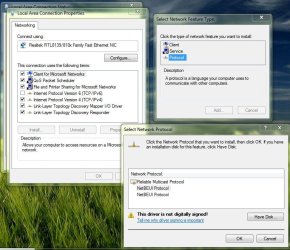
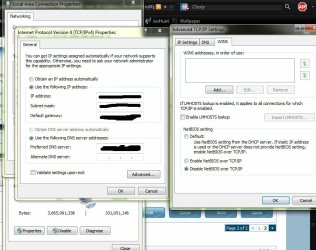
Then disable Netbios in the ip settings screen for the adapter and then add the protocol as per screenshot. Do this for each machine on the network. A plus is that it is also more secure.
 

Attachments

  • Untitled Capture-01.jpg
    Untitled Capture-01.jpg
    83.7 KB · Views: 8
  • a.jpg
    a.jpg
    78 KB · Views: 7

My Computer My Computer

At a glance

7600.20510 x86P4 550 3.4 GHz HT running at 3.5 GHzOCZ 2 GB(2x1GB) DDR400mHz running @ 414 mHzHIS Radeon HD 3850 IceQ 3 Turbo HDMI Dual DL-...
Computer Manufacturer/Model Number
self built
OS
7600.20510 x86
CPU
P4 550 3.4 GHz HT running at 3.5 GHz
Motherboard
MSI PM8M3-V (MS-7211 v1.x) Micro-ATX mainboard
Memory
OCZ 2 GB(2x1GB) DDR400mHz running @ 414 mHz
Graphics Card(s)
HIS Radeon HD 3850 IceQ 3 Turbo HDMI Dual DL-DVI AGP
Sound Card
MOTU Traveler firewire studio interface 192 kHz 24 bit
Monitor(s) Displays
22" widescreen Acer X223W LCD, 17" Compaq P75 CRT
Screen Resolution
1680x1050 and 1280x1024
Hard Drives
SATA I x2 WD, 400 GB and 120 GB, SATA 2 WD Caviar Black 1 TB
PSU
350W generic
Case
Cybertronpc, it glows blue
Cooling
stock cpu fan, Ice-Q 3 gpu and system, many case fans
Keyboard
Logitch Classical Keyboard 200
Mouse
Logitech Mediaplay cordless
Internet Speed
1792/448 kbits/sec
Other Info
SATA II PCI fake RAID adapter, 1 GB Readyboost, original ATI Remote Wonder (even works with WMC perfectly), Logitech Rumblepad 2 game controller x2
shouldnt you get more than that?!? :confused::shock:

on gigabit? I would expect more... depending on the drive specs of course

I did too at first, there's some technical reason for it. I know if I move over to jumbro frames I can get closer to 30-40.
 

My Computer My Computer

At a glance

7264x64/7260x86
OS
7264x64/7260x86
Back
Top