Outlook 2010 and Hotmail Connecter issue...

momanium

New member
Member
Local time
2:31 PM
Messages
50
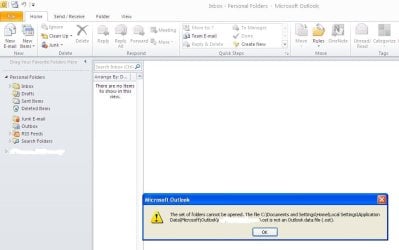
Ok, so heres the problem. I am using Outlook 2010 with the most recent updated outlook connector. Now suddenly I stopped receiving email messages through Outlook but they were there on the hotmail site. So I restarted etc and still the problem was there. Then when I was sending/receiving I got the message of "we were unable to sign in to your account please restart or repair outlook@ so I did both and it still wouldnt work. Next I researched it and heard that I had to remake my profile which still didnt work... :mad: Now it seems to be saying that my data file aint right and that it should be OST when it should be PST. Now OST is an offline file so why isnt it connecting online? Any suggestions or help. I have attatched a picture of the most recent issue which is taken of my XP computer, currently my windows 7 is gathering dust while I buy a new charger:o.
 

Attachments

  • Prnt Scrn Issue.JPG
    Prnt Scrn Issue.JPG
    47.1 KB · Views: 31

My Computer My Computer

At a glance

Windows Xp Home 32 Bit, Windows 7 Home Premiu...
OS
Windows Xp Home 32 Bit, Windows 7 Home Premium 64 bit
If there is anyone out there... then just for future reference I system restored to a previous time and it seems to be working.
 

My Computer My Computer

At a glance

Windows Xp Home 32 Bit, Windows 7 Home Premiu...
OS
Windows Xp Home 32 Bit, Windows 7 Home Premium 64 bit
Ok, so heres the problem. I am using Outlook 2010 with the most recent updated outlook connector. Now suddenly I stopped receiving email messages through Outlook but they were there on the hotmail site. So I restarted etc and still the problem was there. Then when I was sending/receiving I got the message of "we were unable to sign in to your account please restart or repair outlook@ so I did both and it still wouldnt work. Next I researched it and heard that I had to remake my profile which still didnt work... :mad: Now it seems to be saying that my data file aint right and that it should be OST when it should be PST. Now OST is an offline file so why isnt it connecting online? Any suggestions or help. I have attatched a picture of the most recent issue which is taken of my XP computer, currently my windows 7 is gathering dust while I buy a new charger:o.


This has been a probelm since the Dec 14th updates to MSOffice and Outlook. I had the problem and the only solution at this time is to uninstall
update KB2412171.
Just do a typical uninstall using CONTROL PANEL and PROGRAM and FEATURES.
You will need to select "view all updates" in the upper left hand corner of the screen and find and select KB2412171..

Hope this is what you are looking for to solve your problem.
Let me know if it works for you as it did for me.
 

My Computer My Computer

At a glance

Windows 10 ProIntel i5I'm old and lost a few chipsYup
Computer type
PC/Desktop
Computer Manufacturer/Model Number
Self Built
OS
Windows 10 Pro
CPU
Intel i5
Motherboard
I have a fatherboard
Memory
I'm old and lost a few chips
Graphics Card(s)
Yup
Sound Card
Yup
Monitor(s) Displays
Samsung 32" UHD
Screen Resolution
3840 x 2160
Hard Drives
Samsung 860 EVO drives
PSU
450 Watt and some fans that blow
Case
Small tower
Cooling
Yes I am cool. lol
Keyboard
Who needs a keyboard?
Mouse
Logitech Laser G7 wireless
Internet Speed
Zippy fast UP and DOWN
Antivirus
I got a shot
Browser
The new Improved EDGE 2020
That damn UPDATE!!!

Ok, so heres the problem. I am using Outlook 2010 with the most recent updated outlook connector. Now suddenly I stopped receiving email messages through Outlook but they were there on the hotmail site. So I restarted etc and still the problem was there. Then when I was sending/receiving I got the message of "we were unable to sign in to your account please restart or repair outlook@ so I did both and it still wouldnt work. Next I researched it and heard that I had to remake my profile which still didnt work... :mad: Now it seems to be saying that my data file aint right and that it should be OST when it should be PST. Now OST is an offline file so why isnt it connecting online? Any suggestions or help. I have attatched a picture of the most recent issue which is taken of my XP computer, currently my windows 7 is gathering dust while I buy a new charger:o.


This has been a probelm since the Dec 14th updates to MSOffice and Outlook. I had the problem and the only solution at this time is to uninstall
update KB2412171.
Just do a typical uninstall using CONTROL PANEL and PROGRAM and FEATURES.
You will need to select "view all updates" in the upper left hand corner of the screen and find and select KB2412171..

Hope this is what you are looking for to solve your problem.
Let me know if it works for you as it did for me.

Thanks but as I said i system restored. Brilliant that you told me though, Ill probably avoid that update then when it does appear :mad:. For now though it is not present on my computer. (good times). I probably would have lost it if it happened again... Thanks
 

My Computer My Computer

At a glance

Windows Xp Home 32 Bit, Windows 7 Home Premiu...
OS
Windows Xp Home 32 Bit, Windows 7 Home Premium 64 bit
"If I have helped you in anyway please add some REP points to my account"

And some REP points for you sir...
 

My Computer My Computer

At a glance

Windows Xp Home 32 Bit, Windows 7 Home Premiu...
OS
Windows Xp Home 32 Bit, Windows 7 Home Premium 64 bit

My Computer My Computer

At a glance

Windows 10 ProIntel i5I'm old and lost a few chipsYup
Computer type
PC/Desktop
Computer Manufacturer/Model Number
Self Built
OS
Windows 10 Pro
CPU
Intel i5
Motherboard
I have a fatherboard
Memory
I'm old and lost a few chips
Graphics Card(s)
Yup
Sound Card
Yup
Monitor(s) Displays
Samsung 32" UHD
Screen Resolution
3840 x 2160
Hard Drives
Samsung 860 EVO drives
PSU
450 Watt and some fans that blow
Case
Small tower
Cooling
Yes I am cool. lol
Keyboard
Who needs a keyboard?
Mouse
Logitech Laser G7 wireless
Internet Speed
Zippy fast UP and DOWN
Antivirus
I got a shot
Browser
The new Improved EDGE 2020
Back
Top