A Windows 7 search alternative ?

James is right. mborner was too when he said "with that knowledge..."

Trouble is, it is not obvious how to use it at first. A typical search for me is to find the office files that had particular content. For instance, where did I leave that XLS file that had the MSFT stock quotes and links in it?

By default, searching for will yield 100+ entries from my Outlook messgaes, but nothing else.

What you have to do is type in the command line start box is:
*.xls* CONTENT:MSFT
and press ENTER

That will execute a search resulting in the dozen or so files (on my machine) that have MSFT in an XLS file.

I don't know all the ins and outs of search, but with search, knowledge is power. Everyone log their tips on how to use it here and we can summarize a tutorial.

I hope that helps.

:)

May this will help you?

Windows Search - Configure and Use
 

My Computer My Computer

Computer type
PC/Desktop
Computer Manufacturer/Model Number
Virtual Machine
OS
Windows 7 Professional 32-bit SP1
CPU
AMD A4/A6
Motherboard
Intel Corporation 440BX Desktop Reference Platform
Memory
3.00GB EDO
Graphics Card(s)
VMware SVGA 3D
Sound Card
High Definition Audio Device
Monitor(s) Displays
Generic Non-PnP Monitor on VMware SVGA 3D
Screen Resolution
1440x900
Hard Drives
1 x 60GB VMware Virtual SATA Hard Drive ATA Device
Antivirus
Kaspersky Total Security
I'm changing my username to Shill1. :D
 

My Computer My Computer

Computer type
Laptop
Computer Manufacturer/Model Number
Dell Insprion 7559 next to a Toshiba Portege
OS
Win 7 Pro 64-bit
CPU
Intel Core i5
Motherboard
Intel
Memory
16 GB Dell, 6 GB Toshiba
Graphics Card(s)
Intel crap on both but Dell also has nVidia GeForce GTX960M
Sound Card
RealTek
Monitor(s) Displays
internal and external ACER KA270H 27"
Screen Resolution
1920x1080
Hard Drives
SSD 256 GB plus numerous WD Red or Purple on USB3 docks. Used to buy a lot of Seagate but tossed them the second time I got unrecoverable disc corruption in the midst of use.
Keyboard
Garage Mouse SW and some cheap Amazon China made USB device
Mouse
Garage Mouse and some cheap Amazon China made USB device
Internet Speed
50 Mbps (allegedly, depends on server)
Antivirus
Defender, Malwarebytes Premium and Kaspersky
Browser
IE 11, and Chrome something

My Computer My Computer

Computer Manufacturer/Model Number
Toshiba L355D
OS
Windows 7 Ultimate x64 SP1
CPU
Core2 Duo
Motherboard
Intel
Memory
4 GB
Graphics Card(s)
GM965 on-board
Sound Card
RealTek on-board
Monitor(s) Displays
19"+17"(laptop)
Screen Resolution
1440x900 (x 2)
Hard Drives
500GB Ext. 200GB Internal
PSU
N/A
Case
N/A
Cooling
N/A
Hello,


Well finally, I removed Windows 7 on my EEEPC and installed Windows XP with Classic Theme/Settings.

Same thing on my desktop PC (but I kept Windows 7 in dual boot just to try out new softwares).

I don't need Windows 7, I think that Windows 7 search feature is nuts, 100% nuts. I was trying to place my files only on the desktop on my EEE to run away from this new search system.

I have one HDD on my EEEPC, 3 on my desktop computer.

My EEEPC is using a SSD so, the indexing service is completely useless (and disable by default).

When I would want to search a text file talking about planes in D:\DOCS on my desktop.

I nammed this text file : About.txt

On XP I would anywhere press CTRL+F.

I would select 'My Computer' then type *.txt and enter.

15 text documents shows up in 1 minute... But I don't want to open all 15 files.

So I would return in the search assistant then type in content 'Planes'...

I could also select : last date modified, file type (if I search for a folder), size (very useful for me if I don't want files > 1 mb), etc.

XP would clearly display the properties of the file example : its path on the hard drive,

And also very important I would see very clearly the state of the search like to see in what folder XP is actually searching in (and not a silly green bar on top off the window that doesn't even tell you when the search bugged, witch is very usual) and I can see clearly where the file is located on my hard drive.

I searched for the word 'ok' in My Computer and figure what ? ALL files with the word 'ok' in there name where displayed, really ALL, in EVERY folder !
And what about Windows 7 ?

In Windows 7, I search for *.txt.

First thing, the search is trying to start searching each time I press a letter on my keyboard so the typing is slow. If I press enter accidentally Windows restarts back the search...

Windows 7 will find, very slowly, a file on the desktop, another in Documents and thats all. I don't even know if Windows finished because the green bar sucks for that.

I have to open explorer and browse to Computer to type *.txt. A lot of whatever files will be displayed, in fact I don't even know whether 7 considered the '*' in the box.

Sometimes, as the file is hidden, I have to wait for the search to... Fail then go into advanced. Sometime, apparently 7 ignores when I select the advanced option.

Gives me some files but, God, no, its not intuitive to find out the path of the given file.

I would give up...

I would open cmd, then type 'cd D:\', then type 'dir /s /ah *.txt' and everything shows up. No content searching with cmd but found About.txt in D:\DOCS


Maybe, I think, it's because I don't use the default folders to copy my files in this damn library (Bibliotheques in French, I don't know the name in English)...

I think Microsoft's aim with this search tool is to give results only in those default folders. I watched how some of my friends used there laptop and the search tool worked pretty well (for them) because all there files are in those folders.

Useless for me, because when I want to reinstall Windows 7 its very complex (risky I prefer say) when using those default folders...

So I prefer go back to XP or use a 3rd party software, or use cmd.

Don't know, for the moment I'll use XP until that OS is outdated for Office, or games, or Internet browsers, so in year 2014 when Windows 9 will be out, witch I hope will be better.

To play Crysis 2 in DX11, I will dual boot

There is a poster defending Windows 7 as if Microsoft is paying him... I can advise you to try back the search in XP. I know you will find that idea silly but just try it then tell me if Windows 7 is good for searching files.

 
Last edited:

My Computer My Computer

Computer Manufacturer/Model Number
EEEPC 900
OS
XP Pro
CPU
Celeron 353
Motherboard
asus
Memory
2 Gb
Graphics Card(s)
Intel GMA 915
Sound Card
Realtek
Monitor(s) Displays
1024x600
Hard Drives
8gb+4gb ssd
PSU
20 w
Case
EEEPC 900
Cooling
4 cm fan
juandante,
If you read my posts I am not at all positive when it comes to Windows 7 search (I never use it!). The fact that some will never agree with your point of view doesn't matter.
Windows 7 has some features far superior to XP. If I don't like a feature in W7 I dump it and use a 3rd party app. For search I dumped W7 search and use File Locator Lite/Agent Ransack (free & a low cost pro version) which is, in my opinion, better than XP ever was. For more Admin type searching I also have Search "Everything".

Some people hate W7 inbuilt imaging and use 3rd party alternatives but still benefit overall from Windows 7. I actually use the inbuilt imaging and a 3rd party app.

Summary: You can customize Windows 7 to suit your own preferences.

PS: I am not pushing any Microsoft bandwagon here - they don't pay me.
 

My Computer My Computer

Computer type
PC/Desktop
Computer Manufacturer/Model Number
Own build
OS
Windows 7x64 Home Premium SP1
CPU
Intel i7 2600k
Motherboard
ASUS P8Z68 Deluxe
Memory
G.Skill Ripjaws (DDR3-1600) 2x4GB
Graphics Card(s)
Nvidia GeForce GTS 450; Intel HD Graphics 3000(GT2+)
Monitor(s) Displays
Dell Ultrasharp IPS panel U2311H, Samsung SyncMaster P2350
Screen Resolution
1920x1080
Hard Drives
Samsung 850 Pro SSD 256GB, Samsung SSD 840 120GB, Seagates 1TB Barracuda ST31000528AS x2
PSU
Seasonic M12II 520W
Case
Lian Li Lancool PC-K60
Cooling
Case: 1x120mm, 3x140mm CPU: Hyper 212+
Keyboard
Logitech MK520 (wireless)
Mouse
Logitech MK520
Internet Speed
6-7 Mbps
Antivirus
Norton Security Premium, Malwarebytes on 2 (MSE on 3rd PC)
Browser
FireFox
Other Info
Audio: Logitech Z523 2.1
if anyone else is going nutz....

upgrade to win7 pro/ultimate and install the XP mode via virtual PC.
then you can use the old XP search.


keep in mind... XP mode has to always be open and the search is a bit slow.


welcome back to the year 2G
 

My Computer My Computer

Computer Manufacturer/Model Number
Gateway/NV7923u & NV79C52u Laptops
OS
windows 7 professional & ultimate 64bit laptops
CPU
2.27 boost to 2.53 & 2.53 boost to 2.80
Motherboard
Mobile Intel® HM55 Express Chipset ???
Memory
4GB
Graphics Card(s)
Intel® Graphics Media Accelerator HD
Sound Card
realtek High-definition audio support
Monitor(s) Displays
17.3 " HD 1600 x 900
Hard Drives
hatachi Travelstar 5400 500GB & west digital 500GB
Internet Speed
35MB fios
Point well taken, James.

In hindsight, perhaps I could have used a little more tact, and not come off as rude. Which was not my intention.

Hi Peter,

First, my apologies for the delayed response. At times, my business removes me from ‘normal life’ at inopportune times, of which this certainly was.

Also, thank you for your thoughtful response and clarification. As a friend here once said, “we here are all passionate about computers”. This can sometimes cause high feelings. I think what I appreciate and respect most about your response is that you paused to examine, A demonstration of integrity which is not generally common.
I understand that everyone has different skillsets to suit their unique personalities and learning abilities, but by philosophy I always try to help others. Perhaps this is why I get annoyed when someone encounters something new, and dismisses it entirely without at least giving it some effort to learn.


My point is that if you don't try something new at least once, then how can we possibly grow and learn? My anger is directed towards those who just don't make an effort to try. Which is better? Attempting to learn something new, and failing, or just not trying at all?

Personally, I'd rather make a fool of myself 1000 times over failing at something new before I give up without trying at all.


Agreed (and commendable), but it is easy to assume that people fall into just two groups, when there are actually more. It’s not just the group that ‘gets it’ and the group that ‘doesn’t make the effort’. If labels were to be applied to the ‘groups’, I think a few which could be included would be ‘Lazy’, ‘intimidated’, ‘oblivious’, ‘not technically inclined’, and discerning who belongs to which is not always possible.

I think it is this last group that can be so misunderstood. Some find Search so simple that they can’t believe that there are those who just don’t get it. And, while simply educating one’s self to the ‘mechanics’ can morph search into one of Win 7’s most useful tools, this is not the viable for all.

In addition, as mjf rightly points out, there are those who simply don’t want to deal with a ‘command line’ style search. And there is a real validity in that. Perhaps MS, in its next iteration, will additionally provide a ‘multiple choice interface’ GUI to accommodate all groups.

As things stand, I think the ideal response to those who fall into any of the above (or other) groups is simply to post links to tutorials (yours would be an excellent choice) and 3rd party search engines to allow them to choose what works for them. Responding in this way also means that we won’t leave posters feeling disrespected, and they will have been provided the means to find a tool that works for them, which may well be Win 7 Search (or not). An added bonus is that in addition to helping them to ‘grow and learn’, we will as well. Both worthy goals, personally and of this forum.

Sorry for the longwinded post!

James
 

My Computer My Computer

OS
Win7U 64 RTM
CPU
Q9550
Motherboard
GA-EP45-UD3R
Memory
8GB Gskill
Graphics Card(s)
ASUS|EAH4850/HTDI/1GD3/A
Sound Card
xfi Plat
Monitor(s) Displays
Dell 2405fpw
Screen Resolution
1920x1200
Hard Drives
Seagate & WD sata Drives
PSU
Antec
Case
Antec
Keyboard
MS Natural Ergonomic 4000
Mouse
Logitech MX610 USB Cordless
if anyone else is going nutz....

upgrade to win7 pro/ultimate and install the XP mode via virtual PC.
then you can use the old XP search.


keep in mind... XP mode has to always be open and the search is a bit slow.


welcome back to the year 2G
Absolute backward step.
I have an XP laptop and third part tools like FileLocator/lite run rings around it and it's free. I really just don't get it.

Not directed at you pacinitaly:
Comments like "lazy", "not technically inclined" etc do not help the situation.
I am highly technically trained and analytical but I believe in the right tool for the job. Stop putting people down because Windows search is the wrong tool for the job. That is, when it works.
 

My Computer My Computer

Computer type
PC/Desktop
Computer Manufacturer/Model Number
Own build
OS
Windows 7x64 Home Premium SP1
CPU
Intel i7 2600k
Motherboard
ASUS P8Z68 Deluxe
Memory
G.Skill Ripjaws (DDR3-1600) 2x4GB
Graphics Card(s)
Nvidia GeForce GTS 450; Intel HD Graphics 3000(GT2+)
Monitor(s) Displays
Dell Ultrasharp IPS panel U2311H, Samsung SyncMaster P2350
Screen Resolution
1920x1080
Hard Drives
Samsung 850 Pro SSD 256GB, Samsung SSD 840 120GB, Seagates 1TB Barracuda ST31000528AS x2
PSU
Seasonic M12II 520W
Case
Lian Li Lancool PC-K60
Cooling
Case: 1x120mm, 3x140mm CPU: Hyper 212+
Keyboard
Logitech MK520 (wireless)
Mouse
Logitech MK520
Internet Speed
6-7 Mbps
Antivirus
Norton Security Premium, Malwarebytes on 2 (MSE on 3rd PC)
Browser
FireFox
Other Info
Audio: Logitech Z523 2.1
Not directed at you pacinitaly:
Comments like "lazy", "not technically inclined" etc do not help the situation.
I am highly technically trained and analytical but I believe in the right tool for the job.

Those terms were not meant to offend anyone, but to cover all the bases (as seemed expedient to the point, which, apparently, is elusive from all ends), as was the below quote, which was included in my post but seems to have been somehow overlooked in your quoting:

"In addition, as mjf rightly points out, there are those who simply don’t want to deal with a ‘command line’ style search. And there is a real validity in that.".

Stop putting people down because Windows search is the wrong tool for the job. That is, when it works

I think you might be hard pressed to show this to be valid in my postings on the matter.

James
 

My Computer My Computer

OS
Win7U 64 RTM
CPU
Q9550
Motherboard
GA-EP45-UD3R
Memory
8GB Gskill
Graphics Card(s)
ASUS|EAH4850/HTDI/1GD3/A
Sound Card
xfi Plat
Monitor(s) Displays
Dell 2405fpw
Screen Resolution
1920x1200
Hard Drives
Seagate & WD sata Drives
PSU
Antec
Case
Antec
Keyboard
MS Natural Ergonomic 4000
Mouse
Logitech MX610 USB Cordless
I was being facetious:D
 

My Computer My Computer

Computer Manufacturer/Model Number
Gateway/NV7923u & NV79C52u Laptops
OS
windows 7 professional & ultimate 64bit laptops
CPU
2.27 boost to 2.53 & 2.53 boost to 2.80
Motherboard
Mobile Intel® HM55 Express Chipset ???
Memory
4GB
Graphics Card(s)
Intel® Graphics Media Accelerator HD
Sound Card
realtek High-definition audio support
Monitor(s) Displays
17.3 " HD 1600 x 900
Hard Drives
hatachi Travelstar 5400 500GB & west digital 500GB
Internet Speed
35MB fios
My problem with the Windows 7 Search is if I'm searching a large external hard drive, and then I need to sort by category, it just goes ahead and restarts the entire search by category. So if it took 5 minutes to find everything, it takes another 5 minutes. wtf.
 

My Computer My Computer

Computer Manufacturer/Model Number
Home Build
OS
Windows 7 Ultimate x64
CPU
Phenom X4 9650 2.3 GHz
Motherboard
MSI 785GTM-E45
Memory
4GB GSkill
Graphics Card(s)
GeForce GTS 450
You can use "Everything";

Everything Search Engine

Very fast, and with the same context menu as Explorer.

Regards....Mike Connor
 

My Computer My Computer

OS
Several, including Windows 7 x64 Ultimate
Thanks a ton, mike
 

My Computer My Computer

Computer Manufacturer/Model Number
Home Build
OS
Windows 7 Ultimate x64
CPU
Phenom X4 9650 2.3 GHz
Motherboard
MSI 785GTM-E45
Memory
4GB GSkill
Graphics Card(s)
GeForce GTS 450

My Computer My Computer

OS
Several, including Windows 7 x64 Ultimate
  • Like
Reactions: JMH

My Computer My Computer

Computer Manufacturer/Model Number
HP Pavillion dv5t (generation 1)
OS
Vista 64 bit and 32 bit (SP2)
CPU
Intel(R) Core(TM)2 Duo Processor T9400 (2.53 GHz
Memory
4GB DDR2 System Memory (2 Dimm)
Graphics Card(s)
512 MB NVIDIA GeForce 9600M GT
Monitor(s) Displays
15.4" diagonal WSXGA+ High-Definition HP BrightView Widescre
Screen Resolution
1680 x 1050
Hard Drives
320GB 5400RPM SATA Hard Drive with HP ProtectSmart Hard Drive Protection
Keyboard
Built-in HP
Mouse
Built in - Synaptics TouchPad V6.5 on PS/2 Port
Internet Speed
Max
Other Info
~ Intel Next-Gen Wireless-N Mini-card w/Bluetooth ~ Blu-Ray ROM DVD+/-R/RW ~ Integ. HDTV Hybrid Tuner ~ 12 Cell Battery ~ MS Office (Home Premium) 2007 ~
BUT Agent Ransack was designed as a power tool, and is not an aesthetically pleasing tool for amateurs.
I find File Locator Lite (alias Agent Ransack) an absolutely great search tool that I use all the time and exlusively for general searches.
One of it's great features is that it is as powerful as you want but at the same time can definitely be used by an inexperienced user. You can start with the Wizard mode and move on from there. I find the user interface quite intuitive.

I think "Search Everything" is more of a power tool in my mind and best used as an administrative tool.

Just my perspective.
 

My Computer My Computer

Computer type
PC/Desktop
Computer Manufacturer/Model Number
Own build
OS
Windows 7x64 Home Premium SP1
CPU
Intel i7 2600k
Motherboard
ASUS P8Z68 Deluxe
Memory
G.Skill Ripjaws (DDR3-1600) 2x4GB
Graphics Card(s)
Nvidia GeForce GTS 450; Intel HD Graphics 3000(GT2+)
Monitor(s) Displays
Dell Ultrasharp IPS panel U2311H, Samsung SyncMaster P2350
Screen Resolution
1920x1080
Hard Drives
Samsung 850 Pro SSD 256GB, Samsung SSD 840 120GB, Seagates 1TB Barracuda ST31000528AS x2
PSU
Seasonic M12II 520W
Case
Lian Li Lancool PC-K60
Cooling
Case: 1x120mm, 3x140mm CPU: Hyper 212+
Keyboard
Logitech MK520 (wireless)
Mouse
Logitech MK520
Internet Speed
6-7 Mbps
Antivirus
Norton Security Premium, Malwarebytes on 2 (MSE on 3rd PC)
Browser
FireFox
Other Info
Audio: Logitech Z523 2.1
How about Command Line?

Does anyone in this forum use the command line search feature built into every version of windows?

Try where

Start >> run >> cmd

Type:

where c:\ *.*
or
where /?

This it will find all the files on your hard drive. Replace *.* with what your looking for and bam. You're done.
 

My Computer My Computer

OS
Windows 7 x64
Does anyone in this forum use the command line search feature built into every version of windows?

Try where

Start >> run >> cmd

Type:

where c:\ *.*
or
where /?

This it will find all the files on your hard drive. Replace *.* with what your looking for and bam. You're done.
Yes - many people. (Although, I'm not one of them).
 

My Computer My Computer

Computer type
PC/Desktop
Computer Manufacturer/Model Number
Own build
OS
Windows 7x64 Home Premium SP1
CPU
Intel i7 2600k
Motherboard
ASUS P8Z68 Deluxe
Memory
G.Skill Ripjaws (DDR3-1600) 2x4GB
Graphics Card(s)
Nvidia GeForce GTS 450; Intel HD Graphics 3000(GT2+)
Monitor(s) Displays
Dell Ultrasharp IPS panel U2311H, Samsung SyncMaster P2350
Screen Resolution
1920x1080
Hard Drives
Samsung 850 Pro SSD 256GB, Samsung SSD 840 120GB, Seagates 1TB Barracuda ST31000528AS x2
PSU
Seasonic M12II 520W
Case
Lian Li Lancool PC-K60
Cooling
Case: 1x120mm, 3x140mm CPU: Hyper 212+
Keyboard
Logitech MK520 (wireless)
Mouse
Logitech MK520
Internet Speed
6-7 Mbps
Antivirus
Norton Security Premium, Malwarebytes on 2 (MSE on 3rd PC)
Browser
FireFox
Other Info
Audio: Logitech Z523 2.1
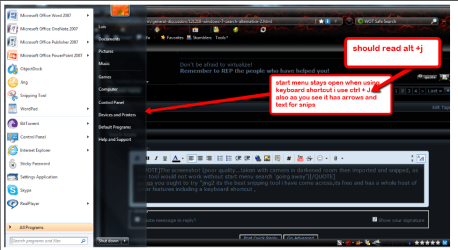
The screenshot (poor quality...taken with camera in darkened room then imported and snipped, as snip tool would not work without start menu search 'going away')
james you ought to try "jing" its the best snipping tool i have come across,its free and has a whole host of other features including a keyboard shortcut , see snip.......
2011-07-04_2120.png
TechSmith | Jing, instant screenshots and screencasts, free tour page

on topic,you wont have to search for your snips it has a history button also. :D
 

My Computer My Computer

Computer Manufacturer/Model Number
Hewlett packard/p6512uk
OS
Microsoft Windows 7 Home Premium 64-bit 7600
CPU
IIx4 amd athelon 635 processor
Motherboard
FOXCONN 2AA9
Memory
2x2gb
Graphics Card(s)
ati radeon HD 5450
Sound Card
(1) Realtek High Definition Audio (2) AMD High Definition
Monitor(s) Displays
samsung lcd tv 32"
Screen Resolution
1360x 768
Hard Drives
(1) WDC WD10 01FAES-60Z2A0 SATA Disk Device (2) Maxtor OneTouch USB Device (3) ST310003 33AS USB Device (4) WD My Book 1111 USB Device
PSU
?
Cooling
air!
Keyboard
wireless hp
Mouse
wireless Hp,optical
Internet Speed
1.10mb/s
Antivirus
MSE
Browser
Firefox
The screenshot (poor quality...taken with camera in darkened room then imported and snipped, as snip tool would not work without start menu search 'going away')
james you ought to try "jing" its the best snipping tool i have come across,its free and has a whole host of other features including a keyboard shortcut , see snip.......

TechSmith | Jing, instant screenshots and screencasts, free tour page

Thanks for the pointer (and the consideration!), boohbah. I'll definitely check that out. I've beeen using the windows snip tool, but it is lacking in markup and commenting tools.

Are you using the free or paid version?
 

My Computer My Computer

OS
Win7U 64 RTM
CPU
Q9550
Motherboard
GA-EP45-UD3R
Memory
8GB Gskill
Graphics Card(s)
ASUS|EAH4850/HTDI/1GD3/A
Sound Card
xfi Plat
Monitor(s) Displays
Dell 2405fpw
Screen Resolution
1920x1200
Hard Drives
Seagate & WD sata Drives
PSU
Antec
Case
Antec
Keyboard
MS Natural Ergonomic 4000
Mouse
Logitech MX610 USB Cordless
Back
Top