

Screenshot from disk management(from former RAID1):

This is what happened>
I had RAID 1 running on Intel Matrix Storage,(Win 7 Pro x86)
then the software failed first with one then with the another disk.
I use ASUS P7P55D PRO Motherboard where I had two
WD Green 1 TB in RAID 1 (Model> WD10EADS-00L5B1)
running.
After failure disks were checked with Linux, and they were healthy and no data lost.
So far so good, I made a backup of the files and now try to boot, but boot fails right after windows 7 logo animation, it shows blue screen. I tried to fix issue with Windows RE (The automatic repair). No help with that.
I'm not familiar with cmd repairing from the installation DVD nor from Hiren's Boot CD 10.1.
I'm thinking the problem could be with the partitioning, but I've got no idea how. Both disks have two partitions:
1:System reserved (105MB or so) NTFS > Partition Type: HPFS\NTFS (0x07)
2 ata 1TB NTFS > Partition Type: HPFS\NTFS (0x07)
Advice appreciated
#EDIT# Advice for everyone, don't use software raid for OS buy a NAS instead, and install OS to SSD or other disk and leave the RAID for Hardware based solution. It'll save you a lot of time.
This is what happened>
I had RAID 1 running on Intel Matrix Storage,(Win 7 Pro x86)
then the software failed first with one then with the another disk.
I use ASUS P7P55D PRO Motherboard where I had two
WD Green 1 TB in RAID 1 (Model> WD10EADS-00L5B1)
running.
After failure disks were checked with Linux, and they were healthy and no data lost.
So far so good, I made a backup of the files and now try to boot, but boot fails right after windows 7 logo animation, it shows blue screen. I tried to fix issue with Windows RE (The automatic repair). No help with that.
I'm not familiar with cmd repairing from the installation DVD nor from Hiren's Boot CD 10.1.
I'm thinking the problem could be with the partitioning, but I've got no idea how. Both disks have two partitions:
1:System reserved (105MB or so) NTFS > Partition Type: HPFS\NTFS (0x07)
2
ata 1TB NTFS > Partition Type: HPFS\NTFS (0x07)Advice appreciated
#EDIT# Advice for everyone, don't use software raid for OS buy a NAS instead, and install OS to SSD or other disk and leave the RAID for Hardware based solution. It'll save you a lot of time.
Last edited:
My Computer
At a glance
Windows 7 Professional (32-bit)Intel Core i7 860 2.8GhzCORSAIR 2X2GB DDR3 1333MHZ KITPALIT GTX 295 PCIE 1792MB 896-BIT GDDR-3
- Computer Manufacturer/Model Number
- Custom build
- OS
- Windows 7 Professional (32-bit)
- CPU
- Intel Core i7 860 2.8Ghz
- Motherboard
- Asus P7P55D PRO
- Memory
- CORSAIR 2X2GB DDR3 1333MHZ KIT
- Graphics Card(s)
- PALIT GTX 295 PCIE 1792MB 896-BIT GDDR-3
- Sound Card
- VIA VT1828S 8-channel High Definition Audio (integrated)
- Monitor(s) Displays
- LG Flatron 24" and HP ZR24w 24"
- Screen Resolution
- 1980*1080 and 1980*1200
- Hard Drives
- WD CAVIAR GP 1TB SATA2 32MB INTELLIPOWER (RAID1)
WD CAVIAR GP 1TB SATA2 32MB INTELLIPOWER (RAID1)
WD Blue 500GB SATA2 16MB
OCZ 60GB Vertex 2
- PSU
- CORSAIR PSU 650W 12CM ATX12V2.2 80+ EPS
- Case
- ANTEC THREE-HUNDRED Black
- Cooling
- TriCool 120mm and TriCool 140mm
- Keyboard
- Microsoft Digital Media Pro Keyboard
- Mouse
- Logitech G9
- Internet Speed
- 2M

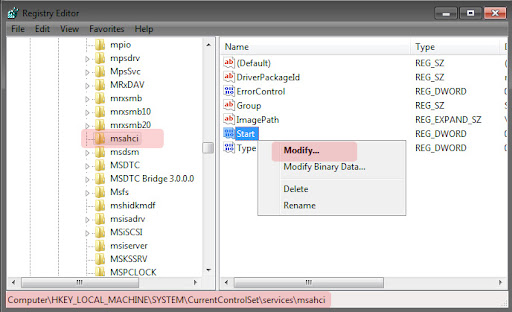
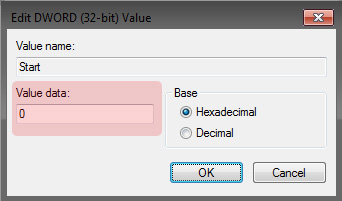
 . I think this solution only applies if the problem was with RAID software not with the disks, but I'm not sure.
 I pulled the wrong disk first, so I had to shutdown again):sarc: