Advanced Boot problem with disk reverted from RAID 1 (Files are ok)

Tonza

New member
Local time
4:31 PM
Messages
40
Location
Finnland
Screenshot from disk management(from former RAID1):
attachment.php

This is what happened>

I had RAID 1 running on Intel Matrix Storage,(Win 7 Pro x86)
then the software failed first with one then with the another disk.

I use ASUS P7P55D PRO Motherboard where I had two
WD Green 1 TB in RAID 1 (Model> WD10EADS-00L5B1)
running.

After failure disks were checked with Linux, and they were healthy and no data lost.

So far so good, I made a backup of the files and now try to boot, but boot fails right after windows 7 logo animation, it shows blue screen. I tried to fix issue with Windows RE (The automatic repair). No help with that.

I'm not familiar with cmd repairing from the installation DVD nor from Hiren's Boot CD 10.1.

I'm thinking the problem could be with the partitioning, but I've got no idea how. Both disks have two partitions:
1:System reserved (105MB or so) NTFS > Partition Type: HPFS\NTFS (0x07)
2:Data 1TB NTFS > Partition Type: HPFS\NTFS (0x07)

Advice appreciated

#EDIT# Advice for everyone, don't use software raid for OS buy a NAS instead, and install OS to SSD or other disk and leave the RAID for Hardware based solution. It'll save you a lot of time.
 
Last edited:

My Computer My Computer

At a glance

Windows 7 Professional (32-bit)Intel Core i7 860 2.8GhzCORSAIR 2X2GB DDR3 1333MHZ KITPALIT GTX 295 PCIE 1792MB 896-BIT GDDR-3
Computer Manufacturer/Model Number
Custom build
OS
Windows 7 Professional (32-bit)
CPU
Intel Core i7 860 2.8Ghz
Motherboard
Asus P7P55D PRO
Memory
CORSAIR 2X2GB DDR3 1333MHZ KIT
Graphics Card(s)
PALIT GTX 295 PCIE 1792MB 896-BIT GDDR-3
Sound Card
VIA VT1828S 8-channel High Definition Audio (integrated)
Monitor(s) Displays
LG Flatron 24" and HP ZR24w 24"
Screen Resolution
1980*1080 and 1980*1200
Hard Drives
WD CAVIAR GP 1TB SATA2 32MB INTELLIPOWER (RAID1)
WD Blue 500GB SATA2 16MB
OCZ 60GB Vertex 2
PSU
CORSAIR PSU 650W 12CM ATX12V2.2 80+ EPS
Case
ANTEC THREE-HUNDRED Black
Cooling
TriCool 120mm and TriCool 140mm
Keyboard
Microsoft Digital Media Pro Keyboard
Mouse
Logitech G9
Internet Speed
2M
Hi Tonza,

Ouch : another RAID problem....we see lots of these here.

I'm not sure that you can boot from either one of those disks without formatting & installing again. I assume you reverted to IDE or AHCI controller in the BIOS, when you tried to boot from one of the single disks?

Regards,
Golden
 

My Computer My Computer

At a glance

Windows 10 Pro x64 ; Xubuntu x64Intel i7 860 @ 2.80 GHz O/C'ed to 4.0GHz16GB Corsair Vengance DDR3 @ 661 MHz Dual Cha...EVGA NVidia GTX 560 1024MB
Computer type
PC/Desktop
Computer Manufacturer/Model Number
Golden Mk. I.4
OS
Windows 10 Pro x64 ; Xubuntu x64
CPU
Intel i7 860 @ 2.80 GHz O/C'ed to 4.0GHz
Motherboard
Gigabyte P55A-UD3R Rev.1. Award BIOS F13
Memory
16GB Corsair Vengance DDR3 @ 661 MHz Dual Channel (9-9-9-24)
Graphics Card(s)
EVGA NVidia GTX 560 1024MB
Sound Card
Realtek Integrated
Monitor(s) Displays
Dual Samsung SyncMaster 2494HS
Screen Resolution
1920*1080 and 1920*1080
Hard Drives
1*Samsung 840 EVO 120GB SSD;
1*OCZ Vertex 2 60GB SSD;
2*Samsung F3 SpinPoint 1TB in RAID0;
1*Samsung F1 SpinPoint 1TB;
2*Western Digital 1TB External USB 3.0
1*Western Digital 500GB External USB 3.0
1*Seagate 500GB External USB 2.0
PSU
Thermaltake ToughPower QFan 750W
Case
Thermaltake Element S VK60001W2Z
Cooling
Corsair H60 Water Cooling, 2*230mm and 2*80mm case fans
Keyboard
Logitech G110
Mouse
Logitech MX518
Ouch indeed!

I reverted to AHCI first and tried if would be able to boot. Then reverted to RAID and made the disks Non-RAID, though it said all data would be lost, but nothing lost, only in my USB-Linux where I'm at right now, I noticed NTFS (version 1.10 something) changed to plain NTFS
 

My Computer My Computer

At a glance

Windows 7 Professional (32-bit)Intel Core i7 860 2.8GhzCORSAIR 2X2GB DDR3 1333MHZ KITPALIT GTX 295 PCIE 1792MB 896-BIT GDDR-3
Computer Manufacturer/Model Number
Custom build
OS
Windows 7 Professional (32-bit)
CPU
Intel Core i7 860 2.8Ghz
Motherboard
Asus P7P55D PRO
Memory
CORSAIR 2X2GB DDR3 1333MHZ KIT
Graphics Card(s)
PALIT GTX 295 PCIE 1792MB 896-BIT GDDR-3
Sound Card
VIA VT1828S 8-channel High Definition Audio (integrated)
Monitor(s) Displays
LG Flatron 24" and HP ZR24w 24"
Screen Resolution
1980*1080 and 1980*1200
Hard Drives
WD CAVIAR GP 1TB SATA2 32MB INTELLIPOWER (RAID1)
WD Blue 500GB SATA2 16MB
OCZ 60GB Vertex 2
PSU
CORSAIR PSU 650W 12CM ATX12V2.2 80+ EPS
Case
ANTEC THREE-HUNDRED Black
Cooling
TriCool 120mm and TriCool 140mm
Keyboard
Microsoft Digital Media Pro Keyboard
Mouse
Logitech G9
Internet Speed
2M
Mmmmm....I think the problem is that the registry entries will still show the controller as RAID. Since the BIOS is now AHCI, I see some conflict.....and maybe Windows see it too......but I can't really be sure.

Best to wait for some one more experienced to look at this, but I suspect you may have to install from scratch.......

Sorry I couldn't be of more help,
Golden
 

My Computer My Computer

At a glance

Windows 10 Pro x64 ; Xubuntu x64Intel i7 860 @ 2.80 GHz O/C'ed to 4.0GHz16GB Corsair Vengance DDR3 @ 661 MHz Dual Cha...EVGA NVidia GTX 560 1024MB
Computer type
PC/Desktop
Computer Manufacturer/Model Number
Golden Mk. I.4
OS
Windows 10 Pro x64 ; Xubuntu x64
CPU
Intel i7 860 @ 2.80 GHz O/C'ed to 4.0GHz
Motherboard
Gigabyte P55A-UD3R Rev.1. Award BIOS F13
Memory
16GB Corsair Vengance DDR3 @ 661 MHz Dual Channel (9-9-9-24)
Graphics Card(s)
EVGA NVidia GTX 560 1024MB
Sound Card
Realtek Integrated
Monitor(s) Displays
Dual Samsung SyncMaster 2494HS
Screen Resolution
1920*1080 and 1920*1080
Hard Drives
1*Samsung 840 EVO 120GB SSD;
1*OCZ Vertex 2 60GB SSD;
2*Samsung F3 SpinPoint 1TB in RAID0;
1*Samsung F1 SpinPoint 1TB;
2*Western Digital 1TB External USB 3.0
1*Western Digital 500GB External USB 3.0
1*Seagate 500GB External USB 2.0
PSU
Thermaltake ToughPower QFan 750W
Case
Thermaltake Element S VK60001W2Z
Cooling
Corsair H60 Water Cooling, 2*230mm and 2*80mm case fans
Keyboard
Logitech G110
Mouse
Logitech MX518

My Computer My Computer

At a glance

Windows 7 Professional (32-bit)Intel Core i7 860 2.8GhzCORSAIR 2X2GB DDR3 1333MHZ KITPALIT GTX 295 PCIE 1792MB 896-BIT GDDR-3
Computer Manufacturer/Model Number
Custom build
OS
Windows 7 Professional (32-bit)
CPU
Intel Core i7 860 2.8Ghz
Motherboard
Asus P7P55D PRO
Memory
CORSAIR 2X2GB DDR3 1333MHZ KIT
Graphics Card(s)
PALIT GTX 295 PCIE 1792MB 896-BIT GDDR-3
Sound Card
VIA VT1828S 8-channel High Definition Audio (integrated)
Monitor(s) Displays
LG Flatron 24" and HP ZR24w 24"
Screen Resolution
1980*1080 and 1980*1200
Hard Drives
WD CAVIAR GP 1TB SATA2 32MB INTELLIPOWER (RAID1)
WD Blue 500GB SATA2 16MB
OCZ 60GB Vertex 2
PSU
CORSAIR PSU 650W 12CM ATX12V2.2 80+ EPS
Case
ANTEC THREE-HUNDRED Black
Cooling
TriCool 120mm and TriCool 140mm
Keyboard
Microsoft Digital Media Pro Keyboard
Mouse
Logitech G9
Internet Speed
2M
Thanks Golden,
Definitely there is some problem which comes from the RAID driver or something related. But since the things in general look good I'm pretty optimistic this can be sorted out without clean install. Ironic that I was just about to move my OS to new OCZ Vertex2 SSD and switch my licenses and stuff but for few days too late.
 

My Computer My Computer

At a glance

Windows 7 Professional (32-bit)Intel Core i7 860 2.8GhzCORSAIR 2X2GB DDR3 1333MHZ KITPALIT GTX 295 PCIE 1792MB 896-BIT GDDR-3
Computer Manufacturer/Model Number
Custom build
OS
Windows 7 Professional (32-bit)
CPU
Intel Core i7 860 2.8Ghz
Motherboard
Asus P7P55D PRO
Memory
CORSAIR 2X2GB DDR3 1333MHZ KIT
Graphics Card(s)
PALIT GTX 295 PCIE 1792MB 896-BIT GDDR-3
Sound Card
VIA VT1828S 8-channel High Definition Audio (integrated)
Monitor(s) Displays
LG Flatron 24" and HP ZR24w 24"
Screen Resolution
1980*1080 and 1980*1200
Hard Drives
WD CAVIAR GP 1TB SATA2 32MB INTELLIPOWER (RAID1)
WD Blue 500GB SATA2 16MB
OCZ 60GB Vertex 2
PSU
CORSAIR PSU 650W 12CM ATX12V2.2 80+ EPS
Case
ANTEC THREE-HUNDRED Black
Cooling
TriCool 120mm and TriCool 140mm
Keyboard
Microsoft Digital Media Pro Keyboard
Mouse
Logitech G9
Internet Speed
2M
Unlucky. For what its worth, the performance of a single SSD far outstrips any RAID, even RAID0 using 15K rpm SAS drives. I have a 60GB OCZ Vertex 2..............it is blindingly fast!
 

My Computer My Computer

At a glance

Windows 10 Pro x64 ; Xubuntu x64Intel i7 860 @ 2.80 GHz O/C'ed to 4.0GHz16GB Corsair Vengance DDR3 @ 661 MHz Dual Cha...EVGA NVidia GTX 560 1024MB
Computer type
PC/Desktop
Computer Manufacturer/Model Number
Golden Mk. I.4
OS
Windows 10 Pro x64 ; Xubuntu x64
CPU
Intel i7 860 @ 2.80 GHz O/C'ed to 4.0GHz
Motherboard
Gigabyte P55A-UD3R Rev.1. Award BIOS F13
Memory
16GB Corsair Vengance DDR3 @ 661 MHz Dual Channel (9-9-9-24)
Graphics Card(s)
EVGA NVidia GTX 560 1024MB
Sound Card
Realtek Integrated
Monitor(s) Displays
Dual Samsung SyncMaster 2494HS
Screen Resolution
1920*1080 and 1920*1080
Hard Drives
1*Samsung 840 EVO 120GB SSD;
1*OCZ Vertex 2 60GB SSD;
2*Samsung F3 SpinPoint 1TB in RAID0;
1*Samsung F1 SpinPoint 1TB;
2*Western Digital 1TB External USB 3.0
1*Western Digital 500GB External USB 3.0
1*Seagate 500GB External USB 2.0
PSU
Thermaltake ToughPower QFan 750W
Case
Thermaltake Element S VK60001W2Z
Cooling
Corsair H60 Water Cooling, 2*230mm and 2*80mm case fans
Keyboard
Logitech G110
Mouse
Logitech MX518
Unlucky. For what its worth, the performance of a single SSD far outstrips any RAID, even RAID0 using 15K rpm SAS drives. I have a 60GB OCZ Vertex 2..............it is blindingly fast!

I have exactly the same one.
 

My Computer My Computer

At a glance

Windows 7 Professional (32-bit)Intel Core i7 860 2.8GhzCORSAIR 2X2GB DDR3 1333MHZ KITPALIT GTX 295 PCIE 1792MB 896-BIT GDDR-3
Computer Manufacturer/Model Number
Custom build
OS
Windows 7 Professional (32-bit)
CPU
Intel Core i7 860 2.8Ghz
Motherboard
Asus P7P55D PRO
Memory
CORSAIR 2X2GB DDR3 1333MHZ KIT
Graphics Card(s)
PALIT GTX 295 PCIE 1792MB 896-BIT GDDR-3
Sound Card
VIA VT1828S 8-channel High Definition Audio (integrated)
Monitor(s) Displays
LG Flatron 24" and HP ZR24w 24"
Screen Resolution
1980*1080 and 1980*1200
Hard Drives
WD CAVIAR GP 1TB SATA2 32MB INTELLIPOWER (RAID1)
WD Blue 500GB SATA2 16MB
OCZ 60GB Vertex 2
PSU
CORSAIR PSU 650W 12CM ATX12V2.2 80+ EPS
Case
ANTEC THREE-HUNDRED Black
Cooling
TriCool 120mm and TriCool 140mm
Keyboard
Microsoft Digital Media Pro Keyboard
Mouse
Logitech G9
Internet Speed
2M
Oh....one thing you could try, assuming that the problem is the RAID reference in the registry, and that you can get access to the registry of course....

Change from IDE to AHCI Mode after Installation

Information:
AHCI stand for Advance Host Controller Interface. AHCI is a hardware mechanism that allows software to communicate with Serial ATA (SATA) devices (such as host bus adapters) that are designed to offer features not offered by Parallel ATA (PATA) controllers, such as:
  • Hot-Plugging
  • Native Command Queuing (NCQ) -might improve computer/system/hard disk responsiveness, especially in multi-tasking environment
You can read more about AHCI mode HERE

Instruction: There is one way to fix this, although you need to have knowledge of registry editing.
The detailed steps from Microsoft website are as follows:

  • Exit all Windows-based programs.
  • Press [Win] + R or take the RUN option from the start menu.
  • Now type regedit there and press Enter Key to open up the Registry Editor Window.
  • If you receive the User Account Control dialog box, click Continue.
  • Locate and then click the following registry subkey:
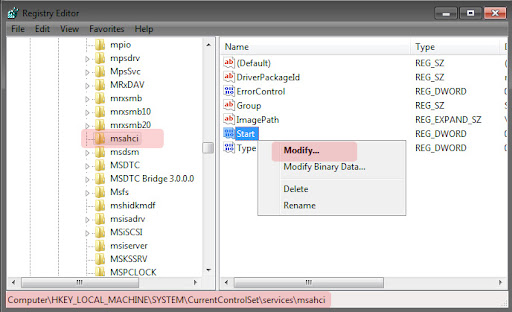
    HKEY_LOCAL_MACHINE\System\CurrentControlSet\Servic es\msahci
  • In the right pane, right-click Start in the Name column, and then click Modify.
IDE%20to%20AHCI.jpg


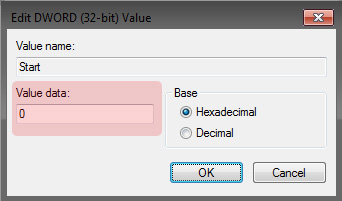
  • In the Value data box, type 0 [3 is default], and then click OK.
IDE%20to%20AHCI%20modify.jpg

  • On the File menu, click Exit to close Registry Editor.
  • Restart your computer
  • Go to BIOS and enable AHCI, Save & Reboot
  • Another restart will be required to finish the driver installation.
This comes from Guide * Windows 7 Ultimate Tweaks & Utilities *
 

My Computer My Computer

At a glance

Windows 10 Pro x64 ; Xubuntu x64Intel i7 860 @ 2.80 GHz O/C'ed to 4.0GHz16GB Corsair Vengance DDR3 @ 661 MHz Dual Cha...EVGA NVidia GTX 560 1024MB
Computer type
PC/Desktop
Computer Manufacturer/Model Number
Golden Mk. I.4
OS
Windows 10 Pro x64 ; Xubuntu x64
CPU
Intel i7 860 @ 2.80 GHz O/C'ed to 4.0GHz
Motherboard
Gigabyte P55A-UD3R Rev.1. Award BIOS F13
Memory
16GB Corsair Vengance DDR3 @ 661 MHz Dual Channel (9-9-9-24)
Graphics Card(s)
EVGA NVidia GTX 560 1024MB
Sound Card
Realtek Integrated
Monitor(s) Displays
Dual Samsung SyncMaster 2494HS
Screen Resolution
1920*1080 and 1920*1080
Hard Drives
1*Samsung 840 EVO 120GB SSD;
1*OCZ Vertex 2 60GB SSD;
2*Samsung F3 SpinPoint 1TB in RAID0;
1*Samsung F1 SpinPoint 1TB;
2*Western Digital 1TB External USB 3.0
1*Western Digital 500GB External USB 3.0
1*Seagate 500GB External USB 2.0
PSU
Thermaltake ToughPower QFan 750W
Case
Thermaltake Element S VK60001W2Z
Cooling
Corsair H60 Water Cooling, 2*230mm and 2*80mm case fans
Keyboard
Logitech G110
Mouse
Logitech MX518
Unlucky. For what its worth, the performance of a single SSD far outstrips any RAID, even RAID0 using 15K rpm SAS drives. I have a 60GB OCZ Vertex 2..............it is blindingly fast!

I have exactly the same one.

Very nice - you are going to be very glad you got that one.
 

My Computer My Computer

At a glance

Windows 10 Pro x64 ; Xubuntu x64Intel i7 860 @ 2.80 GHz O/C'ed to 4.0GHz16GB Corsair Vengance DDR3 @ 661 MHz Dual Cha...EVGA NVidia GTX 560 1024MB
Computer type
PC/Desktop
Computer Manufacturer/Model Number
Golden Mk. I.4
OS
Windows 10 Pro x64 ; Xubuntu x64
CPU
Intel i7 860 @ 2.80 GHz O/C'ed to 4.0GHz
Motherboard
Gigabyte P55A-UD3R Rev.1. Award BIOS F13
Memory
16GB Corsair Vengance DDR3 @ 661 MHz Dual Channel (9-9-9-24)
Graphics Card(s)
EVGA NVidia GTX 560 1024MB
Sound Card
Realtek Integrated
Monitor(s) Displays
Dual Samsung SyncMaster 2494HS
Screen Resolution
1920*1080 and 1920*1080
Hard Drives
1*Samsung 840 EVO 120GB SSD;
1*OCZ Vertex 2 60GB SSD;
2*Samsung F3 SpinPoint 1TB in RAID0;
1*Samsung F1 SpinPoint 1TB;
2*Western Digital 1TB External USB 3.0
1*Western Digital 500GB External USB 3.0
1*Seagate 500GB External USB 2.0
PSU
Thermaltake ToughPower QFan 750W
Case
Thermaltake Element S VK60001W2Z
Cooling
Corsair H60 Water Cooling, 2*230mm and 2*80mm case fans
Keyboard
Logitech G110
Mouse
Logitech MX518
I'll have to see if can get to fork the registry the Install DVD or Linux. At least I could search for the RAID stuff.
 

My Computer My Computer

At a glance

Windows 7 Professional (32-bit)Intel Core i7 860 2.8GhzCORSAIR 2X2GB DDR3 1333MHZ KITPALIT GTX 295 PCIE 1792MB 896-BIT GDDR-3
Computer Manufacturer/Model Number
Custom build
OS
Windows 7 Professional (32-bit)
CPU
Intel Core i7 860 2.8Ghz
Motherboard
Asus P7P55D PRO
Memory
CORSAIR 2X2GB DDR3 1333MHZ KIT
Graphics Card(s)
PALIT GTX 295 PCIE 1792MB 896-BIT GDDR-3
Sound Card
VIA VT1828S 8-channel High Definition Audio (integrated)
Monitor(s) Displays
LG Flatron 24" and HP ZR24w 24"
Screen Resolution
1980*1080 and 1980*1200
Hard Drives
WD CAVIAR GP 1TB SATA2 32MB INTELLIPOWER (RAID1)
WD Blue 500GB SATA2 16MB
OCZ 60GB Vertex 2
PSU
CORSAIR PSU 650W 12CM ATX12V2.2 80+ EPS
Case
ANTEC THREE-HUNDRED Black
Cooling
TriCool 120mm and TriCool 140mm
Keyboard
Microsoft Digital Media Pro Keyboard
Mouse
Logitech G9
Internet Speed
2M
Now I've installed windows on my new SSD and I try to start fixing the system via this installation.

I also checked Brinks tutorial on how to revert dynamic drive back to basic. In my case I've allready kind of reverted the drives, as I switched them to Non-Raid via Intel Matrix Storage Menu. It seems that my problem is somewhere in the Windows Installation since the software RAID failed on boot I never got to windows to do this. Question remains: How should I proceed in the path getting a bootable basic disk?

In more detail I'm interested to get more thorough understanding about the 3rd method of this tutorial.

Help appreciated.


Hopefully someone can benefit from this operation after it's finished.
 
Last edited by a moderator:

My Computer My Computer

At a glance

Windows 7 Professional (32-bit)Intel Core i7 860 2.8GhzCORSAIR 2X2GB DDR3 1333MHZ KITPALIT GTX 295 PCIE 1792MB 896-BIT GDDR-3
Computer Manufacturer/Model Number
Custom build
OS
Windows 7 Professional (32-bit)
CPU
Intel Core i7 860 2.8Ghz
Motherboard
Asus P7P55D PRO
Memory
CORSAIR 2X2GB DDR3 1333MHZ KIT
Graphics Card(s)
PALIT GTX 295 PCIE 1792MB 896-BIT GDDR-3
Sound Card
VIA VT1828S 8-channel High Definition Audio (integrated)
Monitor(s) Displays
LG Flatron 24" and HP ZR24w 24"
Screen Resolution
1980*1080 and 1980*1200
Hard Drives
WD CAVIAR GP 1TB SATA2 32MB INTELLIPOWER (RAID1)
WD Blue 500GB SATA2 16MB
OCZ 60GB Vertex 2
PSU
CORSAIR PSU 650W 12CM ATX12V2.2 80+ EPS
Case
ANTEC THREE-HUNDRED Black
Cooling
TriCool 120mm and TriCool 140mm
Keyboard
Microsoft Digital Media Pro Keyboard
Mouse
Logitech G9
Internet Speed
2M
Now I ran chkdisk on the volumes and it repaired something(probably in the registry) so now it's time for a boot and I'll report how it went. I also bought iolos System Mechanic toolset to see if it can help on the issue. Back to business.
 

My Computer My Computer

At a glance

Windows 7 Professional (32-bit)Intel Core i7 860 2.8GhzCORSAIR 2X2GB DDR3 1333MHZ KITPALIT GTX 295 PCIE 1792MB 896-BIT GDDR-3
Computer Manufacturer/Model Number
Custom build
OS
Windows 7 Professional (32-bit)
CPU
Intel Core i7 860 2.8Ghz
Motherboard
Asus P7P55D PRO
Memory
CORSAIR 2X2GB DDR3 1333MHZ KIT
Graphics Card(s)
PALIT GTX 295 PCIE 1792MB 896-BIT GDDR-3
Sound Card
VIA VT1828S 8-channel High Definition Audio (integrated)
Monitor(s) Displays
LG Flatron 24" and HP ZR24w 24"
Screen Resolution
1980*1080 and 1980*1200
Hard Drives
WD CAVIAR GP 1TB SATA2 32MB INTELLIPOWER (RAID1)
WD Blue 500GB SATA2 16MB
OCZ 60GB Vertex 2
PSU
CORSAIR PSU 650W 12CM ATX12V2.2 80+ EPS
Case
ANTEC THREE-HUNDRED Black
Cooling
TriCool 120mm and TriCool 140mm
Keyboard
Microsoft Digital Media Pro Keyboard
Mouse
Logitech G9
Internet Speed
2M
It seems that my problem is somewhere in the Windows Installation since the software RAID failed on boot I never got to windows to do this

I still think its because under the original RAID setup, the registry has an entry to tell the OS to boot under a RAID configuration. Now, however, the controller in the BIOS tells the OS to boot under ACHI, and this causes the conflict.

I'll be intrested to see how you solve it.

Good luck Tonza,
Golden
 

My Computer My Computer

At a glance

Windows 10 Pro x64 ; Xubuntu x64Intel i7 860 @ 2.80 GHz O/C'ed to 4.0GHz16GB Corsair Vengance DDR3 @ 661 MHz Dual Cha...EVGA NVidia GTX 560 1024MB
Computer type
PC/Desktop
Computer Manufacturer/Model Number
Golden Mk. I.4
OS
Windows 10 Pro x64 ; Xubuntu x64
CPU
Intel i7 860 @ 2.80 GHz O/C'ed to 4.0GHz
Motherboard
Gigabyte P55A-UD3R Rev.1. Award BIOS F13
Memory
16GB Corsair Vengance DDR3 @ 661 MHz Dual Channel (9-9-9-24)
Graphics Card(s)
EVGA NVidia GTX 560 1024MB
Sound Card
Realtek Integrated
Monitor(s) Displays
Dual Samsung SyncMaster 2494HS
Screen Resolution
1920*1080 and 1920*1080
Hard Drives
1*Samsung 840 EVO 120GB SSD;
1*OCZ Vertex 2 60GB SSD;
2*Samsung F3 SpinPoint 1TB in RAID0;
1*Samsung F1 SpinPoint 1TB;
2*Western Digital 1TB External USB 3.0
1*Western Digital 500GB External USB 3.0
1*Seagate 500GB External USB 2.0
PSU
Thermaltake ToughPower QFan 750W
Case
Thermaltake Element S VK60001W2Z
Cooling
Corsair H60 Water Cooling, 2*230mm and 2*80mm case fans
Keyboard
Logitech G110
Mouse
Logitech MX518
I still think its because under the original RAID setup, the registry has an entry to tell the OS to boot under a RAID configuration. Now, however, the controller in the BIOS tells the OS to boot under ACHI, and this causes the conflict.

I'll be intrested to see how you solve it.
I think you've got that right, and I've now been loggin the boot operation with safe mode where I can see exactly where the boot fails. I'm now trying start the system also from another disk where I've copied all the files and in the next step I'll build the bootloader for it and see if it helps.

I'm still doing deeper research for the registry and I'm also considering another approach too where I actually try to build the RAID1 again by formatting the former RAID disks again one at time.

Interesting also is that I read that someone had corrected a similar situation in Vista and he just copied the stuff to backup and then formatted original disk and moved the data back in and then, rebuilded the bootloader and fixed the disk with Windows installation disk and booted again, and that was it!

Thanks for the encouragement!:D -Tonza
 

My Computer My Computer

At a glance

Windows 7 Professional (32-bit)Intel Core i7 860 2.8GhzCORSAIR 2X2GB DDR3 1333MHZ KITPALIT GTX 295 PCIE 1792MB 896-BIT GDDR-3
Computer Manufacturer/Model Number
Custom build
OS
Windows 7 Professional (32-bit)
CPU
Intel Core i7 860 2.8Ghz
Motherboard
Asus P7P55D PRO
Memory
CORSAIR 2X2GB DDR3 1333MHZ KIT
Graphics Card(s)
PALIT GTX 295 PCIE 1792MB 896-BIT GDDR-3
Sound Card
VIA VT1828S 8-channel High Definition Audio (integrated)
Monitor(s) Displays
LG Flatron 24" and HP ZR24w 24"
Screen Resolution
1980*1080 and 1980*1200
Hard Drives
WD CAVIAR GP 1TB SATA2 32MB INTELLIPOWER (RAID1)
WD Blue 500GB SATA2 16MB
OCZ 60GB Vertex 2
PSU
CORSAIR PSU 650W 12CM ATX12V2.2 80+ EPS
Case
ANTEC THREE-HUNDRED Black
Cooling
TriCool 120mm and TriCool 140mm
Keyboard
Microsoft Digital Media Pro Keyboard
Mouse
Logitech G9
Internet Speed
2M
I solved the problem

Thank God, the problem is finally solved(It only took 4 days:shock:). I think this solution only applies if the problem was with RAID software not with the disks, but I'm not sure.

So here is what I did:

1. I had all my data backed up after I found out that the disks were ok. (I had two identical disks that were on RAID1(Check my system spec). Then for some reason first the other failed. Then after quite long time the other on the previous day I started the thread.)

2. Now the status of my RAID1 array was Failed and I was not able to boot.
WARNING: Now if your disks really have failed trying to repair them could just make the situation worse. My HDDs had not given ANY S.M.A.R.T messages that they were failing or having problems so switched the drives to linux machine to check if the data was there.

Result:
All data on place and no data lost. Both disks perfectly healthy. Now I tried a lot of things that just didn't work.
3. Next I installed a Windows on another drive to get the original system to boot.

4. Then I installed Partition Wizard Home Edition the program I learned from Brinks tutorial.

5. Now I went to Windows Disk Manager and formatted the older one of the RAID disks and launched Partition Wizard Home Edition.

6. In Partition Wizard I copied one of the two partitions on the other RAID disk, the partition copied was the one with the data not the system reserved.

7. Then I gave the old new disk a drive letter in Partition Wizard Home Edition.

8.Then I used also a free program called EasyBCD 2.0.2 To create a new BCD to my disk.

9. After that I reverted default settings to BIOS (from AHCI to IDE) just in case.
And booted first to the temporary windows and then did a shutdown for next step.

Note:(I pulled the wrong disk first, so I had to shutdown again):sarc:


10. I unplugged every unnecessary disk, and switched off.

11. First I booted the system in Safe-Mode, and it Started !!!:party:
12. Now in the Safe-Mode system installed drivers for the HDDs and then I restarted the system,

13. The system is as good as new and I still can't believe it's true.

Thats it lets see if I can clarify this tomorrow.
 
Last edited:

My Computer My Computer

At a glance

Windows 7 Professional (32-bit)Intel Core i7 860 2.8GhzCORSAIR 2X2GB DDR3 1333MHZ KITPALIT GTX 295 PCIE 1792MB 896-BIT GDDR-3
Computer Manufacturer/Model Number
Custom build
OS
Windows 7 Professional (32-bit)
CPU
Intel Core i7 860 2.8Ghz
Motherboard
Asus P7P55D PRO
Memory
CORSAIR 2X2GB DDR3 1333MHZ KIT
Graphics Card(s)
PALIT GTX 295 PCIE 1792MB 896-BIT GDDR-3
Sound Card
VIA VT1828S 8-channel High Definition Audio (integrated)
Monitor(s) Displays
LG Flatron 24" and HP ZR24w 24"
Screen Resolution
1980*1080 and 1980*1200
Hard Drives
WD CAVIAR GP 1TB SATA2 32MB INTELLIPOWER (RAID1)
WD Blue 500GB SATA2 16MB
OCZ 60GB Vertex 2
PSU
CORSAIR PSU 650W 12CM ATX12V2.2 80+ EPS
Case
ANTEC THREE-HUNDRED Black
Cooling
TriCool 120mm and TriCool 140mm
Keyboard
Microsoft Digital Media Pro Keyboard
Mouse
Logitech G9
Internet Speed
2M
Back
Top