USB Thumb Drive vs Portable HDD

oreo27

New member
Guru
VIP
Local time
7:30 PM
Messages
521
Location
Philippines
[Solved] USB Thumb Drive vs Portable HDD

Hi Everyone,

I need your opinions on a purchase I'm planning to make soon. I'm in a bit of a fork as to what I'm going to get actually.

A thumb drive would be more portable, so to speak rather than the portable HDD.

An HDD would have way more space, however.

I will mostly use this as a portable drive, bootable with Hiren's Boot CD.

The price difference between the two items, and the two items are as follows:

1. SanDisk® Cruzer® Blade™ USB flash drive 16GB - Php 1,150 - Brand New

2. Seagate FreeAgent Go™ 250GB - Php 2,000 - Used - Warranty until September 2013.
 
Last edited:

My Computer My Computer

Computer type
PC/Desktop
Computer Manufacturer/Model Number
Custom Build
OS
Windows 7 Ultimate x64 Service Pack 1
CPU
AMD Athlon II x4 Propus 2.9 GHz
Motherboard
ASRock N68C-GS FX
Memory
2 x 4GB Corsair XMS 3 DDR3 -1600 CL9
Graphics Card(s)
AMD Radeon HD 5850 1GB GDDR5
Sound Card
On-board 6-Channel HD Audio
Monitor(s) Displays
18' LG Flatron E1942TC-BN on DVI, 18' Chimei 95ND on HDMI
Screen Resolution
1366 x 768 x 2
Hard Drives
1 x 500 GB Seagate
1 x 1 TB Western Digital Caviar Green
1 x 1 TB Hitachi Touro Mobile USB 3
PSU
Seasonic S12II 520W
Case
Generic with Cable Management
Cooling
Deep Cool Gammaxx 200
Keyboard
Dragonwar Desert Eagle
Mouse
Logitech B85
Internet Speed
5Mb/s DL, 0.9Mb/s UL
Antivirus
ESET Nod32
Browser
Google Chrome 64 Bit
Other Info
LG G4 H818P - Rooted with Xposed Framework
I guess the question I would have is what exactly do you intend to use it for? And just how much storage space do you require?
Thumb drives are very compact and easy to setup and use.

I use both. I really like my 2.5in external drives and I think I only paid like 29.99 on the bay (made in china of course) for the last one with 80g's of space, I use it to keep all my paid for programs on and the keys as well as virus removal programs and such.

I use my thumb drive to share programs and music and such with my Nephew since if he loses it it's cheaper for me to replace and he has tested that theory.
Fabe
 

My Computer My Computer

Computer Manufacturer/Model Number
Self Built
OS
Windows 7 ultimate 64 bit / XP Home sp3
CPU
intel Core 2 Duo E8400 3.0ghz
Motherboard
Asus P5ND bios 1401
Memory
8 gigs 1066 OCZ Fata1ty
Graphics Card(s)
EVGA GTX 580 Call of Duty Black Ops Edition
Sound Card
Creative Soundblaster Audigy 2zs
Monitor(s) Displays
Asus 24in LCD's 2MS X2
Screen Resolution
1920x1080p @60Hz
Hard Drives
WD Caviar 500 Black/ WD Caviar 200 Blue
PSU
OCZ 700W GameXtreme
Case
NZXT Apollo
Cooling
Corsair H50 CPU/120mm x3 /60mm x2 /Corsair Dominator Ram
Keyboard
Logitech Bluetooth Wireless MX5000
Mouse
Logitech Bluetooth Wireless MX1000
Internet Speed
Download 19.83 Upload 0.97
Other Info
Logitech Z2300 Speakers/ Bose Noise Cancelling Headphones/Avermedia PCI-e Hybrid TV Bravo/Epson NX415 all in one/ 4 Port Powered USB Hub/ LG 10x Bluray Burner /TSST Corp DVDRW External
I guess the question I would have is what exactly do you intend to use it for? And just how much storage space do you require?
Thumb drives are very compact and easy to setup and use.

I use both. I really like my 2.5in external drives and I think I only paid like 29.99 on the bay (made in china of course) for the last one with 80g's of space, I use it to keep all my paid for programs on and the keys as well as virus removal programs and such.

I use my thumb drive to share programs and music and such with my Nephew since if he loses it it's cheaper for me to replace and he has tested that theory.
Fabe

I'll mostly be using it as a bootable utility USB drive. And maybe have a backup of all my documents, which is very small in size.

And the occasional transfer of converted video files and such.

However, I already have a Western Digital MyBook Essentials 1TB. It runs on external power and is quite bulky.
 

My Computer My Computer

Computer type
PC/Desktop
Computer Manufacturer/Model Number
Custom Build
OS
Windows 7 Ultimate x64 Service Pack 1
CPU
AMD Athlon II x4 Propus 2.9 GHz
Motherboard
ASRock N68C-GS FX
Memory
2 x 4GB Corsair XMS 3 DDR3 -1600 CL9
Graphics Card(s)
AMD Radeon HD 5850 1GB GDDR5
Sound Card
On-board 6-Channel HD Audio
Monitor(s) Displays
18' LG Flatron E1942TC-BN on DVI, 18' Chimei 95ND on HDMI
Screen Resolution
1366 x 768 x 2
Hard Drives
1 x 500 GB Seagate
1 x 1 TB Western Digital Caviar Green
1 x 1 TB Hitachi Touro Mobile USB 3
PSU
Seasonic S12II 520W
Case
Generic with Cable Management
Cooling
Deep Cool Gammaxx 200
Keyboard
Dragonwar Desert Eagle
Mouse
Logitech B85
Internet Speed
5Mb/s DL, 0.9Mb/s UL
Antivirus
ESET Nod32
Browser
Google Chrome 64 Bit
Other Info
LG G4 H818P - Rooted with Xposed Framework
Another couple of choices:

A USB drive dock, into which you can put any spare hard disk drive you may have.

A USB to SATA cable, which connects directly from any USB port to any spare SATA drive, without a dock. You just lay the bare drive on a tabletop.

It depends on how much capacity you need and the degree of portability.

I use a USB drive dock and a spare 320 gig drive for making backups every couple of weeks. I could also have just purchased the USB-SATA cable instead. I think they can be found for $10.

I needed more capacity and found that USB thumb drives get very expensive as the capacity increases. I just think of my setup as a USB drive that I can't fit in my pocket.
 

My Computer My Computer

Computer type
PC/Desktop
Computer Manufacturer/Model Number
Ignatz Special; 4 speed manual gearbox; factory air conditioning; one of one
OS
Windows 7 Home Premium SP1, 64-bit
CPU
Intel Skylake i5-6600K, not overclocked
Motherboard
AsRock Z170M Extreme 4, micro ATX
Memory
8 GB HyperX DDR4-2666 (2 x 4 GB)
Graphics Card(s)
none; graphics are integrated on CPU
Sound Card
onboard: Realtek ALC1150; external: USB Behringer UF0-202
Monitor(s) Displays
Dell S2340M 23 inch IPS
Screen Resolution
1600 x 900
Hard Drives
System: Crucial MX100 series SSD, 128 GB;
Data: Samsung Spinpoint 103SJ, 1 TB;
Backup: WD Caviar Green WD30EZRX-00D8PB0, 3 TB
PSU
Rosewill SilentNight 500 watt fanless, semi-modular
Case
Antec Solo II
Cooling
Noctua NH-U12S; Noctua F12 intake, Noctua S12A exhaust
Keyboard
Microsoft 200 6JH-00001 USB
Mouse
Dell or Microsoft optical wired; USB
Antivirus
Microsoft Security Essentials and Malwarebytes Premium
Browser
Pale Moon
Other Info
All fans PWM; speeds at idle: CPU circa 500 rpm; intake circa 600 rpm; exhaust circa 600 rpm; CPU temps 27 idle and 47 C load in a warm room (27 C/81 F) when running Intel Extreme Tuning Utility stress test.
Note: If your computer has an eSATA port get the eSATA External drive. As eSATA is like 6x faster then USB 2.0.

And also while your Documents you intend on baking up are small now they could grow over time. Personally if it was me i would get both as Thumb Drives are Cheap.

But lots of good suggestions given already. All in all it just depends on what your doing with it. But no one could go wrong having both in their arsenal.

eSATA 1TB Hard Drive only $99.00
http://www.newegg.com/Product/Produ...xternal_hard_drive_1tb-_-22-186-152-_-Product


- Tony
 

My Computer My Computer

Computer Manufacturer/Model Number
Custom
OS
Windows 7 Ultimate x64
CPU
AMD Phenom x4 965 BE
Motherboard
MSI 790FX GD70 Not Wiki
Memory
4gb Gskill
Graphics Card(s)
HD 4850
Sound Card
Onboard Realtek
Monitor(s) Displays
Asus VW246H
Screen Resolution
1920x1080 Native
Hard Drives
2 Seagate Drives Raid 0
PSU
650Watt Corsair
Case
CoolerMaster
Cooling
Air Cooling Stock Heatsink and Fan
Keyboard
Logitech Cordless Duo
Mouse
Logitech Cordless Duo
Internet Speed
24000 KBPS
Another couple of choices:

A USB drive dock, into which you can put any spare hard disk drive you may have.

A USB to SATA cable, which connects directly from any USB port to any spare SATA drive, without a dock. You just lay the bare drive on a tabletop.

It depends on how much capacity you need and the degree of portability.

I use a USB drive dock and a spare 320 gig drive for making backups every couple of weeks. I could also have just purchased the USB-SATA cable instead. I think they can be found for $10.

I needed more capacity and found that USB thumb drives get very expensive as the capacity increases. I just think of my setup as a USB drive that I can't fit in my pocket.

Nice :) That's not an option for me however as they have to be more compact than that. Thanks for the input though.

Note: If your computer has an eSATA port get the eSATA External drive. As eSATA is like 6x faster then USB 2.0.

And also while your Documents you intend on baking up are small now they could grow over time. Personally if it was me i would get both as Thumb Drives are Cheap.

But lots of good suggestions given already. All in all it just depends on what your doing with it. But no one could go wrong having both in their arsenal.

eSATA 1TB Hard Drive only $99.00
Newegg.com - iomega Professional 1TB USB 2.0 / eSATA External Hard Drive 34280


- Tony

I'm not quite sure if I have an eSATA port internally but externally, I'm pretty sure I don't. It's the first time I've actually heard of the technology :D

Well, the undeciding factor for me really is; Is it worth it to get the 16GB thumb drive?

I mean just for 90% more in cash, i get roughly a 1500% increase in capacity.

But it would be less portable.

*sigh*

I wish I just had the money to purchase both.
 

My Computer My Computer

Computer type
PC/Desktop
Computer Manufacturer/Model Number
Custom Build
OS
Windows 7 Ultimate x64 Service Pack 1
CPU
AMD Athlon II x4 Propus 2.9 GHz
Motherboard
ASRock N68C-GS FX
Memory
2 x 4GB Corsair XMS 3 DDR3 -1600 CL9
Graphics Card(s)
AMD Radeon HD 5850 1GB GDDR5
Sound Card
On-board 6-Channel HD Audio
Monitor(s) Displays
18' LG Flatron E1942TC-BN on DVI, 18' Chimei 95ND on HDMI
Screen Resolution
1366 x 768 x 2
Hard Drives
1 x 500 GB Seagate
1 x 1 TB Western Digital Caviar Green
1 x 1 TB Hitachi Touro Mobile USB 3
PSU
Seasonic S12II 520W
Case
Generic with Cable Management
Cooling
Deep Cool Gammaxx 200
Keyboard
Dragonwar Desert Eagle
Mouse
Logitech B85
Internet Speed
5Mb/s DL, 0.9Mb/s UL
Antivirus
ESET Nod32
Browser
Google Chrome 64 Bit
Other Info
LG G4 H818P - Rooted with Xposed Framework
Another couple of choices:

A USB drive dock, into which you can put any spare hard disk drive you may have.

A USB to SATA cable, which connects directly from any USB port to any spare SATA drive, without a dock. You just lay the bare drive on a tabletop.

It depends on how much capacity you need and the degree of portability.

I use a USB drive dock and a spare 320 gig drive for making backups every couple of weeks. I could also have just purchased the USB-SATA cable instead. I think they can be found for $10.

I needed more capacity and found that USB thumb drives get very expensive as the capacity increases. I just think of my setup as a USB drive that I can't fit in my pocket.

Nice :) That's not an option for me however as they have to be more compact than that. Thanks for the input though.

Note: If your computer has an eSATA port get the eSATA External drive. As eSATA is like 6x faster then USB 2.0.

And also while your Documents you intend on baking up are small now they could grow over time. Personally if it was me i would get both as Thumb Drives are Cheap.

But lots of good suggestions given already. All in all it just depends on what your doing with it. But no one could go wrong having both in their arsenal.

eSATA 1TB Hard Drive only $99.00
Newegg.com - iomega Professional 1TB USB 2.0 / eSATA External Hard Drive 34280


- Tony

I'm not quite sure if I have an eSATA port internally but externally, I'm pretty sure I don't. It's the first time I've actually heard of the technology :D

Well, the undeciding factor for me really is; Is it worth it to get the 16GB thumb drive?

I mean just for 90% more in cash, i get roughly a 1500% increase in capacity.

But it would be less portable.

*sigh*

I wish I just had the money to purchase both.

It really just depends on how your going to be using it, 16gb is nice in a thumb drive, however thats rather small if you ever intend on using it for backup say if you ever want to format your HDD and wanna back everything up on to something. If you ever intend on needing more then 16gb i would go with the external drive. And as i said if you do happen to have an eSATA port get a external drive she is eSATA as it is 6x faster then USB 2.0

So overall it just depends on how you intend on using it mostly. Its just a matter of preference. You will most definitely get more bang for your buck going with an external drive. Just less portability then the thumb drive. But still very portable.

- Tony
 

My Computer My Computer

Computer Manufacturer/Model Number
Custom
OS
Windows 7 Ultimate x64
CPU
AMD Phenom x4 965 BE
Motherboard
MSI 790FX GD70 Not Wiki
Memory
4gb Gskill
Graphics Card(s)
HD 4850
Sound Card
Onboard Realtek
Monitor(s) Displays
Asus VW246H
Screen Resolution
1920x1080 Native
Hard Drives
2 Seagate Drives Raid 0
PSU
650Watt Corsair
Case
CoolerMaster
Cooling
Air Cooling Stock Heatsink and Fan
Keyboard
Logitech Cordless Duo
Mouse
Logitech Cordless Duo
Internet Speed
24000 KBPS
USB flash/thumb drives and HDDs can both fail.
HDDs can give some indication of failure. In my experience USBs just fail without warning. In terms of GB/$ there's no comparison.

I'd use small USBs (4GB) for misc document storage and utility USBs. HDDs for everything else.

I have a 4GB USB with Hirens 13., Windows 7 system repair, Macrium linux rescue booting, Puppy linux, ++++++++. Still room to spare. You don't need 16GB for this.
 

My Computer My Computer

Computer type
PC/Desktop
Computer Manufacturer/Model Number
Own build
OS
Windows 7x64 Home Premium SP1
CPU
Intel i7 2600k
Motherboard
ASUS P8Z68 Deluxe
Memory
G.Skill Ripjaws (DDR3-1600) 2x4GB
Graphics Card(s)
Nvidia GeForce GTS 450; Intel HD Graphics 3000(GT2+)
Monitor(s) Displays
Dell Ultrasharp IPS panel U2311H, Samsung SyncMaster P2350
Screen Resolution
1920x1080
Hard Drives
Samsung 850 Pro SSD 256GB, Samsung SSD 840 120GB, Seagates 1TB Barracuda ST31000528AS x2
PSU
Seasonic M12II 520W
Case
Lian Li Lancool PC-K60
Cooling
Case: 1x120mm, 3x140mm CPU: Hyper 212+
Keyboard
Logitech MK520 (wireless)
Mouse
Logitech MK520
Internet Speed
6-7 Mbps
Antivirus
Norton Security Premium, Malwarebytes on 2 (MSE on 3rd PC)
Browser
FireFox
Other Info
Audio: Logitech Z523 2.1
USB flash/thumb drives and HDDs can both fail.
HDDs can give some indication of failure. In my experience USBs just fail without warning. In terms of GB/$ there's no comparison.

I'd use small USBs (4GB) for misc document storage and utility USBs. HDDs for everything else.

I have a 4GB USB with Hirens 13., Windows 7 system repair, Macrium linux rescue booting, Puppy linux, ++++++++. Still room to spare. You don't need 16GB for this.


Well Said, bottom line get an external drive and possible a smaller flash/thumb drive (4gb to 6gb)
 

My Computer My Computer

Computer Manufacturer/Model Number
Custom
OS
Windows 7 Ultimate x64
CPU
AMD Phenom x4 965 BE
Motherboard
MSI 790FX GD70 Not Wiki
Memory
4gb Gskill
Graphics Card(s)
HD 4850
Sound Card
Onboard Realtek
Monitor(s) Displays
Asus VW246H
Screen Resolution
1920x1080 Native
Hard Drives
2 Seagate Drives Raid 0
PSU
650Watt Corsair
Case
CoolerMaster
Cooling
Air Cooling Stock Heatsink and Fan
Keyboard
Logitech Cordless Duo
Mouse
Logitech Cordless Duo
Internet Speed
24000 KBPS
Both serve their own purpose. The suggestion for both is a good one, if you can afford it. But if you do decide on a USB key, the Patriot Xporter is an excellent choice and super fast (and cheap). I have a few of these. They're excellent for booting rescue utilities, linux distros and the like, as well as transfering files. Here are 3 links to 4, 8 & 16GB. Read the reviews:

Newegg.com - Patriot Xporter XT Boost 4GB Flash Drive (USB2.0 Portable) Model PEF4GUSB

Newegg.com - Patriot Xporter XT Boost 8GB Flash Drive (USB 2.0 Portable) Model PEF8GUSB

Newegg.com - Patriot Xporter XT Boost 16GB Flash Drive (USB 2.0 Portable) Model PEF16GUSB

These are cheap enough that they will suffice for whatever use until you shake loose the cost of an HDD. Just keep copies of your important files on other media as well and their should be no problem.

Another great link for thumb drive use:

Boot Multiple ISO from USB (MultiBoot USB) | USB Pen Drive Linux

James
 

My Computer My Computer

OS
Win7U 64 RTM
CPU
Q9550
Motherboard
GA-EP45-UD3R
Memory
8GB Gskill
Graphics Card(s)
ASUS|EAH4850/HTDI/1GD3/A
Sound Card
xfi Plat
Monitor(s) Displays
Dell 2405fpw
Screen Resolution
1920x1200
Hard Drives
Seagate & WD sata Drives
PSU
Antec
Case
Antec
Keyboard
MS Natural Ergonomic 4000
Mouse
Logitech MX610 USB Cordless
The 16gb model is really cheap for what your getting. Good find and suggestion!
 

My Computer My Computer

Computer Manufacturer/Model Number
Custom
OS
Windows 7 Ultimate x64
CPU
AMD Phenom x4 965 BE
Motherboard
MSI 790FX GD70 Not Wiki
Memory
4gb Gskill
Graphics Card(s)
HD 4850
Sound Card
Onboard Realtek
Monitor(s) Displays
Asus VW246H
Screen Resolution
1920x1080 Native
Hard Drives
2 Seagate Drives Raid 0
PSU
650Watt Corsair
Case
CoolerMaster
Cooling
Air Cooling Stock Heatsink and Fan
Keyboard
Logitech Cordless Duo
Mouse
Logitech Cordless Duo
Internet Speed
24000 KBPS
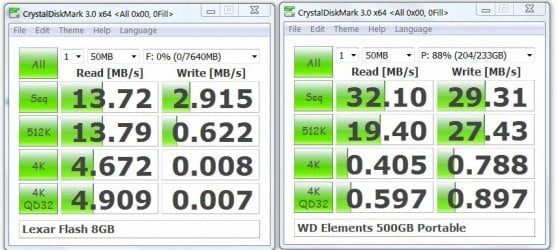
I thought this speed test interesting.
Flash-HDD.JPG
(HDD test done on one of 2 partitions)
I knew USB flash drives could be a bit slow but these results surprised me.
I wonder if it's the test program that's producing the bad write test results for the flash drive?
I bought the 500 GB HDD for around $75.

These devices aren't really substitutes in my mind. They complement each other and serve different purposes.
 

My Computer My Computer

Computer type
PC/Desktop
Computer Manufacturer/Model Number
Own build
OS
Windows 7x64 Home Premium SP1
CPU
Intel i7 2600k
Motherboard
ASUS P8Z68 Deluxe
Memory
G.Skill Ripjaws (DDR3-1600) 2x4GB
Graphics Card(s)
Nvidia GeForce GTS 450; Intel HD Graphics 3000(GT2+)
Monitor(s) Displays
Dell Ultrasharp IPS panel U2311H, Samsung SyncMaster P2350
Screen Resolution
1920x1080
Hard Drives
Samsung 850 Pro SSD 256GB, Samsung SSD 840 120GB, Seagates 1TB Barracuda ST31000528AS x2
PSU
Seasonic M12II 520W
Case
Lian Li Lancool PC-K60
Cooling
Case: 1x120mm, 3x140mm CPU: Hyper 212+
Keyboard
Logitech MK520 (wireless)
Mouse
Logitech MK520
Internet Speed
6-7 Mbps
Antivirus
Norton Security Premium, Malwarebytes on 2 (MSE on 3rd PC)
Browser
FireFox
Other Info
Audio: Logitech Z523 2.1
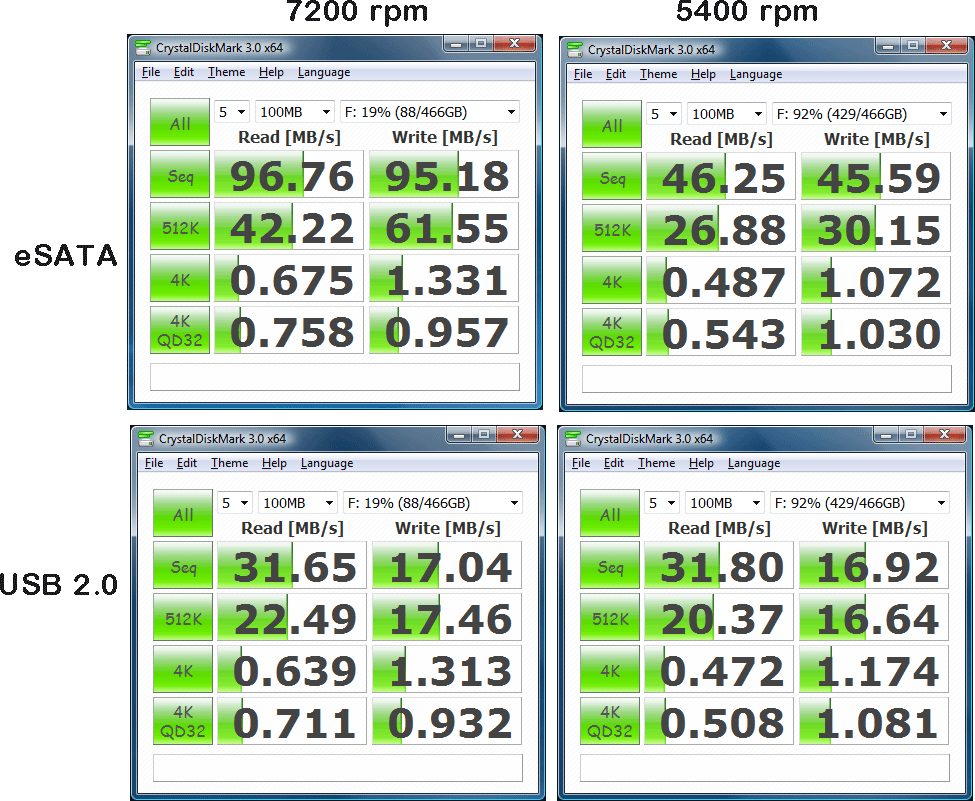
You think thats funny, check out eSATA vs USB 2.0

goflex-500p_500-eSATA-USB2-cdm3x64-100MB.gif
 

My Computer My Computer

Computer Manufacturer/Model Number
Custom
OS
Windows 7 Ultimate x64
CPU
AMD Phenom x4 965 BE
Motherboard
MSI 790FX GD70 Not Wiki
Memory
4gb Gskill
Graphics Card(s)
HD 4850
Sound Card
Onboard Realtek
Monitor(s) Displays
Asus VW246H
Screen Resolution
1920x1080 Native
Hard Drives
2 Seagate Drives Raid 0
PSU
650Watt Corsair
Case
CoolerMaster
Cooling
Air Cooling Stock Heatsink and Fan
Keyboard
Logitech Cordless Duo
Mouse
Logitech Cordless Duo
Internet Speed
24000 KBPS
A story for any occasion

Maybe for small packets head movements play a larger role.
With the sequential tests, because it's doing a write test as well I assume it's using free disk. You'll lose on the 5400 rpm because of this speed but also because that disk is a lot fuller than the 7200rpm disk. The data transfer rate to the heads drops off as the track radius decreases. This explains e-sata @ 7200 versus esata @ 5400 rpm.
Why doesn't the USB 2. speeds also drop off for the sequential test. Maybe the limiting factor is the USB 2. transfer speed itself?
 

My Computer My Computer

Computer type
PC/Desktop
Computer Manufacturer/Model Number
Own build
OS
Windows 7x64 Home Premium SP1
CPU
Intel i7 2600k
Motherboard
ASUS P8Z68 Deluxe
Memory
G.Skill Ripjaws (DDR3-1600) 2x4GB
Graphics Card(s)
Nvidia GeForce GTS 450; Intel HD Graphics 3000(GT2+)
Monitor(s) Displays
Dell Ultrasharp IPS panel U2311H, Samsung SyncMaster P2350
Screen Resolution
1920x1080
Hard Drives
Samsung 850 Pro SSD 256GB, Samsung SSD 840 120GB, Seagates 1TB Barracuda ST31000528AS x2
PSU
Seasonic M12II 520W
Case
Lian Li Lancool PC-K60
Cooling
Case: 1x120mm, 3x140mm CPU: Hyper 212+
Keyboard
Logitech MK520 (wireless)
Mouse
Logitech MK520
Internet Speed
6-7 Mbps
Antivirus
Norton Security Premium, Malwarebytes on 2 (MSE on 3rd PC)
Browser
FireFox
Other Info
Audio: Logitech Z523 2.1
Maybe for small packets head movements play a larger role.
With the sequential tests, because it's doing a write test as well I assume it's using free disk. You'll lose on the 5400 rpm because of this speed but also because that disk is a lot fuller than the 7200rpm disk. The data transfer rate to the heads drops off as the track radius decreases. This explains e-sata @ 7200 versus esata @ 5400 rpm.
Why doesn't the USB 2. speeds also drop off for the sequential test. Maybe the limiting factor is the USB 2. transfer speed itself?

Always Knew eSATA was faster then USB 2.0 but didn't know it was that much faster!
 

My Computer My Computer

Computer Manufacturer/Model Number
Custom
OS
Windows 7 Ultimate x64
CPU
AMD Phenom x4 965 BE
Motherboard
MSI 790FX GD70 Not Wiki
Memory
4gb Gskill
Graphics Card(s)
HD 4850
Sound Card
Onboard Realtek
Monitor(s) Displays
Asus VW246H
Screen Resolution
1920x1080 Native
Hard Drives
2 Seagate Drives Raid 0
PSU
650Watt Corsair
Case
CoolerMaster
Cooling
Air Cooling Stock Heatsink and Fan
Keyboard
Logitech Cordless Duo
Mouse
Logitech Cordless Duo
Internet Speed
24000 KBPS

My Computer My Computer

Computer type
PC/Desktop
Computer Manufacturer/Model Number
Dell Vostro 3558 (Laptop)
OS
Windows 7 Professional 64bit
Motherboard
Dell
Memory
8GB
Graphics Card(s)
Intel HD Graphics, NVIDIA GeForce
Screen Resolution
1366 x 768
Antivirus
Avira Free, MalwareBytes AntiMalware Pro
Browser
Chrome

My Computer My Computer

Computer Manufacturer/Model Number
Custom
OS
Windows 7 Ultimate x64
CPU
AMD Phenom x4 965 BE
Motherboard
MSI 790FX GD70 Not Wiki
Memory
4gb Gskill
Graphics Card(s)
HD 4850
Sound Card
Onboard Realtek
Monitor(s) Displays
Asus VW246H
Screen Resolution
1920x1080 Native
Hard Drives
2 Seagate Drives Raid 0
PSU
650Watt Corsair
Case
CoolerMaster
Cooling
Air Cooling Stock Heatsink and Fan
Keyboard
Logitech Cordless Duo
Mouse
Logitech Cordless Duo
Internet Speed
24000 KBPS
According to Maximum PC eSATA still faster then USB 3.0

eSATA is Still Faster Than USB 3.0 | Maximum PC

I read that article, as I was considering a USB 3 dock. I decided to stay with my current technique, although not really 'portable', but quite useful for local use: a sata front panel. IMO, this trumps all other external connection methods as far as speed is concerned, as it is really just another onboard sata drive connection. I suppose they make docks for this as well, but I just keep a stack of bare drives on my desktop and plug them in when needed.

As long as you're running in AHCI mode, you can plug them in while the system is running and the autoplay dialog will pop up where you can choose 'Open Folder to View Files':

Akasa Thermal Solution

It comes with a power and data cable. I have 3 of these in various machines. Just remember to plug in the power first and allow the drive to spin up before plugging in the data cable. Again, not portable, but worth knowing. And the cost? Less than $15. Of course, you also need a sata drive.

James
 

My Computer My Computer

OS
Win7U 64 RTM
CPU
Q9550
Motherboard
GA-EP45-UD3R
Memory
8GB Gskill
Graphics Card(s)
ASUS|EAH4850/HTDI/1GD3/A
Sound Card
xfi Plat
Monitor(s) Displays
Dell 2405fpw
Screen Resolution
1920x1200
Hard Drives
Seagate & WD sata Drives
PSU
Antec
Case
Antec
Keyboard
MS Natural Ergonomic 4000
Mouse
Logitech MX610 USB Cordless
Thanks for all the input guys. I ended up getting two thumb drives as a donation from my Wife. She had it in her parents house just lying there.

One is 4 GB and another one is 2GB.

The 4 GB now consits of Hirens Boot CD 13, Windows 7 and Windows XP with around 400MB free.

Both serve their own purpose. The suggestion for both is a good one, if you can afford it. But if you do decide on a USB key, the Patriot Xporter is an excellent choice and super fast (and cheap). I have a few of these. They're excellent for booting rescue utilities, linux distros and the like, as well as transfering files. Here are 3 links to 4, 8 & 16GB. Read the reviews:

Newegg.com - Patriot Xporter XT Boost 4GB Flash Drive (USB2.0 Portable) Model PEF4GUSB

Newegg.com - Patriot Xporter XT Boost 8GB Flash Drive (USB 2.0 Portable) Model PEF8GUSB

Newegg.com - Patriot Xporter XT Boost 16GB Flash Drive (USB 2.0 Portable) Model PEF16GUSB

These are cheap enough that they will suffice for whatever use until you shake loose the cost of an HDD. Just keep copies of your important files on other media as well and their should be no problem.

Another great link for thumb drive use:

Boot Multiple ISO from USB (MultiBoot USB) | USB Pen Drive Linux

James

Actually, i just used the custom menu of Hiren's to accomplish what I did. All I did was copy the contents of both DVDs into the Flash Drive and it worked immediately. It was pretty awesome mate :D

I guess I'll be getting another external Hard Drive once I finish the 400GB left on my current one.

Edit - Oh the 2 GB, I'm using that for my documents backup and my portable apps. Works great!
 
Last edited:

My Computer My Computer

Computer type
PC/Desktop
Computer Manufacturer/Model Number
Custom Build
OS
Windows 7 Ultimate x64 Service Pack 1
CPU
AMD Athlon II x4 Propus 2.9 GHz
Motherboard
ASRock N68C-GS FX
Memory
2 x 4GB Corsair XMS 3 DDR3 -1600 CL9
Graphics Card(s)
AMD Radeon HD 5850 1GB GDDR5
Sound Card
On-board 6-Channel HD Audio
Monitor(s) Displays
18' LG Flatron E1942TC-BN on DVI, 18' Chimei 95ND on HDMI
Screen Resolution
1366 x 768 x 2
Hard Drives
1 x 500 GB Seagate
1 x 1 TB Western Digital Caviar Green
1 x 1 TB Hitachi Touro Mobile USB 3
PSU
Seasonic S12II 520W
Case
Generic with Cable Management
Cooling
Deep Cool Gammaxx 200
Keyboard
Dragonwar Desert Eagle
Mouse
Logitech B85
Internet Speed
5Mb/s DL, 0.9Mb/s UL
Antivirus
ESET Nod32
Browser
Google Chrome 64 Bit
Other Info
LG G4 H818P - Rooted with Xposed Framework
Back
Top