Solved Full Screen Games no full screen on Windows Seven

this doesn't solve my problem
i dont have a nvidia or ati card in my laptop
its just the inbuilt intel GMA x3100
i also downloaded the graphics acclerator but there's no scaling option
there's aspect ratio option but it doesn't work !
i use the games like rise of nation, and cannot change the resolution from there
 

My Computer My Computer

At a glance

windows 7
OS
windows 7
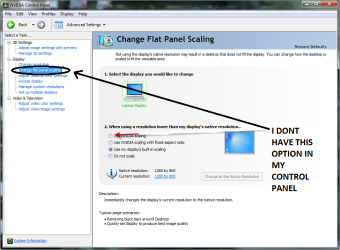
Hello im using a Nvidia GTX 295, and have no scaling optiion in the control panel anybody have same card ? and how did u fix problem
 

My Computer My Computer

At a glance

windows 7 prem
OS
windows 7 prem
i have a sony vaio TT with intel 4500mhd
anyone find a fix or this ?
 

My Computer My Computer

At a glance

Windows 7 Professional 64bitintel core 2 duo e84004gb8800 gts
OS
Windows 7 Professional 64bit
CPU
intel core 2 duo e8400
Motherboard
gigiabyte Q35
Memory
4gb
Graphics Card(s)
8800 gts
Sound Card
ONKYO SE-PCI150
Monitor(s) Displays
dell 23"
Hard Drives
4 harddrives
300 gb
300 gb
150gb
:cry:i have a same problem ...:cry:
i use ati radeon hd3200 with windows 7 64 bits
why when i play my fullscreen game,the display is not on fullscreen:mad:
what should i do??
(sorry my English is not fluently :o)
thanks
 

My Computer My Computer

At a glance

windows 7amd athlon (tm)x2 dualcore ql-661GBATI Radeom HD3200
Computer Manufacturer/Model Number
Hp/Compaq 515
OS
windows 7
CPU
amd athlon (tm)x2 dualcore ql-66
Memory
1GB
Graphics Card(s)
ATI Radeom HD3200
Sound Card
HdAudio.sys
Monitor(s) Displays
Hp
Hard Drives
Sata 250gb
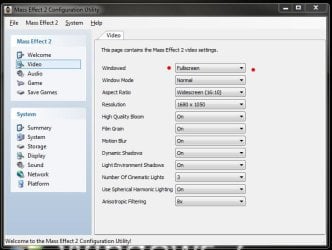
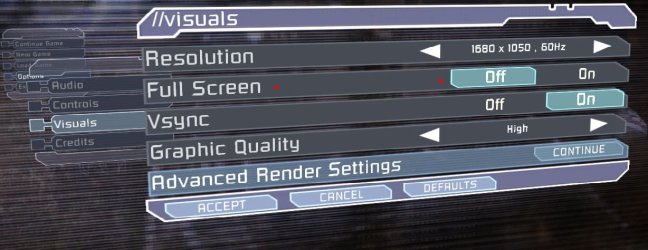
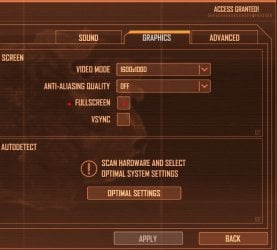
Could you tell us what game this is? And have you checked the game's settings to see if it has a check box for "full screen?

Game Settings.JPG
Mass Effect 2

Game Settings2.JPG
Dead Space

Game Settings3.JPG
Crysis Warhead

Notice all three of these game has the option to run in either full screen or windowed mode.


Thanks
 

My Computer My Computer

At a glance

Windows 10 ProIntel Core i7-4770K (3.5Ghz)32 gig Corsair Dominator Platinum (4x8Gig)Sapphire Tri-X R9 Fury
Computer type
PC/Desktop
Computer Manufacturer/Model Number
Custom built by me.
OS
Windows 10 Pro
CPU
Intel Core i7-4770K (3.5Ghz)
Motherboard
Gigabyte G1 Sniper 5 (F10 Bios)
Memory
32 gig Corsair Dominator Platinum (4x8Gig)
Graphics Card(s)
Sapphire Tri-X R9 Fury
Sound Card
Soundblaster ZXR
Monitor(s) Displays
NEC PA242W 24" LCD Monitor
Screen Resolution
1920 x 1200
Hard Drives
Primary - Samsung 850 Pro (512gig), Samsung 840 Pro (256gig), 2TB WD Caviar Black.
PSU
EVGA Supernova 1000 G2
Case
Cooler Master HAF X
Cooling
Corsair H100i with Corsair Air Series SP120 Quiet Fans
Keyboard
Logitech Wireless Wave
Mouse
Logitech Performance MX
Internet Speed
High Speed Cable
Antivirus
Norton Security
Browser
IE11
Other Info
Memory Timings - 1866MHz @ 9-9-9-27-1T @ 1.5 volts
Hi!!! ...
Thanks for this post
Even my graphics card being ATI i went to basic definitions settings and find that option that helped me a lot ... I was thinking I had to install windows Vista again...
:D .... thanks again

Hello dear i m also having same graphic card of ATI so can u guide how you made change to play games in full screen in windows seven waiting anxiously.Regards,
 

My Computer My Computer

At a glance

Windows 7
OS
Windows 7
YES i have this problem too.but now the problem is solved diffrently:confused:
i have win7 64bit,gfx card n9400gt with 19inch tft samsung
..........im using display drivers from microsoft but now i install the drivers from nvidea there is no option in control panel.i run the game and the screen is fixed automaticly. i m trying too say was this problem is from windows drivers:sarc:
 

Attachments

  • 9-2-200911-14-49PM.png
    9-2-200911-14-49PM.png
    50.1 KB · Views: 710

My Computer My Computer

At a glance

Windows7 ultimate 64 bit
OS
Windows7 ultimate 64 bit
Very simple steps:

i have tested it in my
windows 7 32bit ultimate
dell laptop
ati mobility radeon hd 4570
latest ati catalyst driver-application
1366x768 screen
with GTA San Andreus game

1)Go to ATI CATALYST Applicaton:
- Graphics/Desktop & Display/ click triangle button in big Screen Model and press "Properties" option
- now change resolution to lower one.(in my lapy i have changed it from 1366x768 to 1280x720.)
- Save & Exit.
2)now again go to ATI CATALYST Application
- Graphics/Desktop & Display/ this time click on bottom left small Laptop icon's triangle from where u can get to "Configure" option
- now you will find three scaling options:
>Preserve aspect ratio
>full screen
>centered
- u select full screen button
- save & exit.
3)now go to desktop
- click right click of mouse
- go to "Personalize" option
- than click "Display" button
- in that u will find "Display Resolution" Option,go to there.
- now change resolution to max (as it was 1366x768 in my case)
- apply ,save changes and exit .

you have done,full screen full resolution boom

(if it does not work than try all this procedure after minimizing the game .as i have first started game than switched to desktop via tab button (minimize game) and than i have done above all procedure.i

am just saying i dont no that if this stuff affect or not but try if you want.)

(here i have done changing resolution by two diff methods and use full screen option in ati application
first u might not get three option in configuration option and also cant change scaling option as they are brown as mentioned in step 2 but after lowering resolution u can access them)

if u like please respond
thankx
have a fun
 

My Computer My Computer

At a glance

Windows 7 Ultimate x32
OS
Windows 7 Ultimate x32
It was explained to me before, but I realized that those black boxes on the side is actually a feature... It's so the screen won't get stretched out. 7 recignizes that the resolution doesn't fit the monitor so it letterboxes it. If you want the game to be full screen, then you have to go in the game or application and set it to the resolution that is actually full screen. If you have a wide screen monitor, then set it to 1280x720 or 1360x768.
 

My Computer My Computer

At a glance

Windows 7
OS
Windows 7
Very simple steps:

i have tested it in my
windows 7 32bit ultimate
dell laptop
ati mobility radeon hd 4570
latest ati catalyst driver-application
1366x768 screen
with GTA San Andreus game

1)Go to ATI CATALYST Applicaton:
- Graphics/Desktop & Display/ click triangle button in big Screen Model and press "Properties" option
- now change resolution to lower one.(in my lapy i have changed it from 1366x768 to 1280x720.)
- Save & Exit.
2)now again go to ATI CATALYST Application
- Graphics/Desktop & Display/ this time click on bottom left small Laptop icon's triangle from where u can get to "Configure" option
- now you will find three scaling options:
>Preserve aspect ratio
>full screen
>centered
- u select full screen button
- save & exit.
3)now go to desktop
- click right click of mouse
- go to "Personalize" option
- than click "Display" button
- in that u will find "Display Resolution" Option,go to there.
- now change resolution to max (as it was 1366x768 in my case)
- apply ,save changes and exit .

you have done,full screen full resolution boom

(if it does not work than try all this procedure after minimizing the game .as i have first started game than switched to desktop via tab button (minimize game) and than i have done above all procedure.i

am just saying i dont no that if this stuff affect or not but try if you want.)

(here i have done changing resolution by two diff methods and use full screen option in ati application
first u might not get three option in configuration option and also cant change scaling option as they are brown as mentioned in step 2 but after lowering resolution u can access them)

(for different ati graphics and applications this procedure may be slight different due to differing user interface but you can get idea how to get this done.)

if u like please respond
thankx
have a fun

It was explained to me before, but I realized that those black boxes on the side is actually a feature... It's so the screen won't get stretched out. 7 recignizes that the resolution doesn't fit the monitor so it letterboxes it. If you want the game to be full screen, then you have to go in the game or application and set it to the resolution that is actually full screen. If you have a wide screen monitor, then set it to 1280x720 or 1360x768.

ya "Dreamcube017"
:sarc:
you are right
but it is primary requirement that you set game settings to 1280x720 or 1366x768 .after that in some games you are still not getting full screen for that you will find above procedure helpful which i have explained.
in my case,
first i have set game settings to its full resolution and than done all above explained steps to get successful full screen .
after this every games which i first not got in full screen,all that i am now getting in full screen.
 

My Computer My Computer

At a glance

Windows 7 Ultimate x32
OS
Windows 7 Ultimate x32
Hi I am using Inspiron 15R and with ATI Mo Radeon 550v 1GB Card. And Still Have the Problem. Wht to Do?? Pls assist me.
 

My Computer My Computer

At a glance

Windows 7 Home Basic x64Intel Core i54 GBATI Mobility Radeon 550v
Computer Manufacturer/Model Number
Inspiron 15R
OS
Windows 7 Home Basic x64
CPU
Intel Core i5
Motherboard
Intel
Memory
4 GB
Graphics Card(s)
ATI Mobility Radeon 550v
Sound Card
IDT
Back
Top