Windows7 XP mode - lost space after deleting XP Mode

Imre Burnyoczki

New member
Local time
2:31 AM
Messages
5
Dear forum,

I installed XP mode on my PC and later I wanted to delete it. I used a bad method: I deleted the Virtual hard disks, uninstalled XP Mode, but in wrong order, etc (my fault). Now I don't have XP mode on my PC but I lost the free space on my HD what the differencing disk allocated, so I haven't got my disk space back. (at the beginning the lost space was 127GB, now appr. 80 GB). In system manager programs I cannot see any vdisks.

Is it possible to reclaim this space somehow without reinstalling the operating system?

Thank you in advance!

Imre
 

My Computer My Computer

At a glance

Windows 7 32bit
OS
Windows 7 32bit
Hi Imre, welcome to the Seven Forums.

A virtual hard disk (vhd) is just a file. If you have deleted the XP Mode's vhd, it should no longer be present "eating" your HD space. After uninstalling Virtual PC and XP Mode, delete all files found in these locations if you are sure you are not going to need anymore:

  • C:\Users\Your_Username\AppData\Local\Microsoft\Windows Virtual PC
  • C:\Program Files\Windows XP Mode
  • C:\Program Files\Windows Virtual PC
    • (In 64-bit Windows 7, C:\Program Files (x86)\Windows Virtual PC)
Kari
 

My Computer My Computer

At a glance

Windows 10 Pro x64 EN-GB1.6 GHz Intel Core i7-720QM Processor6 GBATI Mobility Radeon HD 5850 Graphics
Computer type
Laptop
Computer Manufacturer/Model Number
HP ENVY 17-1150eg
OS
Windows 10 Pro x64 EN-GB
CPU
1.6 GHz Intel Core i7-720QM Processor
Memory
6 GB
Graphics Card(s)
ATI Mobility Radeon HD 5850 Graphics
Sound Card
Beats sound system with integrated subwoofer
Monitor(s) Displays
17" laptop display, 22" LED and 32" Full HD TV through HDMI
Screen Resolution
1600*900 (1), 1920*1080 (2&3)
Hard Drives
Internal: 2 x 500 GB SATA Hard Disk Drive 7200 rpm
External: 2TB for backups, 3TB USB3 network drive for media
Cooling
As Envy runs a bit warm, I have it on a Cooler Master pad
Keyboard
Logitech diNovo Media Desktop Laser (bluetooth)
Mouse
Logitech Performance Mouse MX
Internet Speed
50/10 Mbps VDSL
Antivirus
Windows Defender 4.3.9431.0
Browser
Maxthon 3.5.2., IE11
Hi Kari,

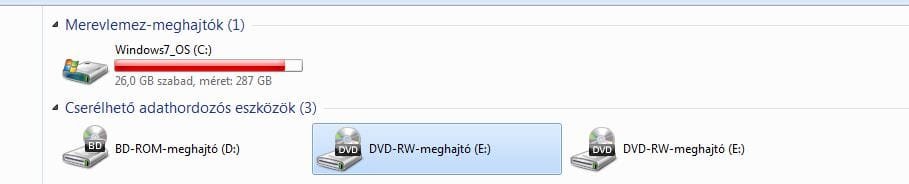
Thanks for your answer! I checked the mentioned directories but unfortunately I haven't found any big files in them. With Explorer I summed up the size of all files on the disk (184GB). According to Explorer the disk size is 287GB, 26 GB free so 77GB is "somewhere else". I asked my colleagues and it turned out that they had the same symptoms earlier, and had to reinstall Windows 7.

Is there any good disk manager program to analyze the disk or file system structure (I run the usual utilies but haven't found anything wrong.

imre
 

My Computer My Computer

At a glance

Windows 7 32bit
OS
Windows 7 32bit
That "missing" space can be a sum of many things. Restore points, shadow copies, recycle bin etc. I'll ask some other geeks to come here to offer you a better answer ;)

Kari
 

My Computer My Computer

At a glance

Windows 10 Pro x64 EN-GB1.6 GHz Intel Core i7-720QM Processor6 GBATI Mobility Radeon HD 5850 Graphics
Computer type
Laptop
Computer Manufacturer/Model Number
HP ENVY 17-1150eg
OS
Windows 10 Pro x64 EN-GB
CPU
1.6 GHz Intel Core i7-720QM Processor
Memory
6 GB
Graphics Card(s)
ATI Mobility Radeon HD 5850 Graphics
Sound Card
Beats sound system with integrated subwoofer
Monitor(s) Displays
17" laptop display, 22" LED and 32" Full HD TV through HDMI
Screen Resolution
1600*900 (1), 1920*1080 (2&3)
Hard Drives
Internal: 2 x 500 GB SATA Hard Disk Drive 7200 rpm
External: 2TB for backups, 3TB USB3 network drive for media
Cooling
As Envy runs a bit warm, I have it on a Cooler Master pad
Keyboard
Logitech diNovo Media Desktop Laser (bluetooth)
Mouse
Logitech Performance Mouse MX
Internet Speed
50/10 Mbps VDSL
Antivirus
Windows Defender 4.3.9431.0
Browser
Maxthon 3.5.2., IE11

My Computer My Computer

At a glance

Windows 7 Enterprise (x64); Windows Server 20...16GB
Computer type
PC/Desktop
Computer Manufacturer/Model Number
Dell OP7010
OS
Windows 7 Enterprise (x64); Windows Server 2008 R2 (x64)
Memory
16GB
Monitor(s) Displays
4 Dell 24" LCD
Screen Resolution
1280x1024
Keyboard
Dell
Mouse
Dell Optical
Internet Speed
40meg

My Computer My Computer

At a glance

Main - Windows 7 Pro SP1 64-Bit; 2nd - Window...Main - Core i7 2600K; 2nd - Core i7 920Main - 16GB Corsair Vengeance; 2nd - 12GB Cor...Main - XFX Radeon 6870 1GB; 2nd - XFX Radeon ...
Computer Manufacturer/Model Number
Self
OS
Main - Windows 7 Pro SP1 64-Bit; 2nd - Windows Server 2008 R2
CPU
Main - Core i7 2600K; 2nd - Core i7 920
Motherboard
Main - Asus P8Z68-V Pro/Gen3; 2nd - Gigabyte GA-EX58-UDR3
Memory
Main - 16GB Corsair Vengeance; 2nd - 12GB Corsair Vengeance
Graphics Card(s)
Main - XFX Radeon 6870 1GB; 2nd - XFX Radeon 4870 1GB
Sound Card
Both: Onboard Realtek Azalia
Monitor(s) Displays
Main - Hann 25" + I-INC 25" + Acer 23"; 2nd - Upgrading Soon
Screen Resolution
Main - 1920x1080 (All Three Monitors); 2nd - Upgrading Soon
Hard Drives
Main - (1) Crucial M4 128GB (Boot)
Main - (1) Seagate 2TB 64MB Cache (Data)
Main - (1) Seagate 2TB 64MB Cache (Data Backup)
2nd - (1) Intel X25-M SSD 80GB (Boot)
2nd - (3) Seagate 1TB 32MB Cache (Data Backup)
2nd - (1) Seagate 320GB (Because)
PSU
Main - OCZ 600W Modular; 2nd - OCZ 600W
Case
Main - Thermaltake Element G; 2nd - NZXT something or other
Cooling
Main - Corsair H80; 2nd - Prolimatech Megahalems
Keyboard
Main - Razer Reclusa; 2nd - Old MS Keyboard
Mouse
Main - Logitech MX Revolution; 2nd - Old MS Mouse
Internet Speed
20Mbps Time-Warner Cable
Hi,

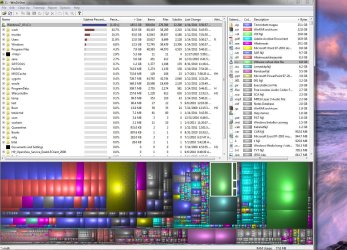
I attach some screenshots about the disk (sorry about the texts, the operating system is hungarian).

Imre
 

Attachments

  • Windirstat.JPG
    Windirstat.JPG
    255.8 KB · Views: 54
  • Disk manager.JPG
    Disk manager.JPG
    77.8 KB · Views: 29
  • explorer.JPG
    explorer.JPG
    22.4 KB · Views: 13

My Computer My Computer

At a glance

Windows 7 32bit
OS
Windows 7 32bit
Hi,

Another info: one of my colleagues still uses XP Mode on his PC, and his Windows reduced free space size with 127GB also. Maybe it's normal, I don't know. It seems to me that I haven't got this space back after deleting XP Mode.

Imre
 

My Computer My Computer

At a glance

Windows 7 32bit
OS
Windows 7 32bit
I ran all your numbers through the calculator and can only find about 38GB missing. Some of that could be the MFT and other hidden files as part of the OS.

NTFS.com Master File Table.Fix MFT
 

My Computer My Computer

At a glance

Windows 7 Enterprise (x64); Windows Server 20...16GB
Computer type
PC/Desktop
Computer Manufacturer/Model Number
Dell OP7010
OS
Windows 7 Enterprise (x64); Windows Server 2008 R2 (x64)
Memory
16GB
Monitor(s) Displays
4 Dell 24" LCD
Screen Resolution
1280x1024
Keyboard
Dell
Mouse
Dell Optical
Internet Speed
40meg
Hi,

Another info: one of my colleagues still uses XP Mode on his PC, and his Windows reduced free space size with 127GB also. Maybe it's normal, I don't know. It seems to me that I haven't got this space back after deleting XP Mode.

Imre
Google "127GB Limit". Unless it's a pretty big coincidence it sounds like the XP Mode setup created a virtual 32-Bit LBA partition which is not properly reverting back to the Win 7 standard 48-Bit LBA. As I recall, back in the early Win XP days it wasn't until SP1 that this was corrected.

Not much help, assuming I'm on to something, but it might be a lead in the right direction.

One other things is that Windows Explorer is notorious for not including everything in subfolders when you highlight a gob of stuff and the Right-Click>>Properties. It could be a simple computer "accounting error".
 

My Computer My Computer

At a glance

Main - Windows 7 Pro SP1 64-Bit; 2nd - Window...Main - Core i7 2600K; 2nd - Core i7 920Main - 16GB Corsair Vengeance; 2nd - 12GB Cor...Main - XFX Radeon 6870 1GB; 2nd - XFX Radeon ...
Computer Manufacturer/Model Number
Self
OS
Main - Windows 7 Pro SP1 64-Bit; 2nd - Windows Server 2008 R2
CPU
Main - Core i7 2600K; 2nd - Core i7 920
Motherboard
Main - Asus P8Z68-V Pro/Gen3; 2nd - Gigabyte GA-EX58-UDR3
Memory
Main - 16GB Corsair Vengeance; 2nd - 12GB Corsair Vengeance
Graphics Card(s)
Main - XFX Radeon 6870 1GB; 2nd - XFX Radeon 4870 1GB
Sound Card
Both: Onboard Realtek Azalia
Monitor(s) Displays
Main - Hann 25" + I-INC 25" + Acer 23"; 2nd - Upgrading Soon
Screen Resolution
Main - 1920x1080 (All Three Monitors); 2nd - Upgrading Soon
Hard Drives
Main - (1) Crucial M4 128GB (Boot)
Main - (1) Seagate 2TB 64MB Cache (Data)
Main - (1) Seagate 2TB 64MB Cache (Data Backup)
2nd - (1) Intel X25-M SSD 80GB (Boot)
2nd - (3) Seagate 1TB 32MB Cache (Data Backup)
2nd - (1) Seagate 320GB (Because)
PSU
Main - OCZ 600W Modular; 2nd - OCZ 600W
Case
Main - Thermaltake Element G; 2nd - NZXT something or other
Cooling
Main - Corsair H80; 2nd - Prolimatech Megahalems
Keyboard
Main - Razer Reclusa; 2nd - Old MS Keyboard
Mouse
Main - Logitech MX Revolution; 2nd - Old MS Mouse
Internet Speed
20Mbps Time-Warner Cable
Hi,

Another info: one of my colleagues still uses XP Mode on his PC, and his Windows reduced free space size with 127GB also. Maybe it's normal, I don't know. It seems to me that I haven't got this space back after deleting XP Mode.

Imre
Google "127GB Limit". Unless it's a pretty big coincidence it sounds like the XP Mode setup created a virtual 32-Bit LBA partition which is not properly reverting back to the Win 7 standard 48-Bit LBA. As I recall, back in the early Win XP days it wasn't until SP1 that this was corrected.

Not much help, assuming I'm on to something, but it might be a lead in the right direction.

One other things is that Windows Explorer is notorious for not including everything in subfolders when you highlight a gob of stuff and the Right-Click>>Properties. It could be a simple computer "accounting error".

Yes yes, great point. I remember someone else talking about a hidden partition in Windows 7. They deleted it and everything worked fine. I cannot remember where I read that...was it here....hummm
 

My Computer My Computer

At a glance

Windows 7 Enterprise (x64); Windows Server 20...16GB
Computer type
PC/Desktop
Computer Manufacturer/Model Number
Dell OP7010
OS
Windows 7 Enterprise (x64); Windows Server 2008 R2 (x64)
Memory
16GB
Monitor(s) Displays
4 Dell 24" LCD
Screen Resolution
1280x1024
Keyboard
Dell
Mouse
Dell Optical
Internet Speed
40meg
Hi,

Another info: one of my colleagues still uses XP Mode on his PC, and his Windows reduced free space size with 127GB also. Maybe it's normal, I don't know. It seems to me that I haven't got this space back after deleting XP Mode.

Imre

By default XP Mode does not take 127 GB of hard disk space. It is only possible if the user has converted the default dynamic vhd to a 127 GB fixed size vhd.

In Microsoft Virtual PC, the maximum size of a vhd is 127 GB. You can not mount or use virtual hard disks bigger than that. When you create a vhd in Virtual PC, it is by default a so called dynamic disk. This means it only uses as much space on host HD as needed but it is allowed to expand, grow, to that maximum you choose when creating the vhd. For instance, I have created a Windows Vista virtual machine, setting the dynamic size of the vhd to be 50 GB. Currently this vhd is 17.5 GB, taking as much space from my host HD; if I install new programs to this Vista vm, it is however allowed to expand until that 50 GB limit. Vista virtual machine sees this vhd as a 50 GB HD because a virtual machine always sees the HD as big as its allowed maximum size.

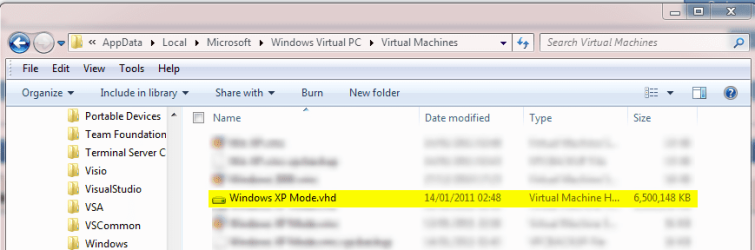
XP Mode is a Virtual PC virtual machine. Its vhd is a 127 GB dynamic disk. This simply means that the virtual hard disk of XP Mode is allowed to expand up to 127 GB. This is why if you check the HD size when running XP Mode, it shows its HD is 126 GB (the XP Mode base vhd, which is needed for XP Mode to run reserves 1 GB from total 127 GB). A virtual machine sees the dynamic vhd always as big as its maximum size. However, on host's HD it only uses the space it needs. Here's a quite freshly installed XP Mode vhd, you can see it is only a bit over 6 GB seen from the host:

XPM_vhd_size.png

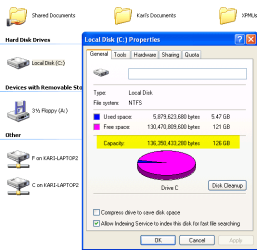
And here's the same vhd, this time seen from the XP Mode showing 126 GB (maximum size minus base vhd):

XPM_vhd_size_2.png

You can convert a dynamic vhd to a fixed size vhd. A fixed size vhd is always the same size, also taking exactly that space from host's hd:

Fixed size XP Mode 127 GB vhd | Dynamic XP Mode 127 GB vhd
Takes 127 GB of host HD space|Takes anything from 5 GB up to 127 GB of host HD space
Is seen to XP Mode as a 126 GB HD |Is seen to XP Mode as a 126 GB HD

Kari
 
Last edited:

My Computer My Computer

At a glance

Windows 10 Pro x64 EN-GB1.6 GHz Intel Core i7-720QM Processor6 GBATI Mobility Radeon HD 5850 Graphics
Computer type
Laptop
Computer Manufacturer/Model Number
HP ENVY 17-1150eg
OS
Windows 10 Pro x64 EN-GB
CPU
1.6 GHz Intel Core i7-720QM Processor
Memory
6 GB
Graphics Card(s)
ATI Mobility Radeon HD 5850 Graphics
Sound Card
Beats sound system with integrated subwoofer
Monitor(s) Displays
17" laptop display, 22" LED and 32" Full HD TV through HDMI
Screen Resolution
1600*900 (1), 1920*1080 (2&3)
Hard Drives
Internal: 2 x 500 GB SATA Hard Disk Drive 7200 rpm
External: 2TB for backups, 3TB USB3 network drive for media
Cooling
As Envy runs a bit warm, I have it on a Cooler Master pad
Keyboard
Logitech diNovo Media Desktop Laser (bluetooth)
Mouse
Logitech Performance Mouse MX
Internet Speed
50/10 Mbps VDSL
Antivirus
Windows Defender 4.3.9431.0
Browser
Maxthon 3.5.2., IE11
Hi,

Sorry, I try to cope with your kind answers... Unfortunately I haven't solved this problem yet (I tried to shrink, and expand the disk, run chkdsk on it, etc.). Maybe the key factor is the differencing type disk. I found a site (hungarian only), that explains the same symptoms: after start the operating system allocates the maximum dynamic size on disk, and everything is perfect if the disk has enough free space.

I try to find and post some additional info about it.

Imre
 

My Computer My Computer

At a glance

Windows 7 32bit
OS
Windows 7 32bit
Imre, if you have uninstalled XP Mode and deleted its files, it is no longer taking any space on your HD.

Differencing disks only means that by default, XP Mode uses two different vhd's: XP Mode Base.vhd in C:\Program Files\Windows XP Mode\, and Windows XP Mode.vhd in C:\Users\Your_Username\AppData\Local\Microsoft\Windows Virtual PC\Virtual Machines\ (read this and this).

Differencing disks can be fixed size or dynamic. For instance in XP Mode's case, one of the two vhd's used (the base vhd) is fixed size and the other is dynamic. Using differencing disks have nothing to do with how much space the vhd takes from host HD. A fixed size vhd takes its actual size, a dynamic vhd only what it needs.

A dynamic vhd only allocates as much HD space as it needs. If your Hungarian website tells XP Mode allocates 127 GB of HD space, it's simply not true.

To make this even more confusing ;) :
Let's say you have 50 GB free on your HD. You can create a Virtual PC virtual machine, creating a dynamic vhd of 127 GB, more than the free space you have. You install Windows 7 to this virtual machine, which takes about 15 or 16 GB. If you now check your host, you'll notice that you still have about 35 GB of free space because the dynamic vhd only takes the space what it needs, in this case 15 GB. But when you run the Windows 7 virtual machine and check the HD size, it shows it has a 127 GB HD.

So, you have created a dynamic 127 GB vhd on a HD which only had 50 GB free space. Your new Windows 7 virtual machine is allowed to expand its vhd up to 127 GB, but in this case it can expand only to about 50 GB because then there's no more space on your HD for the dynamic vhd to expand. If you want to really use the full 127 GB, you have to delete something else from the HD so that the vhd can expand to its maximum size.

Kari
 

My Computer My Computer

At a glance

Windows 10 Pro x64 EN-GB1.6 GHz Intel Core i7-720QM Processor6 GBATI Mobility Radeon HD 5850 Graphics
Computer type
Laptop
Computer Manufacturer/Model Number
HP ENVY 17-1150eg
OS
Windows 10 Pro x64 EN-GB
CPU
1.6 GHz Intel Core i7-720QM Processor
Memory
6 GB
Graphics Card(s)
ATI Mobility Radeon HD 5850 Graphics
Sound Card
Beats sound system with integrated subwoofer
Monitor(s) Displays
17" laptop display, 22" LED and 32" Full HD TV through HDMI
Screen Resolution
1600*900 (1), 1920*1080 (2&3)
Hard Drives
Internal: 2 x 500 GB SATA Hard Disk Drive 7200 rpm
External: 2TB for backups, 3TB USB3 network drive for media
Cooling
As Envy runs a bit warm, I have it on a Cooler Master pad
Keyboard
Logitech diNovo Media Desktop Laser (bluetooth)
Mouse
Logitech Performance Mouse MX
Internet Speed
50/10 Mbps VDSL
Antivirus
Windows Defender 4.3.9431.0
Browser
Maxthon 3.5.2., IE11
Hi,

Sorry, I try to cope with your kind answers... Unfortunately I haven't solved this problem yet (I tried to shrink, and expand the disk, run chkdsk on it, etc.). Maybe the key factor is the differencing type disk. I found a site (hungarian only), that explains the same symptoms: after start the operating system allocates the maximum dynamic size on disk, and everything is perfect if the disk has enough free space.

I try to find and post some additional info about it.

Imre

Is it possible that Windows 7 made some extra restore points for the removal of XP Mode? Maybe that is taking up the extra space???
 

My Computer My Computer

At a glance

Windows 7 Enterprise (x64); Windows Server 20...16GB
Computer type
PC/Desktop
Computer Manufacturer/Model Number
Dell OP7010
OS
Windows 7 Enterprise (x64); Windows Server 2008 R2 (x64)
Memory
16GB
Monitor(s) Displays
4 Dell 24" LCD
Screen Resolution
1280x1024
Keyboard
Dell
Mouse
Dell Optical
Internet Speed
40meg
Back
Top