Enhanced Mitigation Experience Toolkit 2.0 advice sought

karlsnooks

New member
Guru
Gold Member
VIP
Local time
12:29 PM
Messages
10,200
Location
Austin, Texas
I would be interested in hearing any suggestions/experiences using the Enhanced Mitigation Experience Toolkit.

Which apps should be added to the app list?

I have Win 7 Ultimate and am not running any "legacy" programs of which I am aware,

I'm just getting started using EMET.

The concept of EMET impresses me but I'm interested in real-world, practical experiences with EMET.

thanks, karl
 

My Computer My Computer

Computer Manufacturer/Model Number
Toshiba Satellite S875D-S7239 laptop
OS
MS Windows 7 Ultimate SP1 64-bit
CPU
AMD A10-4600M
Motherboard
AMD Pumori (Socket FT1)
Memory
6.00 GB Dual-Channel DDR3 @ 798MHz (11-11-12-28)
Graphics Card(s)
AMD Radeon HD 7660G
Sound Card
High Definition Audio Device
Monitor(s) Displays
Generic PnP Monitor (1600x900@60Hz)
Screen Resolution
1600x900@60Hz
Hard Drives
SSD 119GB Corsair CSSD-V128GB2 ATA Device
Keyboard
Standard PS/2 Keyboard
Mouse
HP Wireless Optical Mobile Mouse Model FHA-3410
Internet Speed
What the local pub, local coffee shop offers.
Other Info
Optical Drive:MATSHITA BD-CMB UJ160B ATA Device


Also have an Asus ha1002xp netbook with Win 7 Ultimate installed.

My Computer My Computer

Computer type
Laptop
Computer Manufacturer/Model Number
Sony Vaio VPCEB47GM Laptop
OS
Win 7 Pro 64-bit
CPU
Intel i5 2.4 Ghz
Memory
8GB DDR3
Graphics Card(s)
Intel HD 3000
Sound Card
IDT High Definition
Monitor(s) Displays
15.6 WGXA Anti-Glare LED
Screen Resolution
1280x800
Hard Drives
640Gb 7200rpm
Antivirus
MSE
Browser
Opera (primary) with IE9 backup
marsmimar,
Thanks for the links. I didn't know that Shawn had written a tutorial on it.

Despite all of the reading I've done aqt the MS sites, I still find there are too many unanswered questions from the user's perspective.

I don't use IE so haven't encountered ie9 problems.

Will start adding some apps and see if it complains.

With "system" set to max, so far I've had no problems, although have some peculiar behaviour using JouleMeter from research.microsoft.com but that could very well be due to the "alpha" level of that program.

I like the idea of the joulemeter and it does show the influence of varying monitor brightness on power consumption, although I don't trust the numerical accuracy of the wattage values.

karl
 

My Computer My Computer

Computer Manufacturer/Model Number
Toshiba Satellite S875D-S7239 laptop
OS
MS Windows 7 Ultimate SP1 64-bit
CPU
AMD A10-4600M
Motherboard
AMD Pumori (Socket FT1)
Memory
6.00 GB Dual-Channel DDR3 @ 798MHz (11-11-12-28)
Graphics Card(s)
AMD Radeon HD 7660G
Sound Card
High Definition Audio Device
Monitor(s) Displays
Generic PnP Monitor (1600x900@60Hz)
Screen Resolution
1600x900@60Hz
Hard Drives
SSD 119GB Corsair CSSD-V128GB2 ATA Device
Keyboard
Standard PS/2 Keyboard
Mouse
HP Wireless Optical Mobile Mouse Model FHA-3410
Internet Speed
What the local pub, local coffee shop offers.
Other Info
Optical Drive:MATSHITA BD-CMB UJ160B ATA Device


Also have an Asus ha1002xp netbook with Win 7 Ultimate installed.
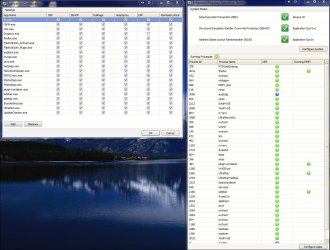
Haven't seen any problems with it since using it, other than having to uncheck EAF (Export Address Table Access Filtering) for Dropbox, as it wouldn't let it run without that unchecked.

Some of the processes I have it configured for atm.

Capture.JPG

Here is a little email I shot off to them a month ago about some questions I had. You could always send them off something just like I did and see if you can get anymore info on it.

Hi,

I'm just starting to look into using EMET 2.0.0.3 for myself on my personal Windows 7 x64 system, and I have a couple questions regarding the Configure System settings.

For instance, when choosing the Maximum Security Settings which lists as:

DEP Always On
SEHOP Application Opt Out
ASLR Application Opt In

Why is SEHOP listed as Application Opt Out? Does this mean that no processes will be using it? Should it be set to Opt In to be used by processes?

Also, if choosing one of the Configure System settings, does this apply to all processes and .exe running at any given time? If so, why does it not show any of the running processes marked off under Running EMET on the EMET GUI?

Or does one have to add each process under Configure Apps section also?


Any clarification on this would be appreciated. Thank your for your time.

Regards,
Hello Aaron,

Application opt-out means that the application will opt-in always unless it explicitly says it does not want to have this mitigation.
Please note ASLR opt-out is not present as an option by default (please refer to the user guide in order to have that option) since it has some compatibility issues with some programs.

EMET also provides some extra mitigations such as Mandatory ASLR, EAT Filtering ,etc. In order to opt-in applications into these you have to configure them through the GUI. Please refer to section 2.3 at the User guide for detailed steps on how to do this.

Thank you,

-
Fermin J. Serna
MSRC Engineering (REACT)
 

My Computer My Computer

Computer type
PC/Desktop
Computer Manufacturer/Model Number
Airbot 2.0
OS
Windows 7 Ultimate x64 SP1
CPU
Core i7 920 (D0) @ 4Ghz, *26c idle *65c full load on air
Motherboard
Asus P6X58D Premium - Sata 6Gb/s - USB 3.0
Memory
12GB DDR3 Corsair Dominator -CMD12GX3M6A1600C8 at 1600MHz
Graphics Card(s)
Zotac Geforce GTX 770
Sound Card
ASUS Xonar D2X
Monitor(s) Displays
1 LG 24" Flatron W2453V-PF 1 Samsung 24" P2450H both 2ms RT
Screen Resolution
1920x1080@60hz
Hard Drives
1 Samsung 250GB 840 Evo SSD
1 OCZ Vertex2 180GB SSD
1 TB Samsung Spinpoint F1 7200RPM 32MB cache
2 500GB WD Caviar Blacks 7200RPM 32MB cache (WD5001AALS)

Pioneer DVD Burner DVR-S18M
PSU
Corsair HX1000W
Case
Cooler Master HAF 932
Cooling
Case Fans *3 230mm, *1 140mm/CPU - *Tuniq Tower 120 Extreme
Keyboard
Logitech Wireless MK700
Mouse
Logitech Wireless MK700
Internet Speed
DL 15 Mbps UL 0.98 Mbps
Antivirus
None
Browser
Firefox Nightly
Other Info
Processor-7.7 *RAM- 7.9 *Graphics-7.9 *Gaming Graphics- 7.9 *SSD- 7.8 W.E.I final score= 7.7
*Phone- LG Nexus 5
All of the programs I added to the emit list work perfectly, I didn't need to un-check any of the protection options.

On a side note though, I did have to leave hardware dept as 'opt-out' since leaving hardware dept as forced caused my computer lag. Well, opt-out is better than opt-in, at at least now all my apps (cept a few core system processes) use hardware DEP (they didn't before.)

I would be interested in hearing any suggestions/experiences using the Enhanced Mitigation Experience Toolkit.
 

My Computer My Computer

Computer Manufacturer/Model Number
HP DV6 1330sa
OS
Windows 7 Professional 64 Bit SP1
CPU
INTEL DUAL CORE 2.1Ghz
Motherboard
N/A
Memory
4GB DDR3
Graphics Card(s)
INTEL
Sound Card
LAPTOP
Monitor(s) Displays
2
Screen Resolution
3200x1080
Hard Drives
250GB
PSU
LAPTOP
Case
LAPTOP
Cooling
LAPTOP
Keyboard
SOLID YEAR 260U
Mouse
USB
Internet Speed
20 MB/S
Progress report:
Have not been able to "break" emet.

Have not added all apps yet but majority have been added.

Have not had to uncheck any of the components on any of the apps.

Have not tried Belarc or PSI or RevoUninstaller yet.

karl
 

My Computer My Computer

Computer Manufacturer/Model Number
Toshiba Satellite S875D-S7239 laptop
OS
MS Windows 7 Ultimate SP1 64-bit
CPU
AMD A10-4600M
Motherboard
AMD Pumori (Socket FT1)
Memory
6.00 GB Dual-Channel DDR3 @ 798MHz (11-11-12-28)
Graphics Card(s)
AMD Radeon HD 7660G
Sound Card
High Definition Audio Device
Monitor(s) Displays
Generic PnP Monitor (1600x900@60Hz)
Screen Resolution
1600x900@60Hz
Hard Drives
SSD 119GB Corsair CSSD-V128GB2 ATA Device
Keyboard
Standard PS/2 Keyboard
Mouse
HP Wireless Optical Mobile Mouse Model FHA-3410
Internet Speed
What the local pub, local coffee shop offers.
Other Info
Optical Drive:MATSHITA BD-CMB UJ160B ATA Device


Also have an Asus ha1002xp netbook with Win 7 Ultimate installed.
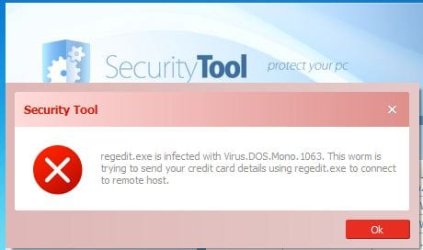
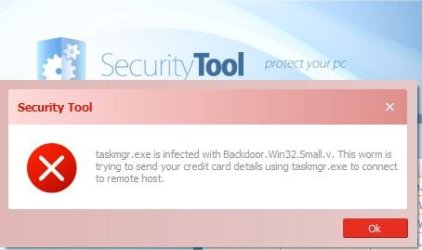
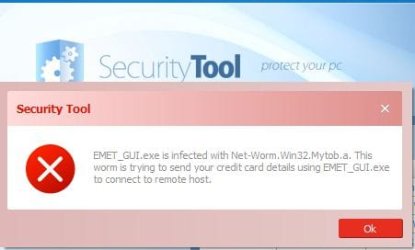
Are you running an anti-malware program called Security Tool or are these pop-ups that suddenly appeared? If these Security Tool notices are pop-ups then Security Tool is probably the malware.
 

My Computer My Computer

Computer type
Laptop
Computer Manufacturer/Model Number
Sony Vaio VPCEB47GM Laptop
OS
Win 7 Pro 64-bit
CPU
Intel i5 2.4 Ghz
Memory
8GB DDR3
Graphics Card(s)
Intel HD 3000
Sound Card
IDT High Definition
Monitor(s) Displays
15.6 WGXA Anti-Glare LED
Screen Resolution
1280x800
Hard Drives
640Gb 7200rpm
Antivirus
MSE
Browser
Opera (primary) with IE9 backup
Security Tool is an exe killing rogue security app.

I added Regedit, Task Manager and Notepad to Emet's protection but Security Tool still killed em.

Emet's gui was killed as well.
 

My Computer My Computer

OS
7
Did you install Security Tool before or after installing and configuring EMET?
 

My Computer My Computer

Computer Manufacturer/Model Number
Toshiba Satellite S875D-S7239 laptop
OS
MS Windows 7 Ultimate SP1 64-bit
CPU
AMD A10-4600M
Motherboard
AMD Pumori (Socket FT1)
Memory
6.00 GB Dual-Channel DDR3 @ 798MHz (11-11-12-28)
Graphics Card(s)
AMD Radeon HD 7660G
Sound Card
High Definition Audio Device
Monitor(s) Displays
Generic PnP Monitor (1600x900@60Hz)
Screen Resolution
1600x900@60Hz
Hard Drives
SSD 119GB Corsair CSSD-V128GB2 ATA Device
Keyboard
Standard PS/2 Keyboard
Mouse
HP Wireless Optical Mobile Mouse Model FHA-3410
Internet Speed
What the local pub, local coffee shop offers.
Other Info
Optical Drive:MATSHITA BD-CMB UJ160B ATA Device


Also have an Asus ha1002xp netbook with Win 7 Ultimate installed.

Then I would have only one further question which I ask only because I find this very strange and that is, Have you tried running MalwareBytes over your computer before installing EMET, adding programs, and then adding your virus-infecting program?

If this also shows problems, then I'm sure these chaps would be interested in your feedback:

7. Support

EMET 2.0.0 is not currently an officially supported Microsoft product. We are working hard to establish
the appropriate agreements to enable that. In the mean time, EMET is being released as an “AS-IS”
product. That said, you can send your support questions to [email protected] and we will do our
best to help you.
 

My Computer My Computer

Computer Manufacturer/Model Number
Toshiba Satellite S875D-S7239 laptop
OS
MS Windows 7 Ultimate SP1 64-bit
CPU
AMD A10-4600M
Motherboard
AMD Pumori (Socket FT1)
Memory
6.00 GB Dual-Channel DDR3 @ 798MHz (11-11-12-28)
Graphics Card(s)
AMD Radeon HD 7660G
Sound Card
High Definition Audio Device
Monitor(s) Displays
Generic PnP Monitor (1600x900@60Hz)
Screen Resolution
1600x900@60Hz
Hard Drives
SSD 119GB Corsair CSSD-V128GB2 ATA Device
Keyboard
Standard PS/2 Keyboard
Mouse
HP Wireless Optical Mobile Mouse Model FHA-3410
Internet Speed
What the local pub, local coffee shop offers.
Other Info
Optical Drive:MATSHITA BD-CMB UJ160B ATA Device


Also have an Asus ha1002xp netbook with Win 7 Ultimate installed.
What is emet supposed to protect?

Installing a Rogue whose sole purpose is to provide scam results to trick people into purchasing the program to test EMET makes no sense whatsoever.

EMET is an acronym for Enhanced Mitigation Experience Toolkit. It is not an antivirus or antimalware tool. In other words, when there is a security vulnerability that has yet to be patched, EMET will help prevent the vulnerability from being exploited.

Ed Bott has a good article about EMET at The one security tool every Windows user should know about.

An example of EMET in use is shown in the Microsoft Security Advisory 2488013 Microsoft Security Advisory (2488013): Vulnerability in Internet Explorer Could Allow Remote Code Execution, Vulnerability in Internet Explorer Could Allow Remote Code Execution:

Enhanced Mitigation Experience Toolkit (EMET) is a utility that helps prevent vulnerabilities in software from successfully being exploited by applying in-box mitigations such as DEP to applications configured in EMET.

At this time, EMET is provided with limited support and is only available in the English language. For more information, see Microsoft Knowledge Base Article 2458544.

Configure EMET for Internet Explorer from the EMET user interface
To add iexplore.exe to the list of applications using EMET, perform the following steps:

1. Click Start, All Programs, Enhanced Mitigation Experience Toolkit, and EMET 2.0.
2. Click Yes on the UAC prompt, click Configure Apps, then select Add. Browse to the application to be configured in EMET.

For 32-bit installations of Internet Explorer the location is:
C:\Program Files (x86)\Internet Explorer\iexplore.exe

Note For 32-bit systems, the path is c:\program files\Internet Explorer\iexplore.exe

For 64-bit installations of Internet Explorer the location is:
C:\Program Files\Internet Explorer\iexplore.exe


3.
Click OK and exit EMET.

The advisory was subsequently updated to provide a Microsoft Fix it: Microsoft Knowledge Base Article 2488013.
 

My Computer My Computer

OS
Windows 7 & Windows Vista Ultimate
I didn't test emet as a security tool against the rogue AV.

I did test emet's application protection capabilities by placing Task Manager, Regedit and Notepad in it's protection which is not the proper way to test I suppose?
 

My Computer My Computer

OS
7
Ed provided a good explanation in his article. Rather than re-invent the wheel, see what he said, with a couple lines I think important in bold. In particular, note the sections quoted by Ed from the EMET documentation.
EMET gives you more granular control over Data Execution Prevention (DEP), a security feature that has been a part of Windows since XP Service Pack 2. Hardware-enforced DEP blocks the execution of code in memory locations that should contain only data, such as the stack or the heap, preventing a common form of exploit. Using EMET, you can turn on DEP for applications that were not originally compiled to be compatible with the feature. (For more on how DEP works, see the two-part “Understanding DEP as a mitigation technology series on the Microsoft Security Research & Defense blog: Part 1, Part 2).

You can also use EMET to overcome a limitation of Address Space Layout Randomization (ASLR). This feature is designed to prevent attackers from jumping to predictable memory addresses to exploit vulnerabilities in code. The problem with ASLR is that it works on a per-process basis; dynamic-link libraries (DLLs) associated with that process can still be located at predictable addresses, where vulnerabilities can be exploited. That’s the attack vector used in the unpatched zero-day vulnerability I mention at the beginning of this post. EMET supports mandatory ASLR, which forces the relocation of DLLs associated with a process and thus blocks this entire class of exploits.

Other features in EMET mitigate against common tricks that hackers use to exploit flaws in code, by blocking common “heap spraying” techniques and validating exceptions before calling an exception handler.

The EMET documentation acknowledges that these are stopgap fixes:
Please note this is a pseudo mitigation designed to break current exploit techniques. It is not designed to break future exploits as well. As exploit techniques continue to evolve, so will EMET.
In fact, that’s one of the promises of EMET. It exists outside the Windows code base, so it can be updated more aggressively. As the official user’s guide explains:
EMET is a living tool designed to be updated as new mitigation technologies become available. This provides a chance for users to try out and benefit from cutting edge mitigations. The release cycle for EMET is also not tied to any product. EMET updates can be made dynamically as soon as new mitigations are ready.
 

My Computer My Computer

OS
Windows 7 & Windows Vista Ultimate
Back
Top