Partition Image - Restore from a HDD to a SSD

   Information
Searching the Web on this topic showed me, time after time, pages and pages of negative results. I tried it anyway and it worked, 1st time!


   Note
I used Acronis True Image Home 2010 so I am not sure if other programs will work.


   Warning
This process will delete all data from the partition Windows was previously installed on


Here's How:

1. Install the SSD

2. Boot up and enter the BIOS to make sure the drive is detected

3. If the SSD is seen in the BIOS, set it to #1 in the hard drive priorty

4. Install Windows to the SSD as a Custom Installation (from Step 2)

5. Once Windows has successfully installed, enter Control Panel,
AdministrativeTools, Computer Management, Disk Management. Right click
the SSD (it should be c: ) and Mark Partition as Active". Click OK at
the warning/s

6. Delete the old partiton that Windows was installed on and reformat

7. Reboot to your Windows installation media (disk or flash drive)

8. Perform a Startup Repair (You may need to do this a few times before
Windows will boot)

9. Once in Windows, install Acronis True Image Home 2010

10. Start Acronis and Activate Startup Recovery Tool (F11)

11. Reboot

12. Press F11 when prompted

13. Select Acronis True Image Home 2010

14. Select Restore

15. Choose the image you created most recently. Do not select the option to restore the MBR

16. Restore the image to your c: drive

17. When complete reboot

18. This is where I got nervous. Windows booted but hung. A hard reset
was needed. Upon restart I got a message that chkdsk needed to run. Allow it
to run.

19. Reboot and enjoy!


   Tip
Check that Windows has disabled Auto Degfrag by right-clicking the drive, select Properties, Tools and Defragment Now. When you click Configure Schedule and then Select Disks, your SSD should not appear. If it does, however, simply un-tick it

To ensure prefetching and Superfetch are disabled you'll need to enter the registry and check these entries:

HKEY_LOCAL_MACHINE\SYSTEM\CurrentControlSet\Control\Session Manager\MemoryManagement\PrefetchParamaters

Both EnablePrefetcher and EnableSuperfetch need to have a value of (0)


Last edited:
  • Like
Reactions: Arc
OK, if you already have Win7 on the SSD from the original installation, then there should be no problem pulling an image back in. No idea what the Acronis problem could be. I have never seen anything comparable, but I use Macrium.
 

My Computer My Computer

At a glance

Vista, Windows7, Mint Mate, Zorin, Windows 8from 1.6GHz Duo to i7
Computer Manufacturer/Model Number
HP, Dell, Gateway, Toshiba - 4 laptops and 2 desktops
OS
Vista, Windows7, Mint Mate, Zorin, Windows 8
CPU
from 1.6GHz Duo to i7
Monitor(s) Displays
2x HP w2207
Hard Drives
5x HDD, 7x SSD, 12x Externals
Keyboard
with trackball - no mices
Mouse
Trackball mice
Internet Speed
DSL 6000
I don't know why, but this has become a HUGE problem and I can't figure out why everything seems to be causing me problems . . .

OK, so I installed my SSD and set it to priority #1 in the bios. The SSD is a 256GB crucial with the most up-to-date firmware and connected via SATAIII for 6 Gps/sec speeds. I installed windows 7 as a custom install no problem and installed all windows updates as well as drivers for motherboard, graphics, card, etc. I unplugged the sata cable from my hdd because I did't want to erase it for fear of screwing something up. When I booted back up into windows on my ssd I marked the partition as active. I had to perform two startup repairs to get my ssd to boot, but it did no problem. I installed Acronis and rebooted to complete the install.

Here's where I start to have issues. Not only is windows (booted from my ssd) unable to see my backup hard drive which contains my old hdd image made with Acronis, but Acronis won't allow me to activate startup recovery manager because it says the "selected hard disk is not available at boot time." To make matters worse when I access Diskpart through cmd it shows my SSD as Disk 0 with 0 bytes free when the OS says I have 210GB free and actually shows my backup hard drive as Disk 1 . . .

I know this is a lot, but I'm literally doing everything step by step (apart from erasing my hdd) for this tutorial and having no luck getting to a point where I can even recover my backup to my ssd. Does anyone have any idea what I'm doing wrong or not doing? All help is greatly appreciated!
 

My Computer My Computer

At a glance

Windows 7 UltimateIntel i7 950 3.07 GhzEVGA Nvidia GTX 580
OS
Windows 7 Ultimate
CPU
Intel i7 950 3.07 Ghz
Graphics Card(s)
EVGA Nvidia GTX 580
Hard Drives
Crucial C300 256GB SSD SATA III @ 6 Gbs/sec
WD Green 500GB HDD
Can you post screenshots of what you are describing?


I have just looked at this tut - not clear to me why you should install 7 on the ssd before restoring an image.

If you partition the ssd using Vista\7 dismk management, it will be correctly aligned.

No need as far as I can see to install to it after - just restore your image.

Not too familiar with Acronis as I find it bloated and inefficient ( tho. oddly, the pe plugin seems pretty good in that respect )
 

My Computers My Computers

  • At a glance

    7 X64i5 84002x8gb 3200mhz
    Computer type
    PC/Desktop
    OS
    7 X64
    CPU
    i5 8400
    Motherboard
    gigabyte b365m ds3h
    Memory
    2x8gb 3200mhz
    Hard Drives
    various
    PSU
    pure power 11 400w cm
    Case
    Coolermaster
    Cooling
    cryorig m9i
  • At a glance

    7x64g54008gb ddr4 2400
    Computer type
    PC/Desktop
    OS
    7x64
    CPU
    g5400
    Motherboard
    ga b365m ds3h
    Memory
    8gb ddr4 2400
    PSU
    xfx pro 450w
A few questions:

The SSD is a 256GB crucial with the most up-to-date firmware and connected via SATAIII for 6 Gps/sec speeds.

Does that mean it is attached at an external Sata3 port?

I had to perform two startup repairs to get my ssd to boot,
Is this because you wanted to move the bootmgr from the 100MB active partition to the OS partition?

Not only is windows (booted from my ssd) unable to see my backup hard drive which contains my old hdd image made with Acronis, but Acronis won't allow me to activate startup recovery manager because it says the "selected hard disk is not available at boot time
How is your backup hard drive attached. Is it a normal internal HDD or is it an external disk maybe on a Sata3 port.
To make matters worse when I access Diskpart through cmd it shows my SSD as Disk 0 with 0 bytes free when the OS says I have 210GB free and actually shows my backup hard drive as Disk 1 . . .
This I would discard for the time being. It may have to do with the Sata3 attachment - not sure though.


PS: as SIW2 says, a snip of Disk Management will really help.
 

My Computer My Computer

At a glance

Vista, Windows7, Mint Mate, Zorin, Windows 8from 1.6GHz Duo to i7
Computer Manufacturer/Model Number
HP, Dell, Gateway, Toshiba - 4 laptops and 2 desktops
OS
Vista, Windows7, Mint Mate, Zorin, Windows 8
CPU
from 1.6GHz Duo to i7
Monitor(s) Displays
2x HP w2207
Hard Drives
5x HDD, 7x SSD, 12x Externals
Keyboard
with trackball - no mices
Mouse
Trackball mice
Internet Speed
DSL 6000
Try uninstalling Acronis , reboot - see if windows is happy now.
 

My Computers My Computers

  • At a glance

    7 X64i5 84002x8gb 3200mhz
    Computer type
    PC/Desktop
    OS
    7 X64
    CPU
    i5 8400
    Motherboard
    gigabyte b365m ds3h
    Memory
    2x8gb 3200mhz
    Hard Drives
    various
    PSU
    pure power 11 400w cm
    Case
    Coolermaster
    Cooling
    cryorig m9i
  • At a glance

    7x64g54008gb ddr4 2400
    Computer type
    PC/Desktop
    OS
    7x64
    CPU
    g5400
    Motherboard
    ga b365m ds3h
    Memory
    8gb ddr4 2400
    PSU
    xfx pro 450w
If you partition the ssd using Vista\7 dismk management, it will be correctly aligned.
Are you saying it must be the Windows partitioning tool?
If so what's so special about it as opposed to say Partition Wizard.
 

My Computer My Computer

At a glance

Windows 7x64 Home Premium SP1Intel i7 2600kG.Skill Ripjaws (DDR3-1600) 2x4GBNvidia GeForce GTS 450; Intel HD Graphics 300...
Computer type
PC/Desktop
Computer Manufacturer/Model Number
Own build
OS
Windows 7x64 Home Premium SP1
CPU
Intel i7 2600k
Motherboard
ASUS P8Z68 Deluxe
Memory
G.Skill Ripjaws (DDR3-1600) 2x4GB
Graphics Card(s)
Nvidia GeForce GTS 450; Intel HD Graphics 3000(GT2+)
Monitor(s) Displays
Dell Ultrasharp IPS panel U2311H, Samsung SyncMaster P2350
Screen Resolution
1920x1080
Hard Drives
Samsung 850 Pro SSD 256GB, Samsung SSD 840 120GB, Seagates 1TB Barracuda ST31000528AS x2
PSU
Seasonic M12II 520W
Case
Lian Li Lancool PC-K60
Cooling
Case: 1x120mm, 3x140mm CPU: Hyper 212+
Keyboard
Logitech MK520 (wireless)
Mouse
Logitech MK520
Internet Speed
6-7 Mbps
Antivirus
Norton Security Premium, Malwarebytes on 2 (MSE on 3rd PC)
Browser
FireFox
Other Info
Audio: Logitech Z523 2.1
Can you post screenshots of what you are describing?


I have just looked at this tut - not clear to me why you should install 7 on the ssd before restoring an image.

If you partition the ssd using Vista\7 dismk management, it will be correctly aligned.

No need as far as I can see to install to it after - just restore your image.

Not too familiar with Acronis as I find it bloated and inefficient ( tho. oddly, the pe plugin seems pretty good in that respect )

I found Acronis to complicated, Paragon on the other hand is easy !
 

My Computer My Computer

At a glance

Windows 7 Professional 64-bit SP1Intel E84004GB Crucial BallistixATI ASUS Radeon HD 4830
Computer Manufacturer/Model Number
Home Built
OS
Windows 7 Professional 64-bit SP1
CPU
Intel E8400
Motherboard
MSI P35 Neo
Memory
4GB Crucial Ballistix
Graphics Card(s)
ATI ASUS Radeon HD 4830
Sound Card
Realtek ALC888 on Board
Monitor(s) Displays
Asus 22-inch VH226H Widescreen
Screen Resolution
1920 x 1080
Hard Drives
Two Western Digital 500GB
PSU
Hiper HPU-4M 530W
Case
Thermaltake Tsunami Dream Black
Cooling
Air/Fans
Keyboard
Saitek Eclipse
Mouse
Razer
Internet Speed
Sky Broadband
Other Info
USB Hub/Card Reader - 2 Pen Drives, 1 Phone Dock
Yes, Paragon make great products.
 

My Computers My Computers

  • At a glance

    7 X64i5 84002x8gb 3200mhz
    Computer type
    PC/Desktop
    OS
    7 X64
    CPU
    i5 8400
    Motherboard
    gigabyte b365m ds3h
    Memory
    2x8gb 3200mhz
    Hard Drives
    various
    PSU
    pure power 11 400w cm
    Case
    Coolermaster
    Cooling
    cryorig m9i
  • At a glance

    7x64g54008gb ddr4 2400
    Computer type
    PC/Desktop
    OS
    7x64
    CPU
    g5400
    Motherboard
    ga b365m ds3h
    Memory
    8gb ddr4 2400
    PSU
    xfx pro 450w
If you partition the ssd using Vista\7 dismk management, it will be correctly aligned.
Are you saying it must be the Windows partitioning tool?
If so what's so special about it as opposed to say Partition Wizard.
We'll take it that any reputable partitioning tool will work.
 

My Computer My Computer

At a glance

Windows 7x64 Home Premium SP1Intel i7 2600kG.Skill Ripjaws (DDR3-1600) 2x4GBNvidia GeForce GTS 450; Intel HD Graphics 300...
Computer type
PC/Desktop
Computer Manufacturer/Model Number
Own build
OS
Windows 7x64 Home Premium SP1
CPU
Intel i7 2600k
Motherboard
ASUS P8Z68 Deluxe
Memory
G.Skill Ripjaws (DDR3-1600) 2x4GB
Graphics Card(s)
Nvidia GeForce GTS 450; Intel HD Graphics 3000(GT2+)
Monitor(s) Displays
Dell Ultrasharp IPS panel U2311H, Samsung SyncMaster P2350
Screen Resolution
1920x1080
Hard Drives
Samsung 850 Pro SSD 256GB, Samsung SSD 840 120GB, Seagates 1TB Barracuda ST31000528AS x2
PSU
Seasonic M12II 520W
Case
Lian Li Lancool PC-K60
Cooling
Case: 1x120mm, 3x140mm CPU: Hyper 212+
Keyboard
Logitech MK520 (wireless)
Mouse
Logitech MK520
Internet Speed
6-7 Mbps
Antivirus
Norton Security Premium, Malwarebytes on 2 (MSE on 3rd PC)
Browser
FireFox
Other Info
Audio: Logitech Z523 2.1
Can you post screenshots of what you are describing?


I have just looked at this tut - not clear to me why you should install 7 on the ssd before restoring an image.

If you partition the ssd using Vista\7 dismk management, it will be correctly aligned.

No need as far as I can see to install to it after - just restore your image.

Not too familiar with Acronis as I find it bloated and inefficient ( tho. oddly, the pe plugin seems pretty good in that respect )

I found Acronis to complicated, Paragon on the other hand is easy !
I've tried most of the imaging software out there and I'd rate Paragon as having one of the most complicated user interfaces I've seen.
 

My Computer My Computer

At a glance

Windows 7x64 Home Premium SP1Intel i7 2600kG.Skill Ripjaws (DDR3-1600) 2x4GBNvidia GeForce GTS 450; Intel HD Graphics 300...
Computer type
PC/Desktop
Computer Manufacturer/Model Number
Own build
OS
Windows 7x64 Home Premium SP1
CPU
Intel i7 2600k
Motherboard
ASUS P8Z68 Deluxe
Memory
G.Skill Ripjaws (DDR3-1600) 2x4GB
Graphics Card(s)
Nvidia GeForce GTS 450; Intel HD Graphics 3000(GT2+)
Monitor(s) Displays
Dell Ultrasharp IPS panel U2311H, Samsung SyncMaster P2350
Screen Resolution
1920x1080
Hard Drives
Samsung 850 Pro SSD 256GB, Samsung SSD 840 120GB, Seagates 1TB Barracuda ST31000528AS x2
PSU
Seasonic M12II 520W
Case
Lian Li Lancool PC-K60
Cooling
Case: 1x120mm, 3x140mm CPU: Hyper 212+
Keyboard
Logitech MK520 (wireless)
Mouse
Logitech MK520
Internet Speed
6-7 Mbps
Antivirus
Norton Security Premium, Malwarebytes on 2 (MSE on 3rd PC)
Browser
FireFox
Other Info
Audio: Logitech Z523 2.1
Please yourself.

If you partition the ssd using Vista\7 dismk management, it will be correctly aligned.

That is not necessarily the case with 3rd party apps.

You are welcome to check if PW does that.
 

My Computers My Computers

  • At a glance

    7 X64i5 84002x8gb 3200mhz
    Computer type
    PC/Desktop
    OS
    7 X64
    CPU
    i5 8400
    Motherboard
    gigabyte b365m ds3h
    Memory
    2x8gb 3200mhz
    Hard Drives
    various
    PSU
    pure power 11 400w cm
    Case
    Coolermaster
    Cooling
    cryorig m9i
  • At a glance

    7x64g54008gb ddr4 2400
    Computer type
    PC/Desktop
    OS
    7x64
    CPU
    g5400
    Motherboard
    ga b365m ds3h
    Memory
    8gb ddr4 2400
    PSU
    xfx pro 450w
In answer to your first question, no. My SSD was attached via SATA III internally on my motherboard. Second question is yes.

However, the questions aren't really relevant now . . . I erased and reformatted my SSD after making my old HDD the main boot drive and booting Acronis from the HDD I was successfully able to recover my backup to the solid state. That was the good news.

However, I didn't realize that when I made my solid state the primary drive again and booted it, the solid state was still associating programs, files, etc. from the old HD, because when I ran the Windows Experience Index I was still getting a score of 5.9 instead of something in the 7 to 7.9 range. In my infinite wisdom, I didn't think anything of it and reformatted my old hard drive to make room for new installations, which has now screwed up my solid state (because all the programs were still pointing to the old hard drive) and now windows won't boot because its looking for the files/programs from my old hdd.

I really thought this whole process would be painless and it has just become a nightmare . . . Any suggestions for how I might get my solid state working and/or restoring the data I had on my old hdd so I can work to get my solid state to boot without needing the original files on my hdd? I recognize that I haven't made helping me any easier, but I really do appreciate everyone's efforts to help me.

BTW I still have my backup image of my original hdd data. I just want to get all of my data on my solid state and have it solely run on my ssd without my hdd! Thanks in advance for anyone who tries to help me get out of this mess I've made . . .
 

My Computer My Computer

At a glance

Windows 7 UltimateIntel i7 950 3.07 GhzEVGA Nvidia GTX 580
OS
Windows 7 Ultimate
CPU
Intel i7 950 3.07 Ghz
Graphics Card(s)
EVGA Nvidia GTX 580
Hard Drives
Crucial C300 256GB SSD SATA III @ 6 Gbs/sec
WD Green 500GB HDD
Hi apizz :)

I still have my backup image of my original hdd data
Then can you install the backup image archive to your HDD then Clone over to your SSD.
 

My Computer My Computer

At a glance

Windows 7 Professional 64-bit SP1Intel E84004GB Crucial BallistixATI ASUS Radeon HD 4830
Computer Manufacturer/Model Number
Home Built
OS
Windows 7 Professional 64-bit SP1
CPU
Intel E8400
Motherboard
MSI P35 Neo
Memory
4GB Crucial Ballistix
Graphics Card(s)
ATI ASUS Radeon HD 4830
Sound Card
Realtek ALC888 on Board
Monitor(s) Displays
Asus 22-inch VH226H Widescreen
Screen Resolution
1920 x 1080
Hard Drives
Two Western Digital 500GB
PSU
Hiper HPU-4M 530W
Case
Thermaltake Tsunami Dream Black
Cooling
Air/Fans
Keyboard
Saitek Eclipse
Mouse
Razer
Internet Speed
Sky Broadband
Other Info
USB Hub/Card Reader - 2 Pen Drives, 1 Phone Dock
Were you running programs from a different partition than the OS on the HDD?

Can you tell us how you had the HDD setup?
 

My Computer My Computer

At a glance

Windows 7 Ult x64 - SP1/ Windows 8 Pro x64Intel Core i5-3570K 4.6GHz8GB (2X4GB) DDR3 1600 Corsair Vengeance CL8 1.5vSapphire HD 7770 Vapor-X OC 1GB DDR5
Computer type
PC/Desktop
Computer Manufacturer/Model Number
76~2.0
OS
Windows 7 Ult x64 - SP1/ Windows 8 Pro x64
CPU
Intel Core i5-3570K 4.6GHz
Motherboard
Gigabyte GA-Z77X UD3H, f18
Memory
8GB (2X4GB) DDR3 1600 Corsair Vengeance CL8 1.5v
Graphics Card(s)
Sapphire HD 7770 Vapor-X OC 1GB DDR5
Sound Card
Onboard VIA VT2021
Monitor(s) Displays
22" LCD Dell
Screen Resolution
1680x1050
Hard Drives
Samsung 840Pro 128GB SSD,
Seagate Barracuda 500GB SATA2 7200rpm 32MB cache, Seagate Barracuda 1TB SATA2 7200rpm 32MB cache,
PSU
Corsair HX650W
Case
Cooler Master Storm Scout
Cooling
Corsair H80 2x12cm Noctua NF P12 , 2x14cm case fans
Keyboard
Logitech Wave
Mouse
CM Sentinel
Internet Speed
Dismal
Antivirus
Avast
Browser
Opera Next
Other Info
Haswell laptop: HP Envy 17t-j, i7-4700MQ, GeForce 740M 2GB DDR3, 17.3" Full HD 1920x1080, 16GB RAM, Samsung 840 Pro 128GB, 1TB Hitachi 7200 HDD,
Desktop: eSATA ports,
External eSATA Seagate 500GB SATA2 7200rpm,
External WD USB 500GB
Then can you install the backup image archive to your HDD then Clone over to your SSD.

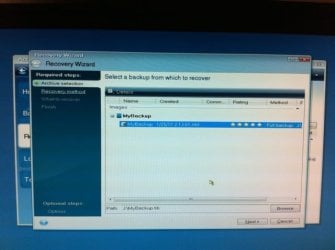
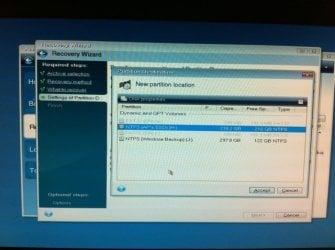
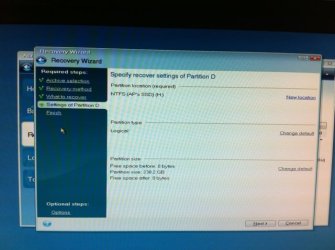
I'm now in the process of restoring my backup to my original hdd. Acronis (booted from a cd I made) says that it's going to make the partition not only the primary partition, but also make it active. This is something that did not happen when I was previously restoring to my ssd. Acronis was saying my ssd would be a logical partition. Here are some shots of trying to restore my backup to my ssd -->


Ciara: won't cloning my hdd to my ssd just give me a different set of issues? wouldn't I experience alignment problems and general performance issues because I'm cloning a standard hdd structure to an ssd?

Were you running programs from a different partition than the OS on the HDD?

Can you tell us how you had the HDD setup?

I just had one big partition on my 500GB hdd that had my OS and programs, which was designated as drive C:. I think where I messed up was when I backed up my original hdd to one of my external hard drives I had the ssd plugged in and it was designated as H:, whereas my original hdd with my OS and programs was C:

Thanks again for everyone's help
 

My Computer My Computer

At a glance

Windows 7 UltimateIntel i7 950 3.07 GhzEVGA Nvidia GTX 580
OS
Windows 7 Ultimate
CPU
Intel i7 950 3.07 Ghz
Graphics Card(s)
EVGA Nvidia GTX 580
Hard Drives
Crucial C300 256GB SSD SATA III @ 6 Gbs/sec
WD Green 500GB HDD
Oops. Here are those photos:
 

Attachments

  • IMG_4156.jpeg
    IMG_4156.jpeg
    31.9 KB · Views: 292
  • IMG_4158.jpeg
    IMG_4158.jpeg
    26.1 KB · Views: 299
  • IMG_4159.jpeg
    IMG_4159.jpeg
    28.2 KB · Views: 307
  • IMG_4160.jpeg
    IMG_4160.jpeg
    40.7 KB · Views: 308
  • IMG_4161.jpeg
    IMG_4161.jpeg
    37.4 KB · Views: 300

My Computer My Computer

At a glance

Windows 7 UltimateIntel i7 950 3.07 GhzEVGA Nvidia GTX 580
OS
Windows 7 Ultimate
CPU
Intel i7 950 3.07 Ghz
Graphics Card(s)
EVGA Nvidia GTX 580
Hard Drives
Crucial C300 256GB SSD SATA III @ 6 Gbs/sec
WD Green 500GB HDD
I just finished recovering my backup to my hdd and am thankfully able to boot with all my programs, etc. phew. But now I'm back exactly where I started trying to get my solid state to become my main drive with all my data, games, etc.

My general question now is how should I go about making my ssd the primary C: partition with all my old hdd data on it so that it will actually work. Someone said I could just clone it but I'm worried that simply cloning my old hdd won't optimize my os for the solid state . . .
 

My Computer My Computer

At a glance

Windows 7 UltimateIntel i7 950 3.07 GhzEVGA Nvidia GTX 580
OS
Windows 7 Ultimate
CPU
Intel i7 950 3.07 Ghz
Graphics Card(s)
EVGA Nvidia GTX 580
Hard Drives
Crucial C300 256GB SSD SATA III @ 6 Gbs/sec
WD Green 500GB HDD
OK, so I essentially solved my own problem. I skipped over a really minute detail.

When I first formatted my solid state hard drive on my old windows partition, it created 3 partitions on the ssd: 1 was a system partition, 1 was the main partition, and 1 was unallocated space at the end of the drive. Instead of reformatting the entire ssd, I was only reformatting the main partition and not the entire drive. This is why my ssd kept coming up as H: and why Acronis was making it a logical partition when I was restoring instead of a primary (and active) one.

After deleting all the partitions using my Windows OS boot disk, I created a brand new partition and installed windows to it to make it the C: drive. My old hdd was disconnected for all of this. After installing windows, I booted from an Acronis boot CD I made and selected my backup to be recovered on my solid state. Even though the ssd was labeled as D: (Windows 7 had made a system partition prior to the main partition when I reformatted it) when I selected my backup file from my external hard drive and chose my ssd as the location to recover to, Acronis said it would make the recovered partition the primary one. I also checked to make the drive active and away it went and recovered my old hdd image to my ssd.

I sincerely apologize for all this posts, questions, and changes in my procedure, but thanks to everyone for helping me out!!!!!
 

My Computer My Computer

At a glance

Windows 7 UltimateIntel i7 950 3.07 GhzEVGA Nvidia GTX 580
OS
Windows 7 Ultimate
CPU
Intel i7 950 3.07 Ghz
Graphics Card(s)
EVGA Nvidia GTX 580
Hard Drives
Crucial C300 256GB SSD SATA III @ 6 Gbs/sec
WD Green 500GB HDD
Glad you got it sorted.
 

My Computer My Computer

At a glance

Windows 7 Ult x64 - SP1/ Windows 8 Pro x64Intel Core i5-3570K 4.6GHz8GB (2X4GB) DDR3 1600 Corsair Vengeance CL8 1.5vSapphire HD 7770 Vapor-X OC 1GB DDR5
Computer type
PC/Desktop
Computer Manufacturer/Model Number
76~2.0
OS
Windows 7 Ult x64 - SP1/ Windows 8 Pro x64
CPU
Intel Core i5-3570K 4.6GHz
Motherboard
Gigabyte GA-Z77X UD3H, f18
Memory
8GB (2X4GB) DDR3 1600 Corsair Vengeance CL8 1.5v
Graphics Card(s)
Sapphire HD 7770 Vapor-X OC 1GB DDR5
Sound Card
Onboard VIA VT2021
Monitor(s) Displays
22" LCD Dell
Screen Resolution
1680x1050
Hard Drives
Samsung 840Pro 128GB SSD,
Seagate Barracuda 500GB SATA2 7200rpm 32MB cache, Seagate Barracuda 1TB SATA2 7200rpm 32MB cache,
PSU
Corsair HX650W
Case
Cooler Master Storm Scout
Cooling
Corsair H80 2x12cm Noctua NF P12 , 2x14cm case fans
Keyboard
Logitech Wave
Mouse
CM Sentinel
Internet Speed
Dismal
Antivirus
Avast
Browser
Opera Next
Other Info
Haswell laptop: HP Envy 17t-j, i7-4700MQ, GeForce 740M 2GB DDR3, 17.3" Full HD 1920x1080, 16GB RAM, Samsung 840 Pro 128GB, 1TB Hitachi 7200 HDD,
Desktop: eSATA ports,
External eSATA Seagate 500GB SATA2 7200rpm,
External WD USB 500GB
After reading all this, I was considering to put my new ssd back in the packaging :D.
Actually I have only one question (at this moment).
How do I put an image from a HDD partition of 294 gb on a SSD partition of 110 gb?
I use Macrium Reflect free. The image is ok. After installing win 7 64 on the ssd, my hdd got corrupt and I was able to replace the image on the hdd with no problems at all.
I did try the roborestore option, but that did not work.

Thanks in advanced
 

My Computer My Computer

At a glance

Windows 7 64 bit home premiumIntel I5-750Corsair 6 gb 1300Radeon XFX HD 6870
OS
Windows 7 64 bit home premium
CPU
Intel I5-750
Motherboard
Asus P7P55D
Memory
Corsair 6 gb 1300
Graphics Card(s)
Radeon XFX HD 6870
Sound Card
On board
Monitor(s) Displays
IIyama prolite 19"
Screen Resolution
1280*1024*32 - 75 hz
Hard Drives
Corsair SDD 128
Samsung HD753LJ
WD3200JD (two)
PSU
Zalman ZM850-HP 850w
Case
Antec
Cooling
Coolmaster
Keyboard
Logitech ps2
Mouse
MS comfort Optical 3000
Internet Speed
Broad band cable
Back
Top