
Solved Help with a complete system image restore from VHD files?

Additional information: Drive K has 193,771 files; 21,240 folders; 147,710,491,882 bytes of information. (However, when read as a single file it is 214GByte).
See why I want it back?

If it was safe to write over C: with the information contained in this directory (K and be assured that the files were there to recreate the former C: drive (and allow it to boot), I would. My problem is: Are ALL the files, including system, in that single directory (K ? and would copying them to C: give me a bootable system back to the backup date?
Windows 7 imaging (which I use!) can be fussy. Corruption of the small mediaid file will cause auto image location to fail.

I have been able to do the following:
(1) Like whs suggests Mount the main vhd (your K) shrink, image with Macrium then reimage to an appropriate sized partition. This may require you to temporarily create another primary partition on C:. I did it as an exercise quite some time ago and worked for me.
OR
(2) Simply copy your folders out of the mounted image (K in your case).
It could be that there are some hidden and system files not shown in the mounted VHD accounting for the size difference.
I would prefer to use another partition or external HDD (slow) but see no problems in copying out to a separate root folder on C:.
You only want to copy out data not OS or installed programs.


I personally like the second answer until I get to the part "copy out data not OS or installed programs". The reason I started this thread in the first place is that I wanted to restore the whole system, not just retrieve my documents, pictures, music and videos, etc.

This computer has a lot of downloaded programs (Super, VLC, ModPlug, DOS Box, PGP, etc.). Some don't even exist anymore for download (PGP was taken over by Symantec) and most, if not all, have been modified over a period of years. To install all the programs and tweak them would take weeks and is not something I want to do if I can avoid it.

So saying, I know there is a way to restore the system and somehow get the programs and data back where they were and readable by the system as this was a backup done a month before the so called "crash" when the system was working fine. I will await the reply on how to "shrink" the image and will see what happens next.

Thank you for the input as I am looking for any answers that might get the job done. :D

Don
 

My Computer My Computer

At a glance

Windows 7 Ultimate 32 bitAMD Phenom II X2 550 3.1GHz8 GB DDR2 (4 I can't use.....yet)ATI Radeon HD 5670
Computer Manufacturer/Model Number
Made by myself
OS
Windows 7 Ultimate 32 bit
CPU
AMD Phenom II X2 550 3.1GHz
Motherboard
Gigabyte MA790X-UD4P
Memory
8 GB DDR2 (4 I can't use.....yet)
Graphics Card(s)
ATI Radeon HD 5670
Sound Card
Audigy 2 Platinum
Monitor(s) Displays
Samsung EX2220
Screen Resolution
1920x1080
Hard Drives
2 Western Digital 1TByte SATA HDs
PSU
Antec Earthwatts EA500D
Case
Antec Full Tower
Cooling
3 case fans, 1 CPU fan, 1 Graphics card fan
Keyboard
Dell Minimum Footprint SK8115
Mouse
Logitech Trackman Wheel
Internet Speed
Fast
Other Info
Philips Mpix WebCam
Canoscan LiDE 35
Lexmark E350d
Creative Inspire 6.1
3'x3'x2' Box full of computer parts
1. Yes, K is unbootable and any simple copy job will not make it bootable.

2. I am not sure about those sizes. They could be confused because of the original Raid setup. And then there is also compression in the image.
If you want to shrink a partition, you just right click on it in Disk Management and => Shrink.

6. The 100MB partition contains your bootmgr. Without it, the system will not boot. The reason why I said to defer that is because that 100MB partition may still be intact. Post another picture of your Disk Management showing Disks 0,1,2 so that we can have a look.

Is there not a way to make the contents of Drive K: bootable and simply copy everything on K: to C: and overwrite everything on C: or copy and then make it bootable?
No, it is not that simple.

The sad part of this whole debacle is that Windows 7 should have been able to backup and restore like it says it can. Just another reason not to believe the claims of MS
That is a question to ask mjf. He is a real Windows7 imaging expert. Maybe he knows how to revive that image you have. I had my own troubles with Windows7 imaging. That's why I did not really persue it and am not familiar with the details.
 

My Computer My Computer

At a glance

Vista, Windows7, Mint Mate, Zorin, Windows 8from 1.6GHz Duo to i7
Computer Manufacturer/Model Number
HP, Dell, Gateway, Toshiba - 4 laptops and 2 desktops
OS
Vista, Windows7, Mint Mate, Zorin, Windows 8
CPU
from 1.6GHz Duo to i7
Monitor(s) Displays
2x HP w2207
Hard Drives
5x HDD, 7x SSD, 12x Externals
Keyboard
with trackball - no mices
Mouse
Trackball mice
Internet Speed
DSL 6000
6. The 100MB partition contains your bootmgr. Without it, the system will not boot. The reason why I said to defer that is because that 100MB partition may still be intact. Post another picture of your Disk Management showing Disks 0,1,2 so that we can have a look.

Here are the two drives as they exist now. Although it doesn't say this in the image, on drive C: 908 of 931 Gbytes are free and on D: 697 of 931 Gbytes are free. The reason is that I have the image (which is also on another external hard drive) on drive D: in case I could restore from that drive.

I hope this can be resoved with minimal trauma. Thank you for your help.

Don
 

Attachments

  • C&DDrives.jpg
    C&DDrives.jpg
    74.4 KB · Views: 19

My Computer My Computer

At a glance

Windows 7 Ultimate 32 bitAMD Phenom II X2 550 3.1GHz8 GB DDR2 (4 I can't use.....yet)ATI Radeon HD 5670
Computer Manufacturer/Model Number
Made by myself
OS
Windows 7 Ultimate 32 bit
CPU
AMD Phenom II X2 550 3.1GHz
Motherboard
Gigabyte MA790X-UD4P
Memory
8 GB DDR2 (4 I can't use.....yet)
Graphics Card(s)
ATI Radeon HD 5670
Sound Card
Audigy 2 Platinum
Monitor(s) Displays
Samsung EX2220
Screen Resolution
1920x1080
Hard Drives
2 Western Digital 1TByte SATA HDs
PSU
Antec Earthwatts EA500D
Case
Antec Full Tower
Cooling
3 case fans, 1 CPU fan, 1 Graphics card fan
Keyboard
Dell Minimum Footprint SK8115
Mouse
Logitech Trackman Wheel
Internet Speed
Fast
Other Info
Philips Mpix WebCam
Canoscan LiDE 35
Lexmark E350d
Creative Inspire 6.1
3'x3'x2' Box full of computer parts
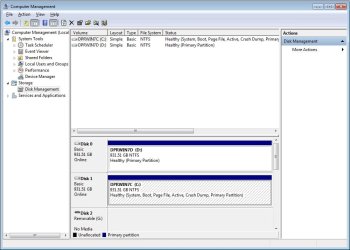
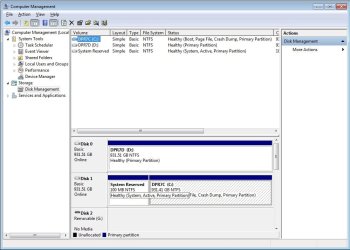
This is interesting. As it looks right now, you never had a 100MB active partition because C: is active. Windows7 imaging seems to have created a dummy VHD for the 100MB partition - which also would explain that the byte count is zero.

With that info in mind you restore the image from K as active. Also replace the MBR. And let's pray that it will boot.

PS: No trauma - this is fun.
 

My Computer My Computer

At a glance

Vista, Windows7, Mint Mate, Zorin, Windows 8from 1.6GHz Duo to i7
Computer Manufacturer/Model Number
HP, Dell, Gateway, Toshiba - 4 laptops and 2 desktops
OS
Vista, Windows7, Mint Mate, Zorin, Windows 8
CPU
from 1.6GHz Duo to i7
Monitor(s) Displays
2x HP w2207
Hard Drives
5x HDD, 7x SSD, 12x Externals
Keyboard
with trackball - no mices
Mouse
Trackball mice
Internet Speed
DSL 6000
This is interesting. As it looks right now, you never had a 100MB active partition because C: is active. Windows7 imaging seems to have created a dummy VHD for the 100MB partition - which also would explain that the byte count is zero.

With that info in mind you restore the image from K as active. Also replace the MBR. And let's pray that it will boot.

PS: No trauma - this is fun.

Just for my own curiosity (and the desire to do it my way), I wiped both drives clean and reinstalled Windows 7 from scratch. It automatically created that 100Mb partition without asking me (see screen caps). This partition was also created on the backup drive during the original backup as well.

So saying, what size would you recommend for me to make the image (which is currently ~1,800 GB by definition only - actual file size is 214 GB)?

Do I then simply send the image to C: to replace the current files (leaving the 100MB partition alone) or do I copy the files to C: to recreate it?

I have the feeling that I may have to revert the computer back to the Raid array to allow for the restoration of the complete image, but am willing to see if this will work on the C: drive as I don't want to use an array again.

Thank you for your help.

Don
 

Attachments

  • 1.jpg
    1.jpg
    76.2 KB · Views: 8
  • 2.jpg
    2.jpg
    76.1 KB · Views: 8

My Computer My Computer

At a glance

Windows 7 Ultimate 32 bitAMD Phenom II X2 550 3.1GHz8 GB DDR2 (4 I can't use.....yet)ATI Radeon HD 5670
Computer Manufacturer/Model Number
Made by myself
OS
Windows 7 Ultimate 32 bit
CPU
AMD Phenom II X2 550 3.1GHz
Motherboard
Gigabyte MA790X-UD4P
Memory
8 GB DDR2 (4 I can't use.....yet)
Graphics Card(s)
ATI Radeon HD 5670
Sound Card
Audigy 2 Platinum
Monitor(s) Displays
Samsung EX2220
Screen Resolution
1920x1080
Hard Drives
2 Western Digital 1TByte SATA HDs
PSU
Antec Earthwatts EA500D
Case
Antec Full Tower
Cooling
3 case fans, 1 CPU fan, 1 Graphics card fan
Keyboard
Dell Minimum Footprint SK8115
Mouse
Logitech Trackman Wheel
Internet Speed
Fast
Other Info
Philips Mpix WebCam
Canoscan LiDE 35
Lexmark E350d
Creative Inspire 6.1
3'x3'x2' Box full of computer parts
Wolfgang,

Two questions come to mind on this.

1. Does the 100 MB partition have data in it regarding the balance of the drive [e.g. C:] ?
I am assuming it does.

2.If I were to take the 100 MB partition from the complete back up and overwrite (if possible) the 100MB partition on c: and then shrink the backup volume (currently ~1800GB) to the size of the balance of C: (9.41 GB) and overwrite it and then set it as active, wouldn't that restore the original system?

Just a thought.

Don
 

My Computer My Computer

At a glance

Windows 7 Ultimate 32 bitAMD Phenom II X2 550 3.1GHz8 GB DDR2 (4 I can't use.....yet)ATI Radeon HD 5670
Computer Manufacturer/Model Number
Made by myself
OS
Windows 7 Ultimate 32 bit
CPU
AMD Phenom II X2 550 3.1GHz
Motherboard
Gigabyte MA790X-UD4P
Memory
8 GB DDR2 (4 I can't use.....yet)
Graphics Card(s)
ATI Radeon HD 5670
Sound Card
Audigy 2 Platinum
Monitor(s) Displays
Samsung EX2220
Screen Resolution
1920x1080
Hard Drives
2 Western Digital 1TByte SATA HDs
PSU
Antec Earthwatts EA500D
Case
Antec Full Tower
Cooling
3 case fans, 1 CPU fan, 1 Graphics card fan
Keyboard
Dell Minimum Footprint SK8115
Mouse
Logitech Trackman Wheel
Internet Speed
Fast
Other Info
Philips Mpix WebCam
Canoscan LiDE 35
Lexmark E350d
Creative Inspire 6.1
3'x3'x2' Box full of computer parts
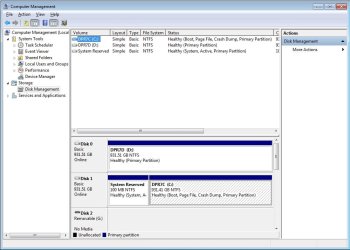
1. The 100MB partition contains the bootmgr (in a normal setup). The problem I have is that your original setup from which you mde the image did not have that 100MB partition. For whatever reason it was C that was "active" meaning it contained the bootmgr.

The complication we have here is that you had this Raid setup. I really do not know what exactly happens with such a setup since I never use Raid because I think it is utterly useless.

2. As a first trial I would disregard the 100MB partition and restore C as the active partition. As to size I am again lost because of this Raid history of the image. Just make the partition as big as possible and see what happens. What can you loose.
 

My Computer My Computer

At a glance

Vista, Windows7, Mint Mate, Zorin, Windows 8from 1.6GHz Duo to i7
Computer Manufacturer/Model Number
HP, Dell, Gateway, Toshiba - 4 laptops and 2 desktops
OS
Vista, Windows7, Mint Mate, Zorin, Windows 8
CPU
from 1.6GHz Duo to i7
Monitor(s) Displays
2x HP w2207
Hard Drives
5x HDD, 7x SSD, 12x Externals
Keyboard
with trackball - no mices
Mouse
Trackball mice
Internet Speed
DSL 6000
Likewise, the RAID configuration is something I'm not familiar enough with.
The 100M system reserved contains intermediate boot files (bootsector, bootmgr, BCD) and will point to your windows loader, winload.exe, on the OS partition. There are commands to rebuild the system reserved from scratch if ever required.
 

My Computer My Computer

At a glance

Windows 7x64 Home Premium SP1Intel i7 2600kG.Skill Ripjaws (DDR3-1600) 2x4GBNvidia GeForce GTS 450; Intel HD Graphics 300...
Computer type
PC/Desktop
Computer Manufacturer/Model Number
Own build
OS
Windows 7x64 Home Premium SP1
CPU
Intel i7 2600k
Motherboard
ASUS P8Z68 Deluxe
Memory
G.Skill Ripjaws (DDR3-1600) 2x4GB
Graphics Card(s)
Nvidia GeForce GTS 450; Intel HD Graphics 3000(GT2+)
Monitor(s) Displays
Dell Ultrasharp IPS panel U2311H, Samsung SyncMaster P2350
Screen Resolution
1920x1080
Hard Drives
Samsung 850 Pro SSD 256GB, Samsung SSD 840 120GB, Seagates 1TB Barracuda ST31000528AS x2
PSU
Seasonic M12II 520W
Case
Lian Li Lancool PC-K60
Cooling
Case: 1x120mm, 3x140mm CPU: Hyper 212+
Keyboard
Logitech MK520 (wireless)
Mouse
Logitech MK520
Internet Speed
6-7 Mbps
Antivirus
Norton Security Premium, Malwarebytes on 2 (MSE on 3rd PC)
Browser
FireFox
Other Info
Audio: Logitech Z523 2.1
This morning I spent some time on the telephone with a Microsoft Level "2" technician. It only took five days for them to call back from the orginal request (althought they told me each day that I would be called the following day).

I asked about restoring it from a Raid 0 and he was not sure about that configuration (he admitted later in the conversation that he had set up his system with a Raid 1 configuration). He then tried to figure out how to do a system restore given the information I have presented in this forum. In listening to him, it was evident that he was searching the Internet for an answer based on his response. His final analysis of the situation is as follows:

I would try to convert the VHD files to TIB using Acronis (Backup and Restore - MSRP $79) and then use the program to shrink the volume of the image and restore it using the software.

I found it interesting that a Microsoft technician would recommend a third party solution, let alone not having experience with a restore failure from a Microsoft product. At least he was honest.

My feeling is that the original image (which contained both the 100Mb seeimingly empty partition (*) as well as the 1800 Gb system image) could be mounted individually into a virtual hard drive and then copied to C: overwriting the current configuration and files. The only question in my mind is, "Would the system allow for the overwriting of the MBR by this method?"

In any case, I have learned a lot from this little adventure and the most valuable lesson comes from Wolfgang's signature. I have decided to do a clean installation of Windows 7, install only the very basic programs I need and copy the directories I need out of the VHD file. The main program I need has been on my computer for almost 10 years and has been updated frequently leaving a lot of unnecessary files. Fortunately, the company that makes the program allows for its complete download from its site using my password. Last night I downloaded the full program (8 GB), which, because all of it's settings are dynamically syncronized at their site, installed exactly the way I last used it with all of my settings and bookmarks, etc. still intact.

Although there are still some questions unanswered like "Why did the system fail in the first place?", I have learned to minimize the number of programs to prevent interaction problems and to find a better way to back up the system in future.

Thenk you all for your suggestions and the information you provided and I will continue to post when I either have a question or solution.

Don

(*) Wolfgang, the 100Mb partition was present in the backup, but I separated it from the other when I copied it to the hard drive so it did not appear with the larger partition.
 

My Computer My Computer

At a glance

Windows 7 Ultimate 32 bitAMD Phenom II X2 550 3.1GHz8 GB DDR2 (4 I can't use.....yet)ATI Radeon HD 5670
Computer Manufacturer/Model Number
Made by myself
OS
Windows 7 Ultimate 32 bit
CPU
AMD Phenom II X2 550 3.1GHz
Motherboard
Gigabyte MA790X-UD4P
Memory
8 GB DDR2 (4 I can't use.....yet)
Graphics Card(s)
ATI Radeon HD 5670
Sound Card
Audigy 2 Platinum
Monitor(s) Displays
Samsung EX2220
Screen Resolution
1920x1080
Hard Drives
2 Western Digital 1TByte SATA HDs
PSU
Antec Earthwatts EA500D
Case
Antec Full Tower
Cooling
3 case fans, 1 CPU fan, 1 Graphics card fan
Keyboard
Dell Minimum Footprint SK8115
Mouse
Logitech Trackman Wheel
Internet Speed
Fast
Other Info
Philips Mpix WebCam
Canoscan LiDE 35
Lexmark E350d
Creative Inspire 6.1
3'x3'x2' Box full of computer parts
I would try to convert the VHD files to TIB using Acronis (Backup and Restore - MSRP $79) and then use the program to shrink the volume of the image and restore it using the software.

I found it interesting that a Microsoft technician would recommend a third party solution, let alone not having experience with a restore failure from a Microsoft product. At least he was honest.
.
It's probably commendable that the MS tech would recommend it and they obviously spent time on your problem. It is the only utility I had seen in the past that would rescue an MS vhd. Unfortunately the free versions of Acronis that apply to WD or Seagate HDDs don't seem to support it.

MS could develop a rescue utility if they wanted.
 

My Computer My Computer

At a glance

Windows 7x64 Home Premium SP1Intel i7 2600kG.Skill Ripjaws (DDR3-1600) 2x4GBNvidia GeForce GTS 450; Intel HD Graphics 300...
Computer type
PC/Desktop
Computer Manufacturer/Model Number
Own build
OS
Windows 7x64 Home Premium SP1
CPU
Intel i7 2600k
Motherboard
ASUS P8Z68 Deluxe
Memory
G.Skill Ripjaws (DDR3-1600) 2x4GB
Graphics Card(s)
Nvidia GeForce GTS 450; Intel HD Graphics 3000(GT2+)
Monitor(s) Displays
Dell Ultrasharp IPS panel U2311H, Samsung SyncMaster P2350
Screen Resolution
1920x1080
Hard Drives
Samsung 850 Pro SSD 256GB, Samsung SSD 840 120GB, Seagates 1TB Barracuda ST31000528AS x2
PSU
Seasonic M12II 520W
Case
Lian Li Lancool PC-K60
Cooling
Case: 1x120mm, 3x140mm CPU: Hyper 212+
Keyboard
Logitech MK520 (wireless)
Mouse
Logitech MK520
Internet Speed
6-7 Mbps
Antivirus
Norton Security Premium, Malwarebytes on 2 (MSE on 3rd PC)
Browser
FireFox
Other Info
Audio: Logitech Z523 2.1
It's probably commendable that the MS tech would recommend it and they obviously spent time on your problem. It is the only utility I had seen in the past that would rescue an MS vhd. Unfortunately the free versions of Acronis that apply to WD or Seagate HDDs don't seem to support it.

MS could develop a rescue utility if they wanted.

When I initiated the call, he did not have the answer and said, "Let's see what we can find out." at which point he went to the Internet for the answer.

He directed me to the page(s) he was on in order that I might see and bookmark (if necessary) them.

My main point in this is that Microsoft should develop a knowledge base on it's own that deals with problems such as this. Perhaps they would then consider creating an answer to the restore problem which is easy to find references to (sans a good answer) with a simple search.

I understand that Microsoft could try to be the jack of all trades, but experience tells me that when you understand a specific type of program inside and out, you do better marketing that until someone comes along with something better. The operating system is MS's main focus and the did fairly well adapting Peter Norton's Speed Disk and Disk Doctor into a scaled down version, but in trying to keep up with all the other applications, they lose sight of their primary goal - the best operating system they can produce. (which does not mean I beleive it is the best operating system, but it certainly is the most obiquitous)

At this point I am considering my question answered, so do I or does someone else click the "solved" button?

Don
 

My Computer My Computer

At a glance

Windows 7 Ultimate 32 bitAMD Phenom II X2 550 3.1GHz8 GB DDR2 (4 I can't use.....yet)ATI Radeon HD 5670
Computer Manufacturer/Model Number
Made by myself
OS
Windows 7 Ultimate 32 bit
CPU
AMD Phenom II X2 550 3.1GHz
Motherboard
Gigabyte MA790X-UD4P
Memory
8 GB DDR2 (4 I can't use.....yet)
Graphics Card(s)
ATI Radeon HD 5670
Sound Card
Audigy 2 Platinum
Monitor(s) Displays
Samsung EX2220
Screen Resolution
1920x1080
Hard Drives
2 Western Digital 1TByte SATA HDs
PSU
Antec Earthwatts EA500D
Case
Antec Full Tower
Cooling
3 case fans, 1 CPU fan, 1 Graphics card fan
Keyboard
Dell Minimum Footprint SK8115
Mouse
Logitech Trackman Wheel
Internet Speed
Fast
Other Info
Philips Mpix WebCam
Canoscan LiDE 35
Lexmark E350d
Creative Inspire 6.1
3'x3'x2' Box full of computer parts
Don, at the top of the thread, near the title, you should see a Mark Thread as Solved button. Just click that.

Regards,
Golden
 

My Computer My Computer

At a glance

Windows 10 Pro x64 ; Xubuntu x64Intel i7 860 @ 2.80 GHz O/C'ed to 4.0GHz16GB Corsair Vengance DDR3 @ 661 MHz Dual Cha...EVGA NVidia GTX 560 1024MB
Computer type
PC/Desktop
Computer Manufacturer/Model Number
Golden Mk. I.4
OS
Windows 10 Pro x64 ; Xubuntu x64
CPU
Intel i7 860 @ 2.80 GHz O/C'ed to 4.0GHz
Motherboard
Gigabyte P55A-UD3R Rev.1. Award BIOS F13
Memory
16GB Corsair Vengance DDR3 @ 661 MHz Dual Channel (9-9-9-24)
Graphics Card(s)
EVGA NVidia GTX 560 1024MB
Sound Card
Realtek Integrated
Monitor(s) Displays
Dual Samsung SyncMaster 2494HS
Screen Resolution
1920*1080 and 1920*1080
Hard Drives
1*Samsung 840 EVO 120GB SSD;
1*OCZ Vertex 2 60GB SSD;
2*Samsung F3 SpinPoint 1TB in RAID0;
1*Samsung F1 SpinPoint 1TB;
2*Western Digital 1TB External USB 3.0
1*Western Digital 500GB External USB 3.0
1*Seagate 500GB External USB 2.0
PSU
Thermaltake ToughPower QFan 750W
Case
Thermaltake Element S VK60001W2Z
Cooling
Corsair H60 Water Cooling, 2*230mm and 2*80mm case fans
Keyboard
Logitech G110
Mouse
Logitech MX518
Back
Top