
Darkshadow33
New member
I've been suggested to use Teamviewer software by DOC, but I just want to use Remote Desktop Connection, instead of fumbling around with programs. Still haven't gotten a real answer with how to do it through RDC.
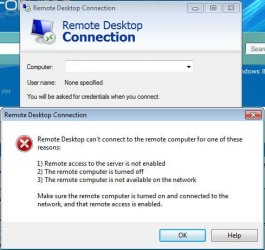
I can perfectly connect to my Windows 7 machine from my XP machine using RDC. But I don't want to get up whenever I want to get onto my XP machine, is there ANY WAY to just connect to my XP machine from my 7 machine using RDC? I just recently updated my xp's RDC to 7.0. Still get this message.
I've blanked out the computer name in the provided picture, for privacy issues. But I get this message everytime.
I've also enabled on both machines the ability to make connections to the computer for Remote Desktop.
Got anything?
I can perfectly connect to my Windows 7 machine from my XP machine using RDC. But I don't want to get up whenever I want to get onto my XP machine, is there ANY WAY to just connect to my XP machine from my 7 machine using RDC? I just recently updated my xp's RDC to 7.0. Still get this message.
I've blanked out the computer name in the provided picture, for privacy issues. But I get this message everytime.
I've also enabled on both machines the ability to make connections to the computer for Remote Desktop.
Got anything?
Attachments
My Computer
At a glance
Windows 7 Ultimate 64 Bit, XP, 95, 98, 2000, ...QuadCore Intel Core 2 Quad Q9550, 2833 MHz (8...4x 2 GB DDR3 DIMMATI Radeon HD 4800 Series (1024 MB) Crossfire
- OS
- Windows 7 Ultimate 64 Bit, XP, 95, 98, 2000, Vista 32/64 Bit, Mobile 6
- CPU
- QuadCore Intel Core 2 Quad Q9550, 2833 MHz (8.5 x 333)
- Motherboard
- Asus P5Q3 Deluxe (2 PCI, 2 PCI-E x1, 3 PCI-E x16)
- Memory
- 4x 2 GB DDR3 DIMM
- Graphics Card(s)
- ATI Radeon HD 4800 Series (1024 MB) Crossfire
- Monitor(s) Displays
- Sony Bravia 52" KDL-52V4100
- Hard Drives
- 2x Hitachi 1 TB, 1x Maxtor 120 GB
- Keyboard
- Logitech MK700
- Internet Speed
- 100 Mbps


