
RDC Windows 7 to Windows XP Home SP3 Question

Darkshadow33

New member
Local time
4:28 AM
Messages
8
Location
Michigan
I've been suggested to use Teamviewer software by DOC, but I just want to use Remote Desktop Connection, instead of fumbling around with programs. Still haven't gotten a real answer with how to do it through RDC.

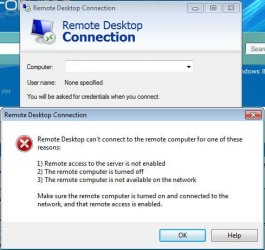
I can perfectly connect to my Windows 7 machine from my XP machine using RDC. But I don't want to get up whenever I want to get onto my XP machine, is there ANY WAY to just connect to my XP machine from my 7 machine using RDC? I just recently updated my xp's RDC to 7.0. Still get this message.

I've blanked out the computer name in the provided picture, for privacy issues. But I get this message everytime.

I've also enabled on both machines the ability to make connections to the computer for Remote Desktop.

Got anything?
 

Attachments
  • Image1.jpg
    Image1.jpg
    41 KB · Views: 7

My Computer My Computer

At a glance

Windows 7 Ultimate 64 Bit, XP, 95, 98, 2000, ...QuadCore Intel Core 2 Quad Q9550, 2833 MHz (8...4x 2 GB DDR3 DIMMATI Radeon HD 4800 Series (1024 MB) Crossfire
OS
Windows 7 Ultimate 64 Bit, XP, 95, 98, 2000, Vista 32/64 Bit, Mobile 6
CPU
QuadCore Intel Core 2 Quad Q9550, 2833 MHz (8.5 x 333)
Motherboard
Asus P5Q3 Deluxe (2 PCI, 2 PCI-E x1, 3 PCI-E x16)
Memory
4x 2 GB DDR3 DIMM
Graphics Card(s)
ATI Radeon HD 4800 Series (1024 MB) Crossfire
Monitor(s) Displays
Sony Bravia 52" KDL-52V4100
Hard Drives
2x Hitachi 1 TB, 1x Maxtor 120 GB
Keyboard
Logitech MK700
Internet Speed
100 Mbps
I've got the opposite problem! Can connect from my 7 -> XP but not XP -> 7.

Only thing to suggest to you is are you connecting from an administrator account?
 

My Computer My Computer

At a glance

Windows 7 Home Premium x64 OEM --> RTM clean ...Intel T44004Gb? - Mobile Intel(R) 4 Series Express Chipset ...
Computer Manufacturer/Model Number
Toshiba Satellite L500
OS
Windows 7 Home Premium x64 OEM --> RTM clean install
CPU
Intel T4400
Motherboard
? - laptop inbuilt ?
Memory
4Gb
Graphics Card(s)
? - Mobile Intel(R) 4 Series Express Chipset Family ?
Sound Card
Realtek
Monitor(s) Displays
? + extended to a 42" LG55PC plasma tele!
Screen Resolution
1366 * 768
Hard Drives
320Gb 5500rpm
PSU
?
Case
?
Cooling
?
Internet Speed
3Meg, when it works.
Other Info
A LOWLY LAPTOP!
Is the XP PC set to allow remote desktop connections? Right click the My computer icon and select properties. Then go to the remote tab and make sure Allow users to connect remotely to this computer is checked.
 

My Computer My Computer

At a glance

Windows 10 Education 64 bitAMD Phenom II X4 980 Black Edition Deneb 3.7GHz8GB 4GBx2 Kingston PC10600 DDR3 1333 MemoryZotac NVIDIA Geforce GT640 2 Gig DDR3 PCIe
Computer type
PC/Desktop
Computer Manufacturer/Model Number
Home Built
OS
Windows 10 Education 64 bit
CPU
AMD Phenom II X4 980 Black Edition Deneb 3.7GHz
Motherboard
Asus M4N68T-M V2 µATX Motherboard
Memory
8GB 4GBx2 Kingston PC10600 DDR3 1333 Memory
Graphics Card(s)
Zotac NVIDIA Geforce GT640 2 Gig DDR3 PCIe
Sound Card
VIA VT1708s High Definition Audio 8-channel Onboard
Monitor(s) Displays
22" LG E2242 1080p and 2 19" I-INC AG191D
Screen Resolution
1280x1024 - 1920x1080 - 1280x1024
Hard Drives
Crucial M100 256 GB SSD and 500 GB WD Blue SATA
PSU
Thermaltake TR 620
Case
Power Up Black ATX Mid-Tower Case
Cooling
Stock heatsink and fan
Keyboard
Logitech Wireless K350 Wave
Mouse
Logitech Wireless M570 Trackman Wheel
Internet Speed
80 Mbps Down 30 Mbps Up
Antivirus
Windows Defender
Browser
Internet Explorer 11
Other Info
HP DVD1040e Lightscribe - External USB2
I've got the opposite problem! Can connect from my 7 -> XP but not XP -> 7.

Only thing to suggest to you is are you connecting from an administrator account?

windows 7 Home Premium doesn't support inbound remote desktop connections. You can connect from it to another PC but not "into" a W7 Home Premium PC.
 
Last edited:

My Computer My Computer

At a glance

Windows 10 Education 64 bitAMD Phenom II X4 980 Black Edition Deneb 3.7GHz8GB 4GBx2 Kingston PC10600 DDR3 1333 MemoryZotac NVIDIA Geforce GT640 2 Gig DDR3 PCIe
Computer type
PC/Desktop
Computer Manufacturer/Model Number
Home Built
OS
Windows 10 Education 64 bit
CPU
AMD Phenom II X4 980 Black Edition Deneb 3.7GHz
Motherboard
Asus M4N68T-M V2 µATX Motherboard
Memory
8GB 4GBx2 Kingston PC10600 DDR3 1333 Memory
Graphics Card(s)
Zotac NVIDIA Geforce GT640 2 Gig DDR3 PCIe
Sound Card
VIA VT1708s High Definition Audio 8-channel Onboard
Monitor(s) Displays
22" LG E2242 1080p and 2 19" I-INC AG191D
Screen Resolution
1280x1024 - 1920x1080 - 1280x1024
Hard Drives
Crucial M100 256 GB SSD and 500 GB WD Blue SATA
PSU
Thermaltake TR 620
Case
Power Up Black ATX Mid-Tower Case
Cooling
Stock heatsink and fan
Keyboard
Logitech Wireless K350 Wave
Mouse
Logitech Wireless M570 Trackman Wheel
Internet Speed
80 Mbps Down 30 Mbps Up
Antivirus
Windows Defender
Browser
Internet Explorer 11
Other Info
HP DVD1040e Lightscribe - External USB2
I have everything checked to allow RDC on both computers. Is it that my XP is home premium, and not Professional?
 

My Computer My Computer

At a glance

Windows 7 Ultimate 64 Bit, XP, 95, 98, 2000, ...QuadCore Intel Core 2 Quad Q9550, 2833 MHz (8...4x 2 GB DDR3 DIMMATI Radeon HD 4800 Series (1024 MB) Crossfire
OS
Windows 7 Ultimate 64 Bit, XP, 95, 98, 2000, Vista 32/64 Bit, Mobile 6
CPU
QuadCore Intel Core 2 Quad Q9550, 2833 MHz (8.5 x 333)
Motherboard
Asus P5Q3 Deluxe (2 PCI, 2 PCI-E x1, 3 PCI-E x16)
Memory
4x 2 GB DDR3 DIMM
Graphics Card(s)
ATI Radeon HD 4800 Series (1024 MB) Crossfire
Monitor(s) Displays
Sony Bravia 52" KDL-52V4100
Hard Drives
2x Hitachi 1 TB, 1x Maxtor 120 GB
Keyboard
Logitech MK700
Internet Speed
100 Mbps
I have everything checked to allow RDC on both computers. Is it that my XP is home premium, and not Professional?

If it wasn't supported there would not be a check box there to enable it. On my Windows 7 Home Premium PC all that is listed under the Remote tab is a Remote Assistance section with "Allow Remote Assistance connections to this computer".
On my Windows XP Pro PC the Remote tab has a Remote Assistance and a Remote Desktop section. If your XP Home system doesn't have the remote desktop section under the remote tab then you can't remote desktop into it.
 

My Computer My Computer

At a glance

Windows 10 Education 64 bitAMD Phenom II X4 980 Black Edition Deneb 3.7GHz8GB 4GBx2 Kingston PC10600 DDR3 1333 MemoryZotac NVIDIA Geforce GT640 2 Gig DDR3 PCIe
Computer type
PC/Desktop
Computer Manufacturer/Model Number
Home Built
OS
Windows 10 Education 64 bit
CPU
AMD Phenom II X4 980 Black Edition Deneb 3.7GHz
Motherboard
Asus M4N68T-M V2 µATX Motherboard
Memory
8GB 4GBx2 Kingston PC10600 DDR3 1333 Memory
Graphics Card(s)
Zotac NVIDIA Geforce GT640 2 Gig DDR3 PCIe
Sound Card
VIA VT1708s High Definition Audio 8-channel Onboard
Monitor(s) Displays
22" LG E2242 1080p and 2 19" I-INC AG191D
Screen Resolution
1280x1024 - 1920x1080 - 1280x1024
Hard Drives
Crucial M100 256 GB SSD and 500 GB WD Blue SATA
PSU
Thermaltake TR 620
Case
Power Up Black ATX Mid-Tower Case
Cooling
Stock heatsink and fan
Keyboard
Logitech Wireless K350 Wave
Mouse
Logitech Wireless M570 Trackman Wheel
Internet Speed
80 Mbps Down 30 Mbps Up
Antivirus
Windows Defender
Browser
Internet Explorer 11
Other Info
HP DVD1040e Lightscribe - External USB2
I just noticed in your screen shoot that there is no computer name listed in the Computer section? did you try typing in the computer name manually or clicking the drop down arrow?
 

My Computer My Computer

At a glance

Windows 10 Education 64 bitAMD Phenom II X4 980 Black Edition Deneb 3.7GHz8GB 4GBx2 Kingston PC10600 DDR3 1333 MemoryZotac NVIDIA Geforce GT640 2 Gig DDR3 PCIe
Computer type
PC/Desktop
Computer Manufacturer/Model Number
Home Built
OS
Windows 10 Education 64 bit
CPU
AMD Phenom II X4 980 Black Edition Deneb 3.7GHz
Motherboard
Asus M4N68T-M V2 µATX Motherboard
Memory
8GB 4GBx2 Kingston PC10600 DDR3 1333 Memory
Graphics Card(s)
Zotac NVIDIA Geforce GT640 2 Gig DDR3 PCIe
Sound Card
VIA VT1708s High Definition Audio 8-channel Onboard
Monitor(s) Displays
22" LG E2242 1080p and 2 19" I-INC AG191D
Screen Resolution
1280x1024 - 1920x1080 - 1280x1024
Hard Drives
Crucial M100 256 GB SSD and 500 GB WD Blue SATA
PSU
Thermaltake TR 620
Case
Power Up Black ATX Mid-Tower Case
Cooling
Stock heatsink and fan
Keyboard
Logitech Wireless K350 Wave
Mouse
Logitech Wireless M570 Trackman Wheel
Internet Speed
80 Mbps Down 30 Mbps Up
Antivirus
Windows Defender
Browser
Internet Explorer 11
Other Info
HP DVD1040e Lightscribe - External USB2
I just noticed in your screen shoot that there is no computer name listed in the Computer section? did you try typing in the computer name manually or clicking the drop down arrow?

I edited it out for privacy Issues, and yes I did put in my computer's name that I was trying to connect to.
 

My Computer My Computer

At a glance

Windows 7 Ultimate 64 Bit, XP, 95, 98, 2000, ...QuadCore Intel Core 2 Quad Q9550, 2833 MHz (8...4x 2 GB DDR3 DIMMATI Radeon HD 4800 Series (1024 MB) Crossfire
OS
Windows 7 Ultimate 64 Bit, XP, 95, 98, 2000, Vista 32/64 Bit, Mobile 6
CPU
QuadCore Intel Core 2 Quad Q9550, 2833 MHz (8.5 x 333)
Motherboard
Asus P5Q3 Deluxe (2 PCI, 2 PCI-E x1, 3 PCI-E x16)
Memory
4x 2 GB DDR3 DIMM
Graphics Card(s)
ATI Radeon HD 4800 Series (1024 MB) Crossfire
Monitor(s) Displays
Sony Bravia 52" KDL-52V4100
Hard Drives
2x Hitachi 1 TB, 1x Maxtor 120 GB
Keyboard
Logitech MK700
Internet Speed
100 Mbps
Are you using a third party security app that has its own firewall on the XP PC? Exceptions would be enabled for the built in windows firewall to allow remote connections. If you are using a different firewall it may be blocking it. Even if you are using the built in windows firewall you could try turning it off as a test. Have you tweaked your XP system and or disabled any services? I've seen this happen when people try to speed up windows by disabling services they "think" they don't need. More often than not it comes back to haunt them latter on when something doesn't work. It was big thing at one time, not so much anymore though, but I ask just to rule it out. ;)
 

My Computer My Computer

At a glance

Windows 10 Education 64 bitAMD Phenom II X4 980 Black Edition Deneb 3.7GHz8GB 4GBx2 Kingston PC10600 DDR3 1333 MemoryZotac NVIDIA Geforce GT640 2 Gig DDR3 PCIe
Computer type
PC/Desktop
Computer Manufacturer/Model Number
Home Built
OS
Windows 10 Education 64 bit
CPU
AMD Phenom II X4 980 Black Edition Deneb 3.7GHz
Motherboard
Asus M4N68T-M V2 µATX Motherboard
Memory
8GB 4GBx2 Kingston PC10600 DDR3 1333 Memory
Graphics Card(s)
Zotac NVIDIA Geforce GT640 2 Gig DDR3 PCIe
Sound Card
VIA VT1708s High Definition Audio 8-channel Onboard
Monitor(s) Displays
22" LG E2242 1080p and 2 19" I-INC AG191D
Screen Resolution
1280x1024 - 1920x1080 - 1280x1024
Hard Drives
Crucial M100 256 GB SSD and 500 GB WD Blue SATA
PSU
Thermaltake TR 620
Case
Power Up Black ATX Mid-Tower Case
Cooling
Stock heatsink and fan
Keyboard
Logitech Wireless K350 Wave
Mouse
Logitech Wireless M570 Trackman Wheel
Internet Speed
80 Mbps Down 30 Mbps Up
Antivirus
Windows Defender
Browser
Internet Explorer 11
Other Info
HP DVD1040e Lightscribe - External USB2
Are you using a third party security app that has its own firewall on the XP PC? Exceptions would be enabled for the built in windows firewall to allow remote connections. If you are using a different firewall it may be blocking it. Even if you are using the built in windows firewall you could try turning it off as a test. Have you tweaked your XP system and or disabled any services? I've seen this happen when people try to speed up windows by disabling services they "think" they don't need. More often than not it comes back to haunt them latter on when something doesn't work. It was big thing at one time, not so much anymore though, but I ask just to rule it out. ;)

I run Malware Bytes, and McAfee SecurityCenter, on both my 7 and XP machines. I'll look into the exceptions on both pieces of software, and with the tweaking, I have no clue right now, I've had the computer for like 2-3 years now and I've forgotten more about what I did and didn't do with it.
 

My Computer My Computer

At a glance

Windows 7 Ultimate 64 Bit, XP, 95, 98, 2000, ...QuadCore Intel Core 2 Quad Q9550, 2833 MHz (8...4x 2 GB DDR3 DIMMATI Radeon HD 4800 Series (1024 MB) Crossfire
OS
Windows 7 Ultimate 64 Bit, XP, 95, 98, 2000, Vista 32/64 Bit, Mobile 6
CPU
QuadCore Intel Core 2 Quad Q9550, 2833 MHz (8.5 x 333)
Motherboard
Asus P5Q3 Deluxe (2 PCI, 2 PCI-E x1, 3 PCI-E x16)
Memory
4x 2 GB DDR3 DIMM
Graphics Card(s)
ATI Radeon HD 4800 Series (1024 MB) Crossfire
Monitor(s) Displays
Sony Bravia 52" KDL-52V4100
Hard Drives
2x Hitachi 1 TB, 1x Maxtor 120 GB
Keyboard
Logitech MK700
Internet Speed
100 Mbps
Back
Top