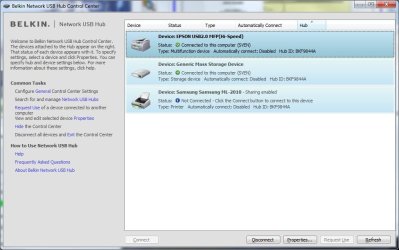
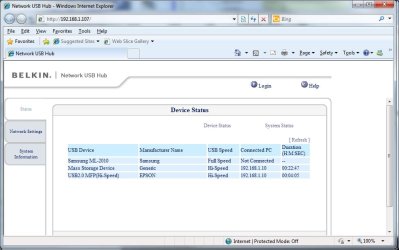
Belkin Network USB hub F5L009

My Computer My Computer

At a glance

Windows 7 Home Premium 64 bit
Computer Manufacturer/Model Number
HP P6675uk
OS
Windows 7 Home Premium 64 bit
A thought occurs to me - is this issue perhaps something to do with the usb drive formatting? My usb drives are formatted NTFS. Has anyone tried reformattting as FAT32?
 

My Computer My Computer

At a glance

Vista Home Prem 32bit
OS
Vista Home Prem 32bit
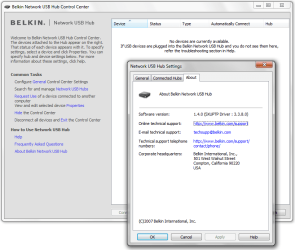
I used to have the problem too of constant disconnection. I fixed it about 2-3 months ago with any recurrent problems. I just reinstalled with latest software (connect.exe) and made sure I run it always as Windows VISTA compatibility (i am using VISTA professional as my OS). I took reinstalling a few times but the last time was the charm. No altering of ports was required. Make sure Belkin USB control center is running with same settings as mentioned above (in VISA compatibility mode). see attached pic
 

Attachments

  • belkin.jpg
    belkin.jpg
    36.5 KB · Views: 56

My Computer My Computer

At a glance

Windows 7Intel Core 2 Duo 2.134GB DDR2NVIDIA GeForce 9600M (1GB)
Computer Manufacturer/Model Number
ASUS x83VM-x2
OS
Windows 7
CPU
Intel Core 2 Duo 2.13
Motherboard
ASUS
Memory
4GB DDR2
Graphics Card(s)
NVIDIA GeForce 9600M (1GB)
Sound Card
NVIDIA

sranta. Thank you very much. That is so easy, fixes the problem. What's more, the user interface is easier to use than the Belkin original. Install, run, see the printer listed, check the options, Windows installs the printer driver, job done.
Drat

Worked OK for small documents, but as soon as I started trying to print photographs it all went wrong. Printer disconnects part way through the job, then reconnects three or four times during a 6x4 high quality print, each time printing the first part of the file again. Tried increasing the disconnect timeout to 300 seconds, tried using Belkin's connect.exe with the SX Virtual Link driver, even tried the Epson Stylus Photo R220 driver (there's no R200 available from Epson, just the driver shipped with Windows 7) - that worked briefly.

Looks like I'll just have to give up. Belkin are still listing this hub on their UK web site even though it doesn't have Win 7 support and there is no mention of operating system support in the product details - there may be a lot of unhappy people out there.
 

My Computer My Computer

At a glance

Windows 7 Home Premium 64 bit
Computer Manufacturer/Model Number
HP P6675uk
OS
Windows 7 Home Premium 64 bit
Right

Several chats by webmail with Belkin support. The numbers are their successive suggestions - I was transferred to a "Technical Support Escalation Agent" after the first couple of contacts.

1. Try deleting everything Belkin and reinstall the F5L009 software - yes, I knew it wasn't going to work, but heigh-ho.

2. Try the F5L049 software. Had to go into tools to find the F5L009 and connect to it, but got there in the end. No go, still kept disconnecting.

3. Try connecting another device - a scanner or a drive. Tried a drive - tried copying a bundle of directories - kept disconnecting.

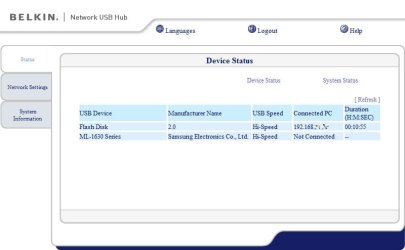
4. Try the software for the F7D4301 Play Max router - which also has Silex USB ports. Despite having to cancel the setup program once the install was complete, able to access the USB Print and Storage Center from the Router Monitor pop-up menu. Found the hub, found the printer, installed itself as a shared printer.

Bingo! Printed a 130MB hi-res colour file with no disconnects. Transferred 7GB of files to the USB drive at the same time.

Still the problem of the router setup program appearing at each boot and having to cancel it, but at least my shared network printer is shared again.
 

My Computer My Computer

At a glance

Windows 7 Home Premium 64 bit
Computer Manufacturer/Model Number
HP P6675uk
OS
Windows 7 Home Premium 64 bit
October 2010.

From me to the Belkin Technical Support:

Few days ago I was writing to you to get help for my F5L009 because it was not working under Windows 7, and (name) from Belkin Technical Support answered my request very correctly saying that "At this time, there has not been any mention of releasing Windows 7 drivers".

Well, investigating a bit, I believe I found a possible solution to Windows 7 problems: all you need change (or add) to the Belkin Control Center installator program is an actualized copy of SXUPTP.SYS.

The sxuptp.sys driver from Silex Technology Inc, version 3.4.4.0 allows the comunication between Windows 7, the Belkin Control Center App, and the devices attached to the Belkin F5L009 device in a stable and secure way.

Of course, perhaps this is not practical for the US patents but perhaps you can develope your own solution investigating this tip.

Sorry the inconvenience, I hope to be useful to you; I bought the device in London but in the country where I live there is not an official service, customer attention or resellers from Belkin, it´s a pitty.

Please, don´t hesitate in feedback me. Thank you for reading this, I apologize you for my English and have a good day!

Regards

-----------------------------


By the way, I never got a response from the Belkin Technical Support, then, I try to share a possible solution in this forum.

Step by step:

a) Install drivers from Belkin and close the program.

b) Download and install drivers from Silexamerica. If you need restart the system, be sure the program is closed too before continue.

c) Search in the C:\Windows folder the SXUPTP.SYS file from Silexamerica. You will found them twice or more. Please, select the new version of SXUPTP.SYS file (version 3.4.4.0 or newest) and copy it.

d) Paste it in C:\Windows\System32\drivers\ When the system asks for permission for a replacement, select YES. Make sure the file you're pasting is the newest, it´s more big than oldest (289 kb vs 77,1 kb) and, if you revise the new file with the right button / properties / details, you can see the newest version 3.4.4.0)

e) Now, you can (or not) unninstall the Silexamerica software and use the original Belkin interface without problems with all your devices. Be careful, uncheck at Windows start the Silexamerica software if you use the Belkin software again.

Have a nice day!
 

My Computer My Computer

At a glance

Windows 7 Ultimate x64Intel Core 2 Duo 8400E8gb DDR2 SuperTalentNVidia 8600 GT
OS
Windows 7 Ultimate x64
CPU
Intel Core 2 Duo 8400E
Motherboard
Asus Maximus Formula
Memory
8gb DDR2 SuperTalent
Graphics Card(s)
NVidia 8600 GT
Monitor(s) Displays
Samsung Syncmaster T240
Hard Drives
Maxtor 750 gb
PSU
Vitsuba 550 va
Case
Vitsuba Master
you can see the newest version 3.4.4.0)
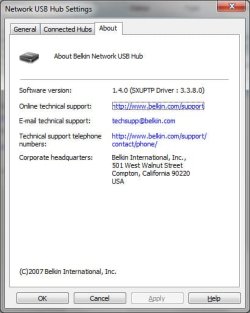
I did install that driver in an earlier attempt - see previous postings - and I tried to access the hub using the Belkin Control Center, and, following reboot, the Silex Control Center. It's easy to check which driver the Control Center is using by looking in Help - About.

This does not provide a stable interface to the hub - as I posted previously, I have random disconnects part way through large print jobs.

The driver installed by the Max Play software is 3.3.8.0 and, with the Max Play version of the Control Center works perfectly on my 64 bit Windows 7 system
 

My Computer My Computer

At a glance

Windows 7 Home Premium 64 bit
Computer Manufacturer/Model Number
HP P6675uk
OS
Windows 7 Home Premium 64 bit
getting this to work

I am running win XP Home and have this hub which as most of you know is a bitch to get to work .
I have run the original software for F5L009 , also run the latest Silex software and tried the F5L049 and also the Max play setup .
All have the same outcome on first installation it works and when I turn off the PC and start again everything ok until the hub control panel comes up and it all freezes .
On checking the driver under device manager it states that this is an unsigned driver and it will not initialise it .
If this forum cannot help , after belkin do not seem to be able to this product will end up in the trash.

Thanks Derek.
 

My Computer My Computer

At a glance

windows xp homeamd 5000 x22gbon board Nvidia
Computer Manufacturer/Model Number
Asus
OS
windows xp home
CPU
amd 5000 x2
Motherboard
asus am2n68
Memory
2gb
Graphics Card(s)
on board Nvidia
Sound Card
on board
Monitor(s) Displays
23" wide screen DGM
Hard Drives
250gb sata
PSU
500w
Case
comport
Cooling
amd supplied cpu cooler and 2 fans in rear of case
That's very odd. The hub normally works on XP without any problem at all. Have you contacted Belkin support? I found them to be helpful - I contacted them through their website (I had to register first) and when the first couple of responses didn't solve the problem my question was escalated to somebody more senior.
 

My Computer My Computer

At a glance

Windows 7 Home Premium 64 bit
Computer Manufacturer/Model Number
HP P6675uk
OS
Windows 7 Home Premium 64 bit
F5l009

I have tried Belkin and have done what they requested , delete the software reinstall with security off and still it refuses to allow my windows explorer to work on reboot once the hub control center is on the screen .
 

My Computer My Computer

At a glance

windows xp homeamd 5000 x22gbon board Nvidia
Computer Manufacturer/Model Number
Asus
OS
windows xp home
CPU
amd 5000 x2
Motherboard
asus am2n68
Memory
2gb
Graphics Card(s)
on board Nvidia
Sound Card
on board
Monitor(s) Displays
23" wide screen DGM
Hard Drives
250gb sata
PSU
500w
Case
comport
Cooling
amd supplied cpu cooler and 2 fans in rear of case
Windows 7 Starter

I run Vista Home uusing Hub F5L009, my wife has purchased a netbook with Windows 7 Starter and of course it won't connect to the hub, will loading the Silex America drivers enable the two laptops to use the hub?
 

My Computer My Computer

At a glance

Windows 7 home
OS
Windows 7 home
If this is not a driver issue why does window keep flagging it as an unsigned driver?
I have installed it again with the latest drivers from Silex even that does not work.
Also had AVG , PCtools Firewall off also windows firewall off by default as using PCtools..
Still no joy , if it is a regestry problem where do I look !

Derekg
 

My Computer My Computer

At a glance

windows xp homeamd 5000 x22gbon board Nvidia
Computer Manufacturer/Model Number
Asus
OS
windows xp home
CPU
amd 5000 x2
Motherboard
asus am2n68
Memory
2gb
Graphics Card(s)
on board Nvidia
Sound Card
on board
Monitor(s) Displays
23" wide screen DGM
Hard Drives
250gb sata
PSU
500w
Case
comport
Cooling
amd supplied cpu cooler and 2 fans in rear of case
I followed AndyGC instructions as labeled in number 4 of his post. It has worked great so far. See: http://www.sevenforums.com/network-sharing/2821-belkin-network-usb-hub-f5l009-5.html#post1211073

The silex software appeared to work as other have mentioned. Yet after a few minutes I noted that it was dropping the connection intermittently. In addition I really could not use the scanner that was connected to the USB network hub.


As AndyGC first pointed out I installed the software for the F7D4301 Play Max Wireless Router (Yes I realize that F5l009 network usb hub is NOT a router but as AndyGC pointed out it has the same or similar chipsets). I downloaded the driver from the following web site: Belkin : Support F7D4301 Play Max Wireless Router - Setup, Router Monitor Software and Apps. I used version 4.0.3.19106 of the software.

Once downloaded, the software first extracts itself. The the regular old windows setup wizard comes up. You go through each of those steps. After the software has installed, a second Belkin router setup dialog comes up. It is a clean white interface. You can just exit out of that. You do not need to go those steps.

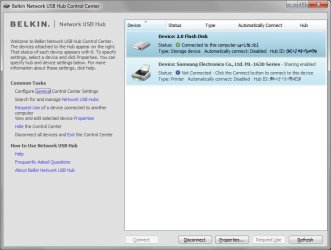
In the system tray you will see a gray or green capsule like icon. This is the Belkin router management app. Right click on that and one of the options is the "USB print and storage manager". This is the replacement for the F5L009 program that used to reside in the system tray. There is little in the app to setup - and of what there is - it is all self explanatory.

After installing this software, I noted that I was not loosing connection to the network hub as I was with the silex software or it not just working with the regular F5L009 software. I have a scanner hooked up over a wireless network, and I was able to scan a 10 page document without issue.

After making sure it worked well, I uninstalled the following bloatware that came with the router software: Vuze, Bitboost, Belkin DJ, and Belkin music labeler. I like Andy GC was unable to find a solution to the issue of the router setup dialog open with each reboot. Again you just have to exit out of that app when it opens.

Finally, I turned the windows firewall back on. The Belkin setup process punched the required holes through the windows firewall for the network hub to function properly.

Again, thanks AndyGC

(I am running Win 7 64x Home Premium)

 

My Computer My Computer

At a glance

Windows 7 Home Premium 64x
OS
Windows 7 Home Premium 64x
I followed AndyGC instructions as labeled in number 4 of his post. It has worked great so far. See: http://www.sevenforums.com/network-sharing/2821-belkin-network-usb-hub-f5l009-5.html#post1211073

The silex software appeared to work as other have mentioned. Yet after a few minutes I noted that it was dropping the connection intermittently. In addition I really could not use the scanner that was connected to the USB network hub.


As AndyGC first pointed out I installed the software for the F7D4301 Play Max Wireless Router (Yes I realize that F5l009 network usb hub is NOT a router but as AndyGC pointed out it has the same or similar chipsets). I downloaded the driver from the following web site: Belkin : Support F7D4301 Play Max Wireless Router - Setup, Router Monitor Software and Apps. I used version 4.0.3.19106 of the software.

Once downloaded, the software first extracts itself. The the regular old windows setup wizard comes up. You go through each of those steps. After the software has installed, a second Belkin router setup dialog comes up. It is a clean white interface. You can just exit out of that. You do not need to go those steps.

In the system tray you will see a gray or green capsule like icon. This is the Belkin router management app. Right click on that and one of the options is the "USB print and storage manager". This is the replacement for the F5L009 program that used to reside in the system tray. There is little in the app to setup - and of what there is - it is all self explanatory.

After installing this software, I noted that I was not loosing connection to the network hub as I was with the silex software or it not just working with the regular F5L009 software. I have a scanner hooked up over a wireless network, and I was able to scan a 10 page document without issue.

After making sure it worked well, I uninstalled the following bloatware that came with the router software: Vuze, Bitboost, Belkin DJ, and Belkin music labeler. I like Andy GC was unable to find a solution to the issue of the router setup dialog open with each reboot. Again you just have to exit out of that app when it opens.

Finally, I turned the windows firewall back on. The Belkin setup process punched the required holes through the windows firewall for the network hub to function properly.

Again, thanks AndyGC

(I am running Win 7 64x Home Premium)

Hello,

I just want to buy a HUB like this, and I want to use it under W7 x64 so I'll have the same problem, but before I've made a custom install pack, where I've replaced the original (old version) SXUPTP.sys to a newer one (ver 3.3.8.0). Somebody wrote that with this version of sys everthings work great... If I upload the installer to somewhere can you check that is it work correctly or not? I've installed it on my machine, and it works on my computer, installs the correct SXUPTP.sys (3.3.8.0) and ofcourse can't find the device, because I don't heve it :)

So the installer contains the original F5L009 control center with an updated SXUPTP.sys... nothing special/magic. Check the screenshot...

Regards,
jnorbi
 

Attachments

  • updated_sxuptp.png
    updated_sxuptp.png
    33.6 KB · Views: 258
Last edited:

My Computer My Computer

At a glance

Win7 HP x64
OS
Win7 HP x64
jnorbi That is great. I am glad that you made the combined drivers. We need smart people like you around to keep our old hardware working with new OSes. I think I can say for the average computer user, I would advise just using AndyGCs method (using the Belkin drivers for F7D4301 Router). It can be downloaded from a reputable source, I am certain that this works with win 7/64bit. It just works. No muss no fuss. Let us know how it works when you find a belkin network hub to play with. Keep up the good work.
 

My Computer My Computer

At a glance

Windows 7 Home Premium 64x
OS
Windows 7 Home Premium 64x
jnorbi That is great. I am glad that you made the combined drivers. We need smart people like you around to keep our old hardware working with new OSes. I think I can say for the average computer user, I would advise just using AndyGCs method (using the Belkin drivers for F7D4301 Router). It can be downloaded from a reputable source, I am certain that this works with win 7/64bit. It just works. No muss no fuss. Let us know how it works when you find a belkin network hub to play with. Keep up the good work.

Hello,

You can download the original software with the updated driver here: Multiupload.com - upload your files to multiple file hosting sites! (Belkin F5L009 driver with updated SXUPTP.sys (3.3.8.0 - F7D4301))

Please reply here is it works or not... hope it'll works great!

jnorbi
 

My Computer My Computer

At a glance

Win7 HP x64
OS
Win7 HP x64
jnorbi That is great. I am glad that you made the combined drivers. We need smart people like you around to keep our old hardware working with new OSes. I think I can say for the average computer user, I would advise just using AndyGCs method (using the Belkin drivers for F7D4301 Router). It can be downloaded from a reputable source, I am certain that this works with win 7/64bit. It just works. No muss no fuss. Let us know how it works when you find a belkin network hub to play with. Keep up the good work.

Hello,

You can download the original software with the updated driver here: Multiupload.com - upload your files to multiple file hosting sites! (Belkin F5L009 driver with updated SXUPTP.sys (3.3.8.0 - F7D4301))

Please reply here is it works or not... hope it'll works great!

jnorbi

Hello,

I've got it! :) So now I can try this driver on my computer (W7 HP x64) and it was buggy (devices appears but can't connect). With this new version I think there's no problems, can connect to devices (thumbdrive/printer checked, printer in shared mode too), I can copy more than 1-2 GBs over the network HUB without disconnecting... so I think it's 99.99...9% working version with the original control center.

You can download it here: Multiupload.com - upload your files to multiple file hosting sites!

Please test it, and report the problems/success stories :)

Regards,
Norbert
 

Attachments

  • belkin_1.jpg
    belkin_1.jpg
    53.6 KB · Views: 76
  • belkin_2.jpg
    belkin_2.jpg
    27 KB · Views: 85
  • belkin_3.jpg
    belkin_3.jpg
    27.5 KB · Views: 112
  • belkin_4.jpg
    belkin_4.jpg
    27.5 KB · Views: 101

My Computer My Computer

At a glance

Win7 HP x64
OS
Win7 HP x64
Hi there

I have also an issue with the belkin network to usb hub.

On mine sister here pc it works fine (Windows 7 Home Premium 32bit)
But on my pc it doesn't work, (Windows 7 ultimate 32bit SP1) I have installed the software. I open the software, but he don't see my belkin hub.

Who can help me?
 

My Computer My Computer

At a glance

Windows 7 Ultimate 32bit
OS
Windows 7 Ultimate 32bit
Many thanks!

jnorbi That is great. I am glad that you made the combined drivers. We need smart people like you around to keep our old hardware working with new OSes. I think I can say for the average computer user, I would advise just using AndyGCs method (using the Belkin drivers for F7D4301 Router). It can be downloaded from a reputable source, I am certain that this works with win 7/64bit. It just works. No muss no fuss. Let us know how it works when you find a belkin network hub to play with. Keep up the good work.

Hello,

You can download the original software with the updated driver here: Multiupload.com - upload your files to multiple file hosting sites! (Belkin F5L009 driver with updated SXUPTP.sys (3.3.8.0 - F7D4301))

Please reply here is it works or not... hope it'll works great!

jnorbi

Hello,

I've got it! :) So now I can try this driver on my computer (W7 HP x64) and it was buggy (devices appears but can't connect). With this new version I think there's no problems, can connect to devices (thumbdrive/printer checked, printer in shared mode too), I can copy more than 1-2 GBs over the network HUB without disconnecting... so I think it's 99.99...9% working version with the original control center.

You can download it here: Multiupload.com - upload your files to multiple file hosting sites!

Please test it, and report the problems/success stories :)

Regards,
Norbert

Many thanks for supplying the modified installer. I was a little apprehensive at first about, that, but I figured what the heck. The fact that the files are still signed by Belkin was a bit more re-assuring. I am now able to both print, scan, and connect to external flash drives through my ol' Belkin USB hub! Thanks!
 

Attachments

  • ConnectedAgain.jpg
    ConnectedAgain.jpg
    66.6 KB · Views: 71
  • ConnectedAgain2.jpg
    ConnectedAgain2.jpg
    59.9 KB · Views: 75

My Computer My Computer

At a glance

Windows 7 Ultimate 64-bitIntel i7 9656GBnVidia 250GTS
Computer Manufacturer/Model Number
HomeBuild
OS
Windows 7 Ultimate 64-bit
CPU
Intel i7 965
Motherboard
ASUS X58
Memory
6GB
Graphics Card(s)
nVidia 250GTS
Monitor(s) Displays
Dual 24"
At long freakin last. 2 years since 7 came out!

At long last. I have been waiting for Belkin to update it's software since win7 came out. Now you have given me an alternative. I thank you so much.

If I ever buy another Belkin product, it will be because I have lost my mind!
 

My Computer My Computer

At a glance

Win7
OS
Win7
Back
Top