Startup Repair Infinite Loop Recovery

How to Recover from an Infinitely Looping Startup Repair Loop without Reinstalling Windows

If you've ever experienced a Startup Repair that continously loops and fails to fix the problem of not being able to load windows, even in safe mode, then you'll know that usually the only way to recover from this when System Restore does not work is to do a clean install of Windows.

Until now.

This tutorial will show you how to use the System Recovery Options provided by Windows to recover your system to a working state so that you don't have to risk losing data by performing a clean install.

   Warning
The instructions presented withing this tutorial must be followed correctly, or you can damage your Windows 7 installation even further. This tutorial is designed to help recover from a bad registry that is causing the startup repair loop. You should note that there may still be some issues remaining that cannot be fixed by manually restoring the registry.


Recovering Your System
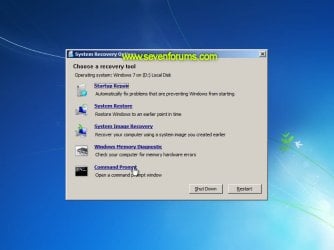
  1. Boot to the System Recovery Options screen.
    • If Windows automatically opens Startup Repair, and subsequently fails to fix a problem, you can skip ahead to step 4 below.
  2. In the System Recovery Options screen, click Startup Repair:
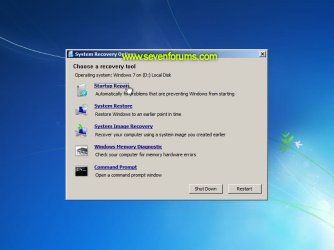
    Image05_startuprepair.jpg


  3. Windows will search for an attempt to repair startup problems:
    Image06_searching.jpg


  4. If startup problems could not be repaired, you will receive the message Windows cannot repair this computer automatically. Click View advanced options for system recovery and support:
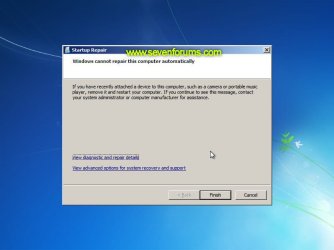
    Image07_cannotfix.jpg


  5. Click View advanced options for system recovery and support, which which bring you back to the main System Recovery Options screen.
  6. Click Command Prompt:
    Image08_clickcommand.jpg


  7. Command Prompt should open to X:, which is an internal ram disk use by System Repair:
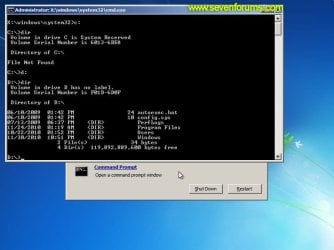
    Image10_changedrive.jpg


  8. Now you need to find your system drive. Depending on how your system is setup, this could be either C: or D:.
    • Type C: and press <ENTER>.
    • Verify that this is your system drive by typing DIR and pressing <ENTER>. If you see the Program Files, Users and Windows folders, then you have found your system drive, and can continue to step 9 below.
    • If the drive is not your system drive, repeat steps I and II above, changing the drive letter to D, E or some other letter until the system drive is located.
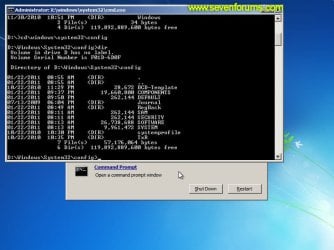
      Image11_chdir_config.jpg

  9. When you have located your Windows system drive, type CD \windows\system32\config and press <ENTER>:
  10. Type DIR and press <ENTER>, and verify that the following files and folders exist in the config folder:
    • RegBack (which is a folder)
    • DEFAULT
    • SAM
    • SECURITY
    • SOFTWARE
    • SYSTEM
      Image11_chdir_config.jpg

  11. Type MD mybackup and press <ENTER> to create a backup folder that you can use incase this procedure does not work as expected.
  12. Type copy *.* mybackup and press <ENTER>.
    • If you are prompted to overwrite existing files, press A to allow all backups to be overwritten.
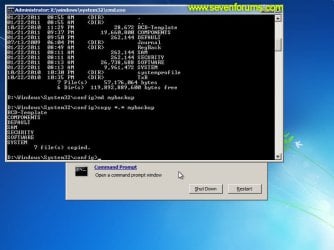
      Image12_mybackup.jpg

  13. Now you need to check if you can use the automatic Windows backups to restore your registry:
    • Type CD RegBack and press <ENTER> to go to the RegBack folder.
    • Type DIR and press <ENTER> to view the contents of the folder. All the following files must exist:
      • The DEFAULT, SAM and SECURITY files should each be about 262,000 bytes in size.
      • The SOFTWARE file should be about 26,000,000 bytes.
      • The SYSTEM file should be about 9,900,000 bytes.
      • The file sizes presented here are approximate estimations, and may vary depending on your system. If any one of them are 0 bytes, then you should stop what you're doing now and seek an alternative method of recovering your system, because Windows cannot function with a 0-byte size registry hive.
    • If the hive files listed in RegBack are ok, then proceed to step 14 of the tutorial.
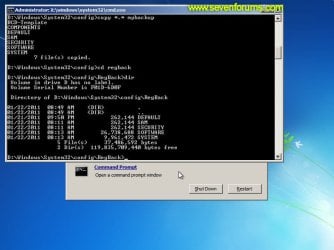
      Image13_checkregback.jpg


  14. Type copy *.* .. and press <ENTER> to copy the backup hive files to \Windows\System32\config.
    • If you are prompted to overwrite existing files, press A to allow all file to be overwritten.
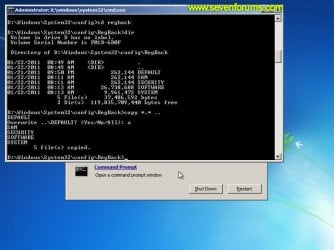
      Image14_copyregback.jpg

  15. Type exit and press <ENTER> to close the command prompt.
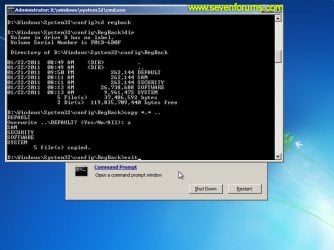
    Image15_exit.jpg


  16. Click the Restart button to reboot your computer. If all goes well, your system will boot normally.
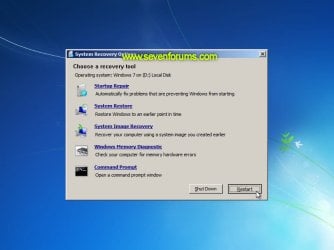
    Image16_restart.jpg
    Image17_working.jpg


Reference Information
This tutorial was made possible after learning how to manualy replace the Windows 7 Registry Hives after reading the Recovering Windows 7 Registry Hives/Files article on Microsoft Technet.


Attachments
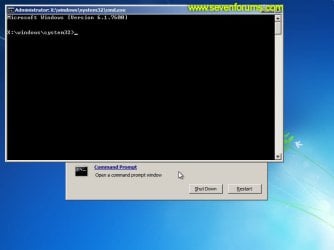
  • Image09_commandprompt.jpg
    Image09_commandprompt.jpg
    26.1 KB · Views: 373
Last edited by a moderator:
Good information wanted to rep you on it.
Fabe
 

My Computer My Computer

Computer Manufacturer/Model Number
Self Built
OS
Windows 7 ultimate 64 bit / XP Home sp3
CPU
intel Core 2 Duo E8400 3.0ghz
Motherboard
Asus P5ND bios 1401
Memory
8 gigs 1066 OCZ Fata1ty
Graphics Card(s)
EVGA GTX 580 Call of Duty Black Ops Edition
Sound Card
Creative Soundblaster Audigy 2zs
Monitor(s) Displays
Asus 24in LCD's 2MS X2
Screen Resolution
1920x1080p @60Hz
Hard Drives
WD Caviar 500 Black/ WD Caviar 200 Blue
PSU
OCZ 700W GameXtreme
Case
NZXT Apollo
Cooling
Corsair H50 CPU/120mm x3 /60mm x2 /Corsair Dominator Ram
Keyboard
Logitech Bluetooth Wireless MX5000
Mouse
Logitech Bluetooth Wireless MX1000
Internet Speed
Download 19.83 Upload 0.97
Other Info
Logitech Z2300 Speakers/ Bose Noise Cancelling Headphones/Avermedia PCI-e Hybrid TV Bravo/Epson NX415 all in one/ 4 Port Powered USB Hub/ LG 10x Bluray Burner /TSST Corp DVDRW External
Well done Peter.
 

My Computer My Computer

Computer Manufacturer/Model Number
* BFK Customs *
OS
W 7 64-bit Ultimate
CPU
Intel Q9550 Yorkfield
Motherboard
ASUS P5Q Pro
Memory
8GB Dominator 8500C5D
Graphics Card(s)
ATI : XFX 5870
Sound Card
Realtek HD Audio 7-1
Monitor(s) Displays
1x 47" LCD HDMI & 3x 26" LCD HDMI
Screen Resolution
1920x1080P & 1920x1200
Hard Drives
1x 80GB Intel X25-M G2 SSD : 1x 500GB & 1x 640GB WD Caviar Black(s)
PSU
Corsair 620HX
Case
Cooler Master RC-690
Cooling
Tuniq Tower 120, 2x 140mm and 3x 120mm case fans
Keyboard
Microsoft 500
Mouse
Razer Diamondback 3G
Internet Speed
14 Mb/s
Other Info
1x Koutech 3Gb/s SATA HDD Hot Swap Rack
You do know doing a chkdsk normally repairs this or if you go to F8 and disable automatic restarts on system failure.

work on a help desk and this normally resolves the issue
 

My Computer My Computer

Computer Manufacturer/Model Number
OWN BUILT
OS
7
CPU
Q6700
Motherboard
Foxconn G31MX-K
Memory
4GB DDR2 RENDITION
Graphics Card(s)
Inno 3D 9800GT 1GB DDR3
Sound Card
REALTEK HD
Monitor(s) Displays
LG 22"
Hard Drives
3 x 500GB Hitiachi
PSU
550 Silent Zoostorm PSU
Case
Coolermaster Caliver
Cooling
AKASA
Internet Speed
16MB ADSL +2
You do know doing a chkdsk normally repairs this or if you go to F8 and disable automatic restarts on system failure.

work on a help desk and this normally resolves the issue
CHKDSK is actually part of what Startup Repair does, but normally resolves the issue is not the same as always resolves the issue. I developed the tutorial after all attempts at solving the infinite repair loop on a customer laptop failed, attempts which included running a manual CHKDSK from the command line 3 times, 2 of which with scanning for and re-evaluating bad clusters enabled.

I eventually adapted a technique I used often with Windows XP as a last ditch effort before performing a data backup and re-install of Windows 7. And I'm pleased to say that it worked perfectly, the results of which led directly to the creation of this tutorial.
 

My Computer My Computer

Computer type
PC/Desktop
Computer Manufacturer/Model Number
Virtual Machine
OS
Windows 7 Professional 32-bit SP1
CPU
AMD A4/A6
Motherboard
Intel Corporation 440BX Desktop Reference Platform
Memory
3.00GB EDO
Graphics Card(s)
VMware SVGA 3D
Sound Card
High Definition Audio Device
Monitor(s) Displays
Generic Non-PnP Monitor on VMware SVGA 3D
Screen Resolution
1440x900
Hard Drives
1 x 60GB VMware Virtual SATA Hard Drive ATA Device
Antivirus
Kaspersky Total Security
Peter, looks good all the way to the end when I get to RegBack Dir hive files are there but they are all much larger than you state, there is also a file = all. When I go to copy in step 18 I get "all The file cannot be copied onto itself. 0 files copied. On rebooting I still can not repair nor boot W7. Many thanks Alex.
 

My Computer My Computer

Computer Manufacturer/Model Number
Dell
OS
Windows 7 and XP
CPU
?
Motherboard
?
Memory
300GB
Graphics Card(s)
yes
Sound Card
yes
Monitor(s) Displays
yes
Hard Drives
yes
PSU
yes
Case
yes
Cooling
yes
Peter, looks good all the way to the end when I get to RegBack Dir hive files are there but they are all much larger than you state, there is also a file = all. When I go to copy in step 18 I get "all The file cannot be copied onto itself. 0 files copied. On rebooting I still can not repair nor boot W7. Many thanks Alex.

Did you include the double-dot destination that appears after the wilcards source specification?

To clarify:

COPY[SPACE]*.*[SPACE]..<ENTER>

Forgetting to include the double-dot for the destination is the only things that can result in the "The file cannot be copied onto itself. 0 file(s) copied." error...
 

My Computer My Computer

Computer type
PC/Desktop
Computer Manufacturer/Model Number
Virtual Machine
OS
Windows 7 Professional 32-bit SP1
CPU
AMD A4/A6
Motherboard
Intel Corporation 440BX Desktop Reference Platform
Memory
3.00GB EDO
Graphics Card(s)
VMware SVGA 3D
Sound Card
High Definition Audio Device
Monitor(s) Displays
Generic Non-PnP Monitor on VMware SVGA 3D
Screen Resolution
1440x900
Hard Drives
1 x 60GB VMware Virtual SATA Hard Drive ATA Device
Antivirus
Kaspersky Total Security
Peter many thanks for your reply, I was worried this thread / tutorial might have archived.

Ah, I think it was the space that I missed, bother. Things however have deteriorated, one thread I followed mentioned the problem with the dual core creating a confusion when booting W7, so I de-activated one of the partitions, not a good move, all I get now is the Windows Boot Manager crash screen telling me Windows failed to start. 1. Insert Windows disk and restart you pc. 2. Choose language. 3. Repair you pc. I thought blow it sounds like a re-install, it's a laptop so not much on it give it a go but no, even with the disc in it boots to the WBM, if I use f10 it starts the re-install but then dies. Any ideas on how to get back to command prompt? Alex.
 

My Computer My Computer

Computer Manufacturer/Model Number
Dell
OS
Windows 7 and XP
CPU
?
Motherboard
?
Memory
300GB
Graphics Card(s)
yes
Sound Card
yes
Monitor(s) Displays
yes
Hard Drives
yes
PSU
yes
Case
yes
Cooling
yes
Using the DVD I managed to kick start the system after many attempts, got back to system recovery, tried the tutorial above, got all the way through this time, rebooted, did start up repair x 3 but still no luck, any further ideas? Alex.
 

My Computer My Computer

Computer Manufacturer/Model Number
Dell
OS
Windows 7 and XP
CPU
?
Motherboard
?
Memory
300GB
Graphics Card(s)
yes
Sound Card
yes
Monitor(s) Displays
yes
Hard Drives
yes
PSU
yes
Case
yes
Cooling
yes

My Computer My Computer

Computer Manufacturer/Model Number
Too many to describe...
OS
Windows 7 x64 pro/ Windows 7 x86 Pro/ XP SP3 x86
Many thanks for your speedy responses, I am booting from my DVD, HD not wanting to play, sometimes it gets no further than "press any key" before dieing, others almost to the finish of "windows is loading files" and then dies. If I go in using the HD it requires me to do diagnostics test or memory test, they start but also die in action. Any ideas, have we gone terminal? Thanks Alex.
 

My Computer My Computer

Computer Manufacturer/Model Number
Dell
OS
Windows 7 and XP
CPU
?
Motherboard
?
Memory
300GB
Graphics Card(s)
yes
Sound Card
yes
Monitor(s) Displays
yes
Hard Drives
yes
PSU
yes
Case
yes
Cooling
yes
Guys, I thank you for your software help, I am now pretty sure it's a hard ware issue, I am thinking a thermal cut out of some sort as the fans work fine, it's clean and not running excessively hot, the good news is it's on warranty so it's going back. But again thank you for your interest, Alex.
 

My Computer My Computer

Computer Manufacturer/Model Number
Dell
OS
Windows 7 and XP
CPU
?
Motherboard
?
Memory
300GB
Graphics Card(s)
yes
Sound Card
yes
Monitor(s) Displays
yes
Hard Drives
yes
PSU
yes
Case
yes
Cooling
yes
Hello again Alex.


That sounds like the best way forward and thanks for the update.
 

My Computer My Computer

Computer Manufacturer/Model Number
* BFK Customs *
OS
W 7 64-bit Ultimate
CPU
Intel Q9550 Yorkfield
Motherboard
ASUS P5Q Pro
Memory
8GB Dominator 8500C5D
Graphics Card(s)
ATI : XFX 5870
Sound Card
Realtek HD Audio 7-1
Monitor(s) Displays
1x 47" LCD HDMI & 3x 26" LCD HDMI
Screen Resolution
1920x1080P & 1920x1200
Hard Drives
1x 80GB Intel X25-M G2 SSD : 1x 500GB & 1x 640GB WD Caviar Black(s)
PSU
Corsair 620HX
Case
Cooler Master RC-690
Cooling
Tuniq Tower 120, 2x 140mm and 3x 120mm case fans
Keyboard
Microsoft 500
Mouse
Razer Diamondback 3G
Internet Speed
14 Mb/s
Other Info
1x Koutech 3Gb/s SATA HDD Hot Swap Rack
Excellent Tutorial for a Laptop Owner!!!;)

SFC /Scannow done 3-4 times during session & at boot (@Bill2) do it aswell moving files in order. But this tutorial is top!
 

My Computer My Computer

Computer type
PC/Desktop
Computer Manufacturer/Model Number
Custom Build
OS
Windows 7 Professional SP1 - x64 [Non-UEFI Boot]
CPU
Ivy Bridge Core i5 3570K (Delidded)
Motherboard
Asus P8Z77-V LE PLUS
Memory
G.Skill "Ares" DDR3 PC3-12800 - 1600MHz (16Gb)
Graphics Card(s)
Asus Dual-RX480-O4G
Sound Card
Creative Sound Blaster Z w/5.1 sound system
Monitor(s) Displays
Asus IPS 23"
Screen Resolution
16/9
Hard Drives
Internal:
500Go Sata 6Gb/s (x2)
500Go Sata 3Gb/s (x2)
SSD 60Go Sata 6Gb/s
PSU
In Win C 900W Series 80+ Platinum
Case
Thermaltake Chaser A71
Cooling
Custom Water Cooling Loop
Keyboard
Cooler Master QuickFire XTi
Mouse
Razer Imperator 2012 (4G)
Antivirus
MSE
Browser
IE 11.0.xxx Rtm
Other Info
"Raid0" with Intel Smart Response Technology (HDD/SSD)
Just thought I would put my issue to bed, yes it was a thermal cut out and due to warranty dell picked up and sorted, thanks guys, Alex.
 

My Computer My Computer

Computer Manufacturer/Model Number
Dell
OS
Windows 7 and XP
CPU
?
Motherboard
?
Memory
300GB
Graphics Card(s)
yes
Sound Card
yes
Monitor(s) Displays
yes
Hard Drives
yes
PSU
yes
Case
yes
Cooling
yes
THANK YOU!!!!

Thank you so much. After a full day of Googling and trying different fixes, and a call to Dell (who wanted $130 for a one time support call, No Thanks!) I finally found this tutorial. This, along with downloading the Windows 7 Start-Up repair CD from here, fixed my problem in under 10 minutes. Nice clear instrucions. Thanks again!
 

My Computer My Computer

Computer Manufacturer/Model Number
Dell Studio 1556 and Dell Studio 1558
OS
Windows 7 Ultimate 64 bit
Thank you so much. After a full day of Googling and trying different fixes, and a call to Dell (who wanted $130 for a one time support call, No Thanks!) I finally found this tutorial. This, along with downloading the Windows 7 Start-Up repair CD from here, fixed my problem in under 10 minutes. Nice clear instrucions. Thanks again!

Thanks DirtSquirt. I'm glad it worked out for you, although I'm sure Dell will be upset with us for "cheating" them out of $130... :D

Welcome to the forums!
 

My Computer My Computer

Computer type
PC/Desktop
Computer Manufacturer/Model Number
Virtual Machine
OS
Windows 7 Professional 32-bit SP1
CPU
AMD A4/A6
Motherboard
Intel Corporation 440BX Desktop Reference Platform
Memory
3.00GB EDO
Graphics Card(s)
VMware SVGA 3D
Sound Card
High Definition Audio Device
Monitor(s) Displays
Generic Non-PnP Monitor on VMware SVGA 3D
Screen Resolution
1440x900
Hard Drives
1 x 60GB VMware Virtual SATA Hard Drive ATA Device
Antivirus
Kaspersky Total Security
Hi there, bit of a computer novice and tried your steps to the letter, which were very clear and easy to follow!
Checked the screens and they all matched up too.
I'm on a Dell Inspiron 1545 which was made with Vista then upgraded to 7.
Tried your method but no luck :(
I would like to re-install windows 7 but I have lost the disc!
Also I'd like to backup my files to an external hard drive.
Is all this possible without the disc?
Thanks!
 

My Computer My Computer

OS
Windows 7 64 bit
Hello lukiej, welcome to Seven Forums!


You can use the method outlined in this tutorial at the link below to copy your data to the external Hard Disk Drive.

How to Copy & Paste in Recovery Console on Windows 7 or Vista


Here's some other information to use to reinstall Windows using the activation key on the COA sticker attached to the PC.

After you have copied out or made back-ups of the data you need to save to external media; if you can find an exact Windows version that the PC shipped with you can do a clean install using the activation key on the COA sticker attached to the PC though it may require a robo-call to MS to sort the OEM batch-key.

How to Activate Windows 7 by Phone


If you can't find an exact same version, you could use the info in this tutorial to create an "all versions" installer of any version Windows installer, to install using the same method I posted above.

Windows 7 Universal Installation Disc - Create


After you have made backups of everything you care to save, the best method is to do a complete wipe (secure erase) of the entire Hard Disk Drive first, it over-writes everything, all the old Windows code including all the old drivers/programs, giving you the best possible space to install Windows to.

SSD / HDD : Optimize for Windows Reinstallation
 

My Computer My Computer

Computer Manufacturer/Model Number
* BFK Customs *
OS
W 7 64-bit Ultimate
CPU
Intel Q9550 Yorkfield
Motherboard
ASUS P5Q Pro
Memory
8GB Dominator 8500C5D
Graphics Card(s)
ATI : XFX 5870
Sound Card
Realtek HD Audio 7-1
Monitor(s) Displays
1x 47" LCD HDMI & 3x 26" LCD HDMI
Screen Resolution
1920x1080P & 1920x1200
Hard Drives
1x 80GB Intel X25-M G2 SSD : 1x 500GB & 1x 640GB WD Caviar Black(s)
PSU
Corsair 620HX
Case
Cooler Master RC-690
Cooling
Tuniq Tower 120, 2x 140mm and 3x 120mm case fans
Keyboard
Microsoft 500
Mouse
Razer Diamondback 3G
Internet Speed
14 Mb/s
Other Info
1x Koutech 3Gb/s SATA HDD Hot Swap Rack
Back
Top