Startup Repair Infinite Loop Recovery

How to Recover from an Infinitely Looping Startup Repair Loop without Reinstalling Windows

If you've ever experienced a Startup Repair that continously loops and fails to fix the problem of not being able to load windows, even in safe mode, then you'll know that usually the only way to recover from this when System Restore does not work is to do a clean install of Windows.

Until now.

This tutorial will show you how to use the System Recovery Options provided by Windows to recover your system to a working state so that you don't have to risk losing data by performing a clean install.

   Warning
The instructions presented withing this tutorial must be followed correctly, or you can damage your Windows 7 installation even further. This tutorial is designed to help recover from a bad registry that is causing the startup repair loop. You should note that there may still be some issues remaining that cannot be fixed by manually restoring the registry.


Recovering Your System
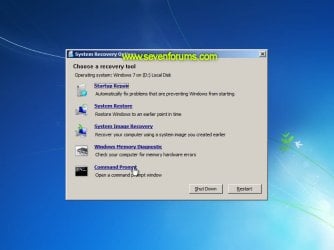
  1. Boot to the System Recovery Options screen.
    • If Windows automatically opens Startup Repair, and subsequently fails to fix a problem, you can skip ahead to step 4 below.
  2. In the System Recovery Options screen, click Startup Repair:
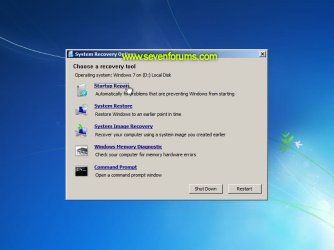
    Image05_startuprepair.jpg


  3. Windows will search for an attempt to repair startup problems:
    Image06_searching.jpg


  4. If startup problems could not be repaired, you will receive the message Windows cannot repair this computer automatically. Click View advanced options for system recovery and support:
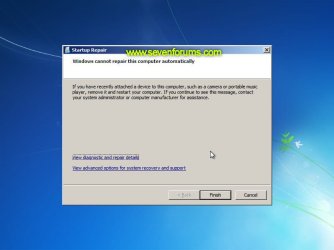
    Image07_cannotfix.jpg


  5. Click View advanced options for system recovery and support, which which bring you back to the main System Recovery Options screen.
  6. Click Command Prompt:
    Image08_clickcommand.jpg


  7. Command Prompt should open to X:, which is an internal ram disk use by System Repair:
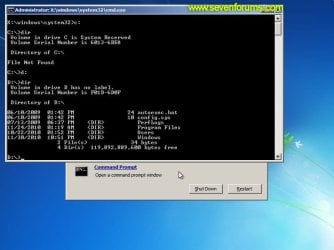
    Image10_changedrive.jpg


  8. Now you need to find your system drive. Depending on how your system is setup, this could be either C: or D:.
    • Type C: and press <ENTER>.
    • Verify that this is your system drive by typing DIR and pressing <ENTER>. If you see the Program Files, Users and Windows folders, then you have found your system drive, and can continue to step 9 below.
    • If the drive is not your system drive, repeat steps I and II above, changing the drive letter to D, E or some other letter until the system drive is located.
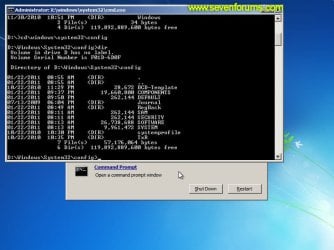
      Image11_chdir_config.jpg

  9. When you have located your Windows system drive, type CD \windows\system32\config and press <ENTER>:
  10. Type DIR and press <ENTER>, and verify that the following files and folders exist in the config folder:
    • RegBack (which is a folder)
    • DEFAULT
    • SAM
    • SECURITY
    • SOFTWARE
    • SYSTEM
      Image11_chdir_config.jpg

  11. Type MD mybackup and press <ENTER> to create a backup folder that you can use incase this procedure does not work as expected.
  12. Type copy *.* mybackup and press <ENTER>.
    • If you are prompted to overwrite existing files, press A to allow all backups to be overwritten.
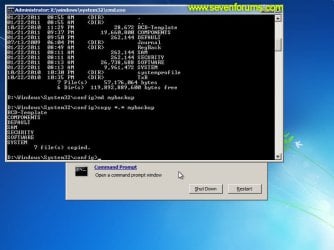
      Image12_mybackup.jpg

  13. Now you need to check if you can use the automatic Windows backups to restore your registry:
    • Type CD RegBack and press <ENTER> to go to the RegBack folder.
    • Type DIR and press <ENTER> to view the contents of the folder. All the following files must exist:
      • The DEFAULT, SAM and SECURITY files should each be about 262,000 bytes in size.
      • The SOFTWARE file should be about 26,000,000 bytes.
      • The SYSTEM file should be about 9,900,000 bytes.
      • The file sizes presented here are approximate estimations, and may vary depending on your system. If any one of them are 0 bytes, then you should stop what you're doing now and seek an alternative method of recovering your system, because Windows cannot function with a 0-byte size registry hive.
    • If the hive files listed in RegBack are ok, then proceed to step 14 of the tutorial.
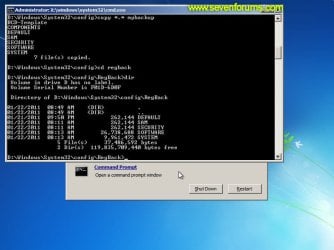
      Image13_checkregback.jpg


  14. Type copy *.* .. and press <ENTER> to copy the backup hive files to \Windows\System32\config.
    • If you are prompted to overwrite existing files, press A to allow all file to be overwritten.
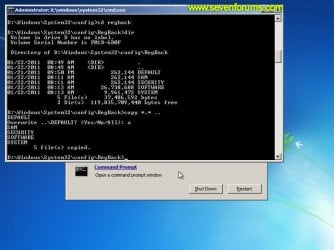
      Image14_copyregback.jpg

  15. Type exit and press <ENTER> to close the command prompt.
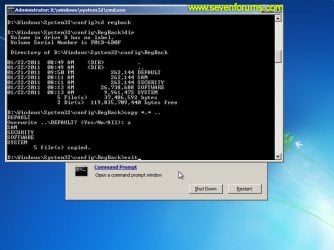
    Image15_exit.jpg


  16. Click the Restart button to reboot your computer. If all goes well, your system will boot normally.
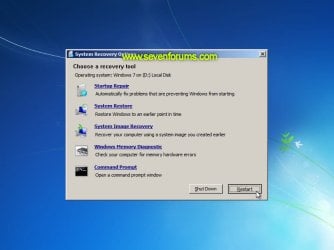
    Image16_restart.jpg
    Image17_working.jpg


Reference Information
This tutorial was made possible after learning how to manualy replace the Windows 7 Registry Hives after reading the Recovering Windows 7 Registry Hives/Files article on Microsoft Technet.


Attachments
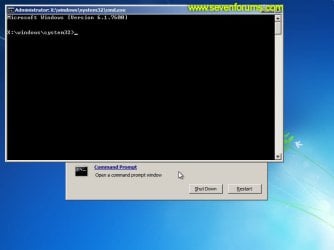
  • Image09_commandprompt.jpg
    Image09_commandprompt.jpg
    26.1 KB · Views: 373
Last edited by a moderator:
ok, i've now found the disc, how do i get the disc to load? can i run it from command prompt?

thanks for your reply by the way, really comprehensive but i thought it'd be better to look for the disc again because i'm not confident with all that!
 

My Computer My Computer

At a glance

Windows 7 64 bit
OS
Windows 7 64 bit
ok, i've now found the disc, how do i get the disc to load? can i run it from command prompt?

thanks for your reply by the way, really comprehensive but i thought it'd be better to look for the disc again because i'm not confident with all that!


You have to boot the disk, have a look at this tutorial at the link below,

How To Change the Drive Boot Priority in BIOS


Then you can use this method to make back-ups of the data you need to save to the external.

How to Copy & Paste in Recovery Console on Windows 7 or Vista


When you get done with that post back here and we'll pick it up there.
 

My Computer My Computer

At a glance

W 7 64-bit UltimateIntel Q9550 Yorkfield8GB Dominator 8500C5DATI : XFX 5870
Computer Manufacturer/Model Number
* BFK Customs *
OS
W 7 64-bit Ultimate
CPU
Intel Q9550 Yorkfield
Motherboard
ASUS P5Q Pro
Memory
8GB Dominator 8500C5D
Graphics Card(s)
ATI : XFX 5870
Sound Card
Realtek HD Audio 7-1
Monitor(s) Displays
1x 47" LCD HDMI & 3x 26" LCD HDMI
Screen Resolution
1920x1080P & 1920x1200
Hard Drives
1x 80GB Intel X25-M G2 SSD : 1x 500GB & 1x 640GB WD Caviar Black(s)
PSU
Corsair 620HX
Case
Cooler Master RC-690
Cooling
Tuniq Tower 120, 2x 140mm and 3x 120mm case fans
Keyboard
Microsoft 500
Mouse
Razer Diamondback 3G
Internet Speed
14 Mb/s
Other Info
1x Koutech 3Gb/s SATA HDD Hot Swap Rack
dell seems to have it's own version of BIOS but I did find the priorities. changed it and no effect, back to the loop.
It also has an option to press F12 for the boot menu, where I also tried loading the CD/DVD drive and still back to the same problem!
I would like to be able to get it sorted myself but is it the sort of thing that a computer shop might be able to fix?
thanks again for your help

EDIT: the Dell version of BIOS has check boxes next to internall HDD and USB storage device along with the DVD drive. I unchecked these all apart from the dvd drive and it said there were no bootable devices (or something along those lines)
 

My Computer My Computer

At a glance

Windows 7 64 bit
OS
Windows 7 64 bit
There is this possibility to restore to factory conditions but you will lose all your data in the process.


   Information

New Dell
Turn on the computer.

2 As the computer starts, press <F8> on the keyboard until the Advanced Boot Options menu appears on the screen.

Note:
You must press <F8> before the Windows logo appears on the screen. If you press <F8> after the Windows logo appears on the screen, the Advanced Boot Options menu will not appear on the screen. If you do not see the Advanced Boot Options menu, restart the computer, and then repeat this step until you see the menu on the screen.

3 Press the <Down Arrow> on the keyboard to select Repair Your Computer on the Advanced Boot Options menu, and then press <Enter>.

4 Specify the language settings that you want, and then click Next.

5 Log in as a user who has administrative credentials, and then click OK.

6 Click Dell Factory Image Restore.

7 In the Dell Factory Image Restore window, click Next.

8 Click to select the Yes, reformat hard drive and restore system software to factory condition check box.

9 Click Next.
The computer is restored to the default factory configuration.

10 When the restore operation is completed, click Finish to restart the computer.
The software is now installed as it was when the computer was first received.


My Computer My Computer

At a glance

W 7 64-bit UltimateIntel Q9550 Yorkfield8GB Dominator 8500C5DATI : XFX 5870
Computer Manufacturer/Model Number
* BFK Customs *
OS
W 7 64-bit Ultimate
CPU
Intel Q9550 Yorkfield
Motherboard
ASUS P5Q Pro
Memory
8GB Dominator 8500C5D
Graphics Card(s)
ATI : XFX 5870
Sound Card
Realtek HD Audio 7-1
Monitor(s) Displays
1x 47" LCD HDMI & 3x 26" LCD HDMI
Screen Resolution
1920x1080P & 1920x1200
Hard Drives
1x 80GB Intel X25-M G2 SSD : 1x 500GB & 1x 640GB WD Caviar Black(s)
PSU
Corsair 620HX
Case
Cooler Master RC-690
Cooling
Tuniq Tower 120, 2x 140mm and 3x 120mm case fans
Keyboard
Microsoft 500
Mouse
Razer Diamondback 3G
Internet Speed
14 Mb/s
Other Info
1x Koutech 3Gb/s SATA HDD Hot Swap Rack
Hey there, i was doing it exactlly as you've said but my computer is still not starting up normally. It throws me on Startup Repair window every time i turn PC on. Everything was the same until that RegBack folder where my files have quite different numbers there for example: Default file has 425,984, Sam file has 28,672, Security has 24,576, Software file is doubled and System is 5,000,000 higher. I'm not sure if that has to do with anything or is it something else but that's kind of onlly diference i'm noticing.
TY
 

My Computer My Computer

At a glance

Windows 7 Eternity 32bit
OS
Windows 7 Eternity 32bit
Hey I have also noticed that when i exited prompt window and opened it again to check something it reseted... Is that normal or is my computer just wierd?
TY
 

My Computer My Computer

At a glance

Windows 7 Eternity 32bit
OS
Windows 7 Eternity 32bit
Thought I'd update....
I ended up having to take my hard drive to the IT technicians at University and they managed to get the important stuff off of it. This is lucky as computer repair shops would charge a fair amount. It turned out my hard drive was corrupt and couldn't be read properly. I bought a new hard drive and have spent the whole weekend reloading windows. The reason I couldn't boot from the CD was because the windows 7 disc I had was only an update disc, so I had to reload vista, then update it.
So now, it's fixed! But lost a fair amount of data, ie programs and videos.
Hope this helps.
 

My Computer My Computer

At a glance

Windows 7 64 bit
OS
Windows 7 64 bit
very...very....veryyy good..
this is what happen to my girl lapton. better try this thing.
 

My Computer My Computer

At a glance

windows 7 profesional 32bit2048MBATI Radeon 4350
Computer Manufacturer/Model Number
HP Probook 4421s
OS
windows 7 profesional 32bit
Memory
2048MB
Graphics Card(s)
ATI Radeon 4350
Screen Resolution
1366x768
Great tutorial, thanks Dzomlija, bookmarked.
 

My Computer My Computer

At a glance

Windows 7 Ult x64 - SP1/ Windows 8 Pro x64Intel Core i5-3570K 4.6GHz8GB (2X4GB) DDR3 1600 Corsair Vengeance CL8 1.5vSapphire HD 7770 Vapor-X OC 1GB DDR5
Computer type
PC/Desktop
Computer Manufacturer/Model Number
76~2.0
OS
Windows 7 Ult x64 - SP1/ Windows 8 Pro x64
CPU
Intel Core i5-3570K 4.6GHz
Motherboard
Gigabyte GA-Z77X UD3H, f18
Memory
8GB (2X4GB) DDR3 1600 Corsair Vengeance CL8 1.5v
Graphics Card(s)
Sapphire HD 7770 Vapor-X OC 1GB DDR5
Sound Card
Onboard VIA VT2021
Monitor(s) Displays
22" LCD Dell
Screen Resolution
1680x1050
Hard Drives
Samsung 840Pro 128GB SSD,
Seagate Barracuda 500GB SATA2 7200rpm 32MB cache, Seagate Barracuda 1TB SATA2 7200rpm 32MB cache,
PSU
Corsair HX650W
Case
Cooler Master Storm Scout
Cooling
Corsair H80 2x12cm Noctua NF P12 , 2x14cm case fans
Keyboard
Logitech Wave
Mouse
CM Sentinel
Internet Speed
Dismal
Antivirus
Avast
Browser
Opera Next
Other Info
Haswell laptop: HP Envy 17t-j, i7-4700MQ, GeForce 740M 2GB DDR3, 17.3" Full HD 1920x1080, 16GB RAM, Samsung 840 Pro 128GB, 1TB Hitachi 7200 HDD,
Desktop: eSATA ports,
External eSATA Seagate 500GB SATA2 7200rpm,
External WD USB 500GB
Hello...
Please help - I can get to Step 3 above, but then it does not go to Step 4... It just sits on a black screen forever.
I cannot get past the screen that asks if I want to run "Startup Repair" or "Start Windows Normally"...
 

My Computer My Computer

At a glance

Windows 7 Home Premium 32 bit
Computer Manufacturer/Model Number
Dell Inspiron 1525
OS
Windows 7 Home Premium 32 bit
I had the same problem the start-up repair tool would finish saying ii had failed to repair - I would then shutdown. Switching on I would find the system had been restored prior to the update. I then turned off automatic updates.

I found a solution that worked for me while I was investigating why google chrome would not load web pages and why opera would not install. This solved the opera and chrome problem and after turning updates back on the start-up repair loop.

It turns out that it was a malware problem that got past comodo. Download, install and run the tdds remover:
How to remove malware belonging to the family Rootkit.Win32.TDSS (aka Tidserv, TDSServ, Alureon)?

I hope it works for you.
 

My Computer My Computer

At a glance

Windows 7 Home Premium 64bit
OS
Windows 7 Home Premium 64bit
Hey there, i was doing it exactlly as you've said but my computer is still not starting up normally. It throws me on Startup Repair window every time i turn PC on. Everything was the same until that RegBack folder where my files have quite different numbers there for example: Default file has 425,984, Sam file has 28,672, Security has 24,576, Software file is doubled and System is 5,000,000 higher. I'm not sure if that has to do with anything or is it something else but that's kind of onlly diference i'm noticing.
TY
i have the exact same problem with the file sizes. i followed the instructions exactly and it still doesnt load past startup repair. i think theres something wrong with the bool files but ive launched startup repair and still nothing..any ideas guys?
 

My Computer My Computer

At a glance

64bit
OS
64bit
OK, What if I make only to number 3 and then my system STOPS?

History- I was using my laptop and the battery was out (dead w/i 8 months of purchase) and the plug came out. When I rebooted, I got only as far as step 3...

PLEASE HELP!!!!
 

My Computer My Computer

At a glance

windows 7 ultimate x64
Computer Manufacturer/Model Number
HP dv6-1355dx
OS
windows 7 ultimate x64
If any one of them are 0 bytes, then you should stop what you're doing now and seek an alternative method of recovering your system, because Windows cannot function with a 0-byte size registry hive.


This happened to me can someone please help as i have recently brought the laptop and i am using someone elses to find a way to solve it
 

My Computer My Computer

At a glance

Windows 7
OS
Windows 7
I am having this infinite startup repair issue on my Dell laptop that runs Windows 7. I want to make sure I can use this I know that it said I had a corrupt file.
 

My Computer My Computer

At a glance

Windows 7
OS
Windows 7
I've successfully reached Step 17 but once I type in DIR, all the files in the RegBack folder have 0 bytes; every single one of them. What other methods can I use to solve this problem? Thank you.
 

My Computer My Computer

At a glance

Windows 7 Professional x64
OS
Windows 7 Professional x64
HELP!!!

This did not work for me? I am new to the forum and a novice user in the way of repairs. My computer prompted me repeatedly last night to run this repair, of course I stupidly said yes, and now I am stuck in this loop! I tried your procedure and it went right back to the loop! I followed every step to a T.

Any suggestions as to what went wrong??!? I start my next semester of grad school tomorrow and NEED MY COMPUTER!! Please help!!!:mad:
 

My Computer My Computer

At a glance

Windows 7
OS
Windows 7
did this procedure continue with startup repair loop on toshiba satellite l550 bought from staples and it was display so i dont have the disks.
Is there a way to save one folder from my desktop to a usb memory stick in the command prompt it has all my school files in it the rest i can get again
 

My Computer My Computer

At a glance

seven
Computer Manufacturer/Model Number
Toshiba satellite
OS
seven

My Computer My Computer

At a glance

Windows 7 x64
OS
Windows 7 x64
Welcome

Thanks for this guide it got me up and running again.I also used the virus checker posted to find i did have a virus How to remove malware belonging to the family Rootkit.Win32.TDSS (aka Tidserv, TDSServ, Alureon)?

After reboot checked again and virus gone so hopefully things are back to normal again.
Only got this repair console after doing an update but am now left with around 80 updates waiting to install.Do i install them or what :confused:

Hey, silverblack, welcome to Window 7 forums;

If you already have successfully recovered your windows, then if you have some updates to install like u said, then only select the most important ones...like Hotfix, Security update,etc.
 

My Computer My Computer

At a glance

Win 7 Ultimate, x64-bitAMD FX-4100 3.6Ghz12 GB DDR3 Kingston 1333 MhzNvidia GeForce GTX 760 2GB DDR5, Hawk Edition
Computer type
PC/Desktop
OS
Win 7 Ultimate, x64-bit
CPU
AMD FX-4100 3.6Ghz
Motherboard
Asus M5A97
Memory
12 GB DDR3 Kingston 1333 Mhz
Graphics Card(s)
Nvidia GeForce GTX 760 2GB DDR5, Hawk Edition
Monitor(s) Displays
LG Flatron L222WS
Screen Resolution
MAX is 1680x1050, 60Hz
Hard Drives
Seagate 1.5 TB
PSU
Thermaltake 600 W, Peak power - 750W
Case
Thermaltake element T black
Cooling
Stock
Keyboard
A4 Tech Wireless
Mouse
A4 Tech X6-80D
Internet Speed
6 Mb/s
Antivirus
BitDefender
Browser
Torch
Back
Top