Home Premium x64 Upgrade Kit (Unable to start / finish)

Dude, can you copy and paste? If yes, please copy all the files in the unzipped acer package to the ROOT of the usb stick. If you do that correctly, you should be able to see all those files (see Theog's screenshot) when you use the command dir at the A: prompt of the usb.

It does appear however that you need more handholding for flashing this way than you imagine. If thats the case, just use the winflash utility- save it to your desktop, double click the .exe and it'll take care of the rest. Make sure you're not into some other user-created task at that time.
 

My Computer My Computer

At a glance

Windows 7 x64 pro/ Windows 7 x86 Pro/ XP SP3 x86
Computer Manufacturer/Model Number
Too many to describe...
OS
Windows 7 x64 pro/ Windows 7 x86 Pro/ XP SP3 x86
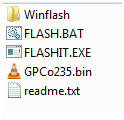
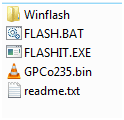
I did unarchive all the files, so, the files are in root, unarchived.
There's not even any sub-folders currently, when I used the dir command.
And it's more than 3 files (Unless it ignores the FreeDOS files, in which case it's three)

And there was a Winflash, but seeing it's used for flashing while in Windows, I removed it.

Edit:
Acer Support: Drivers & Support Documents - Notebook / Aspire / Aspire 5810TG
There's 2 different sets, and I've been using;
Patches BIOS kernel code.

Files in BIOS_Acer_1.35_A_A

Capture.PNG

Files in BIOS_Acer_2.35_A_A

Capture2.PNG
 

My Computer My Computer

At a glance

ME/XP/Vista/Win7
OS
ME/XP/Vista/Win7
I would not update BIOS this way. We can help you troubleshoot the install as it could be any number of things which I would try first to get installed before updating BIOS. You are courting disaster, and the first date is already going bad.

Unless you know for sure your model Acer needs BIOS update to upgrade to Win7 then it is likely another issue which is blocking install. Did you reset the CMOS, try setting SATA controller in BIOS setup to AHCI, and remove all but 2gb of RAM as suggested in my first post?

Can you run your factory Recovery partition or disks to reinstall Vista just for the purpose of updating the BIOS from it (providing there is a Windows BIOS update method) if you must have the latest BIOS? If so, then you can also try running the upgrade DVD from Vista, even in-place Upgrading. http://www.sevenforums.com/installation-setup/44793-simple-guide-successful-place-upgrade.html

Was planning to follow your post from early in the thread. However, to do that there wasn't really any other way to update BIOS other than from DOS, seeing as the main problem is that I can't install Windows.

But I could try taking it from the CMOS step?

Dude, can you copy and paste? If yes, please copy all the files in the unzipped acer package to the ROOT of the usb stick. If you do that correctly, you should be able to see all those files (see Theog's screenshot) when you use the command dir at the A: prompt of the usb.

It does appear however that you need more handholding for flashing this way than you imagine. If thats the case, just use the winflash utility- save it to your desktop, double click the .exe and it'll take care of the rest. Make sure you're not into some other user-created task at that time.

That was what I did in the first place, only that I removed the winflash folder, as I deemed it useless. However, later on I re-added just in case.

And, root, if I'm not mistaken, that would be where I end up, when accessing the USB stick from 'My Computer'?

I don't know why the filenames don't show up when using dir, but it could be related to the DOS I use (FreeDOS)? I assume it's not a copy of the original, and it might have problems with modern hardware (Latest version was from 2006 sometime).
 

My Computer My Computer

At a glance

Windows 7 Ultimate SP1 x64Intel Core 2 Quad Q6600 2.4GHz (2008)Corsair TWIN2X 6400C4 DDR2, 2048MB CL4 (2008)HIS Radeon HD 2600 XT 512MB GDDR3 (2008)
OS
Windows 7 Ultimate SP1 x64
CPU
Intel Core 2 Quad Q6600 2.4GHz (2008)
Motherboard
MSI P35 NEO-F (Socket-775, DDR2) (2008)
Memory
Corsair TWIN2X 6400C4 DDR2, 2048MB CL4 (2008)
Graphics Card(s)
HIS Radeon HD 2600 XT 512MB GDDR3 (2008)
Sound Card
Creative SB Audigy 4 (2006)
Monitor(s) Displays
BenQ G2411HD
Screen Resolution
1920x1080
Hard Drives
Samsung SpinPoint T133S 400GB SATA2 (2006)
PSU
Chieftec Strømforsyning ATX 400W, 120mm (2006)
Case
Chieftec Dragon Medium Tower (2006)
Keyboard
Standard Logitech
Mouse
Razer Lachesis
Internet Speed
12Mbps
Yes, try the other steps since you don't have Windows to update BIOS as specified.

Since you no longer have access to Vista and apparently have no Recovery Disks or Partition (to recover Vista to upgrade BIOS), I would also wipe the HD: http://www.sevenforums.com/tutorials/91339-ssd-hdd-optimize-windows-reinstallation.html

There are other things to try, as well, when you've tried the steps given:

Make sure you have the latest BIOS version updated from Windows. If so, clear the CMOS: http://pcsupport.about.com/od/fixtheproblem/tp/clearcmos.htm

While in BIOS setup, set SATA controller to AHCI to try install.

Remove all peripherals.

Remove all but 2gb of RAM Video showing how to remove laptop RAM
 
Back
Top